Toyota Corolla (2024 year). Manual in english - page 7
 

  Index      Toyota     Toyota Corolla (2024 year). Manual in english


Search            copyright infringement  


Content      ..     5      6      7      8     ..


Toyota Corolla (2024 year). Manual in english - page 7


193

4-5. Using the driving support systems

4

Dr
iv

ing

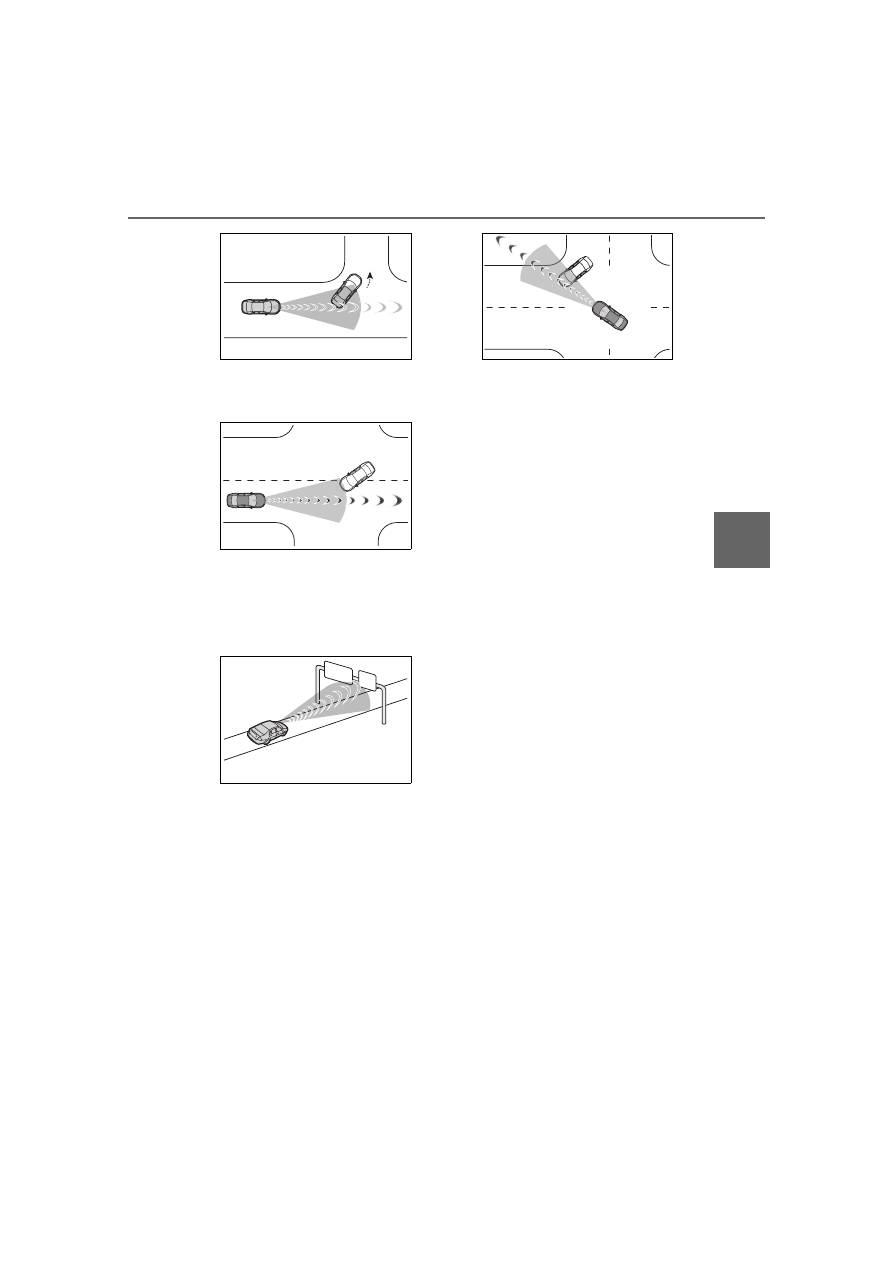
• When passing a detectable object 

which is stopped to make a 
left/right turn

• When a detectable object stops 

immediately before entering the 
path of the vehicle

• When passing through a location 

with a structure above the road 
(traffic sign, billboard, etc.)

• When approaching an electric toll 

gate barrier, parking lot barrier, or 
other barrier that opens and 
closes

• When turning left/right and an 

oncoming vehicle or pedestrian 
crosses in front of the vehicle

• When attempting to turn left/right 

in front of an oncoming vehicle or 
pedestrian

• When turning left/right and an 

oncoming vehicle or pedestrian 
stops immediately before entering 
the path of the vehicle

• When turning left/right and an 

oncoming vehicle turns left/right in 
front of the vehicle

• When the steering wheel is oper-

ated toward the path of an oncom-
ing vehicle

Situations in which the system 
may not operate properly

In certain situations, such as the 
following, a detectable object may 
not be detected by the front sen-
sors, and the system may not 
operate properly:

• When a detectable object is 

approaching your vehicle

• When your vehicle or a detectable 

object is wandering

• When a detectable object makes 

an abrupt maneuver (such as sud-
den swerving, acceleration or 
deceleration)

• When suddenly approaching a 

detectable object

• When the detectable object is 

near a wall, fence, guardrail, man-
hole cover, steel plate on the road 
surface, or another vehicle

• When there is a structure above a 

detectable object

• When part of a detectable object 

is hidden by another object (large 
luggage, umbrella, guardrail, etc.)

• When multiple detectable objects 

are overlapping

• When a bright light, such as the 

sun, is reflecting off of a detect-
able object

• When a detectable object is white 

and looks extremely bright

• When the color or brightness of a 

detectable object causes it to 
blend in with its surroundings

• When a detectable object cuts in 

front of or suddenly emerges in 
front of your vehicle

• When approaching a vehicle 

which is diagonal

194

4-5. Using the driving support systems

• If a vehicle ahead is a child sized 

bicycle, is carrying a large load, is 
carrying an extra passenger, or 
has an unusual shape (bicycles 
equipped with a child seat, tan-
dem bicycles, etc.)

• If a pedestrian or bicycle is shorter 

than approximately 3.2 ft. (1 m) or 
taller than approximately 6.5 ft. (2 
m).

• When the silhouette of a pedes-

trian or bicycle is unclear (such as 
when they are wearing a raincoat, 
long skirt, etc.)

• When a pedestrian or bicycle is 

bending forward or squatting

• When a pedestrian or bicycle is 

moving at high speed

• When a pedestrian is pushing a 

stroller, wheelchair, bicycle or 
other vehicle

• When a detectable object blends 

in with the surrounding area, such 
as when it is dim (at dawn or dusk) 
or dark (at night or in a tunnel)

• When the vehicle has not been 

driven for a certain amount of time 
after the engine was started

• While turning left/right or a few 

seconds after turning left/right

• While driving around a curve and 

a few seconds after driving around 
a curve

• When turning left/right and an 

oncoming vehicle is driving in a 
lane 3 or more lanes from the 
vehicle

• When turning left/right and the 

direction of the vehicle differs 
greatly from the direction traffic 
flows in the oncoming lane

• When turning left/right and 

approaching a pedestrian which 
was traveling in the same direc-

tion as the vehicle and continues 
straight

In addition to the preceding, in 
certain situations, such as the fol-
lowing, the emergency steering 
assist may not operate properly:

• When a detectable object is too 

close to the vehicle

• When there is insufficient space to 

perform evasive steering maneu-
vers or an obstruction exists in the 
evasion direction

• When there is an oncoming vehi-

cle

The pre-collision system can 
be enabled/disabled through 
a customize setting. (

P.406)

The system is enabled each time 
the engine switch is turned to ON.

When the system is disabled, 
the PCS warning light will illu-
minate and a message will be 
displayed on the multi-infor-
mation display.

Changing the pre-colli-
sion setting

195

4-5. Using the driving support systems

4

Dr
iv

ing

The pre-collision setting can 
be changed on the customize 
settings. (

P.406)

When the pre-collision warn-
ing timing is changed, the 
emergency steering assist 
(excluding the active steering 
function) timing will also be 
changed.
When "Later" is selected, the 
emergency steering assist 
(excluding the active steering 
function) will not operate in 
most cases.

When the dynamic radar 
cruise control is operating, the 
pre-collision warning will 
operate at the “Earlier” timing, 
regardless of the user setting.

When driving on a road with 
clear lane lines with the 
dynamic radar cruise control 
operating, lane lines and pre-
ceding and surrounding vehi-
cles are detected using the 
front camera and radar sen-
sor, and the steering wheel is 
operated to maintain the vehi-
cle’s lane position.

Use the this function only on high-
ways and expressways.

If the dynamic radar cruise control 
is not operating, the function will not 
operate.

In situations where the lane lines 
are difficult to see or are not visible, 
such as when in a traffic jam, sup-
port will be provided using the path 
of preceding and surrounding vehi-
cles.

If the system determines that the 
steering wheel has not been oper-
ated for a certain amount of time or 
the steering wheel is not being 
firmly gripped, the driver will be 
alerted via a display and this func-
tion will be temporarily canceled.

If the steering wheel is firmly 
gripped, the function will begin 
operating again.

LTA (Lane Tracing 

Assist)

LTA functions

196

4-5. Using the driving support systems

When the function is operat-

ing, if the vehicle is likely to 

depart from its lane, the driver 

will be alerted via a display 

and buzzer.

When the buzzer sounds, check 

the area around the vehicle and 

carefully operate the steering wheel 

to move the vehicle back to the 

center of the lane.

Operating conditions of func-

tion

This function is operable when all of 

WARNING

Before using the LTA system

Do not overly rely on the LTA 

system. The LTA system is not a 

system which provides auto-

mated assistance in driving and 

it is not a system which reduces 

the amount of attention neces-

sary for safe driving. The driver 

is solely responsible for paying 

attention to their surroundings 

and operating the steering 

wheel as necessary to ensure 

safety. Also, the driver is 

responsible for taking adequate 

breaks when fatigued, such as 

when driving for a long time.

Failure to perform appropriate 

driving operations and pay care-

ful attention may lead to an 

accident.

When not using the LTA system, 

turn it off using the LTA switch.

197

4-5. Using the driving support systems

4

Dr
iv

ing

the following conditions are met:

The LTA system detects lane lines 
or the path of preceding or sur-
rounding vehicles (except when 
the preceding vehicle is small, 
such as a motorcycle).

The dynamic radar cruise control 
is operating.

The lane width is approximately 
10 to 13 ft. (3 to 4 m).

The turn signal lever is not being 
operated.

The vehicle is not being driven 
around a sharp curve.

The vehicle is not accelerating or 
decelerating more than a certain 
amount.

The steering wheel is not being 
turned with a large force.

The hands off steering wheel 
warning (

P.197) is not operat-

ing.

The vehicle is being driven in the 
center of a lane.

Temporary cancelation of func-
tions

When the operating conditions are 
no longer met, a function may be 
temporarily canceled. However, 
when the operation conditions are 
met again, operation of the func-
tion will automatically be restored. 
(

P.196)

If the operating conditions of a 
function are no longer met while 
the function is operating, a buzzer 
may sound to indicate that the 
function has been temporarily 
canceled.

The steering assist operation of 
the function can be overridden by 
the steering wheel operation of 
the driver.

Lane departure warning func-
tion when the LTA is operating

Even if the LDA warning method is 
changed to vibration of the steer-
ing wheel, if the vehicle deviates 

from the lane while the LTA is 
operating, the warning buzzer will 
sound to alert the driver.

If steering wheel operation equiv-
alent to that necessary for a lane 
change is detected, the system 
will determine the vehicle is not 
deviating from the lane and the 
warning will not operate.

Hands off steering wheel warn-
ing operation

In the following situations, a mes-
sage urging the driver to grip the 
steering wheel and the icon shown 
in the illustration will be displayed on 
the multi-information display to warn 
the driver. If the system detects that 
the steering wheel is held, the warn-
ing will be canceled. When using the 
system, make sure to grip the steer-
ing wheel firmly, regardless of 
whether the warning is operating or 
not.

When the system determines the 
driver is not holding the steering 
wheel while the function is operat-
ing

If no operations are detected for a 
certain amount of time, a buzzer will 
sound, the warning will operate, and 
the function will be temporarily can-
celed. This warning may also oper-
ate if the driver only operates 
steering wheel a small amount con-
tinuously.

Depending on the condition of the 
vehicle, handle control condition 
and road surface, the warning func-
tion may not operate.

198

4-5. Using the driving support systems

The LTA will change between 

enabled/disabled each time the 

LTA switch is pressed.

When the LTA is enabled, the LTA 

indicator will illuminate.

Enabling/disabling the 

system

WARNING

Situations in which the func-

tions may not operate prop-

erly

In the following situations, the 

functions may not operate prop-

erly and the vehicle may depart 

from its lane. Do not overly rely on 

these functions. The driver is 

solely responsible for paying 

attention to their surroundings 

and operating the steering wheel 

as necessary to ensure safety.

When a preceding or surround-

ing vehicle changes lanes (Your 

vehicle may follow the preced-

ing or surrounding vehicle and 

also change lanes)

When a preceding or surround-

ing vehicle is swaying (Your 

vehicle may sway accordingly 

and depart from the lane)

When a preceding or surround-

ing vehicle departs from a lane 

(Your vehicle may follow the 

preceding or surrounding vehi-

cle and also depart from the 

lane)

When a preceding or surround-

ing vehicle is being driven 

extremely close to the left/right 

lane line (Your vehicle may fol-

low the preceding or surround-

ing vehicle accordingly and 

depart from the lane)

When there are moving objects 

or structures in the surrounding 

area (Depending on the position 

of the moving object or structure 

relative to your vehicle, your 

vehicle may sway)

When the vehicle is struck by a 

crosswind or the turbulence of 

other nearby vehicles

Situations in which the sensors 

may not operate properly: 

P.182

Situations in which the lane may 

not be detected: 

P.183

When it is necessary to disable 

the system: 

P.178

199

4-5. Using the driving support systems

4

Dr
iv

ing

The operating state of the LTA system is indicated.

Operation display of steering wheel operation support

Indicator

Lane dis-

play

Steering 

icon

Situation

White

Gray

Gray

LTA is on standby

Green

Green

Green

LTA is operating

Orange

Flashing

Orange

Flashing

Green

The vehicle is departing the lane 
toward the side which the lane dis-
play is flashing

200

4-5. Using the driving support systems

The LDA system warns the 
driver if the vehicle may deviate 

from the current lane or course

*

and also can slightly operate the 
steering wheel to help avoid 
deviation from the lane or 

course

*

.

The front camera is used to 

detect lane lines or a course

*

.

*

: Boundary between the asphalt 

and grass, soil, etc., or structures, 
such as a curb, guardrail, etc.

Lane departure alert func-
tion

When the system determines 
that the vehicle might depart 

from its lane or course

*

, a warn-

ing is displayed on a display, 
and either a warning buzzer will 
sound or the steering wheel will 
vibrate to alert the driver.

Check the area around your vehicle 
and carefully operate the steering 
wheel to move the vehicle back to 

the center of the lane or course

*

.

Vehicles with BSM: If the system 
determines that the vehicle may 
collide with a vehicle in an adjacent 
lane, the lane departure alert will 
operate even if the turn signals are 
operating.

*

: Boundary between the asphalt 

and grass, soil, etc., or structures, 

such as a curb, guardrail, etc.

Lane departure prevention 
function

If the system determines that 
the vehicle is likely to depart 

from its lane or course

*

, it pro-

vides assistance through steer-
ing wheel operations to help 
avoid deviation from the lane or 
course.

If the system determines that the 
steering wheel has not been oper-
ated for a certain amount of time or 
the steering wheel is not being 
firmly gripped, a warning message 
may be displayed and a warning 
buzzer may sound to alert the 
driver.

Vehicles with BSM: If the system 
determines that the vehicle may 
collide with a vehicle in an adjacent 
lane, the lane departure prevention 
function will operate even if the turn 
signals are operating.

LDA (Lane Departure 

Alert)

Basic functions

201

4-5. Using the driving support systems

4

Dr

iv

ing

*

: Boundary between the asphalt 

and grass, soil, etc., or structures, 

such as a curb, guardrail, etc.

Break suggestion function

If the vehicle is swaying, a mes-

sage will be displayed and a 

warning buzzer will sound to 

urge the driver to take a break.

Operating conditions of each 

function

Lane departure alert/prevention 

function

WARNING

Before using the LDA system

Do not overly rely on the LDA 

system. The LDA system is a 

system which provides auto-

mated assistance in driving. 

However, as it is not a system 

which reduces the amount of 

attention necessary for safe 

driving. The driver is solely 

responsible for paying attention 

to their surroundings and oper-

ating the steering wheel as nec-

essary to ensure safety. Also, 

the driver is responsible for tak-

ing adequate breaks when 

fatigued, such as when driving 

for a long time.

Failure to perform appropriate 

driving operations and pay care-

ful attention may lead to an 

accident.

202

4-5. Using the driving support systems

This function is operable when all of 
the following conditions are met:
• The vehicle speed is approxi-

mately 30 mph (50 km/h) or more.

Operation may be possible when 
the vehicle speed is approximately 
25 mph (40 km/h) or more if vehi-
cles, motorcycles, bicycles, or 
pedestrians are detected near the 
lane.
• The system recognizes a lane or 

course

*

. (When recognized on 

only one side, the system will 
operate only for the recognized 
side.)

• The lane width is approximately 

9.8 ft. (3 m) or more.

• The turn signal lever is not being 

operated. (Vehicles with BSM: 
Except when a vehicle is detected 
in the direction that the turn signal 
lever is operated.)

• The vehicle is not being driven 

around a sharp curve.

• The vehicle is not accelerating or 

decelerating more than a certain 
amount.

• The steering wheel is not being 

turned sufficiently to perform a 
lane change.

*

: Boundary between the asphalt 

and grass, soil, etc., or structures, 
such as a curb, guardrail, etc.

Break suggestion function

This function is operable when all of 
the following conditions are met:
• The vehicle speed is approxi-

mately 32 mph (50 km/h) or more.

• The lane width is approximately 

9.8 ft. (3 m) or more.

Temporary cancellation of func-
tions

When the operating conditions are 
no longer met, a function may be 
temporarily canceled. However, 
when the operation conditions are 
met again, operation of the function 
will automatically be restored. 
(

P.201)

Operation of the lane departure 
alert function/lane departure 
prevention function

Depending on the vehicle speed, 
road conditions, lane departure 
angle, etc., operation of the lane 
departure prevention function may 
not be felt or the function may not 
operate.

Depending on the conditions, the 
warning buzzer may operate even 
if vibration is selected through a 
customize setting.

If a course

*

 is not clear or straight, 

the lane departure alert function or 
lane departure prevention function 
may not operate.

The lane departure alert function 
or lane departure prevention func-
tion may not operate if the system 
judges that the vehicle is inten-
tionally being steered to avoid a 
pedestrian or parked vehicle.

Vehicles with BSM: It may not be 
possible for the system to judge if 
there is danger of a collision with a 
vehicle in an adjacent lane.

The steering assist operation of 
the lane departure prevention 
function can be overridden by the 
steering wheel operation of the 
driver.

*

: Boundary between the asphalt 

and grass, soil, etc., or structures, 
such as a curb, guardrail, etc.

Hands off steering wheel warn-
ing operation

In the following situations, a mes-
sage urging the driver to operate the 
steering wheel and an icon will be 
displayed and a buzzer will sound to 
warn the driver. When using the sys-
tem, make sure to grip the steering 
wheel firmly, regardless of whether 
the warning is operating or not.

203

4-5. Using the driving support systems

4

Dr

iv

ing

When the system determines that 

the driver is not securely holding 

the steering wheel, or the steering 

wheel is not being operated when 

the steering assist operation of the 

lane departure prevention function 

is operating

The length of time that the warning 

buzzer operates will become longer 

as the frequency of the steering 

assist operating increases. Even if 

the system judges that the steering 

wheel has been operated, the warn-

ing buzzer will sound for a certain 

amount of time.

Break suggestion function

If the vehicle is swaying, a message 

will be displayed and a warning 

buzzer will sound to urge the driver 

to take a break.

Depending on the condition of the 

vehicle and road surface, the break 

suggestion function may not oper-

ate.

The LDA system can be 

enabled/disabled through a 

customize setting. (

P.406)

The settings of the LDA can 

be changed on the customize 

settings. (

P.406)

The operating state of the lane departure alert function and steering 

assist operation of the lane departure prevention function are indi-

Changing LDA settings

WARNING

Situations in which the sys-

tem may not operate properly

In the following situations, the 

system may not operate properly 

and the vehicle may depart from 

its lane. Do not overly rely on 

these functions. The driver is 

solely responsible for paying 

attention to their surroundings 

and operating the steering wheel 

as necessary to ensure safety.

When the boundary between 

the asphalt and grass, soil, etc., 

or structures, such as a curb, 

guardrail, etc. is not clear or 

straight

When the vehicle is struck by a 

crosswind or the turbulence of 

other nearby vehicles

Situations in which the lane may 

not be detected: 

P.183

Situations in which the sensors 

may not operate properly: 

P.182

Situations in which some or all 

of the functions of the system 

cannot operate: 

P.183

When it is necessary to disable 

the system: 

P.178

Displays and system operation

204

4-5. Using the driving support systems

cated.

Indicator

Lane dis-

play

Steering 

icon

Situation

Not illumi-

nated

Not illumi-

nated

Not illumi-

nated

System disabled

White

Gray

Not illumi-

nated

Lane lines are not detected by the 
system

White

White

Not illumi-

nated

Lane lines are detected by the sys-
tem

Orange

Flashing

Orange

Flashing

Not illumi-

nated

Lane departure alert function is 
operating for the side which the lane 
display is flashing

Green

Green

Green

Lane departure prevention function 
is operating for the side which the 
lane display is illuminated

Orange

Flashing

Orange

Flashing

Green

Lane departure alert function/lane 
departure prevention function is 
operating for the side which the lane 
display is flashing

205

4-5. Using the driving support systems

4

Dr

iv

ing

PDA (Proactive driv-

ing assist)

When a detectable object 

(

P.206) is detected, the 

proactive driving assist 

operates the brakes and 

steering wheel to help pre-

vent the vehicle from 

approaching too close to 

the object.

WARNING

For safe use

Driving safely is solely the respon-

sibility of the driver.

The proactive driving assist is 

designed to provide some 

assistance for regular braking 

and steering operations, as well 

as helping to prevent the vehicle 

from approaching too close to a 

detectable object. However, the 

scope of this assistance is lim-

ited.

The driver should perform brake 

and steering operations as neces-

sary. Read the following items 

carefully. Do not overly rely on the 

proactive driving assist and 

always drive carefully.(

P.207)

The proactive driving assist is 

not a system which reduces the 

amount of attention necessary 

for safe driving. Even if the sys-

tem is operating correctly, the 

surrounding conditions as rec-

ognized by the driver and 

detected by the system may dif-

fer. It is necessary for the driver 

to pay attention, assess risks, 

and ensure safety. Over-reli-

ance on this system to drive the 

vehicle safely may lead to an 

accident resulting in death or 

serious injury.

Proactive driving assist is not a 

system which allows for inatten-

tive driving and is not a system 

which assists in poor visibility 

conditions. The driver is solely 

responsible for paying attention 

to their surroundings and driving 

safely.

When turning proactive driv-

ing assist off

Situations in which the sensors 

may not operate properly: 

P.182

When it is necessary to disable 

the system: 

P.178

206

4-5. Using the driving support systems

According to the driving conditions, the operation and detectable 
objects of the proactive driving assist will change as follows.

System operating conditions and detectable objects

Function

Conditions

Operation

Detectable 
objects

Obstacle 
Anticipation 
Assist

A detectable 
object is detected 
crossing the road

Assistance with 
some brake opera-
tions is provided in 
order to reduce the 
possibility of a colli-
sion.

Pedestrians

Bicyclists

A detectable 
object is detected 
on the side of the 
road

Assistance with 
some brake and 
steering wheel oper-
ations are provided 
according to the sur-
rounding conditions 
to help prevent the 
vehicle from 
approaching too 
close to a detected 
object.

Assistance with 
steering wheel oper-
ations is provided 
within a range that 
the vehicle will not 
deviate from its cur-
rent lane.

Pedestrians

Bicyclists

Parked vehi-
cles

Deceleration 
Assist

A preceding or 
adjacent vehicle 
is detected as cut-
ting in front of the 
vehicle

The vehicle is gently 
decelerated so that 
the vehicle-to-vehi-
cle distance is 
excessively short.

Preceding vehi-
cles

Motorcycles

A curve is 
detected ahead of 
the vehicle

The vehicle is gently 
decelerated if the 
vehicle speed is 
determined to be too 
high for the curve 
ahead.

None

207

4-5. Using the driving support systems

4

Dr

iv

ing

Vehicle speeds at which the 

system can operate

Detectable object crossing the 

road assistance

Approximately 20 to 35 mph (30 to 

60 km/h)

Detectable object on the side of 

the road assistance

Approximately 20 to 35 mph (30 to 

60 km/h)

Preceding vehicle deceleration 

assistance

Approximately 15 mph (20 km/h) or 

more

Curve deceleration assistance

Approximately 15 mph (20 km/h) or 

more

System operation will be can-

celed when

In the following situations, system 

operation will be canceled :

• When the dynamic radar cruise 

control is operating

• When the PCS is off

• Situations in which some or all of 

the functions of the system cannot 

operate: 

P.182

• When the P, R or N shift position is 

selected

When the vehicle speed falls below 

approximately 9.3 mph (15 km/h)
Or when a certain vehicle speed 

has been reached, as judged by the 

system, according to the surround-

ing conditions

In the following situations, system 

operation may be canceled :

• When the brake control or output 

restriction control of a driving sup-

port system operates

(For example: PCS, drive-start 

control)

• When the system determines that 

a detected object has moved 

away from the vehicle

In the following situations, system 

assistance may be canceled :

• When lane lines can no longer be 

detected

• When the brake pedal has been 

depressed

• When the accelerator pedal has 

been depressed

• When the steering wheel has 

been operated with more than a 

certain amount of force

• When the turn signal lever is oper-

ated to the left/right turn position

WARNING

Situations in which the sys-

tem may not operate properly

Situations in which the lane may 

not be detected :

P.183

When a detectable object stops 

immediately before entering the 

path of the vehicle

When passing extremely close 

to a detectable object behind a 

guardrail, fence, etc.

When changing lanes while 

overtaking a detectable objec

When passing a detectable 

object that is changing lanes or 

turning left/right

When there are objects (guard-

rails, power poles, trees, walls, 

fences, poles, traffic cones, 

mailboxes, etc.) in the surround-

ing area

When there are patterns or a 

painting ahead of the vehicle 

that may be mistaken for a 

detectable object

When passing through a place 

with a low structure above the 

road (tunnel with a low ceiling, 

traffic sign, signboard, etc.)

When driving on snowy, icy, or 

rutted roads

208

4-5. Using the driving support systems

WARNING

When a detectable object is 

approaching your vehicle

When your vehicle or a detect-

able object is wandering

When the movement of a 

detectable object changes 

(change in direction, sudden 

acceleration or deceleration, 

etc.)

When suddenly approaching a 

detectable object

When a preceding vehicle or 

motorcycle is not directly in front 

of your vehicle

When there is a structure above 

a detectable object

When part of a detectable 

object is hidden by another 

object (large luggage, umbrella, 

guardrail, etc.)

When multiple detectable 

objects are overlapping

When a bright light, such as the 

sun or headlights of another 

vehicle, is reflecting off of the 

detectable object

When the detectable object is 

white and looks extremely bright

When the color or brightness of 

the detectable object causes it 

to blend in with its surroundings

When a detectable object cuts 

in front of or emerges from 

beside a vehicle

When approaching a vehicle 

ahead which is perpendicular or 

at an angle to the vehicle, or is 

facing the vehicle

If a parked vehicle is perpendic-

ular or at an angle to the vehicle

When a bicycle is a child sized 

bicycle, is carrying a large load, 

is carrying an extra passenger, 

or has an unusual shape (bicy-

cles equipped with a child seat, 

tandem bicycles, etc.)

When a pedestrian or bicyclist is 

shorter than approximately 3.2 

ft. (1 m) or taller than approxi-

mately 6.5 ft. (2 m)

When the silhouette of a pedes-

trian or bicyclist is unclear (such 

as when they are wearing a 

raincoat, long skirt, etc.)

When a pedestrian or bicyclist is 

bending forward or squatting

When a pedestrian or bicyclist is 

moving at high speed

When a pedestrian is pushing a 

stroller, wheelchair, bicycle or 

other vehicle

When a detectable object 

blends in with the surrounding 

area, such as when it is dim (at 

dawn or dusk) or dark (at night, 

in a tunnel, etc.)

When the lane width is 13.1 ft. 

(4 m) or more

When the lane width is 8.2 ft. 

(2.5 m) or less

When the vehicle has not been 

driven for a certain amount of 

time after the engine was 

started

While turning left or right or a 

few seconds after turning left or 

right

While changing lanes or a few 

seconds after changing lanes

When entering a curve, driving 

around a curve and a few sec-

onds after driving around a 

curve

209

4-5. Using the driving support systems

4

Dr
iv

ing

The proactive driving assist 
can be enabled/disabled 
through a customize setting. 

(

P.406)

The following settings of the 
proactive driving assist can be 
changed through customize 
settings.(

P.406)

Depending on the situation, the following indicators or icons will be 
displayed.

Some icons cannot be displayed unless the display is changed to 
the driving safety support function information screen.

Changing proactive driv-
ing assist settings

System operation display

Icon

Meaning

White: Monitoring for detectable objects

Green: Detectable object crossing the road or detectable 
object on the side of the road assistance operating

A pedestrian has been detected as crossing the road or on 
the side of the road and brake or steering assistance is 
operating

A vehicle has been detected on the side of the road and 
brake or steering operation assistance is being performed

Steering operation assistance is being performed to pre-
vent the vehicle from approaching too close to a detectable 
object on the side of the road

Preceding vehicle deceleration assistance is being per-
formed

210

4-5. Using the driving support systems

Hands off steering wheel warn-
ing operation

In the following situations, a mes-
sage urging the driver to grip the 
steering wheel and the icon shown 
in the illustration will be displayed on 
the display to warn the driver. If the 
system detects that the steering 
wheel is held, the warning will be 
canceled. When using the system, 
make sure to grip the steering wheel 
firmly, regardless of whether the 
warning is operating or not.

When the system determines the 
driver is not holding the steering 
wheel while the lane centering 
function is operating

If no operations are detected for a 
certain amount of time, a buzzer will 
sound, the warning will operate. 
This warning may also operate if the 
driver only operates steering wheel 
a small amount continuously.

Warning operation after preced-
ing vehicle deceleration assis-
tance has ended

After preceding vehicle decelera-
tion assistance has ended, if the 
driver does not operate the brake 
pedal or accelerator pedal and the 

vehicle approaches the preceding 
vehicle, the display will flash and a 
buzzer will sound to urge the driver 
to decelerate. If the system deter-
mines that the driver is operating the 
brake pedal or accelerator pedal, 
the warning will be canceled.

Warning to maintain appropriate vehicle-to-vehicle dis-
tance

Curve deceleration assistance is being performed

Icon

Meaning

211

4-5. Using the driving support systems

4

Dr

iv

ing

*

: If equipped

When the front camera 

detects a sign or information 

of a sign is available from the 

navigation system, the sign 

will be displayed on the dis-

play.

Multiple signs can be dis-

played.

Depending on the specifications of 

the vehicle, the number of dis-

played signs may be limited.

Operating conditions of sign 

display

Signs will be displayed when the fol-

lowing conditions are met:

The system has detected a sign

In the following situations, a dis-

played sign may stop being dis-

played:

When a new sign has not been 

detected for a certain distance

When the system determines that 

the road being driven on has 

changed, such as after a left or 

right turn

Situations in which the display 

function may not operate prop-

erly

In the following situations, the RSA 

system may not operate properly 

and may not detect signs or may 

display the incorrect sign. However, 

this does not indicate a malfunction.

When a sign is dirty, faded, tilted 

or bent

When the contrast of an electronic 

sign is low

When all or part of a sign is hidden 

by a tree, utility pole, etc.

When a sign is detected by the 

front camera for a short amount of 

time

When the driving state (turning, 

changing lanes, etc.) is judged 

incorrectly

RSA (Road Sign 

Assist)

*

The RSA system detects 

specific road signs using 

the front camera and/or nav-

igation system (when speed 

limit information is avail-

able) and warns the driver 

via displays and buzzers.

WARNING

For safe use

Driving safely is solely the 

responsibility of the driver. Pay 

careful attention to the sur-

rounding conditions in order to 

ensure safe driving.

Do not rely solely upon the 

RSA. The RSA assists the 

driver by providing road sign 

information, but it is not a 

replacement for the driver’s own 

vision and awareness. Driving 

safely is solely the responsibility 

of the driver. Pay careful atten-

tion to the surrounding condi-

tions in order to ensure safe 

driving.

Situations in which the RSA 

should not be used

When it is necessary to disable 

the system: 

P.178

Situations in which the sys-

tem may not operate properly

Situations in which the sensors 

may not operate properly: 

P.182

Display Function

212

4-5. Using the driving support systems

When a sign is immediately after a 
freeway junction or in an adjacent 
lane just before merging

When stickers are attached to the 
rear of a preceding vehicle

When a sign similar to a system 
compatible sign is detected as a 
system compatible sign

When a speed limit sign for a 
frontage road is within detection 
range of the front camera

When driving around a round-
about

When a sign intended for trucks, 
etc. is detected

When the navigation system map 
data is out of date

When the navigation system can-
not be used

In this case, the speed limit signs 
displayed on the multi-information 
display and navigation system dis-
play may differ.

In the following situations, the 
RSA system will output a warn-
ing to notify the driver.

If the vehicle speed exceeds 
the speed warning threshold 
of the speed limit sign dis-
played on the display, the sign 
display will be emphasized 
and a buzzer will sound.

When the RSA system 
detects a do not enter sign 
and determines that the vehi-
cle has entered a no-entry 
area, the do not enter sign 
displayed on the display will 
flash and a buzzer will sound.

Operating conditions of the 
notification functions

Excess speed notification function

This function will operate when the 
following condition is met:
• A speed limit road sign is recog-

nized by the system.

No entry notification function

This function will operate when all of 
the following conditions are met:
• More than one no entry road signs 

are recognized by the system 
simultaneously.

• The vehicle is passing between no 

entry road signs recognized by the 
system.

The following types of road 
signs can be displayed.

However, non-standard or recently 
introduced traffic signs may not be 
displayed.

Notification function

Types of road signs sup-
ported

(U.S.A.)

(Canada)

Speed limit

Do Not Enter

No U-turn

213

4-5. Using the driving support systems

4

Dr

iv

ing

Depending on the specifica-

tions of the vehicle, signs may 

be displayed overlapping.

The following settings of the 

RSA can be changed through 

customize settings. (

P.406)

No Turn On Red

Stop

Yield

Warning

(U.S.A.)

(Canada)

Duplicate display 

example

Changing RSA settings

Dynamic radar cruise 

control

This dynamic radar cruise 

control detects the pres-

ence of vehicles ahead, 

determines the current vehi-

cle-to-vehicle distance, and 

operates to maintain a suit-

able distance from the vehi-

cle ahead. The desired 

vehicle-to-vehicle distance 

can be set by operating the 

vehicle-to-vehicle distance 

switch.
Use the dynamic radar 

cruise control only on high-

ways and expressways.

WARNING

For safe use

Driving safely is solely the 

responsibility of the driver. Do 

not overly rely on this system, 

and pay careful attention to the 

surrounding conditions in order 

to ensure safe driving.

The dynamic radar cruise con-

trol provides driving assistance 

to reduce the driver’s burden. 

However, there are limitations to 

the assistance provided.

Read the following items carefully. 

Do not overly rely on this system 

and always drive carefully.
Conditions under which the sys-

tem may not operate correctly: 

P.219

214

4-5. Using the driving support systems

WARNING

Set the speed appropriately 

according to the speed limit, 

traffic flow, road conditions, 

weather conditions, etc. The 

driver is responsible for confirm-

ing the set speed.

Even if the system is operating 

correctly, the condition of a pre-

ceding vehicle as recognized by 

the driver and detected by the 

system may differ. Therefore, it 

is necessary for the driver to 

pay attention, assess risks, and 

ensure safety. Over-reliance on 

this system to drive the vehicle 

safely may lead to an accident 

resulting in death or serious 

injury.

Precautions for the driving 

assist systems

Observe the following precau-

tions, as there are limitations to 

the assistance provided by the 

system. Over-reliance on this sys-

tem may lead to an accident 

resulting in death or serious injury.

Details of support provided for 

the driver’s vision

The dynamic radar cruise control 

is only intended to help the driver 

in determining the distance 

between the driver’s own vehicle 

and a designated preceding vehi-

cle. It is not a system which allows 

for careless or inattentive driving, 

and is not a system which assists 

in poor visibility conditions.
The driver must pay attention to 

their surroundings, even when the 

vehicle stops.

Details of support provided for 

the driver’s judgement

The dynamic radar cruise control 

determines whether the distance 

between the driver’s own vehicle 

and a designated preceding vehi-

cle is within a set range. It is not 

capable of making any other type 

of judgement. Therefore, it is 

absolutely necessary for the 

driver to remain vigilant and to 

determine whether or not there is 

a possibility of danger.

Details of support provided for 

the driver’s operation

The dynamic radar cruise control 

does not include functions which 

will prevent or avoid collisions 

with vehicles ahead of your vehi-

cle. Therefore, if there is ever any 

possibility of danger, the driver 

must take immediate and direct 

control of the vehicle and act 

appropriately in order to ensure 

safety.

Situations in which the 

dynamic radar cruise control 

should not be used

Do not use the dynamic radar 

cruise control in the following situ-

ations. As the system will not be 

able to provide appropriate con-

trol, using it may lead to an acci-

dent resulting in death or serious 

injury.

Roads where there are pedes-

trians, cyclists, etc.

When driving on a highway or 

expressway entrance or exit

When the approach warning 

sounds frequently

Situations in which the sensors 

may not operate properly: 

P.182

Situations in which the lane may 

not be detected: 

P.183

215

4-5. Using the driving support systems

4

Dr
iv

ing

Constant speed cruising:
When there are no vehicles ahead

The vehicle drives at the speed set by the driver.

If the set vehicle speed is exceeded while driving down a hill, the set vehicle 
speed display will blink and a buzzer will sound.

Deceleration and follow-up cruising
When a preceding vehicle driving slower than the set vehicle 
speed is detected

When a vehicle is detected driving ahead of your vehicle, the vehicle auto-
matically decelerates and if a greater reduction in vehicle speed is neces-
sary, the brakes are applied (the stop lights will come on at this time). The 
vehicle is controlled to maintain the vehicle-to-vehicle distance set by the 
driver, in accordance with changes in the speed of the preceding vehicle. If 
vehicle deceleration is not sufficient and the vehicle approaches the vehicle 
ahead, the approach warning will sound.

Acceleration
When there are no longer any preceding vehicles driving slower 
than the set vehicle speed

The vehicle accelerates until the set vehicle speed is reached and then 
resumes constant speed cruising.

Starting off:
If a preceding vehicle stops, the vehicle will also stop (controlled 
stop). After the preceding vehicle starts off, pressing the “RES” 
switch or depressing the accelerator pedal will resume follow-up 
cruising (start off operation). If a start off operation is not per-

Basic functions

216

4-5. Using the driving support systems

formed, the controlled stop will continue.

Meter display

Multi-information display

Set vehicle speed

Indicators

Switches

Driving assist mode select 
switch

Driving assist switch

“+” switch / “RES” switch

“-” switch

Cancel switch

Vehicle-to-vehicle distance 
switch

1

Press the driving assist mode 
select switch to select 
dynamic radar cruise control.

The dynamic radar cruise control 
indicator will illuminate.

2

Using the accelerator pedal, 
accelerate or decelerate to 
the desired vehicle speed 
(approximately 20 mph [30 
km/h] or more), and press the 
driving assist switch to set 
the set vehicle speed.

The set vehicle speed will be dis-
played on the multi-information dis-
play.

The vehicle speed at the moment 
the switch is released will be the set 

System Components

Using the dynamic radar 
cruise control

Setting the vehicle speed

217

4-5. Using the driving support systems

4

Dr
iv

ing

vehicle speed.

Adjusting the set vehicle 
speed using the switches

To change the set vehicle 
speed, press the “+” or “-” switch 
until the desired speed is dis-
played.

1

Increase set vehicle speed

2

Decrease set vehicle speed

Short press adjustment: Press the 
switch

Long press adjustment: Press and 
hold the switch until the desired set 
vehicle speed is reached.

The set vehicle speed will 
increase or decrease as follows:

For the U.S.A.

Short press adjustment: Increases 
or decreases by 1 mph (1.6 km/h) 

each time the switch is pressed

Long press adjustment: Increases 
or decreases in 1 mph (1.6 km/h) 
increments continuously while the 
switch is pressed and held

For Canada

Short press adjustment: By 1 km/h 
(0.6 mph) or 1 mph (1.6 km/h) each 
time the switch is pressed

Long press adjustment: Increases 
or decreases in 5 km/h (3.1 mph) or 
5 mph (8 km/h) increments continu-
ously while the switch is pressed 
and held

Increasing the set vehicle 
speed using the accelerator 
pedal

1

Depress the accelerator 
pedal to accelerate the vehi-
cle to the desired vehicle 
speed.

2

Press the “+” switch.

1

Press the cancel switch or 
driving assist switch to cancel 
control.

Control will also be canceled if the 
brake pedal is depressed.

Adjusting the set vehicle 
speed

Canceling/resuming con-
trol

218

4-5. Using the driving support systems

(If the vehicle has been stopped by 
system control, depressing the 
brake pedal will not cancel control.)

2

Press the “RES” switch to 
resume control.

Each time the switch is pressed, the vehicle-to-vehicle distance set-
ting will change as follows:

If a preceding vehicle is detected, the preceding vehicle mark will be dis-
played.

The actual vehicle-to-vehicle distance varies in accordance with the vehicle 
speed. Also, when the vehicle is stopped by system control, it will be 
stopped at a certain distance from the preceding vehicle, depending on the 
situation, regardless of the setting.

Operating conditions

The shift lever is in D.

The desired set speed can be set 
when the vehicle speed is approx-
imately 20 mph (30 km/h) or more.

• If the vehicle speed is set while 

driving at below approximately 20 
mph (30 km/h), the set vehicle 
speed will be approximately 20 
mph (30 km/h).

• If the vehicle speed is set while 

driving at a speed that exceeds 

the system's upper limit, the set 
vehicle speed will be the system's 
upper limit.

Accelerating after setting the 
vehicle speed

As with normal driving, acceleration 
can be performed by depressing the 
accelerator pedal. After accelerat-
ing, the vehicle will return to the set 
vehicle speed. However, while in 
vehicle-to-vehicle distance control 
mode, the vehicle speed may 

Changing the vehicle-to-vehicle distance

Illustration 

Number

Vehicle-to-vehicle 

distance

Approximate Distance (Vehicle 

Speed: 60 mph [100 km/h])

1

Extra long

Approximately 200 ft. (60 m)

2

Long

Approximately 145 ft. (45 m)

3

Medium

Approximately 100 ft. (30 m)

4

Short

Approximately 85 ft. (25 m)

219

4-5. Using the driving support systems

4

Dr
iv

ing

decrease to below the set vehicle 
speed in order to maintain the dis-
tance from the preceding vehicle.

When the vehicle is stopped by 
system control during follow-up 
cruising

When the “+RES” switch is 
pressed while the vehicle is 
stopped by system control, if the 
preceding vehicle starts off within 
approximately 3 seconds, fol-
low-up cruising will resume.

If the preceding vehicle starts off 
within approximately 3 seconds of 
the vehicle being stopped by sys-
tem control, follow-up cruising will 
resume.

Automatic cancellation of vehi-
cle-to-vehicle distance control 
mode

In the following situations, vehi-
cle-to-vehicle distance control mode 
will be canceled automatically:

When the brake control or output 
restriction control of a driving sup-
port system operates
(For example: Pre-Collision Sys-
tem, drive-start control)

When the parking brake has been 
operated

When the vehicle is stopped by 
system control on a steep incline

When any of the following are 
detected while the vehicle is 
stopped by system control:

• The driver’s seat belt is unfas-

tened

• The driver’s door is opened
• Approximately 3 minutes have 

elapsed since the vehicle was 
stopped

The parking brake may be actived 
automatically.

Situations in which some or all of 
the functions of the system cannot 
operate: 

P.183

Dynamic radar cruise control 
system warning messages and 
buzzers

For safe use: 

P.178

Preceding vehicles that the sen-
sor may not detect correctly

In the following situations, depend-
ing on the conditions, if the system 
cannot provide sufficient decelera-
tion or acceleration is necessary, 
operate the brake pedal or accelera-
tor pedal.

As the sensor may not be able to 
correctly detect these types of vehi-
cles, the approach warning 
(

P.219) may not operate.

When a vehicle cuts in front of 
your vehicle or changes lanes 
away from your vehicle extremely 
slowly or quickly

When changing lanes

When a preceding vehicle is driv-
ing at a low speed

When a vehicle is stopped in the 
same lane as the vehicle

When a motorcycle is traveling in 
the same lane as the vehicle

Conditions under which the 
system may not operate cor-
rectly

In the following situations, operate 
the brake pedal (or accelerator 
pedal, depending on the situation) 
as necessary.

As the sensor may not be able to 
correctly detect a vehicle, the sys-
tem may not operate properly.

When a preceding vehicle brakes 
suddenly

When changing lanes at low 
speeds, such as in a traffic jam

In situations where the vehicle 
approaches a preceding vehicle 

Approach warning

220

4-5. Using the driving support systems

and the system cannot provide 
sufficient deceleration, such as 
if a vehicle cuts in front of the 
vehicle, a warning display will 
flash and a buzzer will sound to 
alert the driver. Depress the 
brake pedal to ensure appropri-
ate vehicle-to-vehicle distance.

Warnings may not occur 
when

In the following situations, the 
warning may not operate even 
though the vehicle-to-vehicle 
distance is short.

When the preceding vehicle is 
traveling at the same speed 
or faster than your vehicle

When the preceding vehicle is 
traveling at an extremely low 
speed

Immediately after the vehicle 
speed has been set

When the accelerator pedal is 
depressed

When a curve is detected, the 
vehicle speed will begin being 
reduced. When the curve ends, 
the vehicle speed reduction will 
end.

Depending on the situation, the 
vehicle speed will then return to the 
set vehicle speed.

In situations where vehicle-to-vehi-
cle distance control needs to oper-

ate, such as when a preceding 
vehicle cuts in front of your vehicle, 
the curve speed reduction function 
will be canceled.

Situations in which the curve 
speed reduction function may 
not operate

In situations such as the following, 
the curve speed reduction function 
may not operate:

When the vehicle is being driven 
around a gentle curve

When the accelerator pedal is 
being depressed

When the vehicle is being driven 
around an extremely short curve

If your vehicle is being driven at 
approximately 50 mph (80 km/h) 
or more and a lane change to 
the passing lane is performed, 
when the turn signal lever is 
operated and the lane is 
changed, the vehicle will accel-
erate up to the set speed to 
assist in overtaking.

The system’s recognition of which 
lane is the passing lane may be 
based solely on the location of the 
steering wheel in the vehicle 
(left-hand drive/right-hand drive). If 

Curve speed reduction 
function

Support for lane change

221

4-5. Using the driving support systems

4

Dr

iv

ing

the vehicle is driven in a location 

where the passing lane is on the 

opposite side of that where the 

vehicle was originally sold, the 

vehicle may accelerate when the 

turn signal lever is operated away 

from the passing lane. (e.g. The 

vehicle was manufactured for a 

right-hand traffic location, but is 

being driven in a left-hand traffic 

location. The vehicle may acceler-

ate when the turn signal lever is 

operated to the right.)
If your vehicle is being driven at 

approximately 50 mph (80 km/h) or 

more and the lane is changed to 

that with a vehicle traveling slower 

than your vehicle, when the turn 

signal lever is operated the vehicle 

will gradually decelerate to assist in 

changing lanes.

The settings of Dynamic radar 

cruise control can be changed 

through customize settings. 

(

P.406)

Changing Dynamic radar 

cruise control settings

Cruise control

The vehicle can be driven at 

a set speed even if the 

accelerator pedal is not 

depressed.
Use the cruise control only 

on highways and express-

ways.

WARNING

For safe use

Driving safely is solely the 

responsibility of the driver. 

Therefore, do not overly rely on 

this system. The driver is solely 

responsible for paying attention 

to the vehicle’s surroundings 

and driving safely.

Set the speed appropriately 

according to the speed limit, 

traffic flow, road conditions, 

weather conditions, etc. The 

driver is responsible for confirm-

ing the set speed.

Situations in which cruise 

control should not be used

Do not use the cruise control in 

the following situations. As the 

system will not be able to provide 

appropriate control, using it may 

lead to an accident resulting in 

death or serious injury.

On roads with sharp bends

On winding roads

On slippery roads, such as 

those covered with rain, ice or 

snow

On steep downhills, or where 

there are sudden changes 

between sharp up and down 

gradients

222

4-5. Using the driving support systems

Meter display

Set vehicle speed
Cruise control indicator

Switches

Driving assist mode select 

switch
Driving assist switch
“+” switch / “RES” switch
“-” switch
Cancel switch

1

Press the driving assist mode 

select switch to select cruise 

control.

The cruise control indicator will illu-

minate.

2

Using the accelerator pedal, 

accelerate to the desired 

vehicle speed (approxi-

mately 20 mph [30 km/h] or 

more), and press the driving 

assist switch to set the set 

vehicle speed.

The vehicle speed at the moment 

the switch is released will be the set 

vehicle speed.

WARNING

Vehicle speed may exceed the set 

speed when driving down a steep 

hill.

When it is necessary to disable 

the system: 

P.178

System Components

Using the cruise control

Setting the vehicle speed

223

4-5. Using the driving support systems

4

Dr
iv

ing

Adjusting the set vehicle 
speed using the switches

To change the set vehicle 
speed, press the “+” or “-” switch 
until the desired speed is dis-
played.

1

Increase set vehicle speed

2

Decrease set vehicle speed

The set vehicle speed will 
increase or decrease as follows:

Fine adjustment: By 1 mph (1.6 
km/h) or 1 km/h (0.6 mph) each 
time the switch is pressed

Large adjustment: Increases con-
tinuously while the switch is 
pressed and held

Increasing the set vehicle 
speed using the accelerator 
pedal

1

Depress the accelerator 
pedal to accelerate the vehi-
cle to the desired vehicle 
speed.

2

Press the “+” switch.

1

Press the cancel switch or 
driving assist switch to cancel 
control.

Control will also be canceled if the 
brake pedal is depressed.

2

Press the “RES” switch to 
resume control.

Automatic cancellation of the 
cruise control

In the following situations, the cruise 
control will be canceled automati-
cally:

When the vehicle speed drops 
approximately 10 mph (16 km/h) 
or more below the set vehicle 
speed

When the vehicle speed drops 
below approximately 20 mph (30 
km/h)

When the brake control or output 
restriction control of a driving sup-
port system operates (For exam-
ple: PCS, drive-start control)

When the parking brake has been 
operated

Situations in which some or all of 
the functions of the system cannot 
operate: 

P.183

Adjusting the set vehicle 
speed

Canceling/resuming con-
trol

224

4-5. Using the driving support systems

Operation of this system is sep-

arated into 4 control states. 

Emergency Driving 

Stop System

The emergency driving stop 

system is a system which 

automatically decelerates 

and stops the vehicle within 

its lane if the driver 

becomes unable to continue 

driving the vehicle, such as 

if they have suffered a medi-

cal emergency, etc.
During LTA (Lane Tracing 

Assist) control, if the sys-

tem does not detect driving 

operations, such as if the 

driver is not holding the 

steering wheel, and deter-

mines the driver is not 

responsive, the vehicle will 

be decelerated and stopped 

within its current lane to 

help avoid a collision or 

reduce the impact of a colli-

sion.

WARNING

For safe use

Driving safely is solely the 

responsibility of the driver. Pay 

careful attention to the sur-

rounding conditions in order to 

ensure safe driving. The emer-

gency driving stop system is 

designed to provide support in 

an emergency where it is diffi-

cult for the driver to continue 

driving, such as if they have had 

a medical emergency. It is not 

designed to support driving 

while drowsy or in poor physical 

health, or inattentive driving.

Although the emergency driv-

ing stop system is designed to 

decelerate the vehicle within its 

lane to help avoid or help 

reduce the impact of a collision 

if the system determines that it 

is difficult for the driver to con-

tinue driving, its effectiveness 

may change according to vari-

ous conditions. Therefore, it 

may not always be able to 

achieve the same level of per-

formance. Also, if the operating 

conditions are not met, this 

function will not operate.

After the emergency driving 

stop system operates, if driving 

becomes possible again, imme-

diately begin driving again or, if 

necessary, park the vehicle on 

the shoulder of the road and set 

a warning reflector and flare to 

warn other drivers of your 

stopped vehicle.

After this system operates, pas-

sengers should attend to the 

driver as necessary and take 

appropriate hazard prevention 

measures, such as moving to a 

place where safety can be 

ensured, such as the shoulder 

of the road or behind a guard-

rail.

This system detects the condi-

tion of the driver through the 

operation of the steering wheel. 

This system may operate if the 

driver is aware but intentionally 

and continuously does not oper-

ate the vehicle. Also, the system 

may not operate if it cannot 

determine that the driver is not 

responsive, such as if they are 

leaning on the steering wheel.

Summary of the system


Content      ..     5      6      7      8     ..