Toyota Camry (2024 year). Manual in english - page 13
 

  Index      Toyota     Toyota Camry (2024 year). Manual in english


Search            copyright infringement  


Content      ..     11      12      13      14     ..


Toyota Camry (2024 year). Manual in english - page 13


384

5-1. Using the air conditioning system and defogger

CAMRY_U

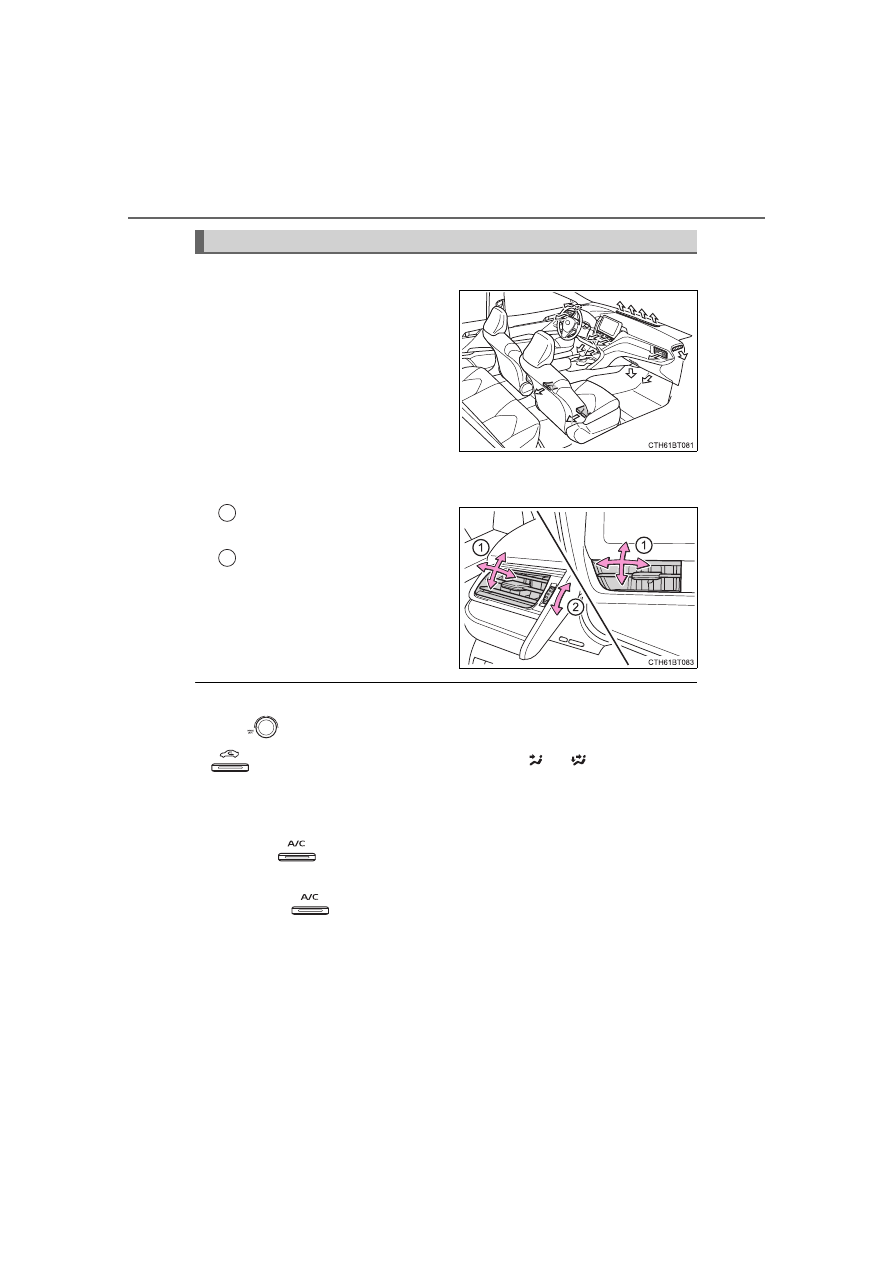
Location of air outlets

The air outlets and air volume
change according to the
selected airflow mode.

Adjusting the position of and opening and closing the air out-
lets

Direct air flow to the left or
right, up or down.

Turn the knob to open or
close the vent.

For quick cooling

Turn 

 to “MAX A/C”. The air conditioning will automatically turn on.

 will be set for recirculated air mode when 

 or 

 is selected. It is

not possible to turn to the outside air mode.

Fogging up of the windows

The windows will easily fog up when the humidity in the vehicle is high.

Turning 

 on will dehumidify the air from the outlets and defog the

windshield effectively.

If you turn 

 off, the windows may fog up more easily.

The windows may fog up if the recirculated air mode is used.

When driving on dusty roads

Close all windows. If dust thrown up by the vehicle is still drawn into the vehi-
cle after closing the windows, it is recommended that the air intake mode be
set to outside air mode and the fan speed to any setting except off.

Air outlets

1

2

385

5-1. Using the air conditioning system and defogger

5

In

te

rior fe

atures

CAMRY_U

Outside/recirculated air mode

Setting to the recirculated air mode temporarily is recommended in prevent-
ing dirty air from entering the vehicle interior and helping to cool the vehicle
when the outside air temperature is high.

Outside/recirculated air mode may automatically switch depending on the
temperature setting or the inside temperature.

When the outside temperature exceeds 75°F (24°C) and the air condition-
ing system is on

In order to reduce the air conditioning power consumption, the air condition-
ing system may switch to recirculated air mode automatically. This may also
reduce fuel consumption.

Vehicles without a smart key system: 
Recirculated air mode is selected as a default mode when the engine switch
is turned to the “ON” position.

Vehicles with a smart key system: 
Recirculated air mode is selected as a default mode when the engine
switch is turned to IGNITION ON mode.

It is possible to switch to outside air mode at any time by pressing 

.

When the outside temperature is low

The dehumidification function may not operate even when


is pressed.

Ventilation and air conditioning odors

To let fresh air in, set the air conditioning system to the outside air mode.

During use, various odors from inside and outside the vehicle may enter into
and accumulate in the air conditioning system. This may then cause odor to
be emitted from the vents.

To reduce potential odors from occurring: 

It is recommended that the air conditioning system be set to outside air
mode prior to turning the vehicle off.

Air conditioning filter

P. 492

Air conditioning system refrigerant

A label regarding the refrigerant of the
air conditioning system is attached to the
hood at the location shown in the illus-
tration.

386

5-1. Using the air conditioning system and defogger

CAMRY_U

The meaning of each symbol on the label are as follows:

Caution

Requires registered

technician to service

air conditioning system

Air conditioning system

Flammable refrigerant

Air conditioning system

lubricant type

WARNING

To prevent the windshield from fogging up

Do not use 

 during cool air operation in extremely humid weather.

The difference between the temperature of the outside air and that of the

windshield can cause the outer surface of the windshield to fog up, block-

ing your vision.

To prevent burns (vehicles with outside rear view mirror defoggers)

Do not touch the rear view mirror surfaces when the outside rear view mirror

defoggers are on.

NOTICE

To prevent battery discharge

Do not leave the air conditioning system on longer than necessary when the

engine is stopped.

When repairing/replacing parts of the air conditioning system

Have repair/replacement performed by your Toyota dealer.
When a part of the air conditioning system, such as the evaporator, is to be

replaced, it must be replaced with a new one.

Do not place anything on the instrument

panel which may cover the air outlets.

Otherwise, air flow may be obstructed,

preventing the windshield defoggers

from defogging.

387

5-1. Using the air conditioning system and defogger

5

In

te

rior fe

atures

CAMRY_U

Adjusting the temperature setting

To adjust the temperature setting, turn 

 clockwise to increase

the temperature and counterclockwise to decrease the tempera-
ture.

If 

 is not pressed, the system will blow ambient temperature

air or heated air.

Fan speed setting

To adjust the fan speed, turn 

 clockwise to increase the fan

speed and counterclockwise to decrease the fan speed.

Press 

 to turn the fan off.

Automatic air conditioning system 

(without “SYNC” button)

: If equipped

Air outlets and fan speed are automatically adjusted according
to the temperature setting.

Air conditioning controls

388

5-1. Using the air conditioning system and defogger

CAMRY_U

Change the airflow mode

To change the airflow mode,

press “<” or “>” on 

.

Air flows to the upper body.

Air flows to the upper body
and feet.

Air flows to the feet.

Air flows to the feet and the
windshield defogger oper-
ates.

Press .

The dehumidification function begins to operate. Air outlets and fan
speed are automatically adjusted according to the temperature set-
ting.

Adjust the temperature setting.

To stop the operation, press 

.

Automatic mode indicator

If the fan speed setting or air flow modes are operated, the auto-
matic mode indicator goes off. However, automatic mode for func-
tions other than that operated is maintained.

1

2

3

4

Using automatic mode

1

2

3

389

5-1. Using the air conditioning system and defogger

5

In

te

rior fe

atures

CAMRY_U

Switching between outside air and recirculated air modes

Press .

The mode switches between outside air mode (indicator off) and recir-

culated air mode (indicator on) each time 

 is pressed.

Defogging the windshield

Defoggers are used to defog the windshield and front side win-
dows.

Press .

The dehumidification function operates and fan speed increases.
Set the outside/recirculated air mode button to the outside air mode if
the recirculated air mode is used. (It may switch automatically.)
To defog the windshield and the side windows early, turn the air flow and
temperature up.

To return to the previous mode, press 

 again when the windshield

is defogged.

Defogging the rear window and outside rear view mirrors

Vehicles without outside rear view mirror defoggers

A defogger is used to defog the rear window.

Press .

The defogger will automatically turn off after a period of time.

Vehicles with outside rear view mirror defoggers

Defoggers are used to defog the rear window, and to remove rain-
drops, dew and frost from the outside rear view mirrors.

Press .

The defoggers will automatically turn off after a period of time.

Other functions

390

5-1. Using the air conditioning system and defogger

CAMRY_U

Location of air outlets

The air outlets and air volume
change according to the
selected airflow mode.

Adjusting the position of and opening and closing the air out-
lets

Direct air flow to the left or
right, up or down.

Turn the knob to open or
close the vent.

Using automatic mode

Fan speed is adjusted automatically according to the temperature setting and
the ambient conditions.

Therefore, the fan may stop for a while until warm or cool air is ready to flow

immediately after 

 is pressed.

Fogging up of the windows

The windows will easily fog up when the humidity in the vehicle is high.

Turning 

 on will dehumidify the air from the outlets and defog the wind-

shield effectively.

If you turn 

 off, the windows may fog up more easily.

The windows may fog up if the recirculated air mode is used.

Air outlets

1

2

391

5-1. Using the air conditioning system and defogger

5

In

te

rior fe

atures

CAMRY_U

When driving on dusty roads

Close all windows. If dust thrown up by the vehicle is still drawn into the vehi-
cle after closing the windows, it is recommended that the air intake mode be
set to outside air mode and the fan speed to any setting except off.

Outside/recirculated air mode

Setting to the recirculated air mode temporarily is recommended in prevent-
ing dirty air from entering the vehicle interior and helping to cool the vehicle
when the outside air temperature is high.

Outside/recirculated air mode may automatically switch depending on the
temperature setting or the inside temperature. 

When the outside temperature exceeds 75°F (24°C) and the air condition-
ing system is on

In order to reduce the air conditioning power consumption, the air condition-
ing system may switch to recirculated air mode automatically. This may also
reduce fuel consumption.

Vehicles without a smart key system: 
Recirculated air mode is selected as a default mode when the engine switch
is turned to the “ON” position.

Vehicles with a smart key system: 
Recirculated air mode is selected as a default mode when the engine
switch is turned to IGNITION ON mode.

It is possible to switch to outside air mode at any time by pressing 

.

When the outside temperature is low

The dehumidification function may not operate even when 

 is pressed.

Operation of the air conditioning system in Eco drive mode (if equipped)

In the Eco drive mode, the air conditioning system is controlled as shown
below to prioritize fuel efficiency.

Fan speed restricted when automatic mode is selected

To improve air conditioning performance, perform the following operations:

• Adjust the fan speed
• Turn off Eco drive mode

392

5-1. Using the air conditioning system and defogger

CAMRY_U

Ventilation and air conditioning odors

To let fresh air in, set the air conditioning system to the outside air mode.

During use, various odors from inside and outside the vehicle may enter into
and accumulate in the air conditioning system. This may then cause odor to
be emitted from the vents.

To reduce potential odors from occurring:

• It is recommended that the air conditioning system be set to outside air

mode prior to turning the vehicle off.

• The start timing of the blower may be delayed for a short period of time

immediately after the air conditioning system is started in automatic
mode.

Air conditioning filter

P. 492

Air conditioning system refrigerant

The meaning of each symbol on the label are as follows:

Customization

Some functions can be customized. (

P. 612)

A label regarding the refrigerant of the
air conditioning system is attached to the
hood at the location shown in the illus-
tration.

Caution

Requires registered
technician to service
air conditioning system

Air conditioning system

Flammable refrigerant

Air conditioning system
lubricant type

393

5-1. Using the air conditioning system and defogger

5

In

te

rior fe

atures

CAMRY_U

WARNING

To prevent the windshield from fogging up

Do not use 

 during cool air operation in extremely humid weather.

The difference between the temperature of the outside air and that of the

windshield can cause the outer surface of the windshield to fog up, block-

ing your vision.

To prevent burns (vehicles with outside rear view mirror defoggers)

Do not touch the rear view mirror surfaces when the outside rear view mirror

defoggers are on.

NOTICE

To prevent battery discharge

Do not leave the air conditioning system on longer than necessary when the

engine is stopped.

When repairing/replacing parts of the air conditioning system

Have repair/replacement performed by your Toyota dealer.
When a part of the air conditioning system, such as the evaporator, is to be

replaced, it must be replaced with a new one.

Do not place anything on the instrument

panel which may cover the air outlets.

Otherwise, air flow may be obstructed,

preventing the windshield defoggers

from defogging.

394

5-1. Using the air conditioning system and defogger

CAMRY_U

Automatic air conditioning system 

(with “SYNC” button)

: If equipped

Air outlets and fan speed are automatically adjusted according
to the temperature setting.

Air conditioning controls

395

5-1. Using the air conditioning system and defogger

5

In

te

rior fe

atures

CAMRY_U

Adjusting the temperature setting

To adjust the temperature setting, turn 

 clockwise to increase

the temperature and counterclockwise to decrease the tempera-
ture.

If 

 is not pressed, the system will blow ambient temperature air or

heated air.

The air conditioning system switches between individual and synchro-

nized modes each time 

 is pressed.

Synchronized modes (indicator on): 

The driver’s side 


dial can be used to adjust the temperature for

the driver’s and front passenger’s side. At this time, operate the front

passenger’s side 


dial to enter individual mode.

Individual modes (indicator off): 
The temperature for the driver’s and front passenger’s side can be
adjusted separately.

Fan speed setting

To adjust the fan speed, press 

 to increase the fan speed

and 

 to decrease the fan speed.

Press 

 to turn the fan off.

396

5-1. Using the air conditioning system and defogger

CAMRY_U

Change the airflow mode

To change the airflow mode,

press .

The air outlets used are
switched each time the button is
pressed.

Air flows to the upper body.

Air flows to the upper body
and feet.

Air flows to the feet.

Air flows to the feet and the
windshield defogger oper-
ates.

Press .

The dehumidification function begins to operate. Air outlets and fan
speed are automatically adjusted according to the temperature set-
ting.

Adjust the temperature setting.

To stop the operation, press 

.

Automatic mode indicator

If the fan speed setting or air flow modes are operated, the auto-
matic mode indicator goes off. However, automatic mode for func-
tions other than that operated is maintained.

1

2

3

4

Using automatic mode

1

2

3

397

5-1. Using the air conditioning system and defogger

5

In

te

rior fe

atures

CAMRY_U

Switching between outside air and recirculated air modes

Press .

The mode switches between outside air mode (indicator off) and recir-

culated air mode (indicator on) each time 

 is pressed.

Defogging the windshield

Defoggers are used to defog the windshield and front side win-
dows.

Press .

The dehumidification function operates and fan speed increases.
Set the outside/recirculated air mode button to the outside air mode if
the recirculated air mode is used. (It may switch automatically.)
To defog the windshield and the side windows early, turn the air flow and
temperature up.

To return to the previous mode, press 

 again when the windshield

is defogged.

Defogging the rear window and outside rear view mirrors

Vehicles without outside rear view mirror defoggers

A defogger is used to defog the rear window.

Press .

The defogger will automatically turn off after a period of time.

Vehicles with outside rear view mirror defoggers

Defoggers are used to defog the rear window, and to remove rain-
drops, dew and frost from the outside rear view mirrors.

Press .

The defoggers will automatically turn off after a period of time.

Other functions

398

5-1. Using the air conditioning system and defogger

CAMRY_U

Location of air outlets

The air outlets and air volume
change according to the
selected airflow mode.

Adjusting the position of and opening and closing the air out-
lets

Direct air flow to the left or right, up or down.

Turn the knob to open or close the vent.

Air outlets

Front

Rear

1

2

399

5-1. Using the air conditioning system and defogger

5

In

te

rior fe

atures

CAMRY_U

Using automatic mode

Fan speed is adjusted automatically according to the temperature setting and
the ambient conditions.

Therefore, the fan may stop for a while until warm or cool air is ready to flow

immediately after 

 is pressed.

Fogging up of the windows

The windows will easily fog up when the humidity in the vehicle is high.

Turning 

 on will dehumidify the air from the outlets and defog the

windshield effectively.

If you turn 

 off, the windows may fog up more easily.

The windows may fog up if the recirculated air mode is used.

When driving on dusty roads

Close all windows. If dust thrown up by the vehicle is still drawn into the vehi-
cle after closing the windows, it is recommended that the air intake mode be
set to outside air mode and the fan speed to any setting except off.

Outside/recirculated air mode

Setting to the recirculated air mode temporarily is recommended in prevent-
ing dirty air from entering the vehicle interior and helping to cool the vehicle
when the outside air temperature is high.

Outside/recirculated air mode may automatically switch depending on the
temperature setting or the inside temperature. 

When the outside temperature exceeds 75°F (24°C) and the air condition-
ing system is on

In order to reduce the air conditioning power consumption, the air condition-
ing system may switch to recirculated air mode automatically. This may also
reduce fuel consumption.

Recirculated air mode is selected as a default mode when the engine switch
is turned to IGNITION ON mode.

It is possible to switch to outside air mode at any time by pressing 

.

When the outside temperature is low

The dehumidification function may not operate even when 

 is pressed.

400

5-1. Using the air conditioning system and defogger

CAMRY_U

Operation of the air conditioning system in Eco drive mode

In the Eco drive mode, “ECO” is displayed on the air conditioning screen
and the air conditioning system is controlled as shown below to prioritize
fuel efficiency.

Fan speed restricted when automatic mode is selected

To improve air conditioning performance, perform the following operations:

• Adjust the fan speed
• Turn off Eco drive mode

Ventilation and air conditioning odors

To let fresh air in, set the air conditioning system to the outside air mode.

During use, various odors from inside and outside the vehicle may enter into
and accumulate in the air conditioning system. This may then cause odor to
be emitted from the vents.

To reduce potential odors from occurring:

• It is recommended that the air conditioning system be set to outside air

mode prior to turning the vehicle off.

• The start timing of the blower may be delayed for a short period of time

immediately after the air conditioning system is started in automatic
mode.

Air conditioning filter

P. 492

Air conditioning system refrigerant

The meaning of each symbol on the label are as follows:

A label regarding the refrigerant of the
air conditioning system is attached to the
hood at the location shown in the illus-
tration.

Caution

Requires registered
technician to service
air conditioning system

Air conditioning system

Flammable refrigerant

Air conditioning system
lubricant type

401

5-1. Using the air conditioning system and defogger

5

In

te

rior fe

atures

CAMRY_U

Customization

Some functions can be customized. (

P. 612)

WARNING

To prevent the windshield from fogging up

Do not use 

 during cool air operation in extremely humid weather.

The difference between the temperature of the outside air and that of the

windshield can cause the outer surface of the windshield to fog up, block-

ing your vision.

To prevent burns (vehicles with outside rear view mirror defoggers)

Do not touch the rear view mirror surfaces when the outside rear view mirror

defoggers are on.

NOTICE

To prevent battery discharge

Do not leave the air conditioning system on longer than necessary when the

engine is stopped.

When repairing/replacing parts of the air conditioning system

Have repair/replacement performed by your Toyota dealer.
When a part of the air conditioning system, such as the evaporator, is to be

replaced, it must be replaced with a new one.

Do not place anything on the instrument

panel which may cover the air outlets.

Otherwise, air flow may be obstructed,

preventing the windshield defoggers

from defogging.

402

5-1. Using the air conditioning system and defogger

CAMRY_U

Heated steering wheel

/seat heaters

/seat 

ventilators

: If equipped

Heated steering wheel and seat heaters heat the side grips of the

steering wheel and seats, respectively. Seat ventilators maintain

good ventilation by pulling air through the seat upholstery.

WARNING

To prevent minor burn injuries

Care should be taken to prevent injury if anyone in the following categories

comes in contact with the steering wheel and seats when the heater is on:

Babies, small children, the elderly, the sick and the physically challenged

Persons with sensitive skin

Persons who are fatigued

Persons who have taken alcohol or drugs that induce sleep (sleeping

drugs, cold remedies, etc.)

To prevent damage to the seat heaters

Observe the following precautions to prevent the minor burns or overheat-

ing

Do not cover the seat with a blanket or cushion when using the seat

heater.

Do not use seat heater more than necessary.

NOTICE

Do not put heavy objects that have an uneven surface on the seat and do

not stick sharp objects (needles, nails, etc.) into the seat.

To prevent battery discharge, do not use the functions when the engine is

not running.

403

5-1. Using the air conditioning system and defogger

5

In

te

rior fe

atures

CAMRY_U

Turns the heated steering wheel
on/off

The indicator light comes on when
the heated steering wheel is oper-
ating.

Operation condition

Vehicles without a smart key system: 
The heated steering wheel can be used when the engine switch is in the “ON”
position.

Vehicles with a smart key system: 
The heated steering wheel can be used when the engine switch is in IGNI-
TION ON mode.

Each time the switch is pressed, the operation condition changes as
follows.

Hi (3 segments lit) 

 Mid (2 segments lit) 

 Lo (1 segment lit) 

 Off

The level indicator (amber) lights up during operation.

Operation condition

Vehicles without a smart key system: 
The seat heaters can be used when the engine switch is in the “ON” position.

Vehicles with a smart key system: 
The seat heaters can be used when the engine switch is in IGNITION ON
mode.

Heated steering wheel

Seat heaters

Without seat ventilators

With seat ventilators

404

5-1. Using the air conditioning system and defogger

CAMRY_U

Each time the switch is pressed,
the operation condition changes
as follows.

Hi (3 segments lit) 

 Mid (2 seg-

ments lit) 

 Lo (1 segment lit) 

Off

The level indicator (green) lights up
during operation.

The seat ventilators can be used when

The engine switch is in IGNITION ON mode.

Air conditioning system-linked control mode

When a seat ventilator is set to Hi, the fan speed of the seat ventilator may
increase according to the fan speed of the air conditioning system

Seat ventilators

405

CAMRY_U

5

In

te

rior fe

atures

5-2. Using the interior lights

Front interior/personal lights (

P. 406, 407)

Shift lever light (if equipped)

Inside door handle lights (if equipped)

Rear interior light (if equipped) (

P. 406)

Rear personal lights (if equipped) (

P. 407)

Door courtesy lights (if equipped)

Instrument panel ornament light (if equipped)

Front center console light (if equipped)

Footwell lights (if equipped)

Interior lights list

1

2

3

4

5

6

7

8

9

406

5-2. Using the interior lights

CAMRY_U

Front (if equipped)

The rear personal lights (if equipped) turn on/off together with the
front interior light.

Turns the lights on/off linked
to door positions

Turns the lights on/off

Rear (if equipped)

Turns the light off

Turns the light on/off linked to
door positions

Turns the light on

Interior lights

1

2

1

2

3

407

5-2. Using the interior lights

CAMRY_U

5

In

te

rior fe

atures

Front

Turns the lights on/off

Rear (if equipped)

Turns the lights on/off

Personal lights

408

5-2. Using the interior lights

CAMRY_U

Illuminated entry system

Vehicles without a smart key system:

The lights automatically turn on/off according to the engine switch position,
whether the doors are locked/unlocked, and whether the doors are open/
closed.

Vehicles with a smart key system:

The lights automatically turn on/off according to the engine switch mode, the
presence of the electronic key, whether the doors are locked/unlocked, and
whether the doors are open/closed.

To prevent the battery from being discharged

If the interior lights remain on when the engine switch is turned off, the lights
will go off automatically after 20 minutes.

The interior lights may turn on automatically when

If any of the SRS airbags deploy (inflate) or in the event of a strong rear
impact, the interior lights will turn on automatically.

The interior lights will turn off automatically after approximately 20 minutes.

The interior lights can be turned off manually. However, in order to help pre-
vent further collisions, it is recommended that they be left on until safety can
be ensured.
(The interior lights may not turn on automatically depending on the force of
the impact and conditions of the collision.)

Customization

Some functions can be customized. (

P. 612)

409

CAMRY_U

5

In

te

rior fe

atures

5-3. Using the storage features

List of storage features

Auxiliary boxes

(

P. 413)

Glove box

(

P. 410)

Bottle holders/door pockets

(

P. 411)

Cup holders

(

P. 412)

Console box

(

P. 410)

Auxiliary box/open tray

(

P. 413, 414)

Coin holder

(

P. 410)

WARNING

Do not leave glasses, lighters or spray cans in the storage spaces, as this

may cause the following when cabin temperature becomes high:
• Glasses may be deformed by heat or cracked if they come into contact

with other stored items.

• Lighters or spray cans may explode. If they come into contact with other

stored items, the lighter may catch fire or the spray can may release

gas, causing a fire hazard.

When driving or when the storage compartments are not in use, keep the

lids closed. 

In the event of sudden braking or sudden swerving, an accident may occur

due to an occupant being struck by an open lid or the items stored inside.

1

2

3

4

5

6

7

410

5-3. Using the storage features

CAMRY_U

Pull up the lever to open the glove
box.

The glove box light turns on when the tail lights are on.

Push the knob.

Pull the lever to open.

Glove box

Console box

Coin holder

411

5-3. Using the storage features

CAMRY_U

5

In

te

rior fe

atures

When storing a bottle, close the cap.

The bottle may not be stored depending on its size or shape.

Bottle holders

Front

Rear

WARNING

Do not place anything other than a bottle in the bottle holders.

Other items may be thrown out of the holders in the event of an accident or

sudden braking and cause injury.

NOTICE

Put the cap on before stowing a bottle. Do not place open bottles in the bot-

tle holders, or glass or paper cups containing liquid. The contents may spill

and glass cups may break.

412

5-3. Using the storage features

CAMRY_U

Cup holders

Front

Rear (if equipped)

Pull the armrest down.

WARNING

Items unsuitable for the cup holder

Do not place anything other than cups or aluminum cans in the cup holders.

Other items may be thrown out of the holders in the event of an accident or

sudden braking, causing injury.

To prevent burns

To prevent burns, cover hot drinks when placed in the cup holders.

413

5-3. Using the storage features

CAMRY_U

5

In

te

rior fe

atures

Opening: 
Push the tray forward until it locks. 
Closing: 
Push the tray forward to release the lock and the tray will automati-
cally close.

When small items are placed on top of the tray (type C)

Auxiliary boxes

Type A (if equipped)

Type B (if equipped)

Push the lid.

Type C

The tray can be opened while small items
are placed on it.

414

5-3. Using the storage features

CAMRY_U

When using wireless charger (if equipped)

P. 420

WARNING

Items unsuitable for storing (type A)

Do not store items heavier than 0.4 lb. (0.2 kg).

Doing so may cause the auxiliary box to open and the items inside may fall

out, resulting in an accident.

NOTICE

When opening or closing the tray (type C)

To prevent damaging small items, when opening the tray while small items

are placed on it, make sure the items will not get caught.

To prevent damaging the tray, do not pull the tray to close it. Doing so may

damage the tray.

Open tray

WARNING

Observe the following precautions when putting items in the open tray. Fail-

ure to do so may cause items to be thrown out of the tray in the event of

sudden braking or steering. In these cases, the items may interfere with

pedal operation or cause driver distraction, resulting in an accident.

Do not store items in the tray that can easily shift or roll out.

Do not stack items in the tray higher than the tray’s edge.

Do not put items in the tray that may protrude over the tray’s edge. 

415

5-3. Using the storage features

CAMRY_U

5

In

te

rior fe

atures

Trunk features

Grocery bag hooks

NOTICE

To prevent damage to the hooks, do not apply too much load to the hooks.


Content      ..     11      12      13      14     ..