Toyota Camry (2024 year). Manual in english - page 12
 

  Index      Toyota     Toyota Camry (2024 year). Manual in english


Search            copyright infringement  


Content      ..     10      11      12      13     ..


Toyota Camry (2024 year). Manual in english - page 12


352

4-5. Using the driving support systems

CAMRY_U

Situations in which the system may operate even if there is no possibil-
ity of a collision

Instances of the RCTA function unnecessary detecting a vehicle and/or object
may increase in the following situations:

When equipment that may obstruct a sensor is installed, such as a towing
eyelet, bumper protector (an additional trim strip, etc.), bicycle carrier, or
snow plow

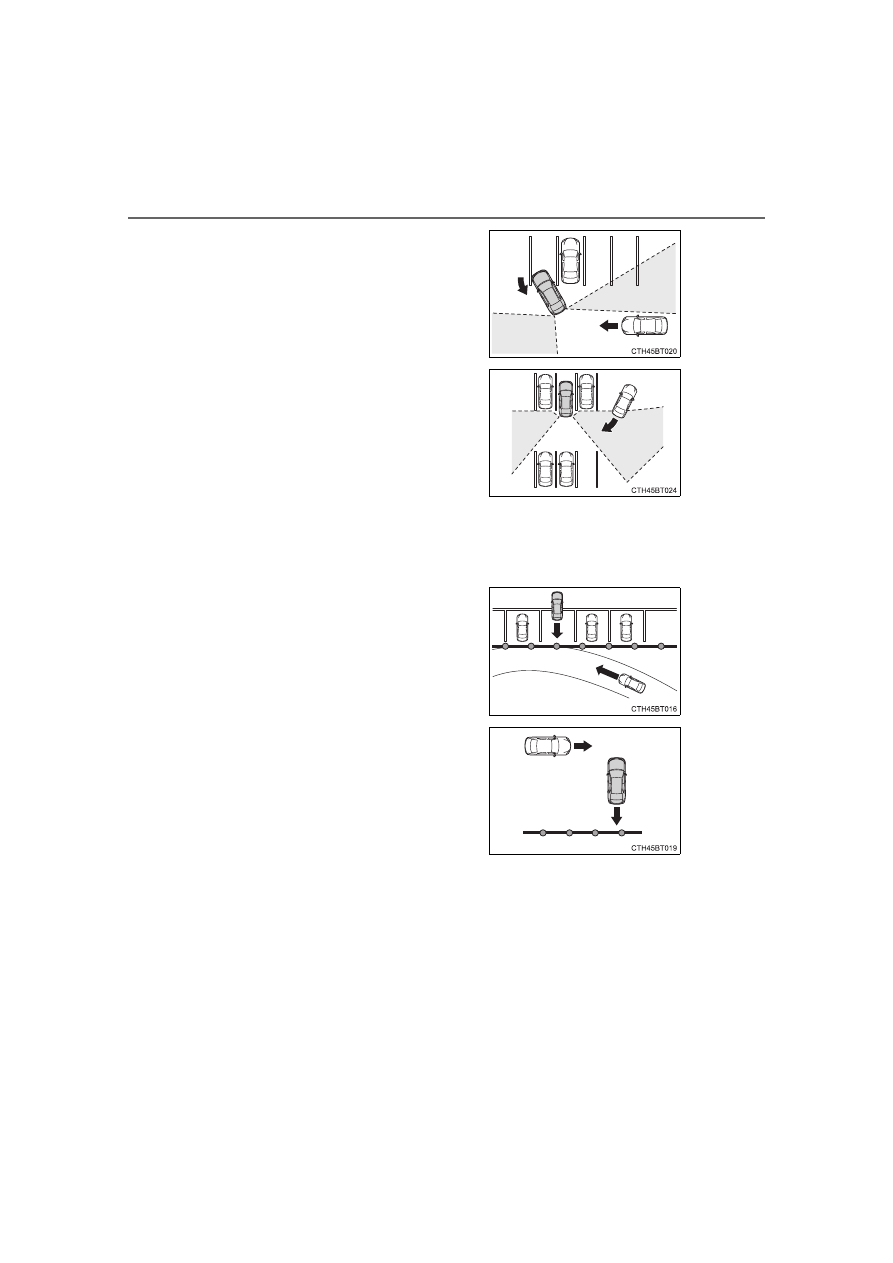
When turning while backing up

When a vehicle turns into the detection
area

When the parking space faces a street
and vehicles are being driven on the
street

When the distance between your vehicle
and metal objects, such as a guardrail,
wall, sigh, or parked vehicle, which may
reflect electrical waves toward the rear
of the vehicle, is short

353

4-5. Using the driving support systems

4

Drivin

g

CAMRY_U

When there are spinning objects near your vehicle such as the fan of an air
conditioning unit

When water is splashed or sprayed a sprinkler

Moving objects (flags, exhaust fumes, large rain droplets or snowflakes, rain
water on the road surface, etc.)

When the distance between your vehicle and a guardrail, wall, etc., that
enters the detection area is short

Gratings and gutters

When a sensor or the area around a sensor is extremely hot or cold

If the suspension has been modified or tires of a size other than specified
are installed

If the front of the vehicle is raised or lowered due to the carried load

When a vehicle passes by the side of
your vehicle

When a detected vehicle turns while
approaching the vehicle

354

4-5. Using the driving support systems

CAMRY_U

Pedestrian detection icon

Displayed automatically when a pedestrian is detected.

RCD OFF icon

When the RCD function is disabled, the RCD OFF icon illuminates.

Vehicles with 4.2-inch multi-information display

Press 

/

 of the meter control switches, select 

.

Press 

/

 of the meter control switches, select 

.

Press 

 of the meter control switch.

When the RCD function is disabled, the RCD OFF indicator (

P.

91) illuminates.

RCD (Rear Camera Detection)

: If equipped

When the vehicle is backing up, the rear camera detection func-
tion can detect pedestrians in the detection area behind the
vehicle. If a pedestrian is detected, a buzzer will sound and an
icon on the audio system screen will be displayed to inform the
driver of the pedestrian.

Display

Toyota parking assist monitor

Panoramic view monitor

Turning the rear camera detection function on/off

1

2

1

2

3

355

4-5. Using the driving support systems

4

Drivin

g

CAMRY_U

Vehicles with 7-inch multi-information display

Press 

/

 of the meter control switches, select 

.

Press 

/

 of the meter control switches, select 

.

Press 

 of the meter control switch.

When the RCD function is disabled, the RCD OFF indicator (

P.

91) illuminates.

If the rear camera detection func-
tion detects a pedestrian in the
detection area, the buzzer and
icon will operate as shown in the
following table:

When a pedestrian is detected

1

2

3

Area

Buzzer

Icon

Sounds repeatedly

Blinks 3 times and then stays on

When the vehicle is stationary:
Sounds 3 times
When the vehicle is backing up:
Sounds repeatedly

When it is determined that a
pedestrian will enter area 
within a few seconds: Sounds
repeatedly

When it is determined that a
pedestrian will enter area 
within a few seconds: Blinks 3
times and then stays on

1

2

3

1

1

356

4-5. Using the driving support systems

CAMRY_U

The rear camera detection function is operational when

The rear camera detection function is operational when the following condi-
tions are met:

The engine switch is in the “ON” position (vehicles without a smart key sys-
tem) or in IGNITION ON mode (vehicles with a smart key system).

RCD function is on.

The shift lever is in R.

Setting the buzzer volume

The buzzer volume can be adjusted with the RCTA buzzer volume on the
multi-information display. (

P. 106, 119)

Muting the buzzer sound

The buzzer can be temporarily muted by pressing 


of the meter control

switches while an object detection display is shown on the multi-information
display.

If “Rear Camera Detection Unavailable Remove the Dirt of Rear Camera”
is displayed on the multi-information display

A rear camera lens may be dirty or covered with snow or ice. In such cases, if
it is removed from the rear camera lens, the system should return to normal.
(It may be necessary to drive the vehicle for some time before the system
returns to normal.)

If “Rear Camera Detection Unavailable” is displayed on the multi-infor-
mation display

If this message is displayed after the battery has been disconnected and
reconnected, fully turn the steering wheel to the left and then the right on
level ground.

If this message is displayed only when the R shift position is selected, the
rear camera lens may be dirty. Clean the rear camera lens.

357

4-5. Using the driving support systems

4

Drivin

g

CAMRY_U

Situations in which the system may not operate properly

Some pedestrians, such as the following, may not be detected by the rear
camera detection function, preventing the function from operating properly: 

• Pedestrians who are squatting
• Pedestrians who are lying down
• Pedestrians who are running
• Pedestrians who suddenly enter the detection area 
• Pedestrians riding a bicycle, skateboard, or other light vehicle
• Pedestrians wearing unusual clothing, such as a costume
• Pedestrians whose body is partially hidden by a cart or other object 
• Pedestrians which are obscured by darkness, such as at night

In some situations, such as the following, pedestrians may not be detected
by the rear camera detection function, preventing the function from operat-
ing properly:

• When backing up in inclement weather (rain, snow, fog, etc.)
• When the rear camera is obscured (dirt, snow, ice, etc. are attached) or

scratched

• When a very bright light, such as the sun, or the headlights of another

vehicle, shines directly into the rear camera

• When backing up in a place where the surrounding brightness changes

suddenly, such as at the entrance or exit of a garage or underground
parking lot

• When backing up in a dim environment such as during dusk or in an

underground parking lot

• When the camera position and direction are deviated
• When a towing hook is attached
• When water droplets are flowing on the camera lens
• When the vehicle height is extremely changed (nose up, nose down)
• When tire chains is used

358

4-5. Using the driving support systems

CAMRY_U

Situations in which the system may operate unexpectedly

Even though there are no pedestrians in the detection area, some objects,
such as the following, may be detected, possibly causing the rear camera
detection function to operate.

• Three dimensional objects, such as a pole, traffic cone, fence, or parked

vehicle

• Moving objects, such as a car or motorcycle
• Objects moving toward your vehicle when backing up, such as flags or

puddles (or airborne matter, such as smoke, steam, rain, or snow)

• Cobblestone or gravel roads, tram rails, road repairs, white lines, pedes-

trian crossings or fallen leaves on the road

• Metal covers (gratings), such as those used for drainage ditches
• Objects reflected in a puddle or on a wet road surface
• Shadows on the road

In some situations, such as the following, the rear camera detection function
may operate even though there are no pedestrians in the detection area.

• When backing up toward the roadside or a bump on the road 
• When backing up toward an incline/decline
• If the rear of the vehicle is raised or lowered due to the carried load
• If a bumper protector, such as an additional trim strip, is installed to the

rear bumper

• If the orientation of the rear camera has been changed
• If a towing eyelet is installed to the rear of the vehicle
• When the rear camera is obscured (dirt, snow, ice, etc. are attached) or

scratched

• When water is flowing over the rear camera lens
• If there is a flashing light in the detection area, such as the emergency

flashers of another vehicle

• When a tire chains is used

Situations in which the rear camera detection function may be difficult to
notice

• If buzzer may be difficult to hear if the surrounding area is noisy, the vol-

ume of the audio system volume is high, the air conditioning system is
being used, etc.

• If the temperature in the cabin is extremely high or low, the audio system

screen may not operate correctly.

359

4-5. Using the driving support systems

4

D

riv

ing

CAMRY_U

WARNING

Cautions regarding the use of the system

The recognition and control capabilities for this system are limited.
The driver should always drive safely by always being responsible without

over relying on the system and have a understanding of the surrounding sit-

uations.

To ensure the system can operate properly

Observe the following, otherwise there is the danger that could lead to an

accident.

Always clean the camera without damaging it.

Do not install market electronic parts (such as Illuminated license plate,

fog lamps, etc.) in the camera vicinity.

Do not subject the camera vicinity to strong impacts. If the vicinity is sub-

jected to a strong impact, have the vehicle inspected at your Toyota dealer.

Do not disassemble, remodel or paint the camera.

Do not attach accessories or stickers to the camera.

Do not install market protection parts (bumper trim, etc.) to the rear

bumper.

Maintain suitable tire air pressure.

Make sure the trunk is completely closed.

RCD function is turned off

In the following situations the system turns off. The RCD function may not

operate properly and thus there is the danger that an accident may occur.

The contents mentioned above are not observed.

Suspensions other than Toyota genuine parts are installed.

360

4-5. Using the driving support systems

CAMRY_U

Parking Support Brake function (static objects)

Ultrasonic sensors are used to detect static objects, such as a wall,
in the detection area when driving at a low speed or backing up.
(

P. 368)

Parking Support Brake function (rear-crossing vehicles)

Rear radar sensors are used to detect approaching vehicles in the
detection area behind the vehicle when backing up. (

P. 372)

PKSB (Parking Support Brake)

: If equipped

The Parking Support Brake system consists of the following
functions that operate when driving at a low speed or backing
up, such as when parking. When the system determines that the
possibility of a collision with a detected object is high, a warning
operates to urge the driver to take evasive action. If the system
determines that the possibility of a collision with a detected
object is extremely high, the brakes are automatically applied to
help avoid the collision or help reduce the impact of the colli-
sion.

PKSB (Parking Support Brake) system

361

4-5. Using the driving support systems

4

Drivin

g

CAMRY_U

Front corner sensors

Front center sensors

Rear corner sensors

Rear center sensors

The Parking Support Brake can be enabled/disabled on the multi-
information display. All of the Parking Support Brake functions (static
objects and rear-crossing vehicles) are enabled/disabled simultane-
ously.

Use the meter control switches to enable/disable the parking support
brake. (

P. 103, 117)

Press 

/

 of the meter control switches, select 

.

Press 

/

 of the meter control switches, select 

.

Press 

 of the meter control switch.

Select the “Yes” and push 

.

When the Parking Support Brake is disabled, the PKSB OFF indicator illu-
minates.

To re-enable the system when it was disabled, select 

 on the multi-infor-

mation display, select 

 and then “On”. If disabled using this method, the

system will not be re-enabled by turning the engine switch off and then to
IGNITION ON mode.

Types of sensors

1

2

3

4

Turning the Parking Support Brake on/off

1

2

3

4

362

4-5. Using the driving support systems

CAMRY_U

If the engine output restriction control or brake control operates, a
buzzer will sound and a message will be displayed on the multi-infor-
mation display to alert the driver.

Depending on the situation, engine output restriction control will operate to
either limit acceleration or restrict output as much as possible.

Displays and buzzers for engine output restriction control and
brake control

Control

Situation

Multi-information 

display

PKSB 

OFF 

Indicator

Buzzer

Engine output 
restriction con-
trol is operating 
(acceleration 
restriction)

Acceleration 
greater than a 
certain amount is 
not possible.

“Object Detected 
Acceleration 
Reduced”

Not illu-
minated

No 
beep

Engine output 
restriction con-
trol is operating 
(output restricted 
as much as pos-
sible)

Stronger-than-
normal brake 
operation is nec-
essary.

“Brake!”

Not illu-
minated

Short 
beep

Brake control is 
operating

Emergency brak-
ing is necessary.

Vehicle stopped 
by system opera-
tion
(When accelera-
tor is stepped on)

The vehicle has 
been stopped by 
brake control 
operation.

“Switch to 
Brake”

Illumi-
nated

Short
beep

Vehicle stopped
by system opera-
tion
(When accelera-
tor is not stepped
on)

The vehicle has
been stopped by
brake control
operation.

“Brake”

Illumi-
nated

Short
beep

363

4-5. Using the driving support systems

4

Drivin

g

CAMRY_U

If the Parking Support Brake detects that a collision with an object is
possible, the engine output will be restricted to restrain any increase
in the vehicle speed. (Engine output restriction control: See A below.)

Additionally, if the accelerator pedal continues to be depressed, the
brakes will be applied automatically to reduce the vehicle speed.
(Brake control: See B below.)

Parking Support Brake function

364

4-5. Using the driving support systems

CAMRY_U

On

Off

Time

Down

On

Off

Time

On

Off

Time

Down

Up

Accelerator pedal

Brake pedal

Engine output

Braking force

Start of control

High possibility of a collision

Extremely high possibility of a
collision

1

2

3

4

5

6

7

365

4-5. Using the driving support systems

4

Drivin

g

CAMRY_U

If the Parking Support Brake function has operated

If the vehicle is stopped due to operation of the Parking Support Brake func-
tion, the Parking Support Brake system will be disabled and the PKSB OFF
indicator will illuminate. If the Parking Support Brake operates unnecessarily,
brake control can be canceled by depressing the brake pedal or waiting for
approximately 2 seconds for it to automatically be canceled. Then, the vehicle
can be operated by depressing the accelerator pedal.

Re-enabling the Parking Support Brake system 

To re-enable the Parking Support Brake system when it is disabled due to
operation of the Parking Support Brake function, either enable the system
again (

P. 361), or turn the engine switch off and then back to IGNITION ON

mode.

Additionally, if the object becomes no longer in the traveling direction of the
vehicle or if the traveling direction of the vehicle changes (such as changing
from moving forward to backing up, or from backing up to moving forward),
the system will be re-enabled automatically.

If “PKSB Unavailable” and “Parking Assist Unavailable Clean Parking
Assist Sensor” are displayed on the multi-information display and the
PKSB OFF indicator is illuminating

A sensor may be covered with ice, snow, dirt, etc. In this case, remove the
ice, snow, dirt, etc., from the sensor to return the system to normal. If this
message is shown even after removing dirt from the sensor, or shown when
the sensor was not dirty to begin with, have the vehicle inspected at your
Toyota dealer.

A sensor may be frozen. Once the ice melts, the system will return to nor-
mal.

Water may be continuously flowing over the sensor surface, such as in a
heavy rain. When the system determines that it is normal, the system will
return to normal.

366

4-5. Using the driving support systems

CAMRY_U

WARNING

Cautions regarding the use of the system

Do not overly rely on the system, as doing so may lead to an accident.
Always drive while checking the safety of the surroundings of the vehicle.
Depending on the vehicle and road conditions, weather, etc., the system

may not operate.
The detection capabilities of sensors and radars are limited. Always drive

while checking the safety of the surroundings of the vehicle.

The driver is solely responsible for safe driving. Always drive carefully, tak-

ing care to observe your surroundings. The Parking Support Brake system

is designed to provide support to lessen the severity of collisions. How-

ever, it may not operate in some situations.

The Parking Support Brake system is not designed to stop the vehicle

completely. Additionally, even if the system has stopped the vehicle, it is

necessary to depress the brake pedal immediately as brake control will be

canceled after approximately 2 seconds.

It is extremely dangerous to check the system operations by intentionally

driving the vehicle into the direction of a wall, etc. Never attempt such

actions.

When to disable the Parking Support Brake

In the following situations, disable the Parking Support Brake as the system

may operate even though there is no possibility of a collision.

When inspecting the vehicle using a chassis roller, chassis dynamo or free

roller

When loading the vehicle onto a boat, truck or other transport vessel

If the suspension has been modified or tires of a size other than specified

are installed

If the front of the vehicle is raised or lowered due to the carried load

When equipment that may obstruct a sensor is installed, such as a towing

eyelet, bumper protector (an additional trim strip, etc.), bicycle carrier, or

snow plow

When using automatic car washing devices

If the vehicle cannot be driven in a stable manner, such as when the vehi-

cle has been in an accident or is malfunctioning

When the vehicle is driven in a sporty manner or off-road

When the tires are not properly inflated

When the tires are very worn

When a tire chains or compact spare tire is used

367

4-5. Using the driving support systems

4

D

riv

ing

CAMRY_U

NOTICE

If “PKSB Unavailable” is displayed on the multi-information display

and the PKSB OFF indicator is illuminating

If this message is displayed immediately after the engine switch is changed

to ON, operate the vehicle carefully, paying attention to your surroundings.

It may be necessary to drive the vehicle for a certain amount of time before

the system returns to normal. (If the system is not return to normal after

driving for a while, clean the sensors and their surrounding area on the

bumpers.)

368

4-5. Using the driving support systems

CAMRY_U

The system will operate in situations such as the following if an object
is detected in the traveling direction of the vehicle.

When traveling at a low speed and the brake pedal is not
depressed, or is depressed late

Parking Support Brake function (static 

objects)

: If equipped

If a collision with an object may occur due to the vehicle sud-
denly moving forward due to an accidental accelerator pedal
operation, the vehicle moving the unintended direction due to
the wrong shift position being selected, or while parking or trav-
eling at low speeds, the sensors detect objects, such as a wall,
in the traveling direction of the vehicle, and the system operates
to lessen an impact with an object and reduce the resulting dam-
age.

Examples of system operation

369

4-5. Using the driving support systems

4

Drivin

g

CAMRY_U

When the accelerator pedal is depressed excessively

When the vehicle moves in the unintended direction due to the
wrong shift position being selected

370

4-5. Using the driving support systems

CAMRY_U

The Parking Support Brake function (static objects) will operate when

The function will operate when the PKSB OFF indicator is not illuminated
(

P. 361, 365) and all of the following conditions are met:

Engine output restriction control

• The Parking Support Brake system is enabled.
• The vehicle speed is approximately 10 mph (15 km/h) or less.
• There is an object in the traveling direction of the vehicle and approxi-

mately 6 to 13 ft. (2 to 4 m) away.

• The system determines that a stronger-than-normal brake operation is

necessary to avoid a collision.

Brake control

• Engine output restriction control is operating.
• The system determines that an emergency brake operation is necessary

to avoid a collision.

The Parking Support Brake function (static objects) will stop operating
when

The function will stop operating if any of the following conditions are met:

Engine output restriction control

• The Parking Support Brake system is disabled.
• The collision becomes avoidable with normal brake operation.
• The object is no longer approximately 6 to 13 ft. (2 to 4 m) away in the

traveling direction of the vehicle.

Brake control

• The Parking Support Brake system is disabled.
• Approximately 2 seconds elapse after the vehicle is stopped by brake

control.

• The brake pedal is depressed after the vehicle is stopped by brake con-

trol.

• The object is no longer approximately 6 to 13 ft. (2 to 4 m) away in the

traveling direction of the vehicle.

Detection range of the Parking Support Brake function (static objects)

The detection range of the Parking Support Brake function differs from the
detection range of the intuitive parking assist. (

P. 339)

Therefore, even if the intuitive parking assist detects an object and provides a
warning, the Parking Support Brake function may not start operating.

Situations in which the system may not operate properly

P. 341

Situations in which the system may operate even if there is no possibil-
ity of a collision

P. 342

371

4-5. Using the driving support systems

4

D

riv

ing

CAMRY_U

WARNING

To ensure the system can operate properly

P. 344

If the Parking Support Brake function (static objects) operates unnec-

essarily, such as at a railroad crossing

P. 365

Notes when washing the vehicle

P. 344

372

4-5. Using the driving support systems

CAMRY_U

The system will operate in situations such as the following if an object
is detected in the traveling direction of the vehicle.

When reversing, a vehicle is approaching and the brake pedal
is not depressed, or is depressed late

Parking Support Brake function (rear-

crossing vehicles)

: If equipped

If a radar sensor detects a vehicle approaching from the right or
left at the rear of the vehicle and the system determines that the
possibility of a collision is high, this function will perform brake
control to reduce the likelihood of an impact with the approach-
ing vehicle.

Examples of system operation

373

4-5. Using the driving support systems

4

Drivin

g

CAMRY_U

The Parking Support Brake function (rear-crossing vehicles) will operate
when

The function will operate when the PKSB OFF indicator is not illuminated
(

P. 361, 365) and all of the following conditions are met:

Engine output restriction control

• The Parking Support Brake is enabled.
• The vehicle speed is approximately 9 mph (15 km/h) or less.
• Vehicles which are approaching from the right or left at the rear of the

vehicle at a traveling speed of approximately 5 mph (8 km/h) or more.

• The shift lever is in R.
• The system determines that a stronger than normal brake operation is

necessary to avoid a collision with an approaching vehicle.

Brake control

• Engine output restriction control is operating.
• The system determines that an emergency brake operation is necessary

to avoid a collision with an approaching vehicle.

The Parking Support Brake function (rear-crossing vehicles) will stop
operating when

The function will stop operating if any of the following conditions are met:

Engine output restriction control

• The Parking Support Brake is disabled.
• The collision becomes avoidable with normal brake operation.
• A vehicle is no longer approaching from the right or left at the rear of the

vehicle.

Brake control

• The Parking Support Brake is disabled.
• Approximately 2 seconds elapse after the vehicle is stopped by brake

control.

• The brake pedal is depressed after the vehicle is stopped by brake con-

trol.

• A vehicle is no longer approaching from the right or left at the rear of the

vehicle.

Detection area of the Parking Support Brake function (rear-crossing
vehicles)

The detection area of the Parking Support Brake function (rear-crossing vehi-
cles) differs from the detection area of the RCTA function (

P. 345).

Therefore, even if the RCTA function detects a vehicle and provides an alert,
the Parking Support Brake function (rear-crossing vehicles) may not start
operating.

Situations in which the system may not operate properly

P. 351

Situations in which the system may operate even if there is no possibil-
ity of a collision

P. 352

374

4-5. Using the driving support systems

CAMRY_U

WARNING

To ensure the system can operate properly

P. 332

375

4-5. Using the driving support systems

4

Drivin

g

CAMRY_U

Normal mode

Use for normal driving.

While in Eco drive mode or sport mode, press the switch to change the
driving mode to normal mode.

Eco drive mode

Use Eco drive mode to help achieve low fuel consumption during
trips that involve frequent accelerating.

When the “ECO” switch is pressed, the “ECO MODE” indicator comes on
in the instrument cluster.

Sport mode

Use sport mode when increased acceleration response and precise
handling is desired, for example, when driving on mountain roads.

When the “SPORT” switch is pressed, the “SPORT” indicator comes on in
the instrument cluster.

Driving mode select switches

: If equipped

The driving modes can be selected to suit driving condition.

1

2

3

376

4-5. Using the driving support systems

CAMRY_U

Operation of the air conditioning system in Eco drive mode

Eco drive mode controls the heating/cooling operations and fan speed of the
air conditioning system to enhance fuel efficiency (

P. 387, 394). To improve

air conditioning performance, adjust the fan speed or turn off Eco drive mode.

Sport mode automatic deactivation

Sport mode is automatically deactivated if the engine switch is turned off after
driving in sport mode.

377

4

Drivin

g

CAMRY_U

4-6. Driving tips

Use fluids that are appropriate to the prevailing outside tempera-
tures. 

• Engine oil
• Engine coolant
• Washer fluid

Have a service technician inspect the condition of the battery.

Have the vehicle fitted with four snow tires or purchase a set of tire
chains for the front tires.

*

Ensure that all tires are the same size and brand, and that chains match
the size of the tires.

*

: Tire chains cannot be mounted on vehicles with 18 and 19-inch tires.

Perform the following according to the driving conditions: 

Do not try to forcibly open a window or move a wiper that is frozen.
Pour warm water over the frozen area to melt the ice. Wipe away
the water immediately to prevent it from freezing. 

To ensure proper operation of the climate control system fan,
remove any snow that has accumulated on the air inlet vents in
front of the windshield. 

Check for and remove any excess ice or snow that may have accu-
mulated on the exterior lights, outside rear view mirrors, windows,
vehicle’s roof, chassis, around the tires or on the brakes.

Remove any snow or mud from the bottom of your shoes before
getting in the vehicle.

Accelerate the vehicle slowly, keep a safe distance between you and
the vehicle ahead, and drive at a reduced speed suitable to road con-
ditions.

Winter driving tips

Carry out the necessary preparations and inspections before
driving the vehicle in winter. Always drive the vehicle in a man-
ner appropriate to the prevailing weather conditions. 

Preparation for winter

Before driving the vehicle

When driving the vehicle

378

4-6. Driving tips

CAMRY_U

Turn automatic mode of the parking brake off. Otherwise, the park-
ing brake may freeze and not be able to be released automatically.
Also, avoid using the following as the parking brake may operate
automatically, even if automatic mode is off.

• Brake hold system

Park the vehicle and shift the shift lever to P without setting the
parking brake. The parking brake may freeze up, preventing it from
being released. If the vehicle is parked without setting the parking
brake, make sure to block the wheels.
Failure to do so may be dangerous because it may cause the vehi-
cle to move unexpectedly, possibly leading to an accident.
When the parking brake is in automatic mode, release the parking
brake after shifting the shift lever to P. (

P. 225)

If the vehicle is parked without setting the parking brake, confirm
that the shift lever cannot be moved out of P

*

.

*

: The shift lever will be locked if it is attempted to be shifted from P to any

other position without depressing the brake pedal. If the shift lever can be
shifted from P, there may be a problem with the shift lock system. Have the
vehicle inspected by your Toyota dealer immediately.

Vehicles with 16 and 17-inch tires

Use the correct tire chain size when mounting the snow chains. 
Chain size is regulated for each tire size.

Side chain:

0.12 in. (3 mm) in diameter

0.39 in. (10 mm) in width

1.18 in. (30 mm) in length

Cross chain:

0.16 in. (4 mm) in diameter

0.55 in. (14 mm) in width

0.98 in. (25 mm) in length

Vehicles with 18 and 19-inch tires

Tire chains cannot be mounted.

Snow tires should be used instead.

When parking the vehicle

Selecting tire chains

1

2

3

4

5

6

379

4-6. Driving tips

4

D

riv

ing

CAMRY_U

Regulations regarding the use of tire chains vary depending on loca-

tion and type of road. Always check local regulations before installing

chains.

Tire chain installation

Observe the following precautions when installing and removing chains:

Install and remove tire chains in a safe location.

Install tire chains on the front tires. Do not install tire chains on the rear tires.

Install tire chains on front tires as tightly as possible. Retighten chains after

driving 1/4 

 1/2 mile (0.5 

 1.0 km).

Install tire chains following the instructions provided with the tire chains.

Regulations on the use of tire chains

WARNING

Driving with snow tires

Observe the following precautions to reduce the risk of accidents. 

Failure to do so may result in a loss of vehicle control and cause death or

serious injury.

Use tires of the size specified.

Maintain the recommended level of air pressure.

Do not drive in excess of 75 mph (120 km/h), regardless of the type of

snow tires being used.

Use snow tires on all, not just some wheels.

Driving with tire chains (vehicles with 16 and 17-inch tires)

Observe the following precautions to reduce the risk of accidents. 

Failure to do so may result in the vehicle being unable to be driven safely,

and may cause death or serious injury.

Do not drive in excess of the speed limit specified for the tire chains being

used, or 30 mph (50 km/h), whichever is lower.

Avoid driving on bumpy road surfaces or over potholes.

Avoid sudden acceleration, abrupt steering, sudden braking and shifting

operations that cause sudden engine braking.

Slow down sufficiently before entering a curve to ensure that vehicle con-

trol is maintained.

Do not use LTA (Lane Tracing Assist) system.

380

4-6. Driving tips

CAMRY_U

NOTICE

Repairing or replacing snow tires

Request repairs or replacement of snow tires from Toyota dealers or legiti-

mate tire retailers.

This is because the removal and attachment of snow tires affects the opera-

tion of the tire pressure warning valve and transmitters.

Fitting tire chains (vehicles with 16 and 17-inch tires)

The tire pressure warning valve and transmitters may not function correctly

when tire chains are fitted.

382

CAMRY_U

5-1. Using the air conditioning system and defogger

Adjusting the temperature setting

To adjust the temperature setting, turn 

 clockwise to

increase the temperature and counterclockwise to decrease the
temperature.

If 

 is not pressed, the system will blow ambient temperature air or

heated air.

Fan speed setting

To adjust the fan speed, turn 

 clockwise to increase the fan

speed and counterclockwise to decrease the fan speed.

Turning the dial to “OFF” turns off the fan.

Change the airflow mode

To change the airflow mode,

press , , 

or .

Air flows to the upper body.

Air flows to the upper body
and feet.

Air flows to the feet.

Air flows to the feet and the windshield defogger operates.

Manual air conditioning system

: If equipped

Air conditioning controls

1

2

3

4

383

5-1. Using the air conditioning system and defogger

5

In

te

rior fe

atures

CAMRY_U

Switching between outside air and recirculated air modes

Press .

The mode switches between outside air mode (indicator off) and recir-

culated air mode (indicator on) each time 

 is pressed.

Defogging the windshield

Defoggers are used to defog the windshield and front side win-
dows.

Press .

If the recirculated air mode is used, it will automatically switch to the out-
side air mode.

Perform the following operations accordingly:

To adjust the fan speed, turn 

.

To adjust the temperature setting, turn 

.

If the dehumidification function is not operating, press 

to operate the dehumidification function.

To defog the windshield and the side windows early, turn the air
flow and temperature up.

Defogging the rear window and outside rear view mirrors

Vehicles without outside rear view mirror defoggers

A defogger is used to defog the rear window.

Press .

The defogger will automatically turn off after a period of time.

Vehicles with outside rear view mirror defoggers

Defoggers are used to defog the rear window, and to remove rain-
drops, dew and frost from the outside rear view mirrors.

Press .

The defoggers will automatically turn off after a period of time.

Other functions

1

2


Content      ..     10      11      12      13     ..