Toyota Land Cruiser Prado (2023 year). Manual in english - page 10
 

  Index      Manuals     Toyota Land Cruiser Prado (2023 year). Manual in english


Search            copyright infringement  


Content      ..     8      9      10      11     ..


Toyota Land Cruiser Prado (2023 year). Manual in english - page 10


160

3-1. Key information

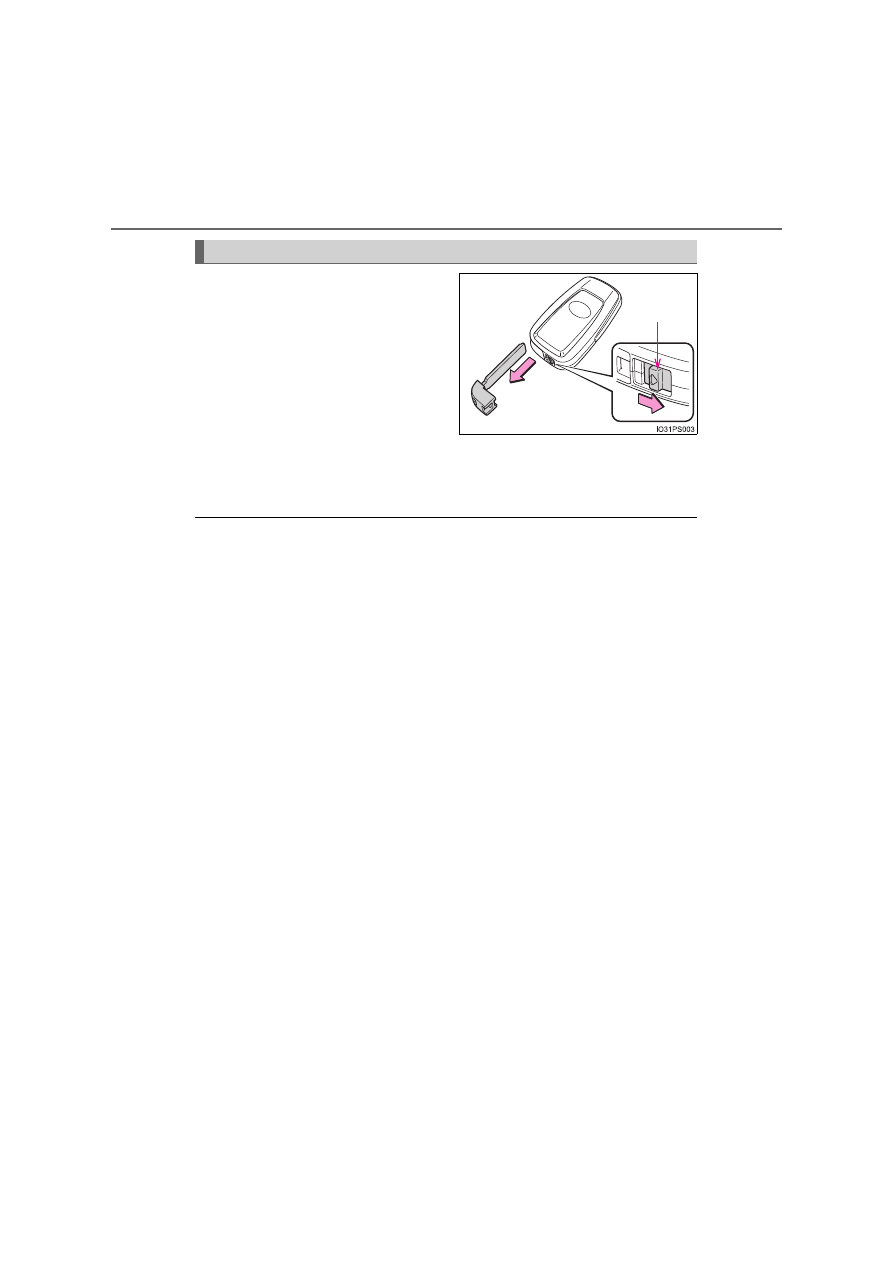
To take out the mechanical key,
slide the release lever and take
the key out.

The mechanical key can only be
inserted in one direction, as the
key only has grooves on one side.
If the key cannot be inserted in a
lock cylinder, turn it over and reat-
tempt to insert it.
After using the mechanical key, store it in the electronic key. Carry the
mechanical key together with the electronic key. If the electronic key bat-
tery is depleted or the entry function does not operate properly, you will
need the mechanical key. (

P. 719)

When required to leave the vehicle’s key with a parking attendant

Lock the glove box as circumstances demand. (

P. 533)

Vehicles without a smart entry & start system

Carry the master key for your own use and provide the attendant with the
valet key.

Vehicles with a smart entry & start system

Remove the mechanical key for your own use and provide the attendant with
the electronic key only.

If you lose your keys/wireless remote control

Keys

New genuine keys can be made by any authorized Toyota retailer or Toyota
authorized repairer, or any reliable repairer using a master key (vehicles with-
out a smart entry & start system) or the other key (vehicles with a smart entry
& start system) and the key number stamped on your key number plate. Keep
the plate in a safe place such as your wallet, not in the vehicle.

Wireless remote control (if equipped)

New genuine wireless remote control can be purchased and programmed by
any authorized Toyota retailer or Toyota authorized repairer, or any reliable
repairer. If a wireless remote control has been lost, bring the other wireless
remote control when going to pick up the new one.

When riding in an aircraft

When bringing a key with wireless remote control function onto an aircraft,
make sure you do not press any buttons on the key while inside the aircraft
cabin. If you are carrying the key in your bag etc., ensure that the buttons are
not likely to be pressed accidentally. Pressing a button may cause the key to
emit radio waves that could interfere with the operation of the aircraft.

Using the mechanical key (vehicles with a smart entry & start system)

Release 
lever

161

3-1. Key information

3

O

p

er

ati

on 
of e
a

ch

 c

o

m

pon
ent

Key battery depletion

Vehicles without a smart entry & start system

If the wireless remote control function does not operate, the battery may be
depleted. Replace the battery when necessary. (

P. 619)

Vehicles with a smart entry & start system

The standard battery life is 1 to 2 years.

If the battery becomes low, an alarm will sound in the cabin when the engine
stops. (

P. 670)

As the electronic key always receives radio waves, the battery will become
depleted even if the electronic key is not used. The following symptoms indi-
cate that the electronic key battery may be depleted. Replace the battery
when necessary. (

P. 619)

• The smart entry & start system or the wireless remote control does not

operate.

• The detection area becomes smaller.
• The LED indicator on the key surface does not turn on.

You can replace the battery by yourself (

P. 619). However, as there is a

danger that the electronic key may be damaged, it is recommended that
replacement is carried out by any authorized Toyota retailer or Toyota autho-
rized repairer, or any reliable repairer.

To reduce key battery depletion when the electronic key is to not be used
for long periods of time, set the electronic key to the battery-saving mode.
(

P. 190)

To avoid serious deterioration, do not leave the electronic key within 1 m (3
ft.) of the following electrical appliances that produce a magnetic field:
• TVs
• Personal computers
• Cellular phones, cordless phones and battery chargers
• Recharging cellular phones or cordless phones
• Table lamps
• Induction cookers

If a message regarding the state of the electronic key or engine switch
mode, etc. is shown

To prevent trapping the electronic key inside the vehicle, leaving the vehicle
without turning off the engine switch or other passengers from unintentionally
taking the key out of the vehicle, etc., a message that prompts the user to
confirm the state of the electronic key or engine switch mode may be shown
on the multi-information display. In those cases, follow the instructions on the
display immediately.

Replacing the electronic key battery

P. 619

162

3-1. Key information

Confirmation of the registered key number

The number of keys already registered to the vehicle can be confirmed. Ask
any authorized Toyota retailer or Toyota authorized repairer, or any reliable
repairer.

If a wrong key is used

On some models: The key cylinder rotates freely to isolate inside mechanism.

163

3-1. Key information

3

O

p

er

ati

on 
of e
a

ch

 c

o

m

pon
ent

NOTICE

To prevent key damage

Do not drop the keys, subject them to strong shocks or bend them.

Do not expose the keys to high temperatures for long periods of time.

Do not get the keys wet or wash them in an ultrasonic washer etc.

Do not attach metallic or magnetic materials to the keys or place the keys
close to such materials.

Do not disassemble the keys.

Do not attach a sticker or anything else to the surface of the electronic key.

Do not place the keys near objects that produce magnetic fields, such as
TVs, audio systems and induction cookers.

Do not place the keys near medical electrical equipment such as low-fre-
quency therapy equipment or microwave therapy equipment, and do not
receive medical attention with the keys on your person.

Carrying the electronic key on your person (vehicles with a smart entry
& start system)

Carry the electronic key 10 cm (3.9 in.) or more away from electric appli-
ances that are turned on. Radio waves emitted from electric appliances
within 10 cm (3.9 in.) of the electronic key may interfere with the key, caus-
ing the key to not function properly.

In case of a smart entry & start system malfunction or other key-related
problems (vehicles with a smart entry & start system)

Take your vehicle with all the electronic keys provided with your vehicle to
any authorized Toyota retailer or Toyota authorized repairer, or any reliable
repairer.

When an electronic key is lost (vehicles with a smart entry & start sys-
tem)

If the electronic key remains lost, the risk of vehicle theft increases signifi-
cantly. Visit any authorized Toyota retailer or Toyota authorized repairer, or
any reliable repairer immediately with all remaining electronic keys that
were provided with your vehicle.

164

3-2. Opening, closing and locking the doors

Side doors

Smart entry & start system (if equipped)

Carry the electronic key to enable this function.

Grip the front door handle to
unlock the doors.

Make sure to touch the sensor
on the back of the handle.
The doors cannot be unlocked
for 3 seconds after the doors are
locked.

Touch the lock sensor (the
indentation on the upper or
lower part of the front door
handle) to lock the doors.

Check that the door is securely locked.

The vehicle can be locked and unlocked using the entry func-
tion, wireless remote control, key or door lock switch.

Locking and unlocking the doors from the outside

1

2

165

3-2. Opening, closing and locking the doors

3

O

p

er

ati

on 
of e
a

ch

 c

o

m

pon
ent

Wireless remote control

Locks all the doors

Press and hold to close the windows and moon roof (if equipped).*
Check that the door is securely locked.

Unlocks all the doors

Press and hold to open the windows and moon roof (if equipped).*

*

: These settings must be customized at any authorized Toyota retailer or

Toyota authorized repairer, or any reliable repairer.

Vehicles without a smart entry
& start system (type A)

Vehicles without a smart entry
& start system (type B)

Vehicles with a smart entry &
start system

1

2

166

3-2. Opening, closing and locking the doors

Key

Vehicles without a smart entry & start system

Locks all the doors

Turn and hold to close the win-
dows and moon roof (if
equipped).

*

Unlocks all the doors

Turn and hold to open the win-
dows and moon roof (if
equipped).

*

*

: These settings must be custom-

ized at any authorized Toyota
retailer or Toyota authorized
repairer, or any reliable repairer.

Vehicles with a smart entry & start system

The doors can also be locked and unlocked with the mechanical
key. (

P. 719)

Operation signals

Doors: A buzzer (if equipped) sounds and the emergency flashers flash to
indicate that the doors have been locked/unlocked. (Locked: Once; Unlocked:
Twice)
Windows and moon roof (if equipped): A buzzer sounds to indicate that the
windows and moon roof are operating.

Security feature

If a door or the glass hatch is not opened within approximately 30 seconds
after the vehicle is unlocked, the security feature automatically locks the vehi-
cle again.

When the door cannot be locked by the lock sensor on the upper part of
the door handle (vehicles with a smart entry & start system)

1

2

If the door will not lock even when the top-
side sensor area is touched, try touching
both the topside and underside sensor
areas at the same time.
When gloves are being worn, remove the
gloves.

167

3-2. Opening, closing and locking the doors

3

O

p

er

ati

on 
of e
a

ch

 c

o

m

pon
ent

Door lock buzzer

If an attempt to lock the doors is made when a door and/or the glass hatch is
not fully closed, a buzzer sounds continuously for 5 seconds. Fully close the
door and/or the glass hatch to stop the buzzer, and lock the vehicle once
more.

Setting the alarm (if equipped)

Locking the doors will set the alarm system. (

P. 114)

If the smart entry & start system or the wireless remote control does not
operate properly (vehicles with a smart entry & start system)

Use the mechanical key to lock and unlock the doors. (

P. 719) 

Replace the battery with a new one if it is depleted. (

P. 619)

WARNING

When closing the windows or moon roof using wireless remote control

Observe the following precautions. Failing to do so may result in death or
serious injury.

Check to make sure that all passengers do not have any part of their body
in a position where it could be caught when a window or moon roof is
being operated.

To prevent inadvertent power windows and moon roof operation, never let
a small child have and use the wireless remote control.

Jam protection function

Never try jamming any part of your body to activate the jam protection
function intentionally.

The jam protection function may not work if something gets caught just
before the window or moon roof fully closes.

168

3-2. Opening, closing and locking the doors

Door lock switch

Locks all the doors
Unlocks all the doors

Inside lock button

Locks the door
Unlocks the door

The driver’s door and front pas-
senger’s door (for some models
only) can be opened by pulling
the inside handle even if the
lock button is in the lock posi-
tion.

Locking and unlocking the doors from the inside

1
2

1
2

169

3-2. Opening, closing and locking the doors

3

O

p

er

ati

on 
of e
a

ch

 c

o

m

pon
ent

Move the inside lock button to the lock position.
Close the door while pulling the door handle.

Vehicles without a smart entry & start system

The door cannot be locked if the key is in the engine switch.

Vehicles with a smart entry & start system

The door cannot be locked if the engine switch is in ACCESSORY or
IGNITION ON mode, or the electronic key is left inside the vehicle.
However, the key may not be detected correctly and the door may be
locked.

The door cannot be opened from
inside the vehicle when the lock is
set. 

Unlock
Lock

These locks can be set to prevent
children from opening the rear
doors. Push down on each rear
door switch to lock both rear doors. 

Locking the front doors from the outside without a key

Rear door child-protector lock (5-door models)

1

2

1
2

170

3-2. Opening, closing and locking the doors

The following functions can be set or canceled:

*

: Vehicles with an automatic transmission

Setting and canceling the functions

To switch between setting and canceling, follow the procedure
below.

Close all the doors and turn the engine switch to IGNITION ON
mode. (Perform step 2 within 20 seconds.)

Shift the shift lever to P or N,
and press and hold the
driver’s door lock switch
(

 or 

) for approxi-

mately 5 seconds and then
release.

The shift lever and switch posi-
tions corresponding to the
desired function to be set are
shown in the following table.
Use the same procedure to cancel the function.

Automatic door locking and unlocking systems (if equipped)

Function

Operation 

Speed linked door lock-
ing function

All doors are automatically locked when vehicle
speed is approximately 20 km/h (12 mph) or
higher.

Shift position linked door
locking function

*

Shifting the shift lever out of P locks all the
doors.

Shift position linked door
unlocking function

*

Shifting the shift lever to P unlocks all the doors.

Driver’s door linked door
unlocking function

All the doors are unlocked when the driver’s
door is opened within 45 seconds after turning
the engine switch off.

1

2

171

3-2. Opening, closing and locking the doors

3

O

p

er

ati

on 
of e
a

ch

 c

o

m

pon
ent

*

: Vehicles with an automatic transmission

When the setting or canceling operation is complete, all the doors are
locked and then unlocked.

Changing the door unlock function setting (vehicles with a smart entry &
start system)

It is possible to set which doors the entry function unlocks using the wireless
remote control.

Turn the engine switch off.
Cancel the intrusion sensor and tilt sensor of the alarm system to prevent
unintended triggering of the alarm during the setting change. (

P. 117)

When the indicator on the key surface is turned off, press and hold 

 or

 (if equipped) for approximately 5 seconds while pressing 

 on the

key.

The setting changes each time an operation is performed, as shown below.
(When changing the setting continuously, release the buttons, wait for at least
5 seconds, and repeat step  .)

Function

Shift lever position

Driver’s door lock 

switch position

Shift position linked door locking
function

*

P

Shift position linked door unlock-
ing function

*

Speed linked door locking func-
tion

N

Driver’s door linked door unlock-
ing function

1

2

3

3

172

3-2. Opening, closing and locking the doors

For vehicles with an alarm: To prevent unintended triggering of the alarm,
unlock the doors using the wireless remote control and open and close a door
once after the settings have been changed. (If a door or the glass hatch is not
opened within 30 seconds after 

 is pressed, the doors will be locked

again and the alarm will automatically be set.) 
In case that the alarm is triggered, immediately stop the alarm. (

P. 114)

Impact detection door lock release system

In the event that the vehicle is subject to a strong impact, all the doors are
unlocked. Depending on the force of the impact or the type of accident, how-
ever, the system may not operate.

Multi-information 

display

Unlocking function

Beep


(Left-hand drive 

vehicles)


(Right-hand drive 

vehicles)

Holding the driver’s door
handle unlocks only the
driver’s door.

Exterior: Beeps 3 times
Interior: Pings once

Holding the front passen-
ger’s door handle unlocks
all the doors.


Holding either door handle
unlocks all the doors.

Exterior: Beeps twice
Interior: Pings once

173

3-2. Opening, closing and locking the doors

3

O

p

er

ati

on 
of e
a

ch

 c

o

m

pon
ent

Conditions affecting the operation of the smart entry and start system or
wireless remote control

Vehicles without a smart entry & start system

The wireless remote control function may not operate normally in the follow-
ing situations.

Near a TV tower, radio station, electric power plant, airport or other facility
that generates strong radio waves

When carrying a portable radio, cellular phone or other wireless communi-
cation device

When multiple wireless keys are in the vicinity

When the wireless key has come into contact with, or is covered by a metal-
lic object

When a wireless key (that emits radio waves) is being used nearby

When the wireless key has been left near an electrical appliance such as a
personal computer

Vehicles with a smart entry & start system

P. 191

Customization

Settings (e.g. unlocking function using a key) can be changed. 
(Customizable features: 

P. 769)

WARNING

To prevent an accident

Observe the following precautions while driving the vehicle.
Failing to do so may result in a door opening and an occupant falling out,
resulting in death or serious injury.

Ensure that all the doors are properly closed.

Do not pull the inside handle of the doors while driving.
Be especially careful for the front doors, as the doors may be opened
even if the inside lock button is in locked position.

Set the rear door child-protector locks when children are seated in the sec-
ond seat.

When opening or closing a door

Check the surroundings of the vehicle such as whether the vehicle is on an
incline, whether there is enough space for a door to open and whether a
strong wind is blowing. When opening or closing the door, hold the door
handle tightly to prepare for any unpredictable movement.

174

3-2. Opening, closing and locking the doors

WARNING

When using the wireless remote control and operating the power win-
dows or moon roof (if equipped)

Operate the power window or moon roof after checking to make sure that
there is no possibility of any passenger having any of their body parts
caught in the window or moon roof. Also, do not allow children to operate
the wireless remote control. It is possible for children and other passengers
to get caught in the power window or moon roof.

175

3

3-2. Opening, closing and locking the doors

O

p

er

ati

on 
of e
a

ch

 c

o

m

pon
ent

Back door

Smart entry & start system (if equipped)

Carry the electronic key to enable this function.

Vehicles with back door mounted spare tire

Locks all the doors

Check that the door is securely
locked.

Unlocks all the doors

The doors cannot be unlocked
for 3 seconds after the doors are
locked.

Vehicles with under floor mounted spare tire

Locks all the doors

Check that the door is securely
locked.

Unlocks all the doors

The doors cannot be unlocked
for 3 seconds after the doors are
locked.

Wireless remote control

P. 165

The back door can be locked/unlocked and opened by the fol-
lowing procedures.

Locking and unlocking the back door from the outside

1

2

1

2


Content      ..     8      9      10      11     ..