Toyota Tundra Hybrid (2023 year). Manual in english - page 24
 

  Index      Toyota     Toyota Tundra Hybrid (2023 year). Manual in english


Search            copyright infringement  


Content      ..     22      23      24      25     ..


Toyota Tundra Hybrid (2023 year). Manual in english - page 24


384

4-5. Using the driving support systems

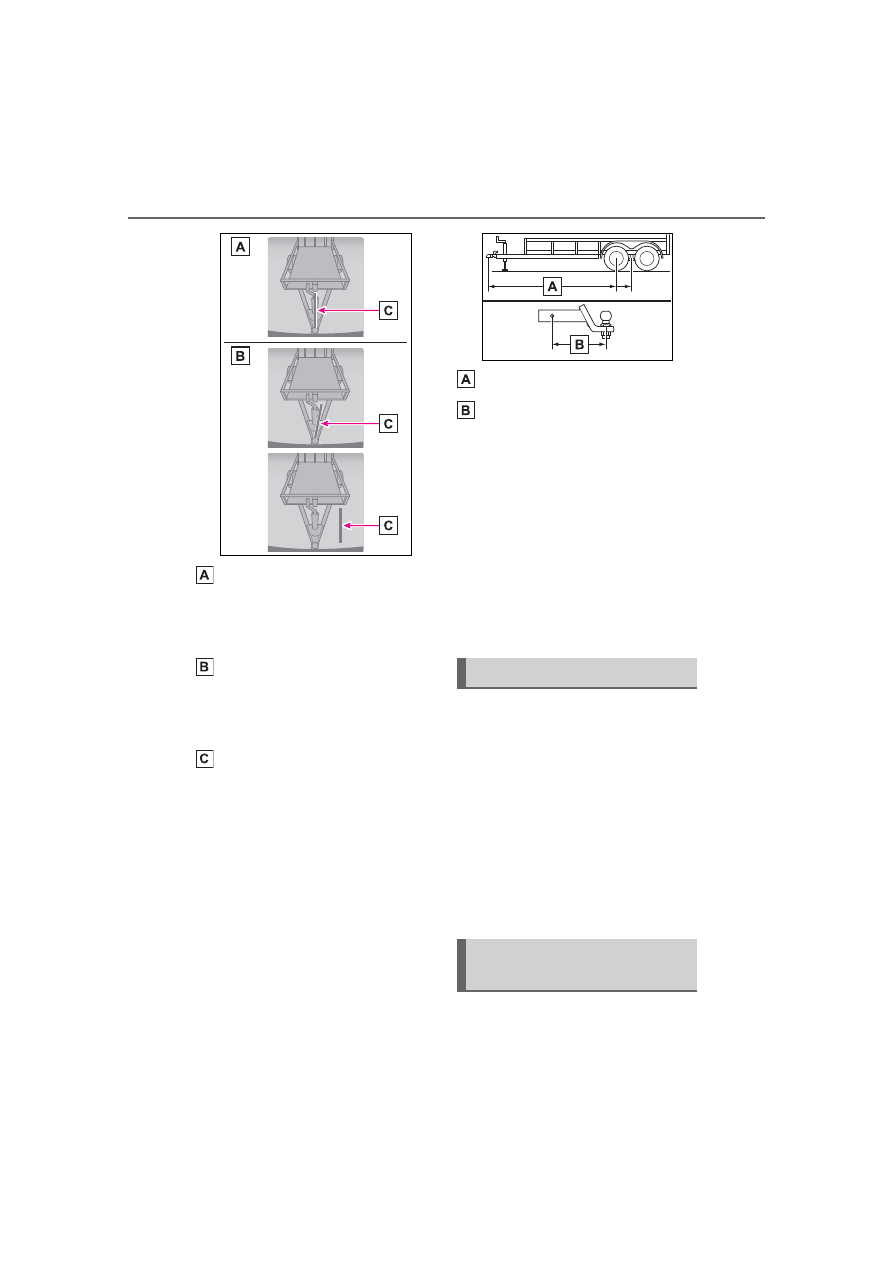
State where the blue line aligns 
with the center of the trailer. 
(Select “Yes” in the multi-infor-
mation display)

State where the blue line does 
not align with the center of the 
trailer. (Select “No” in the multi-
information display)

Blue line

The system is designed to support 

most trailers 6.6 ft. (2 m) to 26.2 ft. 

(8 m) in length (length is defined 

from the coupler center point for 

the ball to the wheel axle [single 

axle] or center of the wheel axles 

[2 or more axles]) with ball mount 

lengths between 4.5 in. (114.3 

mm) and 18.5 in. (469.9 mm). Do 

not attempt to use trailers or ball 

mounts that have a length outside 

of this range as the system perfor-

mance degrades and could cause 

improper system function.

Trailer length

Ball mount length

For best calibration results, cali-

brate in daytime on a smooth and 

level road.

It may be necessary at times to re-

calibrate the trailer to improve per-

formance.

The system is designed to be 

used with the same trailer connec-

tion every time. If the ball mount 

position is changed or reconfig-

ured or items are added to the 

trailer tongue after calibration, re-

calibration may be required.

Guidance mode provides a 
“Trailer Direction” arrow that 
indicates the direction the trailer 
will swing, based on calculations 
from the steering wheel angle 
information. Guidance mode 
provides a “BRAKE Extreme 
Trailer Angle” (jackknife) warn-
ing with warning buzzer to alert 
the driver that the trailer angle is 
near the jackknife condition.

Touch the switch at the bottom 
right on multimedia to activate 

Using Guidance mode

Using Straight Path 
Assist

385

4-5. Using the driving support systems

4

Dr

iv

ing

Straight Path Assist. Straight 
Pass Assist controls steering to 
back up the trailer in a straight-
line. The system can be overrid-
den by using steering wheel to 
adjust trailer direction.
The driver is always responsible 
for paying attention to the vehi-
cle’s surroundings and driving 
safely. This system does not 
control braking. Driver needs to 
control vehicle speed, control 
braking, and stop the vehicle to 
avoid any collision.
For best results, reverse slowly 
when using Straight Path Assist.

Trailer Backup Guide system 
is canceled when the trailer 
cannot be detected (e.g. dirty 
camera lens, insufficient light-
ing condition, obstruction of 
the trailer in the rear camera 
view, incorrectly selected 
trailer, etc.)

Guidance mode is canceled 
when any of the following 
occurs:

• Press the Trailer Backup Guide 

switch

*

• Press the Camera switch

*

• Vehicle speed is greater than 

approximately 4.7 mph (7.6 km/h)

• VSC or ABS is operated

*

• Tailgate is opened

*

• Trailer tracking is lost

• Shift the shift lever out of R

• There is a system malfunction

*

*

: Includes Trailer Backup Guide 

system cancel

Straight Path Assist is can-
celed when any of the follow-
ing occurs:

• Any of the events, above, that 

cancel Guidance mode occur

• Press the Straight Path Assist 

switch on the multimedia screen

• The system temperature preser-

vation function operates (to pre-
vent power steering equipment 
from overheating)

This light’s usage for Trailer 
Backup Guide is controlled by 
the Trailer Backup Guide sys-
tem and the driver does not 
need to activate the light sepa-
rately.
For other usage: 

P.411

Canceling the system

Trailer hitch light

386

4-5. Using the driving support systems

WARNING

Cautions regarding the use of 

the system

In order for this system to perform 

as designed, the vehicle must be 

driven safely and the driver must 

control the speed to keep it within 

operating parameters and to 

avoid a collision.

As there is a limit to the degree of 

control performance that this sys-

tem can provide, do not overly 

rely on this system. The driver is 

always responsible for paying 

attention to the vehicle’s sur-

roundings and driving safely. This 

system does not control braking 

(or steering when in Guidance 

mode). Driver needs to control 

vehicle speed, control braking, 

(and steering when in Guidance 

mode,) and stop the vehicle to 

avoid any collision. Failure to fol-

low this warning could result in 

property damage, serious injury 

or death.

When using the Trailer 

Backup Guide

For proper system performance, 

observe the following precautions. 

Failure to do so may lead to an 

accident resulting in property 

damage, serious injury, or death.

Keep the tailgate fully latched.

Keep the rear camera clean at 

all times.

Do not change the installation 

position or direction of the rear 

camera or remove it.

Do not modify the trailer hitch 

light. (→P.386)

Make sure nothing can obstruct 

the rear camera view of the 

trailer.

The system is designed to oper-

ate in various weather and lighting 

conditions and on different ground 

surfaces (asphalt, grass, gravel, 

etc.), however performance can 

still be affected by various envi-

ronmental factors (e.g. shadow 

passing over the trailer or dimin-

ished contrast between trailer and 

the ground leading to trailer 

detection being lost, etc.) so 

always drive carefully, remain 

alert and aware of your surround-

ings, and do not overly rely on the 

system.

387

4-5. Using the driving support systems

4

Dr

iv

ing

*

: If equipped

Automatic operating conditions

The active front spoiler will acti-

vate automatically as follows 

according:

Always observe the legal speed limit 

when driving on public roads.

Automatically operates when the 

outside temperature is 40°F (5°C) 

and above.

Automatically stows when in Tow 

mode.

Automatically stows when in “4H” 

mode or “4L” mode. (If equipped)

When there is a malfunction in the 

system, avoid high speed driving 

and have the vehicle inspected by 

your Toyota dealer.

It is necessary to deploy the 
Active front spoiler to remove 
the engine under cover for main-
tenance.

Lowering the active front 
spoiler to the service posi-
tion

Within approximately 45 sec-
onds of turning the power switch 
off, move the wiper lever to the 

*1

 or 

*2

 position and 

hold it for approximately 2 sec-
onds or more.
The active front spoiler will 
move to the service position.

*1

:U.S.A.

*2

:Canada

Active front spoiler

*

The equipped active front 
spoiler operates automati-
cally while the vehicle is 
being driven. This active 
front spoiler enhances aero-
dynamic performance espe-
cially at high speeds, 
contributing to a more sta-
ble ride.

Conditions

Speed mph (km/h)

Deploy

Over 37 (60)

Retract

Under 25 (40)

NOTICE

To prevent system damage

Do not attach any accessories 

or other foreign objects to the 

active front spoiler.

Do not modify or disassemble 

the active front spoiler.

Do not subject the active front 

spoiler to severe impacts.

Manually deploying the 
active front spoiler

388

4-5. Using the driving support systems

Raising the active front 
spoiler to the retracted 
position

Turn the power switch to ON, 
and when the shift lever is put in 
R or D, the active front spoiler 
will retract to the stowed posi-
tion.

NOTICE

To prevent damage to the 

active front spoiler

Before manually deploying or 

stowing the active front spoiler, 

make sure there are no obstacles 

or foreign objects in the surround-

ing area.

389

4-6. Driving tips

4

Dr

iv

ing

4-6.Driving tips

When using Eco drive mode, the 
torque corresponding to the 
accelerator pedal depression 
amount can be generated more 
smoothly than it is in normal 
conditions. In addition, the oper-
ation of the air conditioning sys-
tem (heating/cooling) will be 
minimized, improving the fuel 
economy. (

P.358)

The Eco-friendly driving is pos-
sible by keeping the indicate of 
Hybrid System Indicator within 
Eco area. (

P.97)

Shift the shift lever to D when 
stopped at a traffic light, or driv-
ing in heavy traffic etc. Shift the 
shift lever to P when parking. 
When using the N, there is no 
positive effect on fuel consump-
tion. When using the air condi-
tioning system, etc., the hybrid 
battery (traction battery) power 
is consumed.

Drive your vehicle smoothly. 
Avoid abrupt acceleration and 
deceleration. Gradual accel-
eration and deceleration will 
make more effective use of 
the electric motor (traction 
motor) without having to use 
gasoline engine power.

Avoid repeated acceleration. 
Repeated acceleration con-
sumes hybrid battery (trac-
tion battery) power, resulting 
in poor fuel consumption. Bat-
tery power can be restored by 
driving with the accelerator 
pedal slightly released.

Make sure to operate the brakes 
gently and in a timely manner. A 
greater amount of electrical 
energy can be regenerated 
when slowing down.

Repeated acceleration and 
deceleration, as well as long 
waits at traffic lights, will lead to 
bad fuel economy. Check traffic 
reports before leaving and avoid 
delays as much as possible. 
When driving in a traffic jam, 
gently release the brake pedal 
to allow the vehicle to move for-
ward slightly while avoiding 

Hybrid Electric Vehi-

cle driving tips

For economical and ecolog-
ical driving, pay attention to 
the following points:

Using Eco drive mode

Use of Hybrid System 
Indicator

Shift lever operation

Accelerator pedal/brake 
pedal operation

When braking

Delays

390

4-6. Driving tips

overuse of the accelerator 
pedal. Doing so can help control 
excessive gasoline consump-
tion.

Control and maintain the vehicle 
at a constant speed. Before 
stopping at a toll booth or simi-
lar, allow plenty of time to 
release the accelerator and gen-
tly apply the brakes. A greater 
amount of electrical energy can 
be regenerated when slowing 
down.

Use the air conditioning only 
when necessary. Doing so can 
help reduce excessive gasoline 
consumption.
In summer: When the ambient 
temperature is high, use the 
recirculated air mode. Doing so 
will help to reduce the burden on 
the air conditioning system and 
reduce fuel consumption as 
well.
In winter: Because the gasoline 
engine will not automatically cut 
out until it and the interior of the 
vehicle are warm, it will con-
sume fuel. Also, fuel consump-
tion can be improved by 
avoiding overuse of the heater.

Make sure to check the tire infla-
tion pressure frequently. 
Improper tire inflation pressure 
can cause poor fuel economy.
Also, as snow tires can cause 
large amounts of friction, their 
use on dry roads can lead to 
poor fuel economy. Use tires 
that are appropriate for the sea-
son.

Carrying heavy luggage will lead 
to poor fuel economy. Avoid car-
rying unnecessary luggage. 
Installing a large roof rack will 
also cause poor fuel economy.

Since the gasoline engine starts 
up and cuts out automatically 
when cold, warming up the 
engine is unnecessary. More-
over, frequently driving short 
distances will cause the engine 
to repeatedly warm up, which 
can lead to excess fuel con-
sumption.

Highway driving

Air conditioning

Checking tire inflation 
pressure

Luggage

Warming up before driv-
ing

391

4-6. Driving tips

4

Dr

iv

ing

Specific design characteris-
tics give it a higher center of 
gravity than ordinary passen-
ger cars. This vehicle design 
feature causes this type of 
vehicle to be more likely to 
rollover. And, utility vehicles 
have a significantly higher 
rollover rate than other types 
of vehicles.

An advantage of the higher 
ground clearance is a better 
view of the road allowing you 
to anticipate problems.

It is not designed for corner-
ing at the same speeds as 
ordinary passenger cars any 
more than low-slung sports 
cars are designed to perform 
satisfactorily under off-road 
conditions. Therefore, sharp 
turns at excessive speeds 
may cause the vehicle to roll-
over.

When driving your vehicle off-
road, please observe the follow-
ing precautions to ensure your 
driving enjoyment and to help 
prevent the closure of areas to 

Off-road precautions

This vehicle belongs to the 
utility vehicle class, which 
has higher ground clear-
ance and narrower tread in 
relation to the height of its 
center of gravity to make it 
capable of performing in a 
wide variety of off-road 
applications.

Off-road vehicle features

WARNING

Off-road vehicle precautions

Always observe the following pre-

cautions to minimize the risk of 

death, serious injury or damage to 

your vehicle:

In a rollover crash, an unbelted 

person is significantly more 

likely to die than a person wear-

ing a seat belt. Therefore, the 

driver and all passengers 

should always fasten their seat 

belts.

Avoid sharp turns or abrupt 

maneuvers, if at all possible.

Failure to operate this vehicle 

correctly may result in loss of 

control or vehicle rollover caus-

ing death or serious injury.

Avoid loading any items on the 

roof that will raise the vehicle’s 

center of gravity.

Always slow down in gusty 

crosswinds. Because of its pro-

file and higher center of gravity, 

your vehicle is more sensitive to 

side winds than an ordinary 

passenger car.

Slowing down will allow you to 

have better control.

Do not drive horizontally across 

steep slopes. Driving straight up 

or straight down is preferred. 

Your vehicle (or any similar off-

road vehicle) can tip over side-

ways much more easily than 

forward or backward.

Off-road driving

392

4-6. Driving tips

off-road vehicles:

Drive your vehicle only in 
areas where off-road vehicles 
are permitted to travel.

Respect private property. Get 
owner’s permission before 
entering private property.

Do not enter areas that are 
closed. Honor gates, barriers 
and signs that restrict travel.

Stay on established roads. 
When conditions are wet, 
driving techniques should be 
changed or travel delayed to 
prevent damage to roads.

Additional information for 
off-road driving

For owners in U.S. mainland, 
Hawaii and Puerto Rico:

To obtain additional information 
pertaining to driving your vehicle 
off-road, consult the following 
organizations.

State and Local Parks and 
Recreation Departments

State Motor Vehicle Bureau

Recreational Vehicle Clubs

U.S. Forest Service and 
Bureau of Land Management

WARNING

Off-road driving precautions

Always observe the following pre-

cautions to minimize the risk of 

death, serious injury or damage to 

your vehicle:

Drive carefully when off the 

road. Do not take unnecessary 

risks by driving in dangerous 

places.

Do not grip the steering wheel 

spokes when driving off-road. A 

bad bump could jerk the wheel 

and injure your hands. Keep 

both hands and especially your 

thumbs on the outside of the 

rim.

Always check your brakes for 

effectiveness immediately after 

driving in sand, mud, water or 

snow.

After driving through tall grass, 

mud, rock, sand, rivers, etc., 

check that there is no grass, 

bush, paper, rags, stone, sand, 

etc. adhering or trapped on the 

underbody. Clear off any such 

matter from the underbody. If 

the vehicle is used with these 

materials trapped or adhering to 

the underbody, a breakdown or 

fire could occur.

In a rollover crash, an unbelted 

person is significantly more 

likely to die than a person wear-

ing a seat belt. Therefore, the 

driver and all passengers 

should fasten their seat belts 

whenever the vehicle is moving.

When driving off-road or in rug-

ged terrain, do not drive at 

excessive speeds, jump, make 

sharp turns, strike objects, etc. 

This may cause loss of control 

or vehicle rollover causing 

death or serious injury. You are 

also risking expensive damage 

to your vehicle’s suspension 

and chassis.

393

4-6. Driving tips

4

Dr

iv

ing

NOTICE

To prevent water damage

Take all necessary safety mea-

sures to ensure that water dam-

age to the engine, hybrid system 

or other components does not 

occur.

Water entering the engine air 

intake will cause severe engine 

damage.

Water entering the automatic 

transmission will cause deterio-

ration in shift quality, locking up 

of your transmission accompa-

nied by vibration, and ultimately 

damage.

Water can wash the grease 

from wheel bearings, causing 

rusting and premature failure, 

and may also enter the differen-

tials, transmission and transfer 

case, reducing the gear oil’s 

lubricating qualities.

When you drive through 

water

If driving through water, such as 

when crossing shallow streams, 

first check the depth of the 

water and the bottom of the riv-

erbed for firmness. Drive slowly 

and avoid deep water.

When crossing a river or a pud-

dle, be sure to cross it without 

stopping midway. If you stop or 

drive at extremely low speeds in 

water, water may enter the vehi-

cle and damage the hybrid bat-

tery making the vehicle unable 

to be driven.

Inspection after off-road driv-

ing

Sand and mud that has accu-

mulated around brake discs 

may affect braking efficiency 

and may damage brake system 

components.

Always perform a maintenance 

inspection after each day of off-

road driving that has taken you 

through rough terrain, sand, 

mud, or water. For scheduled 

maintenance information, refer 

to the “Scheduled Maintenance 

Guide” or “Owner’s Manual 

Supplement”.

394

4-6. Driving tips

Use fluids that are appropriate 
to the prevailing outside tem-
peratures.

• Engine oil
• Engine/power control unit coolant
• Washer fluid

Have a service technician 
inspect the condition of the 
12-volt battery.

Have the vehicle fitted with 
four snow tires or purchase a 
set of tire chains for the rear 
tires

*

.

*

: Tire chains cannot be mounted 

on 285/65R18 tires.

Ensure that all tires are the same 
size and brand, and that chains 
match the size of the tires.

Winter driving tips

Carry out the necessary 
preparations and inspec-
tions before driving the 
vehicle in winter. Always 
drive the vehicle in a man-
ner appropriate to the pre-
vailing weather conditions.

Preparation for winter

WARNING

Driving with snow tires

Observe the following precautions 

to reduce the risk of accidents.

Failure to do so may result in a 

loss of vehicle control and cause 

death or serious injury.

Use tires of the specified size.

Maintain the recommended 

level of air pressure.

Do not drive in excess of 75 

mph (120 km/h), regardless of 

the type of snow tires being 

used.

Use snow tires on all, not just 

some wheels.

4WD models: Do not mix tires of 

different makes, models, tread 

patterns or treadwear.

Driving with tire chains (vehi-

cles without 285/65R18 tires)

Observe the following precautions 

to reduce the risk of accidents.

Failure to do so may result in the 

vehicle being unable to be driven 

safely, and may cause death or 

serious injury.

Do not drive in excess of the 

speed limit specified for the tire 

chains being used, or 30 mph 

(50 km/h), whichever is lower.

Avoid driving on bumpy road 

surfaces or over potholes.

Avoid sudden acceleration, 

abrupt steering, sudden brak-

ing and shifting operations that 

cause sudden engine braking.

Slow down sufficiently before 

entering a curve to ensure that 

vehicle control is maintained.

Do not use LTA (Lane Tracing 

Assist) (if equipped) system.

395

4-6. Driving tips

4

Dr

iv

ing

Perform the following according 
to the driving conditions:

Do not try to forcibly open a 
window or move a wiper that 
is frozen. Pour warm water 
over the frozen area to melt 
the ice. Wipe away the water 
immediately to prevent it from 
freezing.

To ensure proper operation of 
the climate control system 
fan, remove any snow that 
has accumulated on the air 
inlet vents in front of the wind-
shield.

Check for and remove any 
excess ice or snow that may 
have accumulated on the 
exterior lights, vehicle’s roof, 
chassis, around the tires or on 
the brakes.

Remove any snow or mud 
from the bottom of your shoes 
before getting in the vehicle.

Accelerate the vehicle slowly, 
keep a safe distance between 
you and the vehicle ahead, and 
drive at a reduced speed suit-
able to road conditions.

Park the vehicle and move 
the shift lever to P without set-
ting the parking brake. The 
parking brake may freeze up, 
preventing it from being 
released. If the vehicle is 
parked without setting the 
parking brake, make sure to 
block the wheels.
Failure to do so may be dan-
gerous because it may cause 
the vehicle to move unexpect-
edly, possibly leading to an 
accident.

When the parking brake is in auto-
matic mode, release the parking 
brake after shifting the shift lever to 
P. (

P.206)

If the vehicle is parked without 
setting the parking brake, 
confirm that the shift lever 
cannot be moved out of P

*

.

*

: The shift lever will be locked if it is 

attempted to be shifted from P to 
any other position without 
depressing the brake pedal. If the 
shift lever can be shifted from P, 
there may be a problem with the 
shift lock system. Have the vehi-
cle inspected by your Toyota 

NOTICE

Repairing or replacing snow 

tires

Request repairs or replacement of 

snow tires from Toyota dealers or 

legitimate tire retailers.

This is because the removal and 

attachment of snow tires affects 

the operation of the tire pressure 

warning valves and transmitters.

Before driving the vehicle

When driving the vehicle

When parking the vehicle

396

4-6. Driving tips

dealer immediately.

Vehicles without 285/65R18 
tires

Use the correct tire chain size 
when mounting the tire chains.
Chain size is regulated for each 
tire size.

Side chain (0.2 in. [5 mm] in 
diameter)

Cross chain (0.25 in. [6.3 
mm] in diameter)

Vehicles with 285/65R18 tires

Tire chains cannot be mounted 
as the space between the tire 
and body is too narrow.
Snow tires should be used 
instead.

Regulations regarding the use 
of tire chains vary depending on 
location and type of road. 
Always check local regulations 
before installing chains.

Tire chain installation

Observe the following precautions 

when installing and removing 

chains:

Install and remove tire chains in a 

safe location.

Install tire chains on the rear tires. 

Do not install tire chains on the 

front tires.

Install tire chains on the rear tires 

as tightly as possible. Retighten 

chains after driving 1/4

1/2 mile 

(0.5

1.0 km).

Install tire chains following the 

instructions provided with the tire 

chains.

WARNING

When parking the vehicle

When parking the vehicle without 

applying the parking brake, make 

sure to chock the wheels. If you 

do not chock the wheels, the vehi-

cle may move unexpectedly, pos-

sibly resulting in an accident.

Selecting tire chains

Regulations on the use of 
tire chains (vehicles with-
out 285/65R18 tires)

NOTICE

Fitting tire chains

The tire pressure warning valves 

and transmitters may not function 

correctly when tire chains are fit-

ted.

399

5

5

Interior

 featur

es

Interior features

5-1. Using the air conditioning 

system and defogger

Automatic air conditioning 

system.......................

400

Heated steering wheel/seat 

heaters/seat ventilators

..................................

407

5-2. Using the interior lights

Interior lights list ..........

410

5-3. Using the storage features

List of storage features

413

Luggage compartment fea-

tures ..........................

417

5-4. Using the other interior 

features

Other interior features .

420

Garage door opener....

433

400

5-1. Using the air conditioning system and defogger

5-1.Using the air conditioning system and defogger

Left-hand side temperature control toggle

“AUTO” toggle

Fan speed control toggle

“SYNC” toggle

Air flow mode control toggle

Right-hand side temperature control toggle

“S-FLOW” switch

Outside/recirculated air mode switch

“A/C” switch

Rear window and outside rear view mirror defoggers switch

Windshield defogger switch

“OFF” switch

Adjusting the temperature 
setting

Operate the temperature con-
trol toggle upwards to increase 
the temperature and downwards 
to decrease the temperature.

If the “A/C” switch is not pressed, 
the system will blow ambient tem-
perature air or heated air.

Setting the fan speed

Operate the fan speed control 
toggle upwards to increase the 

Automatic air conditioning system

Air outlets and fan speed are automatically adjusted accord-
ing to the temperature setting.

Air conditioning controls

401

5-1. Using the air conditioning system and defogger

5

Interior

 featur

es

fan speed and downwards to 
decrease the fan speed.

Press the “OFF” switch to turn the 
fan off.

Change the airflow mode

Operate the air flow mode con-
trol toggle

The airflow mode changes as fol-
lows each time the toggle is oper-
ate.

1

Air flows to the upper body.

2

Air flows to the upper body 
and feet.

3

Air flows to the feet.

4

Air flows to the feet and the 
windshield defogger oper-
ates.

Switching between outside 
air and recirculated air 
modes

Press the outside/recirculated 
air mode switch.
The mode switches between 
outside air mode and recircu-
lated air mode each time the 

switch is operated.
When recirculated air mode is 
selected, the indicator illumi-
nates on the outside/recircu-
lated air mode switch.

Set cooling and dehumidifi-
cation function

Press the “A/C” switch.

When the function is on, “A/C ON” 
indicator will illuminate. When the 
function is off, “A/C OFF” indicator 
will illuminate.

Defogging the windshield

Defoggers are used to defog the 
windshield and front side win-
dows.
Press the windshield defogger 
switch.

Press the outside air mode switch if 
the recirculated air mode is used. (It 
may switch automatically.)
To defog the windshield and the 
side windows quickly, turn the air 
flow and temperature up.
To return to the previous mode, 
press the windshield defogger 
switch again when the windshield is 
defogged.
When the windshield defogger 
switch is on, the indicator illumi-
nates on the windshield defogger 
switch.

Defogging the rear window 
and outside rear view mir-
rors

Defoggers are used to defog the 
rear window and to remove rain-
drops, dew and frost from the 


Content      ..     22      23      24      25     ..