Toyota Tundra (2023 year). Manual in english - page 19
 

  Index      Toyota     Toyota Tundra (2023 year). Manual in english


Search            copyright infringement  


Content      ..     17      18      19      20     ..


Toyota Tundra (2023 year). Manual in english - page 19


303

4-5. Using the driving support systems

4

Dr

iv

ing

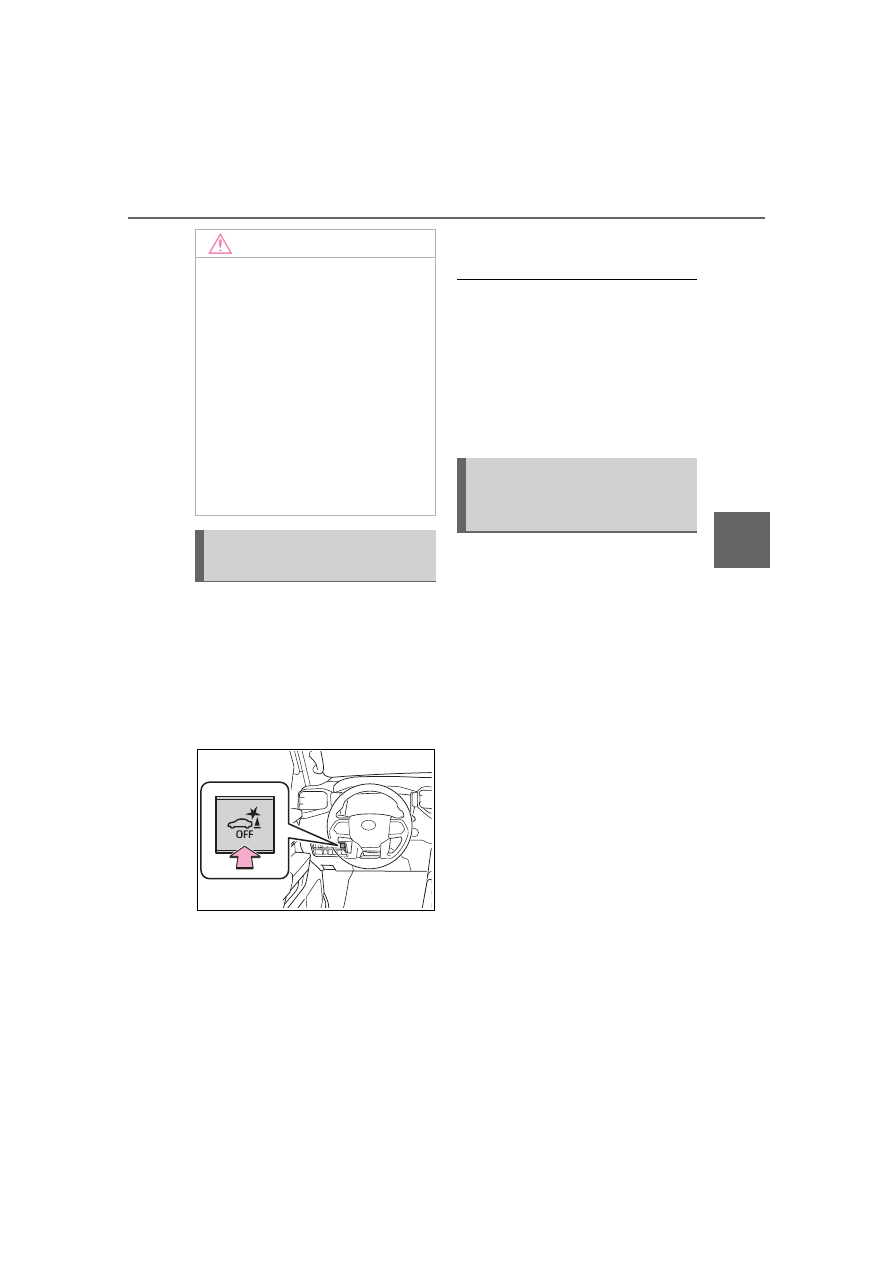
Press the switch to enable/dis-
able the parking support brake.
All of the Parking Support Brake 
functions (static objects and 
rear-crossing vehicles) are 
enabled/disabled simultane-
ously.

When the Parking Support Brake is 
disabled, the PKSB OFF indicator 
(

P.82) illuminates.

To enable the system, press the 
switch again. If disabled using this 
method, the system will not be re-

enabled by turning the engine 
switch off and then to ON.

When towing a trailer

When the 7-pin connector is con-

nected and Auto Trailer Detection 

(ATD) (

P.284) is activated, the 

function automatically turns off.

When “4L” mode selected (4WD 

models)

The parking support brake is auto-

matically disabled.

If the engine output restriction con-
trol or brake control operates, a 
buzzer will sound and a message 
will be displayed on the multi-infor-
mation display and head-up display 
(if equipped), multimedia display, to 
alert the driver.
Depending on the situation, engine 
output restriction control will oper-
ate to either limit acceleration or 
restrict output as much as possible.

Engine output restriction con-
trol is operating (acceleration 
restriction)

Acceleration greater than a certain 
amount is restricted by the system.
Multi-information display: “Object 
Detected Acceleration Reduced”
Multimedia display and head-up 
display (if equipped): No warning 
displayed
PKSB OFF indicator: Not illumi-
nated
Buzzer: Does not sound

Engine output restriction con-

NOTICE

If “PKSB Unavailable” is dis-

played on the multi-informa-

tion display and the PKSB 

OFF indicator is on

If this message is displayed 

immediately after the engine 

switch is changed to ON, operate 

the vehicle carefully, paying atten-

tion to your surroundings. It may 

be necessary to drive the vehicle 

for a certain amount of time 

before the system returns to nor-

mal. (If the system does not return 

to normal after driving for a while, 

clean the sensors and their sur-

rounding area on the bumpers.)

Enabling/Disabling the 
Parking Support Brake

Display and buzzer for 
engine output restriction 
control and brake control

304

4-5. Using the driving support systems

trol is operating (output 
restricted as much as possi-
ble)

The system has determined that 
stronger-than-normal brake opera-
tion is necessary.
Multimedia display: “BRAKE!”
Multi-information display and head-
up display (if equipped): “BRAKE!”
PKSB OFF indicator: Not illumi-
nated
Buzzer: Short beep

Brake control is operating

The system determined that emer-
gency braking is necessary.
Multimedia display: “BRAKE!”
Multi-information display and head-
up display (if equipped): “BRAKE!”
PKSB OFF indicator: Not illumi-
nated
Buzzer: Short beep

Vehicle stopped by system 
operation

The vehicle has been stopped by 
brake control operation.
Multimedia display: “Press Brake 
Pedal”
Multi-information display and head-
up display (if equipped): “Switch to 
Brake” (If the accelerator pedal is 
not depressed, “Press Brake Pedal” 
will be displayed.)
PKSB OFF indicator: Illuminated
Buzzer: Short beep

If the Parking Support Brake 

determines that a collision with a 
detected object is possible, the 
engine output will be restricted 
to restrain any increase in the 
vehicle speed. (Engine output 
restriction control: See figure 2.)
Additionally, if the accelerator 
pedal continues to be 
depressed, the brakes will be 
applied automatically to reduce 
the vehicle speed. (Brake con-
trol: See figure 3.)

Figure 1 When the PKSB 
(Parking Support Brake) is not 
operating

Engine output

Braking force

Time

Figure 2 When engine output 
restriction control operates

System overview

305

4-5. Using the driving support systems

4

Dr

iv

ing

Engine output

Braking force

Time

Engine output restriction con-
trol begins operating (System 
determines that possibility of 
collision with detected object 
is high)

Figure 3 When engine output 
restriction control and brake 
control operates

Engine output

Braking force

Time

Engine output restriction con-
trol begins operating (System 
determines that possibility of 
collision with detected object 
is high)

Brake control begins operat-
ing (System determines that 
possibility of collision with 
detected object is extremely 
high)

If the Parking Support Brake 

has operated

If the vehicle is stopped due to oper-

ation of the Parking Support Brake, 

the Parking Support Brake will be 

disabled and the PKSB OFF indica-

tor will illuminate. If the Parking Sup-

port Brake operates unnecessarily, 

brake control can be canceled by 

depressing the brake pedal or wait-

ing for approximately 2 seconds for 

it to automatically be canceled. 

Then, the vehicle can be operated 

by depressing the accelerator pedal.

Re-enabling the Parking Sup-

port Brake

To re-enable the Parking Support 

Brake when it has been disabled 

due to operation of the Parking Sup-

port Brake, either enable the system 

again (

P.304), or turn the engine 

switch off and then back to ON.
Additionally, if any of the following 

conditions are met, the system will 

be re-enabled automatically and the 

PKSB OFF indicator will turn off:

The P shift position is selected

The object is no longer detected in 

the traveling direction of the vehi-

cle

The traveling direction of the vehi-

cle changes

If “PKSB Unavailable” is dis-

played on the multi-information 

display and the PKSB OFF indi-

cator is on

If the vehicle is stopped due to oper-

ation of the Parking Support Brake, 

the Parking Support Brake will be 

disabled and the PKSB OFF indica-

tor will illuminate.

A sensor may be covered with 

water drops, ice, snow, dirt, etc. 

Remove the water drops, ice, 

snow, dirt, etc., from the sensor to 

return the system to normal.

Also, due to ice forming on a sen-

sor at low temperatures, a warn-

ing message may be displayed or 

306

4-5. Using the driving support systems

the sensor may not be able to 

detect an object. Once the ice 

melts, the system will return to 

normal.

If this message continues to be 

displayed even after cleaning the 

sensor, or is displayed even 

though the sensor is clean, have 

the vehicle inspected by your Toy-

ota dealer.

If a battery terminal has been 

disconnected and reconnected

The system needs to be initialized. 

To initialize the system, drive the 

vehicle straight ahead for 5 seconds 

or more at a speed of approximately 

22 mph (35 km/h) or more.

*

: If equipped

This function will operate in situ-
ations such as the following if an 
object is detected in the travel-
ing direction of the vehicle.

Parking Support Brake 

function (static 

objects)

*

If the sensors detect a static 
object, such as a wall, in the 
traveling direction of the 
vehicle and the system 
determines that a collision 
may occur due to the vehi-
cle suddenly moving for-
ward due to an accidental 
accelerator pedal operation, 
the vehicle moving the 
unintended direction due to 
the wrong shift position 
being selected, or while 
parking or traveling at low 
speeds, the system will 
operate to lessen the impact 
with the detected static 
object and reduce the 
resulting damage.

Examples of function 
operation

307

4-5. Using the driving support systems

4

Dr

iv

ing

When traveling at a low 
speed and the brake pedal 
is not depressed, or is 
depressed late

When the accelerator pedal 
is depressed excessively

When the vehicle moves in 
the unintended direction 
due to the wrong shift posi-
tion being selected

P.289

Types of sensors

WARNING

To ensure the system can 

operate properly

Observe the following precau-

tions.
Failing to do so may result in the 

vehicle being unable to be driven 

safely and possibly cause an acci-

dent.

Do not damage the sensors, 

and always keep them clean.

Do not attach a sticker or install 

an electronic component, such 

as a backlit license plate (espe-

cially fluorescent type), fog 

lights, fender pole or wireless 

antenna near a radar sensor.

308

4-5. Using the driving support systems

The Parking Support Brake 

function (static object) will 

operate when

The function will operate when the 

PKSB OFF indicator is not illumi-

nated or flashing (

P.82, 514) and 

all of the following conditions are 

met:

Engine output restriction control

• The Parking Support Brake is 

enabled.

• The vehicle speed is approxi-

mately 9 mph (15 km/h) or less.

• There is a static object in the trav-

eling direction of the vehicle and 

approximately 6 to 13 ft. (2 to 4 m) 

away.

• The Parking Support Brake deter-

mines that a stronger-than-nor-

mal brake operation is necessary 

to avoid a collision.

Brake control

• Engine output restriction control is 

operating.

• The Parking Support Brake deter-

mines that an immediate brake 

operation is necessary to avoid a 

collision.

WARNING

Do not subject the surrounding 

area of the sensor to a strong 

impact. If subjected to an 

impact, have the vehicle 

inspected by your Toyota 

dealer. If the front or rear 

bumper needs to be 

removed/installed or replaced, 

contact your Toyota dealer.

Do not modify, disassemble or 

paint the sensors.

Do not attach a license plate 

cover.

Keep your tires properly 

inflated.

Handling the suspension

Do not modify the suspension, as 

changes to the height or inclina-

tion of the vehicle may prevent 

the sensors from detecting 

objects correctly or cause the sys-

tem to not operate or operate 

unnecessarily.

If the Parking Support Brake 

function (static objects) oper-

ates unnecessarily, such as 

at a railroad crossing

In the event that the Parking Sup-

port Brake function (static objects) 

operates unnecessarily, such as 

at a railroad crossing, brake con-

trol will be canceled after approxi-

mately 2 seconds, allowing you to 

proceed forward and leave the 

area, brake control can also be 

canceled by depressing the brake 

pedal. Depressing the accelera-

tor pedal after brake control is 

canceled will allow you to proceed 

forward and leave the area.

Notes when washing the vehi-

cle

Do not apply intensive bursts of 

water or steam to the sensor 

area.
Doing so may result in the sensor 

malfunctioning.

When using a high pressure 

washer to wash the vehicle, do 

not spray the sensors directly, 

as doing so may cause a sensor 

to malfunction.

When using steam to clean the 

vehicle, do not direct steam too 

close to the sensors as doing so 

may cause a sensor to malfunc-

tion.

309

4-5. Using the driving support systems

4

Dr

iv

ing

The Parking Support Brake 

function (static objects) will 

stop operating when

The function will stop operating if 

any of the following conditions are 

met:

Engine output restriction control

• The Parking Support Brake is dis-

abled.

• The system determines that the 

collision has become avoidable 

with normal brake operation.

• The static object is no longer 

approximately 6 to 13 ft. (2 to 4 m) 

away from the vehicle or in the 

traveling direction of the vehicle.

Brake control

• The Parking Support Brake is dis-

abled.

• Approximately 2 seconds have 

elapsed since the vehicle was 

stopped by brake control.

• The brake pedal is depressed 

after the vehicle is stopped by 

brake control.

• The static object is no longer 

approximately 6 to 13 ft. (2 to 4 m) 

away from the vehicle or in the 

traveling direction of the vehicle.

Detection range of the Parking 

Support Brake function (static 

objects)

The detection range of the Parking 

Support Brake function (static 

objects) differs from the detection 

range of the intuitive parking assist. 

(

P.294) Therefore, even if the intu-

itive parking assist detects an object 

and provides a warning, the Parking 

Support Brake function (static 

objects) may not start operating.

Situations in which the system 

may not operate properly

P.292

Situations in which the system 

may operate even if there is no 

possibility of a collision

P.293

*

: If equipped

This function will operate in situ-
ations such as the following if a 
vehicle is detected in the travel-
ing direction of the vehicle.

When reversing, a vehicle is 
approaching and the brake 
pedal is not depressed, or 
is depressed late

Parking Support Brake 

function (rear-crossing 

vehicles)

*

If a rear radar sensor 
detects a vehicle approach-
ing from the right or left at 
the rear of the vehicle and 
the system determines that 
the possibility of a collision 
is high, this function will 
perform brake control to 
reduce the likelihood of an 
impact with the approach-
ing vehicle.

Examples of function 
operation

310

4-5. Using the driving support systems

P.283

The Parking Support Brake 

function (rear-crossing vehi-

cles) will operate when

The function will operate when the 

PKSB OFF indicator is not illumi-

nated or flashing (

P.82, 514) and 

all of the following conditions are 

met:

Engine output restriction control

• The Parking Support Brake is 

enabled.

• The vehicle speed is approxi-

mately 9 mph (15 km/h) or less.

• Vehicles are approaching from the 

right or left at the rear of the vehi-

cle at a traveling speed of approx-

imately 5 mph (8 km/h) or more.

• The shift position is in R.

• The Parking Support Brake deter-

mines that a stronger than normal 

brake operation is necessary to 

avoid a collision with an approach-

ing vehicle.

Brake control

• Engine output restriction control is 

operating.

• The Parking Support Brake deter-

mines that an emergency brake 

operation is necessary to avoid a 

collision with an approaching vehi-

cle.

The Parking Support Brake 

function (rear-crossing vehi-

cles) will stop operating when

The function will stop operating if 

any of the following conditions are 

met:

Engine output restriction control

• The Parking Support Brake is dis-

abled.

• The collision becomes avoidable 

with normal brake operation.

• A vehicle is no longer approaching 

from the right or left at the rear of 

the vehicle.

Brake control

• The Parking Support Brake is dis-

abled.

• Approximately 2 seconds have 

elapsed since the vehicle was 

stopped by brake control.

• The brake pedal is depressed 

after the vehicle is stopped by 

brake control.

• A vehicle is no longer approaching 

from the right or left at the rear of 

the vehicle.

Detection area of the Parking 

Support Brake function (rear-

crossing vehicles)

The detection area of the Parking 

Support Brake function (rear-cross-

ing vehicles) differs from the detec-

tion area of the RCTA function 

Types of sensors

WARNING

To ensure the system can 

operate properly

Observe the following precautions 

regarding the rear radar sensors 

(

P.283). Failure to do so may 

cause a sensor to not operate 

properly, and may cause an acci-

dent.

Do not modify, disassemble or 

paint the sensors.

Do not replace a rear radar sen-

sor with a part other than a gen-

uine part.

Do not damage the rear radar 

sensors, and always keep the 

radar sensors and their sur-

rounding area on the bumper 

clean.

If the area around a rear radar 

sensor is subjected to an 

impact, the system may not 

operate properly due to a sen-

sor malfunction. Have the vehi-

cle inspected by your Toyota 

dealer.

Observe the rear radar sensor 

handling precautions. (

P.283)

311

4-5. Using the driving support systems

4

Dr

iv

ing

(

P.298). Therefore, even if the 

RCTA function detects a vehicle and 

provides an alert, the Parking Sup-

port Brake function (rear-crossing 

vehicles) may not start operating.

Situations in which the system 

may not operate properly

P.300

Situations in which the system 

may operate even if there is no 

possibility of a collision

P.301

*

: If equipped

The screen illustrations used in 

this text are intended as exam-

ples, and may differ from the 

image that is actually displayed on 

the screen.

The parking assist monitor is a 
supplemental device intended to 
assist the driver when backing 
up. When backing up, be sure to 
visually check all around the 
vehicle both directly and using 
the mirrors before proceeding. If 
you do not, you may hit another 
vehicle, and could possibly 
cause an accident.
Pay attention to the following 
precautions when using the 
parking assist monitor.

Toyota parking assist 

monitor

*

The parking assist monitor 
assists the driver by dis-
playing an image of the 
view behind the vehicle 
while backing up, for exam-
ple while parking.
When the display is 
changed to the wide rear 
view mode, a wider lateral 
view behind the vehicle will 
be displayed.

Driving precautions

312

4-5. Using the driving support systems

The parking assist monitor 
screen will be displayed if the 
shift lever is shifted to R while 
the engine switch is in ON.
Each time the display mode 
switching button is selected, the 
mode will change as follows:

Rear view: Displays the rear view of 
the vehicle.
Wide rear view: Displays a near 
180° image from the rear view cam-
era.

WARNING

Never depend on the parking 

assist monitor entirely when 

backing up. The image and the 

position of the guide lines dis-

played on the screen may differ 

from the actual state.

Use caution, just as you would 

when backing up any vehicle.

Be sure to back up slowly, 

depressing the brake pedal to 

control vehicle speed.

If you seem likely to hit nearby 

vehicles, obstacles, people or 

mount the shoulder, depress the 

brake pedal to stop the vehicle.

The instructions given are only 

guidelines. When and how 

much to turn the steering wheel 

will vary according to traffic con-

ditions, road surface condi-

tions, vehicle condition, etc., 

when parking. It is necessary to 

be fully aware of this before 

using the parking assist system.

When parking, be sure to check 

that the parking space will 

accommodate your vehicle 

before maneuvering into it.

Do not use the parking assist 

monitor in the following cases:

• On icy or slick road surfaces, or 

in snow

• When using tire chains or emer-

gency tires

• When the tailgate is not closed 

completely

• On roads that are not flat or 

straight, such as curves or 

slopes

• If the suspension has been 

modified or tires of a size other 

than specified are installed

In low temperatures, the screen 

may darken or the image may 

become faint. The image could 

distort when the vehicle is mov-

ing, or you may become unable 

to see the image on the screen. 

Be sure to visually check all 

around the vehicle both directly 

and using the mirrors before 

proceeding.

If the tire sizes are changed, the 

position of the guide lines dis-

played on the screen may 

change.

The camera uses a special lens. 

The distances between objects 

and pedestrians that appear in 

the image displayed on the 

screen will differ from the actual 

distances. (

P.319)

Screen display

313

4-5. Using the driving support systems

4

Dr

iv

ing

Display mode switching but-
ton

Each time the button is selected, 
the rear view mode and the wide 
rear view mode are switched.

Guide line switching button

Select to switch the guide line 
mode. (

P.314)

• Each time the button is selected, 

the display mode changes in the 
following order:

Estimated course line display mode 

 Parking assist guide line display 

mode 

 Distance guide line display 

mode 

 Center guide line display 

mode.

Rear Cross Traffic Alert

*

When a sensor detects a vehicle 
approaching from the rear, the 
direction of the vehicle approaching 
from the rear is displayed and the 
buzzer sounds.

Intuitive parking assist

*

When a sensor detects a stationary 
object, the direction of and the 
approximate distance to the a sta-
tionary object are displayed and the 
buzzer sounds.

*

: If equipped

For details about the Rear Cross 

Traffic Alert function (

P.296) and 

intuitive parking assist. (

P.289)

The parking assist monitor is 
canceled when the shift lever is 
shifted into any position other 
than R.

Use any of the following modes.

Estimated course line display 
mode (

P.315)

Estimated course lines are dis-
played which move in accor-
dance with the operation of the 
steering wheel.

Parking assist guide line dis-
play mode (

P.316)

The steering wheel return points 
(parking assist guide lines) are 
displayed.

WARNING

As the Rear Cross Traffic Alert 

display is displayed over the 

camera view, it may be difficult 

to see the Rear Cross Traffic 

Alert display depending on the 

color and brightness of the sur-

rounding area.

Canceling Toyota parking 
assist monitor

Using the system

314

4-5. Using the driving support systems

This mode is recommended for 
those who are comfortable with 
parking the vehicle without the 
aid of the estimated course 
lines.

Distance guide line display 
mode (

P.317)

Distance guide lines only are 
displayed.
This mode is recommended for 
those who are comfortable with 
parking the vehicle without the 
aid of the guide lines.

Center guide line display 
mode (

P.317)

Estimated course lines and 
vehicle center line are displayed 
which move in accordance with 
the operation of the steering 
wheel.

Vehicle width guide line

Displays a guide path when the 
vehicle is being backed straight up.

Estimated course lines

Show an estimated course when 
the steering wheel is turned.

Distance guide lines

Show distance behind the vehicle 
when the steering wheel is turned.
• The guide lines move in conjunc-

tion with the estimated course 
lines.

• The guide lines display points 

approximately 1.5 ft. (0.5 m) (red) 
and approximately 3 ft. (1 m) (yel-
low) from the center of the edge 
of the bumper.

Estimated course line dis-
play mode

Screen description

315

4-5. Using the driving support systems

4

Dr

iv

ing

Distance guide line

Shows distance behind the vehicle.
• Displays a point approximately 

1.5 ft. (0.5 m) (blue) from the 
edge of the bumper.

Vehicle center guide line

Indicates the estimated vehicle 
center on the ground.

Vehicle width guide line

Displays a guide path when the 
vehicle is being backed straight up.
• The displayed width is wider than 

the actual vehicle width.

Parking assist guide lines

Show the path of the smallest turn 
possible behind the vehicle.

Distance guide line

Shows distance behind the vehicle.
• Displays points approximately 1.5 

ft. (0.5 m) (red) from the edge of 
the bumper.

Vehicle center guide line

Indicates the estimated vehicle 
center on the ground.

Distance guide line

Shows distance behind the vehicle.
• Displays points approximately 1.5 

ft. (0.5 m) (red) from the edge of 
the bumper.

WARNING

If the steering wheel is straight 

and the vehicle width guide 

lines and the estimated course 

lines are not in alignment, have 

the vehicle inspected by your 

Toyota dealer.

Parking assist guide line 
display mode

Screen description

Distance guide line dis-
play mode

Screen description

316

4-5. Using the driving support systems

Center guide line

Indicates the estimated vehicle 
center.

The parking assist monitor dis-
plays an image of the view from 
the bumper of the rear area of 
the vehicle.

Rear view

Corners of bumper

• The area around both corners of 

the bumper will not be displayed.

Wide rear view

Corners of bumper

Center guide line display 
mode

Screen description

Toyota parking assist 
monitor precautions

Area displayed on screen

317

4-5. Using the driving support systems

4

Dr

iv

ing

• The area around both corners of 

the bumper will not be displayed.

The image adjustment procedure 

for the parking assist monitor 

screen is the same as the proce-

dure for adjusting the screen dis-

play. (Refer to the “MULTIMEDIA 

OWNER’S MANUAL”.)

The area displayed on the screen 

may vary according to vehicle ori-

entation conditions.

Objects which are close to either 

corner of the bumper or under the 

bumper cannot be displayed.

The camera uses a special lens. 

The distance of the image that 

appears on the screen differs from 

the actual distance.

Items which are located higher 

than the camera may not be dis-

played on the monitor.

The camera for the parking 
assist monitor is located as 
shown in the illustration.

Using the camera

If dirt or foreign matter (such as 
water droplets, snow, mud, etc.) 
is adhering to the camera, it 
cannot transmit a clear image. 
In this case, flush it with a large 
quantity of water and wipe the 

camera lens clean with a soft 
and wet cloth.

The camera

NOTICE

The parking assist monitor may 

not operate properly in the fol-

lowing cases.

• If the back of the vehicle is hit, 

the position and mounting angle 

of the camera may change.

• As the camera has a water 

proof construction, do not 

detach, disassemble or modify 

it. This may cause incorrect 

operation.

• When cleaning the camera lens, 

flush the camera with a large 

quantity of water and wipe it 

with a soft and wet cloth. 

Strongly rubbing the camera 

lens may cause the camera lens 

to be scratched and unable to 

transmit a clear image.

• Do not allow organic solvent, 

car wax, window cleaner or a 

glass coating to adhere to the 

camera. If this happens, wipe it 

off as soon as possible.

• If the temperature changes rap-

idly, such as when hot water is 

poured on the vehicle in cold 

weather, the system may not 

operate normally.

• When washing the vehicle, do 

not apply intensive bursts of 

water to the camera or camera 

area. Doing so may result in the 

camera malfunctioning.

Do not expose the camera to 

strong impact as this could 

cause a malfunction. If this hap-

pens, have the vehicle 

inspected by your Toyota dealer 

as soon as possible.

318

4-5. Using the driving support systems

The distance guide lines and 
the vehicle width guide lines 
may not actually be parallel 
with the dividing lines of the 
parking space, even when 
they appear to be so. Be sure 
to check visually.

The distances between the 
vehicle width guide lines and 
the left and right dividing lines 
of the parking space may not 
be equal, even when they 
appear to be so. Be sure to 
check visually.

The distance guide lines give 
a distance guide for flat road 
surfaces. In any of the follow-
ing situations, there is a mar-
gin of error between the guide 
lines on the screen and the 
actual distance/course on the 
road.

When the ground behind 
the vehicle slopes up 
sharply

The distance guidelines are pro-
jected on a horizontal surface, 
distances on an upward sloping 
surface appear farther from the 
vehicle than the actual distance. 
Because of this, objects will 
appear to be farther away than 
they actually are. In the same 
way, there will be a margin of 
error between the guidelines 
and the actual distance/course 

on the road.

When the ground behind 
the vehicle slopes down 
sharply

The distance guidelines are pro-
jected on a horizontal surface, 
distances on an downward slop-
ing surface appear closer to the 
vehicle than the actual distance. 
Because of this, objects will 
appear to be closer than they 
actually are. In the same way, 
there will be a margin of error 
between the guidelines and the 
actual distance/course on the 
road.

Differences between the 
screen and the actual road


Content      ..     17      18      19      20     ..