Toyota Tacoma (2023 year). Manual in english - page 19
 

  Index      Toyota     Toyota Tacoma (2023 year). Manual in english


Search            copyright infringement  


Content      ..     17      18      19      20     ..


Toyota Tacoma (2023 year). Manual in english - page 19


316

4-5. Using the driving support systems

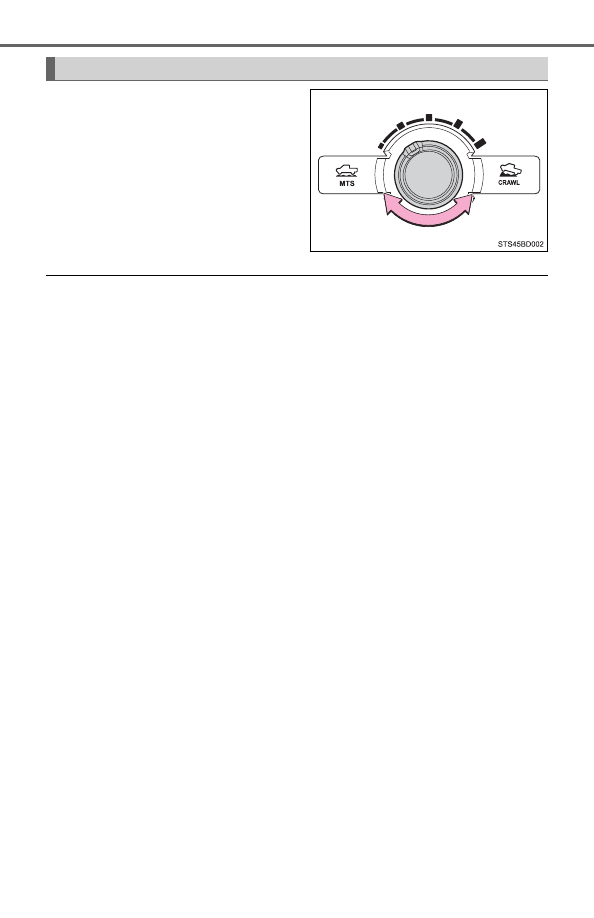
Operate  the  Multi-terrain  Select
mode  selector  dial  during  Multi-
terrain  Select  control  to  select  a
mode.

The Multi-terrain Select can be operated when

The four-wheel drive control switch is in “4L” position.

The Crawl Control is off.

When using the Multi-terrain Select

The VSC system cannot be switched on or off.
A  message  will  be  shown  on  the  multi-information  display  stating  that  this
function cannot be switched using the VSC off switch.

When it is difficult to generate traction

“MUD & SAND” mode provides the largest amount of tire slippage, followed
by “LOOSE ROCK”, “MOGUL”, “ROCK & DIRT” and “ROCK” mode.
If the current tires slip is too large, driveability can be improved by selecting a
mode with a smaller slip amount. Conversely, selecting a mode with a larger
slip can improve driveability, if the current tire slip is too small.

When the vehicle is stuck

Switching the transfer and differentials
For the operation of following function, refer to the following pages.

Four-wheel drive system (

P. 303)

Rear differential lock (

P. 309)

Selecting modes

317

4-5. Using the driving support systems

4

Dr

ivi

ng

When the active traction control operates continuously

P. 313

When the four-wheel drive control switch is in “4L” position

If  the  Multi-terrain  Select  system  is  not  operating  and  the  four-wheel  drive
control switch is in “4L”, the “TRAC OFF” indicator will come on.

When there is a malfunction in the system

The  slip  indicator  light  will  come  on.  Have  the  vehicle  inspected  by  your
Toyota dealer immediately.

WARNING

When using Multi-terrain Select

Observe the following precautions to avoid an accident that could result in
death or serious injuries:

There is a chance that the selected mode may not be the most appropriate
in  terms  of  road  conditions  such  as  pitch,  slipperiness,  undulation,  etc.
(

P. 315)

Multi-terrain  Select  is  not  intended  to  expand  the  limits  of  the  vehicle.
Check  the  road  conditions  thoroughly  beforehand,  and  drive  safely  and
carefully.

NOTICE

Precaution for use

The Multi-terrain Select is intended for use during off-road driving. Do not
use the system at any other time.

318

4-5. Using the driving support systems

Crawl Control

Speed selector dial

Turn  the  dial  clockwise  to  increase  the  speed  and  counterclockwise  to
decrease the speed.

Crawl Control on/off switch

The Crawl Control indicator comes on and the slip indicator flashes when
operating.

Crawl Control indicator
Slip indicator
Multi-information display

The  operating  status  and  speed  select  status  of  the  Crawl  Control  are
shown on the multi-information display.

: If equipped

Allows travel on extremely rough off-road surfaces at a fixed low
speed  without  pressing  the  accelerator  or  brake  pedal.  Mini-
mizes  loss  of  traction  or  vehicle  slip  when  driving  on  slippery
road surfaces, allowing for stable driving.

Crawl Control switch

1

2

3

4

5

319

4-5. Using the driving support systems

4

Dr

ivi

ng

The  following  table  shows  some
typical  terrains  and  the  recom-
mended speed modes.

Press the Crawl Control on/off switch while Crawl Control is operating.
If the switch is turned off, the slip indicator will turn off, the Crawl Con-
trol indicator will flash until the system has turned off completely, and
a message stating that Crawl Control has been turned off will be dis-
played on the multi-information display for several seconds.
When turning off Crawl Control while driving, stop the vehicle before
the Crawl Control indicator turns off, or drive extremely carefully.

Crawl Control can be operated when

The engine is running.

The shift lever is in any position other than P or N.

The front-wheel drive control switch is turned to “4L”.

The driver’s door is closed.

Speed modes

Position

Speed mode

Road conditions

Low

Rock,  mogul  (downhill)  and  gravel
(downhill)

Between low and medium

Mogul (uphill)

Medium

Snow,  mud,  gravel  (uphill),  sand,
dirt, mogul (uphill) and grass

Between medium and high

High

1

2

3

4

5

When the system is turned off

320

4-5. Using the driving support systems

Automatic system cancelation

In the following situations, the buzzer will sound intermittently and Crawl Con-
trol will be canceled automatically. In this event, the Crawl Control indicator
will  flash  and  then  goes  off,  and  a  message  stating  that  Crawl  Control  has
been turned off will be displayed on the multi-information display for several
seconds.

When the shift lever is shifted to P or N

When the front-wheel drive control switch is turned to “4H”

When the driver’s door is opened

Function limitations

When the vehicle speed exceeds approximately 15 mph (25 km), engine con-
trol  and  brake  control  will  stop  temporarily.  In  this  event,  the  Crawl  Control
indicator will flash.

When the Crawl Control system is operated continuously

If Crawl Control is used continuously for a long time, the buzzer will sound, a
malfunction  notification  will  be  displayed  on  the  multi-information  display,
the Crawl Control indicator goes off, and Crawl Control will be temporarily
inoperable as a result of the brake system overheating. In this event, stop
the vehicle immediately in a safe place, and allow the brake system to cool
down sufficiently until the “TRAC OFF” indicator will goes off. (In the mean-
time, normal driving is possible.)

If Crawl Control is used continuously for a long time, the buzzer will sound,
the system will be temporarily canceled, and a malfunction notification will
be  displayed  on  the  multi-information  display  as  a  result  of  the  automatic
transmission system overheating. Stop the vehicle in a safe place until the
display goes off.

Sounds and vibrations caused by the Crawl Control system

A  sound  may  be  heard  from  the  engine  compartment  when  the  engine  is
started or just after the vehicle begins to move. This sound does not indicate
that a malfunction has occurred in Crawl Control system.

Either of the following conditions may occur when the Crawl Control system
is operating. None of these indicates that a malfunction has occurred.
• Vibrations may be felt through the vehicle body and steering.
• A motor sound may be heard after the vehicle comes to a stop.

When there is a malfunction in the system

Warning lights and/or warning messages will turn on. (

P. 489)

321

4-5. Using the driving support systems

4

Dr

ivi

ng

WARNING

When using Crawl Control

Do not rely solely on Crawl Control. This function does not extend the vehi-
cle’s performance limitations. Always check the terrain thoroughly and drive
safely.

These conditions may cause the system may not operate correctly

When  driving  on  the  following  surfaces,  the  system  may  not  be  able  to
maintain a fixed low speed, which may result in an accident: 

Extremely steep inclines

Extremely uneven surfaces

Snow-covered roads, or other slippery surfaces

322

4-5. Using the driving support systems

Clutch start cancel switch

Never use the switch for normal engine starting. Be sure to follow the
starting procedure. (

P. 202)

Press the “CLUTCH START CAN-
CEL”  switch  to  cancel  the  clutch
start  system  when  the  engine
switch is turned to the “ON” posi-
tion.

The  indicator  comes  on  when  the
clutch start system is canceled.
The  clutch  start  cancel  switch  is
automatically  turned  off  when  the
engine switch is turned off.

Clutch start system

The system is designed to keep the starter motor from operating if the clutch
pedal is not depressed all the way down.

: If equipped

The switch allows the vehicle to be driven out of difficult situa-
tions by cranking the engine with the clutch engaged.

323

4-5. Using the driving support systems

4

Dr

ivi

ng

Driving assist systems

ABS (Anti-lock Brake System)

Helps to prevent wheel lock when the brakes are applied suddenly,
or if the brakes are applied while driving on a slippery road surface

Multi Terrain ABS (Anti-lock Brake System) (if equipped)

Helps to prevent wheel lock when the brakes are applied suddenly,
or if the brakes are applied while driving on a slippery road surface,
or in off-road conditions (such as rough roads, sand and mud)

Brake assist

Generates an increased level of braking force after the brake pedal
is depressed when the system detects a panic stop situation

VSC (Vehicle Stability)

Helps  the  driver  to  control  skidding  when  swerving  suddenly  or
turning on slippery road surfaces

Trailer Sway Control (if equipped)

Helps the driver to control trailer sway by selectively applying brake
pressure  for  individual  wheels  and  reducing  engine  torque  when
trailer sway is detected.

Trailer Sway Control is part of the VSC system and will not operate if
VSC system is turned off or experiences a malfunction.

TRAC (Traction Control)

Helps  to  maintain  drive  power  and  prevent  the  drive  wheels  from
spinning when starting the vehicle or accelerating on slippery roads

To help enhance driving safety and performance, the following
systems  operate  automatically  in  response  to  various  driving
situations.  Be  aware,  however,  that  these  systems  are  supple-
mentary and should not be relied upon too heavily when operat-
ing the vehicle. 

324

4-5. Using the driving support systems

Hill-start assist control (if equipped)

Helps to prevent the vehicle from rolling backward when starting on
an incline or slippery slope

The  slip  indicator  light  will  flash
while the TRAC/VSC/Trailer Sway
Control/hill-start  assist  control

*

systems are operating.

*

: If equipped with Multi-terrain Select/

Crawl Control. 

If  the  vehicle  gets  stuck  in  fresh  snow  or  mud,  TRAC/VSC/Trailer
Sway  Control  systems  may  reduce  power  from  the  engine  to  the
wheels. You may need to turn the system off to enable you to rock the
vehicle in order to free it.

Turning off TRAC (turn on the AUTO LSD system)


P. 307

Turning off TRAC, VSC and Trailer Sway Control

Press  and  hold  the  VSC  off
switch for more than 3 seconds
while  the  vehicle  is  stopped  to
turn off TRAC, VSC and Trailer
Sway Control.

The  VSC  off  and  “TRAC  OFF”
indicators will come on. 
Press  the  switch  again  to  turn
the system back on.

When the TRAC/VSC/Trailer Sway Control/hill-start assist control
systems are operating

Disabling  the  TRAC/VSC/Trailer  Sway  Control  systems  (2WD
models and 2WD mode on 4WD models)

325

4-5. Using the driving support systems

4

Dr

ivi

ng

If  the  vehicle  gets  stuck  in  fresh  snow  or  mud,  TRAC/VSC/Trailer
Sway  Control  systems  may  reduce  power  from  the  engine  to  the
wheels. You may need to turn the system off to enable you to rock the
vehicle in order to free it.

Turning off TRAC

Quickly  press  and  release  the
VSC  off  switch  to  turn  off
TRAC.

The  “TRAC  OFF”  indicator  will
come on.
Press  the  switch  again  to  turn
the system back on.

Turning off TRAC, VSC and Trailer Sway Control

Press  and  hold  the  VSC  off
switch for more than 3 seconds
while  the  vehicle  is  stopped  to
turn off TRAC, VSC and Trailer
Sway Control.

The  VSC  off  and  “TRAC  OFF”
indicators will come on.
Press  the  switch  again  to  turn
the system back on.

When  the  “TRAC  OFF”  indicator  light  comes  on  even  if  the  VSC  off
switch has not been pressed

TRAC  and  hill-start  assist  control  cannot  be  operated.  Contact  your Toyota
dealer.

Disabling  the  TRAC/VSC/Trailer  Sway  Control  systems  (4WD
mode on 4WD models)

326

4-5. Using the driving support systems

Sounds  and  vibrations  caused  by  the  ABS,  Multi  Terrain  ABS,  brake
assist, VSC, TRAC and Trailer Sway Control systems

A sound may be heard from the engine compartment when the brake pedal
is depressed repeatedly, when the engine is started or just after the vehicle
begins  to  move.  This  sound  does  not  indicate  that  a  malfunction  has
occurred in any of these systems.

Any  of  the  following  conditions  may  occur  when  the  above  systems  are
operating. None of these indicates that a malfunction has occurred.
• Vibrations may be felt through the vehicle body and steering.
• A motor sound may be heard after the vehicle comes to a stop.
• The brake pedal may pulsate slightly after the ABS is activated.
• The brake pedal may move down slightly after the ABS is activated.

Automatic reactivation of TRAC, VSC and Trailer Sway Control systems
after turning off the engine

Turning off the engine after turning off the TRAC, VSC and Trailer Sway Con-
trol systems will automatically reactivate them.

Automatic reactivation of TRAC system (AUTO LSD mode)

With AUTO LSD mode, VSC off and “AUTO LSD” indicator lights turn on. 
The VSC and TRAC systems will turn on when the vehicle speed increases.

Automatic reactivation of TRAC, VSC and Trailer Sway Control systems

If the TRAC, VSC and Trailer Sway Control systems are turned off, automatic
reactivation will not occur when vehicle speed increases

If the brake system overheats

TRAC will cease operation and a buzzer will sound to alert the driver. Stop
the vehicle in a safe place. (There is no problem with continuing normal driv-
ing.)

When  the  VSC  or  TRAC  system  is  turned  off  by  pressing  the  VSC  off
switch

On vehicles with pre-collision system, pre-collision brake assist and pre-colli-
sion braking will also be disabled. The PCS warning light will  come on and
the message will be shown on the multi-information display. (→P. 501)

Operating conditions of hill-start assist control

When  the  following  four  conditions  are  met,  the  hill-start  assist  control  will
operate:

The shift lever is in a position other than P or N (when starting off forward/
backward on an upward incline).

The vehicle is stopped.

The accelerator pedal is not depressed.

The parking brake is not engaged.

327

4-5. Using the driving support systems

4

Dr

ivi

ng

Automatic system cancelation of hill-start assist control

The hill-start assist control will turn off in any of the following situations:

The shift lever is moved to P or N.

The accelerator pedal is depressed.

The parking brake is engaged.

Approximately 2 seconds elapse after the brake pedal is released.

WARNING

The ABS does not operate effectively when

The  limits  of  tire  gripping  performance  have  been  exceeded  (such  as
excessively worn tires on a snow covered road).

The vehicle hydroplanes while driving at high speed on wet or slick roads.

Stopping distance when the ABS or Multi Terrain ABS is operating may
exceed that of normal conditions

The ABS and  Multi Terrain ABS  are  not designed to  shorten  the vehicle’s
stopping distance. Always maintain a safe distance from the vehicle in front
of you, especially in the following situations:

When driving on dirt, gravel or snow-covered roads

When driving with tire chains

When driving over bumps in the road

When driving over roads with potholes or uneven surfaces

TRAC may not operate effectively when

Directional control and power may not be achievable while driving on slip-
pery road surfaces, even if the TRAC system is operating. 
Drive the vehicle carefully in conditions where stability and power may be
lost.

Hill-start assist control does not operate effectively when

Do not overly rely on hill-start assist control. Hill-start assist control may
not operate effectively on steep inclines and roads covered with ice.

Unlike the parking brake, hill-start assist control is not intended to hold the
vehicle  stationary for an  extended  period  of time. Do not attempt to  use
hill-start assist control to hold the vehicle on an incline, as doing so may
lead to an accident.

When the VSC and Trailer Sway Control are activated

The slip indicator light flashes. Always drive carefully. Reckless driving may
cause an accident. Exercise particular care when the indicator light flashes.

328

4-5. Using the driving support systems

WARNING

When the TRAC/VSC/Trailer Sway Control systems are turned off

Be  especially  careful  and  drive  at  a  speed  appropriate  to  the  road  condi-
tions. As these are the systems to help ensure vehicle stability and driving
force, do not turn the TRAC/VSC/Trailer Sway Control systems off unless
necessary.

Replacing tires

Make sure that all tires are of the specified size, brand, tread pattern and
total load capacity. In addition, make sure that the tires are  inflated to the
recommended tire inflation pressure level.
The ABS, Multi Terrain ABS, TRAC, VSC and Trailer Sway Control systems
will not function correctly if different tires are installed on the vehicle.
Contact  your Toyota  dealer  for  further  information  when  replacing  tires  or
wheels.

Handling of tires and the suspension

Using tires with any kind of problem or modifying the suspension will affect
the driving assist systems, and may cause a system to malfunction.

Trailer Sway Control precaution

The Trailer Sway Control system is not able to reduce trailer sway in all situ-
ations.  Depending  on  many  factors  such  as  the  conditions  of  the  vehicle,
trailer, road surface, and driving environment, the Trailer Sway Control sys-
tem may not be effective. Refer to your trailer owner’s manual for informa-
tion on how to tow your trailer properly.

If trailer sway occurs

Observe the following precautions. 
Failure to do so may cause death or serious injury.

Firmly grip the steering wheel. Steer straight ahead.
Do not try to control trailer swaying by turning the steering wheel.

Begin  releasing  the  accelerator  pedal  immediately  but  very  gradually  to
reduce speed. 
Do not increase speed. Do not apply vehicle brakes.

If you make no extreme correction with the steering or brakes, your vehicle
and trailer should stabilize. (

P. 198)

329

4-6. Driving tips

4

Dr

ivi

ng

Winter driving tips

Use  fluids  that  are  appropriate  to  the  prevailing  outside  tempera-
tures. 

• Engine oil
• Engine coolant
• Washer fluid

Have a service technician inspect the condition of the battery.

Have the vehicle fitted with four snow tires or purchase a set of tire
chains for the rear tires.

Ensure that all tires are the same size and brand, and that chains match
the size of the tires.

Perform the following according to the driving conditions: 

Do not try to forcibly open a window or move a wiper that is frozen.
Pour warm water over the frozen area to melt the ice. Wipe away
the water immediately to prevent it from freezing. 

To  ensure  proper  operation  of  the  climate  control  system  fan,
remove  any  snow  that  has  accumulated  on  the  air  inlet  vents  in
front of the windshield. 

Check for and remove any excess ice or snow that may have accu-
mulated  on  the  exterior  lights,  vehicle’s  roof,  chassis,  around  the
tires or on the brakes.

Remove  any  snow  or  mud  from  the  bottom  of  your  shoes  before
getting in the vehicle.

Accelerate the vehicle slowly, keep a safe distance between you and
the vehicle ahead, and drive at a reduced speed suitable to road con-
ditions.

Carry  out  the  necessary  preparations  and  inspections  before
driving the vehicle in winter. Always drive the vehicle in a man-
ner appropriate to the prevailing weather conditions. 

Preparation for winter

Before driving the vehicle

When driving the vehicle

330

4-6. Driving tips

Park the vehicle and move the shift lever to P (automatic transmis-
sion)  or  1  or  R  (manual  transmission)  without  setting  the  parking
brake. The parking brake may freeze up, preventing it from being
released. If the vehicle is parked without setting the parking brake,
make sure to block the wheels. 
Failure to do so may be dangerous because it may cause the vehi-
cle to move unexpectedly, possibly leading to an accident.

On vehicles with an automatic transmission, if the vehicle is parked
without setting the parking brake, confirm that the shift lever cannot
be moved out of P. 
The shift lever will be locked if it is attempted to be shifted from P to
any  other  position without depressing the  brake  pedal. If  the shift
lever can be shifted from P, there may be a problem with the shift
lock  system.  Have  the  vehicle  inspected  by  your  Toyota  dealer
immediately.

Use the correct tire chain size when mounting the tire chains. 
Chain size is regulated for each tire size.

Side chain 
(0.2 in. [5 mm] in diameter)
Cross chain 
(0.25 in. [6.3 mm] in diameter)

Regulations regarding the use of tire chains vary depending on loca-
tion and type of road. Always check local regulations before installing
chains.

When parking the vehicle

Selecting tire chains

1

2

Regulations on the use of tire chains

331

4-6. Driving tips

4

Dr

ivi

ng

Tire chain installation

Observe the following precautions when installing and removing chains:

Install and remove tire chains in a safe location.

Install tire chains on the rear tires. Do not install tire chains on the front tires.

Install tire chains on rear tires as tightly as possible. Retighten chains after
driving 1/4 

 1/2 mile (0.5 

 1.0 km).

Install tire chains following the instructions provided with the tire chains.

WARNING

Driving with snow tires

Observe the following precautions to reduce the risk of accidents. 
Failure to do so may result in a loss of vehicle control and cause death or
serious injury.

Use tires of the specified size.

Maintain the recommended level of air pressure.

Do  not  drive  in  excess  of  75  mph  (120  km/h),  regardless  of  the  type  of
snow tires being used.

Use snow tires on all, not just some wheels.

4WD models: Do not mix tires of different makes, models, tread patterns
or treadwear.

Driving with tire chains 

Observe the following precautions to reduce the risk of accidents. 
Failure to do so may result in the vehicle being unable to be driven safely,
and may cause death or serious injury.

Do not drive in excess of the speed limit specified for the tire chains being
used, or 30 mph (50 km/h), whichever is lower.

Avoid driving on bumpy road surfaces or over potholes.

Avoid  sudden  acceleration,  abrupt  steering,  sudden  braking  and  shifting
operations that cause sudden engine braking.

Slow down sufficiently before entering a curve to ensure that vehicle con-
trol is maintained.


Content      ..     17      18      19      20     ..