Toyota Sienna Hybrid (2023 year). Manual in english - page 23
 

  Index      Toyota     Toyota Sienna Hybrid (2023 year). Manual in english


Search            copyright infringement  


Content      ..     21      22      23      24     ..


Toyota Sienna Hybrid (2023 year). Manual in english - page 23


368

5-3. Using the storage features

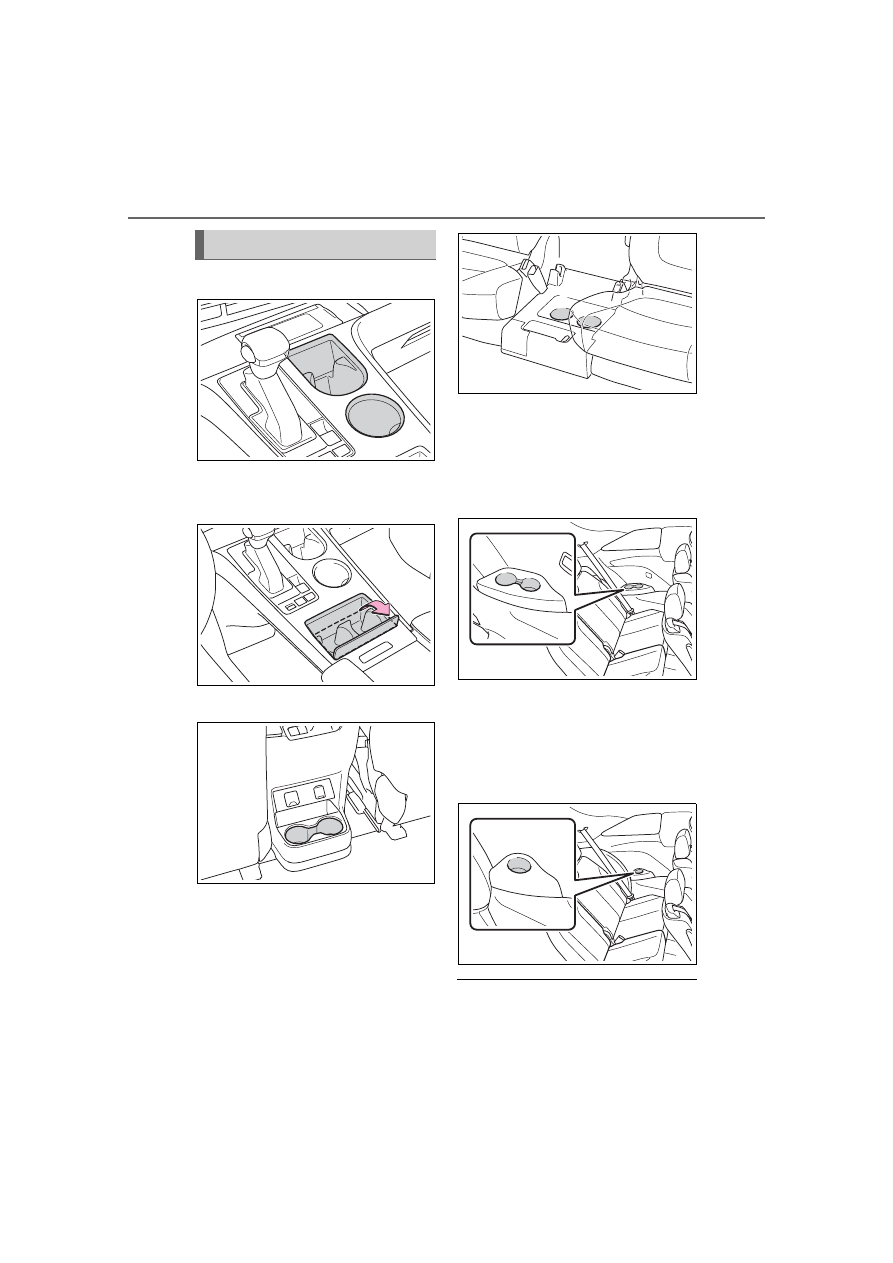
Console box (type A)

Console box (type B)

Open the lid.

Console box (type C)

Second seats (8-passenger 
models)

Removing the second center 
seat. (

P.175)

Third seats (Vehicles without 
spare tire)

Also two cup holders are 
installed in the right side of the 
third seats.

Third seats (Vehicles with 
spare tire)

Also two cup holders are 
installed in the right side of the 
third seats.

Cup holder mats (Type A)

The mats can be removed.

Cup holders

369

5-3. Using the storage features

5

Interior

 featur

es

Front

Rear

Bottle holders

When storing a bottle, close the 

cap.

The bottle may not be stored 

depending on its size or shape.

WARNING

Items unsuitable for the cup 

holders

Do not place anything other than 

cups or beverage cans in the cup 

holders.

Inappropriate items must not be 

stored in the cup holders even if 

the lid is closed.

Other items may be thrown out of 

the holders in the event of an 

accident or sudden braking and 

cause injury. If possible, cover hot 

drinks to prevent burns.

When not in use

Keep the cup holders closed. Inju-

ries may result in the event of 

sudden braking, sudden swerv-

ing or an accident.

Bottle holders

WARNING

Items unsuitable for the bottle 

holders

Do not place anything other than 

a bottle in the bottle holders.

Other items may be thrown out of 

the holders in the event of an 

accident or sudden braking and 

cause injury.

NOTICE

Items that should be not 

stowed in the bottle holders

Do not place open bottles or glass 

and paper cups containing liquid 

in the bottle holders. The contents 

may spill and glasses may break.

When using the sliding door

Make sure items in the sliding 

door bottle holder will not interfere 

with the motion of the door before 

operating the door. Items that pro-

trude from the bottle holder may 

prevent door opening or damage 

the vehicle.

370

5-3. Using the storage features

Front

Rear

Push the lid.

Driver’s side

Front passenger’s side

Door pockets

NOTICE

When using the sliding door

Make sure magazines are not 

bent or protruding from the sliding 

door pockets. Do not insert any-

thing too big so that the shape of 

the sliding door pockets is dis-

torted. Such objects may obstruct 

the opening/closing of the sliding 

doors, damage the sliding door 

pockets or the vehicle body, and 

may result in a malfunction.

Conversation mirror

Open tray

371

5-3. Using the storage features

5

Interior

 featur

es

Front of console box (Type A)

Front of console box (Type B)

Open the lid.

Rear of console box

On the console box

Close the console box.

Under the console box

WARNING

Items unsuitable for the open 

tray

Observe the following precautions 

when putting items in the open 

tray. Failure to do so may cause 

items to be thrown out of the tray 

in the event of sudden braking or 

steering. In these cases, the items 

may interfere with pedal operation 

or cause driver distraction, result-

ing in an accident.

Do not store items in the tray 

that can easily shift or roll out.

Do not stack items in the tray 

higher than the tray’s edge.

Do not put items in the tray that 

may protrude over the tray’s 

edge.

372

5-3. Using the storage features

Raise the hook to use.

The cargo hooks are provided for 
securing loose items.

To hang the cargo net, use the 
cargo net hooks and cargo 
hooks.

Pattern 1

Pattern 2

Type A

Type B (vehicles without 
spare tire only)

Engage the latch buckle.

Luggage compart-

ment features

Cargo hooks

WARNING

When cargo hooks are not in 

use

To avoid injury, always return the 

hooks to their stowed positions 

when not in use.

Cargo net hooks

WARNING

When the cargo net is not in 

use

To avoid injury, always return the 

hooks to their stowed positions 

when not in use.

NOTICE

To prevent damage to the 

cargo net hooks

Avoid hanging things other than a 

cargo net on them.

Side auxiliary box

373

5-3. Using the storage features

5

Interior

 featur

es

374

5-4. Using the other interior features

5-4.Using the other interior features

1

To set the visor in the forward 
position, flip it down.

2

To set the visor in the side 
position, flip down, unhook, 
and swing it to the side.

Slide the cover to open.

The light turns on when the cover is 
opened.

Automatic light off to prevent 

12-volt battery discharge

If the vanity lights remain on when 

the power switch is turned to OFF, 

the lights will go off automatically 

after 20 minutes.

Please use a power supply for 
electronic goods that use less 
than 12 VDC /10 A (power con-
sumption of 120 W).
When using electronic goods, 
make sure that the power con-
sumption of all the connected 
power outlets is less than 120 
W.
Open the lid.

The power outlet can be used 

when

The power switch is in ACC or ON.

When stopping the hybrid sys-

tem

Disconnect electrical devices with 

charging functions, such as mobile 

battery packs.

If such devices are left connected, 

the hybrid system may not stop nor-

mally.

Other interior features

Sun visors

Vanity mirrors

NOTICE

To prevent 12-volt battery dis-

charge

Do not leave the vanity lights on 

for extended periods while the 

hybrid system is off.

Power outlet (12 VDC)

375

5-4. Using the other interior features

5

Interior

 featur

es

Please use as a power supply 
for electronic devices that use 
less than 120 VAC (power con-
sumption of 1500 W).

Using the power outlets

Rear of console box

Open the lid.

Luggage compartment

Open the lid.

When turning the power 
outlets on

1

Check that the parking brake 
is engaged, and press the 
power switch while depress-
ing the brake pedal.

2

Check that the READY indi-
cator is illuminated, and 
press the AC120V switch.

The power outlets can be used 

when the indicator on the AC120V 

switch is illuminated.
The power outlets are turned off/on 

each time the AC120V switch is 

pressed.

When connecting a device

Open the lid, and fully and 
securely insert the plug of the 
device into the power outlet.

NOTICE

When power outlet is not in 

use

To avoid damaging the power out-

let, close the power outlet lid 

when the power outlet is not in 

use.
Foreign objects or liquids that 

enter the power outlet may cause 

a short circuit.

To prevent blown fuse

Do not use an accessory that 

uses more than 12 V 10 A.

To prevent 12-volt battery dis-

charge

Do not use the power outlet lon-

ger than necessary when the 

hybrid system is off.

Power outlets (120 VAC) 
(if equipped)

376

5-4. Using the other interior features

Rear of console box

Luggage compartment

When turning the power 
outlets off

1

Turn the connected devices 
off.

2

Press the AC120V switch to 
turn the power outlets off.

3

Disconnect each plug from 
the power outlet.

4

Close the lid of each power 
outlet.

The power outlet can be used 

when

The READY indicator is illuminated.

Rules/regulations regarding 

idling stop

The engine will start automatically to 

charge the hybrid battery (traction 

battery) if its charge becomes low. 

In some municipalities, if the engine 

starts while the vehicle is parked or 

stopped, it may violate local rules or 

regulations regarding idling stop and 

you may be penalized. Make sure to 

check the local rules and regula-

tions before using the power outlets 

while the vehicle is parked or 

stopped.

Power outlets

When connecting a device, make 

sure that the total power con-

sumption of all devices connected 

to the 120 VAC power outlets is 

less than 1500 W. If a device is 

connected and the power con-

sumption is exceeded, a protec-

tion circuit will cut the power 

supply and the power outlets will 

not be able to be used.

Depending on the device to be 

used, the current flow may be high 

and the initial peak wattage may 

exceed 1500 W.

In this case, the protection circuit 

may operate, and the power out-

lets may not be able to be used.

Depending on the connected 

device, it may cause interference 

with TV and radio broadcasts.

The voltage of the power outlets 

cannot be measured with a com-

mercially available electrical tes-

ter. If it is necessary to check the 

voltage, have the vehicle 

inspected by your Toyota dealer.

While a power outlet is being 

used, a cooling fan sound may be 

heard from near a rear seat. This 

does not indicate a malfunction.

Devices which may not operate 

correctly

The following 120 VAC devices may 

not operate properly even if their 

power consumption is less than 

1500 W:

Devices with high initial peak watt-

age

Measuring devices that process 

precise data

Devices that require an extremely 

377

5-4. Using the other interior features

5

Interior

 featur

es

stable power supply

Devices that require a constant 

power supply from the power out-

let, such as a device with a timer.

When the 120 VAC power out-

lets cannot be used

If the AC120V switch is pressed but 

the switch indicator does not illumi-

nate, the protection circuit may have 

operated.
In this case, perform the appropriate 

procedures as follows.

Disconnect the plug of each 

device from the power outlets, 

check that the total power con-

sumption of all devices to be con-

nected to the power outlets is less 

than 1500 W and check that the 

devices are not malfunctioning, 

reconnect the devices and then 

press the AC120V switch again.

Check the charge of the hybrid 

battery (traction battery) 

(

P.122). If the charge is low, 

shift the shift lever to P, allow the 

engine to run to charge the hybrid 

battery (traction battery), and then 

press the AC120V switch again.

If the temperature inside the vehi-

cle is high, such as after the vehi-

cle has been parked in the sun, 

use the air conditioning system to 

sufficiently ventilate or cool the 

interior, and then press the 

AC120V switch again.

If the vehicle has been stopped in 

a cold area, to protect the hybrid 

battery (traction battery), the 

power outlets may not be able to 

be used. In this case, drive the 

vehicle for a while to warm up the 

hybrid battery (traction battery), 

and then press the AC120V 

switch again.

If the power outlets cannot be used 

even after performing the appropri-

ate procedures above, have the 

vehicle inspected by your Toyota 

dealer.

WARNING

For safe use

Observe the following precau-

tions.

Failure to do so may lead to an 

accident, resulting in death or 

serious injury.

Do not use devices such as the 

following when driving:

• Devices which cannot be prop-

erly secured within the vehicle.

• Devices which may distract the 

driver and be a hinderance to 

safe driving, such as a TV, DVD 

player, etc.

• Unsecured devices which gen-

erate heat, such as a toaster, 

microwave, electric heater, 

electric kettle, coffee maker, 

etc., as they may cause burns 

or a fire in the case of sudden 

braking or an accident.

• Devices which may fall under 

the pedals and prevent the 

brake pedal from being 

depressed.

Do not use devices which pro-

duce steam while the windows 

are closed. Doing so may cause 

the windows to fog up, reducing 

visibility and making it difficult to 

drive safely. Also, the steam 

may damage or negatively 

affect other devices.

Do not connect a malfunctioning 

device to a power outlet, as 

doing so may cause the power 

outlets to become inoperable.

Do not disconnect the plug of a 

device while your hands are wet 

or insert a pin or other object 

into the power outlet. Also, if a 

liquid or snow is on the power 

outlet, dry the outlet before 

using it.

378

5-4. Using the other interior features

WARNING

Do not attempt to modify, disas-

semble or repair a power outlet. 

Also, do not replace the 120 

VAC inverter with a commer-

cially available one. For infor-

mation on repairs, contact your 

Toyota dealer.

Be careful not to get any part of 

your body caught in the power 

outlet lid.

Do not let children touch the 

power outlets.

Keep the power outlets free of 

dust and foreign matter.

If the plug of a device fits 

loosely in a power outlet, even 

though it is fully inserted, 

replace the power outlet. For 

information on replacement, 

contact your Toyota dealer.

Using the power outlets while 

parked or stopped

Observe the following precau-

tions.

Failure to do so may lead to an 

accident, possibly resulting in 

death or serious injury.

Make sure to engage the park-

ing brake and shift the shift 

lever to P.

Do not leave the vehicle unat-

tended while the READY indica-

tor is illuminated and a device is 

connected to a power outlet.

Make sure that the hood is 

closed. As the engine will start 

automatically depending on the 

condition of the vehicle, make 

sure that nothing is left near or 

contacting the exhaust pipes. 

Also, do not put your head or 

hands anywhere inside the 

engine compartment, as the 

cooling fan may operate sud-

denly. Keep hands and clothing 

(especially a tie, scarf, etc.) 

away from the fan as they may 

get caught in a fan.

Do not use the power outlets in 

an area with poor ventilation or 

an enclosed area, such as a 

garage without a ventilation or 

exhaust system, or in an area 

where the vehicle may become 

surrounded by snow, as the 

exhaust gasses may accumu-

late, causing a lack of oxygen.

Do not use the power outlets if 

the vehicle has a vehicle cover 

installed.

Do not sleep in the vehicle while 

using devices such as an elec-

tric heater.

Devices to be connected

Make sure to read any instruction 

manual which came with a device 

and observe any warnings on the 

device. Do not connect a device 

to a power outlet if the device is 

malfunctioning or its plug is dam-

aged.
Do not use power outlets for med-

ical devices, as the output of the 

power outlet may be cut, depend-

ing on the condition of the vehicle.

379

5-4. Using the other interior features

5

Interior

 featur

es

The USB charging ports are 
used to supply 2.5A (USB Type-
A) or 3.0A (USB Type-C) of 
electricity at 5 V to external 
devices. Use the appropriate 
terminal for each charging port 
type.
The USB charging ports are for 
charging only. They are not 
designed for data transfer or 
other purposes.
Depending on the external 
device, it may not charge prop-
erly. Refer to the manual 
included with the device before 
using a USB charging port.

Using the USB charging 
ports

In the console box

Open the console box lid.

NOTICE

Observe the following precau-

tions.

Failure to do so may lead to the 

power outlets not operating cor-

rectly or damage to the vehicle or 

a connected device.

To avoid short circuit or mal-

function

Do not set a device which gen-

erates heat near the interior 

components or on a seat. Heat 

may cause these parts to melt 

or burn.

Do not use devices which are 

sensitive to vibration or heat in 

the vehicle.

These devices may malfunction 

due to vibration while driving or 

heat while the vehicle is parked 

in the sun.

When not using a power outlet, 

make sure to close the cover. If 

foreign matter or a liquid enters 

the power outlet, it may cause a 

malfunction or short circuit.

Do not use a multi-point outlet 

adapter as doing so may over-

load the power outlet.

When the ambient tempera-

ture is high

If the temperature inside the vehi-

cle is high, such as after the vehi-

cle has been parked in the sun, 

the power outlets may not be able 

to be used. Sufficiently ventilate 

the interior or use the air condi-

tioning system to cool the interior 

before attempting to use the 

power outlets.

When the ambient tempera-

ture is low

If the vehicle has been stopped in 

a cold area, to protect the hybrid 

battery (traction battery), the 

power outlets may not be able to 

be used. In this case, drive the 

vehicle for a while to warm up the 

hybrid battery (traction battery).

To prevent 12-volt battery dis-

charge

Do not use the power outlets lon-

ger than necessary when the 

hybrid system is not running.

USB charging ports

380

5-4. Using the other interior features

USB Type-A

USB Type-C

Rear of console box

Open the lid.

USB Type-A

USB Type-C

Luggage compartment

USB Type-A

USB Type-C

The USB charging ports can be 

used when

The power switch is in ACC or ON.

Situations in which the USB 

charging ports may not operate 

correctly

USB Type-A: If a device which 

consumes more than 2.5 A at 5 V 

is connected

USB Type-C: If a device which 

consumes more than 3.0 A at 5 V 

is connected

If a device designed to communi-

cate with a personal computer, 

such as a USB memory device, is 

connected

If the connected external device is 

turned off (depending on device)

If the temperature inside the vehi-

cle is high, such as after the vehi-

cle has been parked in the sun

About connected external 

devices

Depending on the connected exter-

nal device, charging may occasion-

ally be suspended and then start 

again. This is not a malfunction.

When using the USB charging 

ports in the console box

The USB charging ports can be 

used while the console box lid is 

closed.

A

B

A

B

A

B

NOTICE

To prevent damage to the 

USB charging ports

Do not insert foreign objects into 

the ports.

381

5-4. Using the other interior features

5

Interior

 featur

es

A portable device can be 
charged by just placing Qi stan-
dard wireless charge compatible 
portable devices according to 
the Wireless Power Consortium, 
such as smartphones and 
mobile batteries, etc., on the 
charge area.

This function cannot be used 
with portable devices that are 
larger than the charging area. 
Also, depending on the portable 
device, it may not operate as 
normal. Please read the opera-
tion manual for portable devices 
to be used.

The “Qi” symbol

The “Qi” symbol is a trademark 
of the Wireless Power Consor-
tium.

Name for all parts

Charge area

Operation indicator light

Power supply switch

NOTICE

Do not spill water or other liq-

uids into the ports.

Rear of console box: When the 

USB charging ports are not in 

use, close the lids. If a foreign 

object or liquid enters a port 

may cause a short circuit.

Do not apply excessive force to 

or impact the USB charging 

ports.

Do not disassemble or modify 

the USB charging ports.

To prevent damage to exter-

nal devices

Do not leave external devices in 

the vehicle. The temperature 

inside the vehicle may become 

high, resulting in damage to an 

external device.

Do not push down on or apply 

unnecessary force to an exter-

nal device or the cable of an 

external device while it is con-

nected.

To prevent 12-volt battery dis-

charge

Do not use the USB charging 

ports for a long period of time 

when the hybrid system is off.

Wireless charger (if 
equipped)

A

B

C

382

5-4. Using the other interior features

Using the wireless charger

1

Press the power supply 
switch of the wireless char-
ger.

Switches on and off with each 

press of the power supply switch.
When turned on, the operation indi-

cator light (green) comes on.
Even with the hybrid system off, the 

on/off state of the power supply 

switch is memorized.

2

Place the charging side of 
the portable device down.

When charging, the operation indi-

cator light (orange) comes on.
If charging is not occurring, try plac-

ing the portable device as close to 

the center of the charging area as 

possible.
When charging is complete, the 

operation indicator light (green) 

comes on.

Recharging function

When charging is complete 

and after a fixed time in the 
charge suspension state, 
charging restarts.

When the portable device is 
moved, charging is stopped 
for a moment and then it 
restarts.

Lighting conditions of oper-
ation indicator light

*

: Depending on the portable 

device, there are cases where the 
operation indicator light will con-
tinue being lit up orange even 
after the charging is complete.

When the operation indicator 
light flashes

When an error occurs, the oper-
ation indicator light flashes an 
orange color.
Handle the error based on the 
following tables.

Operation 

indicator 

light

Conditions

Turning off

When the Wireless 
charger power supply 
is off

Green 
(comes 
on)

On Standby (charging 
possible state)

When charging is com-
plete

*

Orange 
(comes 
on)

When placing the por-
table device on the 
charging area (detect-
ing the portable device)

Charging

383

5-4. Using the other interior features

5

Interior

 featur

es

• Flashing repeatedly once 

every second (Orange)

• Repeatedly flashes 3 times 

continuously (Orange)

• Repeatedly flashes 4 times 

continuously (Orange)

The wireless charger can be 

operated when

The power switch is in ACC or ON.

Usable portable devices

Qi standard wireless charge stan-

dard can be used on compatible 

devices.

However, not all Qi standard 

devices and compatibility are guar-

anteed.
Starting with mobile phones and 

smartphones, it is aimed for low 

power electrically supplied portable 

devices of no more than 5W.

When covers and accessories 

are attached to portable devices

Do not charge in situations where 

cover and accessories not able to 

handle Qi are attached to the porta-

ble device. Depending on the type 

of cover and accessory, it may not 

be possible to charge. When 

charging is not performed even with 

the portable device placed on the 

charge area, remove the cover and 

accessories.

While charging, noise enters 

the AM radio

Turn off the wireless charger and 

confirm that the noise has 

decreased. If the noise decreases, 

continuously pushing the power 

supply switch of the wireless char-

ger for 2 seconds, the frequency of 

the charger can be changed and the 

noise can be reduced. Also, on that 

occasion, the operation indicator 

Suspected 

causes

Handling method

Vehicle to char-
ger communica-
tion failure.

If the power 
switch is in ACC: 
Turn the power 
switch to ON.
If the power 
switch is in ON: 
Turn the power 
switch off and 
then back to ON.
If the operation 
indicator light still 
blinks after per-
forming the 
above proce-
dure, contact 
your Toyota 
dealer.

Suspected 

causes

Handling method

A foreign sub-
stance is 
between the por-
table device and 
charge area.

Remove the for-
eign substance 
from between 
portable device 
and the charge 
area.

The portable 
device is out of 
sync due to the 
device being 
shifted from the 
center of the 
charge area.

Place the porta-
ble device near 
the center of the 
charge area.

Suspected 

causes

Handling method

Temperature ris-
ing within the 
wireless charger.

Stop charging at 
once and start 
charging again 
after for a while.


Content      ..     21      22      23      24     ..