Toyota Sequoia Hybrid (2023 year). Manual in english - page 26
 

  Index      Toyota     Toyota Sequoia Hybrid (2023 year). Manual in english


Search            copyright infringement  


Content      ..     24      25      26      27     ..


Toyota Sequoia Hybrid (2023 year). Manual in english - page 26


417

5-1. Using the air conditioning system and defogger

5

Interior

 featur

es

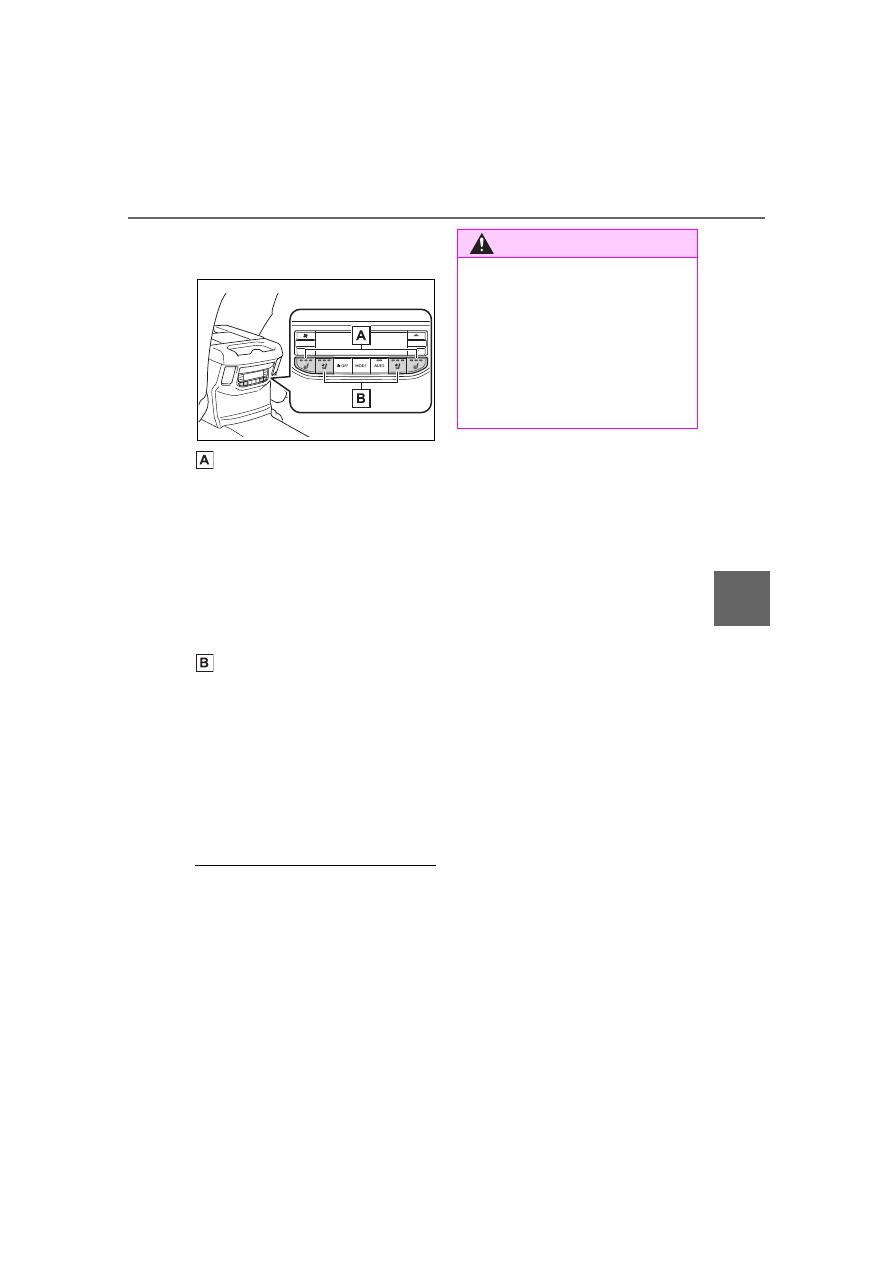
Rear seat heaters/seat ven-
tilators (if equipped)

Adjust the rear seat heater 
temperature level

Each time the switch is pressed, 
the operation condition changes as 
follows.
Hi (3 segments lit) 

 Mid (2 seg-

ments lit) 

 Lo (1 segment lit) 


Off
The level indicator (red) light up 
during operation.

Adjust the rear seat ventilator 
fan speed level

Each time the switch is pressed, 
the operation condition changes as 
follows.
Hi (3 segments lit) 

 Mid (2 seg-

ments lit) 

 Lo (1 segment lit) 


Off
The level indicator (blue) light up 
during operation.

The heated steering wheel, seat 

heaters and seat ventilators can 

be used when

The power switch is in ON.

WARNING

To prevent overheating and 

minor burn injuries

Observe the following precautions 

when using the seat heaters.

Do not cover the seat with a 

blanket or cushion when using 

the seat heater.

Do not use seat heater more 

than necessary.

418

5-2. Using the interior lights

5-2.Using the interior lights

Personal/interior lights (

P.419)

Door courtesy lights

Ambient lights (if equipped) (

P.419)

Shift lever light (if equipped)

Power switch light

Glove box light

Footwell lights (if equipped)

Front tray light

Console box light (if equipped)

Trailer hitch light

Interior lights list

Location of the interior lights

419

5-2. Using the interior lights

5

Interior

 featur

es

“OFF”

The personal/interior lights can be 
individually turned on or off.

“DOOR”

The personal/interior lights come 
on when a door is opened. They 
turn off when the doors are closed.

“ON”

The personal/interior lights cannot 
be individually turned off.

Front

Turns the lights on/off

Rear

Turns the lights on/off

Each time the “MOOD” switch is 
pressed, the brightness level 
changes.

“OFF”

Turns the light off

“DOOR”

Turns on when the door is opened 
or closed while the shift lever is in P 

Personal/interior lights 
main switch

Operating the per-
sonal/interior lights

Ambient lights (if 
equipped)

Trailer hitch light switch

420

5-2. Using the interior lights

or R. Turn off when shift lever in D.

“ON”

Turns on while the shift lever is in P 
or R. Turn off when shift lever in D.

Illuminated entry system

The lights automatically turn on/off 

according to the power switch 

mode, the presence of the elec-

tronic key, whether the doors are 

locked/unlocked, and whether the 

doors are open/closed.

To prevent the 12-volt battery 

from being discharged

If the following lights remain on 

when the door is not fully closed and 

the main switch is in the “DOOR” 

position, the lights will go off auto-

matically after 20 minutes:

Personal/interior lights

Trailer hitch light

The personal/interior lights may 

turn on automatically when

If any of the SRS airbags deploy 

(inflate) or in the event of a strong 

rear impact, the personal/interior 

lights will turn on automatically.
The personal/interior lights will turn 

off automatically after approximately 

20 minutes.
The personal/interior lights can be 

turned off manually. However, in 

order to help prevent further colli-

sions, it is recommended that they 

be left on until safety can be 

ensured.
(The personal/interior lights may not 

turn on automatically depending on 

the force of the impact and condi-

tions of the collision.)

Customization

Some functions can be customized. 

(

P.570)

NOTICE

To prevent 12-volt battery dis-

charge

Do not leave the lights on longer 

than necessary when the hybrid 

system is off.

Removing light lenses

Never remove the lens for the 

personal/interior lights. Otherwise, 

the lights will be damaged. If a 

lens needs to be removed, con-

tact your Toyota dealer.

421

5-3. Using the storage features

5

Interior

 featur

es

5-3.Using the storage features

Auxiliary boxes

Glove box

Cup holders

Console box

Bottle holders

List of storage features

Location of the storage features

WARNING

Items that should not be left 

in the storage spaces

Do not leave glasses, lighters or 

spray cans in the storage spaces, 

as this may cause the following 

when cabin temperature becomes 

high:

Glasses may be deformed by 

heat or cracked if they come 

into contact with other stored 

items.

Lighters or spray cans may 

explode. If they come into con-

tact with other stored items, the 

lighter may catch fire or the 

spray can may release gas, 

causing a fire hazard.

422

5-3. Using the storage features

Pull up the lever to open.

1

Unlock with the mechanical 
key

2

Lock with the mechanical key

Tray within glove box

The tray can be removed by lifting 

the tray and then sliding it out.

1

Lift the tray to disengage clip

2

Slide to remove tab from hole

Front (Type A)

Front (Type B)

Press in and release the button.

Rear (Type A)

Rear (Type B)

Pull the armrest down for use.

Glove box

WARNING

Caution while driving

Keep the glove box closed. In the 

event of sudden braking or sud-

den swerving, an accident may 

occur due to an occupant being 

struck by the open glove box or 

the items stored inside.

Cup holders

423

5-3. Using the storage features

5

Interior

 featur

es

Rear (Type C)

Rear (Type D)

Front

Rear

Bottle holders

When storing a bottle, close the 

cap.

The bottle may not be stored 

depending on its size or shape.

WARNING

Items unsuitable for the cup 

holder

Do not place anything other than 

cups or beverage cans in the cup 

holders.

Inappropriate items must not be 

stored in the cup holders even if 

the lid is closed.

Other items may be thrown out of 

the holders in the event of an 

accident or sudden braking and 

cause injury. If possible, cover hot 

drinks to prevent burns.

When not in use

Keep the cup holders closed.

Injuries may result in the event of 

an accident or sudden braking.

Bottle holders

WARNING

Items unsuitable for the bottle 

holders

Do not place anything other than 

a bottle in the bottle holders.

Other items may be thrown out of 

the holders in the event of an 

accident or sudden braking and 

cause injury.

424

5-3. Using the storage features

Press either button to open the 
console box.

Console box

When the auxiliary box is slid, the 

console box can be accessed.

Console box partition

The partition of the console box can 

be removed.

The removed partition can be 

stowed in the position as shown in 

the illustration.

Type A

Push in and release the auxiliary 
box.

This box is useful for temporarily 
storing the small items.

Type B

Pull the auxiliary box out.

NOTICE

Items that should not be 

stowed in the bottle holders

Put the cap on before stowing a 

bottle. Do not place open bottles 

in the bottle holders, or glasses 

and paper cups containing liquid. 

The contents may spill and 

glasses may break.

Console box

WARNING

Caution while driving

Keep the console box closed.

Injuries may result in the event of 

an accident or sudden braking.

Auxiliary boxes

425

5-3. Using the storage features

5

Interior

 featur

es

Type C (if equipped)

Pull the lid to open.

WARNING

Caution while driving

Do not leave the auxiliary box 

open while driving.

Items may fall out and cause 

death or serious injury in case of 

an accident or sudden stop.

Items unsuitable for storing 

(type A)

Do not store items heavier than 

0.4 lb. (0.2 kg).

Doing so may cause the auxiliary 

box to open and the items inside 

may fall out, resulting in an acci-

dent.

Luggage compart-

ment features

Grocery bag hooks

NOTICE

To prevent damage to the gro-

cery bag hooks

Do not hang any object heavier 

than 6.6 lb. (3 kg) on the grocery 

bag hooks.

426

5-3. Using the storage features

Remove the deck board

Pull up the strap of the deck 
board.

Adjustable deck board

The position of the deck board 
can be changed.

Insertion position:

Stowing position

Low position

Install the support parts:
Install support parts on the deck.
Support parts can be installed in 
any position desired.

Remove the support parts:
To remove the support parts, 
push the claw and lift it up.

Deck board

427

5-3. Using the storage features

5

Interior

 featur

es

Middle position

High position

NOTICE

To prevent damage to the 

deck board

Do not place any object heavier 

than 220 lb. (100 kg) on the deck 

board.

428

5-4. Using the other interior features

5-4.Using the other interior features

The USB charging ports are 
used to supply 2.5A (USB Type-
A) or 3.0A (USB Type-C) of 
electricity at 5 V to external 
devices.
Use the appropriate terminal for 
each charging port type.
The USB charging ports are for 
charging only. They are not 
designed for data transfer or 
other purposes.
Depending on the external 
device, it may not charge prop-
erly. Refer to the manual 
included with the device before 
using a USB charging port.

Using the USB charging 
ports

In the console box

USB Type-A

USB Type-C

Rear of console box

Open the lid.

USB Type-A

USB Type-C

The USB charging ports can be 

used when

The power switch is in ACC or ON.

Situations in which the USB 

charging ports may not operate 

correctly

USB Type-A: If a device which 

consumes more than 2.5 A at 5 V 

is connected

USB Type-C: If a device which 

consumes more than 3.0 A at 5 V 

is connected

If a device designed to communi-

cate with a personal computer, 

such as a USB memory device, is 

connected

If the connected external device is 

turned off (depending on device)

If the temperature inside the vehi-

cle is high, such as after the vehi-

cle has been parked in the sun

About connected external 

devices

Depending on the connected exter-

nal device, charging may occasion-

ally be suspended and then start 

again. This is not a malfunction.

Other interior features

USB charging ports

429

5-4. Using the other interior features

5

Interior

 featur

es

A portable device can be 
charged by just placing Qi stan-
dard wireless charge compatible 
portable devices according to 
the Wireless Power Consortium, 

such as smartphones and 
mobile batteries, etc., on the 
charge area.
This function cannot be used 
with portable devices that are 
larger than the charging area. 
Also, depending on the portable 
device, it may not operate as 
normal. Please read the opera-
tion manual for portable devices 
to be used.

The “Qi” symbol

The “Qi” logo is a trademark of 
the Wireless Power Consortium.

Name for all parts

Charge area

Operation indicator light

NOTICE

To prevent damage to the 

USB charging ports

Do not insert foreign objects into 

the ports.

Do not spill water or other liq-

uids into the ports.

Rear of console box: When the 

USB charging ports are not in 

use, close the lids. If a foreign 

object or liquid enters a port 

may cause a short circuit.

Do not apply excessive force to 

or impact the USB charging 

ports.

Do not disassemble or modify 

the USB charging ports.

To prevent damage to exter-

nal devices

Do not leave external devices in 

the vehicle. The temperature 

inside the vehicle may become 

high, resulting in damage to an 

external device.

Do not push down on or apply 

unnecessary force to an exter-

nal device or the cable of an 

external device while it is con-

nected.

To prevent 12-volt battery dis-

charge

Do not use the USB charging 

ports for a long period of time with 

the hybrid system is off.

Wireless charger (if 
equipped)

430

5-4. Using the other interior features

Using the wireless charger

1

Turn the power switch to 
ACC or ON.

When turned on, the operation indi-

cator light (green) comes on.

2

Place the charging side of 
the portable device down.

When charging, the operation indi-

cator light (orange) comes on.
If charging is not occurring, try plac-

ing the portable device as close to 

the center of the charging area as 

possible.
When charging is complete, the 

operation indicator light (green) 

comes on.

Recharging function

When charging is complete 
and after a fixed time in the 
charge suspension state, 
charging restarts.

When the portable device is 
moved, charging is stopped 
for a moment and then it 
restarts.

Lighting conditions of oper-
ation indicator light

*

: Depending on the portable 

device, there are cases where the 
operation indicator light will con-
tinue being lit up orange even 
after the charging is complete.

When the operation indicator 
light flashes

When an error occurs, the opera-
tion indicator light flashes an 
orange color.
Handle the error based on the fol-
lowing tables.
• Flashing repeatedly once every 

second (Orange)

Operation 

indicator 

light

Conditions

Turning off

When the Wireless 
charger power supply 
is off

Green 
(comes 
on)

On Standby (charging 
possible state)

When charging is com-
plete

*

Orange 
(comes 
on)

When placing the por-
table device on the 
charging area (detect-
ing the portable device)

Charging

Suspected 

causes

Handling method

Vehicle to char-
ger communica-
tion failure.

Contact your 
Toyota dealer.

431

5-4. Using the other interior features

5

Interior

 featur

es

• Repeatedly flashes 3 times con-

tinuously (Orange)

• Repeatedly flashes 4 times con-

tinuously (Orange)

The wireless charger can be 

operated when

The power switch is in ACC or ON.

Usable portable devices

Qi standard wireless charge stan-

dard can be used on compatible 

devices. However, not all Qi stan-

dard devices and compatibility are 

guaranteed.

Starting with mobile phones and 

smartphones, it is aimed for low 

power electrically supplied porta-

ble devices of no more than 5W.

When covers and accessories 

are attached to portable devices

Do not charge in situations where 

cover and accessories not able to 

handle Qi are attached to the porta-

ble device. Depending on the type 

of cover and accessory, it may not 

be possible to charge. When 

charging is not performed even with 

the portable device placed on the 

charge area, remove the cover and 

accessories.

Important points of the wire-

less charger

If the electronic key cannot be 

detected within the vehicle inte-

rior, charging cannot be done. 

When the door is opened and 

closed, charging may be tempo-

rarily suspended.

When charging, the wireless 

charging device and portable 

device will get warmer, however 

this is not a malfunction.

When a portable device gets 

warm while charging, charging 

may stop due to the protection 

function on the portable device 

side. In this case, when the tem-

perature of the portable device 

drops significantly, charge again.

Operation sounds

When the power supply is turned 

on, while searching for the portable 

device a sound will be produced, 

however this is not a malfunction.

Certification

P.623

Suspected 

causes

Handling method

A foreign sub-
stance is 
between the por-
table device and 
charge area.

Remove the for-
eign substance 
from between 
portable device 
and the charge 
area.

The portable 
device is out of 
sync due to the 
device being 
shifted from the 
center of the 
charge area.

Place the porta-
ble device near 
the center of the 
charge area.

Suspected 

causes

Handling method

Temperature ris-
ing within the 
wireless charger.

Stop charging at 
once and start 
charging again 
after a while.

WARNING

Caution while driving

When charging a portable device, 

for safety reasons, the driver 

should not operate the main part 

of the portable device while driv-

ing.

432

5-4. Using the other interior features

WARNING

Caution regarding interfer-

ence with electronic devices

People with implantable cardiac 

pacemakers, cardiac resynchroni-

zation therapy-pacemakers or 

implantable cardioverter defibrilla-

tors, as well as any other electri-

cal medical device, should consult 

their physician about the usage of 

the wireless charger. The opera-

tions of the wireless charger may 

have an affect on medical 

devices.

To prevent damage or burns

Observe the following precau-

tions.

Failure to do so may result in a 

possibility of equipment failure 

and damage, catch fire, burns due 

to overheat.

Do not insert any metallic 

objects between the charging 

area and the portable device 

while charging

Do not attach stickers, metallic 

objects, etc., to the charger area 

or portable device

Do not cover with cloth, etc., 

and charge

Do not charge portable devices 

other than designated

Do not attempt to dismantle for 

disassembly or modifications

Do not hit or apply a strong 

force

NOTICE

Conditions in which the func-

tion may not operate cor-

rectly

In the following conditions, it may 

not operate correctly

The portable device is fully 

charged

There is foreign matter between 

the charge area and portable 

device

The temperature of the portable 

device gets higher from 

charging

The charging surface of the por-

table device is facing up

The placement of the portable 

device is out of alignment with 

the charge area

Near a TV tower, electric power 

plant, gas station, radio station, 

large display, airport or other 

facility that generates strong 

radio waves or electrical noise

When the portable device is in 

contact with, or is covered by 

the following metallic objects

• Cards to which aluminum foil is 

attached

• Cigarette boxes that have alu-

minum foil inside

• Metallic wallets or bags

• Coins

• Hand warmers made of metal

• Media such as CDs and DVDs


Content      ..     24      25      26      27     ..