Toyota Raize (2023 year). Manual in english - page 17
 

  Index      Toyota     Toyota Raize (2023 year). Manual in english


Search            copyright infringement  


Content      ..     15      16      17      18     ..


Toyota Raize (2023 year). Manual in english - page 17


273

5-4. Storage features

: If equipped

Inter

ior f
eatur
es

5

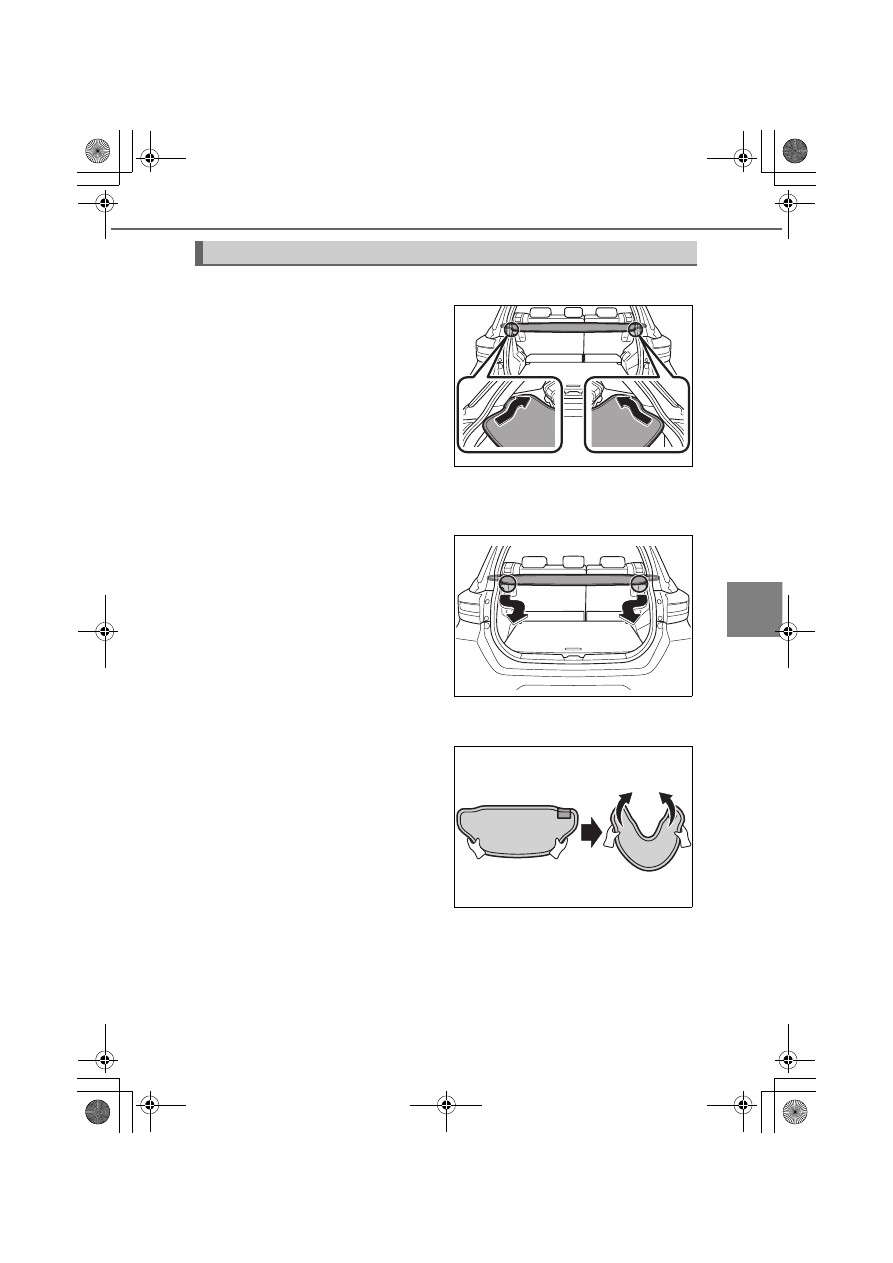
Tonneau cover

Attaching the tonneau cover

Insert the tonneau cover along the

groove

Make sure that both ends of the ton-

neau cover are securely inserted into

the grooves.

Open and close the back door and

make sure that the tonneau cover will

not interfere with the back door.

Check to see if activation of the rear

seat belts works without problems.

Removing the tonneau cover

Hold the both ends and take it off

along the groove

Storing the tonneau cover

a

Hold it as shown in the figure,

and move both ends towards the

center just like holding it in half.

KBRO540301TN

KBRO540302TN

KBRO540303TN

274

5-4. Storage features

b

Hold it in the order of 

a

 and 

b

.

Keep the tag (illustration of storage

guide) to face upper right.

c

Secure it with the hook and loop

strips.

If you do not secure it with the hook

and loop strips, the tonneau cover may

open suddenly.

How to extend the tonneau cover

Remove the hook and loop strips,

and then hold it with your both

hands as shown in the figure and

extend it slowly.

WARNING

Do not place anything on the package tray. It may block driver’s vision or dam-
age the package tray.

Make sure that both ends of the tonneau cover are securely inserted into the
groove parts. If they are not, it could cause the tonneau cover to fall off and

break, leading to damage to the vehicle.

1

2

KBRO540304TN

KBRO540305TN

KBRO540306TN

275

5-4. Storage features

Inter

ior f
eatur
es

5

NOTICE

When removing the tonneau cover,
do not hold the front part. Doing so

could make the tonneau cover to be

deformed.

Remove the tonneau cover from the vehicle when you place a tall load in the
luggage compartment.

KBRO540307TN

276

5-5. Using the other interior features

Other interior features

Sun visors

a

To set the visor in the forward

position, flip it down

b

To set the visor in the side posi-

tion, flip down, unhook, and

swing it to the side

Vanity mirror

Slide the cover

Ticket holder

WARNING

Do not put anything between the sun visor and the ceiling. There is a danger
that items may fall out when the vehicle starts off.

Do not put anything other than items that are intended to be used in the sun visor
ticket holder. There is a danger that items may fall out when the vehicle starts off.

Do not use the vanity mirror while driving. Doing so may lead to an unforeseen
accident.

1

2

KBRO550101E

Hook

KBRO550102E

KBRO550106E

277

5-5. Using the other interior features

Inter

ior f
eatur
es

5

Power outlet

It is used as a power source for electrical appliances with less than 12

VDC/10 A (power consumption of 120 W).
Open the lid to use it

Operating conditions

When the engine switch is “ACC” or “ON”

When turning the engine switch to “OFF”

Remove rechargeable electrical appliances such as mobile batteries. If left con-

nected, the engine switch may not be able to be properly turned to “OFF”.

NOTICE

Electric capacity

The maximum current is 10 A at 12 VDC (Power consumption of up to 120 W).

Do not use any electric appliance using more than the maximum capacity. The

fuses may blow if an electric appliance using more than the maximum electri-

cal capacity is used.

To prevent a short circuit and damage

Close the lid when not in use in order not to let foreign matter get inside or liq-

uid splash on it.

To prevent battery discharge

Do not use the power outlet with the engine stopped.

Even after the engine is running, do not use it for a long time while idling.

KBRO550103E

278

5-5. Using the other interior features

: If equipped

USB ports (For charging)

They are used as power sources for devices with a power consumption of

up to 10.5 W (5 VDC/2.1 A).
They are for charging only and not designed for data transfer or other

purposes.
Depending on the device to be used, charging may not be performed

properly. Before use, also refer to the manual included with the device.

a

Open the lid

Front (Type A)

Front (Type B)

Rear

b

Insert the cable into the port in

the correct direction as far as it

goes

Secure the device and cable where

they will not obstruct driving.

Front (Type B)

KBRO550104E

KBRO550109E

KBRO550105E

KBRO550110E

279

5-5. Using the other interior features

Inter

ior f
eatur
es

5

c

After use, make sure to remove the cable

Check that the lids are closed.

If charging stops temporarily when the engine restarts, the battery may be
deteriorated. In that case, contact your Toyota dealer.

Depending on the devices connected, charging may occasionally be sus-
pended and then start again. This is not a malfunction.

Operating conditions

When the engine switch is “ACC” or “ON”

Situations where the USB ports may not work properly

If a device requiring more than the maximum rating is connected

Charging may not be possible due to protection features.

Even if charging starts, it may take long time to be completed.

If the temperature inside the vehicle is high, such as immediately after the
vehicle has been parked in the hot sun

By using the air conditioning system or other means, ventilate the vehicle

and decrease the temperature inside it. After a while, start charging.

If charging is performed in a high temperature environment, it may be

automatically stopped by the temperature sensor.

WARNING

Inserting fingers or foreign matter such as metals and liquid into the USB
ports may cause damage, a short circuit, or electric shock.

Be careful not to trip over the cables connected. This may cause damage to the
device or injury due to falling.

NOTICE

Do not apply strong impact or force.

To prevent battery discharge

Do not use the USB ports for a long time with the engine stopped.

Even when the ports are used while driving, remove the cables when they
are no longer in use.

280

5-5. Using the other interior features

: If equipped

USB ports (for communication)

Use this port to connect your device

with the display audio pairable with

smart phones.
For details, refer to the instruction

manual included with the display

audio pairable with smart phones.

WARNING

Inserting fingers or foreign matter such as metals and liquid into the USB
ports may cause damage, a short circuit, or electric shock.

Be careful not to trip over the cables connected. This may cause damage to the
device or injury due to falling.

NOTICE

Do not apply strong impact or force.

To prevent battery discharge

Do not use the USB ports for a long time with the engine stopped.

Remove your cables from the ports if they are no longer in use, even when
the ports are used while driving.

KBRO550111E

281

5-5. Using the other interior features

Inter

ior f
eatur
es

5

Retractable assist grips

Use the retractable assist grips

attached to the ceiling to support

your body while sitting on the seat

while the vehicle is moving.

WARNING

Do not use the assist grip when getting in or out of the vehicle or rising from

your seat.
The retractable assist grip may be damaged, and you may fall and be injured.

NOTICE

To prevent damage, do not place heavy objects on the retractable assist grips or

apply excessive load.

KBRO550108E

283

6

Maintenance and care

6-1. Maintenance and care

Cleaning and protecting the 

vehicle exterior........................ 284

Cleaning and protecting the 

vehicle interior......................... 289

6-2. Maintenance

Maintenance requirements .... 292
Scheduled maintenance.......... 294
General maintenance............... 306

6-3. Do-it-yourself maintenance

Do-it-yourself service 

precautions.............................. 309

Hood ............................................ 311
Floor jack ..................................... 314
Engine compartment ............... 315
Tires.............................................. 327
Tire pressure .............................. 334
Wheels ......................................... 336
Replacing the air conditioning 

filter............................................ 338

Replacing the wiper rubbers ... 340
Replacing the key battery........ 344
Checking and replacing 

fuses .......................................... 348

Replacing light bulbs ................ 352

284

: If equipped

6-1. Maintenance and care

Cleaning and protecting the vehicle exterior

Perform the following to clean and protect the vehicle:

Working from top to bottom, liberally apply water to the vehicle body,

wheel wells and underside of the vehicle to remove any dirt and dust

Wash the vehicle body using a sponge or soft cloth, such as a chamois

When heavily soiled, use car wash soap and rinse thoroughly with water

Wipe away any water

Wax the vehicle when the water repellency deteriorates

If water does not bead on a clean surface even after removing the dirt on body sur-

face, apply wax when the vehicle body is cooled down (when it becomes approxi-

mately below the body temperature)

Handling of the pole antenna

The antenna can be removed or retracted when washing the vehicle.

a

Remove

b

Attach

c

Fold

To listen to the radio, pull out the

antenna as is appropriate.

Automatic car washes

Fold the outside rear view mirrors before a car wash.
Start washing from the front of the vehicle. Make sure to extend the outside

rear view mirrors before driving.

Brushes used in automatic car washes may scratch the vehicle surface and
harm your vehicle’s paint.

Depending on the car wash, the vehicle gets scratched or damaged, or it
may not be possible to wash the car, as the rear spoiler gets stuck.

High pressure car washes

As water may enter the cabin, do not bring the nozzle tip near the gaps around

the doors or perimeter of the windows, or spray these areas continuously.

1

2

3

3

KBRO610101E

285

6-1. Maintenance and care

Mai
ntenance and car

e

6

Water splashed over the vehicle during car wash, etc. (vehicles with key-
free system)

If water splashes on the door handle switch, the doors may get locked and

unlocked repeatedly while the electronic key is located within the operating

range. If that happens, perform the procedures listed below. (Without opening

or closing the doors, the unlocked doors will be automatically locked approxi-

mately after 30 seconds)

Place the key at least 3 m (9.8 ft.) away from the vehicle (beware of theft)

Disabling the key-free system activation by setting the key to the battery-sav-
ing mode (

P. 125)

When using detergent or wax

Carefully read the instructions for the detergent or wax you are using and
clean the vehicle correctly.

Do not use wax on unpainted plastic parts. If wax adheres, the part may
become white or blotchy.

Wheels and wheel ornaments

Remove any dirt immediately by using a neutral detergent.

Wash detergent off with water immediately after use.

To protect the paint from damage, make sure to observe the following pre-
cautions.

Do not use acid, alkaline or abrasive detergent

Do not use hard brushes

Do not use detergent on the wheels when they are hot, such as after driv-

ing or parking in hot weather

Do not allow hot water to splash directly on the wheels, for example, with
steam cleaning, as the wheels may lose their luster.

WARNING

When washing the vehicle

Do not apply water to the inside of the engine compartment.
If water splash on the electrical components or the like, vehicle fire may

result.

Be careful not to injure your hands when washing around the underside of
the vehicle and around the wheels.

286

6-1. Maintenance and care

WARNING

: If equipped

Exhaust pipes

Exhaust gases cause the exhaust pipes to become quite hot. When washing

the vehicle, be careful not to touch the hot exhaust pipes until they have

cooled sufficiently. Doing so may cause burns.

Precautions regarding the headlight lens

Do not touch the headlight lens when turning on the light and immediately

after turning off the light. The headlight lens become hot and may cause

burns.

Blind Spot Monitor

Scratches on the rear bumper paint may prevent the system from working

normally. Contact your Toyota dealer.

Waxing the aluminum wheels

Be careful not to have wax attached to the seat of the nut. It could loosen the

nut and cause the tire to come off, which may lead to an unforeseen accident.

It may also lead to excessive tightening, causing the nuts and bolts to break or

the wheels to get damaged.

NOTICE

To prevent paint deterioration and corrosion on the body and components 
(wheels, etc.)

Wash the vehicle immediately in the following cases:

After driving near the sea coast

After driving on roads where the antifreezing agents are spread on

If coal tar or tree sap is present on the paint surface

If dead insects, insect droppings or bird droppings are present on the

paint surface

After driving in an area contaminated with soot, oily smoke, mine dust, iron

powder or chemical substances

If the vehicle becomes heavily soiled with dust or mud

If any organic solvent such as benzene or gasoline is spilled on the paint

surface

If the paint is chipped or scratched, have it repaired immediately.

To prevent the wheels from corroding, remove any dirt and store in a place
with low humidity when storing the wheels.

287

6-1. Maintenance and care

NOTICE

: If equipped

Mai
ntenance and car

e

6

Cleaning the exterior lights

Wash carefully. Do not use any organic solvent or scrub with a hard brush.
This may damage the surfaces of the lights.

Do not apply wax to the surfaces of the lights.
Wax may cause damage to the lenses.

To prevent damage to the outside rear view mirrors

When using an automatic car wash, fold the outside rear view mirrors.

Handling of the pole antenna

When handling the antenna, do not use excessive force. It may lead to defor-

mation of the body or damage to the antenna.

To prevent damage to the pole antenna

Retract the antenna if it touches the garage ceiling, etc.

Remove the antenna in the following cases

When covering the vehicle with a car cover

When using an automatic car wash

When parking the vehicle for a long time during snowfall

Removing the pole antenna

Make sure that the antenna is installed to the vehicle when driving normally.

Be careful not to misplace the antenna when removing it for using an auto-
matic car wash, etc. Replace the antenna on your vehicle before resuming

driving.

Precautions when washing the vehicle

When washing the vehicle, do not press hard, such as by applying weight.
The vehicle body may be dented.

Check that the fuel filler door is closed. High water pressure can cause the
fuel filler door to open vigorously and damage the vehicle body and fuel filler

door.

Washing the vehicle with hot water may damage plastic parts.

When you wash the car with a machine using steam, keep the steam away
from the sonar area. The steam may cause the system to malfunction.

Do not use detergents or waxes containing abrasives (compounds).

When using an automatic car wash

Set the air conditioning system to “recirculated air mode”. Water may get

inside the vehicle and cause a malfunction.

288

6-1. Maintenance and care

NOTICE

: If equipped

When using a high pressure car wash

Do not splash water directly to the cameras

 or their surrounding area using

a high-pressure washer during a car wash. The high water pressure adds

stress and may prevent the equipment from working properly.

Do not bring the nozzle tip close to the coupling parts, boots (rubber or resin
covers) and connectors of the following parts.
The parts may be damaged if they come into contact with high pressure

water.

Drive system parts

Steering parts

Suspension parts

Brake parts

Resin parts, such as moldings and bumpers, may be deformed and dam-
aged, so keep the cleaning nozzle at least 30 cm (11.9 in.) away from the

vehicle body. Also, do not continuously spray water in the same place.

Do not spray the lower part of the windshield continuously. If water enters
the air conditioning system intake located there, the air conditioning system

may not operate correctly.

289

6-1. Maintenance and care

Mai
ntenance and car

e

6

Cleaning and protecting the vehicle interior

The following procedures will help protect your vehicle’s interior and

keep it in top condition:

Protecting the vehicle interior

Remove dirt and dust using a vacuum cleaner. Wipe dirty surfaces with a

cloth dampened with cold or lukewarm water

If dirt cannot be removed, wipe it off with a soft cloth dampened with

neutral detergent diluted to approximately 1%
Wring out any excess water from the cloth and thoroughly wipe off

remaining traces of detergent and water

Cleaning the leather areas

Remove dirt and dust using a vacuum cleaner

Wipe off any excess dirt and dust with a soft cloth dampened with

diluted detergent

Use a diluted water solution of approximately 5% neutral wool detergent.

Wring out any excess water from the cloth and thoroughly wipe off all

remaining traces of detergent

Wipe the surface with a dry, soft cloth to remove any remaining mois-

ture. Allow the leather to dry in a shaded and ventilated area


Content      ..     15      16      17      18     ..