Toyota Raize (2023 year). Manual in english - page 16
 

  Index      Toyota     Toyota Raize (2023 year). Manual in english


Search            copyright infringement  


Content      ..     14      15      16      17     ..


Toyota Raize (2023 year). Manual in english - page 16


257

5-1. Using the air conditioning system and defogger

Inter

ior f
eatur
es

5

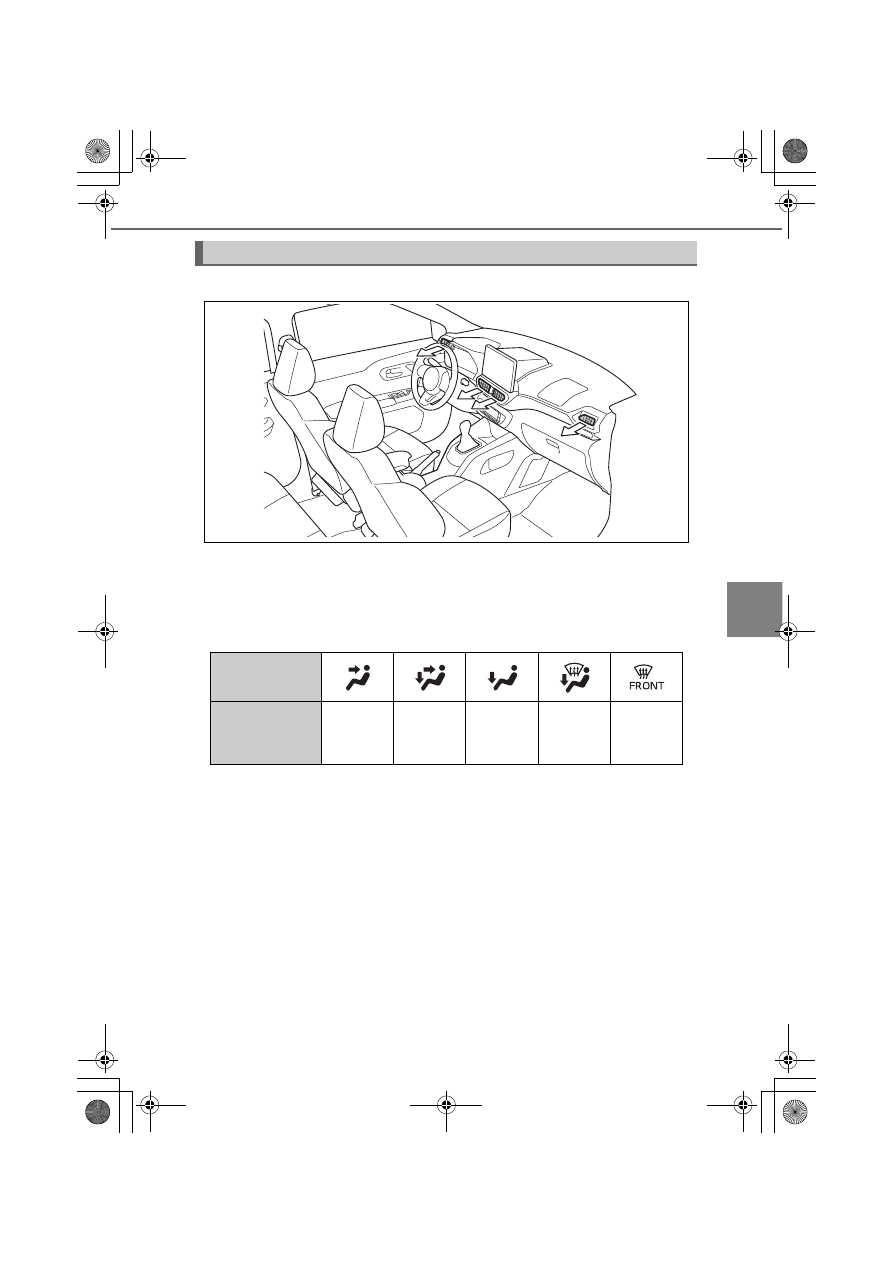
Air outlets

Airflow positions (vehicles without heaters)

Airflow positions and fan speed (vehicles with heaters)

Depending on air outlet settings, the position and speed of the airflow

changes as shown in the following table.

The fan speed depends on the air outlet.

The number in parentheses indicates that the fan speed is particularly low.

Settings

Air outlet

b
c

b
c
d

c
d

(

a

)

a
c
d

a
c

KBRO510106E

258

5-1. Using the air conditioning system and defogger

Positions of air outlets

Adjusting the airflow direction

a

Left and right air outlets

b

Central air outlet

1

1

3

4

4

3

2

2

1

KBRO510206E

1

2

KBRO510108

259

5-1. Using the air conditioning system and defogger

Inter

ior f
eatur
es

5

Operation of the automatic mode

The fan speed is adjusted automatically in accordance with the temperature

setting and ambient conditions. Therefore, immediately after 

 is

pressed, the fan may stop for a while until warm or cool air is ready to flow.

Temperature control sensors

The automatic air conditioning system has sensors so that it can control tem-

perature automatically.

a

Solar radiation sensor

Detects the amount of solar radia-

tion.

b

Inside air temperature sensor

Detects the temperature of inside

air.

If an object is placed on the solar radiation sensor, or the inside air tempera-

ture sensor is covered up with stickers or the like, these sensors may not work

properly.

Using the air conditioning system for cooling

In rare cases, it may appear that fog is blowing out of the air outlet, but this is

normal when moist air is suddenly cooled.

Fogging up of the windows

The windows will easily fog up when the humidity in the vehicle is high.

Turning 

 on will flow the dehumidified air from the outlets and

defog the windshield effectively.

If you turn 

 off, the windows may fog up more easily.

The windows may fog up if the recirculated air mode is used.

1

2

KBRO510221E

260

5-1. Using the air conditioning system and defogger

When the outside air temperature drops to around 0°C (32

)

Even if you press 

, the air conditioning system may not work.

When the air outlets are set to 

 (vehicles with heaters)

In order to deliver cool air to the driver and passengers’ faces and warm air to

their feet, depending on the set temperature, the air sent to the driver and

passengers’ feet will be warmer than the air sent to the upper body.

When driving on dusty roads

Close all windows. If dust thrown up by the vehicle is still drawn into the vehicle

after closing the windows, it is recommended that the air intake mode be set

to outside air mode and the fan speed to any setting except off.

Outside/recirculated air mode

Setting to the recirculated air mode temporarily is recommended in prevent-

ing dirty air from entering the vehicle interior and helping to cool the vehicle

when the outside air temperature is high.

Ventilation and air conditioning odors

To let fresh air in, set the air conditioning system to the outside air introduc-
tion mode.

During use, various odors from inside and outside the vehicle may enter into
and accumulate in the air conditioning system. This may then cause odors to

be emitted from the vents.

When the automatic mode is used, the fan may stop for a while immediately
after the air conditioning system starts to reduce potential odors generated

during startup. In addition, it is recommended that the air conditioning sys-

tem be set to outside air introduction mode prior to turning the vehicle off.

Air conditioning filter

P. 338

261

5-1. Using the air conditioning system and defogger

Inter

ior f
eatur
es

5

WARNING

To prevent the windshield from fogging up (vehicles with heaters)

Do not press 

 when setting the temperature of the air condition-

ing system low in extremely humid weather. Also, do not switch the air out-
lets to 

. The difference between the temperature of the outside air and

that of the windshield can cause the outer surface of the windshield to fog

up, blocking your vision.

Do not place anything on the
instrument panel which may cover

the air outlets. Otherwise, air flow

may be obstructed, preventing the

windshield defoggers from defog-

ging.

NOTICE

To prevent battery discharge

Do not leave the air conditioning system on longer than necessary when the

engine is stopped.

Air outlets (vehicles with heaters)

Be careful when adjusting the air outlets while using the air conditioning sys-

tem for heating, for the outlets will become hot.

KBRO510307E

262

: If equipped

5-2. Using the audio system

Steering switches

The audio system can be operated with the switches on the steering

wheel.
The operation may differ depending on the audio your vehicle has.

For details, refer to the included instruction manual.

Locations of the switches vary according to the vehicle grade level, etc.

WARNING

To prevent an accident

Take extra care when operating the steering switches while driving.

KBRO520101E

263

: If equipped

Inter

ior f
eatur
es

5

5-3. Using the interior light

Interior lights list

a

Front personal lights

b

Interior light

c

Tray light

d

Legroom lights

Front personal lights

Operation with the door link switch

a

Door position (Door linked)

The lights turn on or off when a door is

opened or closed.

b

Turns the lights off

1

2

3

4

4

KBRO530101E

1

2

KBRO530102E

264

5-3. Using the interior light

: If equipped

Operation with separate switches

Turns the light on or off

When the door link switch is in the door

position with the door open, the light will

not turn off even if the lens is pressed.

Interior light

a

Turns the light on

b

Turns the light off

c

Door position (Door linked)

The light turns on or off when a door is

opened or closed.

Illuminated entry system

When the switch of the light is in the door position, the lights automatically

turn on or off in the following conditions.

When approaching the vehicle with the electronic key after locking the
doors

When unlocking or locking the doors

When opening or closing the doors

When operating the engine switch

To prevent battery discharge

When the switch of the light is in the door position with the door not fully
closed, the light automatically turns off after about 10 minutes.

When the lights are left on, they automatically turn off after about 12 min-
utes.

Customizations

You can change the settings such as a period of time until the illuminated entry

system turns off. (List of customizable features: 

P. 430)

KBRO530103E

2

3

1

KBRO530104N

265

5-3. Using the interior light

Inter

ior f
eatur
es

5

NOTICE

To prevent battery discharge

Do not leave the lights on for a long time with the engine stopped.

266

: If equipped

5-4. Storage features

List of storage features

a

Open tray (

P. 270)

b

Bottle holder (

P. 268)

c

Cup holder (

P. 268)

d

Glove box (

P. 267)

e

Console box (

P. 267)

f

Front passenger’s seat under

tray

 (

P. 267)

WARNING

Do not leave glasses, lighters or spray cans in the storage spaces, as this may
cause the following when cabin temperature becomes high:

Glasses may be deformed by heat or cracked if they come into contact with

other stored items.

Lighters or spray cans may explode. If they come into contact with other

stored items, the lighter may catch fire or the spray can may release gas,

causing a fire hazard.

Do not take items in or out of the storage compartments while driving. Doing
so may lead to an accident.

When the storage compartments are not in use, keep the lids closed.
In the event of sudden braking or sudden swerving, an accident may occur

due to an occupant being struck by an open lid or the items stored inside.

3

3

4

5

1

1

2

1

1

6

2

KBRO540101E

267

5-4. Storage features

: If equipped

Inter

ior f
eatur
es

5

Glove box

Pull up the lever to open it

Console box

Pull up the knob to open it

Front passenger’s seat under tray

Lift the tray and pull it out towards

you

KBRO540102E

KBRO540107E

KBRO540103E

268

5-4. Storage features

Cup holder (Driver’s seat/front passenger’s seat)/Bottle holder

Cup holder (Driver’s seat/front passenger’s seat)

Push to open it

Push again to close it.

Bottle holder

Front doors

Rear side

Using the bottle holder

When storing a plastic bottle, close the cap.

Some plastic bottles may not fit into it depending on size or shape.

KBRO540104E

KBRO540105E

KBRO540106E

269

5-4. Storage features

Inter

ior f
eatur
es

5

WARNING

Do not put anything other than cups, cans, and plastic bottles in the cup
holder.
Other items may be thrown out of the holders in the event of an accident or

sudden braking and cause injury.

Do not put anything other than plastic bottles in the bottle holder.
Other items may be thrown out of the holders in the event of an accident or

sudden braking and cause injury.

To prevent burns, close the lid when placing hot drinks in cup holders or bottle
holders.

When using the cup holder on the driver’s seat side, storing a tall cup may
obstruct the driver’s view and lead to an accident.

When the cup holders are not in use, make sure to return them to their origi-
nal positions.
Failure to do so may result in injury. For example, the opened cup holder may

hit a person in the event of sudden braking.

NOTICE

When storing a plastic bottle, close the cap.

Do not store a paper cup or glass with juice or other drinks in the bottle holder.
If you do so, drink may spill or the glass may get broken.

Wipe off any spills immediately to prevent damage. If the liquid contacts
switches or electrical components, they may malfunction, or a vehicle fire may

occur.

To prevent damage, do not place your hand on the cup holder or step on it.

The opening and closing mechanism of the cup holder may get damaged due
to foreign matter including what is listed below.

Small objects such as toothpicks and hairpins

Cigarette ash

Liquid air freshener

270

5-4. Storage features

Open tray

Front doors

Front console tray

Center console tray

WARNING

Do not place anything that could easily roll in the tray while driving. The stored

items may be thrown out and lead to an accident.

KBRO540111E

KBRO540108E

KBRO540109E

KBRO540110E

271

5-4. Storage features

Inter

ior f
eatur
es

5

Luggage compartment features

Deck board

The height of the floor can be

adjusted by changing the set posi-

tion of the deck board.

a

Upper position

b

Lower position

Removing the deck board

Lift up the deck board and pull it

towards you to remove it.

1

2

KBRO540201N

KBRO540203N

272

5-4. Storage features

Standing the deck board up

Lift up the deck board and stand it

against the tabs.

WARNING

Operating the deck board

Do not operate it when luggage is on it.
Doing so may lead to an accident or injury such as getting your fingers caught in it.

Caution while driving

Always close the deck board.
In the event of sudden braking or sudden swerving, the stored items may be

thrown out and lead to an accident.

NOTICE

To prevent damage of the deck board

Do not stand on the deck board or apply excessive force to it.

Deck board hook

The deck board hooks can be used

to fix luggage.

WARNING

When the deck board hooks are not in use, make sure to return them to their

original positions.

KBRO540205N

Tab

KBRO540204N


Content      ..     14      15      16      17     ..