Toyota Raize (2023 year). Manual in english - page 13
 

  Index      Toyota     Toyota Raize (2023 year). Manual in english


Search            copyright infringement  


Content      ..     11      12      13      14     ..


Toyota Raize (2023 year). Manual in english - page 13


209

4-4. Refueling

D

riv

in

g

4

NOTICE

Refueling

Do not spill fuel during refueling.
Doing so may damage the vehicle, such as causing the emission control sys-

tem to operate abnormally, damaging fuel system components, or the vehi-

cle’s painted surface.

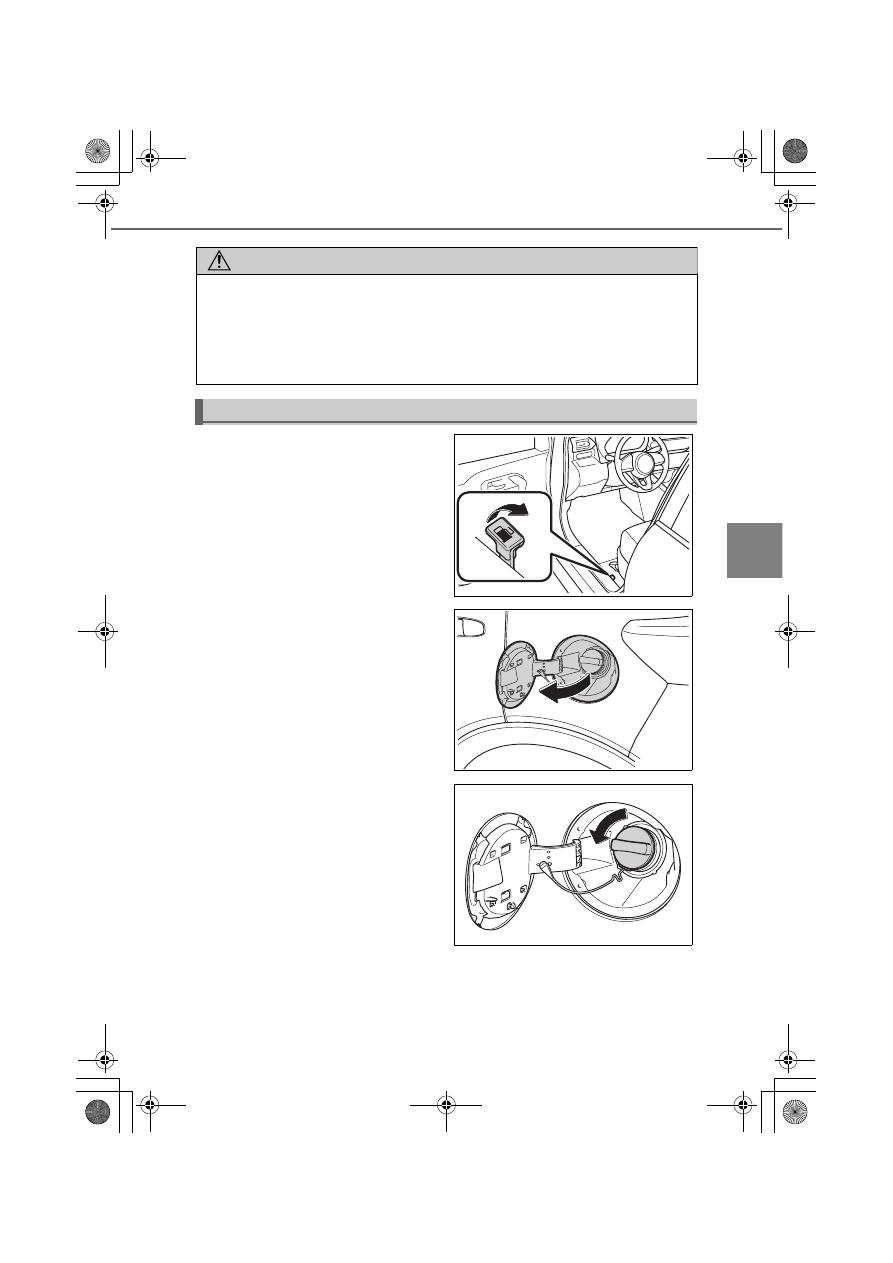
Opening the fuel tank cap

a

Pull up the opener and open the

fuel tank cap

b

Open the fuel filler door until it

no longer extends

Make sure that the fuel filler door will

not close by itself.

c

Turn the fuel tank cap slowly to

remove it

KBRO440101E

KBRO440102N

KBRO440105N

210

4-4. Refueling

d

Put the cap into the hanger

Closing the fuel tank cap

a

Turn and close the cap until you

hear a click

Once the cap is released, it will turn

slightly in the opposite direction.

b

Close the fuel filler door until you hear a click

WARNING

If the cap does not close properly

Make sure to contact your Toyota dealer.
Using a fuel tank cap that does not close properly or using a fuel tank cap

other than a genuine cap may cause a fire or other incident which may result

in death or serious injury.

KBRO440103N

KBRO440104N

211

: If equipped

D

riv

in

g

4

4-5. Using the driving support systems

BSM (Blind Spot Monitor)

Overview of Blind Spot Monitor

Blind Spot Monitor has the 2 functions.

BSM (Blind Spot Monitor) function
Assists the driver in making decisions when changing lanes.

RCTA (Rear Cross Traffic Alert) function
Assists the driver when backing up.

These functions use the same sensors.

a

TFT color multi-information display

The BSM function or the RCTA function can be switched ON and OFF.

b

Outside rear view mirror indicators

Installed on the outside rear view mirrors. When they detect a vehicle approaching

from behind, they light up or start flashing.
BSM function: When a vehicle is detected in the blind spot area of the outside rear

view mirrors or when a vehicle rapidly approaching into the blind spot area is

detected from the behind, it lights up the outside rear view mirror indicator of the

side that detected the vehicle. When you have moved the turn signal lever to the

side where the vehicle is detected, the outside rear view mirror indicators start

flashing.
RCTA function: When a vehicle approaching from the right or left rear end of your

vehicle is detected, both of the outside rear view mirror indicators start flashing.

c

BSM OFF indicator/RCTA OFF indicator

When you turn off the BSM function, the BSM OFF indicator lights up.
When you turn off the RCTA function, the RCTA OFF indicator lights up.

4

3

2

2

1

KBRO460501E

212

4-5. Using the driving support systems

d

Buzzer

BSM buzzer: When you have moved the turn signal lever to the side where the vehi-

cle is detected, the buzzer will sound.
RCTA Buzzer: When a vehicle approaching from the right or left rear end of your

vehicle is detected, the buzzer will sound.

WARNING

To use the BSM function safely

The driver is responsible for driving the vehicle safely. It is the driver’s responsi-

bility to be aware of the situations around the vehicle and drive safely.

The BSM function is an auxiliary system designed to let the driver know of the

presence of a vehicle that has entered or is rapidly approaching toward the

blind spot area of the outside rear view mirrors. Since this system alone is not

sufficient for determining the feasibility of changing lanes, overly relying on the

system could lead to an unforeseen accident, resulting in serious injury or

death.

This system does not work effectively depending on the circumstances. The

driver is responsible for checking the safety around the vehicle by using his/

her own eyes and the mirrors.

To use the RCTA function safely

The driver is responsible for driving the vehicle safely. It is the driver’s responsi-

bility to be aware of the situations around the vehicle and drive safely.

The RCTA function is an auxiliary system designed to let the driver know of the

presence of a vehicle that is approaching from the right or left rear of the vehi-

cle.

Even with the RCTA function enabled, this system does not work effectively

depending on the circumstances. The driver is responsible for checking the

safety around the vehicle by using his/her own eyes.

Overly relying on the system could lead to an unforeseen accident, resulting in

serious injury or death.

213

4-5. Using the driving support systems

D

riv

in

g

4

How to set up

Go to the “Settings” menu on the TFT color multi-information display, you

can change the settings of BSM function/RCTA function ON (enabled)/OFF

(disabled). (

P. 109)

Visibility of the outside rear view mirror indicators

It may be difficult to see if the outside rear view mirror indicators are lit or
flashing in the following cases:

Under strong sunlight

The outside rear view mirrors are covered with ice or snow

Buzzers

It may be difficult to hear the buzzers if there is a loud noise around, such as
high volume audio.

When the TFT color multi-information display shows “BSM Radar Blocked 
Temporarily Unavailable”

It is possible that the rear bumper near the sensors is covered with ice, snow,

or mud. If you remove the ice, snow, or mud covering the rear bumper near

the sensors, the function will start working normally again.

When the TFT color multi-information display shows “BSM Temporary 
Unavailable”

If you use the function in an extremely hot or cold environment or if the bat-

tery voltage is lower or higher than the specified level, the system operation

will be temporarily stopped. If the BSM OFF indicator or the RCTA OFF indicator

remains lit for a long time, have the vehicle inspected at your Toyota dealer.

When the TFT color multi-information display shows “BSM Malfunction 
Visit Your Dealer”

It is possible that the sensors have failed or their positions or orientations are

off. Have the vehicle inspected at your Toyota dealer.

Customizations

The BSM and RCTA settings can be changed.
(List of customizable features: 

P. 430)

(The settings can be changed from the setup screen of the TFT color multi-

information display: 

P. 104)

214

4-5. Using the driving support systems

WARNING

Handling of the radar sensors

The BSM sensors are installed
inside the rear bumper, one each

on the right and left side.
For the system to work properly,

observe the precautions listed

below.

Keep the rear bumper near the sensors clean at all times.
If the rear bumper near the sensors is covered with rain, snow, ice, or dirt,

the warning display (

P. 389) will appear, and the system may stop working.

If that happens, remove the rain, snow, ice, or dirt from the rear bumper,

and drive the vehicle for a while (approx. 10 minutes) under the activation

conditions of the BSM function (

P. 216). If the warning display persists,

have the vehicle inspected at your Toyota dealer.

Avoid strong shock to the rear bumper near the sensors.
If the sensor position and orientation are off even just a little bit, they may

not be able to detect vehicles correctly, or the devices may not work as

intended.

In the following case, have the vehicle inspected at your Toyota dealer.

The sensors and the areas near the sensors received a strong impact

There is a scratch or dent on the rear bumper near the sensors, or some

of the bumper parts are missing

Do not disassemble the sensors.

Do not paste stickers or install accessories on the sensors or on the rear
bumper near the sensors.

Do not alter the sensors or the rear bumper near the sensors.

Do not paint the rear bumper any color other than an official Toyota color. 

Scratches on the rear bumper paint may prevent the system from working
normally. Contact your Toyota dealer.

KBRO460502

215

4-5. Using the driving support systems

D

riv

in

g

4

BSM function

The BSM function uses the radar sensors to detect vehicles traveling in

the next lane as described below and notifies the driver of the vehicles’

presence with the outside rear view mirror indicators and buzzers.

a

A vehicle traveling in the area not reflected in the outside rear view mir-

rors (blind spot area)

b

Vehicles rapidly approaching from behind into the area not reflected in

the outside rear view mirrors (blind spot area)

Detection range of the BSM function

The function detects a vehicle that has entered the area specified below.

a

For both sides of the vehicle, an area of approx. 3.5 m (11.5 ft.) from

approx. 0.5 m (1.6 ft.) away from the side surface

The function does not detect an area of approx. 0.5 m (1.6 ft.) from the side surface

of the vehicle toward the outside.

b

Area approx. 1 m (3.3 ft.) ahead of the rear bumper

c

Area approx. 3 m (9.8 ft.) behind the rear bumper

1

2

KBRO460503E

1

2

3

4

KBRO460504

216

4-5. Using the driving support systems

d

Area approx. between 3 m and 60 m (9.8 and 196.9 ft.) behind the rear

bumper

The greater the speed difference between your vehicle and the other vehicle, the

sooner the outside rear view mirror indicators will turn on and start flashing when

the other vehicle is located further away.

Activation conditions of the BSM function

The BSM function will be activated when all of the following conditions are sat-

isfied:

In the TFT color multi-information display settings (

P. 109), “BSM” is set to

“ON”

When the shift lever is set in other than R

When the BSM OFF indicator is off

When the vehicle speed is approx. 16 km/h (10 mph) or greater

Conditions where the BSM function detects a vehicle

The BSM function detects a vehicle that has entered the detection area in the

following situations:

When another vehicle traveling in the next lane passes your vehicle

When your vehicle passes another vehicle traveling in the next lane with a
small speed difference

When another vehicle enters the detection range while changing lanes

Conditions where the BSM function does not detect a vehicle

The BSM function may not detect vehicles that fit the following description or

non-vehicle objects:

Small motorcycles, bicycles, pedestrians, and so on

Oncoming vehicles

Still objects such as guardrails, walls, road signs, parked vehicles, and so on

A following vehicle traveling in the same lane

Other vehicle traveling in the lane that is 2 lanes away from yours

Vehicles that your vehicle has passed with a large speed difference

Vehicles in the next lane’s detection area, which is the rear side of your vehi-
cle, but not approaching your vehicle (The system determines approaching

vehicles using radar detection data.)

Vehicles in the shape that do not easily reflect radar signals (such as a low
height trailer without cargo, sports cars)

217

4-5. Using the driving support systems

D

riv

in

g

4

Situations where the BSM function may not work properly

The BSM function may not detect vehicles correctly in the following circumstances.

The sensor positions or orientations are off due to a strong impact applied

to the sensors or the surrounding areas

The sensors or the rear bumper near the sensors are covered with mud,

snow, ice, or stickers

Driving on a wet road or driving in a puddle under bad weather conditions,

such as heavy rain, snow, or fog

Several vehicles are continuously approaching in a tight space

When there is not enough distance between your vehicle and the follow-

ing vehicle

When the speed difference between your vehicle and the other vehicle in

the detection range is too large

When the speed difference between your vehicle and the other vehicle is

fluctuating

When the speed of your vehicle and the other vehicle in the detection

range is almost the same

When another vehicle continues to stay in the detection range after your

vehicle starts moving from the stopped state

When driving up and down on a series of steep slopes or driving on

dented areas of a road

When driving through a sharp curve or continuous curves, or driving in an

area with ups and downs

When the other vehicle in the next lane is too far away from your vehicle,

such as while driving in a wide lane or driving on the edge of the lane

When the vehicle has accessories such as a bicycle carrier installed in the rear side

When there is a large difference in the vehicle height of your vehicle and

the other vehicle in the detection range

Right after turning on the BSM function or the RCTA function

Right after setting the shift lever to other than R

When an extremely heavy load is stored in the luggage compartment

When a vehicle changed lanes from 2 lanes away to the next lane

The BSM function may have more unnecessary detections, especially in the
following circumstances.

The sensor positions or orientations are off due to a strong impact applied

to the sensors or the surrounding areas

When guardrails or walls have entered the detection area while the dis-

tance from the vehicle is short

When a vehicle other than that traveling in the next lane has entered the

detection range, such as while driving in a narrow lane or driving on the

edge of the lane

218

4-5. Using the driving support systems

When driving up and down on a series of steep slopes or driving on

dented areas of a road

When driving through a sharp curve or continuous curves, or driving in an

area with ups and downs

While the tires are slipping (spinning)

When there is not enough distance between your vehicle and the follow-

ing vehicle

When the vehicle has accessories such as a bicycle carrier installed in the

rear side

When the vehicle is causing rain or snow to whirl up behind

RCTA function

Activation of the RCTA function

The RCTA function uses the radar sensors to detect vehicles approaching

from the right or left rear of your vehicle and notifies the driver of the vehi-

cles’ presence with the outside rear view mirror indicators and buzzers.

a

Approaching vehicle

b

Detection range of approaching vehicles

Detection range of the RCTA function

The function detects a vehicle that has entered the area specified below.

1

2

2

1

KBRO460505

1

1

KBRO460506

219

4-5. Using the driving support systems

D

riv

in

g

4

For the vehicle traveling fast, the warning buzzer will sound at a position

further away from the vehicle.

Activation conditions of the RCTA function

The RCTA function will be activated when all of the following conditions are sat-

isfied:

In the TFT color multi-information display settings (

P. 109), “RCTA” is set to

“ON”

When the shift lever is set to R

When the RCTA OFF indicator is off

When your vehicle’s speed is approx. 8 km/h (5 mph) or less

When the approaching vehicle’s speed is approx. between 8 and 28 km/h (5
and 18 mph)

Situations where the RCTA function may not work properly

The RCTA function may not detect vehicles that fit the following description or

non-vehicle objects:

A vehicle approaching from directly behind

A vehicle backing up from the parking spot next to your vehicle

Vehicles that cannot be detected by
the sensors due to obstacles

Still objects such as guardrails, walls, road signs, parked vehicles, and so on

Small motorcycles, bicycles, pedestrians, and so on

Vehicles driving away from your vehicle

A vehicle approaching from the parking spot next to your vehicle

A vehicle approaching at high speed

Approaching vehicle’s speed

a

Warning distance (approximate)

Approx. 28 km/h (18 mph) (fast)

Approx. 20 m (65.6 ft.)

Approx. 8 km/h (5 mph) (slow)

Approx. 5.5m (18.0 ft.)

KBRO460507

220

4-5. Using the driving support systems

Situations where the RCTA function may not work properly

The RCTA function may not detect vehicles correctly in the following circumstances.

The sensor positions or orientations are off due to a strong impact applied

to the sensors or the surrounding areas

The sensors or the rear bumper near the sensors are covered with mud,

snow, ice, or stickers

Driving on a wet road or driving in a puddle under bad weather conditions,

such as heavy rain, snow, or fog

When several vehicles are passing continuously behind your vehicle or

when a vehicle is approaching from the opposite direction to the vehicle

detected first

When the vehicle is parked on a hill or an uneven road

When the vehicle has accessories such as a bicycle carrier installed in the

rear side

When the vehicle is moving backward on a steep hill with varying slopes

When the vehicle is parked diagonally

Right after turning on the RCTA function

Right after starting the engine with the RCTA function turned on

When being affected by radio wave interference from the radar sensors

installed on the vehicle parked next to your vehicle

When getting out from a sloped parking spot

When a large vehicle is parked next to your vehicle

When the vehicle is backing up at fast speed

The RCTA function may have more unnecessary detections, especially in the

following circumstances.

The sensor positions or orientations are off due to a strong impact applied

to the sensors or the surrounding areas

When another vehicle passes through the side of your vehicle

When the vehicle is traveling on a

road facing a parking lot

When metal objects (such as guardrails, walls, signs, parked vehicles) that

can easily reflect radio waves are located behind the vehicle

When the vehicle has accessories such as a bicycle carrier installed in the

rear side

When buildings or roadside walls are present in the direction to which the

vehicle is backing up

KBRO460508

221

4-5. Using the driving support systems

: If equipped

D

riv

in

g

4

Front corner sensors

/Reverse sensors

The front corner sensors and reverse sensors are the system that

uses the sonar to recognize the approximate distance between the

vehicle and the obstacle, and that notifies the driver of its presence

by the buzzer and display indicators when the vehicle speed is

approx. 10 km/h (6 mph) or less.

Sonar positions and types

a

Front sonar

The front corner sensors are used to

recognize necessary information.

b

Rear sonar

The reverse sensors are used to recog-

nize necessary information.

Switching front corner sensors and reverse sensors 

(For vehicles with front corner sensors)

Press the switch

Pressing the switch turns on the front

corner sensors or reverse sensors and

lights up the switch-on indicator.
To turn it off, press the switch again.

How to display the front corner sensors or reverse sensors

Once an obstacle is recognized, they

are displayed automatically.

a

Front corner sensor ON indicator

b

Reverse sensor ON indicator

1

2

KBRO451001E

KBRO451002E

1

1

2

2

KBRO451003E

222

4-5. Using the driving support systems

How to read the distance display

When an obstacle is recognized while all the activation conditions are sat-

isfied, the driver is notified of its presence by the buzzer and display indi-

cators.

The buzzer will sound when the parking brake is not applied.

When the distance to the obstacle becomes shorter, the buzzer and dis-

play indicators will change, as shown in the figure below.

Vehicles with multi-information display

Vehicles with TFT color multi-information display

When sonar has recognized more than one obstacle simultaneously, the

buzzer for the closest obstacle will sound.

Buzzer

Display 

indicator

Distance between sonar and obstacle

Front

Rear

A high-pitch intermit-

tent beep continues
(intermittent sound)

Approx. 60 to 45 cm 

(23 - 17 in.)

Approx. 130 to 100 cm 

(51 - 39 in.)

A high-pitch short 

beep continues

(intermittent sound)

Approx. 45 to 30 cm 

(18 - 12 in.)

Approx. 100 to 50 cm 

(39 - 20 in.)

A high-pitch long beep

(continuous sound)

Within approx. 30 cm 

(12 in.)

Within approx. 50 cm 

(20 in.)

Buzzer

Display 

indicator

Distance between sonar and obstacle

Front

Rear

A high-pitch intermit-

tent beep continues
(intermittent sound)

Approx. 60 to 45 cm 

(23 - 17 in.)

Approx. 130 to 100 cm 

(51 - 39 in.)

A high-pitch short 

beep continues

(intermittent sound)

Approx. 45 to 30 cm 

(18 - 12 in.)

Approx. 100 to 50 cm 

(39 - 20 in.)

A high-pitch long beep

(continuous sound)

Within approx. 30 cm 

(12 in.)

Within approx. 50 cm 

(20 in.)

223

4-5. Using the driving support systems

D

riv

in

g

4

Sonar’s obstacle recognition range

The recognition areas are shown in

the right figure.
However, if the obstacle is too close

to the sonar, the recognition fails.
Depending on the obstacles’ shape

and conditions, the recognition

range may become shorter, or the

recognition may fail.

Operating conditions

Front corner sensors:

When the engine switch is “ON”

When the front corner sensors/reverse sensors switch is ON

When the shift lever is set in other than P, and the vehicle speed is approx.

10 km/h or less

Reverse sensors:

When the engine switch is “ON”

Vehicles with front corner sensors: 

When the front corner sensors/reverse sensors switch is ON

When the shift lever is set in R, and the vehicle speed is approx. 10 km/h or

less

When an obstacle is recognized with all the activation conditions satisfied
and the parking brake not being applied, the buzzer will sound.

Sonar recognition capabilities

The sonar recognition range is limited to the area around the sonar on the
front side of the vehicle and the rear bumper of the vehicle.

It takes some time from when the sonar recognizes an obstacle until the
front corner sensors or reverse sensors become activated. If the vehicle gets

too close to the obstacle before the buzzers sounds, the buzzer may not

sound even when the vehicle is traveling at a slow speed.

While the audio or air conditioning system is turned on, the music or fan
noise makes the buzzer sound difficult to hear.

KBRO451004E

224

4-5. Using the driving support systems

When the high-pitch short beeps sound 3 times repeatedly and the front 
corner sensor or reverse sensor ON indicator appears at 2 front locations 

or 2 rear locations (or all 4 locations) simultaneously

The front corner sensor or reverse sensor functionality has been degraded.
When the front corner sensor or reverse sensor functionality temporarily

turns off, check if the sonar is not covered with rain, snow, ice, or dirt. Remove

those attached to it, then wait for the functionality to be restored to normal.

If the master warning light turns on at this time, it may indicate a malfunc-
tion of the system. Have the vehicle inspected at your Toyota dealer.

Vehicles with TFT color multi-information display: Depending on the condi-
tions, the warning messages as “Sonar Sensor Function Stop” and “Sonar

Sensor Malfunction Visit Your Dealer” will be displayed.

Front corner sensors and reverse sensors

In the following cases, the system may become activated even when there is

no obstacle within the operating range.

When driving an area where the road slopes suddenly change

When passing through plastic curtains or driving under flags

When water splashes or drifting snow whirls up

When passing an obstacle at close range

When using an elevator for automobiles or using a mechanical parking lot

When driving over a bump with an obstacle near the vehicle

When there is an obstacle near the side of the vehicle

When the road surface has large bumps, curbstones or protrusions, or when
the ground surface has tire tracks and holes

When entering into a tight space

During pouring rain or when water splashes over the vehicle

Bad weather (heavy rain, snowstorm, fog, etc.)

When the following is present near the vehicle: the sound of other vehicles’
horns, motorcycle engines, and air brakes of large vehicles, the devices emitting

ultrasonic waves, such as vehicle detectors, or sonar systems of other vehicles

When commercially available electrical components (such as an internally illu-
minated number plate, radio antenna) are installed near the sonar sensors

When the vehicle body has been considerably tilted

When the vehicle height has significantly changed by the load conditions, etc.

When the direction of the sonar sensors is deviated by a collision or other
causes

When the sonar sensors are covered with rain, snow, ice or dirt


Content      ..     11      12      13      14     ..