Toyota C-HR (2023 year). Manual in english - page 9
 

  Index      Toyota     Toyota C-HR (2023 year). Manual in english


Search            copyright infringement  


Content      ..     7      8      9      10     ..


Toyota C-HR (2023 year). Manual in english - page 9


163

2. Instrument cluster

2

In

st

rum

ent 
clu

st

er

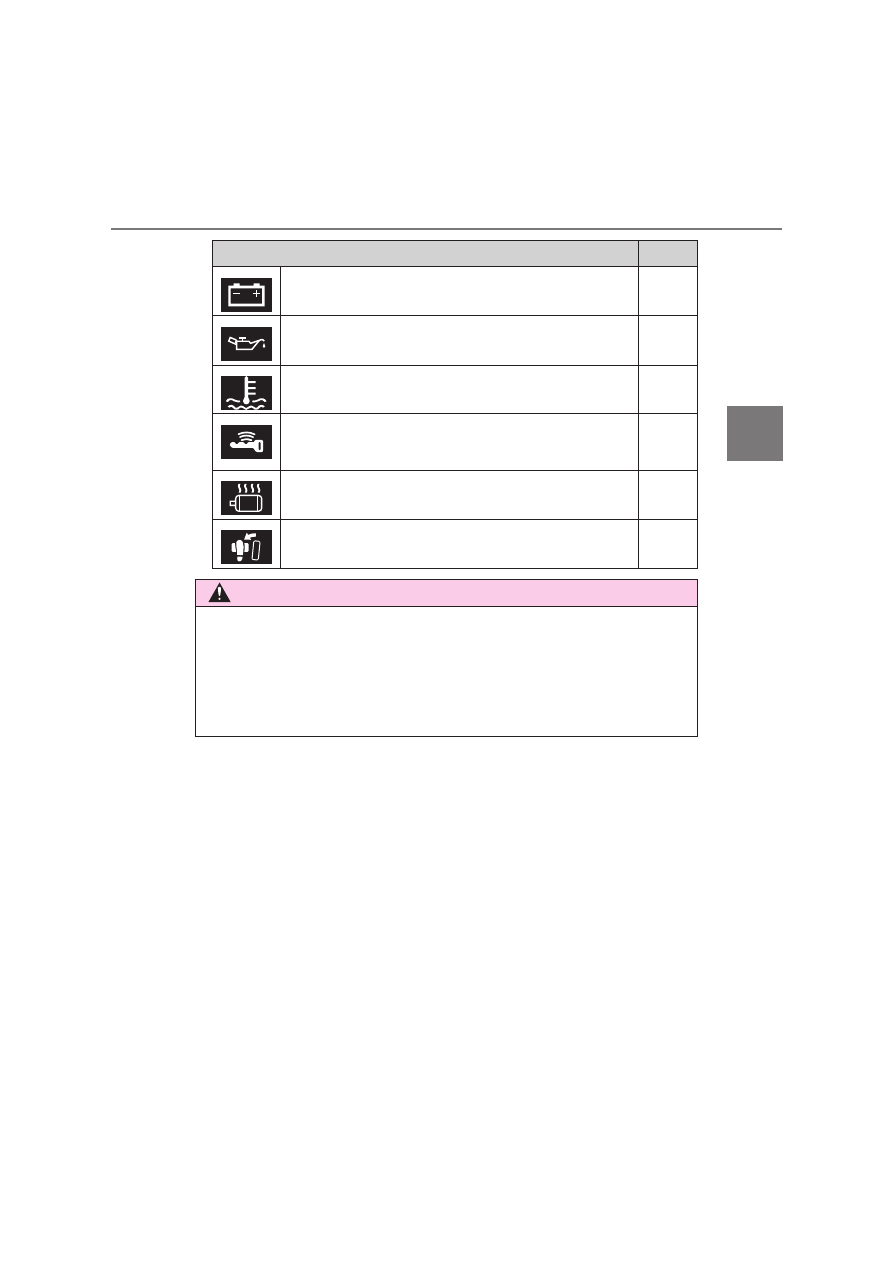
Symbols on multi-information display

Pages

Charging system warning light

P. 679

Low engine oil pressure warning light

P. 679

High engine coolant temperature warning light

P. 684

Smart entry & start system

P. 303

Hybrid system overheat warning light

P. 757

Brake Override System/Drive-Start Control

P. 685

WARNING

If a safety system warning light does not come on

Should a safety system light such as ABS and SRS airbag warning light not
come on when you start the hybrid system, this could mean that these sys-
tems are not available to help protect you in an accident, which could result
in  death  or  serious  injury.  Have  the  vehicle  inspected  by  any  authorized
Toyota retailer or Toyota authorized repairer, or any reliable repairer.

164

2. Instrument cluster

Gauges and meters

The units used on the speedometer may differ depending on the tar-
get region.

Hybrid System Indicator

Displays hybrid system output or regeneration level.

Multi-information display

Presents the driver with a variety of driving-related data. (

P. 168)

Displays warning messages in case of a malfunction. (

P. 690)

Speedometer

Displays the vehicle speed.

Fuel gauge

Displays the quantity of fuel remaining in the tank.

Outside temperature display

Displays the outside temperature within the range of -40°C (-40°F) to 50°C
(122°F).  Low  outside  temperature  indicator  comes  on  when  the  ambient
temperature is 3°C (37°F) or lower.

165

2. Instrument cluster

2

In

st

rum

ent 
clu

st

er

Odometer and trip meter display:
Displays the following items.

Odometer:
Displays the total distance the vehicle has been driven.
Trip meter:
Displays the distance the vehicle has been driven since the meter was last
reset. Trip meters A and B can be used to record and display different dis-
tances independently.

Shift position and shift range display

Displays the selected shift position or selected shift range. (

P. 313, 317)

Engine coolant temperature gauge

Displays the engine coolant temperature.

Switches the items of the odome-
ter  and  trip  meter  display  by
pressing the “TRIP” switch.

When  the  trip  meter  is  displayed,
pressing  and  holding  the  “TRIP”
switch will reset the trip meter.

Changing the display

166

2. Instrument cluster

The meters and display illuminate when

The power switch is turned to ON mode.

Hybrid System Indicator

Eco area 
Shows that the vehicle is being driven in an Eco-friendly manner.
Power area 
Shows  that  an  Eco-friendly  driving  range  is  being  exceeded  (during  full
power driving, etc.)

In the following situation, the Hybrid System Indicator does not operate.
• “READY” indicator is not illuminated.
• The shift position is in a range P, R or N.

By keeping the indicator needle within Eco area, more Eco-friendly driving
can be achieved.

Charge  area  indicates  regeneration

*

  status.  Regenerated  energy  will  be

used to charge the hybrid battery (traction battery).

*

: When  used  in  this  manual,  “regeneration”  refers  to  the  conversion  of

energy created by the movement of the vehicle into electrical energy.

Charge area 
Shows  that  energy  is  being  recovered
via the regenerative brake.
Hybrid Eco area 
Shows  that  gasoline  engine  power  is
not being used very often. 
The  gasoline  engine  will  automatically
stop  and  restart  under  various  condi-
tions.

167

2. Instrument cluster

2

In

st

rum

ent 
clu

st

er

Engine speed

On Hybrid Electric Vehicles, engine speed is precisely controlled in order to
help improve fuel efficiency and reduce exhaust emissions, etc. 
There  are  times  when  the  engine  speed  that  is  displayed  may  differ  even
when vehicle operation and driving conditions are the same.

Outside temperature display

In the following situations, the correct outside temperature may not be dis-
played, or the display may take longer than normal to change.
• When stopped, or driving at low speeds (less than 25 km/h [16 mph])
• When  the outside  temperature has changed suddenly (at  the entrance/

exit of a garage, tunnel, etc.)

When “--” is displayed, the system may be malfunctioning. 
Take  your  vehicle  to  any  authorized  Toyota  retailer  or  Toyota  authorized
repairer, or any reliable repairer.

Adjusting the clock (if equipped)

The clocks can be adjusted on the multimedia system screen. 
Refer to “Navigation and multimedia system Owner’s manual” or “Multimedia
owner’s manual”.

NOTICE

To prevent damage to the engine and its components

The engine may be overheating if the engine coolant temperature gauge is
in  the  red  zone  (“H”).  In  this  case,  immediately  stop  the  vehicle  in  a  safe
place, and check the engine after it has cooled completely. (

P. 755)

168

2. Instrument cluster

Multi-information display

The multi-information display presents the driver with a variety of vehi-
cle data.

Menu icons
Displays  the  following  informa-
tion  when  an  icon  is  selected.
(

P. 169)

Some of the information may be
displayed 

automatically

depending on the situation.

Drive information

Select to display various drive data. (

P. 169)

Navigation system-linked display (if equipped)

Select to display the following navigation system-linked information.

• Route guidance
• Compass display (north-up display/heading-up display)

Audio system-linked display (if equipped)

Select to enable selection of an audio source or track on the meter
using the meter control switches.

Driving assist system information (if equipped)

Select to display the operational status of the following systems: 

• LTA (Lane Tracing Assist) (

P. 385)

• Dynamic radar cruise control with full-speed range (

P. 408)

• RSA (Road Sign Assist) (

P. 400)

Warning message display

Select to display warning messages and measures to be taken if a
malfunction is detected. (

P. 690)

Display contents

169

2. Instrument cluster

2

In

st

rum

ent 
clu

st

er

Settings display

Select  to  change  the  meter  display  settings  and  the  operation  set-
tings of some vehicle functions. (

P. 171)

The  multi-information  display  is
operated  using  the  meter  control
switches.

Return to the previous screen
Enter/set
Select an item/change pages

 Current fuel consumption (zone display/numerical display)

*

1

Displays the current rate of fuel consumption.

Average  fuel  consumption  (

  after  reset

*

2

/

  after  start/

 after refuel)

*

1

Displays  the  average fuel  consumption  since the  function  was reset,  the
hybrid system was on, and the vehicle was refueled, respectively
Use the displayed average fuel consumption as a reference.

Average vehicle speed (

 after reset

*

2

/

 after start)

*

1

Displays the average vehicle speed since the function was reset and the
hybrid system was on, respectively

Elapsed time (

 after reset

*

2

/

 after start)

*

1

Displays the elapsed time since the function was reset and the hybrid sys-
tem was on, respectively

Operating the meter control switches

Drive information

170

2. Instrument cluster

Distance (

 driving range/

 after start)

*

1

Displays  the  estimated  maximum  distance  that  can  be  driven  with  the
quantity of fuel remaining and the distance driven after the hybrid system
was on, respectively

• This distance is computed based on your average fuel consumption. As

a result, the actual distance that can be driven may differ from that dis-
played.

• When only a small amount of fuel is added to the tank, the display may

not be updated. 
When refueling, turn the power switch off. If the vehicle is refueled with-
out turning the power switch off, the display may not be updated.

Energy monitor

P. 177

Speedometer

Displays the vehicle speed.

G Monitor

P. 175

EV drive time ratio

Displays the ratio made up of the EV drive time. (

P. 174)

Display off

A blank screen is displayed.

*

1

: Can be registered to Drive information 1 and 2. (

P. 171)

*

2

: Resetting procedures:

• Select a function to be reset using the meter control switches and then

press and hold 

 to reset.

• If there is more than one function that can be reset, check boxes will be

displayed next to those functions.

171

2. Instrument cluster

2

In

st

rum

ent 
clu

st

er

The settings of the following items can be changed, refer to P. 779.

For  functions  that  can  be  enabled  or  disabled,  the  function  switches
between on and off each time 

 is pressed.

 LTA (Lane Tracing Assist) (

P. 385)

*

1

Select to set up the following items.

• Lane centering function on/off
• Alert sensitivity
• Sway Alert on/off
• Sway sensitivity

 PCS (Pre-Collision System) (

P. 367)

*

1

Select to set up the following items.

• PCS on/off
• PCS sensitivity

 BSM (Blind Spot Monitor) (

P. 435)

*

1

Select to set up the following items. 

• BSM function on/off
• BSM Sensitivity
• BSM Brightness
• RCTA function on/off

 Toyota parking assist-sensor (

P. 454)

*

1

Select to enable/disable the Toyota parking assist-sensor.

 PKSB (Parking Support Brake System) (

P. 475)

*

1

Select to enable/disable the Parking Support Brake function.

Settings display

172

2. Instrument cluster

 RSA (Road Sign Assist) (

P. 400, 420)

*

1

Select to set up the following items.

• RSA on/off
• Radar Cruise Control with Road Sign Assist on/off

Driving mode select (

P. 430)

 Instrument cluster light (

P. 175)

Select to adjust brightness of the instrument cluster light.

Vehicle Settings
Select the menu to set up the following items.

 Toyota parking assist-sensor setup (

P. 785)

*

1

Select  to  change  the  Toyota  parking  assist-sensor  buzzer  vol-
ume.

 Toyota parking assist-sensor and RCTA setup

(

P. 785)

*

1

Select  to  change  the  Toyota  parking  assist-sensor  and  RCTA
buzzer volume.

 RSA (Road Sign Assist) setup (

P. 787)

*

1

Select to set up RSA (Road Sign Assist).

 (Tire pressure warning system) setup (

P. 617)

Select to initialize the tire pressure warning system.

173

2. Instrument cluster

2

In

st

rum

ent 
clu

st

er

Meter settings
Select the menu to set up the following items.

• Language

Select to change the language on the display.

• Units

Select to change the unit of measure for fuel consumption.

 (EV indicator) setup

Select to activate/deactivate the EV indicator on/off.

• Drive information 1 and 2

Select to select up to 2 items that will be displayed on a Drive informa-
tion screen, up to 2 Drive information screens can be set.

• Pop-up display

Select to set the pop-up displays

*

2

, which may appear in some situa-

tions, on/off.

• Default settings

Registered or changed meter settings will be deleted or returned to their
default setting.

*

1

: If equipped

*

2

: Route  guidance  display  of  the  navigation  system-linked  system  (if

equipped) and incoming call display of the hands-free phone system (if
equipped).

174

2. Instrument cluster

Setting items

“Meter  Settings”  and  “Vehicle  Settings”  setting  items  are  not  selectable
during driving and cannot be operated.
Also, the settings screen is temporarily canceled in the following situations.
• A warning message is displayed.
• The vehicle starts off.

Settings for functions not equipped to the vehicle are not displayed.

When a function is turned off, the related settings for that function are not
selectable.

Pop-up display

In some situations, such as when a switch operation is performed, a pop-up
display will be temporarily displayed on the multi-information display. 
The pop-up display function can be set on/off.

Liquid crystal display

Small  spots  or  light  spots  may  appear  on  the  display. This  phenomenon  is
characteristic of liquid crystal displays, and there is no problem continuing to
use the display.

When disconnecting and reconnecting 12-volt battery terminals

The drive information will be reset.

EV drive time ratio

Displays the ratio made up of the EV drive
time within the overall drive time

Overall drive time
EV drive time ratio

175

2. Instrument cluster

2

In

st

rum

ent 
clu

st

er

Meter brightness adjustment

The meter brightness level can be adjusted when the tail lights are on. How-
ever,  when  the  surroundings  are  bright  (daytime,  etc.),  the  brightness  level
may not be adjustable.

G Monitor

Arrow guide navigation (vehicles with navigation system)

The following item is displayed.

G-force display
Displays the current G-force state.

The arrow guide navigation appears only
while  route  guidance  of  the  navigation
system  is  being  performed.  When  a  turn
approaches, the distance to the turn and
the turn direction are displayed.

Turn direction
The image shown may differ from the
actual intersection.
Distance to the next turn

176

2. Instrument cluster

Ending display

When the power switch is turned off, each of the following will be displayed
on  the  multi-information  display,  and  will  extinguish  after  approximately  30
seconds.

Elapsed time/EV drive time ratio

Distance

Average fuel consumption

WARNING

Cautions during setting up the display

As the engine needs to be running during setting up the display, ensure that
the vehicle is parked in a place with adequate ventilation. In a closed area
such as a garage, exhaust gases including harmful carbon monoxide (CO)
may  collect  and  enter  the  vehicle.  This  may  lead  to  death  or  a  serious
health hazard.

NOTICE

During setting up the display

To prevent 12-volt battery discharge, ensure that the hybrid system is oper-
ating while setting up the display features.

177

2

2. Instrument cluster

In

st

rum

ent 
clu

st

er

Energy monitor/consumption screen

Multi-information display
Navigation/multimedia  system
screen (if equipped)
Meter control switches

The  energy  monitor  can  be  used  to  check  the  vehicle  drive  status,
hybrid system operation status and energy regeneration status.

Display procedure

Multi-information display

Press “<” or “>” of the meter control switches and select 

, and

then press “

” or “

” to select the energy monitor display.

Navigation/multimedia  system  screen  (type  A)  (vehicles  without
navigation system)
Press the “MENU” button.
Select “Info” on the “Menu” screen.

If a screen other than energy monitor is displayed, select “Energy”.

Navigation/multimedia system  screen (type A) (vehicles  with navi-
gation system)
Press the “MENU” button.
Select “Info” on the “Menu” screen.
Select “ECO” on the “Information” screen.

If a screen other than energy monitor is displayed, select “Energy”.

You can view the status of your vehicle on the multi-information
display  and  the  navigation/multimedia  system  screen  (if
equipped).

Energy monitor

1
2

1
2
3

178

2. Instrument cluster

Navigation/multimedia system screen (type B)

Select 

 on the main menu.

Select “Energy flow”.

Reading the display

The arrows will appear in accordance with the energy flow. When
there is no energy flow, arrows will not be displayed.

The color of the arrows will change as follows
Green or blue: When the hybrid battery (traction battery) is regenerated
or charged.
Yellow: When the hybrid battery (traction battery) is in use.
Red: When the gasoline engine is in use.

Multi-information display

Gasoline engine
Hybrid battery (traction battery)
Tires

The  image  shows  all  the  arrows  as  an  example.  The  actual  display  will
vary depending on conditions.

Navigation/multimedia system screen (type A) (if equipped)

Gasoline engine
Electric motor (traction motor)
Hybrid battery (traction battery)
Front tires
Rear tires

The  image  shows  all  the  arrows  as  an  example.  The  actual  display  will
vary depending on conditions.

1

2


Content      ..     7      8      9      10     ..