Toyota Corolla Hybrid (2023 year). Manual in english - page 16
 

  Index      Toyota     Toyota Corolla Hybrid (2023 year). Manual in english


Search            copyright infringement  


Content      ..     14      15      16      17     ..


Toyota Corolla Hybrid (2023 year). Manual in english - page 16


257

4-5. Using the driving support systems

4

Dr

iv

ing

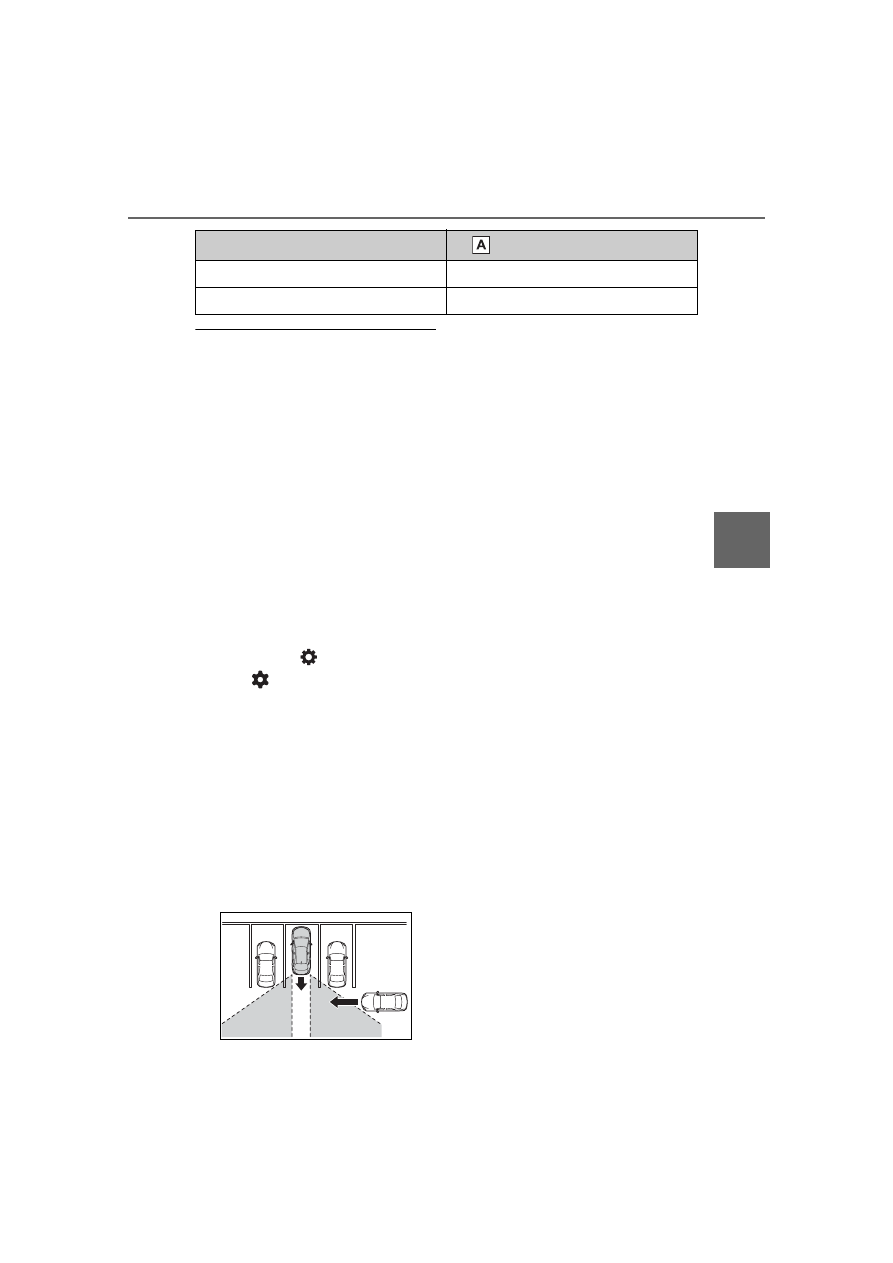
The RCTA function is opera-

tional when

The RCTA function operates when 

all of the following conditions are 

met:

The power switch is in ON.

The RCTA function is on.

The shift lever is in R.

The vehicle speed is less than 

approximately 9 mph (15 km/h).

The approaching vehicle speed is 

between approximately 5 mph (8 

km/h) and 34 mph (56 km/h).

Setting the buzzer volume

The buzzer volume can be adjusted 

on the multi-information display.
The volume of the RCTA buzzer can 
be adjusted on 

 (4.2-inch dis-

play) or 

 (7-inch display) of the 

multi-information display. (

P.442)

Conditions under which the 

system will not detect a vehicle

The RCTA function is not designed 

to detect the following types of vehi-

cles and/or objects:

Vehicles approaching from directly 

behind

Vehicles backing up in a parking 

space next to your vehicle

Vehicles that the sensors cannot 

detect due to obstructions

Guardrails, walls, signs, parked 

vehicles and similar stationary 
objects

*

Small motorcycles, bicycles, 
pedestrians, etc.

*

Vehicles moving away from your 

vehicle

Vehicles approaching from the 

parking spaces next to your vehi-
cle

*

The distance between the sensor 

and approaching vehicle gets too 

close

*

: Depending on the conditions, 

detection of a vehicle and/or 
object may occur.

Situations in which the system 

may not operate properly

The RCTA function may not detect 

vehicles correctly in the following 

situations:

When the sensor is misaligned 

due to a strong impact to the sen-

sor or its surrounding area

When mud, snow, ice, a sticker, 

etc., is covering the sensor or sur-

rounding area on the position 

above the rear bumper

When driving on a road surface 

that is wet with standing water 

during bad weather, such as 

heavy rain, snow, or fog

When multiple vehicles are 

approaching with only a small gap 

between each vehicle

When a vehicle is approaching at 

high speed

When equipment that may 

obstruct a sensor is installed, such 

as a towing eyelet, bumper pro-

tector (an additional trim strip, 

Approaching vehicle speed

 Approximate alert distance

34 mph (56 km/h) (fast)

131 ft. (40 m)

5 mph (8 km/h) (slow)

18 ft. (5.5 m)

258

4-5. Using the driving support systems

etc.), bicycle carrier, or snow plow

When backing up on a slope with 

a sharp change in grade

When backing out of a sharp 

angle parking spot

Immediately after the RCTA func-

tion is turned on

Immediately after the hybrid sys-

tem is started with the RCTA func-

tion on

When the sensors cannot detect a 

vehicle due to obstructions

When towing a trailer

When there is a significant differ-

ence in height between your vehi-

cle and the vehicle that enters the 

detection area

When a sensor or the area around 

a sensor is extremely hot or cold

If the suspension has been modi-

fied or tires of a size other than 

specified are installed

If the front of the vehicle is raised 

or lowered due to the carried load

When turning while backing up

When a vehicle turns into the 

detection area

Situations in which the system 

may operate even if there is no 

possibility of a collision

Instances of the RCTA function 

unnecessary detecting a vehicle 

and/or object may increase in the 

following situations:

When the parking space faces a 

street and vehicles are being 

driven on the street

When the distance between your 

vehicle and metal objects, such as 

a guardrail, wall, sign, or parked 

vehicle, which may reflect electri-

cal waves toward the rear of the 

vehicle, is short

259

4-5. Using the driving support systems

4

Dr

iv

ing

When equipment that may 

obstruct a sensor is installed, such 

as a towing eyelet, bumper pro-

tector (an additional trim strip, 

etc.), bicycle carrier, or snow plow

When a vehicle passes by the 

side of your vehicle

When a detected vehicle turns 

while approaching the vehicle

When there are spinning objects 

near your vehicle such as the fan 

of an air conditioning unit

When water is splashed or 

sprayed toward the rear bumper, 

such as from a sprinkler

Moving objects (flags, exhaust 

fumes, large rain droplets or 

snowflakes, rain water on the road 

surface, etc.)

When the distance between your 

vehicle and a guardrail, wall, etc., 

that enters the detection area is 

short

Gratings and gutters

When a sensor or the area around 

a sensor is extremely hot or cold

If the suspension has been modi-

fied or tires of a size other than 

specified are installed

If the front of the vehicle is raised 

or lowered due to the carried load

260

4-5. Using the driving support systems

*

: If equipped

Multi-information display

Turning the safe exit assist on/off.
When the system determines that 
the possibility of a collision with a 
door is high, the target door is dis-
played on the multi-information dis-
play. Also, if the door is opened 
when the outside rear view mirror 
indicator is illuminated, a buzzer 
will sound as a warning.

Outside rear view mirror indi-
cators

When a vehicle or bicycle which 
may collide with a door when 
opened is detected, the outside 
rear view mirror indicator on the 
detected side will illuminate. When 
a door on the detected side is 
opened, the outside rear view mir-
ror indicator will flash.

Driving assist information 
indicator

Illuminates when the safe exit 
assist is turned off. At this time, 
“Safe Exit Assist OFF” will be dis-
played on the multi-information dis-
play.

Outside rear view mirror indica-

tor visibility

In strong sunlight, the outside rear 

Safe Exit Assist

*

The safe exit assist is a sys-
tem that uses rear side 
radar sensors installed on 
the inner side of the rear 
bumper to help occupants 
judge if an approaching 
vehicle or bicycle may col-
lide with a door when open-
ing it or cancel opening of 
the door, to reduce the pos-
sibility of a collision.

WARNING

Cautions regarding the use of 

the system

The driver is solely responsible 

for safe driving. Always drive 

safely, taking care to observe 

your surroundings.

The safe exit assist is a supple-

mentary system that, when the 

vehicle is stopped, informs 

occupants of the existence of 

approaching vehicles and bicy-

cles. As this system alone can-

not be used to judge safety, 

over-reliance on this system 

may lead to an accident result-

ing in death or serious injury.

In certain situations, this system 

may not function to its fullest 

extent. Therefore it is necessary 

for the occupants to visually 

check for safety directly and using 

the mirrors.

System components

261

4-5. Using the driving support systems

4

Dr

iv

ing

view mirror indicator may be difficult 

to see.

Buzzer

If the volume setting of the audio 

system is high or the surrounding 

area is loud, it may be difficult to 

hear the buzzer.

Customization

Some functions can be customized. 

(

P.442)

The safe exit assist can be 
enabled/disabled on 


(4.2-inch display) or 

 (7-inch 

display) of the multi-information 
display. (

P.442)

When the safe exit assist is off, 
the driving assist information 

WARNING

To ensure the system can 

operate properly

Safe exit assist sensors are 

installed behind the left and right 

sides of the rear bumper respec-

tively. Observe the following to 

ensure the safe exit assist can 

operate correctly.

Keep the sensors and the sur-

rounding areas on the rear 

bumper clean at all times.

If a sensor or its surrounding area 
on the rear bumper is dirty or cov-
ered with snow, the Safe Exit 
Assist may not operate and a 
warning message will be dis-
played. In this situation, clear off 
the dirt or snow and drive the 
vehicle with the operation condi-
tions of the SEA function satisfied 
for approximately 10 minutes. If 
the warning message does not 
disappear, have the vehicle 
inspected by your Toyota dealer.

Do not attach accessories, 

stickers (including transparent 

stickers), aluminum tape, etc. to 

a sensor or its surrounding area 

on the rear bumper.

Do not subject a sensor or its 

surrounding area on the rear 

bumper to a strong impact.

If a sensor is moved even 

slightly off position, the system 

may malfunction and vehicles 

may not be detected correctly.

In the following situations, have 

your vehicle inspected by your 

Toyota dealer.

• A sensor or its surrounding area 

is subject to a strong impact.

• If the surrounding area of a sen-

sor is scratched or dented, or 

part of them has become dis-

connected.

Do not disassemble the sensor.

Do not modify the sensor or sur-

rounding area on the rear 

bumper.

If a sensor or the rear bumper 

needs to be removed/installed 

or replaced, contact your Toyota 

dealer.

Do not paint the rear bumper 

any color other than an official 

Toyota color.

Turning the Safe exit 
assist system ON/OFF

262

4-5. Using the driving support systems

indicator will illuminate. At this 
time, “Safe Exit Assist OFF” will 
be displayed on the multi-infor-

mation display. Each time the 
power switch is turned to ON, 
the safe exit assist is enabled.

Objects that can be detected by the Safe exit assist

When the safe exit assist detects the following vehicles or bicycles 
behind your vehicle using a rear side radar sensor, the occupants of 
the vehicle are informed through an outside rear view mirror indica-
tor, buzzer, and the multi-information display.

Vehicle or bicycle which has a high possibility of colliding with a 
door when opened

The Safe exit assist detection areas

The areas that vehicles can be detected in are outlined below.

Approximately 145 ft. (45 m) rearward from the front door

*

*

: The faster a vehicle or bicycle is approaching, the distance at which an 

outside rear view mirror indicator will illuminate or blink will become fur-
ther.

The Safe exit assist is opera-

tional when

The Safe exit assist is operational 

when all of the following conditions 

are met:

When the power switch is ON, 

less than 3 minutes have elapsed 

since the hybrid system was off, or 

less than 3 minutes have elapsed 

since a door was opened and 

someone has entered the vehicle 

263

4-5. Using the driving support systems

4

Dr

iv

ing

(the time which operation is possi-

ble may be extended if a door is 

opened and closed)

Safe exit assist is on

The vehicle is stopped.

The shift lever is in a position 

other than R.

The Safe exit assist will detect a 

vehicle when

The Safe exit assist will detect a 

vehicle present in the detection area 

in the following situations:

When the vehicle is stopped and a 

vehicle or bicycle, which is travel-

ing parallel to the vehicle, is 

approaching within the area that a 

door opens

Conditions under which the 

system will not detect a vehicle

Safe exit assist does not detect 

the following objects, vehicles, 

and bicycles:

• Vehicles or bicycles which are 

approaching slowly

*

• Vehicles or bicycles which are 

determined to have a low possibil-

ity of colliding with a door when 
opened

*

• Vehicles or bicycles which are 

approaching from directly behind

*

• Vehicles or bicycles which are 

approaching from the front

*

• Guardrails, walls, signs, parked 

vehicles, and other stationary 
objects

*

• Pedestrians, animals, etc.

*

*

: Depending on the conditions, 

detection of a vehicle and/or 
object may occur.

In situations such as the following, 

safe exit assist will not operate:

• When 3 minutes or more have 

elapsed since the engine off (the 

time which operation is possible 

may be extended if a door is 

opened and closed)

• When your vehicle is not com-

pletely stopped

Conditions under which the 

system may not function cor-

rectly

The Safe exit assist may not 

detect vehicles correctly in the fol-

lowing situations:

• When the sensor is misaligned 

due to a strong impact to the sen-

sor or its surrounding area

• When mud, snow, ice, a sticker, 

etc. is covering the sensor or sur-

rounding area on the rear bumper

• When the vehicle is stopped on a 

wet road surface, such as in a 

puddle, while in inclement 

weather, such as heavy rain, 

snow, fog, etc.

• When a vehicle or bicycle 

approaches from behind a nearby 

parked vehicle

• When an approaching vehicle or 

bicycle suddenly changes direc-

tion

• Immediately after a vehicle or 

bicycle starts moving

• When the trunk is open

• When a bicycle carrier, ramp, or 

other accessory is installed to the 

back of the vehicle

• When a parked vehicle, wall, sign, 

person or other stationary object 

is behind the vehicle

• When the vehicle is stopped at an 

angle to the road

• When a vehicle is traveling near 

an approaching vehicle or bicycle

• When an approaching vehicle or 

bicycle is traveling along a station-

ary object, such a wall or sign

• When a vehicle or bicycle is 

approaching at high speed

• When towing with the vehicle

• When stopped on a steep slope

• When stopped on a curve or at the 

exit of a curve

Instances of the Safe exit assist 

unnecessarily detecting a vehicle 

and/or object may increase in the 

following situations:

• When the sensor is misaligned 

due to a strong impact to the sen-

sor or its surrounding area

• When a vehicle or bicycle 

264

4-5. Using the driving support systems

approaches from behind your 

vehicle at an angle

• When the vehicle is stopped at an 

angle to the road

• When a vehicle or bicycle 

approaches from behind a parked 

vehicle at an angle

• When a parked vehicle, wall, sign, 

person or other stationary object 

is behind the vehicle

• When an approaching vehicle or 

bicycle suddenly changes direc-

tion

• When an approaching vehicle or 

bicycle is traveling along a station-

ary object, such a wall or sign

• When the trunk is open

• When a bicycle carrier, ramp, or 

other accessory is installed to the 

back of the vehicle

• When a vehicle or bicycle is 

approaching at high speed

• When towing with the vehicle

• When stopped on a steep slope

• When stopped on a curve or at the 

exit of a curve

Type A

Each time the switch is pressed, 
the system changes between 
Eco drive mode and normal 
mode.

Normal mode

Provides an optimal balance of fuel 
economy, quietness, and dynamic 
performance. Suitable for normal 
driving.

Eco drive mode

Helps the driver accelerate in an 
eco-friendly manner and improve 
fuel economy through moderate 
throttle characteristics and by con-
trolling the operation of the air con-
ditioning system (heating/cooling).

Driving mode select 

switch

The driving modes can be 
selected to suit driving con-
dition.

Selecting a drive mode

265

4-5. Using the driving support systems

4

Dr

iv

ing

Type B

Operate the driving mode select 
switch forward or backward to 
select the desired driving mode 
on the multi-information display.

Normal mode

Provides an optimal balance of fuel 
economy, quietness, and dynamic 
performance. Suitable for normal 
driving.

Sport mode

Controls the hybrid system to pro-
vide quick, powerful acceleration. 
Making it suitable for when agile 
driving response is desired, such 
as when driving on roads with many 
curves.

Eco drive mode

Helps the driver accelerate in an 
eco-friendly manner and improve 
fuel economy through moderate 
throttle characteristics and by con-
trolling the operation of the air con-
ditioning system (heating/cooling).

Operation of the air condition-

ing system in Eco drive mode

Eco drive mode controls the heat-

ing/cooling operations and fan 

speed of the air conditioning system 

to enhance fuel efficiency. To 

improve air conditioning perfor-

mance, perform the following opera-

tions:

Turn off eco air conditioning mode 

(

P.280)

Adjust the fan speed (

P.279)

Turn off Eco drive mode

The driving mode after turning 

the power switch off

The driving mode will not be 

changed automatically until the 

switch is pressed, even if the power 

switch is turned off.

266

4-5. Using the driving support systems

ABS (Anti-lock Brake Sys-
tem)

Helps to prevent wheel lock 
when the brakes are applied 
suddenly, or if the brakes are 
applied while driving on a slip-
pery road surface

Brake assist

Generates an increased level of 
braking force after the brake 
pedal is depressed when the 
system detects a panic stop sit-
uation

VSC (Vehicle Stability Con-
trol)

Helps the driver to control skid-
ding when swerving suddenly or 
turning on slippery road sur-
faces.

Enhanced VSC (Enhanced 
Vehicle Stability Control)

Provides cooperative control of 
the ABS, TRAC, VSC and EPS.
Helps to maintain directional 
stability when swerving on slip-
pery road surfaces by con-
trolling steering performance.

TRAC (Traction Control)

Helps to maintain drive power 
and prevent the drive wheels 
from spinning when starting the 
vehicle or accelerating on slip-
pery roads

Active Cornering Assist 
(ACA)

Helps to prevent the vehicle 
from drifting to the outer side by 
performing inner wheel brake 
control when attempting to 
accelerate while turning

Hill-start assist control

Helps to reduce the backward 
movement of the vehicle when 
starting on an uphill

EPS (Electric Power Steer-
ing)

Employs an electric motor to 
reduce the amount of effort 
needed to turn the steering 
wheel.

E-Four (Electronic 
On-Demand AWD system) 
(AWD models)

Automatically controls the drive 
system such as to front-wheel 
drive or AWD (all wheel drive) 

Driving assist systems

To keep driving safety and 
performance, the following 
systems operate automati-
cally in response to various 
driving situations. Be 
aware, however, that these 
systems are supplementary 
and should not be relied 
upon too heavily when oper-
ating the vehicle.

Summary of the driving 
assist systems

267

4-5. Using the driving support systems

4

Dr

iv

ing

according to various running 
conditions including normal driv-
ing, during cornering, on a 
uphill, when starting off, during 
acceleration, on a slippery roads 
due to snow or rain, thus con-
tributing to stable operability and 
driving stability.

The Secondary Collision 
Brake

When the SRS airbag sensor 
detects a collision and the sys-
tem operates, the brakes and 
brake lights are automatically 
controlled to reduce the vehicle 
speed and help reduce the pos-
sibility of further damage due to 
a secondary collision.

When the TRAC/VSC/ABS sys-

tems are operating

The slip indicator light will flash 

while the TRAC/VSC/ABS systems 

are operating.

Disabling the TRAC system

If the vehicle gets stuck in mud, dirt 

or snow, the TRAC system may 

reduce power from the hybrid sys-
tem to the wheels. Pressing 

 to 

turn the system off may make it eas-

ier for you to rock the vehicle in 

order to free it.
To turn the TRAC system off, quickly 
press and release 

.

The “Traction Control Turned OFF” 
will be shown on the multi-informa-
tion display.

Press 

 again to turn the system 

back on.

Type A

Type B

Turning off both TRAC and VSC 

systems

To turn the TRAC and VSC systems 
off, press and hold

 for more 

than 3 seconds while the vehicle is 

stopped.
The VSC OFF indicator light will 
come on and the “Traction Control 
Turned OFF” will be shown on the 
multi-information display.

*

Press

 again to turn the system 

back on.

*

: PCS will also be disabled (only 

Pre-Collision warning is avail-
able). The PCS warning light will 
come on and a message will be 
displayed on the multi-information 
display. (

P.217)

268

4-5. Using the driving support systems

When the message is dis-

played on the multi-information 

display showing that TRAC has 
been disabled even if 

 has 

not been pressed

TRAC is temporary deactivated. If 

the information continues to show, 

contact your Toyota dealer.

Operating conditions of 

hill-start assist control

When all of the following four condi-

tions are met, the hill-start assist 

control will operate:

The shift lever is in a position 

other than P or N (when starting 

off forward/backward on an 

upward incline)

The vehicle is stopped

The accelerator pedal is not 

depressed

The parking brake is not engaged

The power switch is in ON

Automatic system cancelation 

of hill-start assist control

The hill-start assist control will turn 

off in any of the following situations:

The shift lever is shifted to P or N

The accelerator pedal is 

depressed

The parking brake is engaged

2 seconds at maximum elapsed 

after the brake pedal is released

The power switch is in ON

Sounds and vibrations caused 

by the ABS, brake assist, VSC, 

TRAC and hill-start assist con-

trol systems

A sound may be heard from the 

engine compartment when the 

brake pedal is depressed repeat-

edly, when the hybrid system is 

started or just after the vehicle 

begins to move. This sound does 

not indicate that a malfunction has 

occurred in any of these systems.

Any of the following conditions 

may occur when the above sys-

tems are operating.

None of these indicates that a 

malfunction has occurred.

• Vibrations may be felt through the 

vehicle body and steering.

• A motor sound may be heard also 

after the vehicle comes to a stop.

• The brake pedal may pulsate 

slightly after the ABS is activated.

• The brake pedal may move down 

slightly after the ABS is activated.

Active Cornering Assist opera-

tion sounds and vibrations

When the Active Cornering Assist is 

operated, operation sounds and 

vibrations may be generated from 

the brake system, but this is not a 

malfunction.

Automatic reactivation of TRAC 

and VSC systems

After turning the TRAC and VSC 

systems off, the systems will be 

automatically re-enabled in the fol-

lowing situations:

When the power switch is turned 

off

If only the TRAC system is turned 

off, the TRAC will turn on when 

vehicle speed increases

If both the TRAC and VSC sys-

tems are turned off, automatic 

re-enabling will not occur when 

vehicle speed increases.

Operating conditions of Active 

Cornering Assist

The system operates when the fol-

lowing occurs.

TRAC/VSC can operate

The driver is attempting to accel-

erate while turning

The system detects that the vehi-

cle is drifting to the outer side

The brake pedal is released

Reduced effectiveness of the 

EPS system

The effectiveness of the EPS sys-

tem is reduced to prevent the sys-

269

4-5. Using the driving support systems

4

Dr

iv

ing

tem from overheating when there is 

frequent steering input over an 

extended period of time. The steer-

ing wheel may feel heavy as a 

result. Should this occur, refrain 

from excessive steering input or 

stop the vehicle and turn the hybrid 

system off. The EPS system should 

return to normal within 10 minutes.

Secondary Collision Brake 

operating conditions

The system operates when the SRS 

airbag sensor detects a collision 

while the vehicle is in motion.

However, the system does not oper-

ate when the components are dam-

aged.

Secondary Collision Brake 

automatic cancellation

The system is automatically can-

celed in any of the following situa-

tions.

The vehicle speed drops below 

approximately 0 mph (0 km/h)

A certain amount of time elapses 

during operation

The accelerator pedal is 

depressed a large amount

If a messege about AWD is 

shown on the multi-information 

display (AWD models)

Perform the following actions.

"AWD System Over-heated 

Switching to 2WD Mode"

AWD system is overheated. Stop 
the vehicle in a safe place with the 
hybrid system operating.

*

If the message disappears after a 
while, there is no problem. If the 
message remains, have the vehicle 
inspected by your Toyota dealer 
immediately.

"AWD System Over-heated 2WD 

Mode Engaged"

AWD system has been temporarily 
released and switched to 

front-wheel drive due to overheat-
ing. Stop the vehicle in a safe place 
with the hybrid system operating.

*

If the message disappears after a 
while, AWD system will automati-
cally recover. If the message 
remains, have the vehicle inspected 
by your Toyota dealer immediately.

"AWD system Malfunction 2WD 

Mode Engaged Visit Your Dealer"

A malfunction occurs in the AWD 
system. Have the vehicle inspected 
by your Toyota dealer immediately.

*

: When stopping the vehicle, do not 

stop the hybrid system until the 
display message has turned off.

WARNING

The ABS does not operate 

effectively when

The limits of tire gripping perfor-

mance have been exceeded 

(such as excessively worn tires 

on a snow covered road).

The vehicle hydroplanes while 

driving at high speed on wet or 

slick roads.

Stopping distance when the 

ABS is operating may exceed 

that of normal conditions

The ABS is not designed to 

shorten the vehicle’s stopping dis-

tance. Always maintain a safe dis-

tance from the vehicle in front of 

you, especially in the following sit-

uations:

When driving on dirt, gravel or 

snow-covered roads

When driving with tire chains

When driving over bumps in the 

road

270

4-5. Using the driving support systems

WARNING

When driving over roads with 

potholes or uneven surfaces

TRAC/VSC may not operate 

effectively when

Directional control and power may 

not be achievable while driving on 

slippery road surfaces, even if the 

TRAC/VSC system is operating. 

Drive the vehicle carefully in con-

ditions where stability and power 

may be lost.

Active Cornering Assist does 

not operate effectively when

Do not overly rely on Active 

Cornering Assist. Active Corner-

ing Assist may not operate 

effectively when accelerating 

down slopes or driving on slip-

pery road surfaces.

When Active Cornering Assist 

frequently operates, Active Cor-

nering Assist may temporarily 

stop operating to ensure proper 

operation of the brakes, TRAC 

and VSC.

Hill-start assist control does 

not operate effectively when

Do not overly rely on hill-start 

assist control. Hill-start assist 

control may not operate effec-

tively on steep inclines and 

roads covered with ice.

Unlike the parking brake, 

hill-start assist control is not 

intended to hold the vehicle sta-

tionary for an extended period 

of time. Do not attempt to use 

hill-start assist control to hold 

the vehicle on an incline, as 

doing so may lead to an acci-

dent.

When the TRAC/ABS/VSC is 

activated

The slip indicator light flashes. 

Always drive carefully. Reckless 

driving may cause an accident. 

Exercise particular care when the 

indicator light flashes.

When the TRAC/VSC systems 

are turned off

Be especially careful and drive at 

a speed appropriate to the road 

conditions. As these are the sys-

tems to help ensure vehicle stabil-

ity and driving force, do not turn 

the TRAC/VSC systems off 

unless necessary.

Replacing tires

Make sure that all tires are of the 

specified size, brand, tread pat-

tern and total load capacity. In 

addition, make sure that the tires 

are inflated to the recommended 

tire inflation pressure level.
The ABS, TRAC and VSC sys-

tems will not function correctly if 

different tires are installed on the 

vehicle.

Contact your Toyota dealer for fur-

ther information when replacing 

tires or wheels.

Handling of tires and the sus-

pension

Using tires with any kind of prob-

lem or modifying the suspension 

will affect the driving assist sys-

tems, and may cause a system to 

malfunction.

Secondary Collision Brake

Do not rely solely upon the Sec-

ondary Collision Brake. This sys-

tem is designed to help reduce 

the possibility of further damage 

due to a secondary collision, how-

ever, that effect changes accord-

ing to various conditions. Overly 

relying on the system may result 

in death or serious injury.

271

4-6. Driving tips

4

Dr

iv

ing

4-6.Driving tips

When using Eco drive mode, the 
torque corresponding to the 
accelerator pedal depression 
amount can be generated more 
smoothly than it is in normal 
conditions. In addition, the oper-
ation of the air conditioning sys-
tem (heating/cooling) will be 
minimized, improving the fuel 
economy. (

P.264)

The Eco-friendly driving is pos-
sible by keeping the indicate of 
Hybrid System Indicator within 
Eco area. (

P.104)

Shift the shift lever to D when 
stopped at a traffic light, or driv-
ing in heavy traffic etc. Shift the 
shift lever to P when parking. 
When using the N, there is no 
positive effect on fuel consump-
tion. In the N, the gasoline 
engine operates but electricity 
cannot be generated. Also, 
when using the air conditioning 

system, etc., the hybrid battery 
(traction battery) power is con-
sumed.

Drive your vehicle smoothly. 
Avoid abrupt acceleration and 
deceleration. Gradual accel-
eration and deceleration will 
make more effective use of 
the electric motor (traction 
motor) without having to use 
gasoline engine power.

Avoid repeated acceleration. 
Repeated acceleration con-
sumes hybrid battery (trac-
tion battery) power, resulting 
in poor fuel consumption. Bat-
tery power can be restored by 
driving with the accelerator 
pedal slightly released.

Make sure to operate the brakes 
gently and in a timely manner. A 
greater amount of electrical 
energy can be regenerated 
when slowing down.

Repeated acceleration and 
deceleration, as well as long 
waits at traffic lights, will lead to 
bad fuel economy. Check traffic 
reports before leaving and avoid 
delays as much as possible. 

Hybrid vehicle driving 

tips

For economical and ecolog-
ical driving, pay attention to 
the following points:

Using Eco drive mode

Use of Hybrid System 
Indicator

Shift lever operation

Accelerator pedal/brake 
pedal operation

When braking

Delays

272

4-6. Driving tips

When driving in a traffic jam, 
gently release the brake pedal 
to allow the vehicle to move for-
ward slightly while avoiding 
overuse of the accelerator 
pedal. Doing so can help control 
excessive gasoline consump-
tion.

Control and maintain the vehicle 
at a constant speed. Before 
stopping at a toll booth or simi-
lar, allow plenty of time to 
release the accelerator and gen-
tly apply the brakes. A greater 
amount of electrical energy can 
be regenerated when slowing 
down.

Use the air conditioning only 
when necessary. Doing so can 
help reduce excessive gasoline 
consumption.
In summer: When the ambient 
temperature is high, use the 
recirculated air mode. Doing so 
will help to reduce the burden on 
the air conditioning system and 
reduce fuel consumption as 
well.
In winter: Because the gasoline 
engine will not automatically cut 
out until it and the interior of the 
vehicle are warm, it will con-
sume fuel. Also, fuel consump-
tion can be improved by 

avoiding overuse of the heater.

Make sure to check the tire infla-
tion pressure frequently. 
Improper tire inflation pressure 
can cause poor fuel economy.
Also, as snow tires can cause 
large amounts of friction, their 
use on dry roads can lead to 
poor fuel economy. Use tires 
that are appropriate for the sea-
son.

Carrying heavy luggage will lead 
to poor fuel economy. Avoid car-
rying unnecessary luggage. 
Installing a large roof rack will 
also cause poor fuel economy.

Since the gasoline engine starts 
up and cuts out automatically 
when cold, warming up the 
engine is unnecessary. More-
over, frequently driving short 
distances will cause the engine 
to repeatedly warm up, which 
can lead to excess fuel con-
sumption.

Highway driving

Air conditioning

Checking tire inflation 
pressure

Luggage

Warming up before driv-
ing


Content      ..     14      15      16      17     ..