Toyota Camry (2023 year). Manual in english - page 27
 

  Index      Toyota     Toyota Camry (2023 year). Manual in english


Search            copyright infringement  


Content      ..     25      26      27      28     ..


Toyota Camry (2023 year). Manual in english - page 27


436

5-4. Other interior features

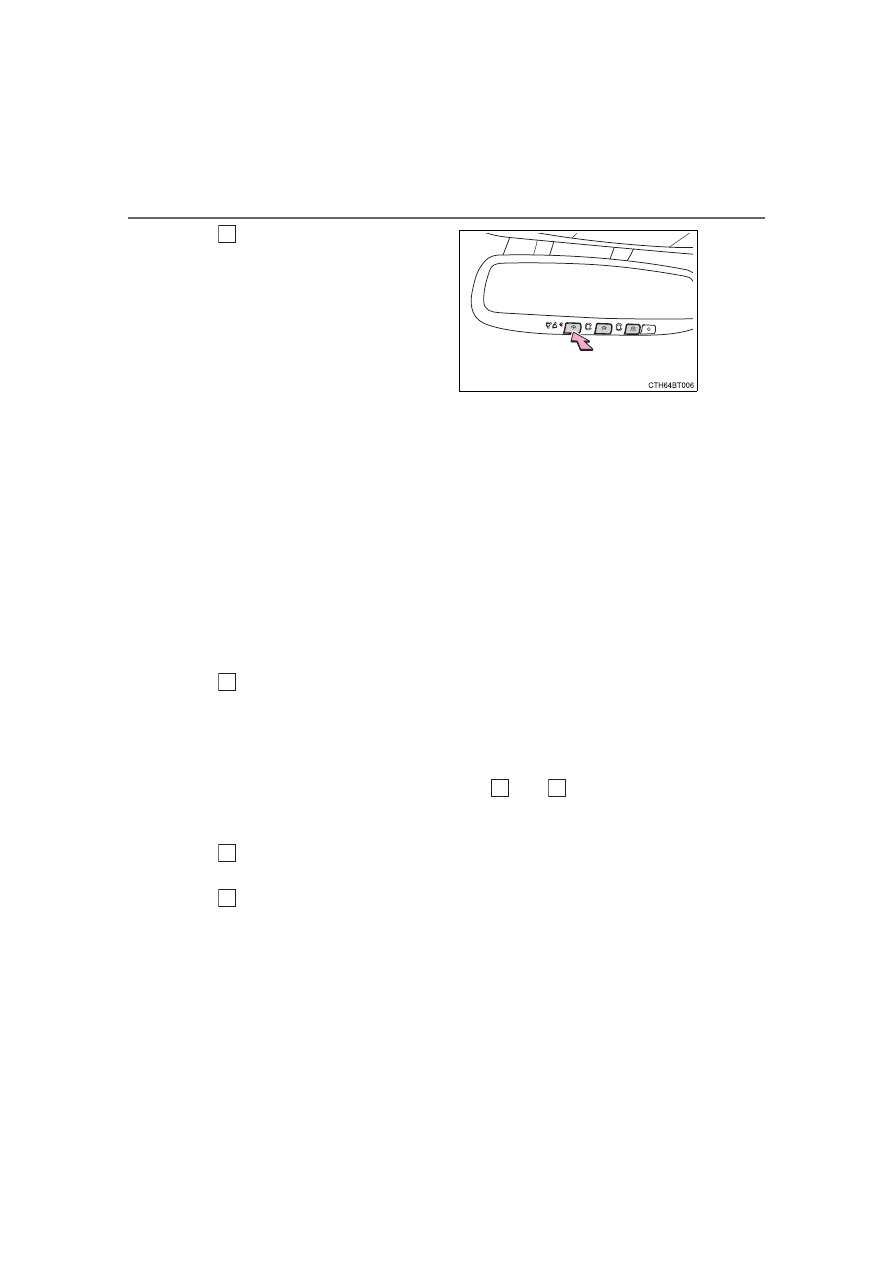
Press  and  hold  the  desired
HomeLink

®

 button (inside the

vehicle)  for  2  seconds  and
release  it.  Repeat  this
sequence 

(press/hold/

release)  up  to  3  times  to
complete programming.
If  the  garage  door  opener
motor  operates  when  the
HomeLink

®


button 

is

pressed,  the  garage  door
opener motor recognizes the
HomeLink

®

 signal.

Enabling 2-way communication with a garage door (only avail-
able for compatible devices)

When enabled, 2-way communication allows you to check the sta-
tus of the opening and closing of a garage door through indicators
in your vehicle.
2-way  communication  is  only  available  if  the  garage  door  opener
motor used is a compatible device. (To check device compatibility,
refer to www.HomeLink.com.)

Within 5 seconds after programming the garage door opener has
been  completed,  if  the  garage  door  opener  motor  is  trained  to
HomeLink

®

, both garage door operation indicators will flash rap-

idly  green  and  the  light  on  the  garage  door  opener  motor  will
blink twice, indicating that 2-way communication is enabled.

If the indicators do not flash, perform 

 and 

 within the first 10

presses  of  the  HomeLink

®

  button  after  programming  has  been

completed.

Press  a  programmed  HomeLink

®

  button  to  operate  a  garage

door.
Within  1  minute  of  pressing  the  HomeLink

®

  button,  after  the

garage door operation has stopped, press the “Learn” or “Smart”
button on the garage door opener motor. Within 5 seconds of the
establishment  of  2-way  communication  with  the  garage  door
opener, both garage door operation indicators in the vehicle will
flash rapidly green and the light on the garage door opener motor
will blink twice, indicating that 2-way communication is enabled.

3

1

2

3

2

3

437

5-4. Other interior features

5

In

te

rior 

fe

at

ures

Reprogramming a single HomeLink

®

 button

When the following procedure is performed, buttons which already
have devices registered to them can be overwritten:

With one hand, press and hold the desired HomeLink

®

 button.

When the HomeLink

®

 indicator starts flashing orange, continue

to  hold  the  HomeLink

®

  button  and  perform  “Programming  the

HomeLink

®

” 

 (it takes 20 seconds for the HomeLink

®

 indicator

to start flashing).

Press  the  appropriate  HomeLink

®

  button.  The  HomeLink

®

  indicator

light should turn on.

The  status  of  the  opening  and
closing of a garage door is shown
by the indicators.

Opening
Closing

This function is only available if the
garage door opener motor used is
a  compatible  device.  (To  check
device  compatibility,  refer  to
www.HomeLink.com.)

The indicators can operate within approximately 820 ft. (250 m) of
the  garage  door.  However,  if  there  are  obstructions  between  the
garage door and the vehicle, such as houses and trees, feedback
signals from the garage door may not be received. To recall the pre-
vious  door  operation  status,  press  and  release  either  HomeLink

®

buttons 

  and 

  or 

  and 

  simultane-

ously. The last recorded status will be displayed for 3 seconds.

Operating the HomeLink

®

Garage door operation indicators

1

2

1

1

2

Color

Status

Orange (flashing)

Currently opening/closing

Green

Opening/closing has completed

Red (flashing)

Feedback signals cannot be received

438

5-4. Other interior features

Press and hold the 2 outside but-
tons  for  10  seconds  until  the
HomeLink

®


indicator 

light

changes  from  continuously  lit
orange to rapidly flashing green.

If you sell your vehicle, be sure to
erase  the  programs  stored  in  the
HomeLink

®

 memory.

Codes stored in the HomeLink

®

 memory

The  registered  codes  are  not  erased  even  if  the  battery  cable  is  discon-
nected.

If  learning  failed  when  registering  a  different  code  to  a  HomeLink

®

  button

that already has a code registered to it, the already registered code will not
be erased.

Before programming

Install a new battery in the transmitter.

The battery side of the transmitter must be pointed away from the Home-
Link

®

.

Erasing the entire HomeLink

®

 memory (all three codes)

WARNING

When programming a garage door or other remote control device

The  garage  door  or  other  device  may  operate,  so  ensure  people  and
objects are out of danger to prevent potential harm.

Conforming to federal safety standards

Do  not  use  the  HomeLink

®

  compatible  transceiver  with  any  garage  door

opener or device that lacks safety stop and reverse features as required by
federal safety standards. This includes any garage door that cannot detect
an interfering object. A door or device without these features increases the
risk of death or serious injury.

When operating or programming HomeLink

®

Never allow a child to operate or play with the HomeLink

®

 buttons.

440

6-1. Maintenance and care

Working  from  top  to  bottom,  liberally  apply  water  to  the  vehicle
body, wheel wells and underside of the vehicle to remove any dirt
and dust.

Wash  the  vehicle  body  using  a  sponge  or  soft  cloth,  such  as  a
chamois.

For hard-to-remove marks, use car wash soap and rinse thoroughly
with water.

Wipe away any water.

Wax the vehicle when the waterproof coating deteriorates.

If  water  does  not  bead  on  a  clean  surface,  apply  wax  when  the  vehicle
body is cool.

Automatic car washes

Fold the mirrors before washing the vehicle. Start washing from the front of
the vehicle. Make sure to extend the mirrors before driving.

Brushes  used  in  automatic  car  washes  may  scratch  the  vehicle  surface,
parts (wheel, etc.) and harm your vehicle's paint.

Vehicles with a rear spoiler: In certain automatic car washes, the rear spoiler
may  interfere  with  machine  operation.  This  may  prevent  the  vehicle  from
being cleaned properly or result in damage to the rear spoiler.

High pressure car washes

As  water  may  enter  the  cabin,  do  not  bring  the  nozzle  tip  near  the  gaps
around the doors or perimeter of the windows, or spray these areas continu-
ously.

Cleaning and protecting the vehicle 

exterior

Perform  the  following  to  protect  the  vehicle  and  maintain  it  in
prime condition:

441

6-1. Maintenance and care

6

Mainten

ance an

d ca

re

When using a car wash (vehicles with a smart key system)

If the door handle becomes wet while the electronic key is within the effective
range, the door may lock and unlock repeatedly. In that case, follow the fol-
lowing correction procedures to wash the vehicle:

Place  the  key  in  a  position  6  ft.  (2  m)  or  more  separate  from  the  vehicle
while the vehicle is being washed. (Take care to ensure that the key is not
stolen.)

Set the electronic key to battery-saving mode to disable the smart key sys-
tem. (

P. 163)

Wheels and wheel ornaments

Remove any dirt immediately by using a neutral detergent.

Wash detergent off with water immediately after use.

To protect the paint from damage, make sure to observe the following pre-
cautions.
• Do not use acidic, alkaline or abrasive detergent
• Do not use hard brushes
• Do not use detergent on the wheels when they are hot, such as after driv-

ing or parking in hot weather

Brake pads and calipers

Rust  may  form  if  the  vehicle  is  parked  with  wet  brake  pads  or  disc  rotors,
causing  them  to  stick.  Before  parking  the  vehicle  after  it  is  washed,  drive
slowly and apply the brakes several times to dry the parts.

Bumpers

Do not scrub with abrasive cleaners.

Plated portions

If dirt cannot be removed, clean the parts as follows:

Use  a  soft  cloth  dampened  with  an  approximately  5%  solution  of  neutral
detergent and water to clean the dirt off.

Wipe the surface with a dry, soft cloth to remove any remaining moisture.

To remove oily deposits, use alcohol wet wipes or a similar product.

442

6-1. Maintenance and care

WARNING

When washing the vehicle

Do not apply water to the inside of the engine compartment. Doing so may
cause the electrical components, etc. to catch fire.

Precautions regarding the exhaust pipes

Exhaust gasses cause the exhaust pipes to become quite hot.
When  washing  the  vehicle,  be  careful  not  to  touch  the  pipes  until  it  has
cooled sufficiently, as touching a hot exhaust pipes can cause burns.

Precaution  regarding  the  rear  bumper  with  Blind  Spot  Monitor  (if
equipped)

If the paint of the rear bumper is chipped or scratched, the system may mal-
function.  If  this  occurs,  avoid  using  the  system  and  consult  your  Toyota
dealer.

NOTICE

To prevent paint deterioration and corrosion on the body and compo-
nents (aluminum wheels, etc.)

Wash the vehicle immediately in the following cases:
• After driving near the sea coast
• After driving on salted roads
• If coal tar or tree sap is present on the paint surface
• If dead insects, insect droppings or bird droppings are present on the

paint surface

• After driving in an area contaminated with soot, oily smoke, mine dust,

iron powder or chemical substances

• If the vehicle becomes heavily soiled with dust or mud
• If liquids such as benzene and gasoline are spilled on the paint surface

If the paint is chipped or scratched, have it repaired immediately.

To prevent the wheels from corroding, remove any dirt and store in a place
with low humidity when storing the wheels.

Cleaning the exterior lights

Wash carefully. Do not use organic substances or scrub with a hard brush. 
This may damage the surfaces of the lights.

Do not apply wax to the surfaces of the lights.
Wax may cause damage to the lenses.

443

6-1. Maintenance and care

6

Mainten

ance an

d ca

re

NOTICE

When using a high pressure car wash

When  washing  the  vehicle,  do  not  spray  the  camera  or  its  surrounding
area directly with a high pressure washer. Shock applied from high pres-
sure water may cause the device to not operate normally.

Do  not  spray  water  directly  on  the  radar  which  is  equipped  behind  the
emblem. Otherwise it may cause the device to be damaged.

Do not bring the nozzle tip close to boots (rubber or resin manufactured
cover),  connectors  or  the  following  parts. The  parts  may  be  damaged  if
they come into contact with high-pressure water.
• Traction related parts
• Steering parts
• Suspension parts
• Brake parts

Keep the cleaning nozzle at least 11.9 in. (30 cm) away from the vehicle
body.  Otherwise  resin  section,  such  as  moldings  and  bumpers,  may  be
deformed and damaged. Also, do not continuously hold the nozzle in the
same place.

Do not spray the lower part of the windshield continuously.
If  water  enters  the air  conditioning system  intake located  near  the  lower
part  of  the  windshield,  the  air  conditioning  system  may  not  operate  cor-
rectly.

Do  not  wash  the  underside  of  the  vehicle  using  a  high  pressure  car
washer.

444

6-1. Maintenance and care

Remove dirt and dust using a vacuum cleaner. Wipe dirty surfaces
with a cloth dampened with lukewarm water.

If dirt cannot be removed, wipe it off with a soft cloth dampened with
neutral detergent diluted to approximately 1%.
Wring out any excess water from the cloth and thoroughly wipe off
remaining traces of detergent and water.

Remove dirt using a soft cloth or synthetic chamois dampened in a
baking soda (sodium bicarbonate) solution.

Use a solution of approximately 9% baking soda dissolved in water.

Wipe  the  surface  with  a  dry,  soft  cloth  to  remove  any  remaining
moisture.

Remove dirt and dust using a vacuum cleaner.

Wipe off any excess dirt and dust with a soft cloth dampened with
diluted detergent.

Use a diluted water solution of approximately 5% neutral wool detergent.

Wring out any excess water from the cloth and thoroughly wipe off
all remaining traces of detergent.

Wipe  the  surface  with  a  dry,  soft  cloth  to  remove  any  remaining
moisture. Allow the leather to dry in a shaded and ventilated area.

Remove dirt and dust using a vacuum cleaner.

Wipe it off with a soft cloth dampened with neutral detergent diluted
to approximately 1%.

Wring out any excess water from the cloth and thoroughly wipe off
remaining traces of detergent and water.

Cleaning and protecting the vehicle 

interior

The following procedures will help protect your vehicle’s interior
and keep it in top condition:

Protecting the vehicle interior

Cleaning the areas with satin-finish metal accents

Cleaning the leather areas

Cleaning the synthetic leather areas

445

6-1. Maintenance and care

6

Mainten

ance an

d ca

re

Caring for leather areas

Toyota recommends cleaning the interior of the vehicle at least twice a year to
maintain the quality of the vehicle's interior.

Shampooing the carpets

There are several commercial foaming-type cleaners available. Use a sponge
or  brush  to  apply  the  foam.  Rub  in  overlapping  circles.  Do  not  use  water.
Wipe dirty surfaces and let them dry. Excellent results are obtained by keep-
ing the carpet as dry as possible.

Seat belts

Clean  with  mild  soap  and  lukewarm  water  using  a  cloth  or  sponge.  Also
check the belts periodically for excessive wear, fraying or cuts.

WARNING

Water in the vehicle

Do not splash or spill liquid in the vehicle.
Doing so may cause electrical components, etc., to malfunction  or catch
fire.

Do not get any of the SRS components or wiring in the vehicle interior wet. 
(

P. 38)

An electrical malfunction may cause the airbags to deploy or not function
properly, resulting in death or serious injury.

Vehicles with wireless charger: 
Do not let the wireless charger (

P. 420) get wet. Failure to do so may

cause the charger to become hot and cause burns or could cause electric
shock resulting in death or serious injury.

Cleaning the interior (especially instrument panel)

Do not use polish wax or polish cleaner. The instrument panel may reflect
off the windshield, obstructing the driver’s view and leading to an accident,
resulting in death or serious injury.

446

6-1. Maintenance and care

NOTICE

Cleaning detergents

Do not use the following types of detergent, as they may discolor the vehi-
cle interior or cause streaks or damage to painted surfaces:
• Areas  other  than  the  seats  and  steering  wheel:  Organic  substances

such  as  benzene  or  gasoline,  alkaline  or  acidic  solutions,  dye,  and
bleach

• Seats: Alkaline or acidic solutions, such as thinner, benzene, and alco-

hol

• Steering wheel: Organic substances, such as thinner, and cleaner that

contains alcohol

Do not use polish wax or polish cleaner. The instrument panel’s or other
interior part’s painted surface may be damaged.

Preventing damage to leather surfaces

Observe the following precautions to avoid damage to and deterioration of
leather surfaces:

Remove any dust or dirt from leather surfaces immediately.

Do not expose the vehicle to direct sunlight for extended periods of time.
Park the vehicle in the shade, especially during summer.

Do not place items made of vinyl, plastic, or containing wax on the uphol-
stery, as they may stick to the leather surface if the vehicle interior heats
up significantly.

Water on the floor

Do not wash the vehicle floor with water.
Vehicle systems such as the audio system may be damaged if water comes
into contact with electrical components such as the audio system above or
under the floor of the vehicle. Water may also cause the body to rust.

When cleaning the inside of the windshield

Do not allow glass cleaner to contact the lens. Also, do not touch the lens.
(

P. 249)

Cleaning the inside of the rear window

Do  not  use  glass  cleaner  to  clean  the  rear  window,  as  this  may  cause
damage to the rear window defogger heater wires or antenna. Use a cloth
dampened with lukewarm water to gently wipe the window clean. Wipe the
window in strokes running parallel to the heater wires or antenna.

Be careful not to scratch or damage the heater wires or antenna.

447

6

Mainten

ance an

d ca

re

6-2. Maintenance

General maintenance should be performed on a daily basis. This can
be done by yourself or by a Toyota dealer.

Scheduled  maintenance  should  be  performed  at  specified  intervals
according to the maintenance schedule.

For details about maintenance items and schedules, refer to the “Sched-
uled Maintenance Guide” or “Owner’s Manual Supplement”.

You can perform some maintenance procedures by yourself. 
Please be aware that do-it-yourself maintenance may affect warranty
coverage.

The use of Toyota Repair Manuals is recommended.
For details about warranty coverage, refer to the separate “Owner’s War-
ranty Information Booklet” or “Owner’s Manual Supplement”.

Maintenance requirements

To ensure safe and economical driving, day-to-day care and reg-
ular maintenance are essential. It is the owner’s responsibility to
perform regular checks. Toyota recommends the following main-
tenance:

General maintenance

Scheduled maintenance

Do-it-yourself maintenance

448

6-2. Maintenance

Repair and replacement

It is recommended that genuine Toyota parts be used for repairs to ensure
performance of each system. If non-Toyota parts are used in replacement or if
a repair shop other than a Toyota dealer performs repairs, confirm the war-
ranty coverage.

Resetting  the  message  indicating  maintenance  is  required  (on  some
models)

After  the  required  maintenance  is  preformed  according  to  the  maintenance
schedule, please reset the message.
To reset the message, perform the following procedure:

Select 

 (4.2-inch display) or 

 (7-inch display) on the multi-information

display using the meter control switches on the steering wheel. 
(

P. 103, 117)

4.2-inch display: Select “Vehicle Settings” and then press 

.

7-inch display: Select 

 and then press and hold 

.

Select “Scheduled Maintenance” and then press 

.

Select “Yes” and then press 

.

A  message  will  be  displayed  on  the  multi-information  display  when  the
reset procedure has been completed.

Allow inspection and repairs to be performed by a Toyota dealer

Toyota technicians are well-trained specialists and are kept up to date with
the latest service information. They are well informed about the operations
of all systems on your vehicle.

Keep  a  copy  of  the  repair  order.  It  proves  that  the  maintenance  that  has
been  performed  is  under  warranty  coverage.  If  any  problem  should  arise
while your vehicle is under warranty, your Toyota dealer will promptly take
care of it.

1

2

3

4

5

449

6-2. Maintenance

6

Mainten

ance an

d ca

re

WARNING

If your vehicle is not properly maintained

Improper  maintenance  could  result  in  serious  damage  to  the  vehicle  and
possible death or serious injury.

Important health and safety information

Engine exhaust, some of its constituents, and a wide variety of automobile
components contain or emit chemicals known to the State of California to
cause  cancer  and  birth  defects  and  other  reproductive  harm.  Work  in  a
well ventilated area.

Oils, fuels and fluids contained in vehicles as well as waste produced by
component  wear  contain  or  emit  chemicals  known  to  the  State  of
California  to  cause  cancer  and  birth  defects  or  other  reproductive  harm.
Avoid exposure and wash any affected area immediately.

Battery  posts,  terminals  and  related  accessories  contain  lead  and  lead
compounds which  are known  to cause brain damage. Wash your hands
after handling. (

P. 469)

450

6-2. Maintenance

General maintenance

Listed below are the general maintenance items that should be
performed  at  the  intervals  specified  in  the  “Owner’s  Warranty
Information  Booklet”  or  “Owner’s  Manual  Supplement/Sched-
uled Maintenance Guide”. It is recommended that any problem
you  notice  should  be  brought  to  the  attention  of  your  Toyota
dealer or qualified service shop for advice.

Engine compartment

Items

Check points

Battery

Check the connections. (

P. 469)

Brake fluid

Is  the  brake  fluid  at  the  correct
level? 

(

P. 468)

Engine coolant

Is  the  engine  coolant  at  the  correct
level? 

(

P. 466)

Engine oil

Is the engine oil at the correct level? 

(

P. 462)

Exhaust system

There  should  not  be  any  fumes  or
strange sounds.

Radiator/condenser

The  radiator  and  condenser  should
be free from foreign objects. 

(

P. 467)

Washer fluid

Is there sufficient washer fluid?

(

P. 472)

451

6-2. Maintenance

6

Mainten

ance an

d ca

re

Vehicle interior

Items

Check points

Accelerator pedal

• The  accelerator  pedal  should

move  smoothly  (without  uneven
pedal effort or catching).

Automatic 

transmission 

“Park”

mechanism

• When  parked  on  a  slope  and  the

shift  lever  is  in  P,  is  the  vehicle
securely stopped?

Brake pedal

• Does  the  brake  pedal  move

smoothly?

• Does the brake pedal have appro-

priate clearance from the floor? 

(

P. 583)

• Does  the  brake  pedal  have  the

correct amount of free play? 

(

P. 583)

Brakes

• The vehicle should not pull to one

side when the brakes are applied.

• The  brakes  should  work  effec-

tively.

• The  brake  pedal  should  not  feel

spongy.

• The  brake  pedal  should  not  get

too  close  to  the  floor  when  the
brakes are applied.

Head restraints (adjustable type)

• Do  the  head  restraints  move

smoothly and lock securely?

Indicators/buzzers

• Do  the  indicators  and  buzzers

function properly?

Lights

• Do all the lights come on?

Parking brake

• Does  the  parking  brake  operate

normally?

• When  parked  on  a  slope  and  the

parking brake is on, is the vehicle
securely stopped?


Content      ..     25      26      27      28     ..