Toyota Camry (2023 year). Manual in english - page 25
 

  Index      Toyota     Toyota Camry (2023 year). Manual in english


Search            copyright infringement  


Content      ..     23      24      25      26     ..


Toyota Camry (2023 year). Manual in english - page 25


404

5-1. Using the air conditioning system and defogger

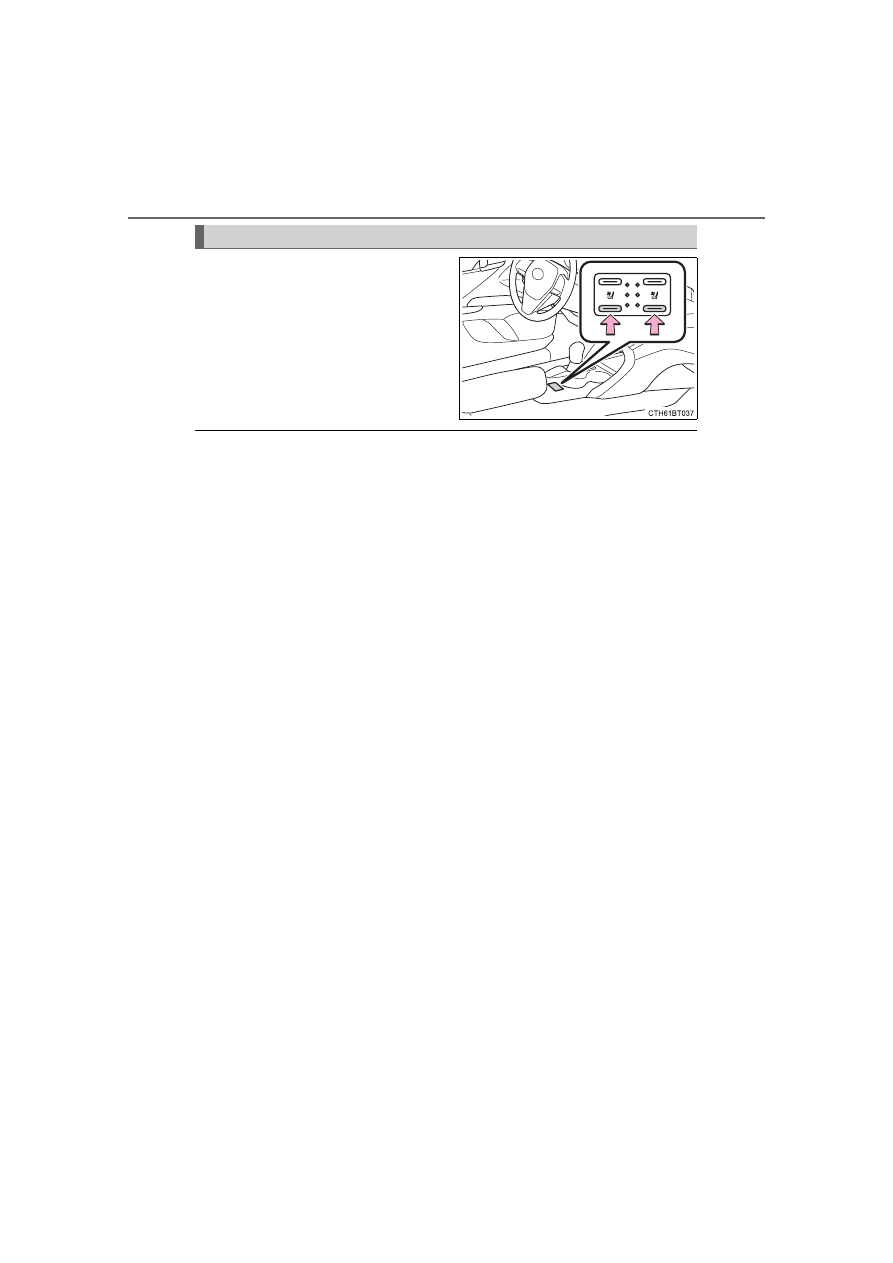
Each  time  the  switch  is  pressed,
the  operation  condition  changes
as follows.
Hi (3 segments lit) 

 Mid (2 seg-

ments lit) 

 Lo (1 segment lit) 

Off

The level indicator (green) lights up
during operation.

The seat ventilators can be used when

The engine switch is in IGNITION ON mode.

Air conditioning system-linked control mode

When a seat ventilator is set to Hi, the fan speed of the seat ventilator may
increase according to the fan speed of the air conditioning system

Seat ventilators

405

5

In

te

rior 

fe

at

ures

5-2. Using the interior lights

Front interior/personal lights (

P. 406, 407)

Shift lever light (if equipped)
Inside door handle lights (if equipped)
Rear interior light (if equipped) (

P. 406)

Rear personal lights (if equipped) (

P. 407)

Door courtesy lights (if equipped)
Instrument panel ornament light (if equipped)
Front center console light (if equipped)
Footwell lights (if equipped)

Interior lights list

1

2

3

4

5

6

7

8

9

406

5-2. Using the interior lights

Front (if equipped)

The rear personal lights (if equipped) turn on/off together with the
front interior light.

Turns  the  lights  on/off  linked
to door positions
Turns the lights on/off

Rear (if equipped)

Turns the light off
Turns the light on/off linked to
door positions
Turns the light on

Interior lights

1

2

1

2

3

407

5-2. Using the interior lights

5

In

te

rior 

fe

at

ures

Front

Turns the lights on/off

Rear (if equipped)

Turns the lights on/off

Personal lights

408

5-2. Using the interior lights

Illuminated entry system

Vehicles without a smart key system:
The lights  automatically turn on/off  according to the  engine switch position,
whether  the  doors  are  locked/unlocked,  and  whether  the  doors  are  open/
closed.
Vehicles with a smart key system:
The lights automatically turn on/off according to the engine switch mode, the
presence of the electronic key, whether the doors are locked/unlocked, and
whether the doors are open/closed.

To prevent the battery from being discharged

If the interior lights remain on when the engine switch is turned off, the lights
will go off automatically after 20 minutes.

The interior lights may turn on automatically when

If  any  of  the  SRS  airbags  deploy  (inflate)  or  in  the  event  of  a  strong  rear
impact, the interior lights will turn on automatically.
The interior lights will turn off automatically after approximately 20 minutes.
The interior lights can be turned off manually. However, in order to help pre-
vent further collisions, it is recommended that they be left on until safety can
be ensured.
(The interior lights may not turn on automatically depending on the force of
the impact and conditions of the collision.)

Customization

Some functions can be customized. (

P. 612)

409

5

In

te

rior 

fe

at

ures

5-3. Using the storage features

List of storage features

Auxiliary boxes

(

P. 413)

Glove box

(

P. 410)

Bottle holders/door pockets

(

P. 411)

Cup holders

(

P. 412)

Console box

(

P. 410)

Auxiliary box/open tray

(

P. 413, 414)

Coin holder

(

P. 410)

WARNING

Do not leave glasses, lighters or spray cans in the storage spaces, as this
may cause the following when cabin temperature becomes high:
• Glasses may be deformed by heat or cracked if they come into contact

with other stored items.

• Lighters or spray cans may explode. If they come into contact with other

stored  items,  the  lighter  may  catch  fire  or  the  spray  can  may  release
gas, causing a fire hazard.

When driving or when the storage compartments are not in use, keep the
lids closed. 
In the event of sudden braking or sudden swerving, an accident may occur
due to an occupant being struck by an open lid or the items stored inside.

1

2

3

4

5

6

7

410

5-3. Using the storage features

Pull up the lever to open the glove
box.

The glove box light turns on when the tail lights are on.

Push the knob.

Pull the lever to open.

Glove box

Console box

Coin holder

411

5-3. Using the storage features

5

In

te

rior 

fe

at

ures

When storing a bottle, close the cap.

The bottle may not be stored depending on its size or shape.

Bottle holders

Front

Rear

WARNING

Do not place anything other than a bottle in the bottle holders.
Other items may be thrown out of the holders in the event of an accident or
sudden braking and cause injury.

NOTICE

Put the cap on before stowing a bottle. Do not place open bottles in the bot-
tle holders, or glass or paper cups containing liquid. The contents may spill
and glass cups may break.

412

5-3. Using the storage features

Cup holders

Front

Rear (if equipped)

Pull the armrest down.

WARNING

Items unsuitable for the cup holder

Do not place anything other than cups or aluminum cans in the cup holders.
Other items may be thrown out of the holders in the event of an accident or
sudden braking, causing injury.

To prevent burns

To prevent burns, cover hot drinks when placed in the cup holders.

413

5-3. Using the storage features

5

In

te

rior 

fe

at

ures

Opening: 
Push the tray forward until it locks. 
Closing: 
Push the tray forward to release the lock and the tray will automati-
cally close.

When small items are placed on top of the tray (type C)

Auxiliary boxes

Type A (if equipped)

Type B (if equipped)

Push the lid.

Type C

The tray can be opened while small items
are placed on it.

414

5-3. Using the storage features

When using wireless charger (if equipped)

P. 420

WARNING

Items unsuitable for storing (type A)

Do not store items heavier than 0.4 lb. (0.2 kg).
Doing so may cause the auxiliary box to open and the items inside may fall
out, resulting in an accident.

NOTICE

When opening or closing the tray (type C)

To prevent damaging small items, when opening the tray while small items
are placed on it, make sure the items will not get caught.

To prevent damaging the tray, do not pull the tray to close it. Doing so may
damage the tray.

Open tray

WARNING

Observe the following precautions when putting items in the open tray. Fail-
ure to do so may cause items to be thrown out of the tray in the event of
sudden  braking  or  steering.  In  these  cases,  the  items  may  interfere  with
pedal operation or cause driver distraction, resulting in an accident.

Do not store items in the tray that can easily shift or roll out.

Do not stack items in the tray higher than the tray’s edge.

Do not put items in the tray that may protrude over the tray’s edge. 

415

5-3. Using the storage features

5

In

te

rior 

fe

at

ures

Trunk features

Grocery bag hooks

NOTICE

To prevent damage to the hooks, do not apply too much load to the hooks.

416

5-4. Other interior features

To  set  the  visor  in  the  forward
position, flip it down.
To set the visor in the side posi-
tion,  flip  down,  unhook,  and
swing it to the side.
To use the side extender, place
the  visor  in  the  side  position,
then slide it backward.

Slide the cover to open.

Vehicles with vanity lights: The light
turns on when the cover is opened.

Vehicles with vanity lights: If the vanity lights remain on for 20 minutes while
the engine is off, the lights will turn off automatically.

Other interior features

Sun visors

1

2

3

Vanity mirrors

417

5-4. Other interior features

5

In

te

rior 

fe

at

ures

Please use as a power supply for electronic goods that use less than
12 VDC/10 A (power consumption of 120 W). 
Open the lid.

The power outlet can be used when

Vehicles without a smart key system:
The engine switch is in the “ACC” or “ON” position.
Vehicles with a smart key system:
The engine switch is in ACCESSORY or IGNITION ON mode.

When turning the engine switch off

Disconnect electrical devices with charging functions, such as mobile battery
packs.
If such devices are left connected, the engine switch may not be turned off
normally.

Power outlet

NOTICE

To avoid damaging the power outlet, close the power outlet lid when it is
not in use. 
Foreign objects or liquids that enter the power outlet may cause a short
circuit.

To prevent battery discharge, do not use the power outlet longer than nec-
essary when the engine is not running.

418

5-4. Other interior features

The USB charging ports are used to supply 2.5 A (USB Type-A port)
or 3.0 A (USB Type-C port) of electricity at 5 V to external devices. 
The USB charging ports are for charging only. They are not designed
for data transfer or other purposes.
Depending on the external device, it may not charge properly. Refer to
the  manual  included  with  the  device  before  using  a  USB  charging
port.

Using the USB charging ports

Open  the  console  box  lid  and
open the lid.

The USB charging ports can be used when

Vehicles without a smart key system:
The engine switch is in the “ACC” or “ON” position.

Vehicles with a smart key system:
The engine switch is in ACCESSORY or IGNITION ON mode.

Situations in which the USB charging ports may not operate correctly

If a device which consumes more than 2.5 A at 5 V (USB Type-A port) or 3.0
A at 5 V (USB Type-C port) is connected

If a device designed to communicate with a personal computer, such as a
USB memory device, is connected

If the connected external device is turned off (depending on device)

If the temperature inside the vehicle is high, such as after the vehicle has
been parked in the sun

About connected external devices

Depending on the connected external device, charging may occasionally be
suspended and then start again. This is not a malfunction.

USB charging ports

419

5-4. Other interior features

5

In

te

rior 

fe

at

ures

Cable pass through

The shape of the console box rim allows
power cables to be passed through when
the console box lid is closed.

NOTICE

To prevent damage to the USB charging ports

Do not insert foreign objects into the ports.

Do not spill water or other liquids into the ports.

When  the USB  charging ports are not  in use,  close the  lids. If a foreign
object or liquid enters a port may cause a short circuit.

Do not apply excessive force to or impact the USB charging ports.

Do not disassemble or modify the USB charging ports.

To prevent damage to external devices

Do not leave external devices in the vehicle. The temperature inside the
vehicle may become high, resulting in damage to an external device.

Do not push down on or apply unnecessary force to an external device or
the cable of an external device while it is connected.

To prevent battery discharge

Do not use the USB charging ports for a long period of time with the engine
stopped.


Content      ..     23      24      25      26     ..