Toyota 4Runner (2023 year). Manual in english - page 18
 

  Index      Toyota     Toyota 4Runner (2023 year). Manual in english


Search            copyright infringement  


Content      ..     16      17      18      19     ..


Toyota 4Runner (2023 year). Manual in english - page 18


289

4-5. Using the driving support systems

4

D

riv

in

g

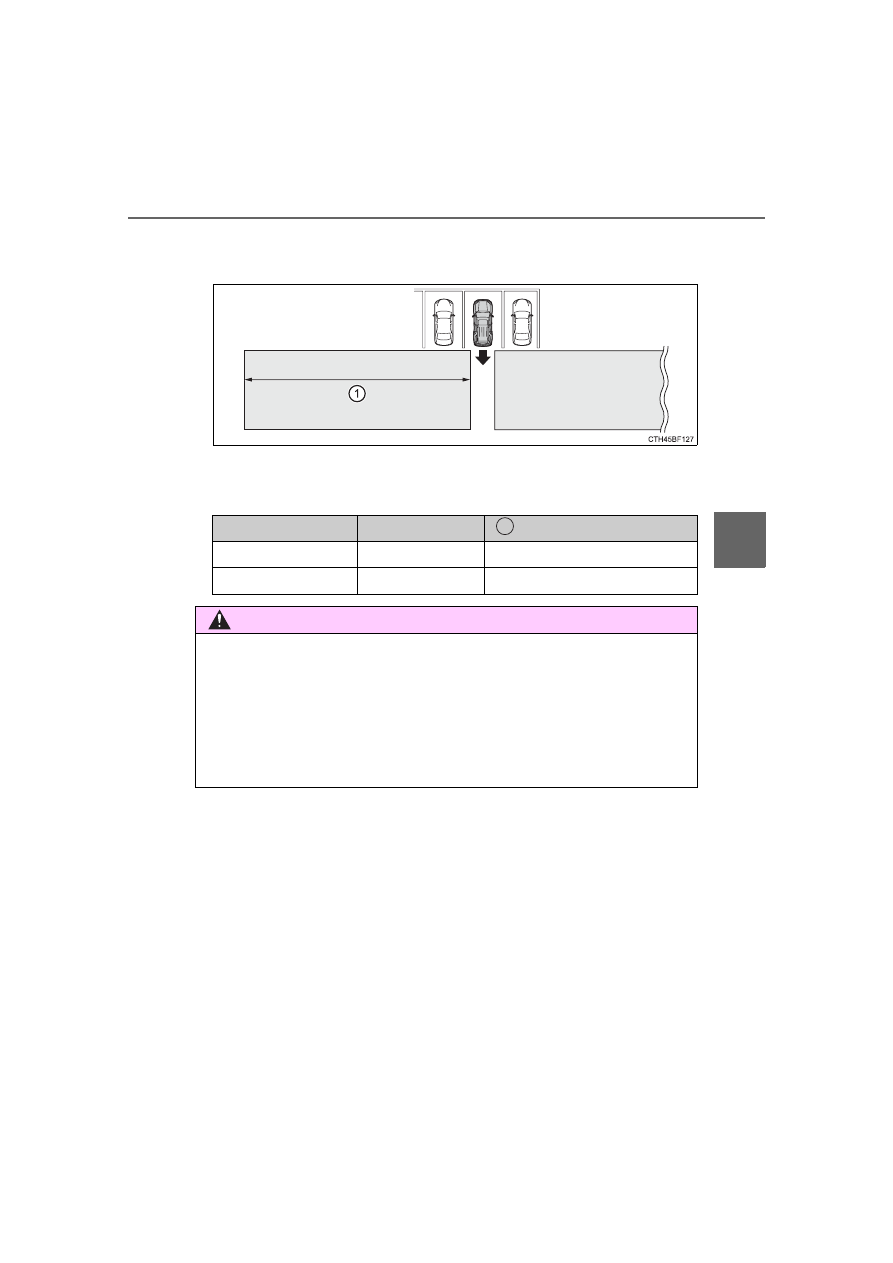
RCTA function detection areas

The areas that vehicles can be detected in are outlined below.

The buzzer can alert the driver of faster vehicles approaching from
farther away.
Example:

Approaching vehicle

Speed

 Approximate alert distance

Fast

35 mph (56 km/h)

130 ft (40 m)

Slow

5 mph (8 km/h)

18 ft (5.5 m)

WARNING

Cautions regarding the use of the system

There  is  a  limit  to  the  degree  of  recognition  accuracy  and  control  perfor-
mance that this system can provide, do not overly rely on this system. The
driver is always responsible for paying attention to the vehicle’s surround-
ings and driving safely. (

P. 274)

To ensure the system can operate properly

P. 272

1

290

4-5. Using the driving support systems

The RCTA function is operational when

The RCTA function operates when all of the following conditions are met:

The engine switch is in the IGNITION ON mode.

The RCTA function is on.

The shift lever is in R.

The vehicle speed is less than approximately 9 mph (15 km/h).

The approaching vehicle speed is between approximately 5 mph (8 km/h)
and 35 mph (56 km/h).

Muting a buzzer temporarily

A mute button will be displayed on the multi-information display when a vehi-
cle or an object is detected. To mute the buzzer, press. The buzzers for the
RCTA  function  and  Toyota  parking  assist-sensor  will  be  muted  simultane-
ously.
Mute will be automatically canceled in the following situations:

When the shift position is changed.

When  there  is  a  malfunction  in  a  sensor  or  the  system  is  temporarily
unavailable.

When the function is disabled while it is operating.

The engine switch is turned off.

Conditions under which the system will not detect a vehicle

The RCTA function is not designed to detect the following types of vehicles
and/or objects:

Vehicles approaching from directly behind

Vehicles backing up in a parking space next to your vehicle

Guardrails, walls, signs, parked vehicles and similar stationary objects

*

Small motorcycles, bicycles, pedestrians, etc.

*

Vehicles moving away from your vehicle

Vehicles approaching from the parking spaces next to your vehicle

*

The distance between the sensor and approaching vehicle gets too close

*

: Depending  on  the  conditions,  detection  of  a  vehicle  and/or  object  may

occur.

Vehicles that the sensors cannot detect
due to obstructions

291

4-5. Using the driving support systems

4

Drivin

g

Situations in which the system may not operate properly

The  RCTA  function  may  not  detect  vehicles  correctly  in  the  following  situa-
tions:

When the sensor is misaligned due to a strong impact to the sensor or its
surrounding area

When mud, snow, ice, a sticker, etc., is covering the sensor or surrounding
area on the rear bumper

When driving on a road surface that is wet with standing water during bad
weather, such as heavy rain, snow, or fog

When  multiple  vehicles  are  approaching  with  only  a  small  gap  between
each vehicle

When a vehicle is approaching at high speed

When equipment that may obstruct a sensor is installed, such as a towing
eyelet,  bumper  protector  (an  additional  trim  strip,  etc.),  bicycle  carrier,  or
snow plow

When towing a trailer

When there is a significant difference in height between your vehicle and the
vehicle that enters the detection area

When a sensor or the area around a sensor is extremely hot or cold

If the suspension has been modified or tires of a size other than specified
are installed

If the front of the vehicle is raised or lowered due to the carried load

When  backing  up  on  a  slope  with  a
sharp change in grade

When backing out of a sharp angle park-
ing spot

292

4-5. Using the driving support systems

Situations in which the system may operate even if there is no possibil-
ity of a collision

Instances  of  the  RCTA  function  unnecessarily  detecting  a  vehicle  and/or
object may increase in the following situations:

When equipment that may obstruct a sensor is installed, such as a towing
eyelet,  bumper  protector  (an  additional  trim  strip,  etc.),  bicycle  carrier,  or
snow plow

When turning while backing up

When  a  vehicle  turns  into  the  detection
area

When  the  parking  space  faces  a  street
and  vehicles  are  being  driven  on  the
street

When the distance between your vehicle
and  metal  objects,  such  as  a  guardrail,
wall, sign, or parked vehicle, which may
reflect  electrical  waves  toward  the  rear
of the vehicle, is short

293

4-5. Using the driving support systems

4

Drivin

g

When there are spinning objects near your vehicle such as the fan of an air
conditioning unit

When water is splashed or sprayed toward the rear bumper, such as from a
sprinkler

Moving objects (flags, exhaust fumes, large rain droplets or snowflakes, rain
water on the road surface, etc.)

When  the  distance  between  your  vehicle  and  a  guardrail,  wall,  etc.,  that
enters the detection area is short

Gratings and gutters

When a sensor or the area around a sensor is extremely hot or cold

If the suspension has been modified or tires of a size other than specified
are installed

If the front of the vehicle is raised or lowered due to the carried load

When  a  vehicle  passes  by  the  side  of
your vehicle

When  a  detected  vehicle  turns  while
approaching the vehicle

294

4-5. Using the driving support systems

Type A

The four-wheel drive indicator comes on when H4, N or L4 mode is
selected.

H2 (high speed position, two-wheel drive)

Use this for normal driving on dry hard-surfaced roads. This position gives
greater economy, quietest ride and least wear.

H4 (high speed position, four-wheel drive)

Use this for driving only on tracks that permit the tires slide, like off-road,
icy  or  snow-covered  roads.  This  position  provides  greater  traction  than
two-wheel drive.

N (neutral position)

No power is delivered to the wheels. The vehicle must be stopped.

L4 (low speed position, four-wheel drive)

Use  this  for  maximum  power  and  traction.  Use  “L4”  for  climbing  or
descending steep hills, off-road driving, and hard pulling in sand, mud or
deep snow.

Four-wheel drive indicator
Low speed four-wheel drive indicator

Four-wheel drive system (part-time 4WD 

models)

Use the front-wheel drive control lever or switch to select the fol-
lowing transfer modes:

1

2

3

4

5

6

295

4-5. Using the driving support systems

4

Drivin

g

Type B

The  four-wheel  drive  indicator  comes  on  when  H4  or  L4  mode  is
selected.

H2 (high speed position, two-wheel drive)

Use this for normal driving on dry hard-surfaced roads. This position gives
greater economy, quietest ride and least wear.

H4 (high speed position, four-wheel drive)

Use this for driving only on tracks that permit the tires slide, like off-road,
icy  or  snow-covered  roads.  This  position  provides  greater  traction  than
two-wheel drive.

L4 (low speed position, four-wheel drive)

Use  this  for  maximum  power  and  traction.  Use  “L4”  for  climbing  or
descending steep hills, off-road driving, and hard pulling in sand, mud or
deep snow.

Four-wheel drive indicator
Low speed four-wheel drive indicator

1

2

3

4

5

296

4-5. Using the driving support systems

Shifting from H2 to H4

Type A
Reduce vehicle speed to less than 50 mph (80 km/h).
Shift the front-wheel drive control lever to H4.

Type B
Reduce vehicle speed to less than 62 mph (100 km/h).
Push the “UNLOCK” button and turn the front-wheel drive control
switch to H4.

The four-wheel drive indicator will turn on.

Shifting from H4 to H2

Type A

Shift the front-wheel drive control lever to H2. 

Type B

Push the “UNLOCK” button and  turn  the front-wheel drive control
switch to H2.
This can be done at any speed.

The four-wheel drive indicator will go off.

Shifting from H4 to L4

Stop  the  vehicle  completely  and  continue  to  depress  the  brake
pedal.
Shift the shift lever to N.

Type A
Shift the front-wheel drive control lever to L4.

Type B
Push  the  “UNLOCK”  button  and  then  push  and  turn  the  front-
wheel drive control switch to L4.

The low speed four-wheel drive indicator will turn on.

Shifting between H2 and H4

Shifting between H4 and L4

1

2

1

2

1

2

3

3

297

4-5. Using the driving support systems

4

D

riv

in

g

Shifting from L4 to H4

Stop  the  vehicle  completely  and  continue  to  depress  the  brake
pedal.
Shift the shift lever to N.

Type A
Shift the front-wheel drive control lever to H4.

Type B
Push the “UNLOCK” button and turn the front-wheel drive control
switch to H4.

The low speed four-wheel drive indicator will go off.

When the front-wheel drive control lever or switch is shifted to L4

VSC and TRAC are automatically turned off.

If the four-wheel drive indicator flashes

The transfer mode may not successfully change. Drive straight ahead while
accelerating or decelerating, or drive in reverse.

If the low speed four-wheel drive indicator continues to flash

The  transfer  mode  may  not  successfully  change.  Operate  the  four-wheel
drive control switch again.

If  the  low  speed  four-wheel  drive  indicator  continues  to  flash  and  a
buzzer sounds

The shift lever is not in N and/or the vehicle is moving. Stop the vehicle com-
pletely, shift the shift lever to N and make sure that the indicator stops flash-
ing.

If  the  four-wheel  drive  or  low  speed  four-wheel  drive  indicator  flashes
rapidly

There may be a malfunction in the four-wheel drive system. Have the vehicle
inspected by your Toyota dealer immediately.

Four-wheel drive usage frequency

You should drive in four-wheel drive for at least 10 miles (16 km) each month.
This will assure that the front drive components are lubricated.

WARNING

Shifting  the  front-wheel  drive  control  lever  or  switch  from  H2  to  H4
while driving

Never operate the front-wheel drive control lever or switch if the wheels are
slipping.
Stop the slipping or spinning before shifting.

1

2

3

3

298

4-5. Using the driving support systems

H4F (high speed position)

Use this for normal driving on dry hard-surfaced roads. This position gives
greater economy, quietest ride and least wear.

H4L (high speed position, center differential locked)

Use this for driving only on tracks that permit the tires slide, like off-road,
icy or snow-covered roads.

L4L (low speed position, center differential locked)

Use  this  for  maximum  power  and  traction.  Use  “L4L”  for  climbing  or
descending steep hills, off-road driving, and hard pulling in sand, mud or
deep snow.

Center differential lock indicator
Low speed four-wheel drive indicator

Four-wheel drive system (full-time 4WD 

models)

Use  the  four-wheel  drive  control  switch  to  select  the  following
transfer modes:

1

2

3

4

5

299

4-5. Using the driving support systems

4

Drivin

g

Push  the  “UNLOCK”  button  and
turn  the  four-wheel  drive  control
switch to H4L or H4F.
This can be done at any speed.

The  center  differential  lock  indica-
tor  will  turn  on  (H4L)  or  go  off
(H4F).

Shifting from H4L to L4L

Stop  the  vehicle  completely  and  continue  to  depress  the  brake
pedal.
Shift the shift lever to N.
Push  the  “UNLOCK”  button
and  then  push  and  turn  the
four-wheel 

drive 

control

switch to L4L.

Maintain  this  condition  until  the
low speed four-wheel drive indi-
cator turns on.

Shifting between H4F and H4L

Shifting between H4L and L4L

1

2

3

300

4-5. Using the driving support systems

Shifting from L4L to H4L

Stop  the  vehicle  completely  and  continue  to  depress  the  brake
pedal.
Shift the shift lever to N.
Push  the  “UNLOCK”  button
and turn the four-wheel drive
control switch to H4L.

Maintain  this  condition  until  the
low speed four-wheel drive indi-
cator goes off.

The four-wheel drive control switch can be operated when

The engine switch is in IGNITION ON mode.

When the four-wheel drive control switch is turned to L4L

VSC and TRAC are automatically turned off.

If the center differential lock indicator flashes

Locking or unlocking of the center differential is not complete. Drive straight
ahead while accelerating or decelerating, or drive in reverse.

If the center differential lock indicator flashes and a buzzer sounds

Locking of the center differential is not complete. Stop the wheels from slip-
ping or spinning and, if the indicator still flashes, operate the four-wheel drive
control switch again.

If the low speed four-wheel drive indicator continues to flash

The  transfer  mode  may  not  successfully  change.  Operate  the  four-wheel
drive control switch again.

1

2

3

301

4-5. Using the driving support systems

4

D

riv

in

g

If  the  low  speed  four-wheel  drive  indicator  continues  to  flash  and  a
buzzer sounds

The shift lever is not in N and/or the vehicle is moving. Stop the vehicle com-
pletely, shift the shift lever to N and make sure that the indicator stops flash-
ing.

If the low speed four-wheel drive indicator or the center differential lock
indicator flashes rapidly

There may be a malfunction in the four-wheel drive system. Have the vehicle
inspected by your Toyota dealer immediately.

WARNING

Operating the four-wheel drive control switch

Never  operate  the  four-wheel  drive  control  switch  if  the  wheels  have  lost
traction.  Doing  so  may  cause  an  accident  resulting  in  death  or  serious
injury.
Stop the wheels from slipping or spinning before operating the switch.

NOTICE

To prevent damage to the center differential

For normal driving on dry and hard surface roads, unlock the center differ-
ential.

Unlock the center differential after the wheels are out of the ditch or off the
slippery or bumpy surface.

Do not lock or unlock the center differential when the vehicle is turning or
when its wheels are spinning freely off the ground.

302

4-5. Using the driving support systems

System operation

Part-time 4WD models:
Stop the vehicle, shift the shift lever to N and shift the front-wheel
drive control lever into L4.
Full-time 4WD models:
Stop the vehicle, shift the shift lever to N and then push and turn
the four-wheel drive control switch to L4L.
Press the “A-TRAC” switch to
activate the system.

At  this  time,  the  “A-TRAC”  indi-
cator will come on.
To  cancel  the  system,  push  the
switch again.

Active traction control system

: If equipped

The  active  traction  control  system  automatically  helps  prevent
the spinning of 4 wheels when the vehicle is started or acceler-
ated on slippery road surfaces.

1

2

303

4-5. Using the driving support systems

4

D

riv

in

g

If all wheels spin, the slip indicator
flashes  to  indicate  that  the  active
traction  control  system  has  been
engaged.

When the rear differential is locked (vehicles with a rear differential lock
system)

The  active  traction  control  system  is  activated  only  when  vehicle  speed  is
less than 4 mph (6 km/h).

Sounds and vibrations caused by the active traction control system

A  sound  may  be  heard  from  the  engine  compartment  when  the  engine  is
started or just after the vehicle begins to move. This sound does not indicate
that a malfunction has occurred in the system.

Vibrations  may  be  felt  through  the  vehicle  body  and  steering.  This  may
occur when the system is operating.

If the brake system overheats

The system will cease operation and a buzzer will sound to alert the driver. At
this time, the “A-TRAC” indicator will go off and the “TRAC OFF” indicator will
come on. Stop the vehicle in a safe place. (There is no problem with continu-
ing normal driving.)
The system will be automatically restored after a short time.

When the active traction control system is operating

WARNING

The active traction control system may not operate effectively when 

Directional control and power may not be achievable while driving on slip-
pery road surfaces, even if the active traction control system is operating.
Do not drive the vehicle in conditions where stability and power may be lost.

304

4-5. Using the driving support systems

The system can be used on 2WD models.

Press 

 to turn on the system.

At this time, the “AUTO LSD” and
VSC OFF indicators will come on.

To turn off the system, press 

again.

AUTO LSD system (2WD models)

The AUTO LSD system aids traction by using the traction con-
trol  system  to  control  engine  performance  and  braking  when
one of the drive wheels begins to spin.
The system should be used only when one of the drive wheels
spinning occurs in a ditch or rough surface.

System operation


Content      ..     16      17      18      19     ..