Toyota Yaris Cross (2022 year). Manual in english - page 20
 

  Index      Toyota     Toyota Yaris Cross (2022 year). Manual in english


Search            copyright infringement  


Content      ..     18      19      20      21     ..


Toyota Yaris Cross (2022 year). Manual in english - page 20


322

n

5-1. Using the air conditioning system and defogger

*

: If equipped

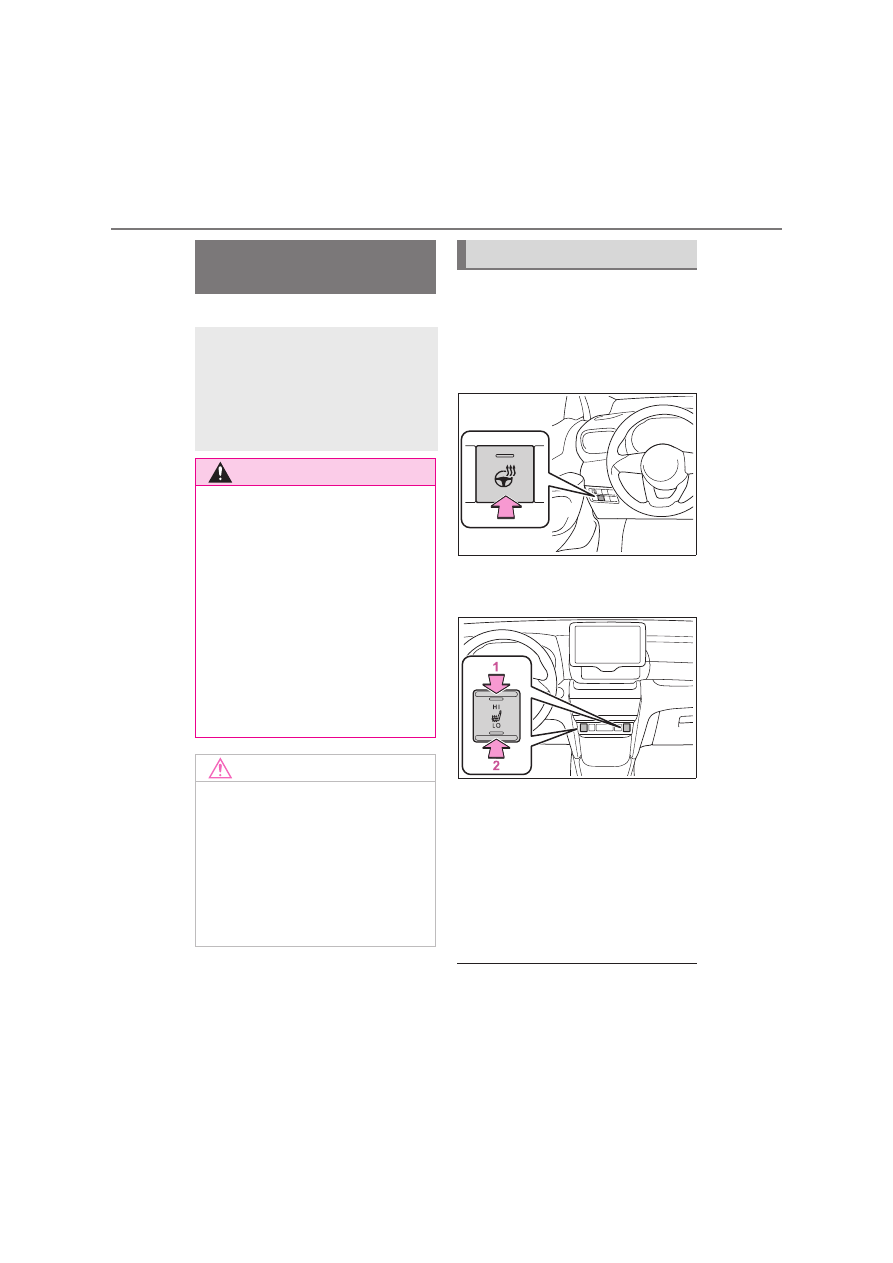
Heated steering wheel

Turns heated steering wheel on/off

When the heated steering wheel is on, 
the indicator illuminates on the heated 
steering wheel switch.

Seat heaters

Turns seat heaters on/off

1

High temperature

2

Low temperature

When the seat heater is on, the indica-
tor illuminates on the seat heater 
switch.

When not in use, put the switch in the 
neutral position. The indicator will turn 
off.

The heated steering wheel and seat 

heaters can be used when

The engine switch is in ON.

Heated steering 
wheel

*

/seat heaters

*

Heated steering wheel

Warms up the grip of the steering 
wheel

Seat heaters

Warm up the seat upholstery

WARNING

To prevent minor burn injuries

Care should be taken if anyone in the 
following categories comes in contact 

with the steering wheel or seats when 

the heater is on:

Babies, small children, the elderly, 

the sick and the physically chal-
lenged

Persons with sensitive skin

Persons who are fatigued

Persons who have taken alcohol or 

drugs that induce sleep (sleeping 

drugs, cold remedies, etc.)

NOTICE

To prevent damage to the seat 

heaters

Do not put heavy objects that have an 

uneven surface on the seat and do 

not stick sharp objects (needles, 
nails, etc.) into the seat.

To prevent battery discharge

Do not use the functions when the 

engine is off.

Operation instructions

323

5

n

5-1. Using the air conditioning system and defogger

Interior features

WARNING

To prevent overheating and 

minor burn injuries

Observe the following precautions 

when using the seat heaters.

Do not cover the seat with a blanket 

or cushion when using the seat 

heater.

Do not use seat heater more than 

necessary.

324

n

5-2. Using the interior lights

5-2.Using the interior lights

Door trim lights (if equipped)

Interior/personal lights (

P.324, 325)

Footwell lights (if equipped)

Front console lights

Turns the door position on/off

When a door is opened while the door 
position is on, the lights turn on.

Interior lights list

Location of the interior lights

Operating the interior lights

325

5

n

5-2. Using the interior lights

Interior features

Turns the lights on/off

Illuminated entry system

The lights automatically turn on/off 

according to the engine switch mode 

(position), the presence of the electronic 
key (vehicles with a smart entry & start 

system), whether the doors are 

locked/unlocked, and whether the doors 
are opened/closed.

To prevent the battery from being 

discharged

If the interior lights remain on when the 
engine switch is turned off, the lights will 

go off automatically after 20 minutes.

The interior lights may turn on 

automatically when

If any of the SRS airbags deploy (inflate) 

or in the event of a strong rear impact, 

the interior lights will turn on automati-
cally.

The interior lights will turn off automati-

cally after approximately 20 minutes.
The interior lights can be turned off man-

ually. However, in order to help prevent 

further collisions, it is recommended that 
they be left on until safety can be 

ensured.

(The interior lights may not turn on auto-
matically depending on the force of the 

impact and conditions of the collision.)

Customization

Some functions can be customized. 
(

P.457)

Operating the personal 
lights

NOTICE

To prevent battery discharge

Do not leave the lights on longer than 
necessary when the engine is not run-

ning.

326

n

5-3. Using the storage features

5-3.Using the storage features

Bottle holders (

P.327)

Glove box (

P.327)

Cup holders (

P.327)

Console box (

P.328)

List of storage features

Location of the storage features

WARNING

Items that should not be left in 
the storage spaces

Do not leave glasses, lighters or 

spray cans in the storage spaces, as 
this may cause the following when 

cabin temperature becomes high:

Glasses may be deformed by heat 

or cracked if they come into contact 

with other stored items.

Lighters or spray cans may 

explode. If they come into contact 
with other stored items, the lighter 

may catch fire or the spray can may 

release gas, causing a fire hazard.

327

5

n

5-3. Using the storage features

Interior features

Pull up the lever to open the glove 
box.

Front

Rear (if equipped)

Pulling the strap to pull down the 
armrest.

Front

Glove box

WARNING

Caution while driving

Keep the glove box closed. In the 
event of sudden braking or sudden 

swerving, an accident may occur due 

to an occupant being struck by the 
open glove box or the items stored 

inside.

Cup holders

WARNING

Items unsuitable for the cup 

holder

Do not place anything other than cups 

or beverage cans in the cup holders.
Inappropriate items must not be 

stored in the cup holders even if the 

lid is closed.
Other items may be thrown out of the 

holders in the event of an accident or 

sudden braking and cause injury. If 
possible, cover hot drinks to prevent 

burns.

Bottle holders

328

n

5-3. Using the storage features

Rear

Bottle holders

When storing a bottle, close the cap.

The bottle may not be stored depend-
ing on its size or shape.

Lift the lid while pulling up the knob.

When not in use

The console box can be raised to reveal 

a secondary console box.

WARNING

Items unsuitable for the bottle 

holders

Do not place anything other than a 

bottle in the bottle holders.

Other items may be thrown out of the 
holders in the event of an accident or 

sudden braking and cause injury.

Console box

WARNING

Caution while driving

Keep the console box closed. 
Injuries may result in the event of an 

accident or sudden braking.

329

5

n

5-3. Using the storage features

Interior features

Opening the deck board

Open the deck board.

Type A

Type B

Changing the height of the 
luggage compartment floor (if 
equipped)

By changing the position of the 
deck board, the height of the lug-
gage compartment floor can be 
changed.

Upper position

Lower position

Open the deck board.

Open the floor cover.
If necessary, remove the deck 
board.

Luggage compartment 

features

Deck board (if equipped)

Auxiliary box (if equipped)

330

n

5-3. Using the storage features

Type A

Type B

Removing the luggage cover

1

Unhook the cords.

2

Unhook the cords and remove 
the tonneau cover.

Luggage cover

331

5

n

5-3. Using the storage features

Interior features

Stowing the luggage cover

1

Hold the luggage cover with 
both hands. Point your thumbs 
in opposite directions.

2

Bend one side of the cover 
towards you.

3

Twist the other side in the oppo-
site direction, as shown in the 
illustration.

4

Make a small circle, then fold it 
inward.

5

Make sure the three circles are 
side by side.

6

Make sure the luggage cover is 
properly folded.

WARNING

Observe the following precautions.

Failure to do so may result in death or 
serious injury.

332

n

5-3. Using the storage features

WARNING

Do not place anything on the lug-

gage cover. In the event of sudden 
braking or turning, the item may go 

flying and strike an occupant.

Do not allow children to climb on 

the luggage cover. Climbing on the 

luggage cover could result in dam-
age to the luggage cover.

Be sure to properly fold the luggage 
cover. Otherwise it could unexpect-

edly unfold.

Be sure to attach the cords cor-

rectly to prevent the cover from fly-

ing off.

NOTICE

Do not apply too much force when 

folding the luggage cover. Doing so 

may damage the luggage cover.

333

5

n

5-4. Other interior features

Interior features

5-4.Other interior features

The power outlet can be used for 
12 V accessories that run on less 
than 10 A.
Open the lid.

Front

Luggage compartment (if 
equipped)

The power outlet can be used when

The engine switch is in ACC or ON.

When turning the engine switch off

Disconnect electrical devices with 

charging functions, such as mobile bat-

tery packs.
If such devices are left connected, the 

engine switch may not be turned off nor-

mally.

A portable device, such as a smart-
phone or mobile battery, can be 
charged by just placing it on the 
charging area, provided the device 
is compatible with the Qi wireless 
charging standard created by the 
Wireless Power Consortium. The 
wireless charger cannot be used 
with a portable device that is larger 
than the charging area. Addition-
ally, depending on the portable 
device, the wireless charger may 
not operate properly. Refer to the 
operation manual of the portable 
device.

The “Qi” symbol

The “Qi” symbol is a trademark of 
the Wireless Power Consortium.

Other interior features

Power outlet

NOTICE

To prevent the fuse from being 

blown

Do not use an accessory that uses 

more than 12 V 10 A.

To avoid damaging the power 

outlet

Close the power outlet lid when the 
power outlet is not in use.

Foreign objects or liquids that enter 

the power outlet may cause a short 
circuit.

To prevent the battery from being 
discharged

Do not use the power outlet longer 

than necessary when the engine is 
not running.

Wireless charger (if 
equipped)

334

n

5-4. Other interior features

Name for all parts

Power supply switch

Operation indicator light

Charge area

Using the wireless charger

1

Press the power supply switch 
of the wireless charger.

Pressing the switch again turns the 

wireless charger off. 
When turned on, the operation indicator 

light (green) comes on.

When the engine switch is turned off, 
the on/off state of the wireless charger 

will be memorized.

2

Place a portable device on the 
charging area with its charging 
surface facing down.

While charging, the operation indicator 

light (orange) will be illuminated. If 

charging does not begin, move the por-
table device as close to the center of 

the charging area as possible. 

When charging is complete, the opera-
tion indicator light (green) will illumi-

nate.

Recharging function

If a certain amount of time has 
elapsed since charging com-
pleted and the portable device 
has not been moved, the wire-
less charger will restart charging.

If the portable device is moved 
within the charging area, 
charging will stop temporarily 
then restart.

335

5

n

5-4. Other interior features

Interior features

Operation indicator light status

*

: Depending on the portable device, the operation indicator light may stay illumi-

nated (orange) after charging has completed.

If the operation indicator light blinks

If an error is detected, the operation indicator light will blink (orange). Take 
the appropriate measures according to the table below.

The wireless charger can be oper-

ated when

The engine switch is in ACC or ON.

Portable devices that can be 

charged

Portable devices compatible with the 

Qi wireless charging standard can be 

charged by the wireless charger. How-
ever, compatibility with all devices 

which meet the Qi wireless charging 

standard is not guaranteed.

The wireless charger is designed to 

supply low power electricity (5 W or 
less) to a cellular phone, smartphone, 

or other portable device.

If a cover or accessory is attached 

to the portable device

Do not charge a portable device if a 

cover or accessory which is not Qi com-

Operation indicator light

State

Off

The Wireless charger is off

Green (illuminated)

Standby (charging is possible)

Charging is complete

*

Orange (illuminated)

A portable device has been placed on the 
charging area (identifying the portable device)

Charging in progress

Operation indicator light

Suspected cause

Measure

Blinks (orange) at a one 
second interval continu-
ously

Vehicle to charger commu-
nication failure.

Contact any authorized 
Toyota retailer or Toyota 
authorized repairer, or 
any reliable repairer.

Blinks (orange) 3 times 
repeatedly

A foreign object exists 
between the portable 
device and charging area.

Remove the foreign 
object.

Portable device is not posi-
tioned properly on the 
charging area.

Move the portable device 
toward the center of the 
charging area.

Blinks (orange) 4 times 
repeatedly

The temperature of the 
wireless charger is exces-
sively high.

Stop charging immedi-
ately and continue 
charging after a while.

336

n

5-4. Other interior features

patible is attached. Depending on the 
type of cover and/or accessory 

attached, it may not be possible to 

charge the portable device. If the porta-
ble device is placed on the charging 

area and does not charge, remove the 

cover and/or accessories.

If interference is heard in AM radio 
broadcasts while charging

Turn off the wireless charger and check 

if the noise is reduced. If noise is 
reduced, press and hold the power sup-

ply switch of the wireless charger for 2 

seconds. The frequency of the wireless 
charger is changed and noise may be 

reduced. When the frequency is 

changed, the operation indicator light 
will blink (orange) 2 times.

Charging precautions

If the electronic key cannot be 
detected in the cabin, charging cannot 

be performed. When a door is opened 

and closed, charging may be tempo-
rarily suspended.

While charging, the wireless charger 
and the portable device will become 

warm.

This is not a malfunction.If a portable 
device becomes warm while charging 

and charging stops due to the protec-

tion function of the portable device, 
wait until the portable device cools 

down and charge it again.

Sound generated during operation

When the power supply switch is turned 
on or while a portable device is being 

identified, operation sounds may be 

heard. This is not a malfunction.

Cleaning the wireless charger

P.345

WARNING

Caution while driving

When charging a portable device 
while driving, for safety reasons, the 

driver should not operate the portable 

device.

Caution regarding interference 

with electronic devices

People with implantable cardiac pace-
makers, cardiac resynchronization 

therapy pacemakers or implantable 

cardioverter defibrillators, as well as 
any other electrical medical device, 

should consult their physician about 

the usage of the wireless charger.
Operations of the wireless charger 

may have an affect on medical 

devices.

To prevent damage or burns

Observe the following precautions.
Failure to do so may result in the pos-

sibility of fire, equipment failure or 

damage, or burns due to heat.

Do not put any metallic objects 

between the charging area and the 
portable device while charging.

Do not attach metallic objects, such 
as aluminum stickers, to the 

charging area.

Do not cover the wireless charger 

with a cloth or other object while 

charging.

Do not attempt to charge portable 

devices which are not compatible 
with the Qi wireless charging stan-

dard.

Do not disassemble, modify or 

remove the wireless charger.

Do not apply force or impact to the 

wireless charger.

NOTICE

Conditions in which the wireless 
charger may not operate cor-

rectly

In the following situations, the wire-
less charger may not operate cor-

rectly:

337

5

n

5-4. Other interior features

Interior features

NOTICE

When a portable device is fully 

charged

When there is a foreign object 

between the charging area and por-
table device

When a portable device becomes 
hot while charging

When a portable device is placed 
on the wireless area with its 

charging surface facing up

When a portable device is not cen-

tered on the charging area

When the vehicle is near a TV 

tower, electric power plant, gas sta-

tion, radio station, large display, air-
port or other facility that generates 

strong radio waves or electrical 

noise

When the portable device is in con-

tact with, or is covered by any of the 
following metallic objects:

• Cards to which aluminum foil is 

attached

• Cigarette boxes that have alumi-

num foil inside

• Metallic wallets or bags

• Coins

• Metal hand warmers

• Media such as CDs and DVDs

When wireless keys (that emit radio 

waves) other than those of your 

vehicle are being used nearby.

If in situations other than above the 
wireless charger does not operate 
properly or the operation indicator 
light is blinking, the wireless charger 
may be malfunctioning. Contact any 
authorized Toyota retailer or Toyota 
authorized repairer, or any reliable 
repairer.

To prevent failure or damage to 
data

Do not bring magnetic cards, such 

as a credit card, or magnetic 
recording media, close to the wire-

less charger while charging. Other-

wise, data may be erased due to 
the influence of magnetism.

Additionally, do not bring precision 

instruments such as wrist watches, 
close to the wireless charger, as 

such objects may malfunction.

Do not leave portable devices in the 

cabin. The temperature inside the 

cabin may become high when 
parked in the sun, and cause dam-

age to the device.

To prevent battery discharge

Do not use the wireless charger for a 

long period of time with the engine 
stopped.

Sun visors


Content      ..     18      19      20      21     ..