Toyota Yaris Cross (2022 year). Manual in english - page 4
 

  Index      Toyota     Toyota Yaris Cross (2022 year). Manual in english


Search            copyright infringement  


Content      ..     2      3      4      5     ..


Toyota Yaris Cross (2022 year). Manual in english - page 4


64

n

1-2. Child safety

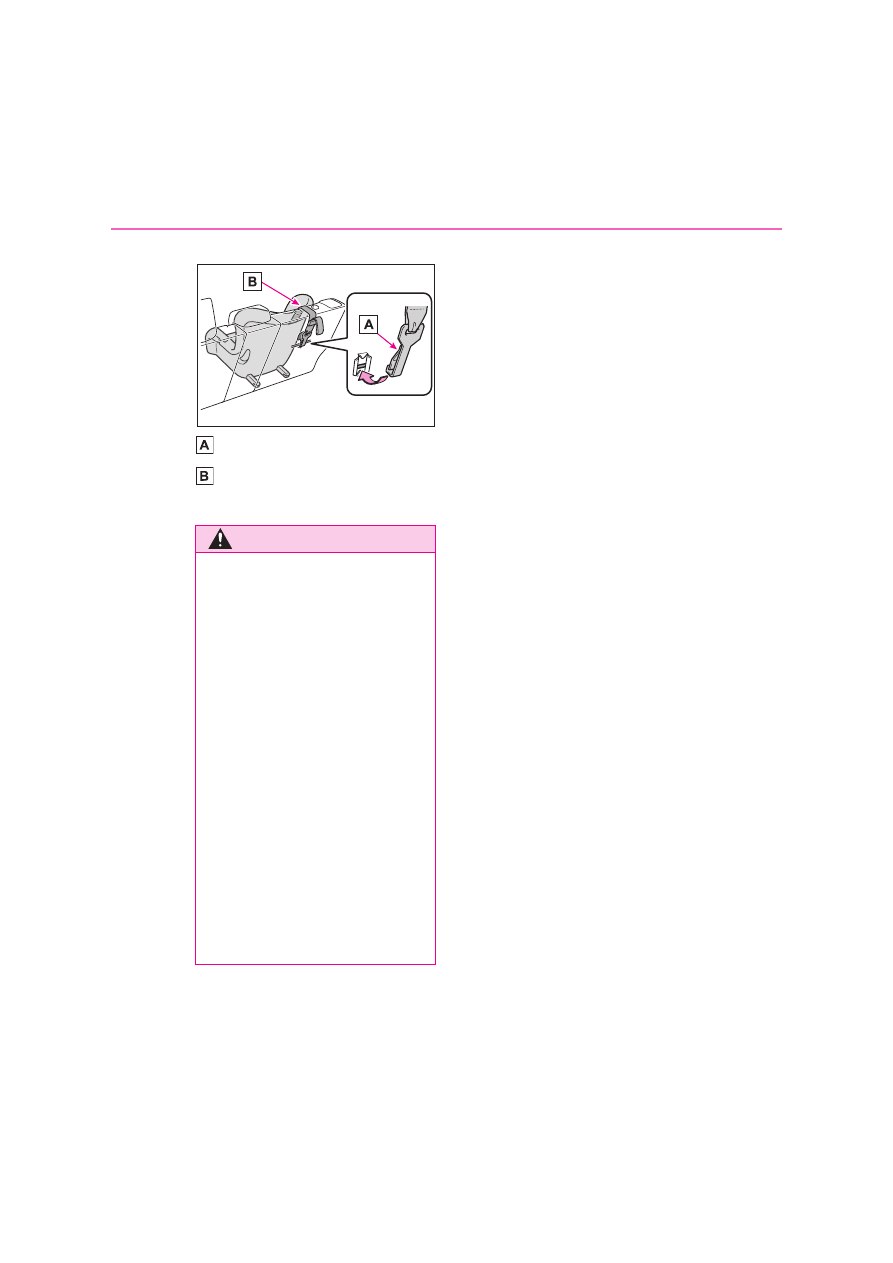
pass underneath the head restraint.

Hook

Top strap

4

Reinstall the luggage cover.

WARNING

When installing a child restraint 

system

Observe the following precautions.
Failure to do so may result in death or 

serious injury.

Firmly attach the top strap and 

make sure that the belt is not 

twisted.

Do not attach the top strap to any-

thing other than the top tether 
anchorage.

After securing a child restraint sys-
tem, never adjust the seat.

Follow all installation instructions 
provided by the child restraint sys-

tem manufacturer.

When installing the child restraint 

system with the head restraint 

being raised, after the head 
restraint has been raised and then 

the top tether anchorage has been 

fixed, do not lower the head 
restraint.

65

1

n

1-3. Emergency assistance

For s

afety
 and s

ec

ur

ity

1-3.Emergency assistance

*1

: If equipped

*2

: Operates within the eCall coverage. 

The system name differs depending 
on the country.

Microphone

“SOS” button

*

Indicator lights

Speaker

*

: This button is intended for communi-

cation with the eCall system operator.
Other SOS buttons available in other 
systems of a motor vehicle do not 
relate to the device and are not 
intended for communication with the 
eCall system operator.

Automatic Emergency Calls

If any airbag deploys, the system is 
designed to automatically call the 
eCall control center.

*

 The answer-

ing operator receives the vehicle’s 
location, the time of the incident 
and the vehicle VIN, and attempts 
to speak with the vehicle occupants 
to assess the situation. If the occu-
pants are unable to communicate, 
the operator automatically treats 
the call as an emergency and con-
tacts the nearest emergency ser-
vices provider (112 system etc.) to 
describe the situation and request 
that assistance be sent to the loca-
tion.

*

: In some cases, the call cannot be 

made. (

P.66)

Manual Emergency Calls

In the event of an emergency, press 
the “SOS” button to call the eCall 
control center.

*

 The answering 

operator will determine your vehi-
cle’s location, assess the situation, 
and dispatch the necessary assis-

eCall

*1, 2

eCall is a telematics service 
that uses Global Navigation 
Satellite System (GNSS) data 
and embedded cellular tech-
nology to enable the following 
emergency calls to be made: 
Automatic emergency calls 
(Automatic Collision Notifica-
tion) and manual emergency 
calls (by pressing the “SOS” 
button). This service is 
required by European Union 
Regulations.

System components

Emergency Notification Ser-
vices

66

n

1-3. Emergency assistance

tance required.
Make sure to open the cover before 
pressing the “SOS” button.

If you accidentally press the “SOS” but-
ton, tell the operator that you are not 
experiencing an emergency.

*

: In some cases, the call cannot be 

made. (

P.66)

When the engine switch is turned to 
ON, the red indicator light will illumi-
nate for 10 seconds and then the 
green indicator light will illuminate, 
indicating that the system is 
enabled. The indicator lights indi-
cate the following:

If the green indicator light illumi-
nates and stays on, the system is 
enabled.

If the green indicator light 
flashes, an automatic or manual 
Emergency Call is being made.

If the red indicator light illumi-
nates at any time other than 
immediately after the engine 
switch is turned to ON, the sys-
tem may be malfunctioning or 
the backup battery may be 

depleted.

If the red indicator light blinks for 
approximately 30 seconds during 
an Emergency Call, the call has 
been disconnected or the cellular 
network signal is weak.

Indicator lights

WARNING

When the Emergency Call may 
not be made

It may not be possible to make 

Emergency Calls in any of the fol-
lowing situations. In such cases, 

report to emergency services pro-

vider (112 system etc.) by other 
means such as nearby public 

phones.

• Even when the vehicle is in the cel-

lular phone service area, it may be 

difficult to connect to the eCall con-
trol center if the reception is poor or 

the line is busy. In such cases, even 

though the system attempts to con-
nect to the eCall control center, you 

may not be able to connect to the 

eCall control center to make Emer-
gency Calls and contact emergency 

services.

• When the vehicle is out of the cellu-

lar phone service area, the Emer-

gency Calls cannot be made.

• When any related equipment (such 

as the “SOS” button panel, indicator 
lights, microphone, speaker, DCM, 

antenna, or any wires connecting 

the equipment) is malfunctioning, 
damaged or broken, the Emer-

gency Call cannot be made.

67

1

n

1-3. Emergency assistance

For s

afety
 and s

ec

ur

ity

WARNING

• During an Emergency Call, the sys-

tem makes repeated attempts to 
connect to the eCall control center. 

However, if it cannot connect to the 

eCall control center due to poor 
radio wave reception, the system 

may not be able to connect to the 

cellular network and the call may 
finish without connecting. The red 

indicator light will blink for approxi-

mately 30 seconds to indicate this 
disconnection.

If the battery’s voltage decreases or 
there is a disconnection, the system 

may not be able to connect to the 

eCall control center.

The Emergency Call system might 

not work outside of EU area, 
depending on the available infra-

structure in the country.

When the Emergency Call sys-

tem is replaced with a new one

The Emergency Call system should 
be registered. Contact any authorized 

Toyota retailer or Toyota authorized 

repairer, or any reliable repairer.

For your safety

Please drive safely.
The function of this system is to 

assist you in making the Emer-

gency Call in case of accidents 
such as traffic accidents or sudden 

medical emergencies, and it does 

not protect the driver or passengers 
in any way. Please drive safely and 

fasten your seatbelts at all times for 

your safety.

In case of an emergency, make 

lives the top priority.

If you smell anything burning or 

other unusual smells, leave the 
vehicle and evacuate to a safe area 

immediately.

If the airbags deploy when the sys-

tem is operating normally, the sys-

tem makes emergency call. The 
system also makes emergency call 

when the vehicle is struck from the 

rear or rolls over, even if the airbags 
do not deploy.

For safety, do not make the Emer-
gency Call while driving.

Making calls during driving may 

cause mishandling of the steering 
wheel, which may lead to unex-

pected accidents.

Stop the vehicle and confirm the 
safety of your surroundings before 

making the Emergency Call.

When changing fuses, please use 

the specified fuses. Using other 

fuses may cause ignition or smoke 
in the circuit and lead to a fire.

Using the system while there is 
smoke or an unusual smell may 

cause a fire. Stop using the system 

immediately and consult any autho-
rized Toyota retailer or Toyota 

authorized repairer, or any reliable 

repairer.

NOTICE

To prevent damage

Do not pour any liquids onto the 

“SOS” button panel, etc. and do not 
impact it.

If the “SOS” button panel, 
speaker or microphone malfunc-

tions during an Emergency Call 

or manual maintenance check

It may not be possible to make Emer-

gency Calls, confirm the system sta-

tus, or communicate with the eCall 
control center operator. If any of the 

above equipment is damaged, please 

consult any authorized Toyota retailer 
or Toyota authorized repairer, or any 

reliable repairer.

68

n

1-3. Emergency assistance

Data processing flow

Server

Storage

Processing

DCM

1

Activation of data sharing is done by enabling a service on the “MyT by 
Toyota” app or purchasing a service that requires data collection.

2

Server activates the service in the DCM and defines which vehicle data 
to collect.

3

Defined vehicle data is collected by the DCM.

4

Data is shared with the server.

5

Data is stored in the server.

6

Data is processed in the server for fulfilling the service.

7

Processed data is presented to the customer.

For a list of eligible services in your region please visit the Toyota website or contact 
any authorized Toyota retailer or Toyota authorized repairer, or any reliable repairer.

System overview of added service

69

1

n

1-3. Emergency assistance

For s

afety
 and s

ec

ur

ity

Implementing Regulation

Implementing Regulation Annex1 PART3 User Information

Conformity

1. DESCRIPTION OF THE ECALL IN-VEHICLE SYSTEM

1.1.

Overview of the 112-based eCall in-vehicle sys-
tem, its operation and functionalities

O

1.2.

The 112-based eCall service is a public service 
of general interest and is accessible free of 
charge.

O

1.3.

The 112-based eCall in-vehicle system is acti-
vated by default. It is activated automatically by 
means of in-vehicle sensors in the event of a 
severe accident. It will also be triggered automat-
ically when the vehicle is equipped with a TPS 
system which does not function in the event of a 
severe accident.

O

1.4.

The 112-based eCall in-vehicle system can also 
be triggered manually, if needed. Instructions for 
manual activation of the system

O

1.5.

In the event of a critical system failure that would 
disable the 112-based eCall in-vehicle system, 
the following warning will be given to the occu-
pants of the vehicle

O

70

n

1-3. Emergency assistance

2. INFORMATION ON DATA PROCESSING

2.1.

Any processing of personal data through the 112-
based eCall in-vehicle system shall comply with 
the personal data protection rules provided for in 
Directives 95/46/EC and 2002/58/EC, and in par-
ticular, shall be based on the necessity to protect 
the vital interests of the individuals in accordance 
with Article 7(d) of Directive 95/46/EC.

O

2.2.

Processing of such data is strictly limited to the 
purpose of handling the emergency eCall to the 
single European emergency number 112.

O

2.3. Types of data and its recipients

2.3.1.

The 112-based eCall in-vehicle system may col-
lect and process only the following data: Vehicle 
Identification Number, Vehicle type (passenger 
vehicle or light commercial vehicle), Vehicle pro-
pulsion storage type (gasoline/die-
sel/CNG/LPG/electric/hydrogen), Vehicle last 
three locations and direction of travel, Log file of 
the automatic activation of the system and its 
timestamp, Any additional data (if applicable)

O

2.3.2.

Recipients of data processed by the 112-based 
eCall in-vehicle system are the relevant public 
safety answering points designated by the 
respective public authorities of the country on 
which territory they are located, to first receive 
and handle eCalls to the single European emer-
gency number 112. Additional information (if 
available):

O

Implementing Regulation Annex1 PART3 User Information

Conformity

71

1

n

1-3. Emergency assistance

For s

afety
 and s

ec

ur

ity

2.4. Arrangements for data processing

2.4.1.

The 112-based eCall in-vehicle system is 
designed in such a way as to ensure that the 
data contained in the system memory is not 
available outside the system before an eCall is 
triggered. Additional remarks (if any):

O

2.4.2.

The 112-based eCall in-vehicle system is 
designed in such a way as to ensure that it is not 
traceable and not subject to any constant track-
ing in its normal operation status. Additional 
remarks (if any):

O

2.4.3.

The 112-based eCall in-vehicle system is 
designed in such a way as to ensure that data in 
the system internal memory is automatically and 
continuously removed.

O

2.4.3.1.

The vehicle location data is constantly overwrit-
ten in the internal memory of the system so as 
always to keep maximum of the last three up-to-
date locations of the vehicle necessary for the 
normal functioning of the system.

O

2.4.3.2.

The log of activity data in the 112-based eCall in-
vehicle system is kept for no longer than neces-
sary for attaining the purpose of handling the 
emergency eCall and in any case not beyond 13 
hours from the moment an emergency eCall was 
initiated.

O

Implementing Regulation Annex1 PART3 User Information

Conformity

72

n

1-3. Emergency assistance

2.5. Modalities for exercising data subject’s rights

2.5.1.

The data subject (the vehicle’s owner) has a right 
of access to data and as appropriate to request 
the rectification, erasure or blocking of data, con-
cerning him or her, the processing of which does 
not comply with the provisions of Directive 
95/46/EC. Any third parties to whom the data 
have been disclosed have to be notified of such 
rectification, erasure or blocking carried out in 
compliance with this Directive, unless it proves 
impossible or involves a disproportionate effort.

O

2.5.2.

The data subject has a right to complain to the 
competent data protection authority if he or she 
considers that his or her rights have been 
infringed as a result of the processing of his or 
her personal data.

O

2.5.3.

Contact service responsible for handling access 
requests (if any):

P.73

O

Implementing Regulation Annex1 PART3 User Information

Conformity

73

1

n

1-3. Emergency assistance

For s

afety
 and s

ec

ur

ity

Service responsible for handling access requests

3. INFORMATION ON THIRD PARTY SERVICES AND OTHER ADDED VALUE 
SERVICES (IF FITTED)

3.1.

Description of the operation and the functional-
ities of the TPS system/added value service

P.68

3.2.

Any processing of personal data through the 
TPS system/other added value service shall 
comply with the personal data protection rules 
provided for in Directives 95/46/EC and 
2002/58/EC.

O

3.2.1.

Legal basis for the use of TPS system and/or 
added value services and for processing data 
through them

The Euro-

pean Union 

General 

Data Protec-

tion Regula-

tion

3.3.

The TPS system and/or other added value ser-
vices shall process personal data only on the 
base of the explicit consent of the data subject 
(the vehicle’s owner or owners).

O

3.4.

Modalities for data processing through TPS sys-
tem and/or other added value services, including 
any necessary additional information regarding 
traceability, tracking and processing of personal 
data

P.68

3.5.

The owner of a vehicle equipped with a TPS 
eCall system and/or other added value service in 
addition to the 112-based eCall in-vehicle system 
has the right to choose to use the 112-based 
eCall in-vehicle system rather than the TPS eCall 
system and the other added value service.

O

3.5.1.

Contact details for handling TPS eCall system 
deactivation requests

N/A

Country

Contact information

Austria

datenschutz@toyota-frey.at

Belgium/Luxembourg

privacy@toyota.be

Implementing Regulation Annex1 PART3 User Information

Conformity

74

n

1-3. Emergency assistance

Free/Open Source Software Information

This product contains Free/Open Source Software (FOSS). The license information 
and/or the source code of such FOSS can be found at the following URL.
http://www.opensourceautomotive.com/dcm/toyota/

Certification for eCall

P.486

Croatia

dpcp@toyota.hr

Czech Republic/
Hungary/Slovakia

adatvedelem@toyota-ce.com

Denmark

toyota@toyota.dk og

Estonia

privacy@toyota.ee

Finland

tietosuoja@toyota.fi

France

delegue.protectiondonnees@toyota-europe.com

Germany

Toyota.Datenschutz@toyota.de

Great Britain

privacy@tgb.toyota.co.uk

Greece

customer@toyota.gr

Iceland

personuvernd@toyota.is

Ireland

customerservice@toyota.ie

Italy

tmi.dpo@toyota-europe.com

Netherlands

www.toyota.nl/klantenservice

Norway

personvern@toyota.no

Poland

klient@toyota.pl

Portugal

gestaodadospessoais@toyotacaetano.pt

Romania

relatii.clienti@toyota.ro

Slovenia

dpcp@toyota.si

Spain

clientes@toyota.es / dpo@toyota.es.

Sweden

integritet@toyota.se

Switzerland

info@toyota.ch

Country

Contact information

75

1

n

1-4. Theft deterrent system

For s

afety
 and s

ec

ur

ity

1-4.Theft deterrent system

Vehicles without a smart entry & 
start system

The indicator light flashes after the 
key has been removed from the 
engine switch to indicate that the 
system is operating.
The indicator light stops flashing 
after the registered key has been 
inserted into the engine switch to 

indicate that the system has been 
canceled.

Vehicles with a smart entry & 
start system

The indicator light flashes after the 
engine switch has been turned off 
to indicate that the system is oper-
ating.
The indicator light stops flashing 
after the engine switch has been 
turned to ACC or ON to indicate 
that the system has been canceled.

System maintenance

The vehicle has a maintenance-free 
type engine immobilizer system.

Conditions that may cause the sys-

tem to malfunction

If the grip portion of the key is in con-

tact with a metallic object

If the key is in close proximity to or 

touching a key to the security system 

(key with a built-in transponder chip) 
of another vehicle

Certifications for the engine immo-

bilizer system

P.487

Engine immobilizer sys-

tem

The vehicle’s keys have built-
in transponder chips that pre-
vent the engine from starting if 
a key has not been previously 
registered in the vehicle’s on-
board computer.

Never leave the keys inside the 
vehicle when you leave the 
vehicle.

This system is designed to 
help prevent vehicle theft but 
does not guarantee absolute 
security against all vehicle 
thefts.

Operating the system

NOTICE

To ensure the system operates 

correctly

Do not modify or remove the system. 

If modified or removed, the proper 

operation of the system cannot be 
guaranteed.

76

n

1-4. Theft deterrent system

*

: If equipped

Setting

Turn the engine switch off, have all 
the passengers exit the vehicle and 
ensure that all the doors are closed.
Using the entry function (if 
equipped): Touch the sensor area 
on the outside door handle twice 
within 5 seconds.

Using the wireless remote control: 

Press 

 twice within 5 seconds.

Canceling

Using the entry function (if 
equipped): Hold the outside door 

handle.

Using the wireless remote control: 

Press 

.

Using power back door (if 
equipped): Using wireless remote 
control (

P.126), or using Hands 

Free Power Back Door (

P.128).

Double locking system

*

Unauthorized access to the 
vehicle is prevented by dis-
abling the door unlocking 
function from both the interior 
and exterior of the vehicle.
Vehicles employing this sys-
tem have labels on the window 
glass of both front doors.

Setting/canceling the double 
locking system

WARNING

Double locking system precau-

tion

Never activate the double locking sys-
tem when there are people in the 

vehicle because all the doors cannot 

be opened from inside the vehicle.

77

1

n

1-4. Theft deterrent system

For s

afety
 and s

ec

ur

ity

*

: If equipped

Items to check before locking 
the vehicle

To prevent unexpected triggering of 
the alarm and vehicle theft, make 
sure of the following:

Nobody is in the vehicle.

The windows are closed before 
the alarm is set.

No valuables or other personal 
items are left in the vehicle.

Setting

Close the door and hood, and lock 
all the doors using the entry func-
tion (if equipped) or wireless 
remote control. The system will set 
automatically after 30 seconds.

The indicator light changes from being 
on to flashing when the system is set.

Canceling or stopping

Do one of the following to deacti-
vate or stop the alarms:

Unlock the doors using the entry 
function (if equipped) or wireless 
remote control.

Starting the engine. (The alarm 
will be deactivated or stopped 
after a few seconds.)

Setting the alarm

The alarm can be set if all the doors are 

closed even with the hood open.

System maintenance

The vehicle has a maintenance-free 

type alarm system.

Triggering of the alarm

The alarm may be triggered in the fol-
lowing situations: 

(Stopping the alarm deactivates the 

alarm system.)

The doors are unlocked using the key 

or the mechanical key.

Alarm

*

The alarm uses light and 
sound to give an alert when an 
intrusion is detected. 
The alarm is triggered in the 
following situations when the 
alarm is set:

A locked door is unlocked or 
opened in any way other than 
using the entry function (if 
equipped) or wireless remote 
control. (The doors will lock 
again automatically.)

The hood is opened.

Setting/canceling/stopping 
the alarm system

78

n

1-4. Theft deterrent system

A person inside the vehicle opens a 
door or hood, or unlocks the vehicle.

The battery is recharged or replaced 
when the vehicle is locked. (

P.440)

Alarm-operated door lock

In the following cases, depending on the 

situation, the door may automatically 
lock to prevent improper entry into the 

vehicle:

When a person remaining in the vehi-

cle unlocks the door and the alarm is 

activated.

While the alarm is activated, a person 

remaining in the vehicle unlocks the 
door.

When recharging or replacing the bat-
tery

Customization

Some functions can be customized. 

(

P.457)

NOTICE

To ensure the system operates 

correctly

Do not modify or remove the system. 

If modified or removed, the proper 

operation of the system cannot be 
guaranteed.

2

79

n

2

Vehi

cle s
tatus

 informati

on and indi

cators

Vehicle status informa-

tion and indicators

2-1. Instrument cluster

Warning lights and indicators

.........................................

80

Gauges and meters (4.2-inch 

display) .............................

85

Gauges and meters (7-inch 

display) .............................

89

Multi-information display (4.2-

inch display)......................

94

Multi-information display (7-

inch display)....................

100

Head-up display................

106

Fuel consumption information

.......................................

110


Content      ..     2      3      4      5     ..


------WebKitFormBoundaryy7YX0sP4PvL9vHHT--