Toyota Corolla Hybrid (2022 year). Manual in english - page 23
 

  Index      Toyota     Toyota Corolla Hybrid (2022 year). Manual in english


Search            copyright infringement  


Content      ..     21      22      23      24     ..


Toyota Corolla Hybrid (2022 year). Manual in english - page 23


375

5-17. Connected Services Operation

5

Audio

5-17.Connected Services Operation

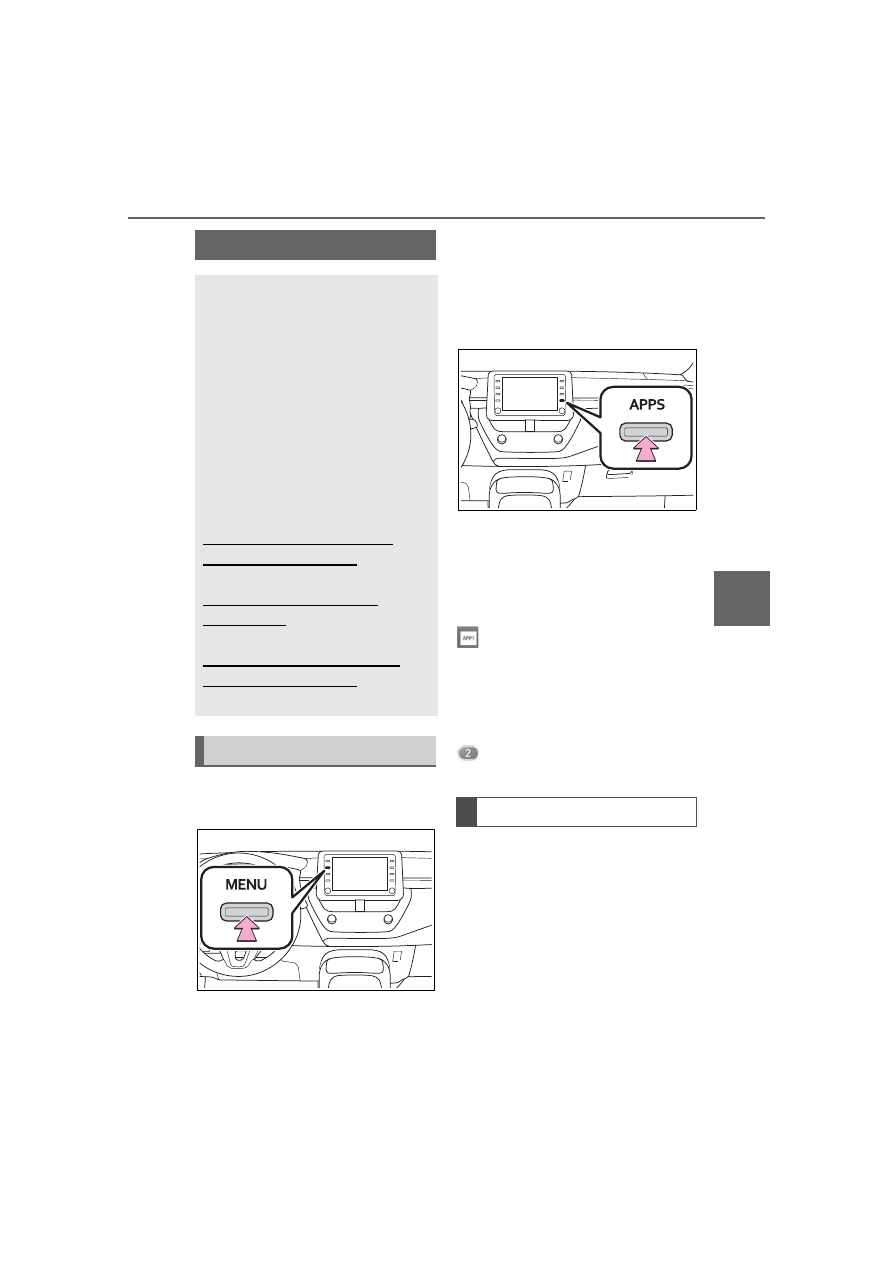
From the “MENU” button

1

Press the “MENU” button.

2

Select “Apps”.

3

Follow the steps in “From the 
“APPS” button” from step 

3

(

P.375)

From the “APPS” button

1

Press the “APPS” button.

2

Select “Apps”.

If a specific application screen is 

displayed, select “Apps” again.

3

Select the desired application 
screen button.

: Select to activate an applica-

tion.
“Update”: Select to update the 

applications. (

P.375)

“App Catalog”: Select to change the 

order of the applications. (

P.376)

: Displays the number of new 

notifications for the application

When the Toyota apps is acti-
vated, an application may need 
to be updated. To update an 
application, it is necessary to 
download update data and 
install it.

Downloading update

If an update is available, 
“Update” can be selected.

Toyota apps

Toyota apps is a function 
that enables certain apps 
installed on a smart phone 
or the system to be dis-
played on and operated 
from the system screen. 
Before the Toyota apps can 
be used, some setup needs 
to be performed. (

P.371)

For details about the func-
tions and services provided 
by each application, refer to
https://www.toyota.com/
connected-services
in the United States,
https://www.toyota.ca/
connected
in Canada, and
http://www.toyotapr.com/
connected-services
in Puerto Rico.

Using Toyota apps

Updating an application

376

5-17. Connected Services Operation

1

Select “Update” on the appli-
cation screen. (

P.375)

2

Check that downloading 
starts.

“Download in Background”: Select 

to operate other functions while 

downloading.
“Cancel”: Select to cancel updating.

3

Check that downloading is 
complete.

“Later”: Select to install later. When 

this screen button is selected, the 

screen will return to the last dis-

played screen. To install the update 

data: (

P.376)

“See Detail”: Select to display 

detailed information on the update 

data.
“Install”: Select to install the update 

data. Follow the steps “Installing 

the update data” from step 

2

(

P.376)

Installing the update data

After the downloading is com-
plete, “Update” will be changed 
to “Install”.

1

Select “Install” on the appli-
cation screen. (

P.375)

2

Select “Continue”.

“Later”: Select to postpone the 

installation of the update data and 

go back to the previous screen.

3

Check that installing is 
started.

“Install in Background”: Select to 

operate other functions while 

installing.

4

Select “OK” after the install-
ing is complete.

The Toyota apps cannot be oper-

ated while installing.

Order of the applications can be 
changed.

1

Display the application 
screen. (

P.375)

2

Select “App Catalog”.

3

Select the desired application 
to be moved.

4

Select “<<” or “>>” to move 
the application, and then 
select the done button.

When problems occur with start-
ing the application player, a 
message will appear on the 
screen. Referring to the follow-
ing items, identify the problem 
and take the suggested correc-
tive action.

“When it is safe and legal to 
do so, please ensure your 
mobile application is running 
and logged in on your phone.”

The Toyota mobile application can-
not be connected to Bluetooth

®


SPP.
Refer to
https://www.toyota.com/
connected-services
in the United States,
https://www.toyota.ca/connected
in Canada, and
http://www.toyotapr.com/
connected-services
in Puerto Rico, to confirm if the 

Reordering the applica-
tions

If a message appears on 
the screen

377

5-17. Connected Services Operation

5

Audio

phone is Bluetooth

®

 SPP compati-

ble or not, and then activate the 
Toyota mobile application.

“Installation failed, please try 
again”

Installation can be attempted again 
by changing to the application 
screen and pressing the “Install” 
switch.

“Application download error. 
Please try again later.”

Downloading can be attempted 
again by checking the communica-
tion status, changing to the applica-
tion screen and pressing the 
“Download” switch again.

“Download error, some mobile 
application functions may not 
work as expected. Please 
reinitiate the download pro-
cess.”

The Toyota mobile application can-
not be connected to Bluetooth

®


SPP.
Refer to
https://www.toyota.com/
connected-services
in the United States,
https://www.toyota.ca/connected
in Canada, and
http://www.toyotapr.com/
connected-services
in Puerto Rico, to confirm if the 
phone is Bluetooth

®

 SPP compati-

ble or not, and then activate the 
Toyota mobile application.
Please ensure your Toyota mobile 
application is running and logged in 
on your phone while vehicle is not 
moving.

“To use the services, mobile 
application needs to be run-
ning on your phone. For more 
information, please visit toy-
ota.com or call 
1-800-331-4331 in the United 
States, 1-888-869-6828 in 
Canada, and 1-877-855-8377 
in Puerto Rico.”

The Toyota mobile application can-
not be connected to Bluetooth

®


SPP.
Refer to
https://www.toyota.com/
connected-services
in the United States,
https://www.toyota.ca/connected
in Canada, and
http://www.toyotapr.com/
connected-services
in Puerto Rico, to confirm if the 
phone is Bluetooth

®

 SPP compati-

ble or not, and then activate the 
Toyota mobile application.

“Communication unsuccess-
ful. Please try again.”

Communication was disconnected.
After a few moments, retry the 
operation.

A keyword can be entered to an 
application by the software key-
board or voice recognition func-
tion. For details about the 
functions and services provided 
by each application, refer to
https://www.toyota.com/

Entering keyword opera-
tion

378

5-17. Connected Services Operation

connected-services
in the United States,
https://www.toyota.ca/connected
in Canada, and
http://www.toyotapr.com/
connected-services
in Puerto Rico.
The keyboard layout can be 
changed. (

P.287)

1

Display the application 
screen. (

P.375)

2

Select the desired application 
screen button.

3

Select the character entering 
space.

4

Enter a search term, and 
then select “OK”.

5

Entering characters will be 
reflected on the character 
entering space.

For details on operating the key-

board: 

P.259

1

Display the application 
screen. (

P.375)

2

Select the desired application 
screen button.

3

Press the talk switch. 
(

P.330)

4

Say the desired keyword.

Completion of the keyword will be 

detected automatically.

5

Search results will be dis-
played on the screen.

Entering a keyword using 
the software keyboard

Entering a keyword using 
the voice recognition func-
tion

379

5-18. Toyota apps settings

5

Audio

5-18.Toyota apps settings

1

Press the “MENU” button.

2

Select “Setup”.

3

Select “Toyota apps”.

4

Select the desired items to 
be set.

Select to set the pop up 
reminder for smart phone 
data usage. (

P.377)

Select to detect iPhone app 
automatically on/off.

Select to set the enhanced 
mode with connecting USB 
device on/off.

When an iPhone is connected while 
this setting is set to “On”, communi-
cation with devices connected to 
other USB ports may not be possi-
ble. Also, depending on the device, 
charging may not be possible.

Select to reset all setup 
items.

The data use notification 
pop-up, which indicates that the 
system will use an internet con-
nection, can be enabled/dis-
abled.

1

Display the Toyota apps set-
tings screen. (

P.379)

2

Select “Data Usage Mes-
sage”.

3

Change the setting as 
desired.

Setup

The settings of Toyota apps 
can be changed.

Displaying the Toyota 
apps settings screen

Toyota apps settings 
screen

Data use notification 
pop-up settings

381

6

6

Interior

 featur

es

Interior features

.

6-1. Using the air conditioning

system and defogger

Automatic air conditioning 

system.......................

382

Heated steering wheel/seat 

heaters ......................

389

6-2. Using the interior lights

Interior lights list ..........

391

6-3. Using the storage features

List of storage features

..................................

393

6-4. Other interior features

Other interior features .

397

382

6-1. Using the air conditioning system and defogger

6-1.Using the air conditioning system and defogger

Temperature control switch
Fan speed control switch
“A/C” switch
S-FLOW mode switch
Outside/recirculated air mode switch
Eco air conditioning mode switch
Airflow mode control switch
Rear window defogger and outside rear view mirror defoggers
switch

*

Windshield defogger switch
Off switch
Automatic mode switch

Rear window defogger switch

*

*

: If equipped

Adjusting the temperature
setting

To adjust the temperature set-

ting, turn the temperature con-
trol switch clockwise (warm) or 
counterclockwise (cool).

Automatic air conditioning system

Air outlets are automatically selected and fan speed is auto-
matically adjusted according to the set temperature setting.
Also, the display and button positions will differ depending on 
the type of the system.

Air conditioning controls

383

6-1. Using the air conditioning system and defogger

6

Interior

 featur

es

If “A/C” switch is not pressed, the 
system will blow ambient tempera-
ture air or heated air.

Setting the fan speed

To adjust the fan speed, turn the 
fan speed control switch clock-
wise (increase) or counterclock-
wise (decrease).

Pressing the off switch to turns off 
the fan.

Change the airflow mode

Press the airflow mode control 
switch.

The airflow mode changes as fol-
lows each time the switch is 
pressed.

1

Upper body

2

Upper body and feet

3

Feet

4

Feet and the windshield 
defogger operates

Switching between outside 
air and recirculated air 
modes

Press the outside/recirculated 

air mode switch.

The mode switches between out-
side air mode and recirculated air 
mode modes each time the switch 
is operated.
When recirculated air mode is 
selected, the indicator illuminates 
on the outside/recirculated air 
mode switch.

Set cooling and dehumidifi-
cation function

Press the “A/C” switch.

When the function is on, the indica-
tor illuminates on the “A/C” switch.

Defogging the windshield

Defoggers are used to defog the 
windshield and front side win-
dows.
Press the windshield defogger 
switch.

Set the outside/recirculated air 
mode switch to outside air mode if 
the recirculated air mode is used. (It 
may switch automatically.)
To defog the windshield and the 
side windows quickly, turn the air 
flow and temperature up.
To return to the previous mode, 
press the windshield defogger 
switch again when the windshield is 
defogged.
When the windshield defogger 
switch is on, the indicator illumi-
nates on the windshield defogger 
switch.

384

6-1. Using the air conditioning system and defogger

Defogging the rear window 
and outside rear view mir-
rors

Vehicles without outside rear 
view mirror defoggers

A defogger is used to defog the 
rear window.
Press the rear window defogger 
switch.

The defogger will automatically turn 
off after a while.
When the rear window defogger 
switch is on, the indicator illumi-
nates on the rear window defogger 
switch.

Vehicles with outside rear 
view mirror defoggers

Defoggers are used to defog the 
rear window, and to remove 
raindrops, dew and frost from 
the outside rear view mirrors.
Press the rear window and out-
side rear view mirror defoggers 
switch.

The defoggers will automatically 
turn off after a while.
When the rear window and outside 
rear view mirror defoggers switch is 
on, the indicator illuminates on the 
rear window and outside rear view 
mirror defoggers switch.

Eco air conditioning mode

The air conditioning is controlled 
with low fuel consumption priori-
tized such as reducing fan 
speed, etc.
Press the eco air conditioning 
mode switch.

When the eco air conditioning 
mode is on, the indicator illumi-
nates on the eco air conditioning 
mode switch.

When the outside temperature 

exceeds 75°F (24°C) and the air 

conditioning system is on

In order to reduce the air condi-

tioning power consumption, the air 

conditioning system may switch to 

recirculated air mode automati-

cally. This may also reduce fuel 

consumption.

Recirculated air mode is selected 

as a default mode when the power 

switch is turned to ON.

It is possible to switch to outside 

air mode at any time by pressing 

the outside air mode switch.

Fogging up of the windows

The windows will easily fog up 

when the humidity in the vehicle is 

high. Turning “A/C” on will dehu-

midify the air from the outlets and 

defog the windshield effectively.

If you turn “A/C” off, the windows 

may fog up more easily.

The windows may fog up if the 

recirculated air mode is used.

When driving on dusty roads

Close all windows. If dust thrown up 

by the vehicle is still drawn into the 

vehicle after closing the windows, it 

is recommended that the air intake 

mode be set to outside air mode and 

the fan speed to any setting except 

off.

Outside/recirculated air mode

Setting to the recirculated air 

mode temporarily is recom-

mended in preventing dirty air 

from entering the vehicle interior 

and helping to cool the vehicle 

when the outside air temperature 

is high.

Outside/recirculated air mode may 

automatically switch depending on 

385

6-1. Using the air conditioning system and defogger

6

Interior

 featur

es

the temperature setting or the 

inside temperature.

Eco air conditioning mode

When Eco drive mode is selected 

using the driving mode select 

switch, eco air conditioning mode 

turns on.
When a drive mode other than Eco 

drive mode is selected, eco air con-

ditioning mode may turn off.

Operation of the air condition-

ing system in Eco drive mode

In Eco drive mode, the air condi-

tioning system is controlled as fol-

lows to prioritize fuel efficiency:

• Engine speed and compressor 

operation controlled to restrict 

heating/cooling capacity

• Fan speed restricted when auto-

matic mode is selected

To improve air conditioning perfor-

mance, perform the following 

operations:

• Turn off eco air conditioning mode 

(

P.384)

• Adjust the fan speed

• Turn off Eco drive mode (

P.234)

When the outside temperature 

falls to nearly 32°F (0°C)

The dehumidification function may 

not operate even when “A/C” switch 

is pressed.

Ventilation and air conditioning 

odors

To let fresh air in, set the air condi-

tioning system to the outside air 

mode.

During use, various odors from 

inside and outside the vehicle may 

enter into and accumulate in the 

air conditioning system. This may 

then cause odor to be emitted 

from the vents.

To reduce potential odors from 

occurring:

• It is recommended that the air 

conditioning system be set to out-

side air mode prior to turning the 

vehicle off.

• The start timing of the blower may 

be delayed for a short period of 

time immediately after the air con-

ditioning system is started in auto-

matic mode.

When parking, the system auto-

matically switches to outside air 

mode to encourage better air cir-

culation throughout the vehicle, 

helping to reduce odors that occur 

when starting the vehicle.

Air conditioning filter

P.438

Air conditioning system refrig-

erant

A label regarding the refrigerant of 

the air conditioning system is 

attached to the hood at the loca-

tion shown in the following illustra-

tion.

The meaning of each symbol on 

the label are as follows:

Caution

Air conditioning sys-
tem

Air conditioning sys-
tem lubricant type

Requires registered 
technician to service 
air conditioning sys-
tem

Flammable refrigerant

386

6-1. Using the air conditioning system and defogger

Customization

Some functions can be customized. 

(

P.528)

1

Press the automatic mode 
switch.

2

Adjust the temperature set-
ting.

3

To stop the operation, press 
the off switch.

If the fan speed setting or air 
flow modes are operated, the 
automatic mode indicator goes 
off. However, automatic mode 
for functions other than that 
operated is maintained.

Using automatic mode

Fan speed is adjusted automati-

cally according to the temperature 

setting and the ambient conditions.
Therefore, the fan may stop for a 

while until warm or cool air is ready 

to flow immediately after the auto-

matic mode switch pressed.

Prevent ice from building up on 
the windshield and wiper 
blades.

When the windshield wiper de-icer 
switch is on, the indicator illumi-
nates on the windshield wiper 
de-icer switch.
The windshield wiper de-icer will 
automatically turn off after a period 
of time.

WARNING

To prevent the windshield 

from fogging up

Do not use the windshield defog-

ger switch during cool air opera-

tion in extremely humid weather. 

The difference between the tem-

perature of the outside air and 

that of the windshield can cause 

the outer surface of the wind-

shield to fog up, blocking your 

vision.

When the outside rear view 

mirror defoggers are operat-

ing (if equipped)

Do not touch the outside rear view 

mirror surfaces, as they can 

become very hot and burn you.

NOTICE

To prevent 12-volt battery dis-

charge

Do not leave the air conditioning 

system on longer than necessary 

when the hybrid system is off.

When repairing/replacing 

parts of the air conditioning 

system

Have repair/replacement per-

formed by your Toyota dealer.

When a part of the air conditioning 

system, such as the evaporator, is 

to be replaced, it must be 

replaced with a new one.

Using automatic mode

Windshield wiper de-icer 
(if equipped)

387

6-1. Using the air conditioning system and defogger

6

Interior

 featur

es

In S-FLOW mode, priority for the 
airflow is given to the front 
seats, reducing the airflow and 
air conditioning effect on the 
rear seats.
The following S-FLOW modes 
are available:

Automatic S-FLOW mode

In this mode, when a passenger 
is judged to be in a rear seat, 
S-FLOW mode will be automati-
cally disabled.

When the S-FLOW mode is on, the 
indicator illuminates on the 
S-FLOW mode switch.
To enable/disable S-FLOW mode 
and enter manual S-FLOW mode, 
press the S-FLOW mode switch.

Manual S-FLOW mode

When the S-FLOW mode switch 
is pressed, S-FLOW mode will 
be manually enabled/ disabled.

When the S-FLOW mode is on, the 
indicator illuminates on the 
S-FLOW mode switch.

Operation in S-FLOW mode dif-
fers according to the following 
conditions:

Priority is given to the driver’s 

seat only when:

Automatic S-FLOW mode

When no passengers are judged to 
be in the front passenger seat or 
rear seats.

Manual S-FLOW mode

When no passenger is judged to be 
in the front passenger seat.

Priority is given to the front 
seats when:

Manual S-FLOW mode is selected 
or no passengers are judged to be 
in the rear seats when in automatic 
S-FLOW mode.

S-FLOW mode will be dis-
abled when:

A passenger is judged to be in a 
rear seat when in automatic 
S-FLOW mode.

Depending on the set tempera-
ture, operation in S-FLOW 
mode  may not change as 
described above.

How the system judges if a pas-

senger is in the vehicle when in 

S-FLOW mode

In S-FLOW mode, the system 

judges if a passenger is in the vehi-

cle as follows:
• Front passenger seat:
A passenger is judged to be in the 

front passenger seat when the sys-

tem detects an object on the front 

passenger seat, fastening of the 

front passenger seat belt or the 

opening and closing of the front pas-

senger door. (However, when only 

opening and closing of the front pas-

senger door is detected, the system 

will judge that a passenger is not in 

WARNING

To prevent burns

Do not touch the glass at lower 

part of the windshield or to the 

side of the front pillars when the 

windshield wiper de-icer is on.

S-FLOW mode

388

6-1. Using the air conditioning system and defogger

the front passenger seat after the 

vehicle speed reaches approxi-

mately 12 mph [20 km/h] or more.)
• Rear seats (automatic S-FLOW 

mode only):

A passenger is judged to be in a 

rear seat when the system detects 

the opening and closing of a rear 

door.
If a passenger is judged to be in the 

vehicle, the system will retain the 

judgement for a certain amount of 

time after the power switch is turned 

off.

Operation of automatic S-FLOW 

mode

When the system is operating in 

automatic S-FLOW mode, if a rear 

door is opened and then closed, 

S-FLOW mode will be disabled. To 

enable S-FLOW mode, press the 

S-FLOW mode switch. (In this case, 

the system will operate in manual 

S-FLOW mode.)

Changing from manual S-FLOW 

mode to automatic S-FLOW 

mode

1

Press the S-FLOW mode switch 

to disable S-FLOW mode.

2

Turn the power switch off.

3

Wait for 60 minutes or more and 

change the power switch to ON.

Location of air outlets

The air outlets and air volume 
changes according to the 
selected air flow mode.

:If equipped

Adjusting the position of 
and opening and closing 
the air outlets

Front center

Direct air flow to the left or right, up 
or down

Front right-hand side

Direct air flow to the left or right, up 
or down

Air outlet layout and oper-
ations

389

6-1. Using the air conditioning system and defogger

6

Interior

 featur

es

Front left-hand side

Direct air flow to the left or right, up 
or down

*

: If equipped

WARNING

To prevent the windshield 

defogger from operating 

improperly

Do not place anything on the 

instrument panel which may cover 

the air outlets. Otherwise, air flow 

may be obstructed, preventing the 

windshield defoggers from defog-

ging.

Heated steering 

wheel

*

/seat heaters

*

Heated steering wheel

Warms up the grip of the 
steering wheel

Seat heaters

Warm up the seat upholstery

WARNING

To prevent minor burn inju-

ries

Care should be taken if anyone in 

the following categories comes in 

contact with the steering wheel or 

seats when the heater is on:

Babies, small children, the 

elderly, the sick and the physi-

cally challenged

Persons with sensitive skin

Persons who are fatigued

Persons who have taken alco-

hol or drugs that induce sleep 

(sleeping drugs, cold remedies, 

etc.)

NOTICE

To prevent damage to the 

seat heaters

Do not put heavy objects that 

have an uneven surface on the 

seat and do not stick sharp 

objects (needles, nails, etc.) into 

the seat.

To prevent 12-volt battery dis-

charge

Do not use the functions when the 

hybrid system is off.

390

6-1. Using the air conditioning system and defogger

Heated steering wheel

Turns heated steering wheel 
on/off

When the heated steering wheel is 
on, the indicator illuminates on the 
heated steering wheel switch.

Seat heaters

Front

Turns seat heaters on/off

1

High temperature

2

Low temperature

When the seat heater is on, the 
indicator illuminates on the seat 
heater switch.
When not in use, put the switch in 
the neutral position. The indicator 
will turn off.

Rear

Turns seat heaters on/off

When the seat heater is on, the 
indicator illuminates on the seat 
heater switch.

The heated steering wheel and

seat heaters can be used when

The power switch is in ON.

Operation instructions

WARNING

To prevent overheating and

minor burn injuries

Observe the following precautions 

when using the seat heaters.

Do not cover the seat with a

blanket or cushion when using

the seat heater.

Do not use seat heater more

than necessary.

391

6-2. Using the interior lights

6

Interior

 featur

es

6-2.Using the interior lights

Rear interior light (

P.392)

Door trim lights (if equipped)
Front interior/personal lights (

P.391)

Center tray light (if equipped)
Cup holder lights (if equipped)

Front

1

Turns the door position on/off

When a door is opened while the 
door position is on, the lights turn 
on.

Interior lights list

Location of the interior lights

Operating the interior 
lights


Content      ..     21      22      23      24     ..