Toyota Corolla Hybrid (2022 year). Manual in english - page 24
 

  Index      Toyota     Toyota Corolla Hybrid (2022 year). Manual in english


Search            copyright infringement  


Content      ..     22      23      24      25     ..


Toyota Corolla Hybrid (2022 year). Manual in english - page 24


392

6-2. Using the interior lights

2

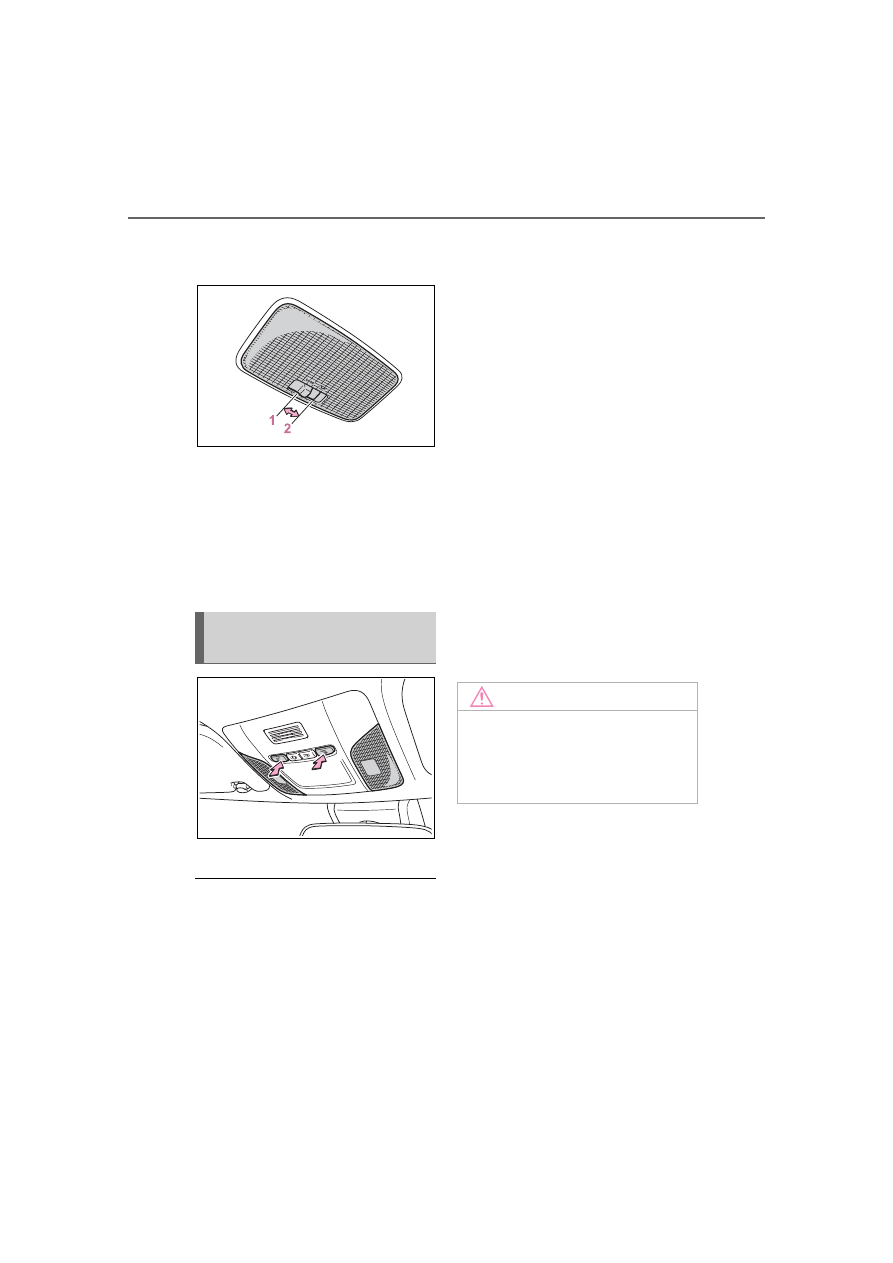
Turns the lights on/off

Rear

1

Turns the door position on

The rear interior light turns on/off 
together the front interior lights.
When a door is opened while the 
front and rear interior light door 
position is on, the lights turn on.

2

Turns the light on

Turns the lights on/off

Illuminated entry system

The lights automatically turn on/off 

according to the power switch 

mode, the presence of the elec-

tronic key, whether the doors are 

locked/unlocked, and whether the 

doors are open/closed.

To prevent the 12-volt battery

from being discharged

If the interior lights remain on when 

the power switch is turned off, the 

lights will go off automatically after 

20 minutes.

The interior lights may turn on

automatically when

If any of the SRS airbags deploy 

(inflate) or in the event of a strong 

rear impact, the interior lights will 

turn on automatically.

The interior lights will turn off auto-

matically after approximately 20 

minutes.

The interior lights can be turned off 

manually. However, in order to help 

prevent further collisions, it is rec-

ommended that they be left on until 

safety can be ensured.

(The interior lights may not turn on 

automatically depending on the 

force of the impact and conditions of 

the collision.)

Customization

Some functions can be customized.

(

P.528)

Operating the personal 
lights

NOTICE

To prevent 12-volt battery dis-

charge

Do not leave the lights on longer 

than necessary when the hybrid 

system is off.

393

6-3. Using the storage features

6

Interior

 featur

es

6-3.Using the storage features

Bottle holders/door pockets (

P.394)

Open trays (if equipped) (

P.395)

Glove box (

P.394)

Cup holders (

P.394)

Console box (

P.395)

List of storage features

Location of the storage features

WARNING

Items that should not be left

in the storage spaces

Do not leave glasses, lighters or 

spray cans in the storage spaces, 

as this may cause the following 

when cabin temperature becomes 

high:

Glasses may be deformed by

heat or cracked if they come

into contact with other stored

items.

Lighters or spray cans may

explode. If they come into con-

tact with other stored items, the

lighter may catch fire or the

spray can may release gas,

causing a fire hazard.

394

6-3. Using the storage features

Pull up the lever to open the 
glove box.

Front

Rear

Pull the armrest down.

Front

Rear

Glove box

WARNING

Caution while driving

Keep the glove box closed. In the 

event of sudden braking or sud-

den swerving, an accident may 

occur due to an occupant being 

struck by the open glove box or 

the items stored inside.

Cup holders

WARNING

Items unsuitable for the cup 

holder

Do not place anything other than 

cups or beverage cans in the cup 

holders.

Other items may be thrown out of 

the holders in the event of an 

accident or sudden braking and 

cause injury. If possible, cover hot 

drinks to prevent burns.

Bottle holders

395

6-3. Using the storage features

6

Interior

 featur

es

Bottle holders

When storing a bottle, close the 

cap.

The bottle may not be stored 

depending on its size or shape.

1

Slide the lid to the rear most 
position.

2

Lift the lid while pulling up the 
knob.

Slide function

The console box lid can be slid for-

ward or backward.

Front (if equipped)

Rear

WARNING

Items unsuitable for the bottle 

holders

Do not place anything other than 

a bottle in the bottle holders.

Other items may be thrown out of 

the holders in the event of an 

accident or sudden braking and 

cause injury.

Console box

WARNING

Caution while driving

Keep the console box closed.

Injuries may result in the event of 

an accident or sudden braking.

Open trays

WARNING

Caution while driving

Observe the following precautions 

when putting items in the open 

tray. Failure to do so may cause 

items to be thrown out of the tray 

in the event of sudden braking or 

steering. In these cases, the items 

may interfere with pedal operation 

or cause driver distraction, result-

ing in an accident.

Do not store items in the tray 

that can easily shift or roll out.

396

6-3. Using the storage features

WARNING

Do not stack items in the tray

higher than the tray’s edge.

Do not put items in the tray that

may protrude over the tray’s

edge.

397

6-4. Other interior features

6

Interior

 featur

es

6-4.Other interior features

The USB charging port are used 
to supply 3.0 A of electricity at 5 
V to external devices.
The USB charging port are for 
charging only. They are not 
designed for data transfer or 
other purposes.
Depending on the external 
device, it may not charge prop-
erly. Refer to the manual 
included with the device before 
using a USB charging port.

Using the USB charging
port

Lift the lid while pulling up the 
knob.

The USB charging port can be

used when

The power switch is in ACC or ON.

Situations in which the USB

charging port may not operate

correctly

If a device which consumes more

than 3.0 A at 5 V is connected

If a device designed to communi-

cate with a personal computer,

such as a USB memory device, is

connected

If the connected external device is

turned off (depending on device)

If the temperature inside the vehi-

cle is high, such as after the vehi-

cle has been parked in the sun

About connected external

device

Depending on the connected exter-

nal device, charging may occasion-

ally be suspended and then start 

again. This is not a malfunction.

Other interior features

USB charging port

NOTICE

To prevent damage to the

USB charging port

Do not insert foreign objects into

the port.

Do not spill water or other liq-

uids into the port.

Do not apply excessive force to

or impact the USB charging

port.

Do not disassemble or modify

the USB charging port.

To prevent damage to exter-

nal devices

Do not leave external devices in

the vehicle. The temperature

inside the vehicle may become

high, resulting in damage to an

external device.

Do not push down on or apply

unnecessary force to an exter-

nal device or the cable of an

external device while it is con-

nected.

To prevent 12-volt battery dis-

charge

Do not use the USB charging port 

for a long period of time with the 

hybrid system stopped.

398

6-4. Other interior features

The power outlet can be used 
for 12 V accessories that run on 
less than 10 A.
Lift the lid while pulling up the 
knob and open the power outlet 
lid.

The power outlet can be used 

when

The power switch is in ACC or ON.

When stopping the hybrid sys-

tem

Disconnect electrical devices with 

charging functions, such as mobile 

battery packs.

If such devices are left connected, 

the hybrid system may not stop nor-

mally.

A portable device, such as a 
smartphone or mobile battery, 
can be charged by just placing it 
on the charging area, provided 
the device is compatible with the 
Qi wireless charging standard 
created by the Wireless Power 
Consortium.
The wireless charger cannot be 
used with a portable device that 
is larger than the charging area. 
Additionally, depending on the 
portable device, the wireless 
charger may not operate prop-
erly. Refer to the operation man-
ual of the portable device.

The “Qi” symbol

The “Qi” symbol is a trademark 
of the Wireless Power Consor-
tium.

Power outlet

NOTICE

To prevent the fuse from 

being blown

Do not use an accessory that 

uses more than 12 V 10 A.

To avoid damaging the power 

outlet

Close the power outlet lid when 

the power outlet is not in use. 

Foreign objects or liquids that 

enter the power outlet may cause 

a short circuit.

To prevent 12-volt battery dis-

charged

Do not use the power outlet lon-

ger than necessary when the 

hybrid system is off.

Wireless charger (if 
equipped)

399

6-4. Other interior features

6

Interior

 featur

es

Name for all parts

Power supply switch
Operation indicator light
Charge area

Using the wireless charger

1

Press the power supply 
switch of the wireless char-
ger.

Pressing the switch again turns the 

wireless charger off.

When turned on, the operation indi-

cator light (green) comes on. 

When the power switch is turned 

off, the on/off state of the wireless 

charger will be memorized.

2

Place a portable device on 
the charging area with its 
charging surface facing 
down.

While charging, the operation indi-

cator light (orange) will be illumi-

nated.

If charging does not begin, move 

the portable device as close to the 

center of the charging area as pos-

sible.

When charging is complete, the 

operation indicator light (green) will 

illuminate.

Recharging function

If a certain amount of time has 
elapsed since charging com-
pleted and the portable device 
has not been moved, the 
wireless charger will restart 
charging.

If the portable device is 
moved within the charging 
area, charging will stop tem-
porarily then restart.

400

6-4. Other interior features

Operation indicator light status

*

: Depending on the portable device, the operation indicator light may stay 

illuminated (orange) after charging has completed.

If the operation indicator light blinks

If an error is detected, the operation indicator light will blink (orange). Take 
the appropriate measures according to the table below.

The wireless charger can be 

operated when

The power switch is in ACC or ON.

Portable devices that can be 

charged

Portable devices compatible with 

the Qi wireless charging standard 

can be charged by the wireless 

charger. However, compatibility 

with all devices which meet the Qi 

wireless charging standard is not 

guaranteed.

The wireless charger is designed 

to supply low power electricity (5 

W or less) to a cellular phone, 

smartphone, or other portable 

device.

Operation indicator light

State

Off

The Wireless charger is off

Green (illuminated)

Standby (charging is possible)

Charging is complete

*

Orange (illuminated)

A portable device has been placed on the 
charging area (identifying the portable 
device)

Charging in progress

Operation indicator light Suspected cause

Measure

Blinks (orange) at a one 
second interval continu-
ously

Vehicle to charger com-
munication failure.

Contact your Toyota 
dealer.

Blinks (orange) 3 times 
repeatedly

A foreign object exists 
between the portable 
device and charging 
area.

Remove the foreign 
object.

Portable device is not 
positioned properly on 
the charging area.

Move the portable 
device toward the cen-
ter of the charging area.

Blinks (orange) 4 times 
repeatedly

The temperature of the 
wireless charger is 
excessively high.

Stop charging immedi-
ately and continue 
charging after a while.

401

6-4. Other interior features

6

Interior

 featur

es

If a cover or accessory is 

attached to the portable device

Do not charge a portable device if a 

cover or accessory which is not Qi 

compatible is attached. Depending 

on the type of cover and/or acces-

sory attached, it may not be possi-

ble to charge the portable device. If 

the portable device is placed on the 

charging area and does not charge, 

remove the cover and/or accesso-

ries.

If interference is heard in AM 

radio broadcasts while 

charging

Turn off the wireless charger and 

check if the noise is reduced. If 

noise is reduced, press and hold the 

power supply switch of the wireless 

charger for 2 seconds. The fre-

quency of the wireless charger is 

changed and noise may be 

reduced. When the frequency is 

changed, the operation indicator 

light will blink (orange) 2 times.

Charging precautions

If the electronic key cannot be 

detected in the cabin, charging 

cannot be performed. When a 

door is opened and closed, 

charging may be temporarily sus-

pended.

While charging, the wireless char-

ger and the portable device will 

become warm. 

This is not a malfunction.If a porta-

ble device becomes warm while 

charging and charging stops due 

to the protection function of the 

portable device, wait until the por-

table device cools down and 

charge it again.

Sound generated during opera-

tion

When the power supply switch is 

turned on or while a portable device 

is being identified, operation sounds 

may be heard. This is not a malfunc-

tion.

Cleaning the wireless charger

P.409

WARNING

Caution while driving

When charging a portable device 

while driving, for safety reasons, 

the driver should not operate the 

portable device.

Caution regarding interfer-

ence with electronic devices

People with implantable cardiac 

pacemakers, cardiac resynchroni-

zation therapy pacemakers or 

implantable cardioverter defibrilla-

tors, as well as any other electri-

cal medical device, should consult 

their physician about the usage of 

the wireless charger.

Operations of the wireless char-

ger may have an affect on medi-

cal devices.

To prevent damage or burns

Observe the following precau-

tions. 

Failure to do so may result in the 

possibility of fire, equipment fail-

ure or damage, or burns due to 

heat.

Do not put any metallic objects 

between the charging area and 

the portable device while 

charging.

Do not attach metallic objects, 

such as aluminum stickers, to 

the charging area.

Do not cover the wireless char-

ger with a cloth or other object 

while charging.

Do not attempt to charge porta-

ble devices which are not com-

patible with the Qi wireless 

charging standard.

402

6-4. Other interior features

WARNING

Do not disassemble, modify or 

remove the wireless charger.

Do not apply force or impact to 

the wireless charger.

NOTICE

Conditions in which the wire-

less charger may not operate 

correctly

In the following situations, the 

wireless charger may not operate 

correctly:

When a portable device is fully 

charged

When there is a foreign object 

between the charging area and 

portable device

When a portable device 

becomes hot while charging

When a portable device is 

placed on the wireless area with 

its charging surface facing up

When a portable device is not 

centered on the charging area

When the vehicle is near a TV 

tower, electric power plant, gas 

station, radio station, large dis-

play, airport or other facility that 

generates strong radio waves or 

electrical noise

When the portable device is in 

contact with, or is covered by 

any of the following metallic 

objects:

• Cards to which aluminum foil is 

attached

• Cigarette boxes that have alu-

minum foil inside

• Metallic wallets or bags

• Coins

• Metal hand warmers

• Media such as CDs and DVDs

When wireless keys (that emit 

radio waves) other than those of 

your vehicle are being used 

nearby.

If in situations other than above 
the wireless charger does not 
operate properly or the operation 
indicator light is blinking, the wire-
less charger may be malfunction-
ing. Contact your Toyota dealer.

To prevent failure or damage 

to data

Do not bring magnetic cards, 

such as a credit card, or mag-

netic recording media, close to 

the wireless charger while 

charging. Otherwise, data may 

be erased due to the influence 

of magnetism.

Additionally, do not bring preci-

sion instruments such as wrist 

watches, close to the wireless 

charger, as such objects may 

malfunction.

Do not leave portable devices in 

the cabin. The temperature 

inside the cabin may become 

high when parked in the sun, 

and cause damage to the 

device.

To prevent 12-volt battery dis-

charge

Do not use the wireless charger 

for a long period of time with the 

hybrid system stopped.

403

6-4. Other interior features

6

Interior

 featur

es

1

To set the visor in the forward 
position, flip it down.

2

To set the visor in the side 
position, flip down, unhook, 
and swing it to the side.

3

To use the side extender, 
place the visor in the side 
position, then slide it back-
ward.

Slide the cover to open.

The vanity light turns on.

To prevent 12-volt battery dis-

charge

If the vanity lights remain on when 

the power switch is OFF, the lights 

will go off automatically after 20 min-

utes.

Fold down the armrest for use.

An assist grip installed on the 
ceiling can be used to support 
your body while sitting on the 
seat.

Sun visors

Vanity mirrors

NOTICE

To prevent the 12-volt battery 

from being discharged

Do not leave the vanity lights on 

for extended periods while the 

hybrid system is off.

Armrest

NOTICE

To prevent damage to the 

armrest

Do not apply too much load on the 

armrest.

Assist grips

404

6-4. Other interior features

The coat hooks are provided 
with the rear assist grips.

WARNING

Assist grip

Do not use the assist grip when 

getting in or out of the vehicle or 

rising from your seat.

NOTICE

To prevent damage to the

assist grip

Do not hang any heavy object or 

put a heavy load on the assist 

grip.

Coat hooks

WARNING

Items that cannot be hung on

the coat hook

Do not hang coat hangers or 

other hard or sharp objects on the 

hook. If the SRS curtain shield air-

bags deploy, these items may 

become projectiles, causing death 

or serious injury.

405

7

7

Maintena

nce
 a

nd ca

re

Maintenance and care

.

7-1. Maintenance and care

Cleaning and protecting the 

vehicle exterior ..........

406

Cleaning and protecting the 

vehicle interior ...........

408

7-2. Maintenance

Maintenance requirements

..................................

411

General maintenance..

412

Emission inspection and 

maintenance (I/M) pro-
grams ........................

415

7-3. Do-it-yourself mainte-

nance

Do-it-yourself service pre-

cautions.....................

416

Hood ...........................

418

Positioning a floor jack

..................................

419

Engine compartment...

420

Tires ............................

427

Tire inflation pressure..

434

Wheels ........................

436

Air conditioning filter....

438

Cleaning the hybrid battery 

(traction battery) air intake 
vent and filter.............

439

Electronic key battery..

443

Checking and replacing 

fuses..........................

445

Light bulbs...................

447

406

7-1. Maintenance and care

7-1.Maintenance and care

Working from top to bottom,
liberally apply water to the
vehicle body, wheel wells and
underside of the vehicle to
remove any dirt and dust.

Wash the vehicle body using
a sponge or soft cloth, such
as a chamois.

For hard-to-remove marks,
use car wash soap and rinse
thoroughly with water.

Wipe away any water.

Wax the vehicle when the
waterproof coating deterio-
rates.

If water does not bead on a clean 
surface, apply wax when the vehi-
cle body is cool.

Automatic car washes

Fold the mirrors before washing

the vehicle. Start washing from the

front of the vehicle. Make sure to

extend the mirrors before driving.

Brushes used in automatic car

washes may scratch the vehicle

surface, parts (wheel, etc.) and

harm your vehicle’s paint.

High pressure car washes

As water may enter the cabin, do

not bring the nozzle tip near the 

gaps around the doors or perimeter 

of the windows, or spray these 

areas continuously.

When using a car wash

If the door handle becomes wet 

while the electronic key is within the 

effective range, the door may lock 

and unlock repeatedly. In that case, 

follow the following correction pro-

cedures to wash the vehicle:

Place the key in a position 6 ft. (2

m) or more separate from the

vehicle while the vehicle is being

washed. (Take care to ensure that

the key is not stolen.)

Set the electronic key to bat-

tery-saving mode to disable the

smart key system. (

P.124)

Wheels and wheel ornaments

Remove any dirt immediately by

using a neutral detergent.

Wash detergent off with water

immediately after use.

To protect the paint from damage,

make sure to observe the follow-

ing precautions.

• Do not use acidic, alkaline or

abrasive detergent

• Do not use hard brushes

• Do not use detergent on the

wheels when they are hot, such

as after driving or parking in hot

weather

Brake pads and calipers

Rust may form if the vehicle is 

parked with wet brake pads or disc 

rotors, causing them to stick. Before 

parking the vehicle after it is 

washed, drive slowly and apply the 

brakes several times to dry the 

parts.

Bumpers

Do not scrub with abrasive cleaners.

Plated portions

If dirt cannot be removed, clean the 

parts as follows:

Cleaning and protect-

ing the vehicle exte-

rior

Perform cleaning in a man-
ner appropriate to each 
component and its material.

Cleaning instructions

407

7-1. Maintenance and care

7

Maintena

nce
 a

nd ca

re

Use a soft cloth dampened with an 

approximately 5% solution of neu-

tral detergent and water to clean 

the dirt off.

Wipe the surface with a dry, soft 

cloth to remove any remaining 

moisture.

To remove oily deposits, use alco-

hol wet wipes or a similar product.

WARNING

When washing the vehicle

Do not apply water to the inside of 

the engine compartment. Doing 

so may cause the electrical com-

ponents, etc. to catch fire.

Precautions regarding the 

exhaust pipe

Exhaust gasses cause the 

exhaust pipe to become quite hot.

When washing the vehicle, be 

careful not to touch the pipe until it 

has cooled sufficiently, as touch-

ing a hot exhaust pipe can cause 

burns.

Precaution regarding the rear 

bumper with Blind Spot Moni-

tor (if equipped)

If the paint of the rear bumper is 

chipped or scratched, the system 

may malfunction. If this occurs, 

consult your Toyota dealer.

NOTICE

To prevent paint deteriora-

tion and corrosion on the 

body and components (alumi-

num wheels, etc.)

Wash the vehicle immediately in 

the following cases:

• After driving near the sea coast

• After driving on salted roads

• If coal tar or tree sap is present 

on the paint surface

• If dead insects, insect droppings 

or bird droppings are present on 

the paint surface

• After driving in an area contami-

nated with soot, oily smoke, 

mine dust, iron powder or chem-

ical substances

• If the vehicle becomes heavily 

soiled with dust or mud

• If liquids such as benzene and 

gasoline are spilled on the paint 

surface

If the paint is chipped or 

scratched, have it repaired 

immediately.

To prevent the wheels from cor-

roding, remove any dirt and 

store in a place with low humid-

ity when storing the wheels.

Cleaning the exterior lights

Wash carefully. Do not use 

organic substances or scrub 

with a hard brush.

This may damage the surfaces 

of the lights.

Do not apply wax to the sur-

faces of the lights.

Wax may cause damage to the 

lenses.

To prevent damage to the 

windshield wiper arms

When lifting the wiper arms away 

from the windshield, pull the driver 

side wiper arm upward first, and 

repeat for the passenger side. 

When returning the wipers to their 

original position, do so from the 

passenger side first.


Content      ..     22      23      24      25     ..