Toyota Mirai (2022 year). Manual in english - page 22
 

  Index      Toyota     Toyota Mirai (2022 year). Manual in english


Search            copyright infringement  


Content      ..     20      21      22      23     ..


Toyota Mirai (2022 year). Manual in english - page 22


355

6-4. Using the other interior features

6

Interior

 featur

es

*

: If equipped

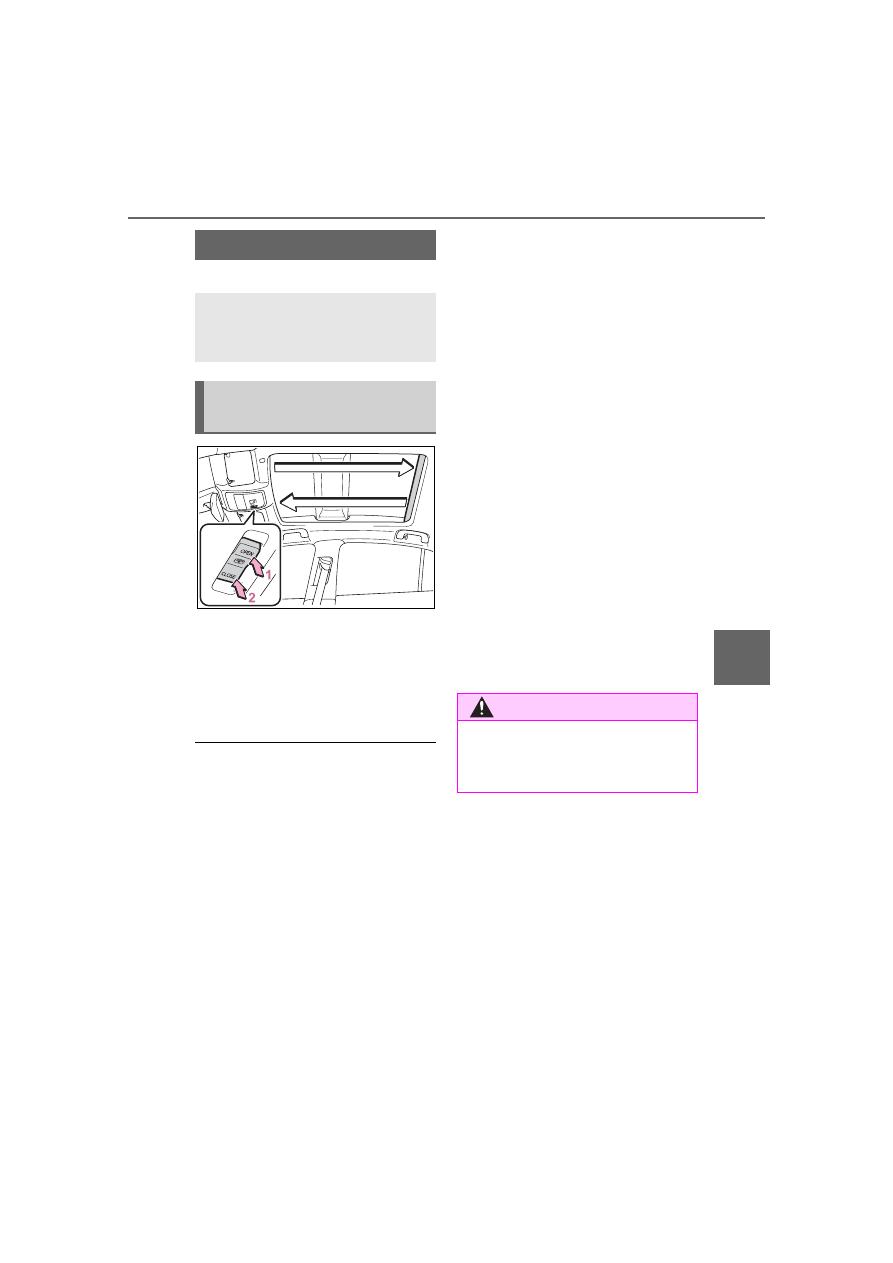
1

Open

*

2

Close

*

*

: To stop the electronic sunshade 

partway, lightly press the either 
end of the switch.

The electronic sunshade can be 

operated when

The power switch is in ON.

Jam protection function for the 

electronic sunshade

If an object becomes jammed 

between the electronic sunshade 

and the sunshade frame while the 

electronic sunshade is closing, the 

electronic sunshade movement is 

stopped and the electronic sun-

shade is opened slightly.

When the jam protection function 

has operated, even if the 

“CLOSE” side of the switch is 

pressed again, the electronic sun-

shade will not move in the close 

direction until the reverse opera-

tion has stopped completely.

The electronic sunshade may 

operate in reverse if the electronic 

sunshade is subject to an impact 

due to the surroundings or the 

driving conditions.

When the electronic sunshade 

does not close normally

Perform the following initialization 

procedure.

1

Turn the power switch to ON.

2

Press and hold the “CLOSE” 

side of the switch.

It closes until it is near the fully 

closed position and then stops. After 

that, it operates in the opening 

direction then closes to the fully 

closed position.
If the switch is released at the incor-

rect time, the procedure will have to 

be performed again from the begin-

ning.
If the automatic opening and closing 

function does not work normally 

even after performing the operations 

above, have the vehicle inspected 

by your Toyota dealer.

Electronic sunshade

*

Use the overhead switches 
to operate the electronic 
sunshade.

Operating the electronic 
sunshade

WARNING

Observe the following precau-

tions.

Failure to do so may result in 

death or serious injury.

356

6-4. Using the other interior features

The USB charging ports are 
used to supply 2.1 A of electric-
ity at 5 V to external devices.
The USB charging ports are for 
charging only. They are not 
designed for data transfer or 
other purposes.
Depending on the external 
device, it may not charge prop-
erly. Refer to the manual 
included with the device before 
using a USB charging port.

Using the USB charging 
ports

In the console box

Open the console box.

Rear of the console box

Open the lid.

WARNING

Opening and closing the elec-

tronic sunshade

Check to make sure that all pas-

sengers do not have any part of 

their body in a position where it 

could be caught when the elec-

tronic sunshade is being oper-

ated.

Do not let a child operate the 

electronic sunshade. Closing 

the electronic sunshade on 

someone can cause death or 

serious injury.

Jam protection function

Never use any part of your body 

to intentionally activate the jam 

protection function.

The jam protection function may 

not work if something gets 

caught just before the electronic 

sunshade is fully closed. Also, 

the jam protection function is 

not designed to operate while 

the switch is being pressed. 

Take care so that your fingers, 

etc., do not get caught.

To prevent burns or injuries

Do not touch the area between 

the underside of the panoramic 

moon roof and the electronic sun-

shade. Your hand may get caught 

and you could injure yourself. 

Also, if the vehicle is left in direct 

sunlight for a long time, the under-

side of the panoramic moon roof 

could become very hot and could 

cause burns.

Other interior features

USB charging ports

357

6-4. Using the other interior features

6

Interior

 featur

es

The USB charging ports can be 

used when

The power switch is in ACC or ON.

Situations in which the USB 

charging ports may not operate 

correctly

If a device which consumes more 

than 2.1 A at 5 V is connected

If a device designed to communi-

cate with a personal computer, 

such as a USB memory device, is 

connected

If the connected external device is 

turned off (depending on device)

If the temperature inside the vehi-

cle is high, such as after the vehi-

cle has been parked in the sun

About connected external 

devices

Depending on the connected exter-

nal device, charging may occasion-

ally be suspended and then start 

again. This is not a malfunction.

A portable device can be 
charged by just placing Qi stan-
dard wireless charge compatible 
portable devices according to 
the Wireless Power Consortium, 
such as smartphones and 
mobile batteries, etc., on the 
charge area.
This function cannot be used 
with portable devices that are 
larger than the charging area. 
Also, depending on the portable 
device, it may not operate as 
normal. Please read the opera-
tion manual for portable devices 
to be used.

NOTICE

To prevent damage to the 

USB charging ports

Do not insert foreign objects into 

the ports.

Do not spill water or other liq-

uids into the ports.

When the USB charging ports 

are not in use, close the lids. If a 

foreign object or liquid enters a 

port may cause a short circuit.

Do not apply excessive force to 

or impact the USB charging 

ports.

Do not disassemble or modify 

the USB charging ports.

To prevent damage to exter-

nal devices

Do not leave external devices in 

the vehicle. The temperature 

inside the vehicle may become 

high, resulting in damage to an 

external device.

Do not push down on or apply 

unnecessary force to an exter-

nal device or the cable of an 

external device while it is con-

nected.

To prevent 12-volt battery dis-

charge

Do not use the USB charging 

ports for a long period of time with 

the fuel cell system stopped.

Wireless charger (if 
equipped)

358

6-4. Using the other interior features

The “Qi” symbol

The “Qi” symbol is a trademark 
of the Wireless Power Consor-
tium.

Name for all parts

Power supply switch

Operation indicator light

Charge area

Using the wireless charger

1

Press the power supply 
switch of the wireless char-
ger.

Switches on and off with each 

press of the power supply switch.
When turned on, the operation indi-

cator light (green) comes on.
Even with the fuel cell system off, 

the on/off state of the power supply 

switch is memorized.

2

Place the charging side of 
the portable device down.

When charging, the operation indi-

cator light (orange) comes on.
If charging is not occurring, try plac-

ing the portable device as close to 

the center of the charging area as 

possible.
When charging is complete, the 

operation indicator light (green) 

comes on.

Recharging function

When charging is complete 
and after a fixed time in the 
charge suspension state, 
charging restarts.

When the portable device is 
moved, charging is stopped 
for a moment and then it 
restarts.

359

6-4. Using the other interior features

6

Interior

 featur

es

Lighting conditions of oper-
ation indicator light

*

: Depending on the portable 

device, there are cases where the 
operation indicator light will con-
tinue being lit up orange even 
after the charging is complete.

When the operation indicator 
light flashes

When an error occurs, the opera-
tion indicator light flashes an 
orange color.
Handle the error based on the fol-
lowing tables.
• Flashing repeatedly once every 

second (Orange)

• Repeatedly flashes 3 times con-

tinuously (Orange)

• Repeatedly flashes 4 times con-

tinuously (Orange)

The wireless charger can be 

operated when

The power switch is in ACC or ON.

Usable portable devices

Qi standard wireless charge stan-

dard can be used on compatible 

devices. However, not all Qi stan-

dard devices and compatibility are 

guaranteed.

Starting with mobile phones and 

smartphones, it is aimed for low 

power electrically supplied porta-

ble devices of no more than 5W.

When covers and accessories 

are attached to portable devices

Do not charge in situations where 

Operation 

indicator 

light

Conditions

Turning off

When the Wireless 
charger power supply 
is off

Green 
(comes 
on)

On Standby (charging 
possible state)

When charging is com-
plete

*

Orange 
(comes 
on)

When placing the por-
table device on the 
charging area (detect-
ing the portable device)

Charging

Suspected 

causes

Handling method

Vehicle to char-
ger communica-
tion failure.

Contact your 
Toyota dealer.

Suspected 

causes

Handling method

A foreign sub-
stance is 
between the por-
table device and 
charge area.

Remove the for-
eign substance 
from between 
portable device 
and the charge 
area.

The portable 
device is out of 
sync due to the 
device being 
shifted from the 
center of the 
charge area.

Place the porta-
ble device near 
the center of the 
charge area.

Suspected 

causes

Handling method

Temperature ris-
ing within the 
wireless charger.

Stop charging at 
once and start 
charging again 
after a while.

360

6-4. Using the other interior features

cover and accessories not able to 

handle Qi are attached to the porta-

ble device. Depending on the type 

of cover and accessory, it may not 

be possible to charge. When 

charging is not performed even with 

the portable device placed on the 

charge area, remove the cover and 

accessories.

While charging, noise enters 

the AM radio

Turn off the wireless charger and 

confirm that the noise has 

decreased. If the noise decreases, 

continuously pushing the power 

supply switch of the wireless char-

ger for 2 seconds, the frequency of 

the charger can be changed and the 

noise can be reduced. Also, on that 

occasion, the operation indicator 

light will flash orange 2 times.

Important points of the wire-

less charger

If the electronic key cannot be 

detected within the vehicle inte-

rior, charging cannot be done. 

When the door is opened and 

closed, charging may be tempo-

rarily suspended.

When charging, the wireless 

charging device and portable 

device will get warmer, however 

this is not a malfunction.

When a portable device gets 

warm while charging, charging 

may stop due to the protection 

function on the portable device 

side. In this case, when the tem-

perature of the portable device 

drops significantly, charge again.

Operation sounds

When the power supply is turned 

on, while searching for the portable 

device a sound will be produced, 

however this is not a malfunction.

Certification

P.550

WARNING

Caution while driving

When charging a portable device, 

for safety reasons, the driver 

should not operate the main part 

of the portable device while driv-

ing.

Caution regarding interfer-

ence with electronic devices

People with implantable cardiac 

pacemakers, cardiac resynchroni-

zation therapy-pacemakers or 

implantable cardioverter defibrilla-

tors, as well as any other electri-

cal medical device, should consult 

their physician about the usage of 

the wireless charger. The opera-

tions of the wireless charger may 

have an affect on medical 

devices.

To prevent damage or burns

Observe the following precau-

tions.

Failure to do so may result in a 

possibility of equipment failure 

and damage, catch fire, burns due 

to overheat.

Do not insert any metallic 

objects between the charging 

area and the portable device 

while charging

Do not place containers with liq-

uid such as water on the wire-

less charger.

Do not attach stickers, metallic 

objects, etc., to the charger area 

or portable device

Do not cover with cloth, etc., 

and charge

Do not charge portable devices 

other than designated

361

6-4. Using the other interior features

6

Interior

 featur

es

Pull the armrest down for use.

WARNING

Do not attempt to dismantle for 

disassembly or modifications

Do not hit or apply a strong 

force

NOTICE

Conditions in which the func-

tion may not operate cor-

rectly

In the following conditions, it may 

not operate correctly

The portable device is fully 

charged

There is foreign matter between 

the charge area and portable 

device

The temperature of the portable 

device gets higher from 

charging

The charging surface of the por-

table device is facing up

The placement of the portable 

device is out of alignment with 

the charge area

Near a TV tower, electric power 

plant, gas station, radio station, 

large display, airport or other 

facility that generates strong 

radio waves or electrical noise

When the portable device is in 

contact with, or is covered by 

the following metallic objects

• Cards to which aluminum foil is 

attached

• Cigarette boxes that have alu-

minum foil inside

• Metallic wallets or bags

• Coins

• Hand warmers made of metal

• Media such as CDs and DVDs

When other wireless keys (that 

emit radio waves) are being 

used nearby

In addition, excluding the above-
mentioned, when the charger 
does not perform normally or the 
operation display lamp is flashing 
continuously, it is considered that 
the wireless charger is malfunc-
tioning. Contact authorized Toyota 
dealer.

To prevent failure or damage 

to data

Do not bring magnetic cards, 

such as credit cards, or mag-

netic recording media, etc., 

close to the charger while 

charging, otherwise, data may 

disappear under the influence of 

magnetism. Also, do not bring 

precision instruments such as 

wrist watches, etc., close to the 

charger, as such objects may 

break.

Do not leave portable devices in 

the cabin. The temperature 

inside the cabin may become 

high, when under the sun, and 

cause damage to the device.

To prevent 12-volt battery dis-

charge

When the fuel cell system is 

stopped, do not use the wireless 

charger for a long time.

Armrest

362

6-4. Using the other interior features

An assist grip installed on the 
ceiling can be used to support 
your body while sitting on the 
seat.

The power outlet can be used 
for 12 V accessories that run on 
less than 10 A.
Open the console box and open 
the lid.

NOTICE

To prevent damage to the 

armrest

Do not place too much strain on 

the armrest.

Assist grips

WARNING

Assist grip

Do not use the assist grip when 

getting in or out of the vehicle or 

rising from your seat.

Doing so could damage the assist 

grip, or could cause you to injure 

yourself by falling over.

NOTICE

To prevent damage to the 

assist grip

Do not hang any heavy object or 

put a heavy load on the assist 

grip.

Coat hooks

WARNING

Items that must not be hung 

on the hook

Do not hang a coat hanger or 

other hard or sharp object on the 

hook. If the SRS curtain shield air-

bags deploy, these items may 

become projectiles that cause 

death or serious injury.

Power outlet (12 VDC)

363

6-4. Using the other interior features

6

Interior

 featur

es

The power outlet can be used 

when

The power switch is in ACC or ON.

When stopping the fuel cell sys-

tem

Disconnect electrical devices with 

charging functions, such as mobile 

battery packs. If such devices are 

left connected, the fuel cell system 

may not stop normally.

Please use as a power supply 
for electronic devices that use 
less than 120 VAC (power con-
sumption of 1500 W).

Using the power outlets

Rear of the console box

Open the lid.

NOTICE

To avoid damaging the power 

outlet

Close the power outlet lid when 

the power outlet is not in use. 

Foreign objects or liquids that 

enter the power outlet may cause 

a short circuit.

To prevent the fuse from 

being blown

Do not use an accessory that 

uses more than 12 V 10 A.

To prevent incorrect opera-

tion of the vehicle

When turning the power switch 

off, make sure to disconnect 

accessories designed for 

charging, such as portable char-

gers, power banks, etc., from the 

power outlet.
If such an accessory is left con-

nected, the following may occur:

The doors cannot be locked 

using the smart key system or 

wireless remote control.

The opening screen will be dis-

played on the multi-information 

display.

The interior lights, instrument 

panel lights, etc., will illuminate.

To prevent 12-volt battery dis-

charge

Do not use the power outlet lon-

ger than necessary when the fuel 

cell system is off.

Power outlets (120 VAC) 
(if equipped)

364

6-4. Using the other interior features

In the trunk

Open the lid.

When turning the power 
outlets on

1

Check that the parking brake 
is engaged, securely depress 
the brake pedal and press 
the power switch.

2

Check that the READY indi-
cator is illuminated, and 
press the AC120V switch.

The power outlets can be used 

when the indicator on the AC120V 

switch is illuminated.
The power outlets are turned off/on 

each time the AC120V switch is 

pressed.

When connecting a device

Open the lid, and fully and 
securely insert the plug of the 
device into the power outlet.

Rear of the console box

In the trunk

When turning the power 
outlets off

1

Turn the connected devices 
off.

2

Press the AC120V switch to 
turn the power outlets off.

365

6-4. Using the other interior features

6

Interior

 featur

es

3

Disconnect each plug from 
the power outlets.

4

Close the lid of each power 
outlet.

The power outlet can be used 

when

The READY indicator is illuminated.

Electronic devices that can be 

connected to the power outlets

Use electronic devices in which the 

total power consumption of all 

devices connected to the 120 VAC 

power outlets is less than 1500 W. 

Depending on the device being 

used, the current flow may become 

high and the electric power for a 

moment may exceed the regulated 

capacity. If the regulated capacity is 

exceeded by the electronic devices 

being used, the protection function 

of the power outlet may operate and 

power outlet may not be able to be 

used, but this is not a malfunction. 

However, observe the following pre-

cautions:

Depending on the devices used, it 

may cause interference with TV 

and radio broadcasts.

Observe the precautions that are 

stated in the instruction manuals 

for each of the electronic devices.

It is assumed that many typical 

general electronic devices will not 

be used within the vehicle. The 

following problems may occur 

when using electronic devices 

within the vehicle.

• Electronic device malfunction due 

to vibrations while driving.

• Electronic device malfunction or 

poor operations due to tempera-
ture changes

*

 within the vehicle.

• The installation is unstable and 

may not operate normally as the 

compartment within the vehicle is 

not flat.

*

: Depending on the weather, sea-

son, usage environment, etc., the 
vehicle compartment may 
undergo extreme high or low tem-
peratures.

Power Outlet

The power outlet is a device in 

order to use electronic devices 

within the vehicle.

While a power outlet is being 

used, a cooling fan sound may be 

heard from near a rear seat. This 

does not indicate a malfunction.

Devices which may not operate 

correctly

The following 120 VAC devices may 

not operate properly even if their 

power consumption is less than 

1500 W:

Devices with high initial peak watt-

age

Measuring devices that process 

precise data

Devices that require an extremely 

stable power supply

Devices that require a constant 

power supply from the power out-

let, such as a device with a timer.

When the power supply func-

tion cannot be used

If the AC120V switch is pressed but 

the switch indicator does not illumi-

nate, the protection circuit may have 

operated.
In this case, perform the appropriate 

procedures as follows.

Disconnect the plug of each 

device from the power outlets, 

check that the total power con-

sumption of all devices to be con-

nected to the power outlets is less 

than 1500 W, reconnect the 

devices and then press the 

AC120V switch again.

Disconnect the plug of each 

device from the power outlets, 

check that the devices are not 

malfunctioning, reconnect the 

366

6-4. Using the other interior features

devices and then press the 

AC120V switch again.

Check the charge of the traction 

battery (

P.111). If the charge is 

low, shift the shift position to P, 

allow the fuel cell system to oper-

ate to charge the traction battery, 

and then press the AC120V 

switch again.

If the temperature inside the vehi-

cle is high, such as after the vehi-

cle has been parked under the 

sun, move the vehicle to a shaded 

area, use the air conditioning sys-

tem to sufficiently cool the interior, 

and then press the AC120V 

switch again.

When it is particularly cold, the 

power outlets may not be able to 

be used, to protect the traction 

battery. In that case, drive the 

vehicle and use the power outlets 

after the traction battery has 

warmed up.

When the fuel door is open, close 

the door and press the AC120V 

switch again.

If the power outlets cannot be used 

even after performing the appropri-

ate procedures above, have the 

vehicle inspected by your Toyota 

dealer.

If any electrical device has mal-

functioned, park the vehicle in a 

safe location and turn the AC 

inverter off.

If the protection function activates 

and power is cut, perform the fol-

lowing procedure.

1

Stop the vehicle in a safe place 

and set the parking brake.

2

Ensure that the shift position is in 

P or N.

3

Check that the power consumed 

by the electrical devices is within 

1500 W and any device has not 

malfunctioned.

4

Press the AC 120 V switch.

If the inside of the vehicle is hot, 
open the windows to lower the tem-

perature and turn the switch back on 
once the inside of the vehicle 
reaches a normal temperature. If 
following the procedure above does 
not restore power, have the vehicle 
inspected at your Toyota dealer.

WARNING

For safe use

Observe the following precau-

tions.
Failure to do so may lead to an 

accident, resulting in death or 

serious injury.

Do not use devices such as the 

following when driving:

• Devices which cannot be prop-

erly secured within the vehicle.

• Devices which may distract the 

driver and be a hindrance to 

safe driving, such as a TV, DVD 

player, etc.

• Unsecured devices which gen-

erate heat, such as a toaster, 

microwave, electric heater, elec-

tric kettle, coffee maker, etc., as 

they may cause burns or a fire 

in the case of sudden braking or 

an accident.

• Devices which may fall under 

the pedals and prevent the 

brake pedal from being 

depressed.

Do not use devices which pro-

duce steam while the windows 

are closed. Doing so may cause 

the windows to fog up, reducing 

visibility and making it difficult to 

drive safely. Also, the steam 

may damage or negatively 

affect other devices. If the 

device must be used, stop the 

vehicle and open the windows 

before use.

367

6-4. Using the other interior features

6

Interior

 featur

es

WARNING

Do not use damaged electronic 

devices. The power supply 

function may not be able to be 

used.

Do not disconnect the plug of a 

device while your hands are wet 

or insert a pin or other object 

into the power outlet. Also, if a 

liquid or snow is on the power 

outlet, dry the outlet before 

using it.

Do not attempt to modify, disas-

semble or repair a power outlet. 

For information on repairs, con-

tact your Toyota dealer.

Do not let children touch the 

power outlets.

Keep the power outlets free of 

dust and foreign matter. Also, 

regularly clean the power outlet.

If the plug of a device fits 

loosely in a power outlet, even 

though it is fully inserted, 

replace the power outlet. For 

information on replacement, 

contact your Toyota dealer.

Using the power outlets while 

parked or stopped

Observe the following precau-

tions.
Failure to do so may lead to an 

accident, possibly resulting in 

death or serious injury.

Make sure to engage the park-

ing brake and shift the shift posi-

tion to P.

Do not leave the vehicle unat-

tended while the READY indica-

tor is illuminated and a device is 

connected to a power outlet.

Do not place luggage or get 

near the vicinity of the tailpipe.

Make sure that the hood is 

closed. Do not put your head or 

hands anywhere inside the fuel 

cell unit room, as the cooling 

fans may operate suddenly. If 

too close, hands and clothing 

(especially a tie, scarf, etc.) may 

get caught in a fan.

Do not stop the vehicle near 

objects which burn easily.

Install and use appropriately 

related devices to make air sup-

ply and exhaust ventilation pos-

sible in places where ventilation 

is bad, such as within garages, 

and places where the vehicle is 

surrounded (places where snow 

accumulates).

Do not use in places where ven-

tilation is bad, such as within 

garages where there are no air 

supply and exhaust ventilation 

devices, and places where the 

vehicle is surrounded (places 

where snow accumulates, etc.).

Do not use the power outlets if 

the vehicle has a vehicle cover 

installed.

Do not sleep in the vehicle while 

using devices such as an elec-

tric heater.

Devices to be connected

Read the instruction manual 

included with the electronic 

device being used and observe 

the precautions that are stated 

regarding the product.

Do not use when the power plug 

or electronic device are dam-

aged.

Malfunctions or poor operations 

may occur when the outside 

temperatures are particularly 

high or low.

368

6-4. Using the other interior features

1

To set the visor in the forward 
position, flip it down.

2

To set the visor in the side 
position, flip down, unhook, 
and swing it to the side.

3

To use the side extender, 
place the visor in the side 
position, then slide it back-
ward.

WARNING

Normal operations may not be 

possible for electronic devices 

that require level installation.

Excluding electronic devices 

with waterproof specifications, 

do not use in places where it 

can be covered by rain or water, 

or places with lots of humidity.

Do not use medical equipment 

as the power supply function 

may temporarily stop depending 

the conditions of the vehicle.

NOTICE

Observe the following precau-

tions.
Failure to do so may lead to the 

power outlets not operating cor-

rectly or damage to the vehicle or 

a connected device.

To avoid short circuit or mal-

function

Do not set a device which gen-

erates heat near the interior 

components or on a seat. Heat 

may cause these parts to melt 

or burn.

Do not use devices which are 

sensitive to vibration or heat in 

the vehicle.

These devices may malfunction 

due to vibration while driving or 

heat while the vehicle is parked 

in the sun.

When not using a power outlet, 

make sure to close the cover. If 

foreign matter or a liquid enters 

the power outlet, it may cause a 

malfunction or short circuit.

Do not use a multi-point outlet 

adapter as doing so may over-

load the power outlet.

Immediately stop using if there 

is an unusual amount of heat 

being felt from the power outlet.

When the ambient tempera-

ture is high

If the temperature inside the vehi-

cle is high, such as after the vehi-

cle has been parked under the 

sun, move the vehicle to a shaded 

area, use the air conditioning sys-

tem to sufficiently cool the interior, 

and then press the AC120V 

switch again.

When the ambient tempera-

ture is low

When it is particularly cold, the 

power outlets may not be able to 

be used, to protect the traction 

battery. In that case, drive the 

vehicle and use the power outlets 

after the traction battery has 

warmed up.

Sun visors

369

6-4. Using the other interior features

6

Interior

 featur

es

Slide the cover to open.

The vanity light turns on.

To prevent 12-volt battery dis-

charge

If the vanity lights remain on when 

the power switch is turned off, the 

lights will go off automatically after 

20 minutes.

Pull up the tab of the sunshade 
and hook the shade on using 
the anchors.

To retract the sunshade, unhook 
the sunshade and retract it slowly.

Vanity mirrors

NOTICE

To prevent the 12-volt battery 

from being discharged

Do not leave the vanity lights on 

for extended periods while the 

fuel cell system is off.

Rear door sunshades (if 
equipped)

NOTICE

To ensure normal operation 

of the sunshades

Observe the following precau-

tions:

Do not place anything where it 

may hinder the opening/closing 

of the rear door sunshades.

Do not attach items to the rear 

door sunshades.

Do not apply excessive load to 

the rear door sunshades while 

they are hanging from the 

hooks.

Do not operate the rear door 

sunshade while the rear door is 

opening/closing.

Do not store the rear door sun-

shade in a tilted position. If 

stored in a tilted position, the 

rear door sunshade screen may 

become creased.

To prevent damage to the rear 

door sunshade

Observe the following precau-

tions:

Do not use the rear door sun-

shade when either hook is 

detached. When the rear door is 

opened/closed, the rear door 

sunshade may be damaged.

Do not pull on the screen while 

the hooks are attached. The 

screen may be damaged.

370

6-4. Using the other interior features

The rear sunshade can be 
extended and retracted using 
the Toyota multi-operation touch 
(

P.353) or rear control panel 

(

P.341).

From front seat

1

Using the Toyota multi-opera-
tion touch, select 

.

2

Select 

.

3

Select 

.

The rear sunshade will be extended 

or retracted.

From rear seat

1

Using the rear control panel, 
press 

.

2

Select 

.

The rear sunshade will be extended 

or retracted.

The rear sunshade can be used 

when

The power switch is in ON.

Operating the rear sunshade 

after turning the fuel cell sys-

tem off

The rear sunshade can be operated 

for a while even after the power 

switch is switched to ACC or turned 

off.

Reverse operation feature

To ensure adequate rear visibility, 

the rear sunshade automatically 

lowers when the shift position is 

shifted to R.
However, the rear sunshade is 

raised again if any of the following 

occurs:

The button is touched again.

The shift position is shifted to P.

The shift position is shifted out of 

P and R, and the vehicle reaches 

a speed of 9 mph (15 km/h).

If the fuel cell system is turned off 

when the rear sunshade has been 

lowered due to the reverse opera-

tion feature, it will not be raised 

even when the fuel cell system is 

turned on again and the vehicle 

reaches a speed of 9 mph (15 

km/h). To raise the sunshade again, 

touch the button.

Customization

Some functions can be customized. 

(

P.498)

Rear sunshade (if 
equipped)


Content      ..     20      21      22      23     ..