Subaru Forester (2023 year). Manual in english - page 24
 

  Index      Manuals     Subaru Forester (2023 year). Manual in english


Search            copyright infringement  


Content      ..     22      23      24      25     ..


Subaru Forester (2023 year). Manual in english - page 24


(384,1)

&

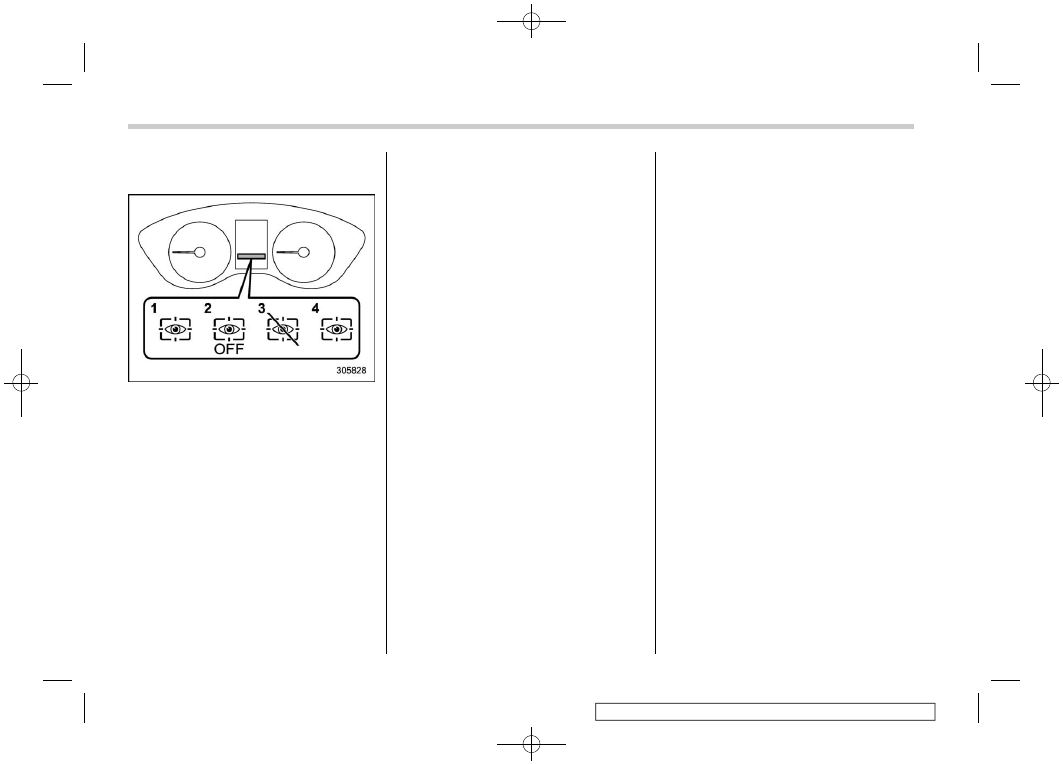
Driver Monitoring System in-
dicator/warning

1

Driver Monitoring System operation in-
dicator light (green)

2

Driver Monitoring System OFF indicator
light

3

Driver Monitoring System temporary stop
indicator light

4

Driver Monitoring System warning light
(yellow)

The Driver Monitoring System indicator/
warning indicates the status of the Driver
Monitoring System on the combination
meter display.

NOTE

When the Driver Monitoring System
OFF indicator, Driver Monitoring Sys-
tem temporary stop indicator, or Driver
Monitoring System warning is illumi-

nated, the Driver Monitoring System
function cannot be used. In addition,
the following items cannot be selected.

.

Register User

.

Delete User

.

Delete All Users

.

Update User Settings

.

Delete Driver Position

.

Automatically retract seat on entry

!

Driver Monitoring System operation
indicator light (green)

This indicator illuminates when the Driver
Monitoring System is operating.

!

Driver Monitoring System OFF in-
dicator light

This indicator illuminates when the user
has pressed the Driver Monitoring System
OFF switch and the Driver Monitoring
System is not operating.

!

Driver Monitoring System tempor-
ary stop indicator light

This indicator illuminates when the Driver
Monitoring System is temporarily stopped.

NOTE

The Driver Monitoring System stops
temporarily in the following circum-
stances.

.

When the temperature of the main
unit of the Driver Monitoring System

is high or low.

.

When the Driver Monitoring System
cannot monitor the driver’s eye
movement.

.

When the Driver Monitoring System
cannot monitor the driver’s eye-
brows, eyes, nose or mouth.

.

When the camera and the infrared
light source (LED) are covered and
the Driver Monitoring System can-
not monitor the driver correctly.

!

Driver Monitoring System warning
light (yellow)

This warning illuminates when there is a
problem with the Driver Monitoring Sys-
tem. Contact a SUBARU dealer to have
the system inspected.

&

Using the Driver Monitoring
System

!

User recognition

When a user is registered with the user
recognition function, the Driver Monitoring
System performs the following.

Driver Monitoring System

382

(385,1)

1. When the door is opened and the

push-button ignition switch is OFF,
the user recognition screen appears
and the Driver Monitoring system
starts user recognition.
The user recognition screen may not
appear when the door is opened in
some cases, such as when only a short
time has passed after the push-button
ignition switch was turned OFF. In such
cases, user recognition starts when the
door is closed however the user
recognition screen does not appear.

2. Sit in the driver’s seat and face forward

for a few moments.

3. When user recognition is completed,

the Hello screen appears on the multi-
function display.

At this time, the seat position, outside
mirror angle, climate control settings,
combination meter display basic screen,
multi-function display basic screen, and
customization settings all change based
on the user information.

NOTE

.

When a multi-function display op-
eration switch is pressed, the user
recognition screen is canceled,
however user recognition con-
tinues.

.

When the select lever is not in the
“P” position, the seat position will
not change even when user recogni-
tion is completed.

.

If user recognition fails, perform
recognition again following the in-
structions, refer to “When a user is
not recognized”

P384.

.

User recognition is not performed
while driving.

.

If the seat position or outside mirror
angle are in motion at the time when
user recognition is completed, then
it is not possible to retrieve the seat
position, outside mirror angle, or
reverse tilt-down outside mirror an-
gle.

.

If any of the following operations is
performed while retrieving of the
seat position or outside mirror an-
gle, retrieving of the seat position
and outside mirror angle is can-
celed.

– The power seat adjustment

switch was operated.

– The outside mirror adjustment

switch was operated.

– The “SET” button was pressed.
– The “1” or “2” button was

pressed.

– The select lever was moved to a

position other than “P” position.

– CONTINUED –

Driver Monitoring System

383

7

Starting

and

operating

(386,1)

!

When a user is not recognized

In the following case, user recognition may
not be possible and “User recognition
stopped” may be displayed.

.

There is an object blocking the camera.

Remove the obstacle and follow the
reference procedure to perform user re-
cognition again.
Refer to “Repeat facial scan”

P214.

1

Camera

NOTE

.

User recognition may not be possi-
ble when there is dirt or fingerprints
on the user recognition camera. To
clean, either wipe using a soft cloth
or else wipe gently using a mois-
tened cloth that has been thoroughly

wrung out.

.

When the synchronized user func-
tion is turned OFF, manual repeat
facial scan is not possible.

&

Registering and deleting a
user

Users can be registered in the Driver
Monitoring System, and registered users
can be deleted. For the user registration
and delete procedures, refer to “Driver
Monitoring System settings”

P214.

NOTE

.

When the Driver Monitoring System
OFF indicator, Driver Monitoring
System temporary stop indicator,
or Driver Monitoring System warn-
ing is illuminated, the following
items cannot be selected.

– Register User
– Delete User
– Delete All Users

.

User information can also be deleted
by resetting the multi-function dis-
play to the factory default settings.
When the settings are reset to the
factory default settings, all user
information is deleted. The settings
cannot be reset to the factory default
settings when the Driver Monitoring
System is OFF.

&

Registering and deleting dri-
ver position personalization

At the time when a user is registered, the
seat position, outside mirror angle, and
reverse tilt-down outside mirror angle are
registered at the same time. To change the
setting for the seat position, outside mirror
angle, or reverse tilt-down outside mirror
angle, refer to “Driver Monitoring System
settings”

P214.

NOTE

.

Start the user registration after ad-
justing the seat position, outside
mirror angle, and reverse tilt-down
outside mirror angle. If they are
adjusted during user registration, it
may be disrupted. Refer to “Power
seat”

P34 or “Outside mirrors”

P249.

.

If the ignition switch is turned to the
“OFF” position before user registra-
tion is complete, the information of
the adjusted seat position, outside
mirror angle, and reverse tilt-down
outside mirror angle will not be
saved.

.

When the user recognition setting is
OFF, or when the Driver Monitoring
System OFF indicator, Driver Mon-
itoring System temporary stop indi-
cator, or Driver Monitoring System

Driver Monitoring System

384

(387,1)

warning is illuminated, the following
items cannot be selected.

– Update User Settings
– Delete Driver Position

.

The driver position can be registered
or deleted only when a registered
user is sitting in the driver’s seat and
user recognition is completed.

&

Driver Monitoring System
ON/OFF settings

NOTE

.

When the Driver Monitoring System
is turned OFF after user recognition
was completed, the user recognition
function stores the Driver Monitor-
ing System ON/OFF state.

.

Even when the Driver Monitoring
System OFF switch is set to OFF,
the Driver Monitoring System auto-
matically turns ON once the driver’s
door is opened and closed while the
vehicle is stopped. This only occurs
when the user recognition setting is
ON. The system then reverts auto-
matically to the OFF state.

.

After the Driver Monitoring System
was turned OFF, if the Driver Mon-
itoring System is turned ON while
the driver’s door is open, user
recognition may not occur correctly.

!

Driver Monitoring System OFF
switch

When the Driver Monitoring System OFF
switch is pressed, the Driver Monitoring
System turns OFF. When the Driver
Monitoring System is turned OFF, the
Driver Monitoring System OFF indicator
on the combination meter display will
illuminate. To turn the Driver Monitoring
System ON, press the Driver Monitoring
System OFF switch again.

NOTE

Even when the Driver Monitoring Sys-
tem is turned off, the user recognition
and automatically retract seat on entry
functions do not switch on or off
automatically.

!

User recognition settings

The Driver Monitoring System User recog-
nition function can be turned ON/OFF. For
the setting procedure, refer to “Driver
Monitoring System settings”

P214.

NOTE

.

The user recognition function
setting cannot be changed for each
individual user.

.

The default setting for the user
recognition function is ON.

.

When the user recognition function
is turned OFF, the following items
cannot be selected.

– Repeat facial scan
– Register User
– Update User Settings
– Delete Driver Position

!

Automatically retract seat on entry

The automatically retract seat on entry
which automatically slides back the dri-
ver’s seat when the driver’s door is
unlocked and opened. This function can
be turned ON/OFF. For the setting proce-
dure, refer to “Driver Monitoring System
settings”

P214.

– CONTINUED –

Driver Monitoring System

385

7

Starting

and

operating

(388,1)

CAUTION

Wait until the seat automatic retrac-
tion is fully completed before sitting
in the driver’s seat.

NOTE

.

If the seat position is not registered
in the access key fob memory, the
automatically retract seat on entry
function can be used.

.

Even when the automatically retract
seat on entry setting is ON, the
automatically retract seat on entry
function automatically turns OFF
when the user recognition function
is OFF.

.

Automatically retract seat on entry
cannot be selected when the Driver
Monitoring System OFF indicator,
Driver Monitoring System temporary
stop indicator, or Driver Monitoring
System warning is illuminated.

.

This function will operate if the seat
is in front of the center of the seat
sliding mechanism.

&

Gesture control

Gesture control is a function that allows
you to raise or lower the set temperature
on the driver’s side by 4 steps of the
temperature dial when a specific gesture
operation is performed in the area imme-
diately in front of the navigation system
and/or audio system.
Gesture control allows you to operate the
climate control system without taking your
eyes off the road and reduces the time you
take your hand off the steering wheel.
Gesture control can be used under the
following conditions:

.

The engine is running.

.

The climate control system is activated.
Refer to “Climate control panel”

P257.

.

The select lever is in a position other
than the “P” or “R” position.

Driver Monitoring System

386

(389,1)

1

Camera

2

When the gesture is an open palm, the
set temperature rises.

3

When the gesture is a closed fist, the set
temperature lowers.

Face your palm toward the camera and
gesture so that your fingers are in a vertical

position in front of the camera. Keep your
hand in that position until you hear a short
beep sound.
If there is no sound within a few seconds,
remove your hand from the detection area,
such as by returning your hand to the
steering wheel, and then perform the
gesture again.
The set temperature changes once per
gesture operation. The temperature can-
not be changed continuously by using
gesture operations. If you want to continue
setting the temperature, remove your hand
from the detection area, such as by
returning your hand to the steering wheel,
and then perform the gesture again.

Gesture control is not available under the
following conditions.

.

Any of the following lights is illuminated.

– Driver Monitoring System OFF in-

dicator light

– Driver Monitoring System tempor-

ary stop indicator light

– Driver Monitoring System warning

light (yellow)

.

The select lever is in the “P” or “R”
position.

.

Driver Monitoring System does not
recognize the driver’s face. Refer to
“Driver Monitoring System”

P374.

While you are driving the vehicle, gesture
control is not available when the following
applies.

.

The turn signal or hazard warning
flasher is activated.

.

The steering wheel is turned sharply.

.

The inattentive driving warning is acti-
vated.

.

The drowsy driving warning is acti-
vated.

.

Driver Monitoring System is in the
process of recognizing the driver.

.

The vehicle is traveling at low speeds.

NOTE

.

Gesture control may not operate
correctly under the following condi-
tions.

– The sunlight (or any light source

with a strong infrared compo-
nent) is causing the driver’s hand
to cast a shadow.

– There are large momentary fluc-

tuations in the strength of the
sunlight (or any light source with
a strong infrared component)
shining on the driver’s hand.

– The driver is wearing gloves or

accessories on their hands.

– There is something between the

driver’s hand and the camera.

– CONTINUED –

Driver Monitoring System

387

7

Starting

and

operating

(390,1)

– There is more than one hand

within the range of detection,
such as when the passenger’s
hand is within the range of detec-
tion.

.

Gesture control may not operate
correctly when the following ap-
plies.

– The driver’s hand is too close to

the camera. If the camera does
not recognize your hand, move
your hand slightly closer to your
face.

– The driver’s hand is outside of

the sensor range.

– The driver’s hand is rotating

greatly.

– The driver’s hand is tilted at a

sharp perpendicular angle rela-
tive to the sensor area.

.

In the following cases, the system
may mistakenly detect hand move-
ment as a hand gesture, which may
cause the temperature setting to
change.

– Your hand is within the sensor

range when you motion to a
person outside the vehicle.

– You operate the inside mirror or

room lamp.

– A rear passenger reaches for-

ward from the rear seats and

places their hand within the
range of detection.

.

When the climate control system is
off, the system may beep in re-
sponse to the driver’s gestures.

.

The operational/non-operational
setting of gesture control can be
changed by a SUBARU dealer. For
details, we recommend that you
contact your SUBARU dealer.

&

How to get the source code
using the open source

Free/Open Source Software Information
This product contains Free/Open Source
Software (FOSS).
The license information and/or the source
code of such FOSS can be found at the
following URL.
http://www.embedded-carmultimedia.jp/
RTOS/License/oss/DMS_0102/

Driver Monitoring System

388

(391,1)

8-1. New vehicle break-in driving – the first

1,000 miles (1,600 km) .................................. 390

8-2. Fuel economy hints ........................................ 390
8-3. Engine exhaust gas (carbon monoxide) ....... 390
8-4. Catalytic converter ......................................... 391
8-5. Periodic inspections....................................... 392
8-6. Driving in foreign countries........................... 392
8-7. Driving tips for AWD models ......................... 392
8-8. On-road and off-road driving ......................... 394

Before driving..................................................... 395
During driving .................................................... 395
After driving ....................................................... 396

8-9. Winter driving ................................................. 397

Operation during cold weather ............................ 397
Driving on snowy and icy roads.......................... 398
Corrosion protection........................................... 399
Snow tires .......................................................... 399

Tire chains ......................................................... 400
Rocking the vehicle............................................ 400

8-10. Loading your vehicle ....................................401

Vehicle capacity weight ...................................... 401
GVWR and GAWR (Gross Vehicle Weight

Rating and Gross Axle Weight Rating).............. 402

Roof rails (if equipped)....................................... 403
Roof tent (models with roof rails) ....................... 403

8-11. Trailer hitch (dealer option) ..........................405

Connecting a trailer............................................ 406
If not towing a trailer .......................................... 407

8-12. Trailer towing .................................................408

Warranties and maintenance .............................. 408
Maximum load limits .......................................... 408
Trailer Hitches.................................................... 411
When you do not tow a trailer ............................ 412
Connecting a trailer............................................ 412
Trailer towing tips .............................................. 413

Driving tips

8

Driving

tips

(392,1)

8-1. New vehicle break-in
driving – the first 1,000 miles
(1,600 km)

The performance and long life of your
vehicle are dependent on how you handle
and care for your vehicle while it is new.
Follow these instructions during the first
1,000 miles (1,600 km):

.

Do not race the engine. And do not
allow engine speed to exceed 4,000
rpm except in an emergency.

.

Do not drive at one constant engine or
vehicle speed, either fast or slow.

.

Avoid starting suddenly and rapid ac-
celeration, except in an emergency.

.

Avoid hard braking, except in an emer-
gency.

The same break-in procedures should be
applied to an overhauled engine, newly
mounted engine or when brake pads are
replaced with new ones.

8-2. Fuel economy hints

The following suggestions will help to save
your fuel.

.

Select the proper gear position for the
speed and road conditions.

.

Avoid sudden acceleration or decelera-
tion. Always accelerate gently until you
reach the desired speed. Then try to
maintain that speed for as long as
possible.

.

Do not pump the accelerator and avoid
racing the engine.

.

Avoid unnecessary engine idling.

.

Keep the engine properly tuned.

.

Keep the tires inflated to the correct
pressure shown on the tire inflation
pressure label, which is located under
the door latch on the driver’s side. Low
pressure will increase tire wear and fuel
consumption.

.

Use the air conditioner only when
necessary.

.

Keep the front and rear wheels in
proper alignment.

.

Avoid carrying unnecessary luggage or
cargo.

8-3. Engine exhaust gas (car-
bon monoxide)

WARNING

.

Never inhale engine exhaust gas.

Engine exhaust gas contains
carbon monoxide, a colorless
and odorless gas which is dan-
gerous, or even lethal, if inhaled.

.

Always properly maintain the en-

gine exhaust system to prevent
engine exhaust gas from entering
the vehicle.

.

Never run the engine in a closed

space, such as a garage, except
for the brief time needed to drive
the vehicle in or out of it.

.

Avoid remaining in a parked ve-

hicle for a lengthy time while the
engine is running. If that is un-
avoidable, then use the ventila-
tion fan to force fresh air into the
vehicle.

.

Always keep the front ventilator

inlet grille free from snow, leaves
or other obstructions to ensure
that the ventilation system al-
ways works properly.

New vehicle break-in driving – the first 1,000 miles (1,600 km)

390

(393,1)

.

If at any time you suspect that

exhaust fumes are entering the
v e h i c l e , h a v e t h e p r o b l e m
checked and corrected as soon
as possible. If you must drive
under these conditions, drive
only with all windows fully open.

.

Keep the rear gate closed while

driving to prevent exhaust gas
from entering the vehicle.

NOTE

Due to the expansion and contraction
of the metals used in the manufacture
of the exhaust system, you may hear a
crackling sound coming from the ex-
haust system for a short time after the
engine has been shut off. This sound is
normal.

8-4. Catalytic converter

The catalytic converter is installed in the
exhaust system. It serves as a catalyst to
reduce HC, CO and NOx in exhaust gases,
thus providing cleaner exhaust.

To avoid damage to the catalytic converter:

.

Use only unleaded fuel. Even a small
amount of leaded fuel will damage the
catalytic converter.

.

Never start the engine by pushing or
pulling the vehicle.

.

Avoid racing the engine.

.

Never turn the ignition switch to the
“OFF” position while the vehicle is
moving.

.

Keep your engine tuned-up. If you feel
the engine running rough (misfiring,

backfiring or incomplete combustion),
have your vehicle checked and re-
paired by an authorized SUBARU deal-
er.

.

Do not apply undercoating or rust
prevention treatment to the heat shield
of catalytic converter and the exhaust
system.

.

Do not drive with an extremely low fuel
level.

WARNING

.

Avoid fire hazards. Do not drive

or park the vehicle anywhere
near flammable materials (e.g.,
grass, paper, rags or leaves),
because the catalytic converter
operates at very high tempera-
tures.

.

Keep everyone and flammable

materials away from the exhaust
pipe while the engine is running.
The exhaust gas is very hot.

Catalytic converter

391

8

Driving

tips

(394,1)

8-5. Periodic inspections

To keep your vehicle in the best condition
at all times, always have the recom-
mended maintenance services listed in
the maintenance schedule in the “War-
ranty and Maintenance Booklet” per-
formed at the specified time or mileage
intervals.

8-6. Driving in foreign coun-
tries

When planning to use your vehicle in
another country:

.

Confirm the availability of the correct
fuel. Refer to “Fuel requirements”

P299.

.

Comply with all regulations and require-
ments of each country.

8-7. Driving tips for AWD
models

WARNING

.

Always maintain a safe driving

speed according to the road and
weather conditions in order to
avoid having an accident on a
sharp turn, during sudden brak-
ing or under other similar condi-
tions.

.

Always use the utmost care in

driving – overconfidence be-
cause you are driving an All-
Wheel Drive vehicle could easily
lead to a serious accident.

.

When replacing or installing

tire(s), all four tires must be the
same for following items.

(a) Size

(b) Speed symbol

(c) Load index

(d) Circumference

(e) Construction

(f) Manufacturer

(g) Brand (tread pattern)

(h) Degrees of wear

Periodic inspections

392

(395,1)

For the items (a) to (c), you must
obey the specification that is
printed on the tire inflation pres-
sure label. The tire inflation pres-
sure label is located on the dri-
ver’s door pillar.

If all the four tires are not the
same for items (a) to (h), serious
mechanical damage could be
caused to the drivetrain of the
car, and affect the followings.

– Ride

– Handling

– Braking

– Speedometer/Odometer cali-

bration

– Clearance between the body

and tires

It also may be dangerous and
lead to loss of vehicle control,
and it can lead to an accident.

CAUTION

If you use a temporary spare tire to
replace a flat tire, be sure to use the
original temporary spare tire stored
in the vehicle. Using other sizes may
result in severe mechanical damage
to the drivetrain of your vehicle.

All-Wheel Drive distributes the engine
power to all four wheels. AWD models
provide better traction when driving on
slippery, wet or snow-covered roads and
when moving out of mud, dirt and sand. By
shifting power between the front and rear
wheels, SUBARU AWD can also provide
added traction during acceleration and
added engine braking force during decel-
eration.

Therefore, your SUBARU AWD vehicle
may handle differently than an ordinary
two wheel drive vehicle and it contains
some features unique to AWD. For safety
purposes as well as to avoid damaging the
AWD system, you should keep the follow-
ing tips in mind.

.

An AWD model is better able to climb
steeper roads under snowy or slippery

conditions than a two wheel drive
vehicle. There is little difference in
handling, however, during extremely
sharp turns or sudden braking. There-
fore, when driving down a slope or
turning corners, be sure to reduce your
speed and maintain an ample distance
from other vehicles.

.

Always check the cold tire pressure
before starting to drive. The recom-
mended tire pressure is provided on the
tire inflation pressure label, which is
located under the door latch on the
driver’s side.

.

Frequent driving of an AWD vehicle
under hard-driving conditions such as
steep hills or dusty roads will necessi-
tate more frequent replacement of the
following items than that specified in the
“Warranty and Maintenance Booklet”.

– Engine oil
– Brake fluid
– Rear differential gear oil
– Continuously variable transmission

fluid

– Front differential gear oil

.

There are some precautions that you
must observe when towing your vehi-
cle. For detailed information, refer to
“Towing”

P429.

Driving tips for AWD models

393

8

Driving

tips

(396,1)

8-8. On-road and off-road
driving

WARNING

.

In a rollover crash, an unbelted

person is significantly more
likely to die than a person wear-
ing a seatbelt. The driver and all
passengers should fasten their
seatbelts before starting to drive
in order to minimize the chance
of serious injury or death.

.

Do not make sharp turns or quick

maneuvers unless absolutely un-
avoidable. Such actions are dan-
gerous, as you may lose control,
possibly resulting in a rollover
which could cause death or ser-
ious injury.

.

Always maintain a safe driving

speed according to the road and
weather conditions in order to
avoid having an accident on a
sharp turn, during sudden brak-
ing or under other similar condi-
tions.

.

Whenever strong crosswinds are

present, slow down sufficiently
to maintain control of your vehi-
cle. Remember that your vehicle,

with its higher profile and center
of gravity, is more likely to be
affected by crosswinds than or-
dinary passenger cars.

.

Always use the utmost care in

driving – overconfidence be-
cause you are driving an All-
Wheel Drive model could easily
lead to a serious accident.

.

Never attempt to drive through

pools and puddles, or roads
flooded with water. Water enter-
ing the engine air intake or the
exhaust pipe or water splashing
onto electrical parts may damage
your vehicle and may cause it to
stall. In this case, contact your
SUBARU dealer immediately. Re-
gardless of its depth, it can wash
away the ground from under your
tires, resulting in possible loss of
traction and even vehicle roll-
over.

CAUTION

.

After driving on gravel roads or

rough roads, check the under-
carriage of the vehicle body for
any damage, deformation, or
paint removal. If you notice any

irregularities, contact a SUBARU
dealer for an inspection as soon
as possible.

.

Frequent driving of an AWD mod-

el under hard-driving conditions
such as rough roads or off roads
will necessitate more frequent
replacement of the following
items than that specified in the
maintenance schedule described
in the “Warranty and Mainte-
nance Booklet”.

– Engine oil

– Brake fluid

Remember that damage done to

your SUBARU while operating it
off-road and not using common
sense precautions such as those
listed above is not eligible for
warranty coverage.

Your vehicle is classified as a utility
vehicle. A utility vehicle features a high
ground clearance and may be equipped
with off-road tires (Subaru Forester
Wilderness models only), which enable
the vehicle to be used for a wider range of
applications. Because of the AWD feature
and higher ground clearance, you can
drive your SUBARU on ordinary roads or
off-road. It handles and maneuvers differ-

On-road and off-road driving

394

(397,1)

ently from many passenger vehicles both
on-road and off-road, so take time to
become familiar with your vehicle. Note,
however, that your vehicle is not a con-
ventional off-road vehicle or an all-terrain
vehicle, and it should not be operated like
one. A higher center of gravity in relation to
the tread width as compared with ordinary
passenger cars makes vehicles of this
type more likely to roll over. In reality, utility
vehicles have a significantly higher roll-
over rate than other types of vehicles. The
high ground clearance of this vehicle is a
real advantage, giving you a better view of
the road and allowing you to anticipate
problems earlier. However, remember that
your utility vehicle is not designed for high-
speed cornering comparable to ordinary
passenger cars and that your vehicle could
roll over if you make a sharp turn at high
speed. If you do take your SUBARU off-
road, certain common sense precautions
such as those in the following list should be
taken.

&

Before driving

.

Make certain that you and all of your
passengers are wearing seatbelts.

.

Carry some emergency equipment,
such as a towing rope or chain, a
shovel, wheel blocks, first aid kit and
cell phone or citizens band radio.

.

Secure all cargo carried inside the
vehicle and make certain that it is not
piled higher than the seatbacks. During
sudden stops or jolts, unsecured cargo
could be thrown around in the vehicle
and cause injury. Do not pile heavy
loads on the roof. Those loads raise the
vehicle’s center of gravity and make it
more prone to tip over.

.

Never equip your vehicle with tires
larger than those specified in this
manual.

&

During driving

General precautions:

.

Drive carefully. Do not take unneces-
sary risks by driving in dangerous areas
or over rough terrain.

.

Slow down and employ extra caution at
all times. When driving off-road, you will
not have the benefit of marked traffic
lanes, banked curves, traffic signs and
the like.

.

Do not drive across steep slopes.
Instead, drive either straight up or
straight down the slopes. A vehicle
can much more easily tip over sideways
than it can end over end. Avoid driving
straight up or down slopes that are too
steep.

.

Avoid sharp turning maneuvers, espe-

cially at higher speeds.

.

Do not grip the inside or spokes of the
steering wheel. A bad bump could jerk
the wheel and injure your hands.
Instead, drive with your fingers and
thumbs on the outside of the rim.

.

Do not drive or park over or near
flammable materials such as dry grass
or fallen leaves, as they may burn
easily. The exhaust system is very hot
while the engine is running and right
after the engine stops. This could
create a fire hazard.

Precautions when driving under espe-
cially dangerous situations:

.

When driving over bumps in the road,
drive as slowly as possible to avoid
damaging the wheels, underside of the
vehicle, etc.

.

If you must rock the vehicle to free it
from sand or mud, depress the accel-
erator pedal slightly and move the
select lever back and forth between
“D” and “R” repeatedly. Do not race the
engine. For the best possible traction,
avoid spinning the wheels when trying
to free the vehicle.

.

Do not perform the following opera-
tions. Doing so may cause the trans-
mission to overheat or malfunction.

– Depressing the accelerator pedal

– CONTINUED –

On-road and off-road driving

395

8

Driving

tips

(398,1)

and brake pedal at the same time
while the select lever is in a position
other than “P” or “N”.

– Depressing the accelerator to hold

the vehicle in a stationary position
while on a slope and while the select
lever is in a position other than “P” or
“N”.

– Trying repeatedly to drive over a

bump that the vehicle cannot climb
over.

.

When the road surface is extremely
slippery, you can obtain better traction
by starting the vehicle with the trans-
mission in 2nd than 1st. Refer to
“Selection of manual mode”

P322.

.

Do not rotate the tires at a high speed if
the vehicle is stuck due to muddy,
snowy, icy, or similar low-traction con-
ditions, or if any tire is not touching the
ground. Doing so may cause the tires to
burst or lead to an accident due to
abnormal overheating or damage to
drivetrain components.

.

On rough roads and roads with large
undulations, have a leader guide you,
or check the road surface in advance to
select a road where the ground will not
come in contact with the undercarriage
of the vehicle body.
Drive the vehicle at 6 mph (10 km/h) or
less. If you hear any abnormal noise

while driving, contact a SUBARU deal-
er for an inspection as soon as possi-
ble.

.

Do not allow the vehicle tires to be
submerged in deep sand, a river, or
seawater. If you have to drive under
these conditions, thoroughly wash the
vehicle after driving. If you hear any
abnormal noise while driving, contact a
SUBARU dealer for an inspection as
soon as possible.

.

If the wheels are stuck, cutting the
steering wheel at a sharp angle may
cause the steering components to be
deformed. If you hear any abnormal
noise while driving or if you notice any
abnormalities due to rough running,
contact a SUBARU dealer for an
inspection as soon as possible.

.

Avoid driving over curbs. Tires, wheels,
suspensions, and the mechanical com-
ponents under the vehicle body may be
unnoticeably damaged by the impact of
striking a curb or driving on a rough
road. If driving over a curb is unavoid-
able, ride over it slowly and at a right
angle to the curb. When parking your
vehicle, make sure that the tires are not
pressed against the curb.

.

Do not drive for a long time while the
vehicle is tilted to the left or right.

&

After driving

.

Always check your brakes for effective-
ness immediately after driving in sand,
mud or water. Do this by driving slowly
and stepping on the brake pedal.
Repeat that process several times to
dry out the brake discs and brake pads.

.

After driving through tall grass, mud,
rocks, sand, rivers, etc., check that
there is no grass, bush, paper, rags,
stones, sand, etc. adhering to or
trapped on the underbody. Clear off
any such matter from the underbody. If
the vehicle is used with these materials
trapped or adhering to the underbody, a
mechanical breakdown or fire could
occur.

.

Wash the vehicle’s underbody after off-
road driving. Suspension components
are particularly prone to dirt buildup, so
they need to be washed thoroughly.

On-road and off-road driving

396

(399,1)

8-9. Winter driving

&

Operation during cold weath-
er

!

Maintenance

Carry some emergency equipment, such
as a window scraper, a bag of sand, flares,
a small shovel and jumper cables.

Check the battery and cables. Cold tem-
peratures reduce battery capacity. The
battery must be in good condition to
provide enough power for cold winter
starts.

It normally takes longer to start the engine
in very cold weather conditions. Use an
engine oil of a proper grade and viscosity
for cold weather. Using heavy summer oil
will make it harder to start the engine.
Keep the door locks from freezing by
squirting them with deicer or glycerin.

Forcing a frozen door open may damage
or separate the rubber weather strips
around the door. If the door is frozen, use
hot water to melt the ice, and afterwards
thoroughly wipe the water away.

Use a windshield washer fluid that con-
tains an antifreeze solution. Do not use
engine antifreeze or other substitutes
because they may damage the paint of

the vehicle.

If you fill the reservoir tank with a fluid with
a different concentration from the one
used previously, purge the old fluid from
the piping between the reservoir tank and
washer nozzles by operating the washer
for a certain period of time. Otherwise, if
the concentration of the fluid remaining in
the piping is too low for the outside
temperature, it may freeze and block the
nozzles.

CAUTION

.

Adjust the washer fluid concen-

tration appropriately for the out-
side temperature. If the concen-
tration is inappropriate, sprayed
washer fluid may freeze on the
windshield and obstruct your
view, and the fluid may freeze in
the reservoir tank.

.

State or local regulations on

volatile organic compounds may
restrict the use of methanol, a
common windshield washer anti-
freeze additive. Washer fluids
containing non-methanol anti-
freeze agents should be used
only if they provide cold weather
protection without damaging
your vehicle’s paint, wiper blades

or washer system.

!

Before driving your vehicle

Before entering the vehicle, remove any
snow or ice from your shoes because that
could make the pedals slippery and driving
dangerous.

While warming up the vehicle before
driving, check that the accelerator pedal,
brake pedal, and all other controls operate
smoothly.

Clear away ice and snow that has accu-
mulated under the fenders to avoid making
steering difficult. During severe winter
driving, stop when and where it is safe to
do so and check under the fenders
periodically.

!

Parking in cold weather

WARNING

Snow can trap dangerous exhaust
gases under your vehicle. Keep
snow clear of the exhaust pipe and
from around your vehicle if you park
the vehicle in snow with the engine
running.

– CONTINUED –

Winter driving

397

8

Driving

tips


Content      ..     22      23      24      25     ..