Subaru Forester (2023 year). Manual in english - page 23
 

  Index      Manuals     Subaru Forester (2023 year). Manual in english


Search            copyright infringement  


Content      ..     21      22      23      24     ..


Subaru Forester (2023 year). Manual in english - page 23


(368,1)

cancel the system, refer to “Cancel-
ing the Reverse Automatic Braking
(RAB) system operation”

P372.

&

Operating conditions

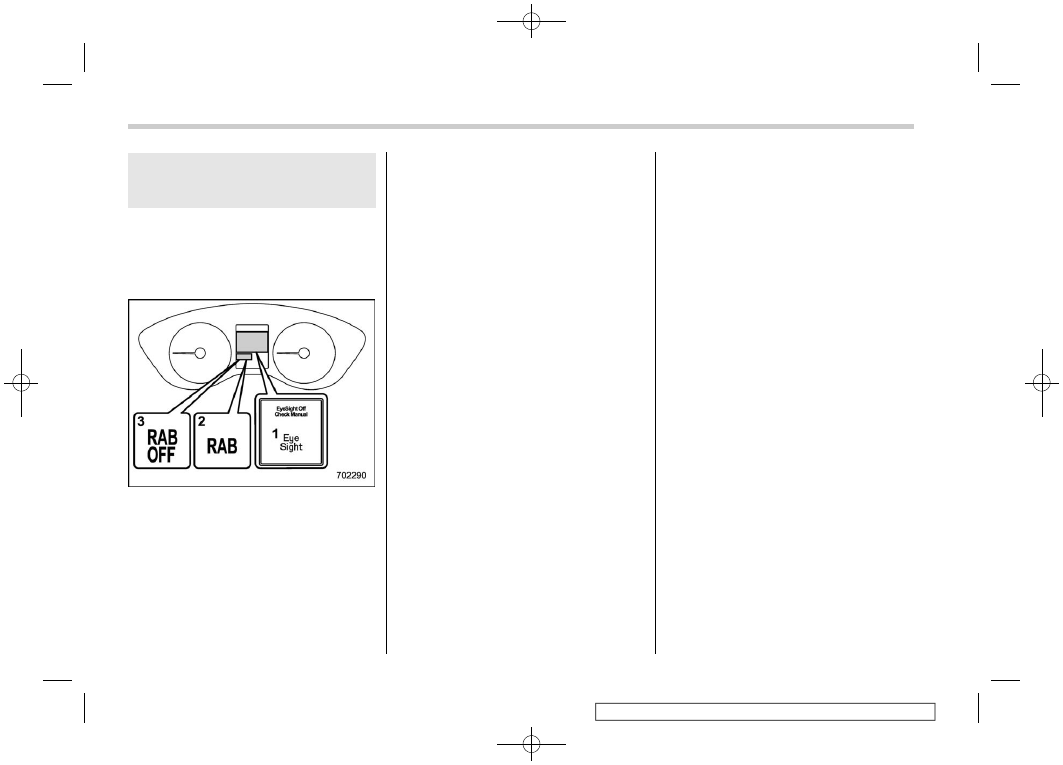
The Reverse Automatic Braking (RAB)
system will operate when all of the follow-
ing conditions are met.

1

EyeSight warning indicator

2

RAB warning indicator

3

RAB OFF indicator

.

The ignition switch is in the “ON”
position.

.

The EyeSight warning indicator is off.

.

The RAB warning indicator is off.

.

The RAB OFF indicator is off.

.

The Reverse Automatic Braking (RAB)

system is set to on.

.

The select lever is in the “R” position.

.

The vehicle speed is between 1 to 9
mph (1.5 to 15 km/h).

NOTE

.

In the following cases, the Reverse
Automatic Braking (RAB) system
will not operate. Promptly contact a
SUBARU dealer to have the system
inspected.

– The EyeSight warning indicator

is illuminated.

– The RAB warning indicator is

illuminated.

.

When the RAB OFF indicator is
illuminated, the Reverse Automatic
Braking (RAB) system cannot be
operated.

.

In the following cases, the system
may not be able to properly detect an
obstacle. Promptly contact a
SUBARU dealer to have the system
inspected.

– A sticker, paint, or a chemical is

applied to the sonar sensor or the
rear bumper near the sonar sen-
sor.

– The rear bumper is modified.
– The rear bumper has been re-

moved and reattached.

– The ground clearance is changed

due to the vehicle’s loading con-
dition or modification.

– Ice, snow or mud is adhered to

the rear bumper near the sonar
sensor.

– The rear bumper is exposed to

strong impact, or the rear bumper
is deformed.

.

When the 8-inch audio/navigation
system is performing a software
update, the Reverse Automatic
Braking (RAB) system may not dis-
play the following items on the
audio/navigation screen until the
update is complete.

– Display Icon on/off Function
– Distance Indicator Image
– Warning Message

.

On a steep hill, the system’s auto-
matic braking ability will be reduced.

.

The system is designed to avoid
collisions by automatic hard braking
when the vehicle’s reversing speed
is less than approximately 3 mph (5
km/h). However, the system does not
guarantee that the vehicle will be
able to avoid collisions in any situa-
tion.

.

If the vehicle is reversed at an
extremely slow speed, the driver’s
operation may be prioritized. In this

Reverse Automatic Braking (RAB) system

366

(369,1)

case, automatic braking will not
operate.

.

The system may not be able to detect
the following objects.

– Sharp or thin objects such as

poles, fences and ropes which
may not reflect the sound wave
emitted from the sonar sensor.

– Objects that are too close to the

rear bumper when the select
lever is set to the “R” position.

– Objects with a surface which may

not reflect the sound wave
emitted from the sonar sensor
such as a chain link fence.

.

Objects the system is not designed
to detect.

– Pedestrians
– Moving objects including moving

vehicles

– Objects which absorb sound

waves such as cloth or snow.

– Objects whose surface has a

diagonal angle.

– Objects that are low to the ground

such as parking blocks.

– Objects that are high above the

ground such as objects hanging
from above.

– Objects that are out of range of

the center of the vehicle in the
horizontal direction.

– Objects that are not perpendicu-

lar to the ground.

– The surface of the object is

uneven or wavy.

.

The system may not be able to
properly detect objects or may
cause a system malfunction when
the following conditions exist.

High frequency sound from other
sources are nearby:

– Horn sounds from other vehicles.
– Engine sounds from other vehi-

cles.

– Sounds of air brakes
– Vehicle detection equipment or a

sonar from other vehicles

– A sound wave with a frequency

similar to the vehicle’s system is
transmitted nearby.

– A vehicle equipped with the same

system is reversing toward your
reversing direction.

Weather conditions:

– Extremely high or extremely low

temperatures in which the area
near the sonar sensor becomes
too hot or too cold to operate.

– The sonar sensors or the rear

bumper near the sonar sensors is
exposed to heavy rain or a sig-

nificant amount of water.

– Fog, snow or sandstorm, etc.
– Air is moving rapidly such as

when a strong wind is blowing.

Parts attached to the rear bumper
near the sonar sensor:

– Commercial electronic parts (fog

light, fender pole, radio antenna)
or commercial attachment parts
(trailer hitch, bicycle carrier,
bumper guard) are attached.

– Parts that emit high frequency

sound, such as a horn or speaker,
are attached.

Vehicle conditions:

– The vehicle is significantly in-

clined.

– The ground clearance is signifi-

cantly reduced due to the vehi-
cle’s loading condition, etc.

– When the sonar sensor is mis-

aligned due to a collision or an
accident.

Surrounding environment:

– A cloth banner, flag, hanging

branch or railroad crossing bars
are present in the reversing di-
rection.

– When reversing on a gravel or

grassy area.

– CONTINUED –

Reverse Automatic Braking (RAB) system

367

7

Starting

and

operating

(370,1)

– When reversing in an area where

objects or walls are adjacent to
the vehicle such as narrow tun-
nels, narrow bridges, narrow
roads or narrow garages.

– Wheel tracks or a hole is present

in the ground of the reversing
direction.

– When reversing over a drainage

cover (grate cover).

– The path of the reversing direc-

tion is inclined such as on a steep
uphill.

– A curb is present in the reversing

direction.

– When reversing downhill.

– When reversing on an uneven

road.

.

In circumstances such as the follow-
ing, it may not be possible to avoid a
collision even when the system
operates normally.

– The roads are slippery.
– The tire air pressure is not cor-

rect.

– The tires have become worn.
– Tires which are not the desig-

nated size are installed.

– Emergency repairs were per-

formed using a puncture repair
kit.

– The suspension was modified.
– Tire chains are installed.
– Vehicle driving is unstable due to

accident or malfunction.

– The brake warning light is illumi-

nated.

Reverse Automatic Braking (RAB) system

368

(371,1)

&

Reverse Automatic Braking
(RAB) system operation

When the Reverse Automatic Braking
(RAB) system is in operation, the range
between the vehicle and the detected
object will be indicated on the audio/
navigation monitor. Also, warning sounds
will activate in 3 levels to warn the driver of
a potential collision.
While the RAB is operating, a warning
message is displayed on the audio/navi-
gation monitor and the combination meter
display (color LCD).

Guideline of detecting range

Alert level

Range of detected object*

Distance indicator

Alarm pattern

Long proximity alert
(object detected)

35 in (90 cm) or more

Green

No warning sound

Medium proximity
alert (approaching the
object)

28 to 35 in (70 to 90 cm)

Yellow

Short beeps

Short proximity alert
(approaching closer
to the object)

20 to 28 in (50 to 70 cm)

Orange

Rapid short beeps

Closest proximity
alert (too close to the
object)

20 in (50 cm) or less

Red

Continuous beep

*: Range of detection may vary depending on the environmental condition.

– CONTINUED –

Reverse Automatic Braking (RAB) system

369

7

Starting

and

operating

(372,1)

!

Obstacle detected and alert level

Long proximity alert (object detected)

1

Green: 35 in (90 cm) or more

Medium proximity alert (approaching the
object)

1

Yellow: 28 to 35 in (70 to 90 cm)

Short proximity alert (approaching the
object closer)

1

Orange: 20 to 28 in (50 to 70 cm)

Closest proximity alert (too close to the
object)

1

Red: 20 in (50 cm) or less

When an object is detected in the rever-
sing direction, the range of detected object
will be shown on the audio/navigation
monitor.
A warning alarm will sound and, depend-
ing on the speed, either torque control to
generate engine braking or automatic
braking will be applied.

!

Object close behind warning

Automatic braking warning

1

Warning message

If the vehicle continues to go in reverse,
the system may determine the risk of
collision with the object. In this case, short
warning beeps or continuous warning
beeps will sound and either strong auto-
matic braking or torque control will be
applied to prevent collision.

Reverse Automatic Braking (RAB) system

370

(373,1)

Depress brake pedal warning

1

Warning message

Make sure to depress the brake pedal
once the vehicle has been stopped by
automatic braking. Until the brake pedal is
depressed, a message will be displayed
on the audio/navigation monitor and the
continuous beep will remain sounding.
At this time, a warning message is also
displayed on the combination meter dis-
play (color LCD).

NOTE

The Sonar Audible Alarm function and
Automatic Braking function are differ-
ent operation conditions. Therefore,
there are cases in which only one of
these functions will activate.

WARNING

Depress the brake pedal immedi-
ately after the system stops the
vehicle by automatic braking. De-
pending on the conditions of the
road surface and tires, the vehicle
may not remain stopped, possibly
leading to an unexpected accident.

!

After the vehicle is stopped by the
system

1

RAB OFF indicator

After the brake pedal is depressed, the
RAB OFF indicator will illuminate and the
system will temporarily stop operating.
The RAB OFF indicator will turn off when
the select lever is shifted to a position other

than the “R” position.
The system will operate again the next
time the select lever is shifted to “R”
position.
In circumstances such as the following, the
Reverse Automatic Braking (RAB) system
automatically stops operating and the RAB
OFF indicator illuminates.
– There is ice, snow, mud, or other

substance on the sonar sensors.

– The select lever was shifted to “R”

when there is an obstacle located close
to the rear bumper.

– A sound with a frequency close to that

of the sonar used by the Reverse
Automatic Braking (RAB) system was
detected.

NOTE

.

In the following cases, after the
vehicle has been stopped by the
Reverse Automatic Braking (RAB)
system, brake control is released
and the electronic parking brake
operates. For details about releasing
the parking brake, refer to “Electro-
nic parking brake”

P341.

– When 2 minutes pass after the

vehicle is stopped.

– When any door is opened.
– When the EyeSight system mal-

functions.

– CONTINUED –

Reverse Automatic Braking (RAB) system

371

7

Starting

and

operating

(374,1)

– When the Reverse Automatic

Braking (RAB) system stops tem-
porarily.

.

The message/warning message will
not display for approximately 8 sec-
onds after turning the ignition
switch to the “ON” position.

&

Canceling the Reverse Auto-
matic Braking (RAB) system
operation

The Reverse Automatic Braking (RAB)
system can be temporarily canceled by
any of the following operations.

.

Depressing the brake pedal*

.

Depressing the accelerator pedal*

.

The accelerator pedal is kept de-
pressed. (In this case, limited accelera-
tion will be canceled and the vehicle will
continue reversing.)

.

The select lever is shifted to a position
other than the “R” position.

*: While the vehicle is stopped by the automatic

braking

NOTE

The system will be canceled if the
object is no longer detected.

&

Reverse Automatic Braking
(RAB) system ON/OFF setting

While the select lever is shifted to the “R”
position, the below functions of the Re-
verse Automatic Braking (RAB) system
can be set by operating the audio/naviga-
tion monitor.

1

ON setting key of Reverse Automatic
Braking (RAB) system

2

OFF setting key of Reverse Automatic
Braking (RAB) system

3

ON setting key of the object detection
warning beeping sound

4

OFF setting key of the object detection
warning beeping sound

When the ON setting key is shown, the
corresponding setting is ON.
Touch and hold the ON setting key to turn
the setting OFF.

When the OFF setting is shown, the
corresponding setting is OFF.
Touch and hold the OFF setting key to turn
the setting ON.

When the Reverse Automatic Braking
(RAB) system is turned OFF, the following
indicator will illuminate.

RAB OFF indicator: illuminates when the
Reverse Automatic Braking (RAB) system is
turned OFF.

RAB OFF indicator will turn off when the
Reverse Automatic Braking (RAB) system
is turned ON.

Reverse Automatic Braking (RAB) system

372

(375,1)

NOTE

.

When the settings cannot be chan-
ged, the ON/OFF setting key will be
grayed out.

.

The ON/OFF setting key may be
grayed out if the Reverse Automatic
Braking (RAB) system malfunctions,
etc. In this case, turn the ignition
switch to the “OFF” position and
then turn it to the “ON” position
again. If the setting cannot be chan-
ged even after turning the ignition
switch to the “ON” position again,
consult your SUBARU dealer.

.

The settings will be restored as
follows when the select lever is
shifted to the “R” position next time.

– Reverse Automatic Braking

(RAB) system settings: default
(ON setting)

– Object detection warning beep-

ing sound: the setting selected
by operating the combination
meter display (color LCD)

Also, the following settings can be chan-
ged by operating the combination meter
display (color LCD).

.

Warning volume

.

Sonar audible alarm ON/OFF

For details, refer to “Menu screens”

P196.

&

RAB warning indicator

1

RAB malfunction message

2

RAB warning indicator

If the Reverse Automatic Braking (RAB)
system malfunctions, the above indicator
illuminates on the combination meter.
Contact the nearest SUBARU dealer for
details.

&

Handling of the sonar sen-
sors

The 4 sonar sensors are located in the rear
bumper. To ensure the proper operation of
the Reverse Automatic Braking (RAB)
system, observe the following precau-
tions.

.

Do not affix any stickers or other items
on the sonar sensor or the bumper
surface near the sonar sensors.

.

Always keep the rear bumper surface
near the sonar sensors clean.

.

Do not modify the rear bumper.

.

Do not paint the bumper near the sonar
sensors.

.

Do not apply high pressure water to the
sonar sensors with a high pressure
carwashing machine.

– CONTINUED –

Reverse Automatic Braking (RAB) system

373

7

Starting

and

operating

(376,1)

.

Do not apply strong impacts to the rear
bumper near the sonar sensors. If a
sensor becomes misaligned, a system
malfunction may occur, including in-
ability to detect objects in the reversing
direction. If any strong impact is applied
to the rear bumper, contact a SUBARU
dealer to have the system inspected.

.

Do not disassemble the sonar sensors.

NOTE

If the sonar sensors require repair or
replacement, or if the area of the rear
bumper near the sonar sensors re-
quires repair, paintwork or replace-
ment, contact your SUBARU dealer for
assistance.

7-21. Driver Monitoring Sys-
tem (if equipped)

Driver Monitoring System is introduced as
DriverFocus in some countries.
The Driver Monitoring System monitors
possible cases when the driver is not
paying attention to the forward direction,
and also recognizes individual users.
This system warns the driver of inattentive/
drowsy driving, and can support safe and
comfortable driving by automatically re-
trieving the following settings.
– Driver’s position
– Climate control setting
– Meter setting
– Multi-function display setting

When a user is registered, various settings
are automatically retrieved when the user
enters the vehicle.
The interior temperature setting can also
be changed using gesture control. Refer to
“Gesture control”

P386.

1

Camera

CAUTION

.

Always use the utmost care in

driving

– Overconfidence because you

are driving a vehicle with the
Driver Monitoring System
could easily lead to a serious
accident.

.

This system cannot detect if the

driver is feeling drowsy or is
concentrating on safe driving.

.

It cannot judge if the driver is

awake or asleep, if their driving
abilities have diminished, or if
they are concentrating on safe

Driver Monitoring System

374

(377,1)

driving.

.

In some circumstances, the sys-

tem may not be able to correctly
detect the driver state.

NOTE

.

The user recognition camera does
not save images, audio, or video.

.

The Driver Monitoring System may
not operate correctly when sunlight
is shining into the vehicle in the
following ways.

– Sunlight is shining directly (or

through glass) onto the user
recognition camera.

– There are shadows on the dri-

ver’s face caused by sunlight (or
any light with a strong infrared
component).

– There are large momentary fluc-

tuations in the strength of the
sunlight (or any light with a
strong infrared component) shin-
ing on the face.

.

Correct detection may not be possi-
ble when a device that includes an
infrared light source (such as a
commercially available driver mon-
itoring system) is installed in the
vehicle interior.

.

The Driver Monitoring System may
not operate correctly at the following
times when the driver is wearing
glasses or sunglasses.

– The sunglasses do not allow the

easy passage of infrared light.

– The surrounding scenery is re-

flected strongly in the lenses of
the glasses or sunglasses.

– The eyes are hidden by the frame

of the glasses and the user
recognition camera cannot de-
tect the eyes.

– The light from an infrared light

source (LED) is reflected in the
lenses of the glasses or sun-
glasses.

– The driver is wearing an eye-

patch.

– The driver is wearing a hat set

deeply over the eyes.

.

Depending on the type of mask,
correct detection of inattentive/
drowsy driving may not be possible.

.

Correct user recognition is not pos-
sible if the eyes, nose, or mouth is
covered with a mask, muffler, sun-
glasses, or other item.

.

The Driver Monitoring System may
not operate correctly when the eye-
brows, eyes, nose, or mouth is
hidden due to item that is between

the face and the system.

.

If a thick cover is attached to the
steering wheel, then depending on
the position set for the tilt/telescopic
steering wheel, the cover may block
the system’s view of the face, and
the system and the Driver Monitor-
ing System may not operate cor-
rectly.

.

Do not attach any stickers to the
user recognition camera or the infra-
red light source (LED). If the user
recognition camera or infrared light
source (LED) is covered by an
obstruction, it will not be possible
to correctly monitor the driver.

.

If an accessory is hung from the
inside mirror, correct detection may
not be possible.

.

Do not touch the user recognition
camera or the infrared light source
(LED) directly with your fingers. If
there is dirt or a fingerprint on these
parts, it will not be possible to
correctly monitor the driver. If there
is dirt or a fingerprint on these parts,
either wipe them with a soft dry
cloth, or wipe gently with a damp
cloth after first firmly wringing the
water out.

.

If the surface of the user recognition
camera or the infrared light source
(LED) becomes scratched, correct

– CONTINUED –

Driver Monitoring System

375

7

Starting

and

operating

(378,1)

detection may not be possible. Be
careful that hard objects do not
contact these parts.

.

If there is condensation on the user
recognition camera or the infrared
light source (LED), correct detection
may not be possible. If there is
condensation on these parts, wipe
it away with a soft dry cloth.

.

When registering a user for user
recognition, avoid closing your eyes
as much as possible.

.

If the user recognition success rate
is low, it is possible that the user is
not correctly registered. Delete the
registered data and perform regis-
tration again.

.

If a user frequently drives both with
glasses and contact lenses, it is
recommended that registration be
performed both when wearing
glasses and when wearing contact
lenses.

.

User recognition starts immediately
after entering the vehicle, however if
the user looks downward or at the
driver side mirror for a long time, the
user may not be recognized.

.

When one person among twins or
another pair of persons with similar
facial features is registered, the
other person may be incorrectly
recognized as the registered user

when entering the vehicle.

.

If the person in the passenger’s seat
leans into the driver’s seat, or in
other cases when there are two or
more faces near the driver’s seat, the
system may not operate correctly.

.

There are cases when the system
concludes that the user’s eyes are
closed when the user is looking
downward during driving, such as
when checking instruments or the
navigation screen. In such cases,
the drowsy driving warning buzzer
may sound or the system may
otherwise not operate correctly.

.

If the eyes are narrowed when laugh-
ing or when there is a dazzling
outside light, the system may judge
that the eyes are closed and the
drowsy driving warning buzzer may
sound or the system may otherwise
not operate correctly.

.

The drowsy driving or asleep warn-
ing states are recognized from the
length of time and percentage of
time that the eyes are closed. The
drowsy driving warning buzzer will
not sound simply when the driver
feels sleepy or yawns.

.

Even when the driver does not feel
sleepy, if his or her eyes are closed
or if he or she blinks frequently, the
drowsy driving warning buzzer may

sound.

.

The inattentive driving warning buz-
zer may sound if the driver leans
forward or puts his or her head out of
the window while driving.

.

The inattentive driving warning buz-
zer will not sound when the vehicle
is stopped or travelling at slow
speed even if the driver is not
looking ahead.

.

The Driver Monitoring System col-
lects and stores data regarding
drivers’ facial features. Facial recog-
nition data is stored locally and does
not leave the vehicle. It is not
transmitted to or stored by SUBARU
or anyone else. The Driver Monitor-
ing System may be disabled and any
stored driver data may be deleted by
following the instructions below. If
the Driver Monitoring System is
disabled, it will be unable to provide
any of its safety or convenience
functions.

Driver Monitoring System

376

(379,1)

The functions which are available vary depending on the Driver Monitoring System
setting and the user recognition function setting.

Available functions

Driver Monitoring System*

1

ON

OFF

User recognition
function*

2

ON

Inattentive/drowsy
driving warning

Available

Not available

User recognition
function

Available

Not available

OFF

Inattentive/drowsy
driving warning

Available

Not available

User recognition
function

Not available

Not available

– CONTINUED –

Driver Monitoring System

377

7

Starting

and

operating

(380,1)

Available function items

Driver Monitoring System*

1

ON

OFF

User recognition
function*

2

ON

Register User

Available

Not available

Delete User

Available

Not available

Delete All Users

Available

Not available

Update User Set-
tings

Available

Not available

Delete Driver Posi-
tion

Available

Not available

OFF

Register User

Not available

Not available

Delete User

Available

Not available

Delete All Users

Available

Not available

Update User Set-
tings

Not available

Not available

Delete Driver Posi-
tion

Not available

Not available

*1: The system can be turned ON/OFF with the Driver Monitoring System OFF switch. Refer to “Driver

Monitoring System OFF switch”

P385.

*2: The function can be turned ON/OFF in the multi-function display customization settings. Refer to

User Recognition settings”

P219.

The functions which are available vary depending on whether or not the user is
registered.

Available functions

The user is registered.

The user is not registered.

User recognition function

Available

Not available

&

User recognition function

WARNING

Perform registration, retrieving, or
delete of the seat position and out-
side mirror angle before beginning
driving. There is the risk of an
accident if registration, retrieving,
or delete is performed while driving.

When a user is registered, it is possible to
retrieve the following settings.

!

Driver position personalization

.

Seat position and outside mirror angle

Retrieves the registered seat position and
outside mirror angle.

.

Reverse tilt angle

Retrieves the registered reverse tilt-down
outside mirror angle.

!

Meter personalization

.

Combination meter display basic
screen

Displays the screen which the user had
selected at the time when he/she last
exited the vehicle.

.

Fuel consumption screen

Displays the average fuel economy for
past driving by that user.

Driver Monitoring System

378

(381,1)

!

Multi-function display personalization

.

Multi-function display basic screen

Displays the screen which the user had selected at the time when he/she last exited the
vehicle.

.

Fuel consumption screen

Displays the average fuel economy for past driving by that user.

.

Customization linked with the user recognition function

Menu

Item

Date

Birthday

Anniversary

Display/Beep

Screen Off

Favorite

Bypass Screen

Birthday Reminder

Anniversary Reminder

Traffic Info

Weather

Turn by turn

Beep

Climate Control

Mode Setting

Occupant Detection

!

Climate control personalization

.

Climate control settings

Retrieves setting the temperature, airflow
mode, and other settings which the user
had selected at the time when he/she last
exited the vehicle.

NOTE

When a recognized user exits the
vehicle while the Max A/C mode is on
and the push engine switch is turned
off, the system stores the setting con-
figured before Max A/C mode was
turned on.

!

Driver Monitoring System ON/OFF
status

Retrieves the Driver Monitoring System
ON/OFF status which the user had se-
lected at the time when he/she last exited
the vehicle.

– CONTINUED –

Driver Monitoring System

379

7

Starting

and

operating

(382,1)

!

Changing the personalization settings

Item

Driver’s position personaliza-
tion

Seat position/outside mirror
angle

Change the setting by using the
multi-function display customi-
zation function. Refer to “Driver

Monitoring System settings”

P214.

Reverse tilt-down outside mir-
ror angle

Meter personalization*

Combination meter display ba-
sic screen

When the customization screen
linked with the synchronized
user function is selected and
the setting is changed, it is
automatically stored.

Multi-function display persona-
lization*

Multi-function display basic
screen

Customization linked with syn-
chronized user function

Climate control personaliza-
tion*

Climate control settings

Driver Monitoring System ON/OFF status

*: When the Driver Monitoring System is OFF, the Driver Monitoring System continues to store the

conditions from immediately before the Driver Monitoring System was turned OFF even if the
screen was selected and the setting was changed.

&

Inattentive/drowsy driving
warning

While driving, the Driver Monitoring Sys-
tem monitors possible cases of driver
inattention or drowsiness and warns the
driver.
When the inattentive/drowsy driving warn-
ing activates, the buzzer sounds and an
interrupt display appears.

NOTE

.

The inattentive/drowsy driving warn-
ing operates regardless of the status
of the user recognition function.

.

The inattentive driving warning does
not activate when the turn signal is
operating or when the select lever is
in the “R” position.

.

When the pre-crash brake OFF in-
dicator is illuminated on the combi-
nation meter display, the inattentive
driving warning activates at the
same timing as usual even when a
vehicle ahead or obstacle is de-
tected. For details about the
EyeSight system, refer to the Own-
er’s Manual supplement for the
EyeSight system.

Driver Monitoring System

380

(383,1)

!

Inattentive driving warning

When the system monitors that the driver
may be inattentive, it warns the driver.
When the inattentive driving warning acti-
vates, the buzzer sounds and an interrupt
display appears on the combination meter
display.
When the EyeSight system has detected a
vehicle ahead or obstacle in the forward
direction, the inattentive driving warning
may activate at earlier timing than usual.
Refer to the Owner’s Manual supplement
for the EyeSight system.

!

Drowsy driving warning

Possible drowsiness is detected from the amount of driver eyelid closure, and a warning
is given to the driver. When the drowsy driving warning activates, the buzzer sounds and
an interrupt display appears.

Combination meter

display

Multi-function display

Warning chime

Drowsy driving

Beep, beep... (Con-

tinues until the driver’s

eyes open.)

Very drowsy

Beep, beep, beep,

beep, beep (5 times)

Slightly drowsy

Beep

Not drowsy

– CONTINUED –

Driver Monitoring System

381

7

Starting

and

operating


Content      ..     21      22      23      24     ..