Subaru Ascent (2023 year). Manual in english - page 14
398 Reverse Automatic Braking (RAB) system
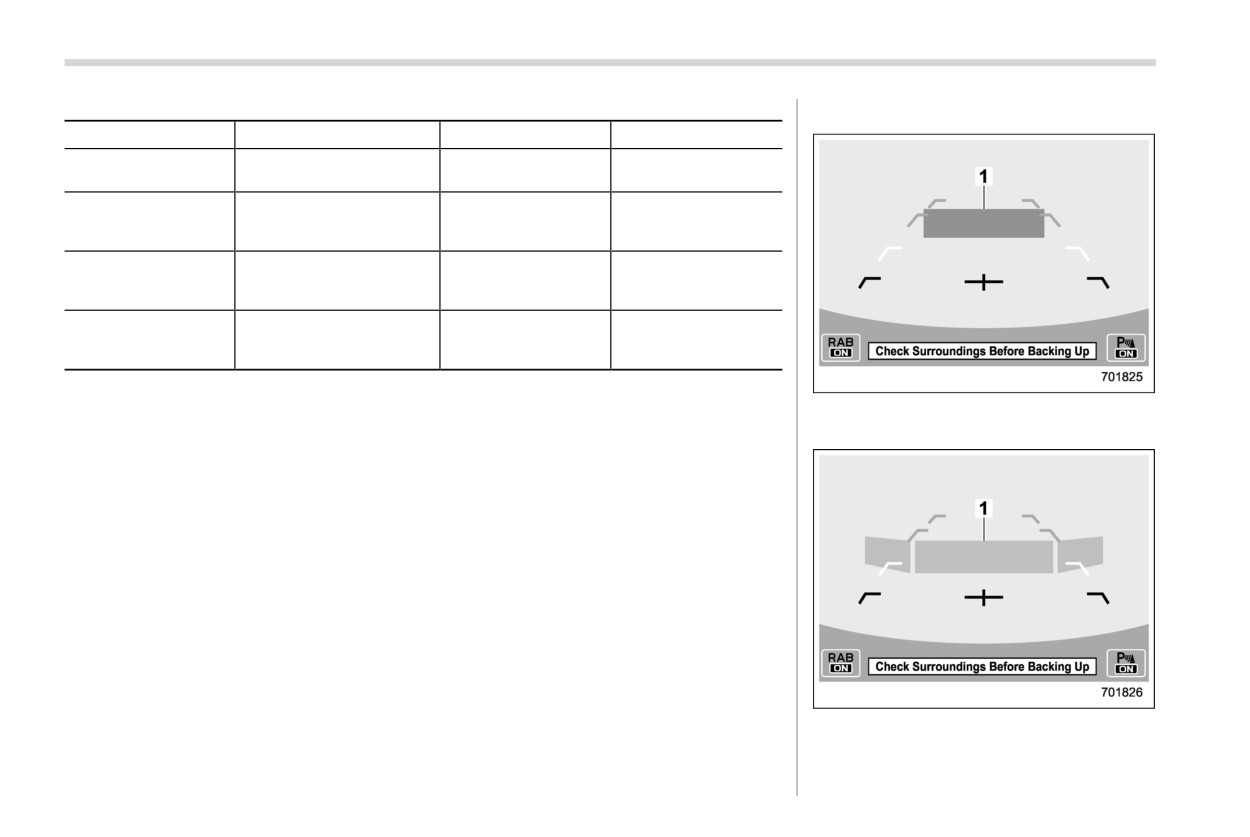
Guideline of detecting range
! Obstacle detected and alert level
Alert level
Range of detected object*
Distance indicator
Alarm pattern
Long proximity (ob-
35 in (90 cm) or more
Green
No warning sound
ject detected)
Medium proximity
alert (approaching the
28 to 35 in (70 to 90 cm)
Yellow
Short beeps
object)
Short proximity alert
(approaching closer
20 to 28 in (50 to 70 cm)
Orange
Rapid short beeps
to the object)
Closest proximity
alert (too close to the
20 in (50 cm) or less
Red
Continuous beep
object)
*: Range of detection may vary depending on the environmental condition.
Long proximity alert (object detected)
1
35 in (90 cm) or more
Medium proximity alert (approaching the
object)
1
Yellow: 28 to 35 in (70 to 90 cm)
Reverse Automatic Braking (RAB) system
399
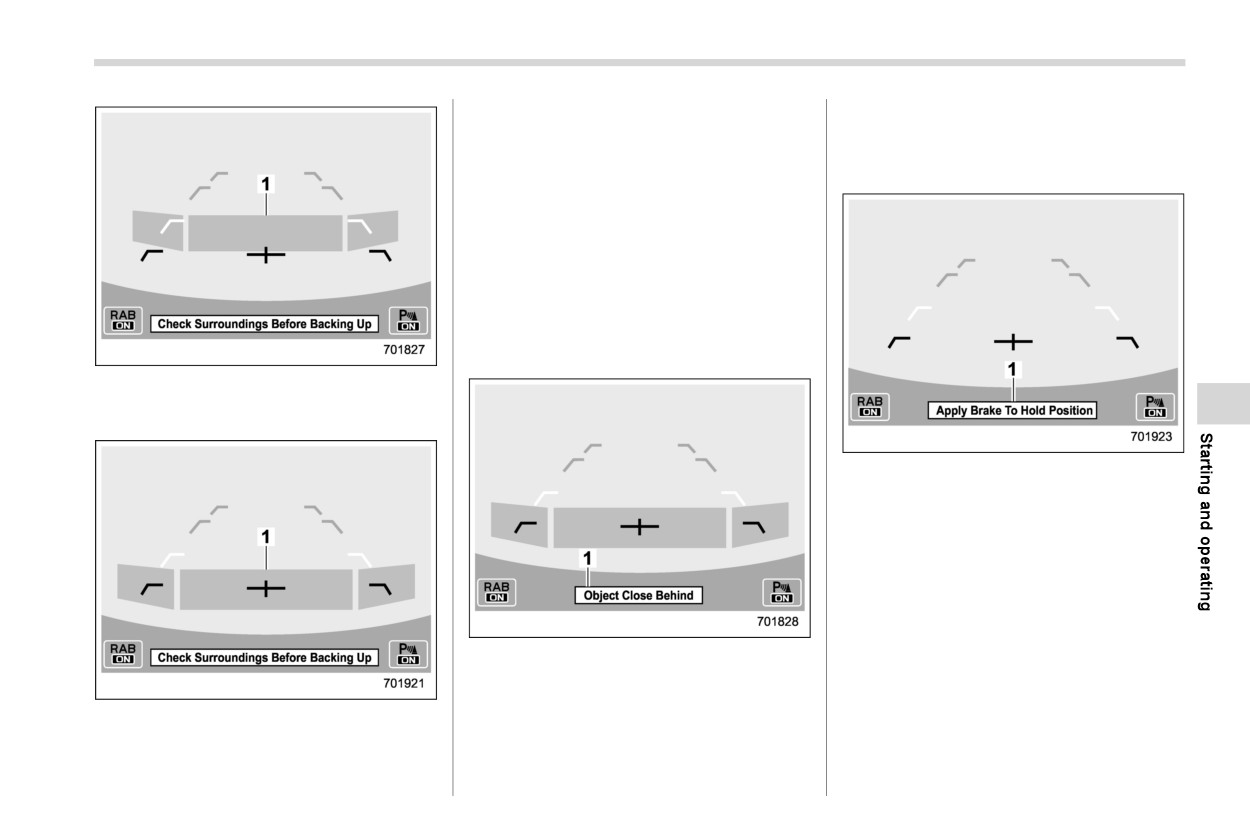
When an object is detected in the rever-
control will be applied to prevent collision.
sing direction, the range of detected object
At this time, a warning message is also
will be shown on the center information
displayed on the combination meter dis-
display.
play (color LCD).
A warning alarm will sound and, depend-
ing on the speed, either torque control to
generate engine braking or automatic
braking will be applied.
& Automatic Braking function
operation
! Object close behind warning
Short proximity alert
(approaching the
object closer)
1
Orange: 20 to 28 in (50 to 70 cm)
Depress brake pedal warning
1
Warning message
Make sure to depress the brake pedal
once the vehicle has been stopped by
automatic braking. Until the brake pedal is
depressed, a message will be displayed
on the center information display and the
continuous beep will remain sounding.
At this time, a warning message is also
Automatic braking warning
displayed on the combination meter dis-
1
Warning message
play (color LCD).
If the system determine the risk of collision
Closest proximity alert (too
close to the
with the object. Short warning beeps or
object)
continuous warning beeps will sound and
1
Red: 20 in (50 cm) or less
either strong automatic braking or torque
- CONTINUED -
400 Reverse Automatic Braking (RAB) system
NOTE
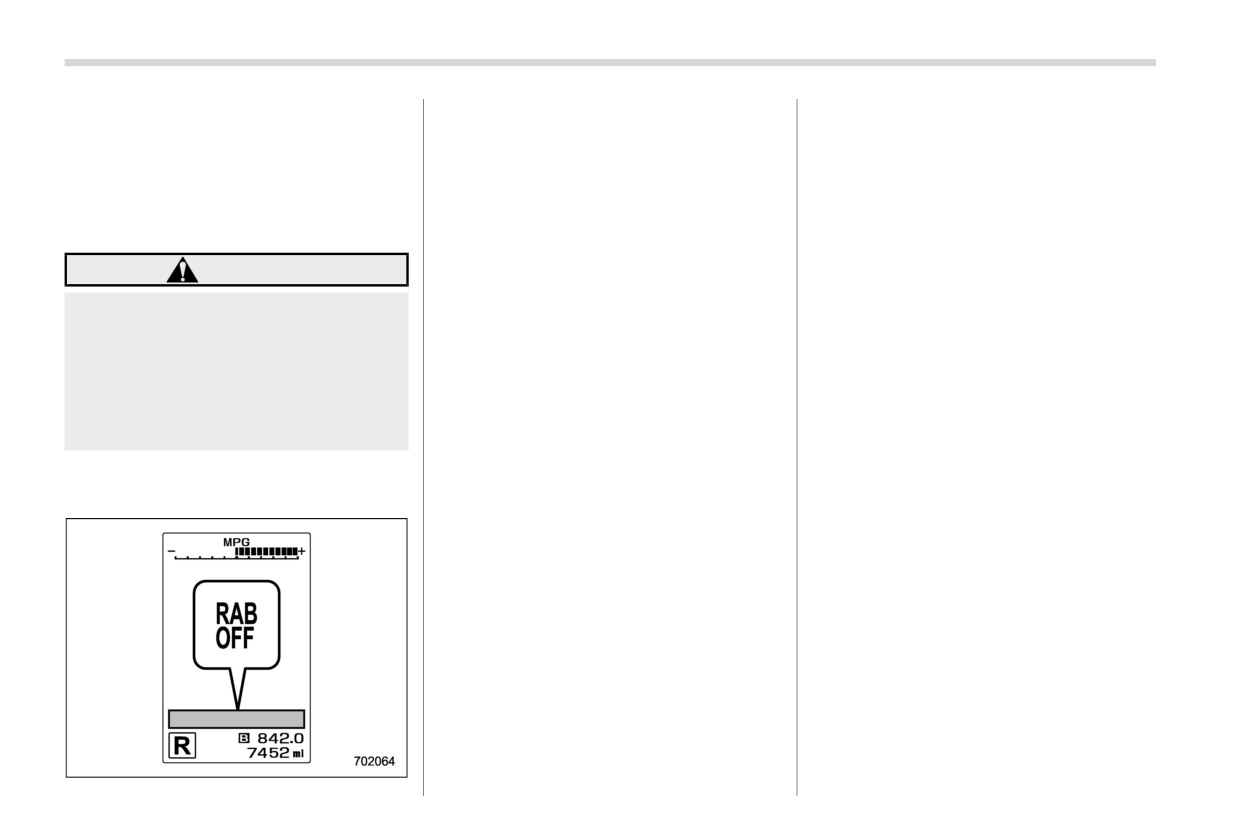
After the brake pedal is depressed, the
set to the “R” position
RAB OFF indicator will illuminate and the
- The system detects sounds of a
The Sonar Audible Alarm function and
system will temporarily stop operating.
similar frequency to the RAB
Automatic Braking function are differ-
The RAB OFF indicator will turn off when
sonar
ent in operation conditions. Therefore
the select lever is shifted to a position other
there are cases in which only one of
than the “R” position.
these functions will activate.
& Canceling the Reverse Auto-
The system will operate again the next
matic Braking (RAB) system
time the select lever is shifted to the “R”
WARNING
operation
position.
The Reverse Automatic Braking (RAB)
Depress the brake pedal immedi-
NOTE
system can be temporarily canceled by
ately after the system stops the
In the following cases, after the
any of the following operation.
vehicle by automatic braking. De-
vehicle has been stopped by the
. While the vehicle is stopped by the
pending on the conditions of the
Reverse Automatic Braking (RAB)
operation of automatic braking, the
road surface and tires, the vehicle
system, brake control is released
brake pedal is depressed.
may not remain stopped, possibly
and the electronic parking brake
leading to an accident.
. While the vehicle is stopped by the
operates. For details about releasing
operation of automatic braking, the
the parking brake, refer to “Electro-
accelerator pedal is depressed.
! After the vehicle is stopped by the
nic parking brake” FP374.
. The accelerator pedal is depressed
system
- When 2 minutes pass after the
continuously (In this case, limited ac-
vehicle is stopped
celeration will be canceled and the
- When any door is opened
vehicle will continue reversing.)
The Reverse Automatic Braking
. The select lever is shifted to a position
(RAB) system may stop operating
other than the “R” position.
temporarily in the following cases
and the RAB OFF indicator will
NOTE
illuminate.
The system will be canceled if the
- Ice, snow or mud is adhered to
object is no longer detected.
the sonar sensors or the rear
bumper near the sonar sensor
- Objects are too close to the rear
bumper when the select lever is
Reverse Automatic Braking (RAB) system
401
& Reverse Automatic Braking
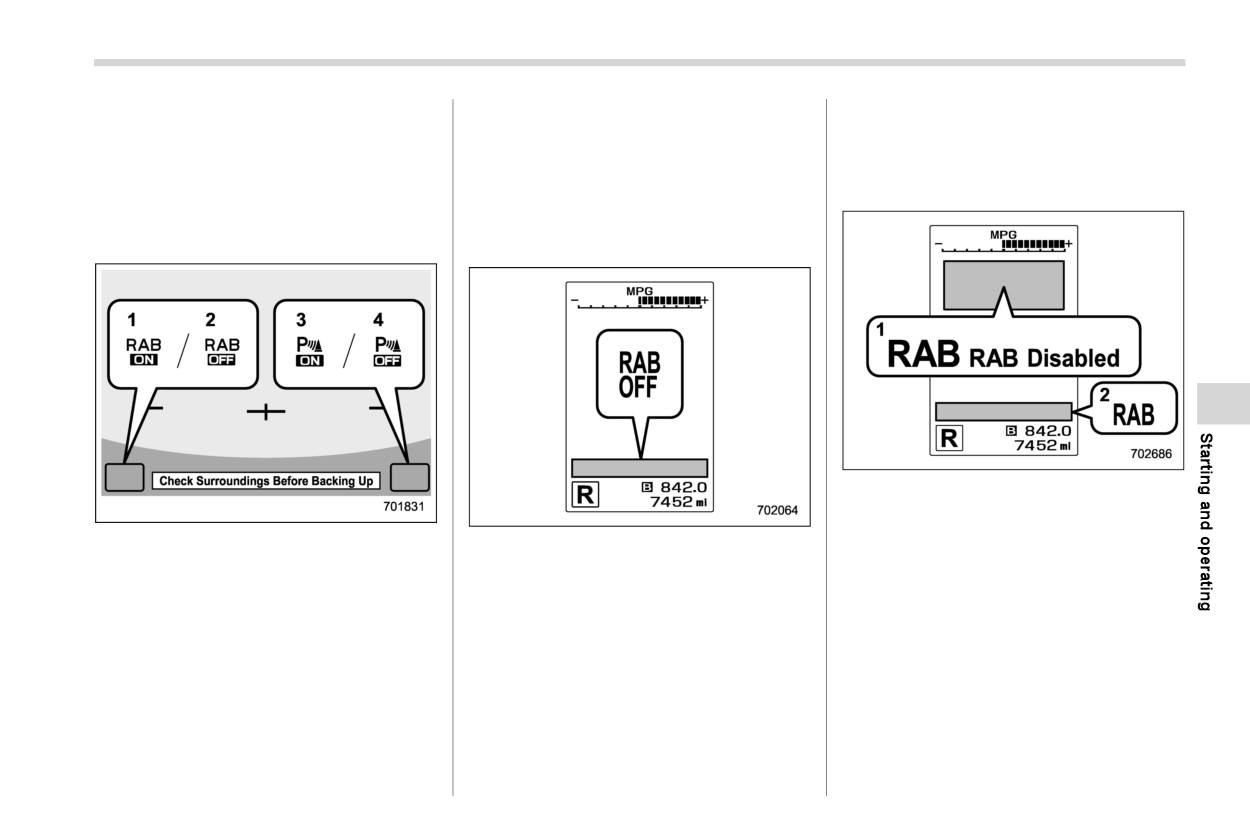
When the OFF setting is shown, the
. Sonar Audible Alarm
(RAB) system ON/OFF setting
corresponding setting is OFF.
For details, refer to “Car settings” FP215.
Touch and hold the OFF setting key to turn
While the select lever is shifted to the “R”
the setting ON.
position, the below functions of the Re-
& RAB warning indicator
verse Automatic Braking (RAB) system
When the Automatic Braking function are
can be set by operating the center in-
turned OFF, the following indicator(s) will
formation display.
illuminate.
1
RAB malfunction message
2
RAB warning indicator
1
ON setting key of Automatic Braking
If the Reverse Automatic Braking (RAB)
The RAB OFF indicator will turn off when
function
system malfunctions, the above indicator
the corresponding function is turned ON.
2
OFF setting key of Automatic Braking
illuminates on the combination meter.
function
NOTE
Contact the nearest SUBARU dealer for
3
ON setting key of the Sonar Audible
details.
Alarm function
When the settings cannot be changed,
4
OFF setting key of the Sonar Audible
the ON/OFF setting key will be grayed
Alarm function
out.
When the ON setting key is shown, the
Also, the following settings can be chan-
corresponding setting is ON.
ged by operating the center information
Touch and hold the ON setting key to turn
display.
the setting OFF.
. Warning Volume
- CONTINUED -
402 Driver Monitoring System
& Handling of the sonar sen-
. Do not apply strong impacts to the rear
7-19. Driver Monitoring Sys-
sors
bumper near the sonar sensors. If a
tem (if equipped)
sensor becomes misaligned, a system
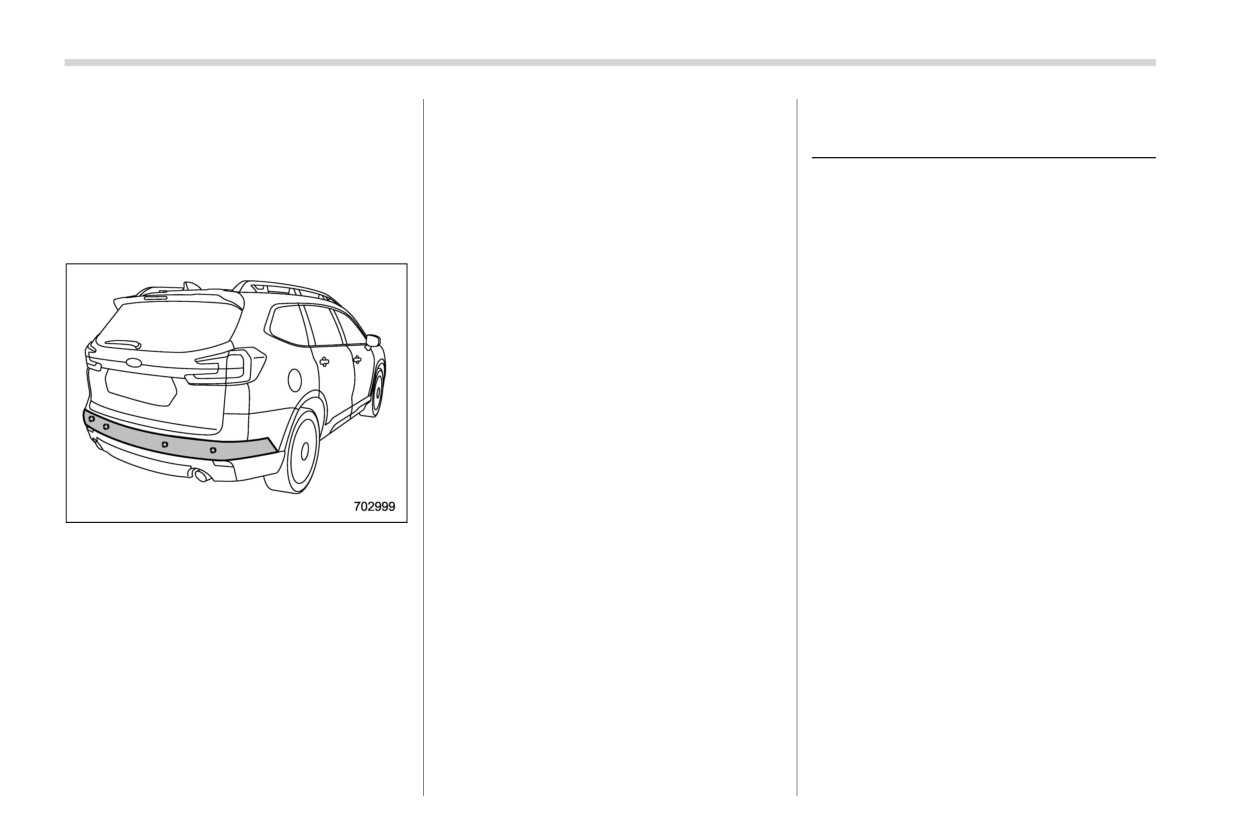
The 4 sonar sensors are located in the rear
malfunction may occur, including in-
bumper. To ensure the proper operation of
Driver Monitoring System is introduced as
ability to detect objects in the reversing
the Reverse Automatic Braking
(RAB)
DriverFocus in some countries.
direction. If any strong impact is applied
system, observe the following precau-
to the rear bumper, contact a SUBARU
The Driver Monitoring System monitors
tions.
dealer to have the system inspected.
possible cases when the driver is not
paying attention to the forward direction,
. Do not disassemble the sonar sensors.
and also recognizes individual users.
NOTE
This system warns the driver of inattentive/
If the sonar sensors require repair or
drowsy driving, and can support safe and
replacement, or if the area of the rear
comfortable driving by automatically re-
bumper near the sonar sensors re-
trieving the following settings.
quires repair, paintwork or replace-
- Driver’s position
ment, contact your SUBARU dealer for
- Climate control setting
assistance.
- Meter setting
- Center information display setting
When a user is registered, various settings
are automatically retrieved when the user
Do not affix any stickers or other items
enters the vehicle.
on
the sonar sensor or the bumper
surface near the sonar sensors.
Always keep the rear bumper surface
near the sonar sensors clean.
Do not modify the rear bumper.
Do not paint the bumper near the sonar
sensors.
Do not apply high pressure water to the
sonar sensors with a high pressure
carwashing machine.
Driver Monitoring System
403
driving.
The Driver Monitoring System may
not operate correctly at the following
. In some circumstances, the sys-
times when the driver is wearing
tem may not be able to correctly
glasses or sunglasses.
detect the driver state.
-
The sunglasses do not allow the
easy passage of infrared light.
NOTE
-
The surrounding scenery is re-
The user recognition camera does
flected strongly in the lenses of
not save images, audio, or video.
the glasses or sunglasses.
The Driver Monitoring System may
-
The eyes are hidden by the frame
not operate correctly when sunlight
of the glasses and the user
is shining into the vehicle in the
recognition camera cannot de-
following ways.
tect the eyes.
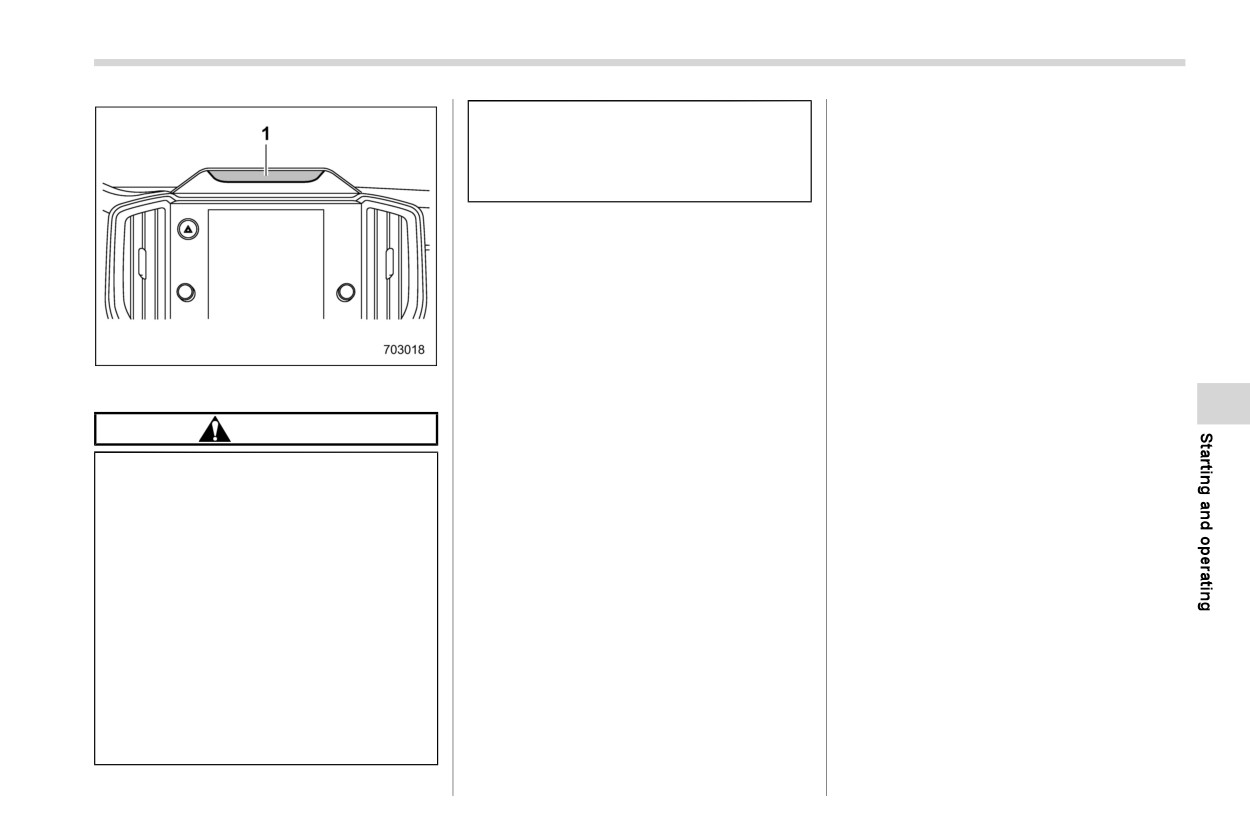
1
Camera
- Sunlight is shining directly (or
-
The light from an infrared light
through glass) onto the user
source (LED) is reflected in the
CAUTION
recognition camera.
lenses of the glasses or sun-
- There are shadows on the dri-
glasses.
Always use the utmost care
in
ver’s face caused by sunlight (or
-
The driver is wearing an eye-
driving
any light with a strong infrared
patch.
- Overconfidence because you
component).
-
The driver is wearing a hat set
are driving a vehicle with the
- There are large momentary fluc-
deeply over the eyes.
Driver Monitoring System
tuations in the strength of the
Depending on the type of mask,
could easily lead to a serious
sunlight
(or any light with a
correct detection of inattentive/
accident.
strong infrared component) shin-
drowsy driving may not be possible.
ing on the face.
Correct user recognition is not pos-
This system cannot detect if the
driver is feeling drowsy or is
Correct detection may not be possi-
sible if the eyes, nose, or mouth is
concentrating on safe driving.
ble when a device that includes an
covered with a mask, muffler, sun-
infrared light source
(such as a
glasses, or other item.
It cannot judge if the driver is
commercially available Driver Mon-
The Driver Monitoring System may
awake or asleep, if their driving
itoring System) is installed in the
not operate correctly when the eye-
abilities have diminished, or if
vehicle interior.
brows, eyes, nose, or mouth is
they are concentrating on safe
hidden due to item that is between
- CONTINUED -
404 Driver Monitoring System
the face and the system.
detection may not be possible. Be
when entering the vehicle.
If a thick cover is attached to the
careful that hard objects do not
If the person in the passenger’s seat
steering wheel, then depending on
contact these parts.
leans into the driver’s seat, or in
the position set for the tilt/telescopic
If there is condensation on the user
other cases when there are two or
steering wheel, the cover may block
recognition camera or the infrared
more faces near the driver’s seat, the
the system’s view of the face, and
light source (LED), correct detection
system may not operate correctly.
the system and the Driver Monitor-
may not be possible. If there is
There are cases when the system
ing System may not operate cor-
condensation on these parts, wipe
concludes that the user’s eyes are
rectly.
it away with a soft dry cloth.
closed when the user is looking
Do not attach any stickers to the
When registering a user for user
downward during driving, such as
user recognition camera or the infra-
recognition, avoid closing your eyes
when checking instruments or the
red light source (LED). If the user
as much as possible.
navigation screen. In such cases,
recognition camera or infrared light
If the user recognition success rate
the drowsy driving warning buzzer
source
(LED) is covered by an
is low, it is possible that the user is
may sound or the system may
obstruction, it will not be possible
not correctly registered. Delete the
otherwise not operate correctly.
to correctly monitor the driver.
registered data and perform regis-
If the eyes are narrowed when laugh-
If an accessory is hung from the
tration again.
ing or when there is a dazzling
inside mirror, correct detection may
If a user frequently drives both with
outside light, the system may judge
not be possible.
glasses and contact lenses, it is
that the eyes are closed and the
Do not touch the user recognition
recommended that registration be
drowsy driving warning buzzer may
camera or the infrared light source
performed both when wearing
sound or the system may otherwise
(LED) directly with your fingers. If
glasses and when wearing contact
not operate correctly.
there is dirt or a fingerprint on these
lenses.
The drowsy driving or asleep warn-
parts, it will not be possible to
User recognition starts immediately
ing states are recognized from the
correctly monitor the driver. If there
after entering the vehicle, however if
length of time and percentage of
is dirt or a fingerprint on these parts,
the user looks downward or at the
time that the eyes are closed. The
either wipe them with a soft dry
driver side mirror for a long time, the
drowsy driving warning buzzer will
cloth, or wipe gently with a damp
user may not be recognized.
not sound simply when the driver
cloth after first firmly wringing the
When one person among twins or
feels sleepy or yawns.
water out.
another pair of persons with similar
Even when the driver does not feel
If the surface of the user recognition
facial features is registered, the
sleepy, if his or her eyes are closed
camera or the infrared light source
other person may be incorrectly
or if he or she blinks frequently, the
(LED) becomes scratched, correct
recognized as the registered user
drowsy driving warning buzzer may

Driver Monitoring System
405
sound.
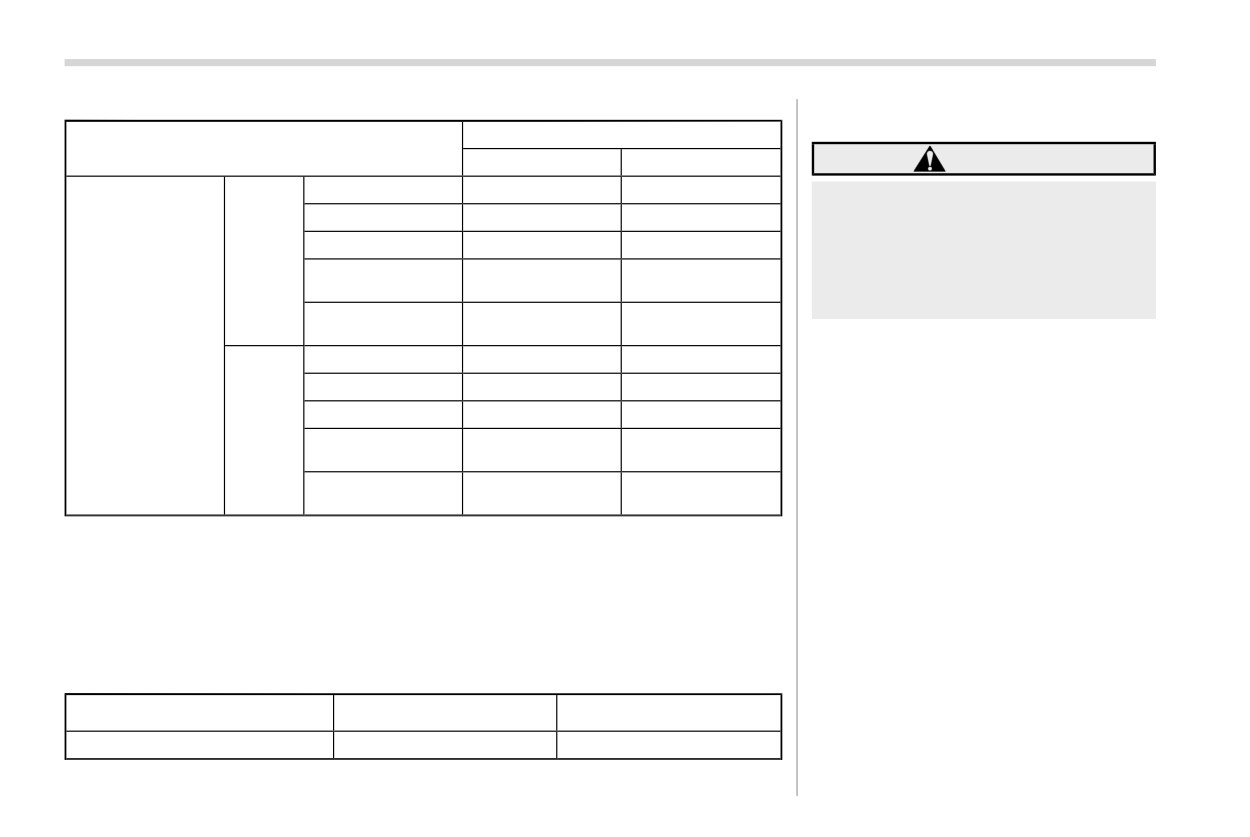
The functions which are available vary depending on the Driver Monitoring System
The inattentive driving warning buz-
setting and the user recognition function setting.
zer may sound if the driver leans
forward or puts his or her head out of
Available functions
the window while driving.
Driver Monitoring System*1
The inattentive driving warning buz-
ON
OFF
zer will not sound when the vehicle
is stopped or travelling at slow
Inattentive/drowsy
Available
Not available
driving warning
speed even if the driver is not
ON
looking ahead.
User recognition
Available
Not available
The Driver Monitoring System col-
User recognition
function
function*2
lects and stores data regarding
Inattentive/drowsy
Available
Not available
driving warning
drivers’ facial features. Facial recog-
OFF
nition data is stored locally and does
User recognition
Not available
Not available
not leave the vehicle. It is not
function
transmitted to or stored by SUBARU
or anyone else. The Driver Monitor-
ing System may be disabled and any
stored driver data may be deleted by
following the instructions below. If
the Driver Monitoring System is
disabled, it will be unable to provide
any of its safety or convenience
functions.
- CONTINUED -
406 Driver Monitoring System
Available function items
& User recognition function
Driver Monitoring System*1
ON
OFF
WARNING
Register User
Available
Not available
Perform registration, retrieving, or
Delete User
Available
Not available
delete of the seat position and out-
Delete All Users
Available
Not available
side mirror angle before beginning
ON
driving. There is the risk of an
Update Seat and
Available
Not available
accident if registration, retrieving,
Mirror Position
or delete is performed while driving.
Delete Driver Posi-
Available
Not available
tion
User recognition
When a user is registered, it is possible to
function*2
Register User
Not available
Not available
retrieve the following settings.
Delete User
Available
Not available
! Driver position personalization
Delete All Users
Available
Not available
. Seat position and outside mirror angle
OFF
Update Seat and
Retrieves the registered seat position and
Not available
Not available
Mirror Position
outside mirror angle.
Delete Driver Posi-
. Reverse tilt angle
Not available
Not available
tion
Retrieves the registered reverse tilt-down
*1: The system can be turned ON/OFF with the center information display. Refer to “Car settings”
outside mirror angle.
FP215.
! Meter personalization
*2: The function can be turned ON/OFF in the center information display customization settings.
Refer to “Car settings” FP215.
. Combination meter display (color LCD)
basic screen
The functions which are available vary depending on whether or not the user is
Displays the screen which the user had
registered.
selected at the time when he/she last
exited the vehicle.
Available functions
! Center information display perso-
The user is registered.
The user is not registered.
nalization
User recognition function
Available
Not available
. Center information display basic
screen

Driver Monitoring System
407
Displays the screen which the user had
! Changing the personalization settings
selected at the time when he/she last
exited the vehicle.
Item
. Fuel consumption screen
Seat position/outside mirror
Change the setting by using the
Displays the average fuel economy for
angle
Driver’s position personaliza-
center information display cus-
past driving by that user.
tion
tomization function. Refer to
Reverse tilt-down outside mir-
“Car settings” FP215.
ror angle
! Climate control personalization
Combination meter display
. Climate control settings
Meter personalization*
(color LCD) basic screen
When the customization screen
Retrieves the preferred setting tempera-
linked with the synchronized
Center information display
Center information display ba-
user function is selected and
ture, airflow mode selection and other
personalization*
sic screen
the setting is changed, it is
settings which the user had selected at
automatically stored.
the time when he/she last exited the
Driver Monitoring System ON/OFF status
vehicle.
*: When the Driver Monitoring System is OFF, the Driver Monitoring System continues to store the
conditions from immediately before the Driver Monitoring System was turned OFF even if the
NOTE
screen was selected and the setting was changed.
When a recognized user exits the
vehicle while the Max A/C mode is on
and the push engine switch is turned
off, the system stores the setting con-
figured before Max A/C mode was
turned on.
! Driver Monitoring System ON/OFF
status
Retrieves the Driver Monitoring System
ON/OFF status which the user had se-
lected at the time when he/she last exited
the vehicle.
- CONTINUED -
408 Driver Monitoring System
& Inattentive/drowsy driving
! Inattentive driving warning
warning
While driving, the Driver Monitoring Sys-
tem monitors possible cases of driver
inattention or drowsiness and warns the
driver.
When the inattentive/drowsy driving warn-
ing activates, the buzzer sounds and an
interrupt display appears.
NOTE
The inattentive/drowsy driving warn-
ing operates regardless of the status
of the user recognition function.
The inattentive driving warning does
When the system monitors that the driver
not activate when the turn signal is
may be inattentive, it warns the driver.
operating or when the select lever is
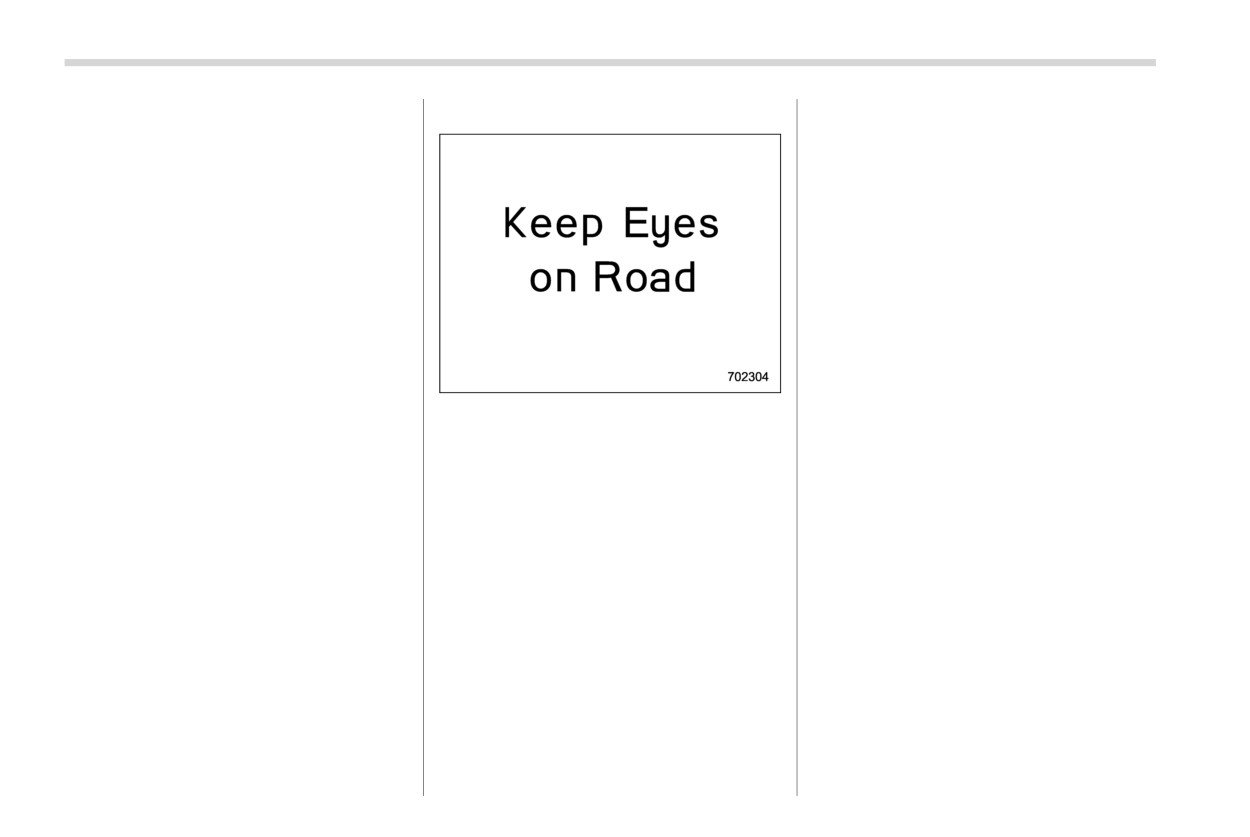
When the inattentive driving warning acti-
in the “R” position.
vates, the buzzer sounds and an interrupt
When the pre-collision brake system
display appears on the combination meter
OFF indicator is illuminated on the
display (color LCD).
combination meter display (color
When the EyeSight system has detected a
LCD), the inattentive driving warning
vehicle ahead or obstacle in the forward
activates at the same timing as usual
direction, the inattentive driving warning
even when a vehicle ahead or ob-
may activate at earlier timing than usual.
stacle is detected. For details about
Refer to the Owner’s Manual supplement
the EyeSight system, refer to the
for the EyeSight system.
Owner’s Manual supplement for the
EyeSight system.
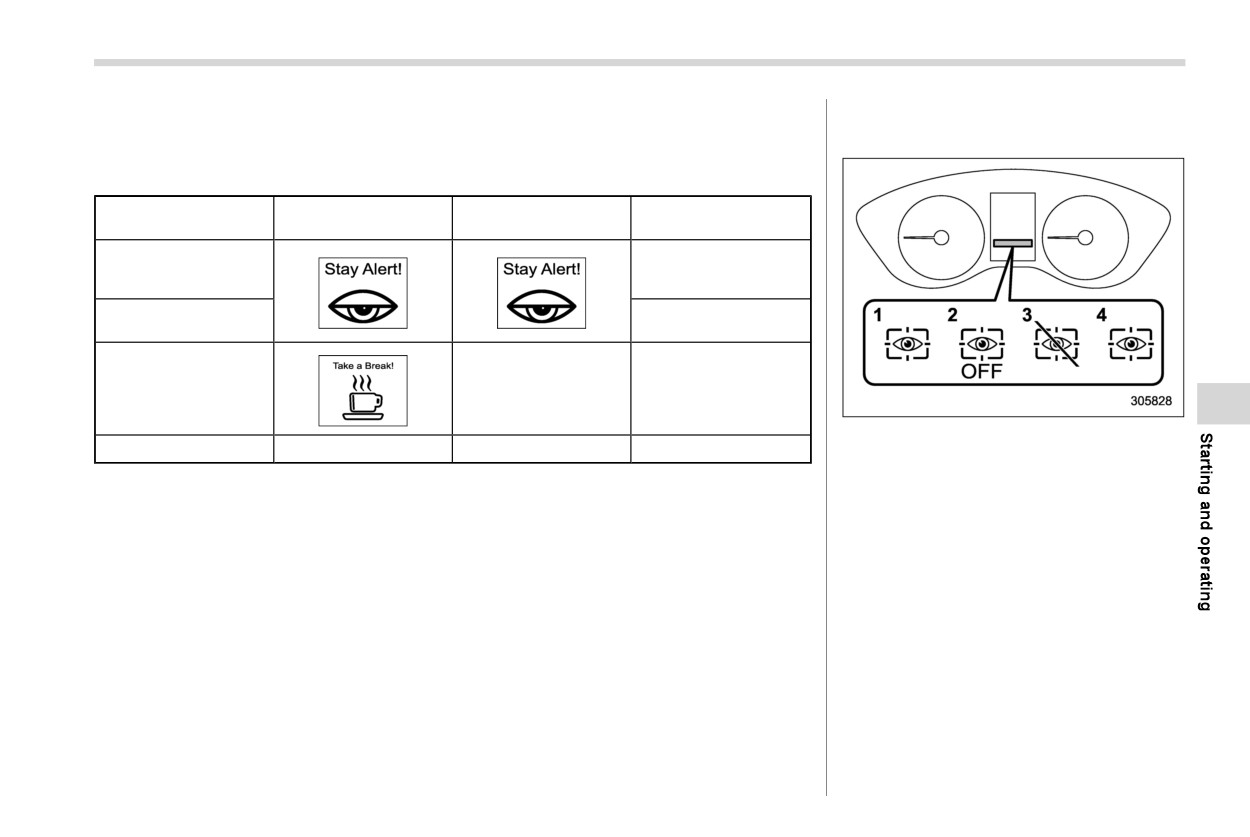
Driver Monitoring System
409
! Drowsy driving warning
& Driver Monitoring System in-
Possible drowsiness is detected from the amount of driver eyelid closure, and a warning
dicator/warning
is given to the driver. When the drowsy driving warning activates, the buzzer sounds and
an interrupt display appears.
Combination meter
Center information
Warning chime
display (color LCD)
display
Beep, beep... (Con-
Drowsy driving
tinues until the driver’s
eyes open.)
Beep, beep, beep,
Very drowsy
beep, beep (5 times)
Slightly drowsy
—
Beep
1
Driver Monitoring System operation in-
Not drowsy
—
—
—
dicator light (green)
2
Driver Monitoring System OFF indicator
light
3
Driver Monitoring System temporary stop
indicator light
4
Driver Monitoring System warning light
(yellow)
The Driver Monitoring System indicator/
warning indicates the status of the Driver
Monitoring System on the combination
meter display (color LCD).
NOTE
When the Driver Monitoring System
OFF indicator, Driver Monitoring Sys-
tem temporary stop indicator, or Driver
Monitoring System warning is illumi-
- CONTINUED -
410 Driver Monitoring System
nated, the Driver Monitoring System
is high or low.
function cannot be used. In addition,
. When the Driver Monitoring System
the following items cannot be selected.
cannot monitor the driver’s eye
. Register User
movement.
. Delete User
. When the Driver Monitoring System
. Delete All Users
cannot monitor the driver’s eye-
. Update Seat and Mirror Position
brows, eyes, nose or mouth.
. Delete Driver Position
. When the camera and the infrared
. Automatically Retract Seat on Entry
light source (LED) are covered and
the Driver Monitoring System can-
! Driver Monitoring System operation
not monitor the driver correctly.
indicator light (green)
! Driver Monitoring System warning
This indicator illuminates when the Driver
light (yellow)
Monitoring System is operating.
1.
When the door is opened
and the
This warning illuminates when there is a
! Driver Monitoring System OFF in-
push-button ignition switch
is OFF,
problem with the Driver Monitoring Sys-
dicator light
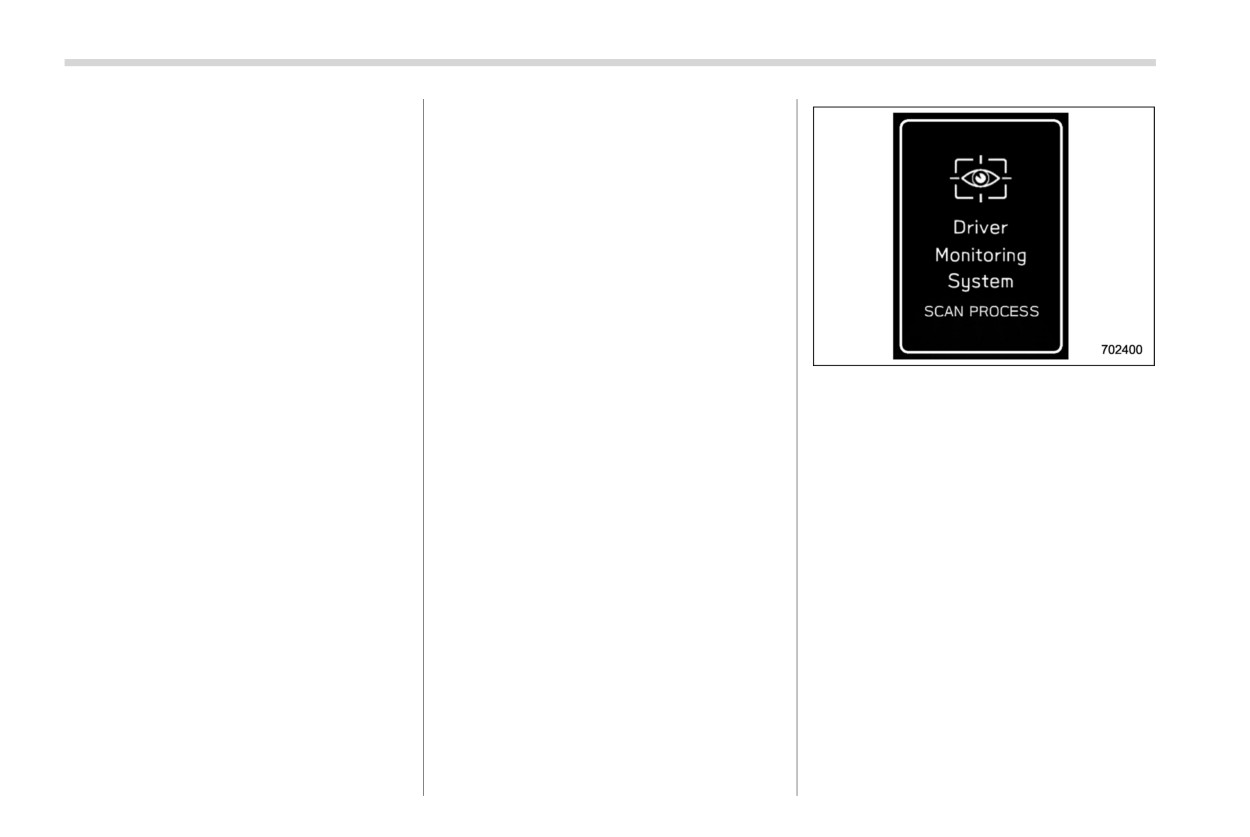
the user recognition screen
appears
tem. Contact a SUBARU dealer to have
and the Driver Monitoring
system
This indicator illuminates when the user
the system inspected.
starts user recognition.
has turned off the Driver Monitoring
The user recognition screen may not
System and the Driver Monitoring System
& Using the Driver Monitoring
appear when the door is opened in
is not operating.
System
some cases, such as when only a short
! Driver Monitoring System tempor-
time has passed after the push-button
! User recognition
ary stop indicator light
ignition switch was turned OFF. In such
This indicator illuminates when the Driver
When a user is registered with the user
cases, user recognition starts when the
Monitoring System is temporarily stopped.
recognition function, the Driver Monitoring
door is closed however the user
System performs the following.
recognition screen does not appear.
NOTE
The Driver Monitoring System stops
temporarily in the following circum-
stances.
. When the temperature of the main
unit of the Driver Monitoring System
Driver Monitoring System
411
When the select lever is not in the
! When a user is not recognized
“P” position, the seat position will
In the following case, user recognition may
not change even when user recogni-
not be possible and
“User recognition
tion is completed.
stopped” may be displayed.
If user recognition fails, perform
. There is an object blocking the camera.
recognition again following the in-
structions, refer to “When a user is
Remove the obstacle and follow the
not recognized” FP41 1.
reference procedure to perform user re-
User recognition is not performed
cognition again. Refer to “Driver Monitor-
while driving.
ing System” FP222.
If the seat position or outside mirror
angle are in motion at the time when
user recognition is completed, then
it is not possible to retrieve the seat
2.
Sit in the driver’s seat and face forward
position, outside mirror angle, or
for a few moments.
reverse tilt-down outside mirror an-
3.
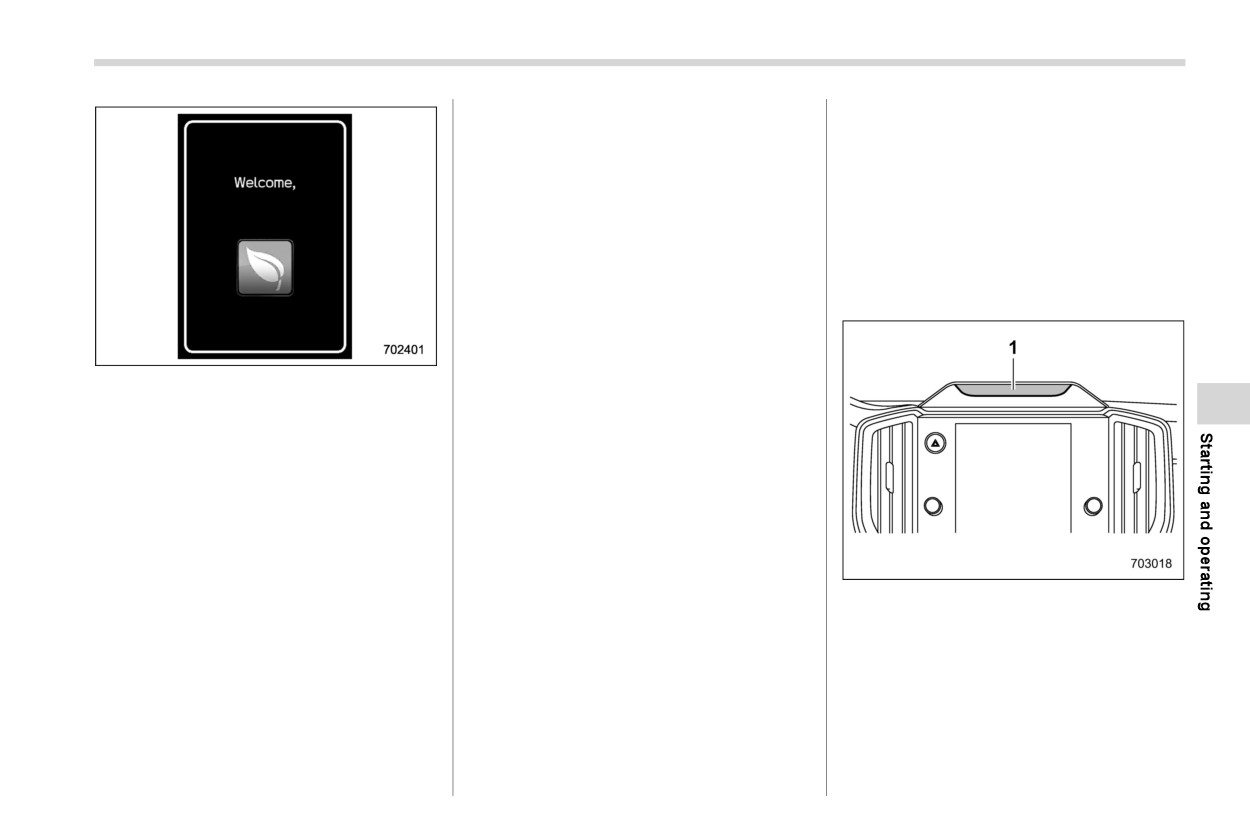
When user recognition is completed,
gle.
the Hello screen appears on the center
If any of the following operations is
information display.
performed while retrieving of the
At
this time, the seat position, outside
seat position or outside mirror an-
mirror angle, climate control settings,
gle, retrieving of the seat position
combination meter display
(color LCD)
and outside mirror angle is can-
basic screen and center information dis-
celed.
play basic screen will all change based on
- The power seat adjustment
1
Camera
the user information.
switch was operated.
- The outside mirror adjustment
NOTE
switch was operated.
NOTE
. User recognition may not be possi-
- The “SET” button was pressed.
. When a center information display
ble when there is dirt or fingerprints
operation switch is pressed, the
- The
“1” or
“2” button was
on the user recognition camera. To
user recognition screen is canceled,
pressed.
clean, either wipe using a soft cloth
however user recognition con-
- The select lever was moved to a
or else wipe gently using a mois-
tinues.
position other than “P” position.
tened cloth that has been thoroughly
- CONTINUED -
412 Driver Monitoring System
wrung out.
& Registering and deleting dri-
warning is illuminated, the following
. When the synchronized user func-
ver position personalization
items cannot be selected.
tion is turned OFF, manual repeat
- Update Seat and Mirror Position
At the time when a user is registered, the
facial scan is not possible.
- Delete Driver Position
seat position, outside mirror angle, and
. The driver position can be registered
reverse tilt-down outside mirror angle are
& Registering and deleting a
or deleted only when a registered
registered at the same time. To change the
user
user is sitting in the driver’s seat and
setting for the seat position, outside mirror
Users can be registered in the Driver
user recognition is completed.
angle, or reverse tilt-down outside mirror
Monitoring System, and registered users
angle, refer to “Driver Monitoring System”
can be deleted. For the user registration
FP222.
& Driver Monitoring System
and delete procedures, refer to “Driver
ON/OFF settings
Monitoring System” FP222.
NOTE
Start the user registration after ad-
NOTE
NOTE
justing the seat position, outside
When the Driver Monitoring System
When the Driver Monitoring System
mirror angles, and reverse tilt-down
is turned OFF after user recognition
OFF indicator, Driver Monitoring
outside mirror angle. If they are
was completed, the user recognition
System temporary stop indicator,
adjusted during user registration, it
function stores the Driver Monitor-
or Driver Monitoring System warn-
may be disrupted. Refer to “Power
ing System ON/OFF state.
ing is illuminated, the following
seat” FP34
or “Outside mirrors”
Even when the Driver Monitoring
items cannot be selected.
FP269.
System is set to OFF, the Driver
- Register User
If the ignition switch is turned to the
Monitoring System automatically
- Delete User
“OFF” position before user registra-
turns ON once the driver’s door is
- Delete All Users
tion is complete, the information of
opened and closed while the vehicle
User information can also be deleted
the adjusted seat position, outside
is stopped. This only occurs when
by resetting the center information
mirror angle, and reverse tilt-down
the user recognition setting is ON.
display to the factory default set-
outside mirror angle will not be
The system then reverts automati-
tings. When the settings are reset to
saved.
cally to the OFF state.
the factory default settings, all user
When the user recognition setting is
After the Driver Monitoring System
information is deleted. The settings
OFF, or when the Driver Monitoring
was turned OFF, if the Driver Mon-
cannot be reset to the factory default
System OFF indicator, Driver Mon-
itoring System is turned ON while
settings when the Driver Monitoring
itoring System temporary stop indi-
the driver’s door is open, user
System is OFF.
cator, or Driver Monitoring System
recognition may not occur correctly.
Driver Monitoring System
413
! To turn on/off the Driver Monitoring
– Repeat Facial Scan
. Automatically retract seat on entry
System
- Register User
cannot be selected when the Driver
- Update Seat and Mirror Position
Monitoring System OFF indicator,
To turn the Driver Monitoring System on
- Delete Driver Position
Driver Monitoring System temporary
and off, operate the center information
stop indicator, or Driver Monitoring
display. Refer to “Car settings” FP215.
! Automatically retract seat on entry
System warning is illuminated.
When the Driver Monitoring System is
. This function will operate if the seat
turned OFF, the Driver Monitoring System
The automatically retract seat on entry
is in front of the center of the seat
OFF indicator on the combination meter
which automatically slides back the dri-
ver’s seat when the driver’s door is
sliding mechanism.
display (color LCD) will illuminate.
unlocked and opened.
NOTE
This function can be turned ON/OFF. For
& How to get the source code
Even when the Driver Monitoring Sys-
the setting procedure, refer to “Car set-
using the Open Source
tem is turned off, the user recognition
tings” FP215.
This product contains Free/Open Source
and automatically retract seat on entry
Software (FOSS).
functions do not switch on or off
CAUTION
The license information and/or the source
automatically.
Sit in the seat after the power seat
code of such FOSS can be found at the
! User recognition settings
movement backward has been com-
following URL.
pleted. Not doing so could result in
The Driver Monitoring System User recog-
injury.
RTOS/License/oss/DMS_0101/
nition function can be turned ON/OFF. For
the setting procedure, refer to “Car set-
tings” FP215.
NOTE
NOTE
. If the seat position is not registered
. The user recognition function
in the access key fob memory, the
setting cannot be changed for each
automatically retract seat on entry
function can be used.
individual user.
. Even when the automatically retract
. The default setting for the user
seat on entry setting is ON, the
recognition function is ON.
automatically retract seat on entry
. When the user recognition function
function automatically turns OFF
is turned OFF, the following items
cannot be selected.
when the user recognition function
is OFF.
Driving tips
Tire chains
425
8-1. New vehicle break-in driving - the first
1,000 miles (1,600 km)
416
Rocking the vehicle
426
8-2. Fuel economy hints
416
8-10. Loading your vehicle
426
Vehicle capacity weight
427
8-3. Engine exhaust gas (carbon monoxide)
416
GVWR and GAWR (Gross Vehicle Weight
8-4. Catalytic converter
417
Rating and Gross Axle Weight Rating)
428
8-5. Periodic inspections
418
Roof rails
428
8-6. Driving in foreign countries
418
Roof tent
429
8-7. Driving tips for AWD models
418
8-11. Trailer hitch (dealer option)
431
8-8. On-road and off-road driving
420
Connecting a trailer
432
Before driving
421
If not towing a trailer
434
During driving
421
8-12. Trailer towing
434
After driving
421
Warranties and maintenance
435
8-9. Winter driving
422
Maximum load limits
435
Operation during cold weather
422
Trailer Hitches
438
Driving on snowy and icy roads
424
When you do not tow a trailer
439
Corrosion protection
425
8
Connecting a trailer
439
Snow tires
425
Trailer towing tips
440
416 New vehicle break-in driving - the first 1,000 miles (1,600 km)
8-1. New vehicle break-in
8-2. Fuel economy hints
8-3. Engine exhaust gas (car-
driving - the first 1,000 miles
bon monoxide)
(1,600 km)
The following suggestions will help to save
fuel.
WARNING
Select the proper gear position for the
The performance and long life of your
speed and road conditions.
vehicle are dependent on how you handle
Never inhale engine exhaust gas.
and care for your vehicle while it is new.
Avoid sudden acceleration or decelera-
Engine exhaust gas contains
Follow these instructions during the first
tion. Always accelerate gently until you
carbon monoxide, a colorless
1,000 miles (1,600 km):
reach the desired speed. Then try to
and odorless gas which is dan-
. Do not race the engine. And do not
maintain that speed for as long as
gerous, or even lethal, if inhaled.
possible.
allow engine speed to exceed 4,000
Always properly maintain the en-
rpm except in an emergency.
Do not pump the accelerator and avoid
gine exhaust system to prevent
racing the engine.
. Do not drive at one constant engine or
engine exhaust gas from entering
vehicle speed, either fast or slow.
Avoid unnecessary engine idling.
the vehicle.
. Avoid starting suddenly and rapid ac-
Keep the engine properly tuned.
Never run the engine in a closed
celeration, except in an emergency.
Keep the tires inflated to the correct
space, such as a garage, except
. Avoid hard braking, except in an emer-
pressure shown on the tire inflation
for the brief time needed to drive
gency.
pressure label, which is located under
the vehicle in or out of it.
the door latch on the driver’s side. Low
Avoid remaining in a parked ve-
The same break-in procedures should be
pressure will increase tire wear and fuel
hicle for a lengthy time while the
applied to an overhauled engine, newly
consumption.
engine is running. If that is un-
mounted engine or when brake pads are
Use the air conditioner only when
avoidable, then use the ventila-
replaced with new ones.
necessary.
tion fan to force fresh air into the
Keep the front and rear wheels in
vehicle.
proper alignment.
Always keep the front ventilator
Avoid carrying unnecessary luggage or
inlet grille free from snow, leaves
cargo.
or other obstructions to ensure
that the ventilation system al-
ways works properly.
417
Catalytic converter
. If at any time you suspect that
backfiring or incomplete combustion),
8-4. Catalytic converter
exhaust fumes are entering the
have your vehicle checked and re-
vehicle, have the problem
paired by an authorized SUBARU deal-
checked and corrected as soon
er.
as possible. If you must drive
. Do not apply undercoating or rust
under these conditions, drive
prevention treatment to the heat shield
only with all windows fully open.
of catalytic converter and the exhaust
. Keep the rear gate closed while
system.
driving to prevent exhaust gas
. Do not drive with an extremely low fuel
from entering the vehicle.
level.
WARNING
NOTE
Avoid fire hazards. Do not drive
Due to the expansion and contraction
or park the vehicle anywhere
of the metals used in the manufacture
near flammable materials (e.g.,
of the exhaust system, you may hear a
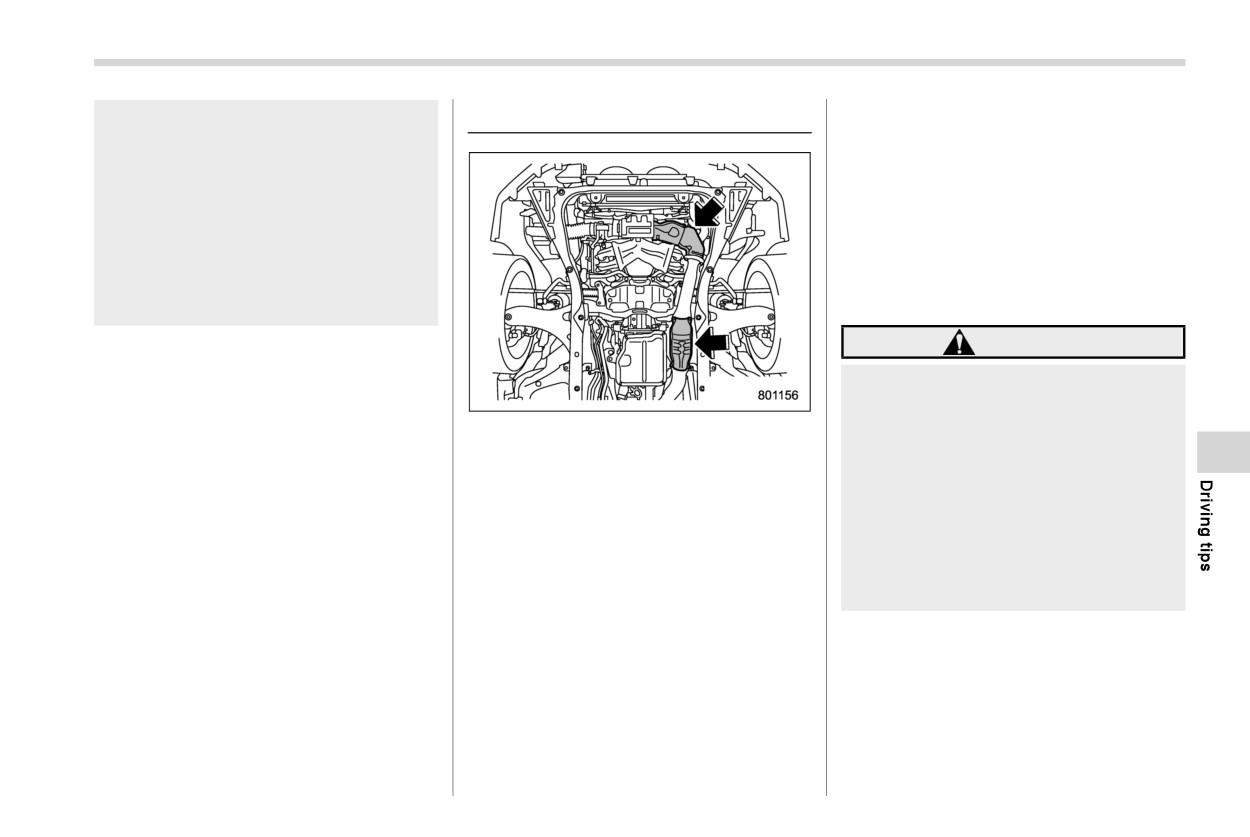
The catalytic converter is installed in the
grass, paper, rags or leaves),
crackling sound coming from the ex-
exhaust system. It serves as a catalyst to
because the catalytic converter
haust system for a short time after the
reduce HC, CO and NOx in exhaust gases,
operates at very high tempera-
engine has been shut off. This sound is
thus providing cleaner exhaust.
tures.
normal.
To avoid damage to the catalytic converter:
Keep everyone and flammable
. Use only unleaded fuel. Even a small
materials away from the exhaust
amount of leaded fuel will damage the
pipe while the engine is running.
catalytic converter.
The exhaust gas is very hot.
. Never start the engine by pushing or
pulling the vehicle.
. Avoid racing the engine.
. Never turn the ignition switch to the
“OFF” position while the vehicle is
moving.
. Keep your engine tuned-up. If you feel
the engine running rough
(misfiring,
418 Periodic inspections
8-5. Periodic inspections
8-6. Driving in foreign coun-
8-7. Driving tips for AWD
tries
models
To keep your vehicle in the best condition
at all times, always have the recom-
When planning to use your vehicle in
WARNING
mended maintenance services listed in
another country:
the maintenance schedule in the “War-
Confirm the availability of the correct
Always maintain a safe driving
ranty and Maintenance Booklet” per-
fuel. Refer to
“Fuel requirements”
speed according to the road and
formed at the specified
time
or
mileage
FP337.
weather conditions in order to
intervals.
Comply with all regulations and require-
avoid having an accident on a
ments of each country.
sharp turn, during sudden brak-
ing or under other similar condi-
tions.
Always use the utmost care in
driving
- overconfidence be-
cause you are driving an All-
Wheel Drive vehicle could easily
lead to a serious accident.
When replacing or installing
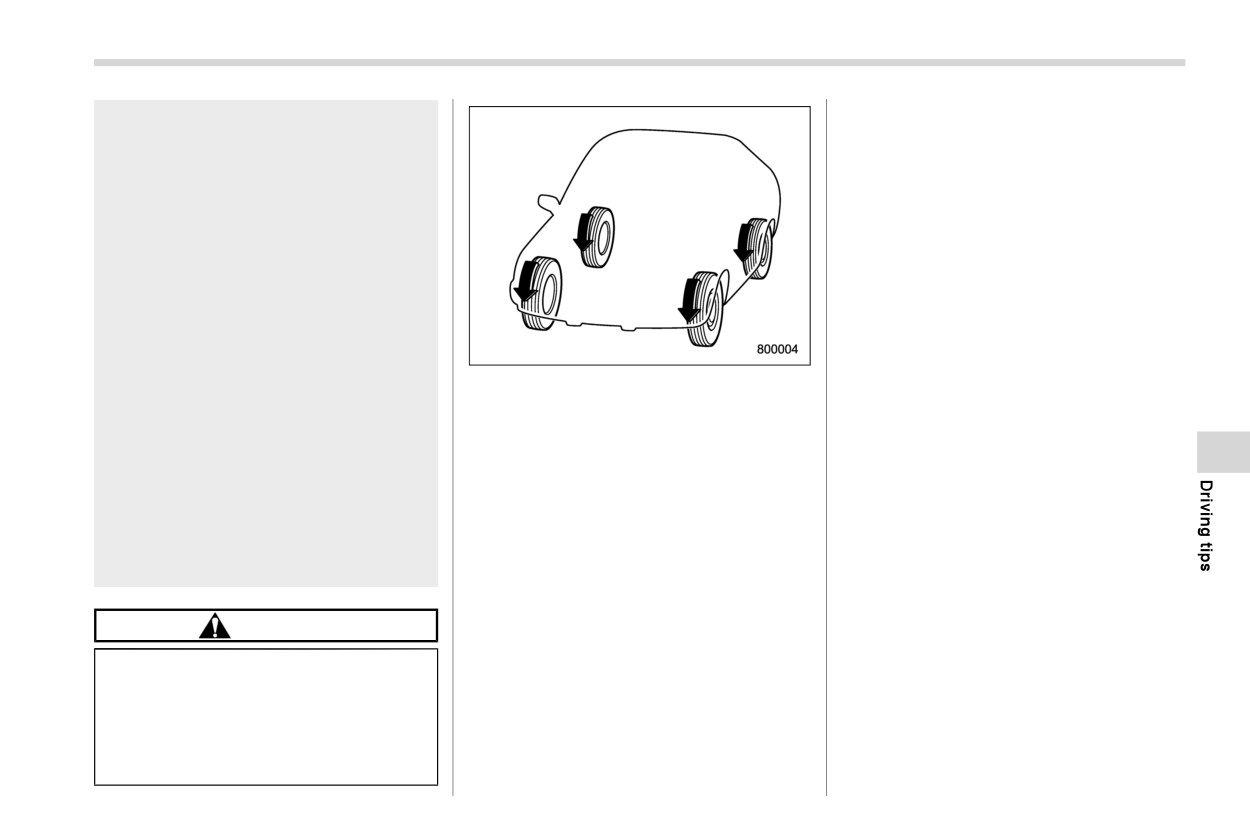
tire(s), all four tires must be the
same for following items.
(a) Size
(b) Speed symbol
(c) Load index
(d) Circumference
(e) Construction
(f) Manufacturer
(g) Brand (tread pattern)
(h) Degrees of wear
Driving tips for AWD models
419
For the items (a) to (c), you must
An AWD model is better able to climb
obey the specification that is
steeper roads under snowy or slippery
printed on the tire inflation pres-
conditions than a two wheel drive
sure label. The tire inflation pres-
vehicle. There is little difference in
sure label is located on the dri-
handling, however, during extremely
ver’s door pillar.
sharp turns or sudden braking. There-
fore, when driving down a slope or
If all the four tires are not the
turning corners, be sure to reduce your
same for items (a) to (h), serious
speed and maintain an ample distance
mechanical damage could be
from other vehicles.
caused to the drivetrain of the
Always check the cold tire pressure
car, and affect the followings.
before starting to drive. The recom-
- Ride
mended tire pressure is provided on the
- Handling
All-Wheel Drive distributes the engine
tire inflation pressure label, which is
- Braking
power to all four wheels. AWD models
located under the door latch on the
provide better traction when driving on
driver’s side.
- Speedometer/Odometer cali-
slippery, wet or snow-covered roads and
Frequent driving of an AWD vehicle
bration
when moving out of mud, dirt and sand. By
under hard-driving conditions such as
- Clearance between the body
shifting power between the front and rear
steep hills or dusty roads will necessi-
and tires
wheels, SUBARU AWD can also provide
tate more frequent replacement of the
It also may be dangerous and
added traction during acceleration and
following items than that specified in the
lead to loss of vehicle control,
added engine braking force during decel-
“Warranty and Maintenance Booklet”.
and it can lead to an accident.
eration.
- Engine oil
Therefore, your SUBARU AWD vehicle
- Brake fluid
may handle differently than an ordinary
- Rear differential gear oil
CAUTION
two wheel drive vehicle and it contains
- Continuously variable transmission
If
you use a temporary spare tire to
some features unique to AWD. For safety
fluid
replace a flat tire, be sure to use the
purposes as well as to avoid damaging the
- Front differential gear oil
original temporary spare tire stored
AWD system, you should keep the follow-
There are some precautions that you
in the vehicle. Using other sizes may
ing tips in mind.
must observe when towing your vehi-
result in severe mechanical damage
cle. For detailed information, refer to
to the drivetrain of your vehicle.
“Towing” FP460.
420 On-road and off-road driving
8-8. On-road and off-road
ious injury.
items than that specified in the
maintenance schedule described
driving
Whenever strong crosswinds are
in the
“Warranty and Mainte-
present, slow down sufficiently
nance Booklet”.
to maintain control of your vehi-
WARNING
cle. Remember that your vehicle,
- Engine oil
with its higher profile and center
- Brake fluid
Always maintain a safe driving
of gravity, is more likely to be
speed according to the road and
Remember that damage done to
affected by crosswinds than or-
weather conditions in order to
your SUBARU while operating it
dinary passenger cars.
avoid having an accident on a
off-road and not using common
sharp turn, during sudden brak-
Never attempt to drive through
sense precautions such as those
pools and puddles, or roads
ing or under other similar condi-
listed here is not eligible for
flooded with water. Water enter-
tions.
warranty coverage.
ing the engine air intake or the
Always use the utmost care in
After driving on gravel roads or
exhaust pipe or water splashing
driving
- overconfidence be-
rough roads, check the under-
onto electrical parts may damage
cause you are driving an All-
carriage of the vehicle body for
your vehicle and may cause it to
Wheel Drive model could easily
any damage, deformation, or
stall. In this case, contact your
lead to a serious accident.
paint removal. If you notice any
SUBARU dealer immediately. Re-
irregularities, contact a SUBARU
In a rollover crash, an unbelted
gardless of its depth, it can wash
dealer for an inspection as soon
person is significantly more
away the ground from under your
as possible.
likely to die than a person wear-
tires, resulting in possible loss of
ing a seatbelt. The driver and all
traction and even vehicle roll-
Your vehicle is classified as a utility
passengers should fasten their
over.
vehicle. Utility vehicles feature a higher
seatbelts before starting to drive
ground clearance which enables them to
in order to minimize the chance
be used for wide applications including off-
of serious injury or death.
CAUTION
road driving. However, please keep in
Do not make sharp turns or quick
Frequent driving of an AWD mod-
mind that your vehicle is neither a conven-
maneuvers unless absolutely un-
el under hard-driving conditions
tional off-road vehicle nor an all-terrain
avoidable. Such actions are dan-
such as rough roads or off roads
vehicle. A higher center of gravity in
gerous, as you may lose control,
will necessitate more frequent
relation to the tread width as compared
possibly resulting in a rollover
replacement of the following
with ordinary passenger cars makes ve-
which could cause death or ser-
On-road and off-road driving
421
hicles of this type more likely to roll over. In
. Never equip your vehicle with tires
easily. The exhaust system is very hot
reality, utility vehicles have a significantly
larger than those specified in this
while the engine is running and right
higher rollover rate than other types of
manual.
after the engine stops. This could
vehicles. The high ground clearance of this
create a fire hazard.
vehicle is a real advantage, giving you a
& During driving
Precautions when driving under espe-
better view of the road and allowing you to
General precautions:
cially dangerous situations:
anticipate problems earlier. However, re-
Drive carefully. Do not take unneces-
. If you must rock the vehicle to free it
member that your utility vehicle is not
sary risks by driving in dangerous areas
from sand or mud, depress the accel-
designed for high-speed cornering com-
or over rough terrain.
erator pedal slightly and move the
parable to ordinary passenger cars and
Slow down and employ extra caution at
select lever back and forth between
that your vehicle could roll over if you make
all times. When driving off-road, you will
“D” and “R” repeatedly. Do not race the
a sharp turn at a high speed.
not have the benefit of marked traffic
engine. For the best possible traction,
If you take your SUBARU off-road, certain
lanes, banked curves, traffic signs and
avoid spinning the wheels when trying
common sense precautions such as those
the like.
to free the vehicle.
in the following list should be taken.
Do not drive across steep slopes.
. When the road surface is extremely
Instead, drive either straight up or
slippery, you can obtain better traction
& Before driving
straight down the slopes. A vehicle
by starting the vehicle with the trans-
. Make certain that you and all of your
can much more easily tip over sideways
mission in
2nd than
1st. Refer to
passengers are wearing seatbelts.
than it can end over end. Avoid driving
“Selection of manual mode” FP359.
. Carry some emergency equipment,
straight up or down slopes that are too
such as a towing rope or chain, a
steep.
& After driving
shovel, wheel blocks, first aid kit and
Avoid sharp turning maneuvers, espe-
. Always check your brakes for effective-
cell phone or citizens band radio.
cially at higher speeds.
ness immediately after driving in sand,
. Secure all cargo carried inside the
Do not grip the inside or spokes of the
mud or water. Do this by driving slowly
vehicle and make certain that it is not
steering wheel. A bad bump could jerk
and stepping on the brake pedal.
piled higher than the seatbacks. During
the wheel and injure your hands.
Repeat that process several times to
sudden stops or jolts, unsecured cargo
Instead, drive with your fingers and
dry out the brake discs and brake pads.
could be thrown around in the vehicle
thumbs on the outside of the rim.
. After driving through tall grass, mud,
and cause injury. Do not pile heavy
Do not drive or park over or near
rocks, sand, rivers, etc., check that
loads on the roof. Those loads raise the
flammable materials such as dry grass
there is no grass, bush, paper, rags,
vehicle’s center of gravity and make it
or fallen leaves, as they may burn
stones, sand, etc. adhering to or
more prone to tip over.
- CONTINUED -
422 Winter driving
trapped on the underbody. Clear off any
the vehicle.
8-9. Winter driving
such matter from the underbody. If the
If you fill the reservoir tank with a fluid with
vehicle is used with these materials
& Operation during cold weath-
a different concentration from the one
trapped or adhering to the underbody, a
er
used previously, purge the old fluid from
mechanical breakdown or fire could
the piping between the reservoir tank and
occur.
! Maintenance
washer nozzles by operating the washer
Wash the vehicle’s underbody after off-
Carry some emergency equipment, such
for a certain period of time. Otherwise, if
road driving. Suspension components
as a window scraper, a bag of sand, flares,
the concentration of the fluid remaining in
are particularly prone to dirt buildup, so
a small shovel and jumper cables.
the piping is too low for the outside
they need to be washed thoroughly.
Check the battery and cables. Cold tem-
temperature, it may freeze and block the
peratures reduce battery capacity. The
nozzles.
battery must be in good condition to
CAUTION
provide enough power for cold winter
starts.
Adjust the washer fluid concen-
It normally takes longer to start the engine
tration appropriately for the out-
in very cold weather conditions. Use an
side temperature. If the concen-
engine oil of a proper grade and viscosity
tration is inappropriate, sprayed
for cold weather. Using heavy summer oil
washer fluid may freeze on the
will make it harder to start the engine.
windshield and obstruct your
view, and the fluid may freeze in
Keep the door locks from freezing by
the reservoir tank.
squirting them with deicer or glycerin.
State or local regulations on
Forcing a frozen door open may damage
volatile organic compounds may
or separate the rubber weather strips
restrict the use of methanol, a
around the door. If the door is frozen, use
common windshield washer anti-
hot water to melt the ice, and afterwards
freeze additive. Washer fluids
thoroughly wipe the water away.
containing non-methanol anti-
Use a windshield washer fluid that con-
freeze agents should be used
tains an antifreeze solution. Do not use
only if they provide cold weather
engine antifreeze or other substitutes
protection without damaging
because they may damage the paint of
your vehicle’s paint, wiper blades
Winter driving
423
or washer system.
! Refueling in cold weather
CAUTION
To help prevent moisture from forming in
Do not use the parking brake
! Before driving your vehicle
the fuel system and the risk of its freezing,
when parking for long periods in
use of an antifreeze additive in the fuel
Before entering the vehicle, remove any
cold weather since it could freeze
tank is recommended during cold weather.
snow or ice from your shoes because that
in that position.
could make the pedals slippery and driving
Use only additives that are specifically
dangerous.
When the vehicle is parked in
designed for this purpose. When an anti-
snow or when it snows, raise the
freeze additive is used, its effect lasts
While warming up the vehicle before
wiper blades off the glass to
longer if the tank is refilled whenever the
driving, check that the accelerator pedal,
prevent damage to them.
fuel level reaches half empty.
brake pedal, and all other controls operate
When the vehicle has been left
smoothly.
If your SUBARU is not going to be used for
parked after use on roads heavily
an extended period, it is best to have the
Clear away ice and snow that has accu-
covered with snow, or has been
fuel tank filled to capacity.
mulated under the fenders to avoid making
left parked during a snowstorm,
steering difficult. During severe winter
icing may develop on the brake
! Opening rear gate (models with
system, which could cause poor
power rear gate)
driving, stop when and where it is safe to
do so and check under the fenders
braking action. Check for snow or
periodically.
ice buildup on the suspension,
CAUTION
disc brakes and brake hoses
! Parking in cold weather
Before operating the power rear
underneath the vehicle. If there
gate, check that there is no frost or
is caked snow or ice, remove it,
WARNING
snow between the power rear gate
being careful not to damage the
disc brakes, brake hoses or ABS
and the vehicle body. If you notice
Snow can trap dangerous exhaust
frost or snow on the power rear gate,
harness.
gases under your vehicle. Keep
remove it. If you forcibly operate the
snow clear of the exhaust pipe and
power rear gate with frost or snow, it
When parking for long periods in cold
from around your vehicle if you park
may cause a malfunction.
weather, you should observe the following
the vehicle in snow with the engine
tips.
running.
1. Place the select lever in the
“P”
position.
2. Use tire stops under the tires to prevent
the vehicle from moving.
- CONTINUED -
424 Winter driving
& Driving on snowy and icy
When driving in snow, if frozen snow starts
CAUTION
roads
to stick on the surface of the windshield
Avoid prolonged continuous driving
despite wiper operation, use the defroster
To prevent skidding and slipping, avoid
in snowstorms. Snow will enter the
with the airflow selection in “
” and the
sudden braking, abrupt acceleration, high-
engine’s intake system and may
temperature set for maximum warmth.
speed driving, and sharp turning when
hinder the airflow, which could re-
After the windshield gets warmed enough
driving on snowy or icy roads.
sult in engine shutdown or even
to melt the frozen snow on it, wash it away
Always maintain ample distance between
breakdown.
using the windshield washer. Refer to
your vehicle and the vehicle ahead of you
“Windshield washer” FP245.
to avoid the need for sudden braking.
! Wiper operation when snowing
Snow stuck on the wiper arm prevents the
To supplement the foot brake, use the
engine brake effectively to control the
Before driving in cold weather, make sure
wiper from working effectively. If snow is
vehicle speed. (Shift into a lower gear
the wiper blade rubbers are not frozen to
stuck on the wiper arm, pull off the road to
when necessary.)
the windshield or rear window.
a safe place, then remove it. If you stop the
vehicle at road side, use the hazard
Avoid shifting down abruptly. Such beha-
If the wiper blade rubbers are frozen to the
warning flasher to alert other drivers. Refer
vior can cause the wheels to lock, possibly
windshield or rear window, perform the
to “Hazard warning flasher” FP168.
leading to loss of vehicle control.
following procedure.
We recommend use of non-freezing type
An anti-lock brake system
(ABS) en-
. To thaw the windshield wiper blade
wiper blades (winter blades) during the
hances your vehicle’s braking perfor-
rubbers, use the defroster with the
seasons you could have snow and freez-
mance on snowy and icy roads. For
airflow selection in “
” and the tem-
ing temperatures. Blades of this type give
information on braking on slippery sur-
perature set for maximum warmth until
superior wiping performance in snowy
faces, refer to
“ABS (Anti-lock Brake
the wiper blade rubbers are completely
conditions. Be sure to use blades that are
System)” FP365
and “Vehicle Dynamics
thawed. Refer to
“Climate control”
suitable for your vehicle.
Control system” FP367.
FP277.
. If your vehicle is equipped with a wiper
CAUTION
WARNING
deicer, use it. It is helpful to thaw the
windshield wiper blade rubbers. Refer
During high-speed driving, non-
Do not use the cruise control on
to “Defogger and deicer” FP273.
freezing type wiper blades may not
slippery roads such as snowy or icy
. To thaw the rear wiper blade rubbers,
perform as well as standard wiper
roads. This may cause loss of vehi-
use the rear window defogger. Refer to
blades. If this happens, reduce the
cle control.
“Defogger and deicer” FP273.
vehicle speed.
Winter driving
425
NOTE
If all the four tires are not the
your vehicle, be sure to use the correct tire
same for items (a) to (h), serious
size and type. You must install four winter
When the season requiring non-freez-
mechanical damage could be
tires that are of the same size, construc-
ing type wiper blades is over, replace
caused to the drivetrain of the
tion, brand and load range and you should
them with standard wiper blades.
car, and affect the followings.
never mix radial, belted bias or bias tires
since this may result in dangerous hand-
- Ride
& Corrosion protection
ling characteristics. When you choose a
- Handling
Refer to “Corrosion protection” FP474.
tire, make sure that there is enough
- Braking
clearance between the tire and vehicle
& Snow tires
- Speedometer/Odometer cali-
body.
bration
Remember to drive with care at all times
WARNING
- Clearance between the body
regardless of the type of tires on your
and tires
vehicle.
When replacing or installing win-
It also may be dangerous and
ter tire(s), all four tires must be
lead to loss of vehicle control,
& Tire chains
the same for following items.
and it can lead to an accident.
(a) Size
CAUTION
Do not use a combination of
(b) Speed symbol
radial, belted bias or bias tires
Tire chains cannot be used on your
(c) Load index
since it may cause dangerous
vehicle because of the lack of clear-
handling characteristics and lead
(d) Circumference
ance between the tires and vehicle
to an accident.
(e) Construction
body.
(f) Manufacturer
Your vehicle is equipped with “all season
(g) Brand (tread pattern)
tires” as original equipment, which are
NOTE
designed to provide an adequate measure
(h) Degrees of wear
When tire chains cannot be used, use of
of traction, handling and braking perfor-
For the items (a) to (c), you must
another type of traction device (such as
mance in year-round driving. In winter, it
obey the specification that is
spring chains) may be acceptable if use
may be possible to enhance performance
printed on the tire inflation pres-
on your vehicle is recommended by the
through use of tires designed specifically
device manufacturer, taking into ac-
sure label. The tire inflation pres-
for winter driving conditions.
count tire size and road conditions.
sure label is located on the dri-
When you choose to install winter tires on
Follow the device manufacturer’s in-
ver’s door pillar.
- CONTINUED -
426 Loading your vehicle
structions, especially regarding max-
For information about holding the trans-
8-10. Loading your vehicle
imum vehicle speed.
mission in the
2nd position, refer
to
To help avoid damage to your vehicle,
“Selection of manual mode” FP359.
drive slowly, readjust or remove the
WARNING
device if it is contacting your vehicle,
Never allow passengers to ride
and do not spin your wheels. Damage
on a folded rear seatback in the
caused to your vehicle by use of a
cargo area. Doing so may result
traction device is not covered under
in serious injury.
warranty.
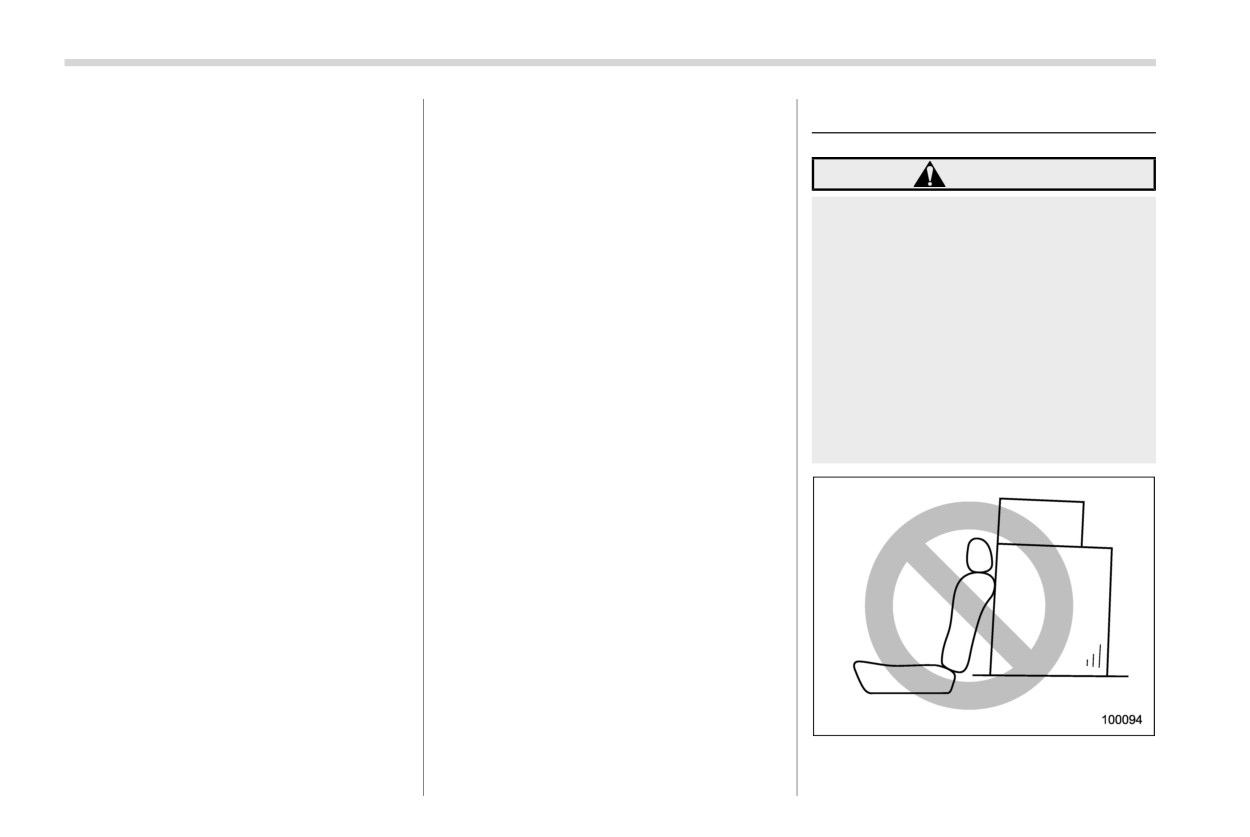
Never stack luggage or other
Make certain that any traction device
cargo higher than the top of the
you use is an SAE class S device, and
seatback because it could tumble
use it on the front wheels only. Always
forward and injure passengers in
use the utmost care when driving with a
the event of a sudden stop or
traction device. Overconfidence be-
accident. Keep luggage or cargo
cause you are using a traction device
low, as close to the floor as
could easily lead to a serious accident.
possible.
& Rocking the vehicle
If you must rock the vehicle to free it from
snow, sand, or mud, depress the accel-
erator pedal slightly and move the select
lever back and forth between “D” and “R”
repeatedly. Do not race the engine. For the
best possible traction, avoid spinning the
wheels when trying to free the vehicle.
When the road surface is extremely
slippery, you can obtain better traction by
starting the vehicle with the transmission in
2nd than 1st.
Loading your vehicle
427
WARNING
CAUTION
Do not carry spray cans, containers
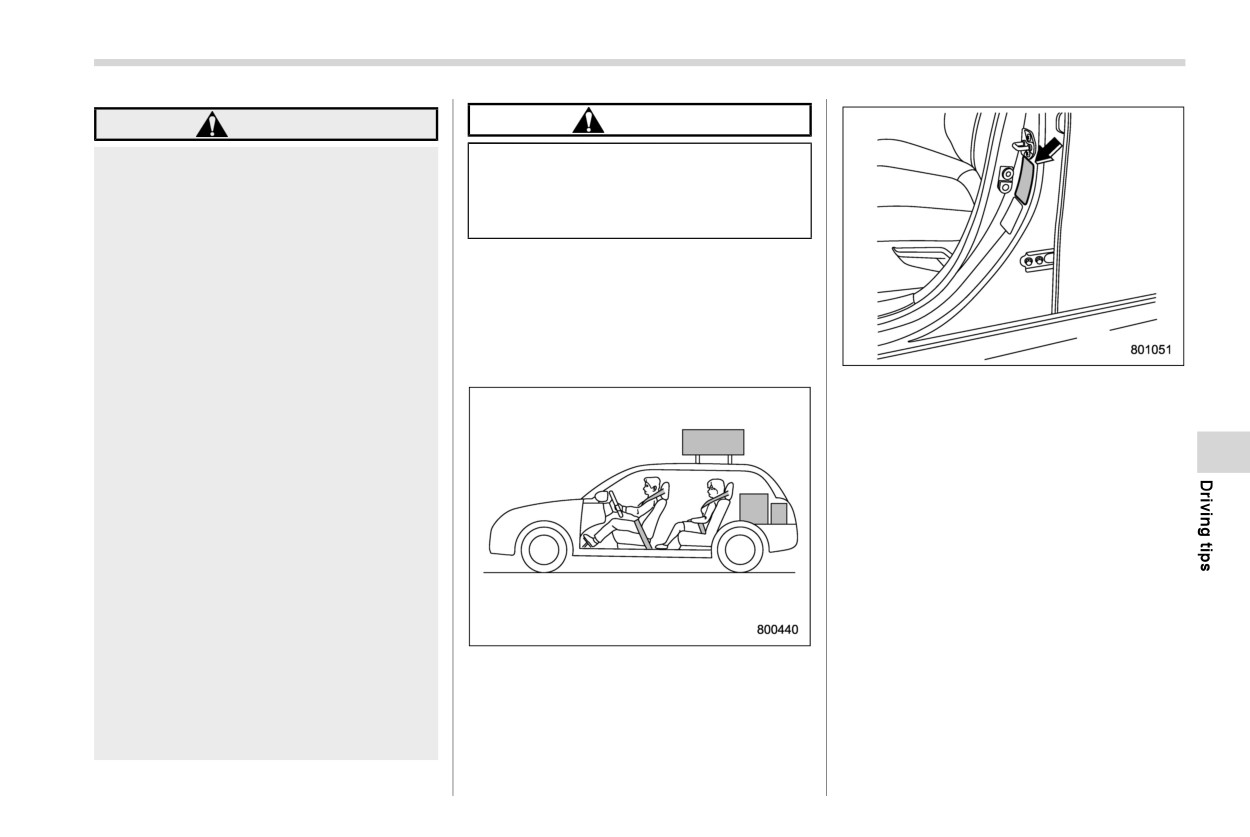
When you carry something inside
the vehicle, secure it whenever
with flammable or corrosive liquids
you can to prevent it from being
or any other dangerous items inside
thrown around inside the vehicle
the vehicle.
during sudden stops, sharp turns
or in an accident.
NOTE
Do not pile heavy loads on the
For better fuel economy, do not carry
roof. These loads raise the vehi-
unneeded cargo.
cle’s center of gravity and make it
more prone to tip over.
& Vehicle capacity weight
Secure lengthy items properly to
Vehicle placard
prevent them from shooting for-
The load capacity of your vehicle is
ward and causing serious injury
determined by weight, not by available
during a sudden stop.
cargo space. The maximum load you can
Never exceed the maximum load
carry in your vehicle is shown on the
limit. If you do, some parts on
vehicle placard attached to the driver’s
your vehicle can break, or it can
side door pillar. It includes the total weight
change the way your vehicle
of the driver and all passengers and their
handles. This could result in loss
belongings, any optional equipment such
of control and cause personal
as a trailer hitch, roof rack or bike carrier,
injury. Also, overloading can
etc., and the tongue load of a trailer.
shorten the life of your vehicle.
Do not place anything on the
extended cargo area cover. Such
items could tumble forward in the
event of a sudden stop or a
collision. This could cause ser-
ious injury.
- CONTINUED -
428 Loading your vehicle
& GVWR and GAWR (Gross Ve-
assembly) plus the vehicle capacity
& Roof rails
hicle Weight Rating and
weight.
Gross Axle Weight Rating)
In addition, the total weight applied to each
axle
(GAW) must never exceed the
GAWR. The front and rear GAWs can be
adjusted by relocating luggage inside the
vehicle.
Even if the total weight of your luggage is
lower than the vehicle capacity weight,
either front or rear GAW may exceed the
GAWR, depending on the distribution of
the luggage.
When possible, the load should be evenly
distributed throughout the vehicle.
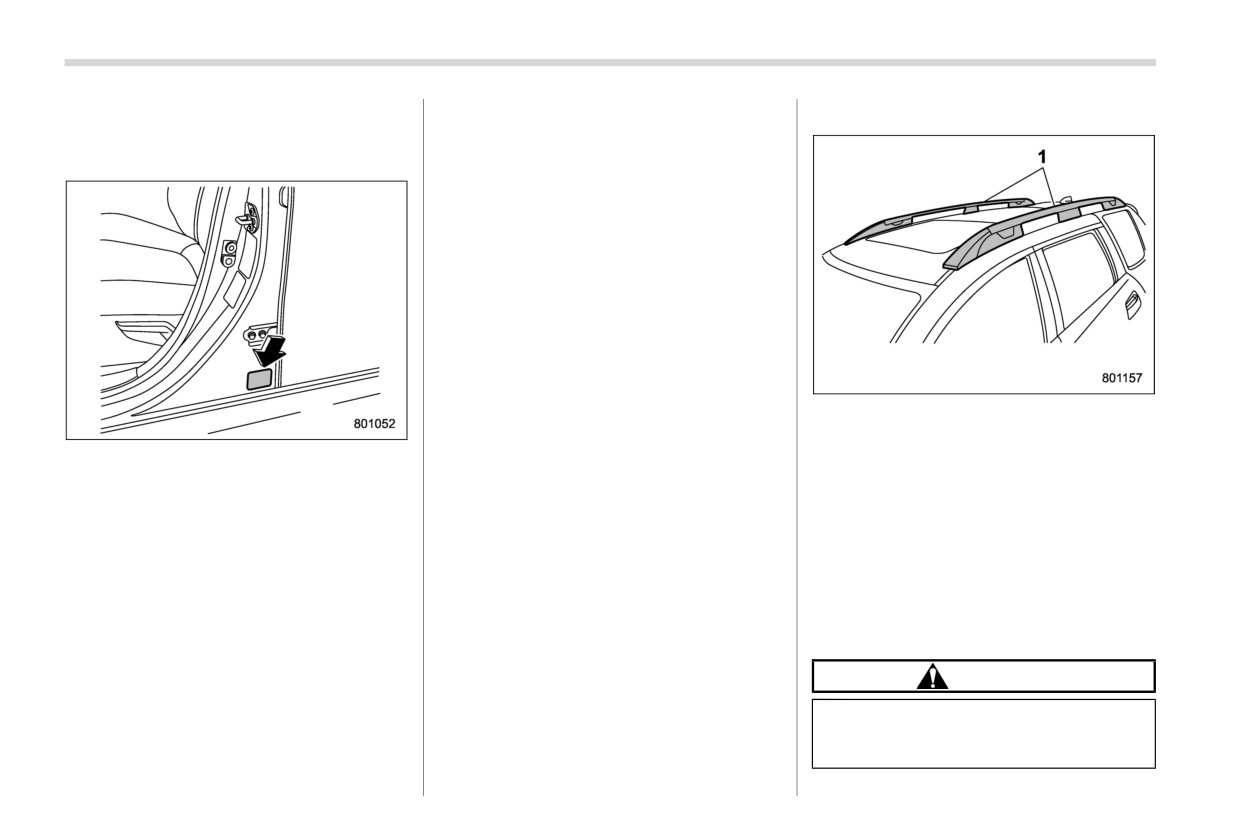
1
Roof rails
If you carry heavy loads in the vehicle, you
Cargo can be carried
on the
roof
after
Certification label
should confirm that GVW and front and
securing the roof crossbars to the roof rails
rear GAWs are within the GVWR and
and installing the appropriate carrying
The certification label
attached
to the
GAWR by putting your vehicle on a vehicle
attachments. When installing the roof
bottom of driver’s side door pillar shows
scale, found at a commercial weighing
crossbars and the carrying attachments,
GVWR (Gross Vehicle Weight Rating) and
station.
follow the manufacturer’s instructions. The
GAWR (Gross Axle Weight Rating).
roof rail system is designed to carry loads
Do not use replacement tires with a lower
The GVW (Gross Vehicle Weight) must
(cargo, roof crossbars and carrying attach-
load range than the originals because they
never exceed the GVWR. GVW is the
ments) of no more than 176 lbs (80 kg). Be
may lower the GVWR and GAWR limita-
combined total of weight of the vehicle,
sure not to exceed your vehicle’s GVWR
tions. Replacement tires with a higher load
fuel, driver, all passengers, luggage, any
and GAWR.
range than the originals do not increase
optional equipment and trailer tongue
the GVWR and GAWR limitations.
load. Therefore, the GVW changes de-
CAUTION
pending on the situation. The GVWR
equals Curb Weight (actual weight of your
. When using the carrying attach-
vehicle - including standard equipment,
ments, make sure that the total
fluids, emergency tools and spare tire
carrying load of the cargo, roof