Subaru Ascent (2023 year). Manual in english - page 7
184 Warning and indicator lights
& Power steering warning
. The steering wheel remains in the
inoperative, the Vehicle Dynamics
fully turned position for a long
Control system becomes unable to
light
period of time.
provide ABS control. As a result, the
While the engine is running, this warning
Vehicle Dynamics Control system
light illuminates when a malfunction has
At this time, there will be more resis-
also becomes inoperative, causing
been detected in the electric power steer-
tance when steering. However this is
the warning light to illuminate.
ing system.
not a malfunction. Normal steering
Although both the Vehicle Dynamics
force will be restored after the steering
Control system and ABS are inop-
CAUTION
wheel is not operated for a while and
erative in this case, the ordinary
the power steering control system has
functions of the brake system are
When the power steering warning
an opportunity to cool down. However,
still available. You will be safe while
light is illuminated, there may be
if the power steering is operated in a
driving with this condition, but drive
more resistance when the steering
non-standard way which causes power
carefully and have your vehicle
wheel is operated. Drive carefully to
assist limitation to occur too frequently,
checked at a SUBARU dealer as
the nearest SUBARU dealer and
that may result in a malfunction of the
soon as possible.
have the vehicle inspected immedi-
power steering control system.
ately.
& Vehicle Dynamics Con-
NOTE
NOTE
trol warning light/Vehi-
. If the electrical circuit of the Vehicle
Dynamics Control system itself mal-
If the steering wheel is operated in the
cle Dynamics Control
functions, the warning light only
following ways, the power steering
operation indicator
illuminates. At this time, the ABS
control system may temporarily limit
light
(Anti-lock Brake System) remains
the power assist in order to prevent the
fully operational.
system components, such as the con-
! Vehicle Dynamics Control warning
. The warning light illuminates when
trol computer and drive motor, from
light
the electronic control system of the
overheating.
ABS/Vehicle Dynamics Control sys-
. The steering wheel is operated fre-
CAUTION
tem malfunctions.
quently and turned sharply while the
The Vehicle Dynamics Control sys-
. The Vehicle Dynamics Control warn-
vehicle is maneuvered at extremely
tem provides its ABS control
ing light, ABS warning light, and
low speeds, such as while frequently
through the electrical circuit of the
brake system warning light illumi-
turning the steering wheel during
ABS. Accordingly, if the ABS is
nate simultaneously if the EBD sys-
parallel parking.
tem malfunctions. For further details
Warning and indicator lights
185
of the EBD system malfunction
. The warning light illuminates during
. The light does not turn off even after the
warning, refer to “Electronic Brake
driving, but it turns off immediately
lapse of several minutes (the engine
Force Distribution
(EBD) system
and remains off.
has warmed up) after the engine has
warning” FP181.
. The warning light illuminates when
started.
the engine has stalled and continues
The Vehicle Dynamics Control system is
to illuminate after the engine has
& Vehicle Dynamics Con-
probably inoperative under any of the
been restarted. However, it will turn
trol OFF indicator light
following conditions. Have your vehicle
off once the vehicle starts moving.
checked at a SUBARU dealer immedi-
The light illuminates when “Vehicle Dy-
ately.
! Vehicle Dynamics Control operation
namics Control” is selected to deactivate
. The warning light does not illuminate
indicator light
the Vehicle Dynamics Control system.
when the ignition switch is turned to the
The indicator light flashes during activation
The Vehicle Dynamics Control system is
“ON” position.
of the skid suppression function and during
probably malfunctioning under any of the
. The warning light illuminates while the
activation of the traction control function.
following conditions. Have your vehicle
vehicle is running.
checked at a SUBARU dealer immedi-
NOTE
NOTE
ately.
. The light may remain illuminated for
If the warning light behavior is as
The light does not illuminate when the
a short period of time after the
described in the following examples,
ignition switch is turned to the “ON”
engine has been started, especially
the Vehicle Dynamics Control system
position.
in cold weather. This does not in-
may be considered normal.
The light does not turn off even once
dicate the existence of a problem.
. The warning light illuminates when
several seconds have elapsed after the
The light should turn off as soon as
the ignition switch is turned to the
ignition switch has been turned to the
the engine has warmed up.
“ON” position and turns off approxi-
“ON” position.
. The indicator light illuminates when
mately 2 seconds after the engine
the engine has developed a problem
has started.
and the CHECK ENGINE warning
. The warning light illuminates right
light/malfunction indicator light is
after the engine is started but turns
on.
off immediately, remaining off.
The Vehicle Dynamics Control system is
. The warning light illuminates after
probably malfunctioning under the follow-
the engine has started and turns off
ing condition. Have your vehicle checked
while the vehicle is subsequently
at a SUBARU dealer as soon as possible.
being driven.
- CONTINUED -
186 Warning and indicator lights
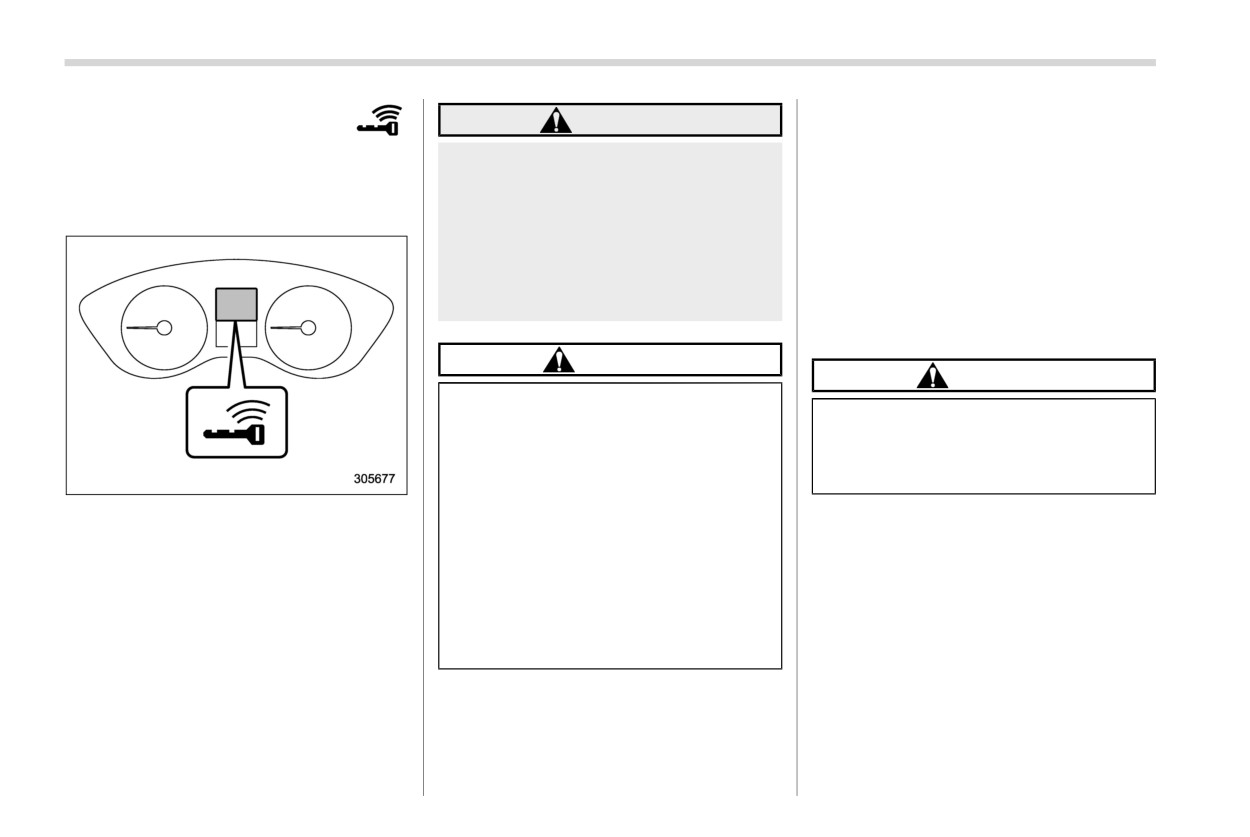
& Warning chimes and
for engine start may be provided
WARNING
depending on the status of the
warning indicator of the
Never drive the vehicle if the indica-
access key fob and the environmen-
keyless access with
tor on the push-button ignition
tal conditions.
push-button start sys-
switch is flashing in green when
. When the access key fob is taken out
tem (if equipped)
starting the engine. This indicates
of the vehicle through an open
the status that the steering wheel is
window, the access key fob takeout
not released and could result in an
warning or passenger access key
accident involving serious injury or
fob takeout warning will not be
death.
provided.
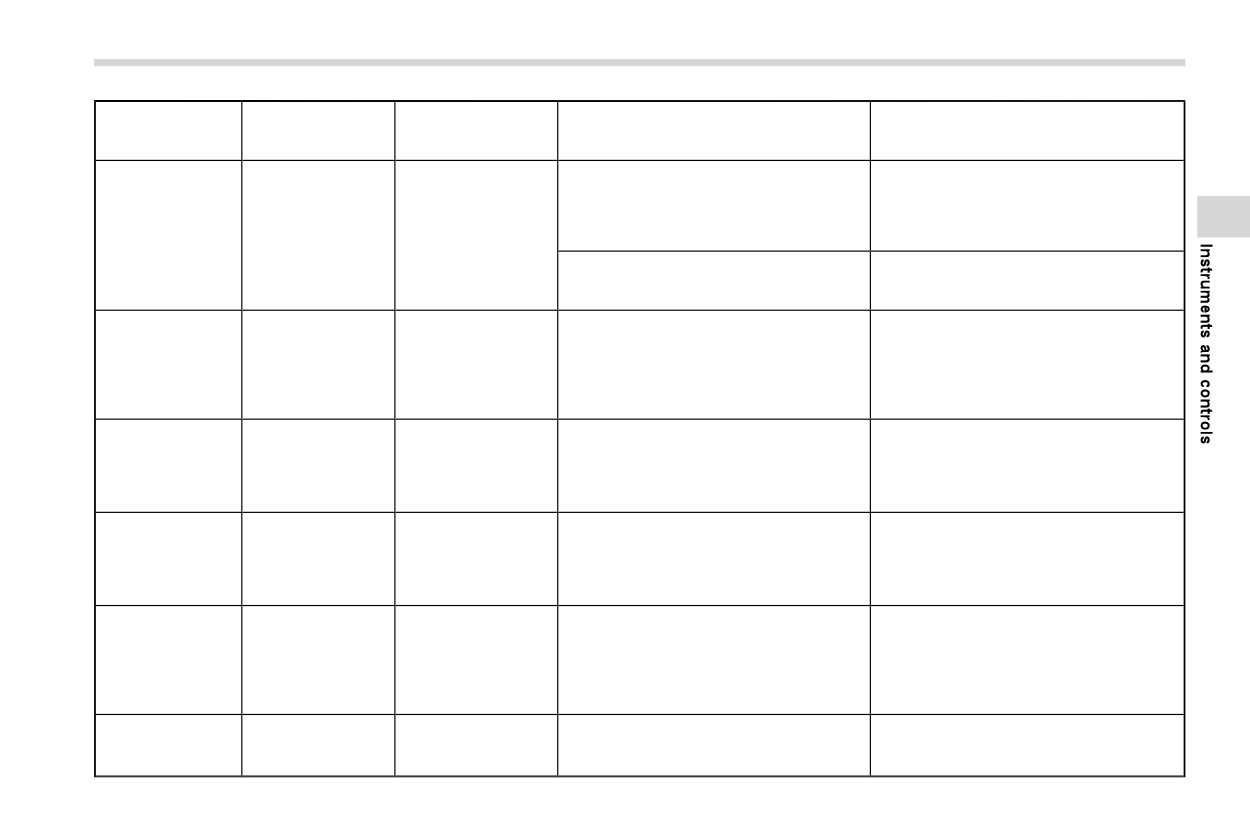
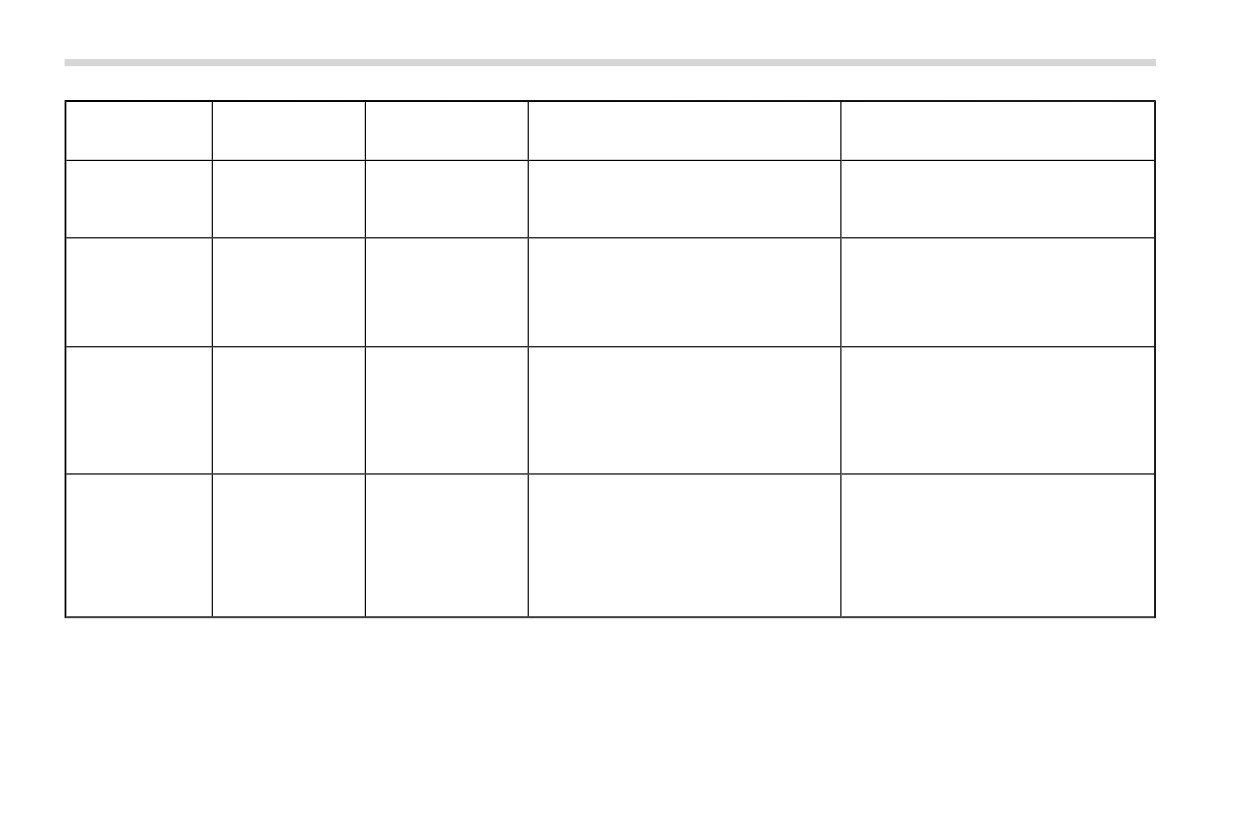
! List of warnings
CAUTION
CAUTION
When starting the engine again
after the operation indicator on
When any of the following warnings
the push-button ignition switch
occurs even if the access key warn-
flashes in green, if the operation
ing indicator does not appear, take
indicator is still flashing in green,
the appropriate action.
there could be a steering lock
Access key warning indicator
malfunction. Contact your
The keyless access with push-button start
SUBARU dealer as soon as pos-
system sounds a warning chime and
sible.
flashes the access key warning indicator
When the operation indicator on
on the combination meter in order to
the push-button ignition switch
minimize improper operations and help
flashes in orange, contact a
protect your vehicle from theft.
SUBARU dealer immediately.
When the warning chime sounds and/or
the warning indicator flashes, take the
appropriate action.
NOTE
. Even when the access key fob is
within the operating ranges inside
the vehicle, the access key warning
Warning and indicator lights
187
Operation indicator
Inside warning
Outside warning
on push-button igni-
Status
Action
chime
chime
tion switch
Switch the push-button ignition switch to
The driver’s door was opened while the
“OFF”, or close the driver’s door.
push-button ignition switch is “ACC”
When exiting the vehicle, be sure to
(when the select lever is in the “P”
switch the push-button ignition switch to
Ding, ding ...
position).
—
—
“OFF”.
(intermittent)
The push-button ignition switch was
switched to “OFF” while the driver’s door
Close the driver’s door.
is open.
Lockout warning:
Take out the access key fob from the
An attempt was made to lock all doors
vehicle, and lock the doors.
Short beep
using the power door locking switch or
The doors cannot be locked while the
Ding
—
(2 seconds)
access key fob while the access key fob is
access key fob is inside the vehicle.
left inside the vehicle. For details, refer to
A chirp sound will be heard, and all doors
“Key lock-in prevention function” FP140.
will be unlocked.
Access key fob lock-in warning:
Take out the access key fob from the
The door lock sensor was touched while
Short beep
vehicle, and lock the doors.
—
—
the push-button ignition switch is “OFF”
(2 seconds)
If the access key fob is inside the vehicle,
and the access key fob is inside the
the doors cannot be locked.
vehicle.
Door ajar warning:
Beep, beep, beep,
The door lock sensor is touched while the
Close the doors securely and lock them.
—
beep, beep
—
ignition switch is in the “OFF” position and
If one of the doors including the rear gate
(5 times)
one of the doors including the rear gate is
is opened, the doors cannot be locked.
opened.
Power warning:
Return the access key fob inside the
The door lock sensor was touched while
vehicle, or switch the push-button ignition
Long beep
carrying the access key fob, the push-
switch to “OFF”.
Ding
—
(60 seconds max.)
button ignition switch is in a position other
If the push-button ignition switch is not
than “OFF” (when the select lever is in the
switched to “OFF”, the doors cannot be
“P” position).
locked.
Access key warning:
Ding, ding ...
Carry the access key fob, and drive the
—
—
The vehicle was driven while the access
(7 seconds)
vehicle.
key fob is not inside the vehicle.
- CONTINUED -
188 Warning and indicator lights
Operation indicator
Inside warning
Outside warning
on push-button igni-
Status
Action
chime
chime
tion switch
Access key warning for engine start:
The push-button ignition switch was
Carry the access key fob, and press the
Ding
—
—
pressed while the access key fob is not
push-button ignition switch.
inside the vehicle.
Access key takeout warning:
The driver exited the vehicle with the
Beep, beep, beep
access key fob and closed the driver’s
Switch the push-button ignition switch to
Ding
—
(3 times)
door while the push-button ignition switch
“OFF”, and get out of the vehicle.
is in a position other than “OFF” (when the
select lever is in the “P” position).
Passenger access key takeout warn-
ing:
A fellow passenger exited the vehicle with
Return the access key fob to inside the
Beep, beep, beep
Ding
—
the access key fob and closed a door
vehicle, or switch the push-button ignition
(3 times)
other than the driver’s door while the
switch to “OFF”.
push-button ignition switch is in a position
other than “OFF”.
Access key takeout without “P” posi-
tion warning:
The driver exited the vehicle with the
Shift the select lever to the “P” position,
Long beep
Long beep
access key fob and closed the driver’s
—
switch the push-button ignition switch to
(continuous)
(continuous)
door while the push-button ignition switch
“OFF” and exit the vehicle.
is in a position other than “OFF” and the
select lever is in a position other than the
“P” position.
Warning and indicator lights
189
Operation indicator
Inside warning
Outside warning
on push-button igni-
Status
Action
chime
chime
tion switch
Select lever position warning:
. Case 1: The engine is turned off by
. Case 1: Start the engine, shift the
pressing the push-button ignition
select lever to the “P” position, switch
switch while the select lever is in a
the push-button ignition switch to
Long beep
position other than the “P” position.
“OFF” and exit the vehicle.
—
—
(continuous)
. Case 2: The driver’s door is opened
. Case 2: Shift the select lever to the “P”
while the push-button ignition switch
position, switch the push-button igni-
is in a position other than “OFF” and
tion switch to “OFF” and exit the
the select lever is in a position other
vehicle.
than the “P” position.
Ding
—
—
The battery of the access key fob is low.
Replace the battery of the access key fob.
Steering lock warning:
While turning the steering wheel right and
Flashes in green
Ding
—
The engine start procedure was per-
left lightly, depress the brake pedal and
(15 seconds max.)
formed, but the steering is still locked.
press the push-button ignition switch.
System malfunction warning:
Flashes in orange
Contact a SUBARU dealer immediately
Ding
—
A malfunction was detected in the power
(15 seconds max.)
and have the vehicle inspected.
system or steering lock.
- CONTINUED -
190 Warning and indicator lights
& Security indicator light
For models without “keyless access
has been turned to the “ON” or
with push-button start system”:
“ACC” position and the driver’s
This indicator light shows the status of the
. Immediately after the key is pulled out.
door has not been opened or
alarm system. It also indicates operation of
closed.
. Approximately
60 seconds after the
the immobilizer system.
ignition switch is turned from the “ON”
Models without “keyless access
! Alarm system
position to the “ACC” or “LOCK” posi-
with push-button start system”:
It blinks to show the driver the operational
tion.
- While the engine is running.
status of the alarm system. For detailed
If the indicator light does not blink in the
- When the ignition switch is in the
information, refer to
“Alarm system”
above conditions, it may indicate that
“ON” position.
FP142.
immobilizer system may be malfunction-
- For approximately 60 seconds
! Immobilizer system
ing. Contact your nearest SUBARU dealer
after the ignition switch is turned
The security indicator light starts blinking
immediately.
from the “ON” position to the
in the following conditions.
“ACC” or “LOCK” position.
In the event that an unauthorized key (for
For models with “keyless access with
example, an unauthorized duplicate) is
Even if a malfunction occurs, such
push-button start system”:
used to start the engine, the security
as the security indicator light
indicator light illuminates. For details about
. Immediately after the push-button igni-
flashes irregularly, it will not affect
the immobilizer system, refer to “Immobi-
tion switch is turned to the
“OFF”
the functionality of the immobilizer
lizer” FP132.
position.
system.
. Immediately after the driver’s door is
NOTE
opened or closed when all of the
. The security indicator light remains
following conditions are met.
off in the following conditions. It
- The push-button ignition switch is in
means that the matching of the ID
the “ON” or “ACC” position.
code is completed and the immobi-
- The engine is not running.
lizer system is deactivated, and it
does not indicate a malfunction.
In the event that an unauthorized key is
used (for example, the key is unregistered
Models with “keyless access with
or the ID code does not match), the power
push-button start system”:
is not switched to “ON” and the security
- While the engine is running.
indicator light continues blinking.
- The push-button ignition switch
Warning and indicator lights
191
& Select lever/gear position in-
& Turn signal indicator
& Automatic headlight
dicator
lights
beam leveler warning
light
These lights show the operation of the turn
signal or lane change signal.
This light illuminates when the automatic
If the indicator lights do not blink or blink
headlight beam leveler does not operate
rapidly, the turn signal bulb may be burned
normally.
out. Replace the bulb as soon as possible.
If this light illuminates during driving, have
Refer to “Replacing bulbs” FP51 1.
your vehicle inspected at your SUBARU
dealer.
& High beam indicator
light
& LED headlight warning
light
This light shows that the headlights are in
the high beam mode.
This light illuminates if the LED headlights
This indicator light also illuminates when
malfunction. Have your vehicle inspected
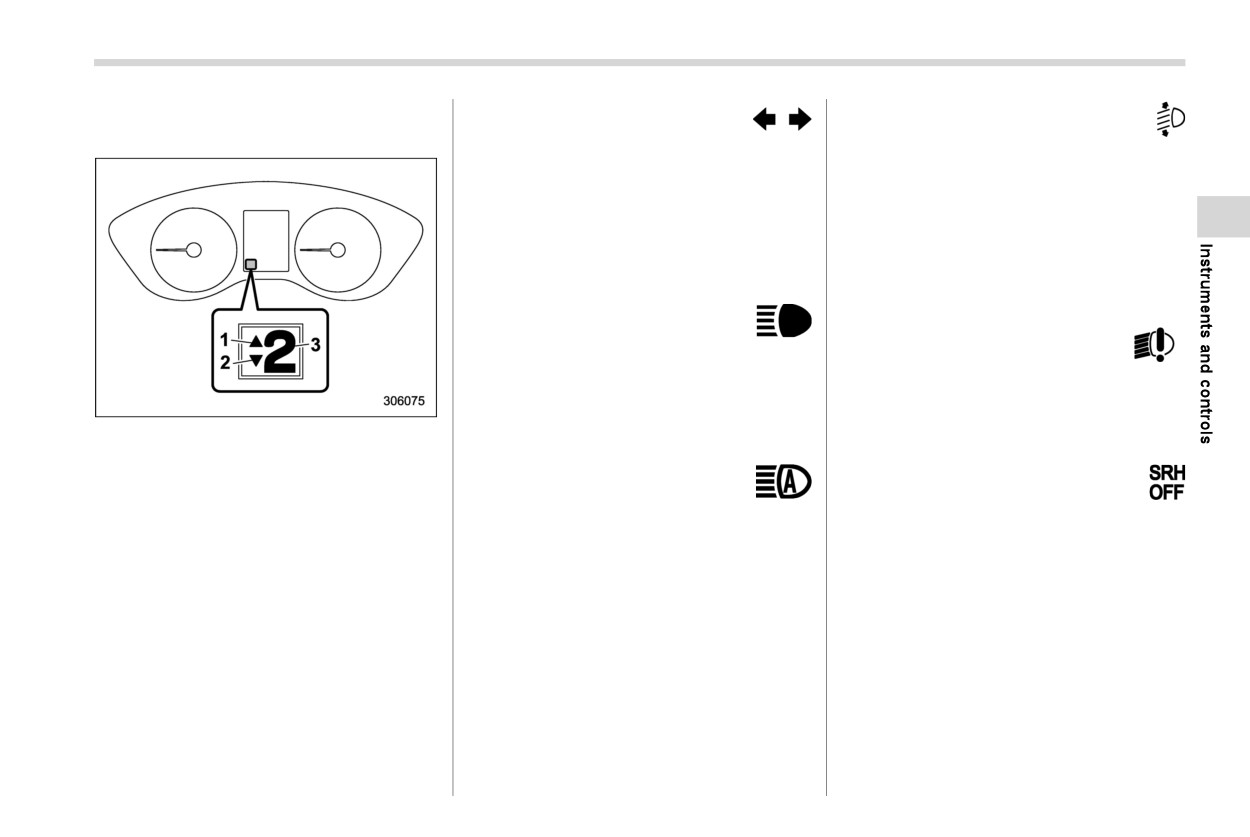
1
Upshift indicator
the headlight flasher is operated.
at a SUBARU dealer as soon as possible.
2
Downshift indicator
3
Select lever/gear position indicator
& High beam assist indi-
& Steering Responsive
This
indicator shows the position of
the
cator light
Headlight OFF indicator
select lever.
light
This light illuminates when the high beam
When the manual mode is selected, the
assist function is activated. For details
This light illuminates when the Steering
gear position indicator (which shows the
about the high beam assist function, refer
Responsive Headlight is turned off. Refer
current gear selection) and the upshift/
to “High beam assist function” FP234.
to “Steering Responsive Headlight (SRH)”
downshift indicator light up. Refer to
FP238.
“Continuously variable transmission”
FP357.
- CONTINUED -
192 Warning and indicator lights
& Steering Responsive
& X-MODE indicator
This indicator appears while X-MODE is
activated. It will disappear when X-MODE
Headlight warning light
is deactivated. Refer to “To activate/deac-
The light illuminates when a malfunction
tivate X-MODE” FP370.
occurs in the Steering Responsive Head-
light. Refer to “Steering Responsive Head-
& Hill descent control in-
light (SRH)” FP238.
dicator
& Front fog light indicator
This indicator appears while the hill des-
cent control function is in standby. It will
light (if equipped)
flash while the hill descent control function
This indicator light illuminates while the
is operating. It will disappear when the hill
front fog lights are illuminated.
descent control function is not available.
Refer to
“Hill descent control function”
& Headlight indicator
FP372.
X-MODE indicator (models with 1
mode)
light
1
X-MODE indicator
& BSD/RCTA warning in-
This indicator light illuminates under the
dicator (if equipped)
following conditions.
. The light switch is turned to the “
” or
This warning indicator appears when the
“
” position.
BSD/RCTA is malfunctioning. In this case
. The light control switch is in the “AUTO”
the BSD/RCTA warning indicator will be
position and the headlights illuminate
shown on the combination meter display.
automatically.
When this indicator appears, have your
vehicle inspected by your SUBARU dealer
as soon as possible.
& BSD/RCTA OFF indica-
tor (if equipped)
This indicator appears on the combination
X-MODE indicator (models with 2
modes)
meter display (color LCD) when “BSD/
1
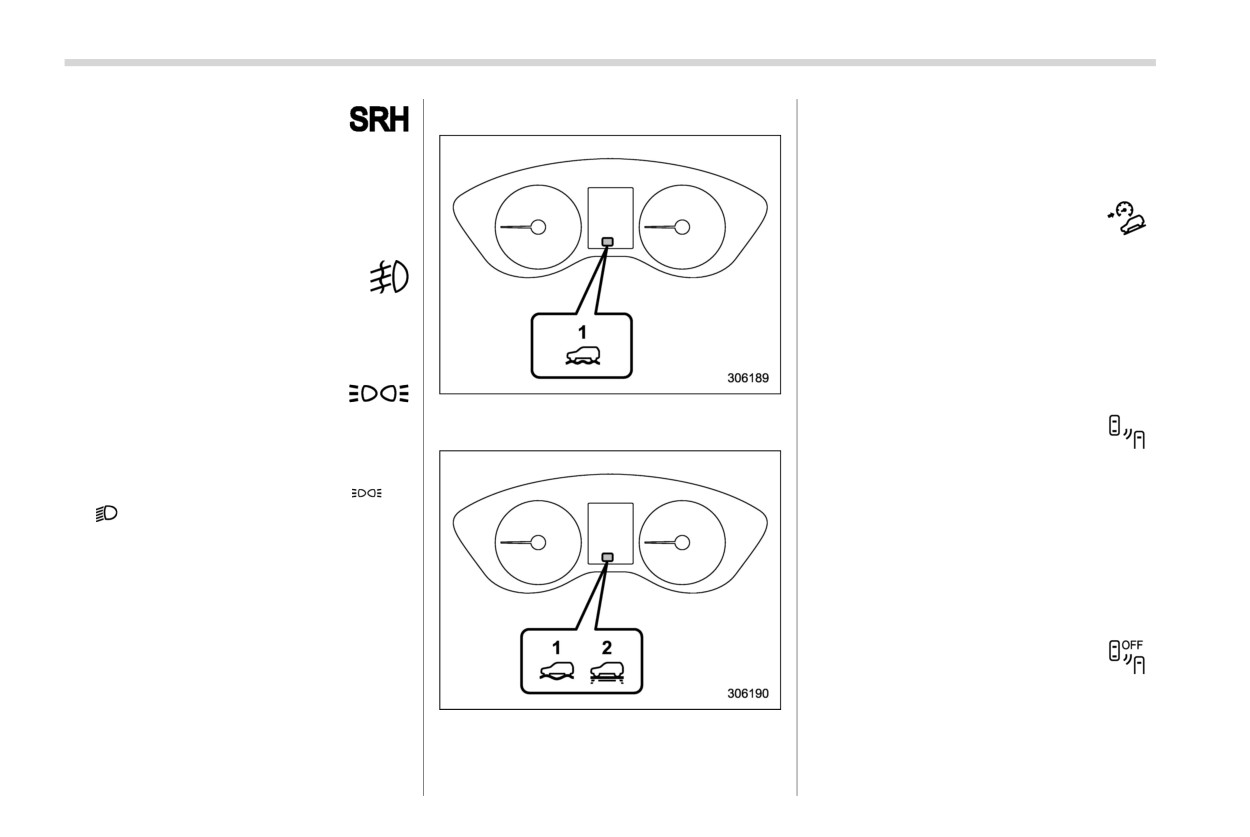
DEEP SNOW/MUD mode indicator
RCTA” is touched to deactivate the BSD/
2
SNOW/DIRT mode indicator
RCTA or when the BSD/RCTA is sus-
Warning and indicator lights
193
pended temporarily. In this case the BSD/
around the sensor. However, the
& Driver Monitoring Sys-
RCTA OFF indicator will be shown on the
temperature may not be indicated
tem warning light (yel-
combination meter display. For details,
correctly or the update may be
low) (if equipped)
refer to “BSD/RCTA” FP382.
delayed in the following conditions.
- While parking or driving at low
This warning light illuminates if the Driver
& RAB warning indica-
speeds
Monitoring System malfunctions. Have
tor (if equipped)
- When the outside temperature
your vehicle inspected at a SUBARU
changes suddenly
(example:
dealer as soon as possible. Refer to
This indicator illuminates if the Reverse
when going in and out of an
“Driver Monitoring System operation in-
Automatic Braking (RAB) system malfunc-
underground parking area or
dicator light (green)” FP410.
tions. Refer to “Reverse Automatic Brak-
when passing through a tunnel)
ing (RAB) system” FP391.
- When starting the engine after
& Driver Monitoring Sys-
being parked for a certain period
tem OFF indicator light
& RAB OFF indicator (if
of time
(if equipped)
equipped)
The icy road surface warning screen
This indicator illuminates when
“Driver
This indicator illuminates when the Re-
should be treated only as a guide. Be
Monitoring System” is touched to deacti-
verse Automatic Braking (RAB) system is
sure to check the condition of the
vate Driver Monitoring System. Refer to
turned off, or when the Reverse Automatic
road surface before driving.
“Driver Monitoring System OFF indicator
Braking (RAB) system is suspended tem-
Once the icy road surface warning
light” FP410.
porarily. Refer to
“Reverse Automatic
screen appears, it will not disappear
Braking (RAB) system” FP391.
unless the outside temperature has
& Driver Monitoring Sys-
increased to 418F (58C) or higher.
tem temporary stop in-
& Icy road surface warn-
dicator light (if
ing indicator
& Driver Monitoring Sys-
equipped)
When the outside temperature is 378F
tem operation indicator
(38C) or less, the icy road surface warning
light (green) (if
This indicator illuminates when the Driver
will illuminate to inform the driver that the
equipped)
Monitoring System is temporarily stopped.
road surface may be frozen.
Refer to “Driver Monitoring System tem-
This indicator illuminates when the Driver
porary stop indicator light” FP410.
NOTE
Monitoring System is activated. Refer to
“Driver Monitoring System operation in-
. The outside temperature indicator
dicator light (green)” FP410.
shows the temperature in the area
- CONTINUED -
194 Combination meter display (color LCD)
NOTE
3-7. Combination meter dis-
The Driver Monitoring System stops
play (color LCD)
temporarily in the following circum-
stances.
WARNING
. The temperature of the Driver Mon-
itoring System unit is high.
Always pay adequate attention to
safe driving when operating the
& One-touch Interior Illu-
combination meter display while
mination indicator (if
the vehicle is in motion. When
equipped)
operation of the combination meter
display interferes with your ability to
This indicator light illuminates when the
concentrate on driving, stop the
One-touch Interior Illumination function is
vehicle before performing opera-
activated. Refer to
“One-touch
Interior
tions on the screen. Also, do not
Illumination function” FP304.
concentrate on the display while
driving. Doing so may cause you to
look away from the road and could
result in an accident.
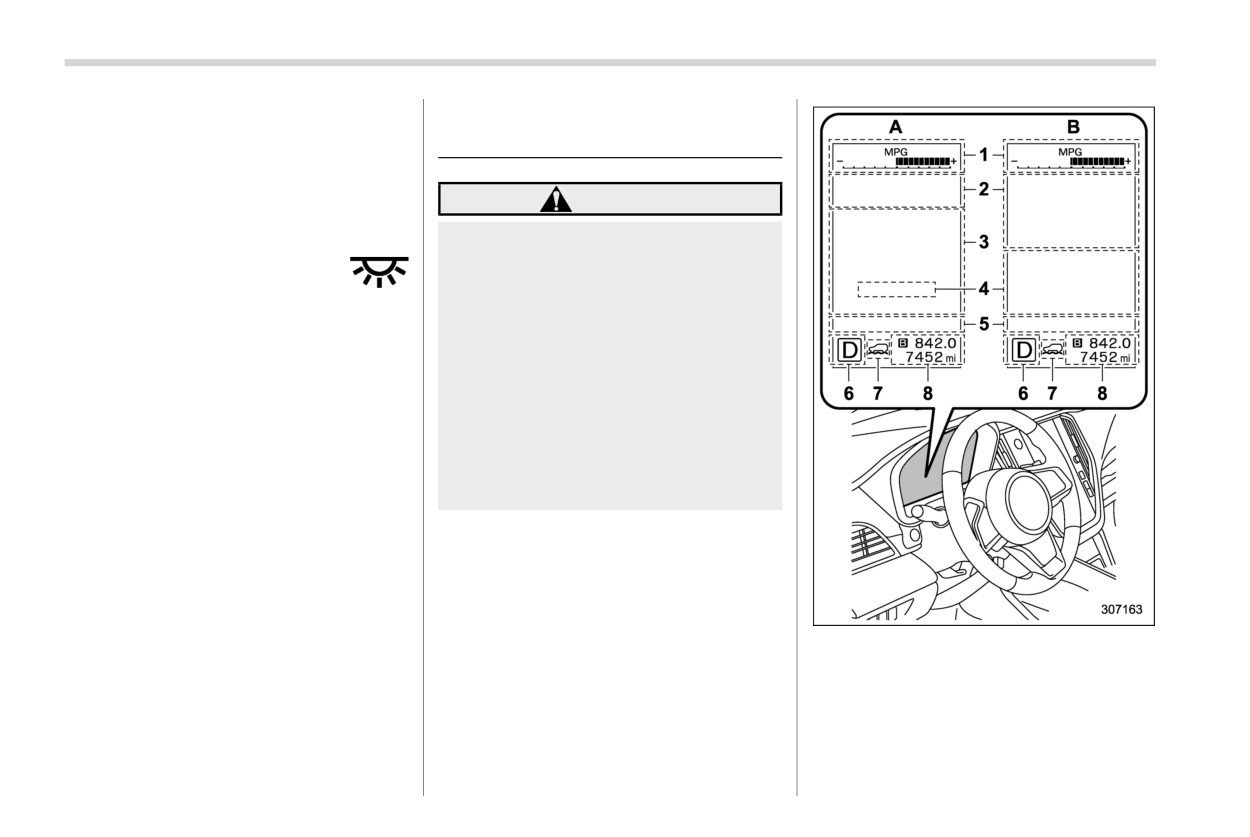
Various information will be shown on the
combination meter display. Also, a warn-
ing message will appear on the display if a
malfunction is detected. In addition, sev-
eral settings for the displayed content can
be performed.
Combination meter display
1
Meter information screen (Refer to “Me-
ter information screen” FP196.)
2
Warning screen
(Refer to
“Warning
screen” FP196.)/Basic screen (Refer to
“Basic screens” FP198.)
3
EyeSight screen
Combination meter display (color LCD)
195
4
Digital speed screen
(Refer to
“Basic
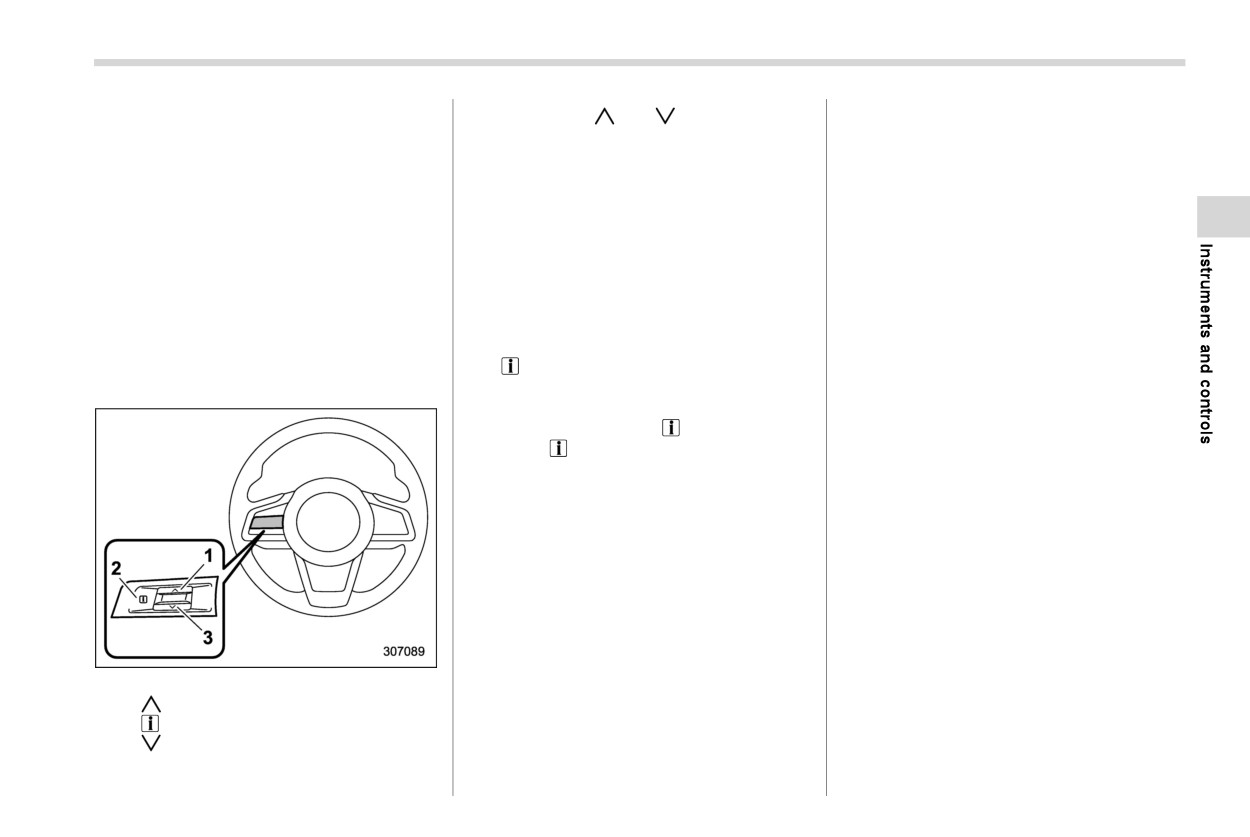
By operating
or
of the control
NOTE
screens” FP198.)
switches, the screens can be changed.
5
Telltale screen (Refer to “Telltale screen”
The welcome screen and the good-
FP197.)
bye screen may differ in the actual
If there are some useful messages, such
6
Select lever/gear position indicator (Re-
as vehicle information, warning informa-
words and appearance.
fer to “Select lever/gear position indica-
tion, etc., they will interrupt the current
The basic screen will be shown
tor” FP191.)
7
X-MODE indicator (Refer to “X-MODE
screen, and appear on the display accom-
when the ignition switch is turned
indicator” FP192.)
panied by a beep. If such a screen is
to the “ON” position while the wel-
8
Odometer
(Refer to
“Odometer”
displayed, take proper action according to
come screen is displayed.
FP169.)/Double trip meter (Refer to
Once the welcome screen appears, it
the message shown on the screen.
“Double trip meter” FP169.)
takes a certain period of time to
A: Activating the EyeSight system
The warning screen will return to the
display it again.
B: Deactivating the EyeSight system
original screen after a few seconds. While
If the ignition switch is operated
the
information reminder is shown on
after unlocking the driver’s door,
the display, it may be possible to display
& Basic operation
the welcome screen will not appear
the warning screen again. To recall the
even when the driver’s door is
message marked with on the display,
opened and closed.
press the switch on the steering wheel.
The welcome screen will disappear
when you lock the driver’s door by
& Welcome screen (opening
using the remote keyless entry sys-
animation) and Good-bye
tem (all models) or the keyless
screen (ending animation)
access function (if equipped) while
the welcome screen is displayed.
When the driver’s door is opened and
The welcome screen including the
closed after unlocking the door, the wel-
audio/navigation unit can be set to
come screen (opening animation) will
on or off.
appear on the combination meter display
The welcome screen and the good-
for approximately 20 seconds.
bye screen can be set to on or off.
When the ignition switch is turned to the
Control switches
For details, refer to “General set-
“LOCK”/“OFF” position, the combination
1
tings” FP210.
meter display gradually turns off by show-
2
ing Good-bye screen (ending animation).
3
- CONTINUED -
196 Combination meter display (color LCD)
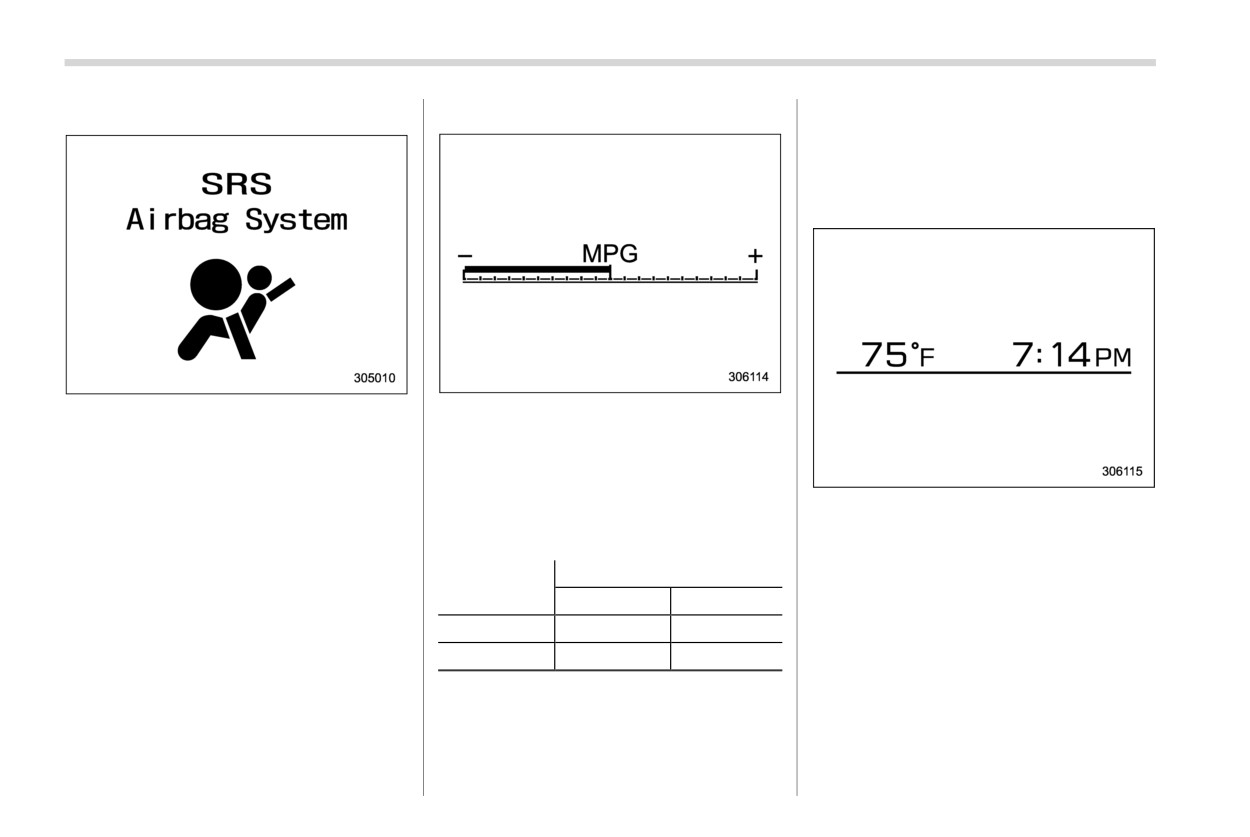
& Warning screen
! ECO gauge
average rate of fuel consumption is
not shown until driving 0.6 miles (1
km). Until that time, the ECO gauge
does not operate.
! Clock and outside temperature
Example of warning
The ECO gauge shows the difference
If there is a warning message or a
between the average rate of fuel con-
maintenance notification, it will appear on
sumption since the trip meter was last
this screen. Take the appropriate actions
reset and the current rate of fuel consump-
based on the messages indicated.
tion.
This screen displays the clock and outside
The ECO gauge indicates the current fuel
temperature.
& Meter information screen
efficiency as shown in the following chart.
NOTE
The meter information screen can be
Needle position
changed. For details, refer to
“General
Displayed unit
. The clock can be displayed in either
“+” side
“−” side
settings” FP210.
12-hour display or 24-hour display.
MPG
Better
Poorer
For details, refer to “Clock” FP228.
. You can set the temperature units to
l/100km
Poorer
Better
be displayed in Celsius
(8C) or
Fahrenheit (8F). For details, refer to
NOTE
“Car settings” FP215.
. The ECO gauge shows only an
approximate indication.
. After resetting the trip meter, the
Combination meter display (color LCD)
197
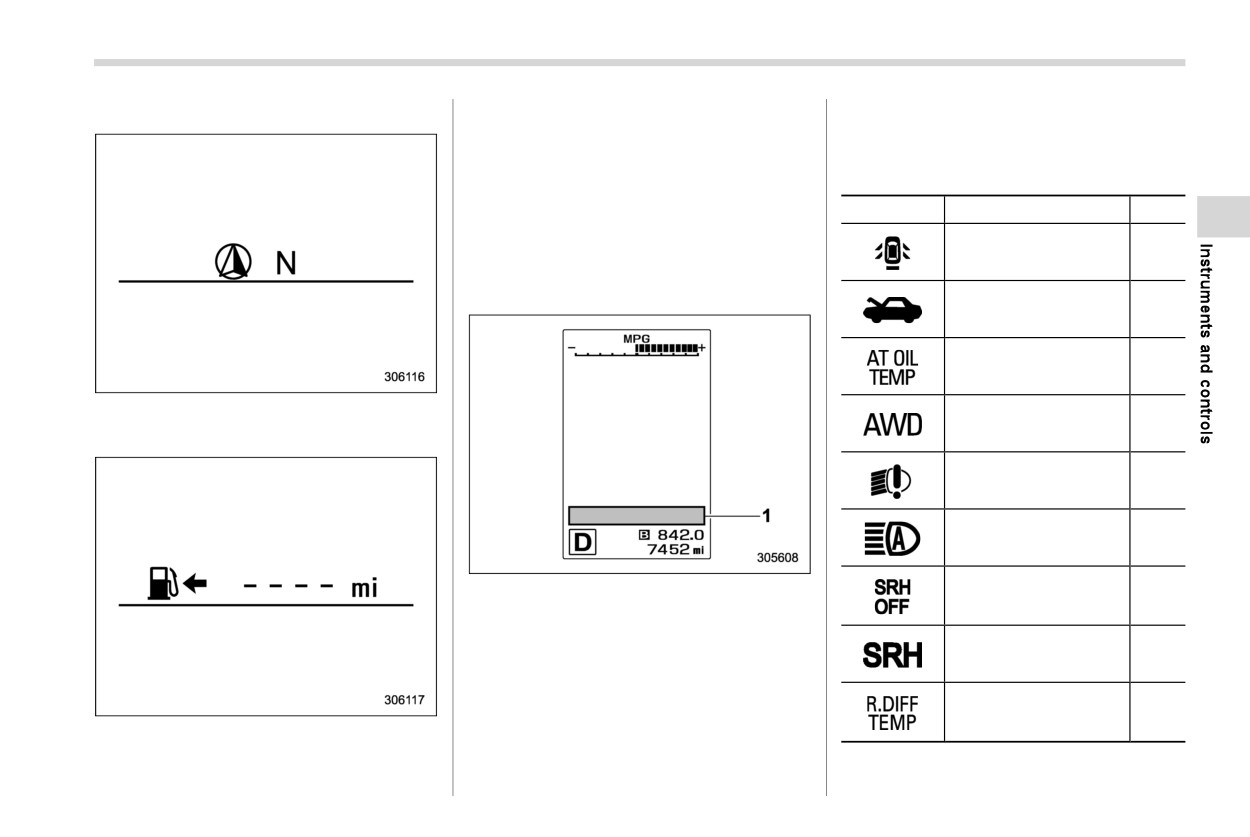
! Compass (if equipped)
NOTE
left in ascending order of severity.
. If there are
6 or more warning
The driving range on the remaining fuel
messages to display, the indicators
is only a guide. The indicated value may
will be displayed in sequential order.
differ from the actual driving range on
the remaining fuel, so you must im-
Mark
Name
Page
mediately fill the tank when the low fuel
warning light illuminates.
Door open warning light
183
& Telltale screen
Engine hood open
183
warning light
AT OIL TEMP warning
178
light
The direction of the vehicle is displayed.
All-Wheel Drive warn-
183
ing light
! Driving range on remaining fuel
LED headlight warning
191
light
High beam assist indi-
191
cator light
Steering Responsive
1
Telltale screen
Headlight OFF indicator
191
light
When the corresponding situation occurs,
the following telltales will be displayed on
Steering Responsive
192
the telltale screen.
Headlight warning light
NOTE
Rear differential oil
temperature warning
178
. When there is warning information
light (if equipped)
to display, it will be displayed in five
warning indicators, starting on the
- CONTINUED -
198 Combination meter display (color LCD)
Mark
Name
Page
Mark
Name
Page
This screen displays the average rate of
fuel consumption since the trip meter was
Driver Monitoring Sys-
Engine low oil level
177
tem temporary stop in-
last reset.
warning light
193
dicator light (if
equipped)
NOTE
RAB warning indicator
193
The driving range on the remaining fuel
(if equipped)
Icy road surface warn-
193
ing indicator
is only a guide. The indicated value may
RAB OFF indicator (if
differ from the actual driving range on
193
One-touch Interior Illu-
equipped)
the remaining fuel, so you must im-
mination indicator (if
194
mediately fill the tank when the low fuel
equipped)
BSD/RCTA warning in-
warning light illuminates.
192
dicator (if equipped)
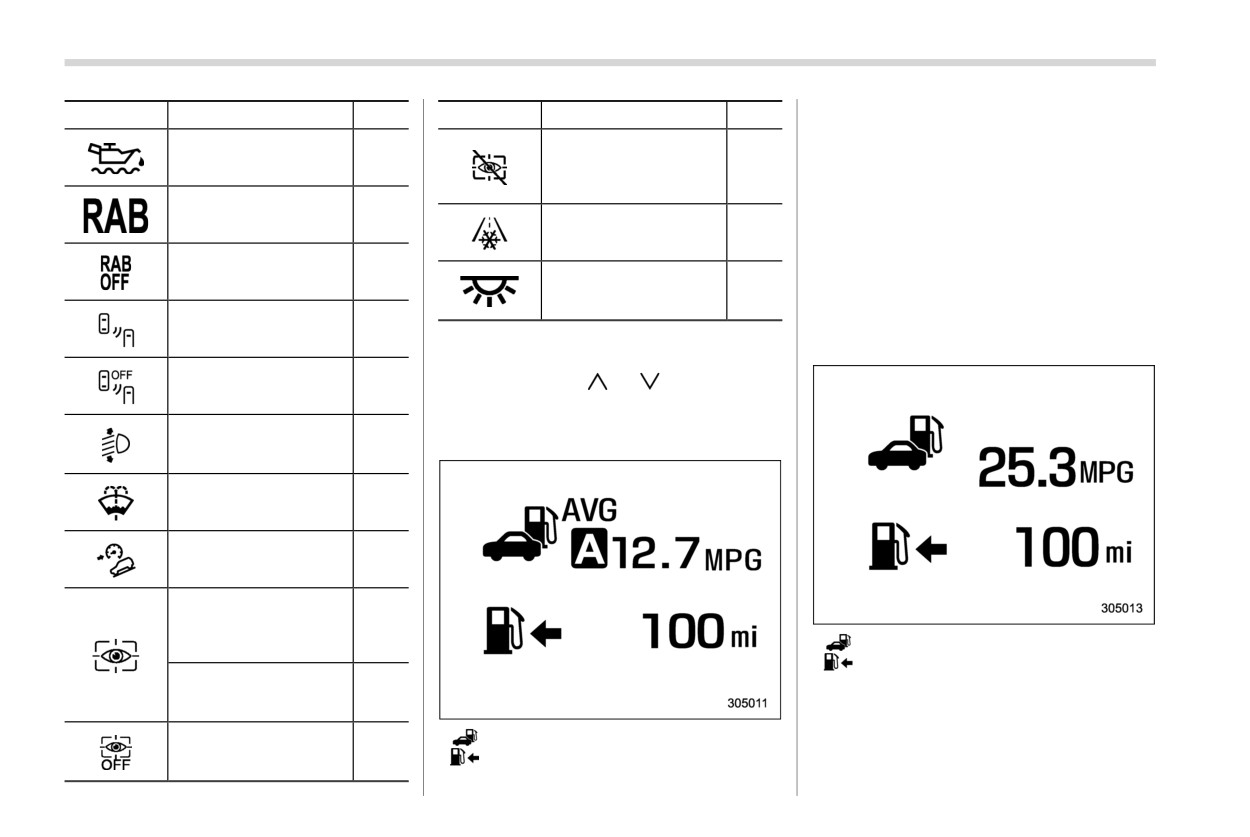
& Basic screens
Current fuel consumption screen:
BSD/RCTA OFF indi-
By operating the
or
switch on the
192
cator (if equipped)
steering wheel, you can change the screen
that is always displayed.
Automatic headlight
beam leveler warning
191
Average fuel consumption screen:
light
Windshield washer fluid
178
warning light
Hill descent control in-
192
dicator
Driver Monitoring Sys-
tem operation indicator
193
light (green) (if
: Current fuel consumption
equipped)
: Driving range on remaining fuel
Driver Monitoring Sys-
tem warning light (yel-
193
This screen displays the rate of
fuel
low) (if equipped)
consumption at the present moment.
Driver Monitoring Sys-
: Average fuel consumption
tem OFF indicator light
193
: Driving range on remaining fuel
(if equipped)
Combination meter display (color LCD)
199
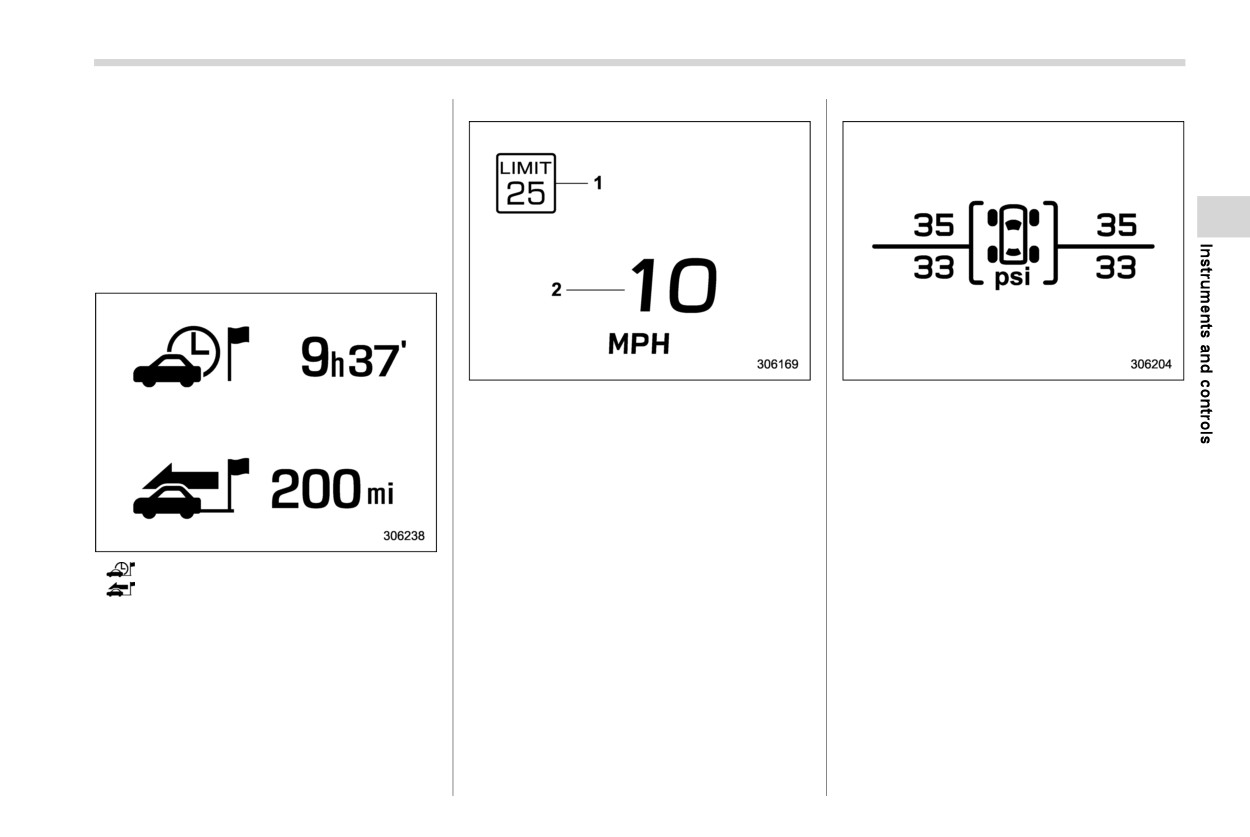
Digital speed screen:
TPMS screen (U.S.-spec. models):
NOTE
The driving range on the remaining fuel
is only a guide. The indicated value may
differ from the actual driving range on
the remaining fuel, so you must im-
mediately fill the tank when the low fuel
warning light illuminates.
Driving information screen:
1
Speed limit indicator (if equipped)
This screen displays each tire pressure.
2
Vehicle speed
When a tire is deflated, the deflated tire
This screen displays the current
vehicle
and the tire pressure will be displayed on
speed.
the screen in yellow.
NOTE
. The tire pressure values are dis-
played several minutes after driving.
: Journey time
. Once the tire pressure monitoring
: Journey distance
system detects the low tire pressure,
This screen displays the journey time (the
the tire pressure values will display
time that has elapsed since the ignition
in yellow until the system detects the
switch was turned to the “ON” position)
normal tire pressure.
. Immediately adjust the tire pressure
and journey distance (the distance that
when the warning light illuminates.
has been driven since the ignition switch
was turned to the “ON” position).
When the tire pressure monitoring
system detects the adjusted tire
pressure, the warning light will turn
- CONTINUED -
200 Combination meter display (color LCD)
off and the tire pressure values will
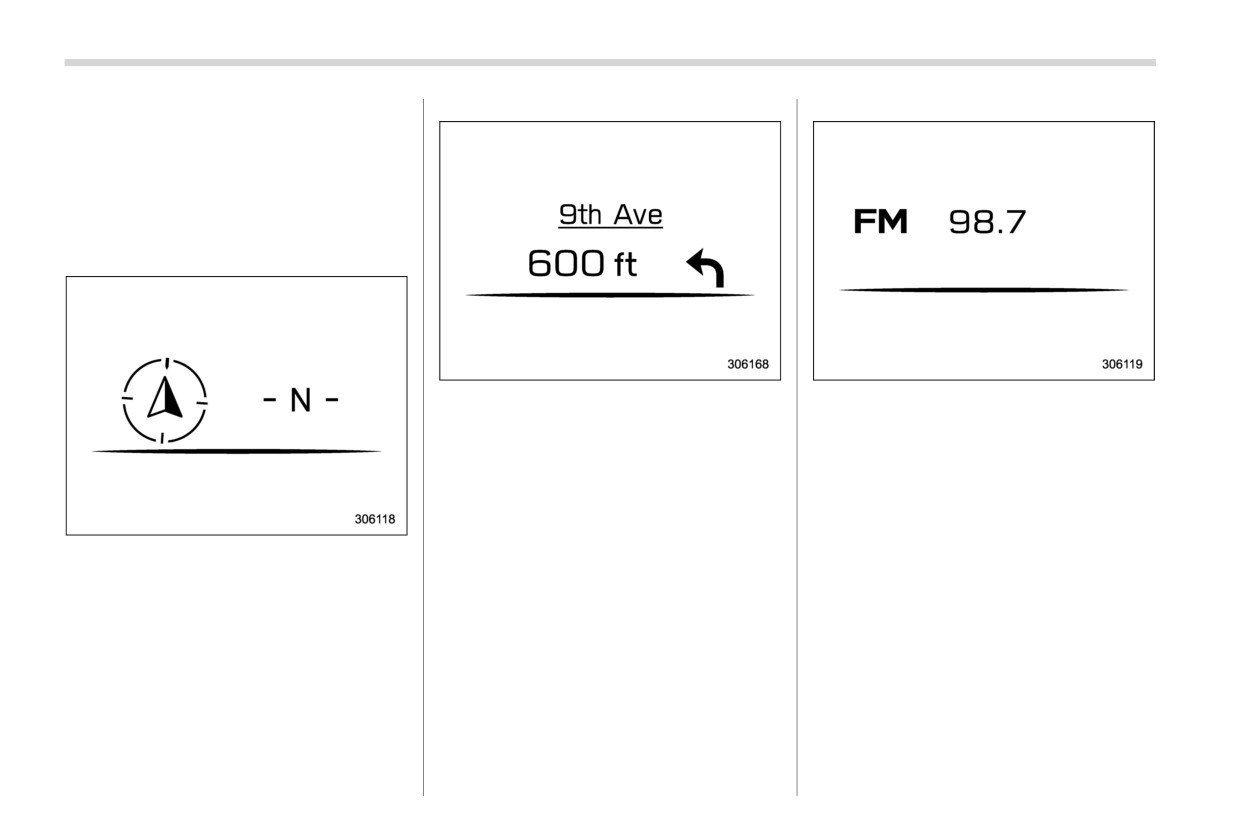
Navigation screen (if equipped):
Audio screen:
turn to white.
. You can set the tire pressure units.
For details about setting the units,
refer to “General settings” FP210.
For information about the specified value
of the air pressure, refer to “Tires” FP526.
Compass screen (if equipped):
When the route guidance is set in the
The audio screen shows the status of
navigation system, this item shows the
audio information. For details about the
navigation route information. For details
audio system, refer to the separate navi-
about the navigation system, refer to the
gation/audio Owner’s Manual.
separate navigation/audio Owner’s Man-
ual.
The direction of the vehicle is displayed.
Center information display (CID)
201
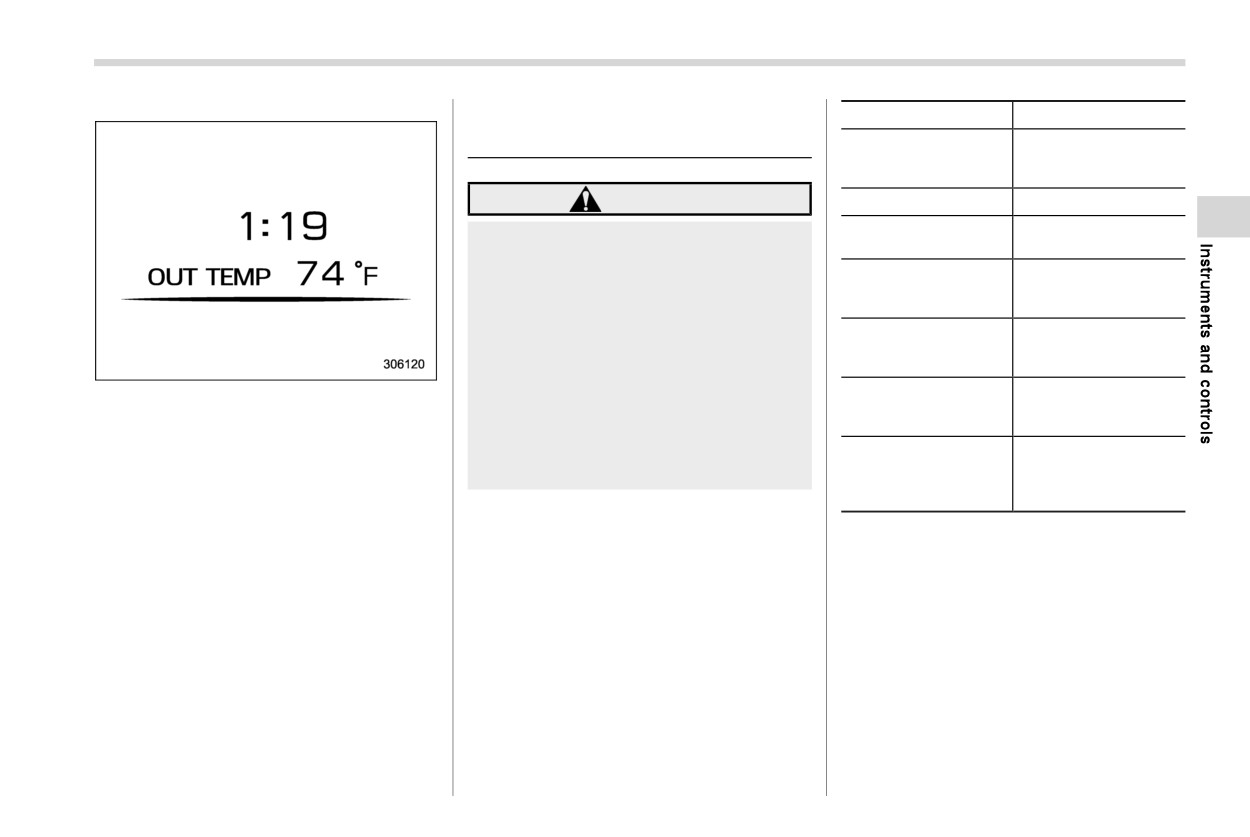
Clock and outside temperature screen:
Interruption screen
202
3-8. Center information dis-
play (CID)
Vehicle status and
maintenance infor-
204
mation
WARNING
Vehicle settings
210
Climate control op-
210
Always pay attention to safe driving
erations
when operating the center informa-
Surround View Moni-
320/Refer to the navi-
tion display while the vehicle is in
tor (if equipped)/Rear
gation/audio Owner’s
motion. When operation of the cen-
view camera
Manual.
ter information display is disturbing
Refer to the naviga-
your awareness and ability to con-
Navigation system
tion/audio Owner’s
Manual.
centrate on driving, stop the vehicle
in a safe place before performing
Refer to the naviga-
This screen displays the clock and outside
operations on the display. Also, do
Audio/telephone
tion/audio Owner’s
temperature.
Manual.
not concentrate on the display while
driving. Doing so could result in an
Refer to the Owner’s
NOTE
Manual supplement
accident.
EyeSight
for the EyeSight sys-
. The clock can be displayed in either
tem.
12-hour display or 24-hour display.
For details, refer to “Clock” FP228.
& Features
The center information display can also be
. You can set the temperature units to
used to set and initialize the center
All information is displayed on the center
be displayed in Celsius
(8C) or
information display itself.
information display, including vehicle set-
Fahrenheit (8F). For details, refer to
tings, vehicle status, navigation system (if
“General settings” FP210.
NOTE
equipped) operation, audio operation, and
. When the vehicle is in motion,
climate control operation.
certain functions and selections
may not be available.
. The language and units for both the
center information display and the
combination meter display (color
LCD) can be changed. For details
- CONTINUED -
202 Center information display (CID)
about language settings, refer to
. For a certain period of time after the
& Touch screen operations
“General settings” FP210. For de-
welcome screen has once appeared,
The center information display has a touch
tails about unit settings, refer to “Car
it may not appear again even when
screen. Operations are
performed
by
settings” FP215.
the driver’s door is opened and
touching the touch screen directly.
. The images displayed in this Own-
closed. This does not indicate a
er’s Manual are sample images. The
malfunction.
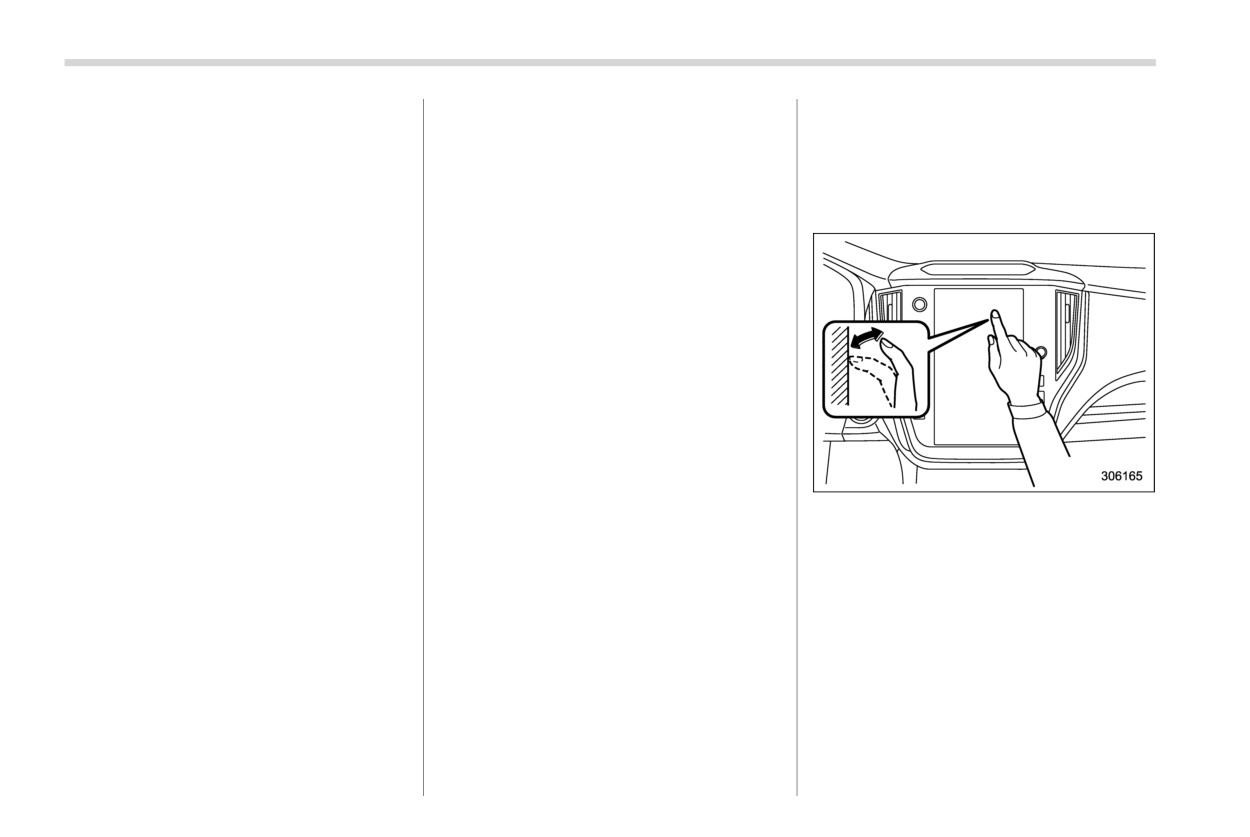
! Touch
actual image may vary depending on
the region and vehicle specifica-
& Good-bye screen
tions.
The good-bye screen will be displayed
under the following conditions.
& Welcome screen
. The driver’s door is opened after the
Welcome screen and Good-bye screen
ignition switch is put in the
“OFF”
are motion graphic displayed on the
position.
combination meter display and center
3 minutes have passed after the ignition
information display upon entering and
switch is put in the “OFF” position with
exiting the vehicle.
the driver’s door closed.
When the driver’s door is opened and
10 minutes have passed when the
closed, the welcome screen will appear for
hands-free phone is used after the
a short time.
ignition switch is put in the
“OFF”
Quickly touch and release once.
position.
NOTE
. The battery voltage is low when the
. The welcome screen will disappear
ignition switch is put in the
“OFF”
when the ignition switch is turned to
position.
the “ON” position while the welcome
screen is shown.
& Interruption screen
. The welcome screen can be turned
on or off. For details, refer to “Gen-
Useful messages, such as reminders,
eral settings” FP210.
weather information
(if equipped) and
traffic information (if equipped) may inter-
rupt the current screen and appear on the
display accompanied by a beep. Take the
proper action according to the message.
Center information display (CID)
203
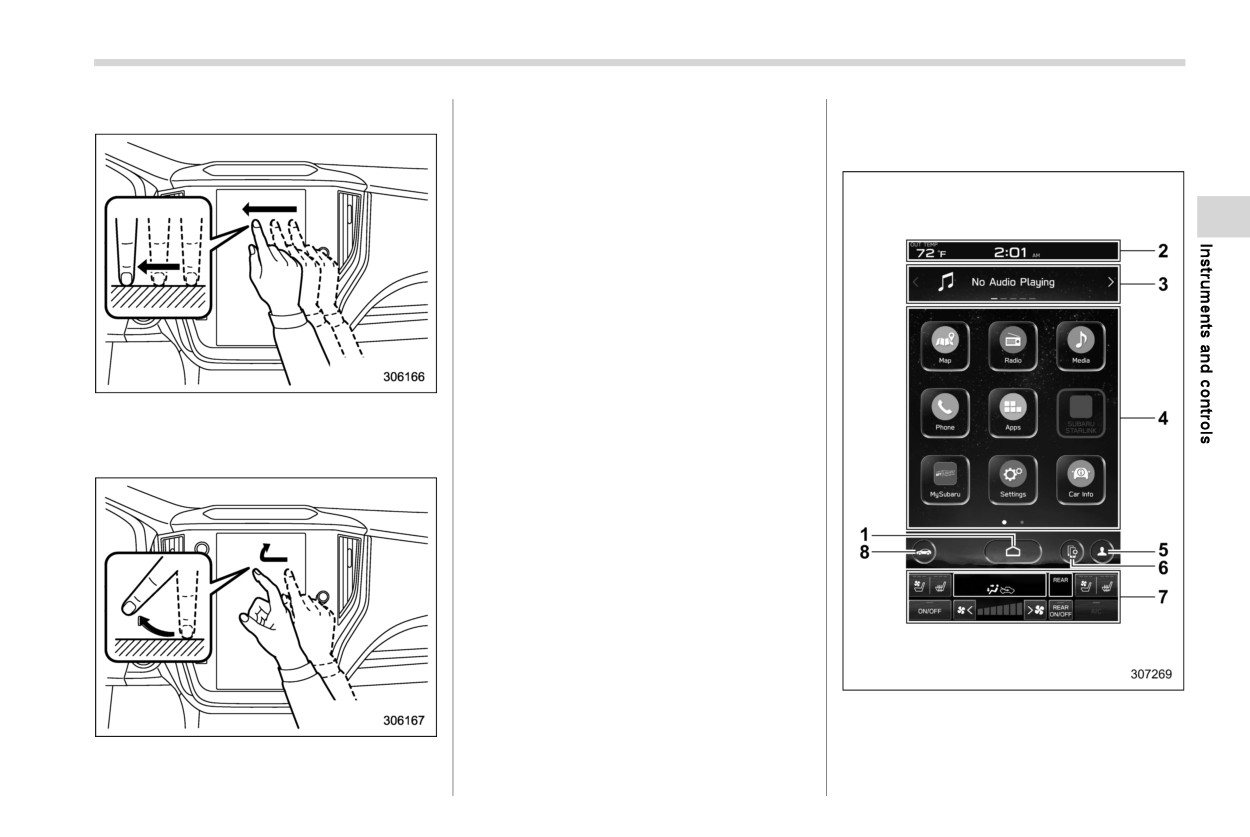
! Drag
Quickly move the screen by swiping with
& Display
your finger.
! Touch screen
NOTE
Swipe operations may not be per-
formed smoothly in high altitudes.
Touch the screen and move the screen to
the desired position.
! Swipe
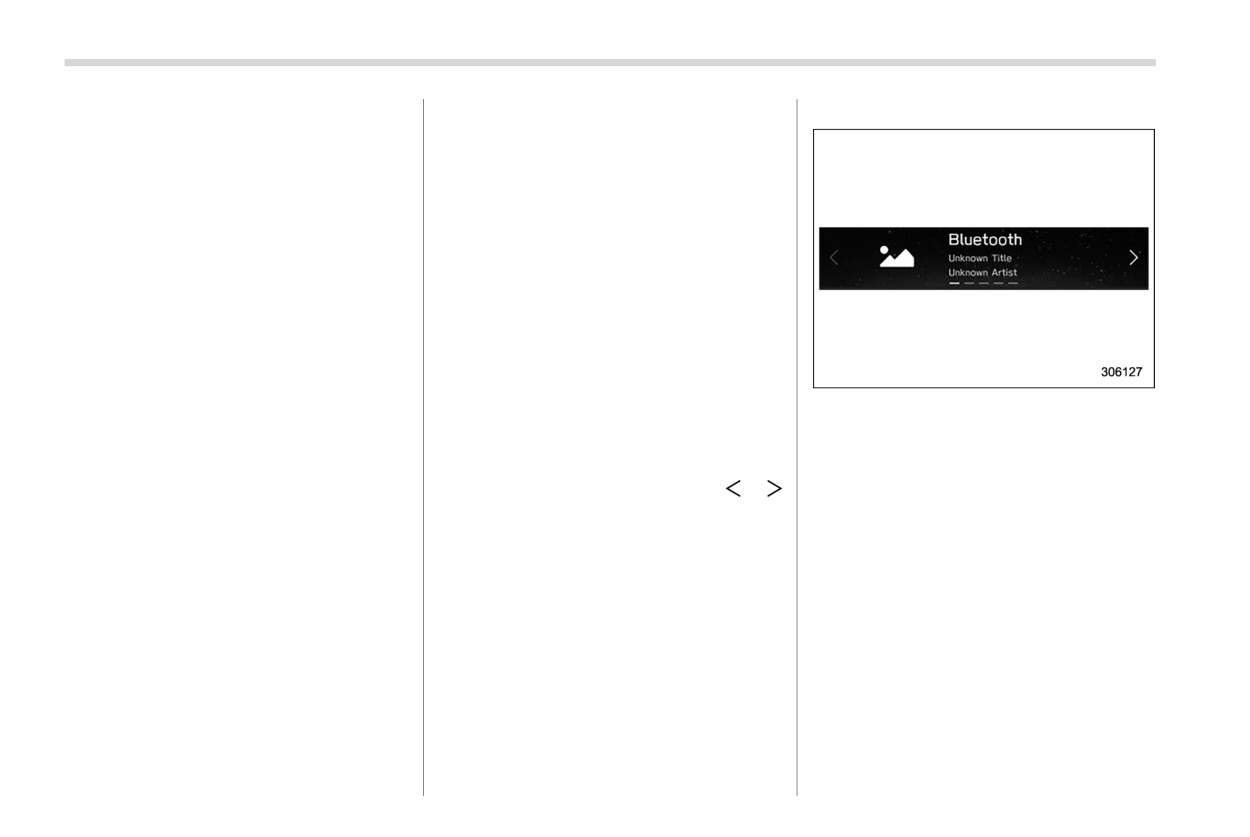
1
HOME icon (Refer to “HOME icon”
FP210.)
2
Status bar (Refer to “Status bar” FP204.)
3
Information bar
(Refer to
“Information
- CONTINUED -
204 Center information display (CID)
bar” FP204.)
- When starting the engine after
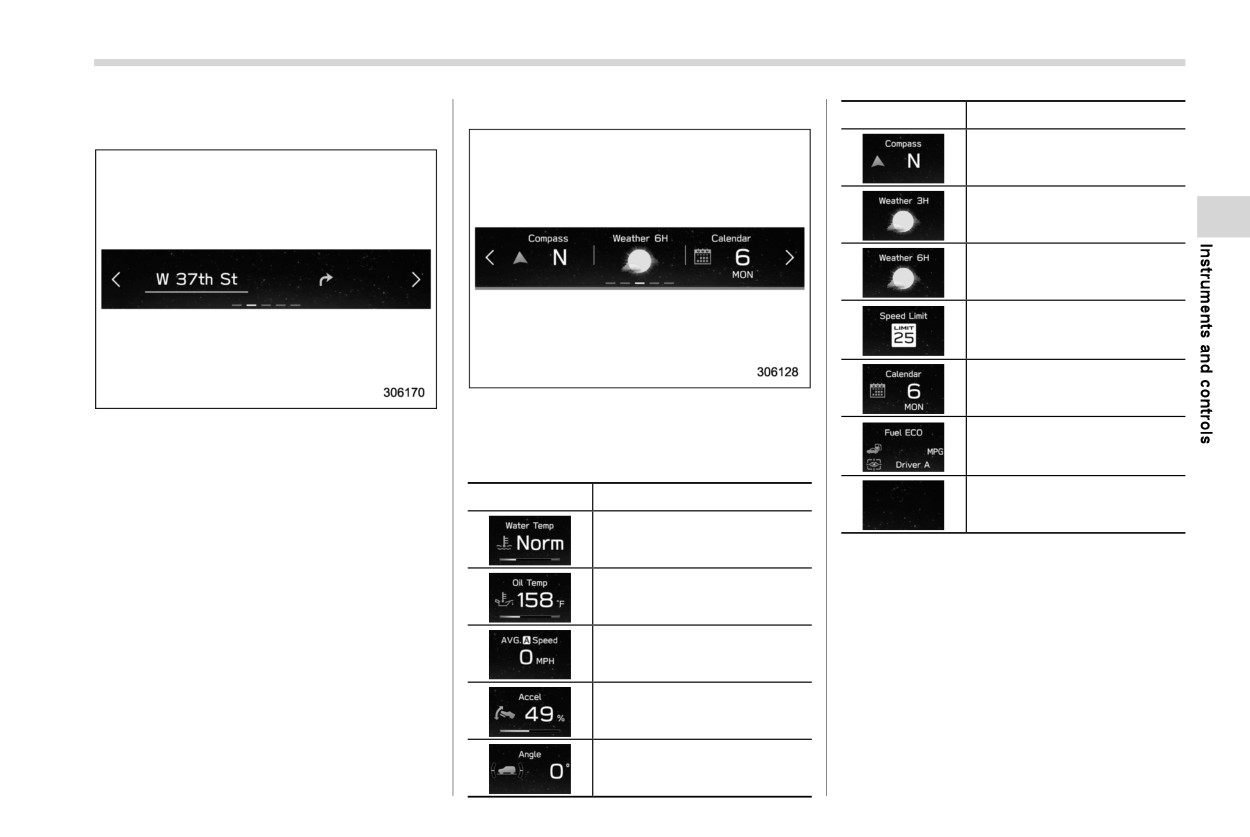
Audio screen:
4
Main screen (Refer to
“Main screen”
being parked for a certain period
FP210.)
of time
5
Driver profiles icon
(Refer to
“Driver
You can set the temperature units to
profiles icon” FP210.)
6
Manage device icon (Refer to the sepa-
be displayed in Celsius
(8C) or
rate navigation/audio Owner’s Manual.)
Fahrenheit (8F). For details, refer to
7
Climate control screen (Refer to “Climate
“General settings” FP210.
control screen” FP210.)
The clock can be displayed in either
8
Car settings icon (Refer to “Car settings
12-hour display or 24-hour display.
icon” FP208.)
For details, refer to “Clock” FP228.
While the ignition switch is in the “ACC” or
Touch the clock on the status bar to
“ON” position, the touch panel will activate.
display the clock setting screen.
Refer to “Clock” FP228.
! Status bar
For details about Bluetooth device
The outside temperature and clock are
information, refer to the navigation/
The screen of the currently selected audio
displayed on the status bar.
audio Owner’s Manual.
source is displayed.
For details about how to use the audio set,
NOTE
! Information bar
refer to the separate navigation/audio
. The outside temperature indicator
Swipe the information bar or touch or
Owner’s Manual.
shows the temperature around the
on the information bar to switch the item
sensor. However, the temperature
displayed.
may not be indicated correctly or
the update may be delayed in the
following conditions.
- While parking or driving at low
speeds
- When the outside temperature
changes suddenly
(example:
when going in and out of an
underground parking area or
when passing through a tunnel)
Center information display (CID)
205
Navigation screen (models with naviga-
Favorite screen:
Item
Details
tion system):
Direction of the vehicle*1
Weather information for the
next three hours*
2
Weather information for the
next six hours*
2
Posted speed limit of the
road you are currently driv-
ing on*1
Calendar
Favorite screen
The directions to the destination are
This screen displays up to three optional
Driver Monitoring System*1
displayed on the screen.
pieces of information that can be selected
information and the average
fuel consumption of driver
from the following items.
NOTE
Item
Details
When a destination is not set in the
Nothing is displayed.
navigation system, the compass orien-
Engine coolant temperature
tation, street name and speed limit
*1: If equipped
remain displayed on the screen.
*2: Models with SiriusXM Satellite Radio
Engine oil temperature
NOTE
Some items may not be shown depend-
ing on the model and specifications.
Average vehicle speed
The items shown on the favorite screen
can be changed. For details, refer to
Accelerator opening ratio
“Favorite Widgets” FP221.
Vehicle posture
- CONTINUED -
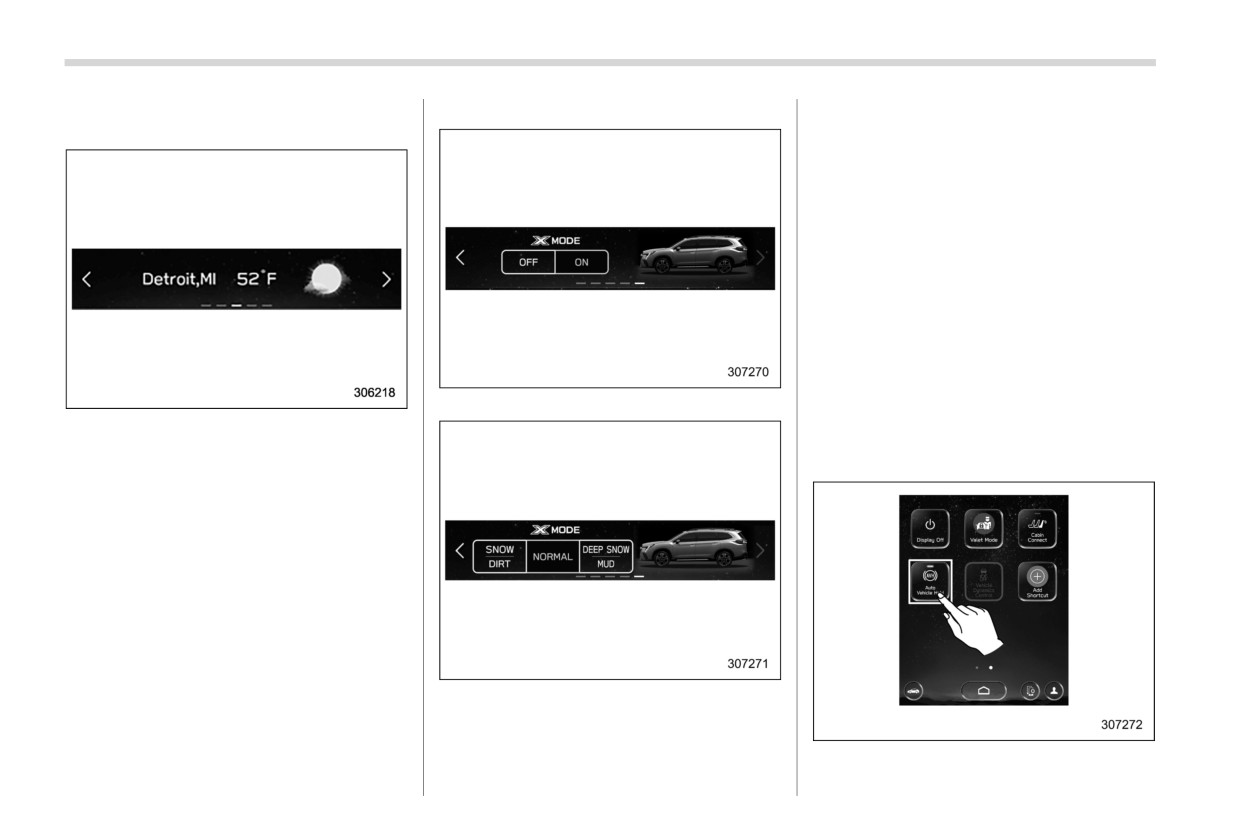
206 Center information display (CID)
Weather information screen
(if
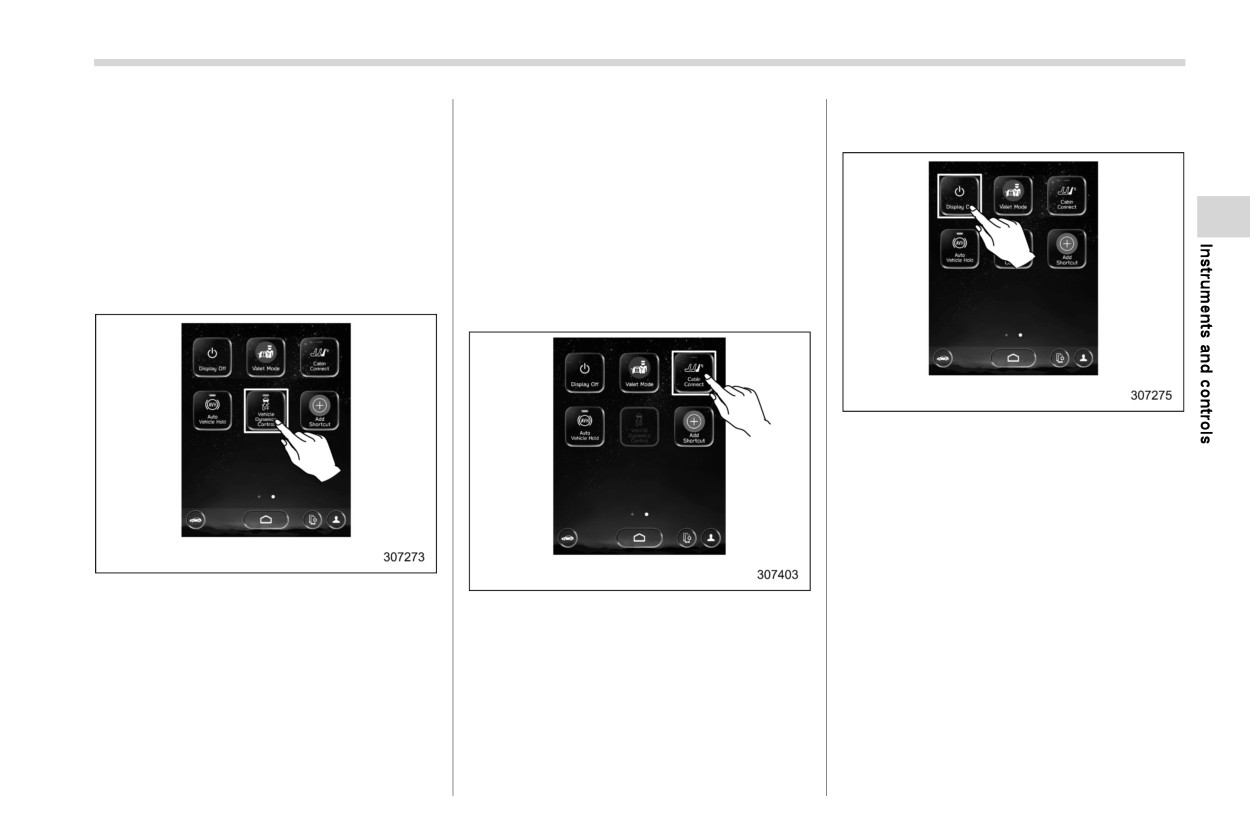
X-MODE screen:
Also, X-MODE can be switched to a
equipped):
different mode on the screen.
! Main screen
For details about the following menu, refer
to the separate navigation/audio Owner’s
Manual.
Radio
Media
Phone
Map
Apps
My Subaru
Models with 1
mode
SUBARU STARLINK
Add Shortcut
NOTE
. When all of the following conditions
! Auto Vehicle Hold icon
are satisfied, weather information is
displayed.
- The vehicle is equipped with an
audio and navigation system for
SiriusXM satellite radio.
- The SiriusXM satellite radio sub-
scription is active.
. The weather forecast for the set
destination remains displayed until
a new destination is set or until the
destination is reached.
Models with 2
modes
. Depending on the reception timing
X-MODE information is displayed on the
of XM, the weather information may
screen.
be delayed.
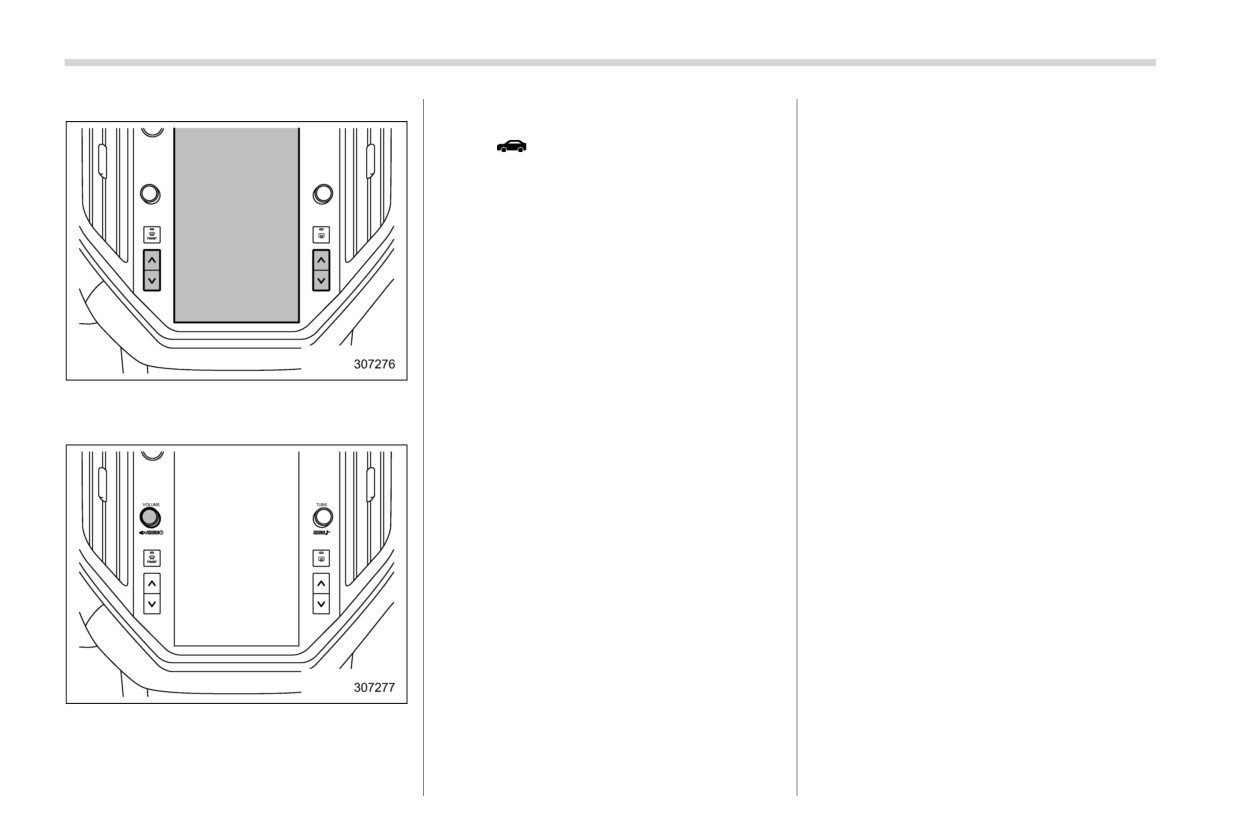
To turn the Auto Vehicle Hold function on
Center information display (CID)
207
and off, touch the “Auto Vehicle Hold” icon.
The Vehicle Dynamics Control system will
! Display Off
When the Auto Vehicle Hold function is off,
be deactivated. When you touch the
Activation of the display off mode:
the Auto Vehicle Hold indicator light on the
“Vehicle Dynamics Control” icon again to
combination meter turns off. The “Auto
reactivate the Vehicle Dynamics Control
Vehicle Hold” indicator on center informa-
system, the Vehicle Dynamics Control
tion display also turns off at the same time.
OFF indicator light turns off. The “Vehicle
Dynamics Control” icon will then turn on.
Refer to “To turn on/off the Auto Vehicle
Hold function” FP377.
Refer to
“To turn on/off the Vehicle
Dynamics Control system” FP368.
! Vehicle Dynamics Control icon
! Cabin Connect
1. Touch “Display Off”.
To turn the Vehicle Dynamics Control on
and off, touch the
“Vehicle Dynamics
Touch the “Cabin Connect” icon to turn it
Control” icon.
on and off. When the “Cabin Connect”
function is on, the indicator illuminates,
When the Vehicle Dynamics Control sys-
tem is turned off during engine operation,
when the “Cabin Connect” function is off,
the indicator does not illuminate. For de-
the Vehicle Dynamics Control OFF indica-
tails, refer to “Cabin Connect” FP302.
tor light on the combination meter illumi-
nates. The
“Vehicle Dynamics Control”
icon will then turn off.
- CONTINUED -
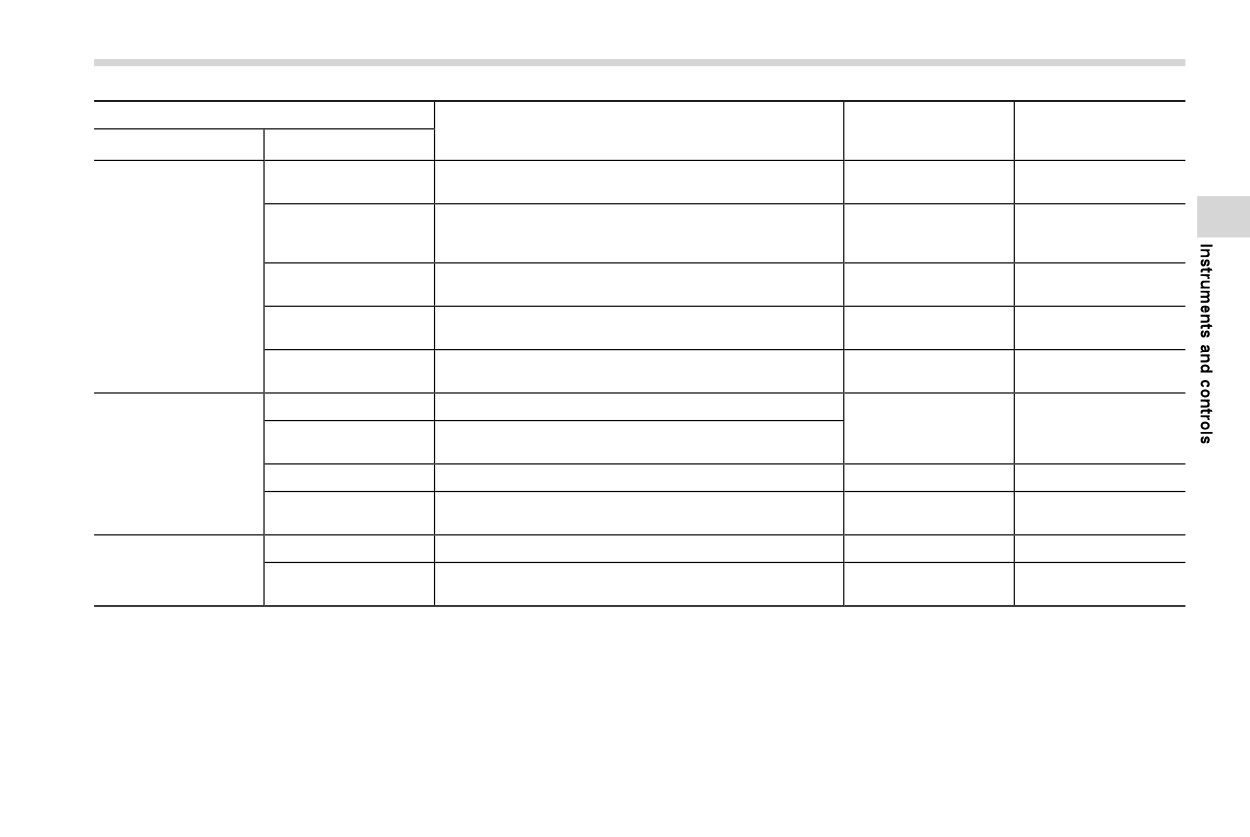
208 Center information display (CID)
Deactivation of the display off mode:
! Car settings icon
Touch
to display the items that are
changeable while driving.
1. Touch the display or push the tem-
perature control button.
2. Press and hold the volume knob to turn
the screen back on.
Center information display (CID)
209
Item
Page reference for
Page reference for
Available settings
the vehicle system
the setting procedure
1st menu
2nd menu
operation
Vehicle Dynamics
ON/OFF
368
220
Control
Models with 1 mode: ON/OFF
X-MODE
Models with 2 modes: Normal, Deep Snow/Mud, Snow/
370
220
Dirt
Vehicle Control
Auto Vehicle Hold
ON/OFF
376
220
(AVH)
Steering Responsive
ON/OFF
238
220
Headlights (SRH)
Cruise Control Accel-
*2
Eco/Comfort/Standard/Dynamic
—
eration
Pre-Collision Braking
Setting ON/Setting OFF
*2
—
All Functions/Lane Departure Prevention Function
Lane Departure
Only/Warning Buzzer Only/OFF
Driving Assistance
BSD/RCTA*1
ON/OFF
388
220
Driver Monitoring
ON/OFF
402
220
System*1
Warning Volume
Min/Mid/Max
387, 401 and *2
—
More Settings
km, km/h, Liter/
Units
168 and 194
220
Miles, MPH, Gallon
*1: If equipped
*2: For details about the EyeSight system, refer to the Owner’s Manual supplement for the EyeSight system.
- CONTINUED -
210 Center information display (CID)
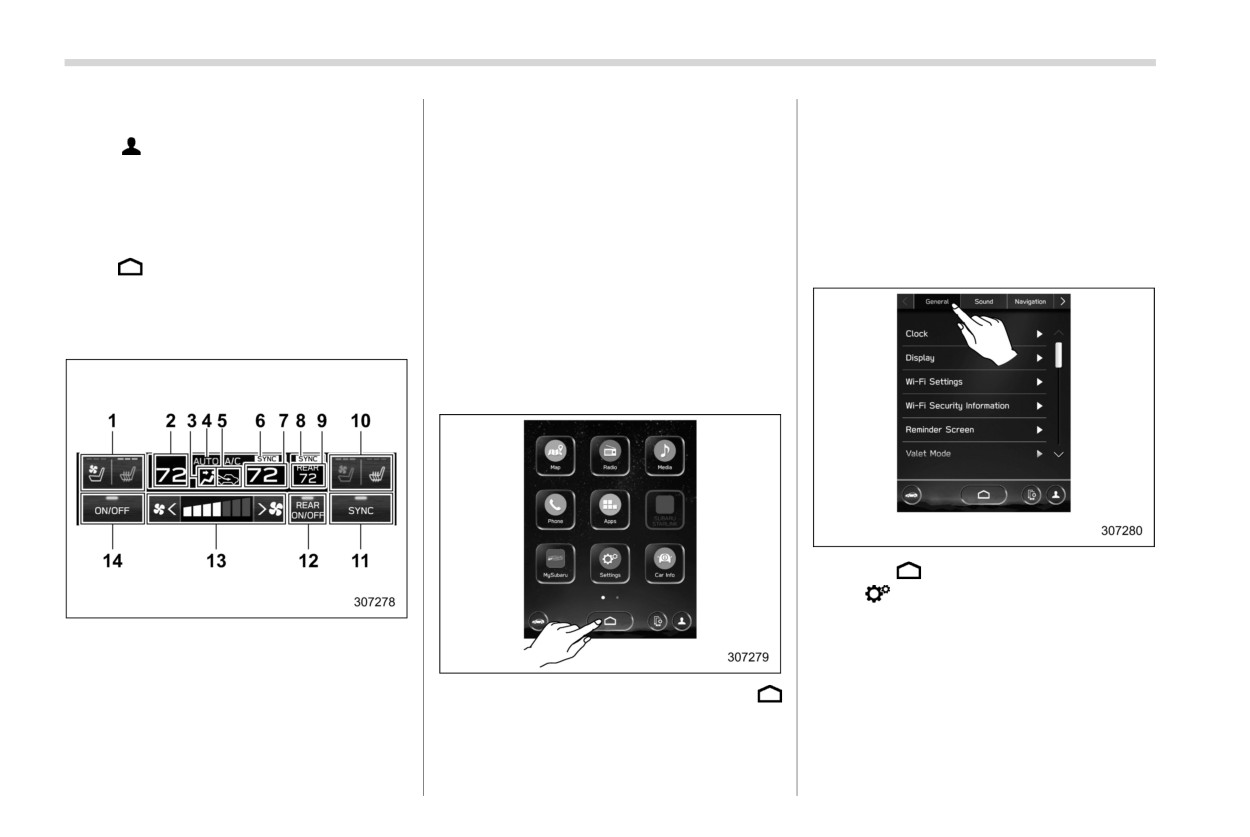
7
Set temperature indicator (passenger’s
! Driver profiles icon
about other items, refer to the separate
side)
navigation/audio Owner’s Manual.
Touch
(driver profiles icon) to confirm
8
REAR SYNC mode indicator
the driver’s information. For details, refer
9
REAR set temperature
-
“Settings” ? “General”
to the separate navigation/audio Owner’s
10
Front passenger’s seat heater/ventilation
–
“Settings” ? “Car”
icon (if equipped)
Manual.
–
“Car Info”
11
Customizable icon
! HOME icon
12
REAR Climate control ON/OFF icon
! General settings
13
Fan speed control
Touch
(HOME) to display the top menu.
14
Climate control ON/OFF icon
Set the time and display general items.
! Climate control screen
When operating the climate control sys-
The climate control status is shown on the
tem, the main screen switches to the
screen.
climate control screen. For details, refer
to “Climate control panel” FP279.
! Main screen
1. Touch
(HOME).
2.
?
(Settings)
3.
? “General”
1
Driver’s seat heater/ventilation icon
(if
4. Select the preferred menu.
equipped)
2
Set temperature indicator (driver’s side)
3
Airflow mode
To display the main screen, touch
4
Climate control mode
(HOME).
5
Air inlet selection
In this Owner’s Manual, the following
6
SYNC mode indicator
settings will be explained. For details
Center information display (CID)
211
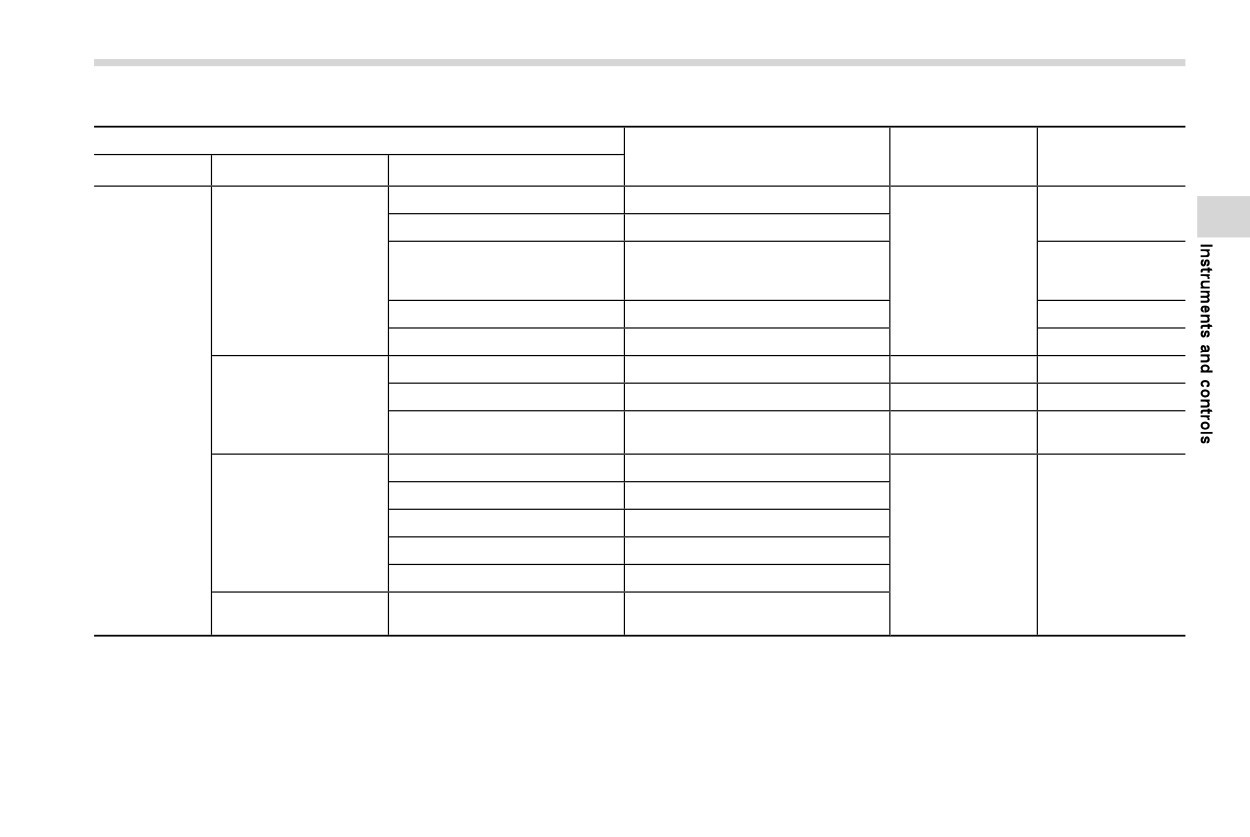
The setting adjustments to the following items can be manually changed to meet your personal requirements.
Item
Page reference for
Page reference for
Available settings
the vehicle system
the setting proce-
1st menu
2nd menu
3rd menu
operation
dure
Time Setting*1*2
AUTO/Manual
228
Time Setting*3
Sync With Phone/Manual
AUTO/Hawaii/Alaska/Pacific/
Clock
Time Zone*1
Mountain/Central/Eastern/Atlantic/
228
220
Newfoundland/Guam
Daylight Saving Time*1
AUTO/ON (+1 hour)/OFF
220
Clock Format
12H/24H
220
Display Off
Turn the screen off.
—
220
Brightness Dial
ON/OFF
171
220
Display
General
Set and adjust the brightness and
Brightness/Contrast
220
220
contrast of the display.
Wi-Fi
ON/OFF
Connected to:
Select the registered devise.
Wi-Fi Settings
Available Wi-Fi Networks
Add
*6
—
Wi-Fi Protected Setup
PIN Setup/Push Button Setup
Registered Wi-Fi Networks
—
Wi-Fi Security Infor-
Wi-Fi Security Information (AP
—
mation
mode)
- CONTINUED -
212 Center information display (CID)
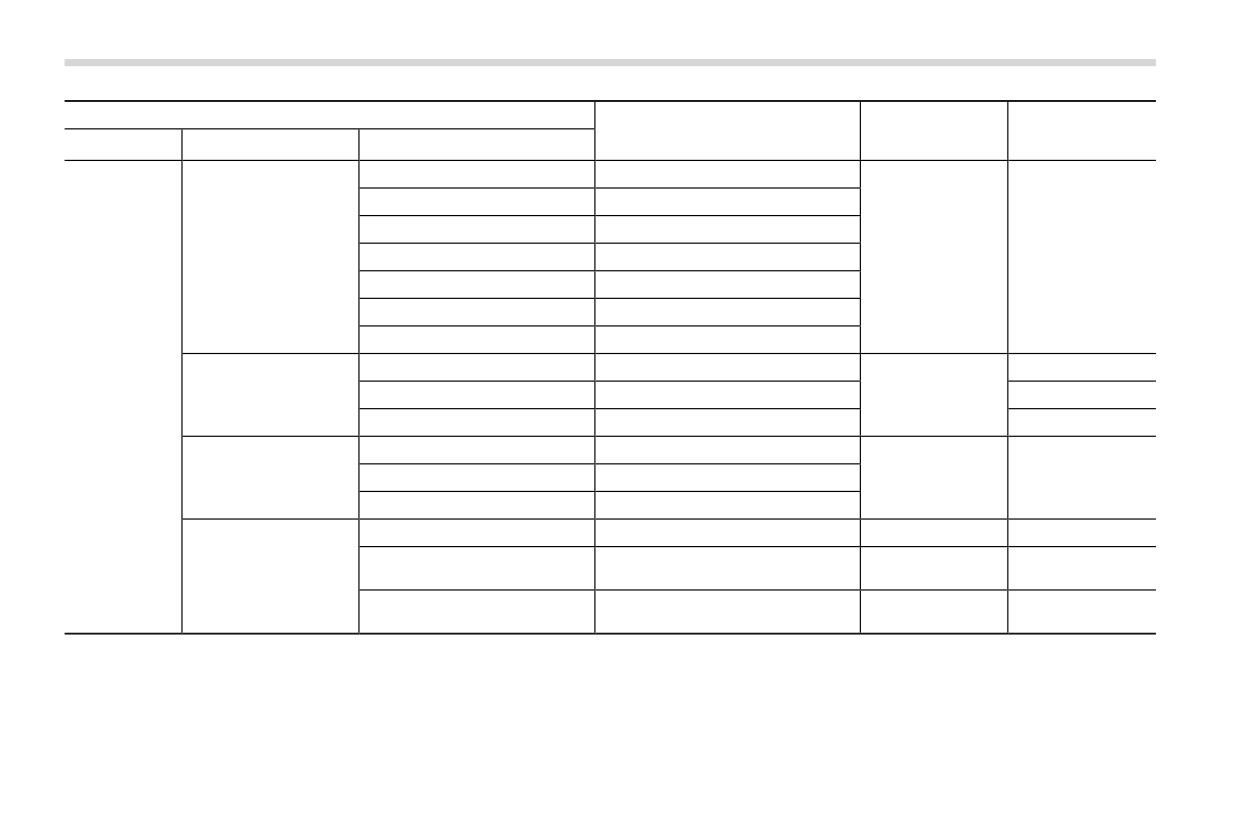
Item
Page reference for
Page reference for
Available settings
the vehicle system
the setting proce-
1st menu
2nd menu
3rd menu
operation
dure
Wi-Fi Hotspot
ON/OFF
Wi-Fi name (SSID):
—
Security Type:
—
Wi-Fi Hotspot
Password:
—
*7
—
Broadcast Frequency:
—
SSID Broadcast
ON/OFF
Connected Devices:
—
Maintenance
ON/OFF
220
General
Reminder Screen
Birthday
ON/OFF
202
220
Anniversary
ON/OFF
220
Passcode Setting*8
Keyboard: Enter New Passcode
Valet Mode
Activate Valet Mode
Keyboard: Enter Your Passcode
230
220
Change Passcode
Keyboard: Change Passcode
Gauge Initial Movement
ON/OFF
168
220
Eco Gauge/OUT TEMP/Clock/
Meter Information Screen
196
220
Meter Screen
Compass*4/Gas Range
Turn by Turn Screen Interrup-
ON/OFF
198
220
tion*1
Center information display (CID)
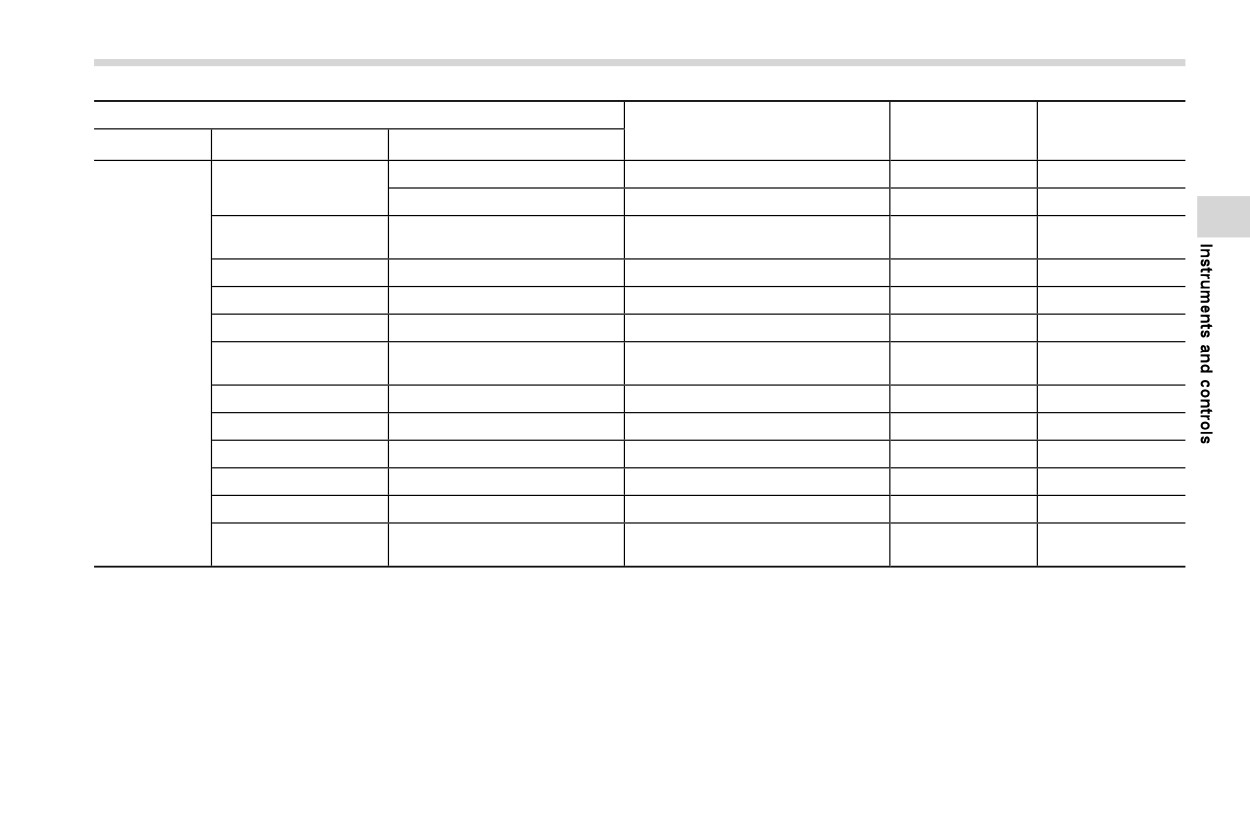
213
Item
Page reference for
Page reference for
Available settings
the vehicle system
the setting proce-
1st menu
2nd menu
3rd menu
operation
dure
Rear Camera Delay Control
ON/OFF
320
220
Camera
Steering Angle Lines
ON/OFF
320
220
A/C/MAX A/C/AUTO/Recircula-
Climate Control
Customize Climate Button
286
220
tion/SYNC
Temperature Unit
8F/8C
—
—
221
Language
—
English/Français/Español
194 and 201
220
Tire Pressure Units*5
—
kPa/PSi
198
220
Home Screen Short-
General
—
ON/OFF
*6
220
cuts
Welcome Screen
—
ON/OFF
195
220
Goodbye Screen
—
ON/OFF
195
220
Favorite Widgets
—
Set a favorite widget from the list.
204
221
Birthday List
—
Set a birthday.
202
221
Anniversary List
—
Set an anniversary day.
202
222
Periodic Rest Notifica-
—
ON/OFF
*6
—
tion*1
- CONTINUED -