Seat Tarraco (2022 year). Manual in english - page 6
Operation
Multifunction steering wheel
Functions
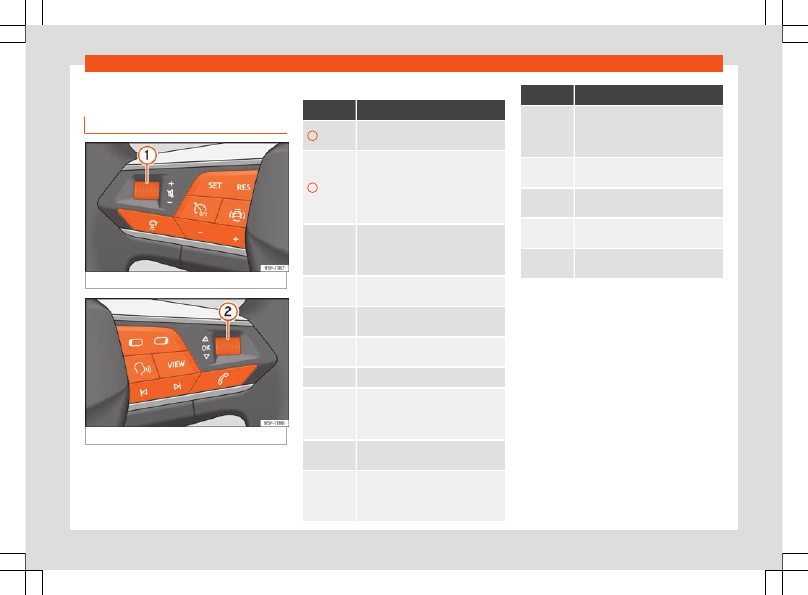
Fig. 70
Controls on the steering wheel.
Fig. 71
Controls on the steering wheel.
The steering wheel includes multifunction
modules from where it is possible to control
the audio, telephone, navigation, voice con-
trol and assist functions without the driver
needing to be distracted from the road.
Buttons available depending on the version
Symbol
Function
1
Turn:
Turn volume up/down
Press:
Mute volume
2
Turn:
Search in the instrument panel
menu. In Navigation mode, turn to in-
crease/decrease map size in SEAT
Digital Cockpit
Press:
Select the highlighted option in
the instrument panel
Radio:
Search for the previous/next
station.
Media:
Short press: previous/next
track; long press: fast forward/rewind
Activate phone menu (answer call,
end call)
Switch between media and radio
sources
Change the instrument panel menu
(previous/next)
Enable/disable voice control
Analogue Panel:
No function
Digital Panel (SEAT Digital Cockpit):
Change digital panel views
Activate or deactivate steering wheel
heating
Connect/disconnect the Cruise con-
trol system
›››
/ ACC
Symbol
Function
: Activate ACC / Cruise control sys-
tem / Limiter
: Reset programmed ACC speed or
cruise control system
: Increase programmed speed
: Decrease programmed speed
Open the drive assist menu in the in-
strument panel
Modify the programmed ACC dis-
tance
Switching Travel Assist on and off
92