Seat Alhambra (2022 year). Manual in english - page 15
Operating modes
Note
If you edit a number before calling, it will
not be saved in the phonebook but only
used for the call.
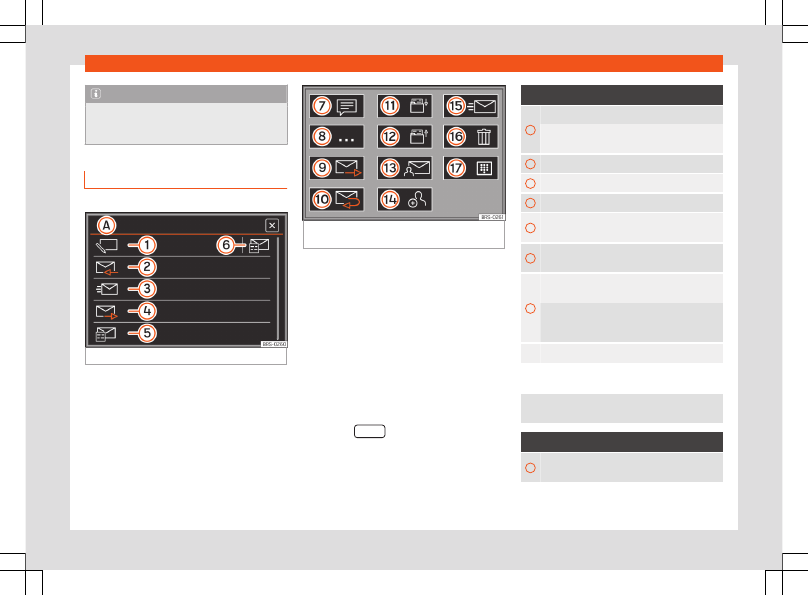
Short messages (SMS) menu
3
Not available for model: Media System Colour
Fig. 227
Short messages (SMS) menu.
Fig. 228
Overview of possible function buttons
in submenus.
Requirements
To receive, view and send short messages
(SMS) via the infotainment system, the mobile
phone connected to the infotainment system
must
be compatible with the
MAP
›››
Bluetooth® profile.
Due to the large number of different Blue-
tooth devices on the market, it cannot be
guaranteed that all of the functions will be
executed.
Opening the short messages (SMS) menu
●
Press the
SMS
function button from the
TELEPHONE
main menu.
Function buttons
A
Indicates the selected menu.
: To return to the short message (SMS) menu
.
1
New SMS
: To write and send an SMS.
2
Inbox
: To open the received SMS folder.
3
Sent
: To open the sent SMS folder.
4
Outbox
: To open the outbox folder. SMS mes-
sages that have not been sent are stored here.
5
Drafts
: To open the Drafts folder. SMSs stored
as drafts are saved here.
6
Open the
Templates
menu: To select a text
template from the list.
During route guidance, a template is prepared
with the current destination (
I am on my
way to <...> <...>
).
To return to the main
PHONE
menu.
Possible submenu function buttons
The number of functions available depends on the
mobile phone that is connected.
Function buttons
7
For the voice control system to read the text of
the SMS.
»
235