Seat Toledo (2019 year). Manual in english - page 2
The essentials
Driver information system
Introduction
With the ignition switched on, it is possible to
read the different functions of the display by
scrolling through the menus.
In vehicles with multifunction steering wheel,
the multifunction display can only be operat-
ed with the steering wheel buttons.
The number of menus displayed on the in-
strument panel will vary according to the ve-
hicle electronics and equipment.
A specialised workshop will be able to pro-
gramme or modify additional functions, ac-
cording to the vehicle equipment. SEAT rec-
ommends visiting a SEAT Official Service.
Some menu options can only be read when
the vehicle is at a standstill.
As long as a priority 1 warning is displayed, it
will not be possible to read the menus
. Some warning messages can
be confirmed and made to disappear with
the windscreen wiper lever button or the mul-
tifunction steering wheel button.
The information system also provides the fol-
lowing information and displays (depending
on the vehicle's equipment):
Driving data
■
Since start
■
Since refuelling
■
Long-term
Assistance systems
Navigation
›››
Audio
›››
Telephone
›››
Vehicle status
WARNING
Any distraction may lead to an accident,
with the risk of injury.
●
Do not operate the instrument panel con-
trols when driving.
Operating the instrument panel
menus
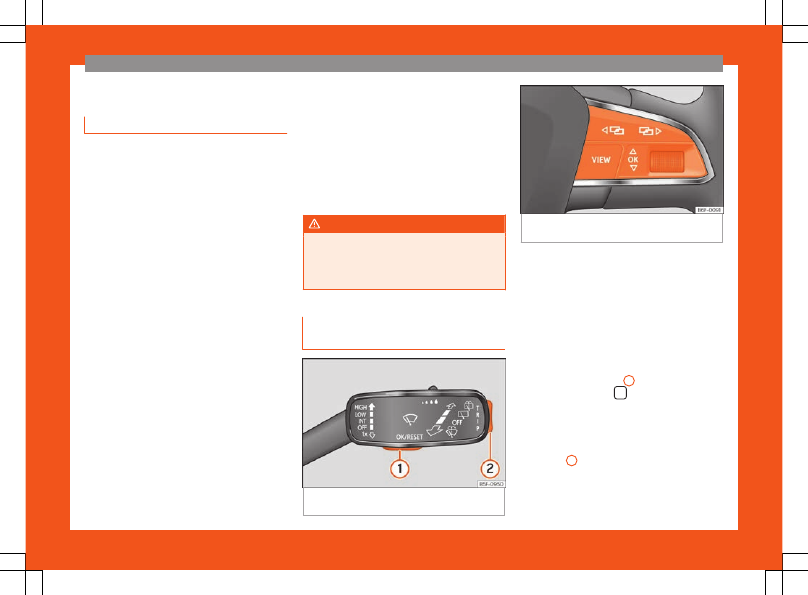
Fig. 38
Windscreen wipers lever: control but-
tons.
Fig. 39
Right side of the multifunction steering
wheel: control buttons.
The driver information system is controlled
with the multifunction steering wheel buttons
or with the windscreen wiper lever
(if the vehicle is not equipped with
multifunction steering wheel).
Enabling the main menu
●
Switch the ignition on.
●
If a message or vehicle pictogram appears,
press button
1
on the windscreen
wiper lever or button
on the multifunction
steering wheel
.
●
If using the wiper lever:
to display the main
screen or to return to the main menu from an-
other menu, hold down the rocker button
›››
2
.
●
If handled with the multi-function steering
wheel:
the main menu list will not be dis-
played. To go from point to point in the main
»
27