Peugeot 4008 (2017 year). Instruction - part 16
 

  Index      Peugeot     Peugeot 4008 - instruction 2017 year in english


Search            copyright infringement  


Content   ..  14  15  16  17   ..


Peugeot 4008 (2017 year). Instruction - part 16


239

4008_en_Chap10a_Mitsu3_ed01-2016

BLUETOOTH

®

 TELEPHONE  

WITH VOICE RECOGNITION

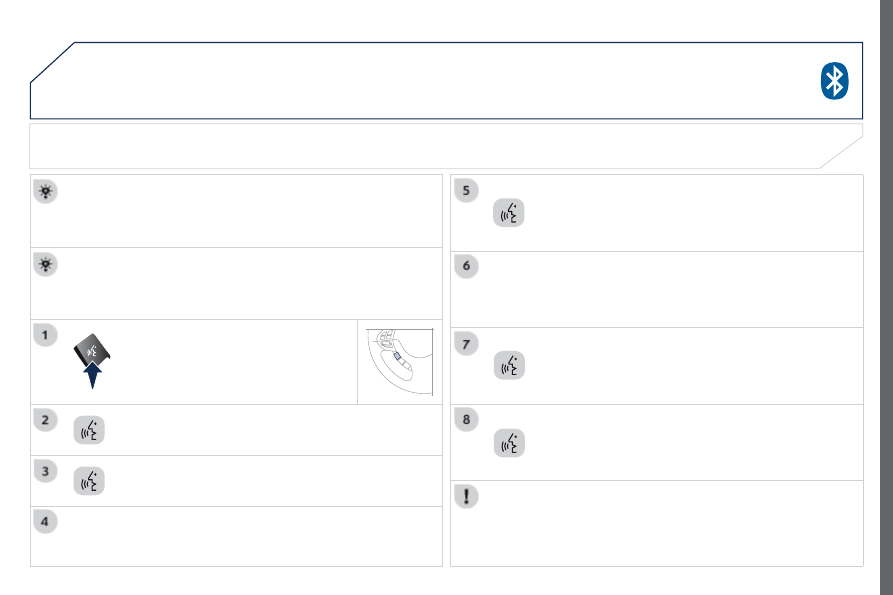
For reasons of safety and because the sustained attention of the 
driver is needed, operations of matching a Bluetooth

®

 mobile phone 

with the audio system's hands-free function must be done with the 
vehicle stationary.

the systems says "

Please say the 4 digits of a pairing code".

Press this button.

The system confirms the validity of the number spoken, 

answer "Yes".
Say "No" to return to step 7.

Say "

Pairing options".

Pairing a Bluetooth

® 

telephone

First connection

Say "

Pair a telephone".

Say "

Configure".

the system can register up to 7 Bluetooth

®

 compatible mobile 

telephones.
the telephone which has the highest level of priority is connected 
automatically.

the system says "Do you wish to 

pair a telephone, delete a 

telephone or obtain the list of paired telephones?".

Say a 4-digit number which will be recorded as the pairing 
code.

Remember this pairing code as you must enter it in the telephone  
in one of the following steps of the matching procedure.

240

4008_en_Chap10a_Mitsu3_ed01-2016

Consult your mobile telephone's user manual and enter 
the pairing code recorded in step 7 in the telephone.

BLUETOOTH

®

 TELEPHONE  

WITH VOICE RECOGNITION

the system says "Start the 

pairing procedure on the telephone. 

Consult the instructions in the telephone manual".

If the code is incorrect, the system locks. to clear the code:

check that the telephone's voice recognition is not activated,

with the ignition on and the audio system active, press  
the eND CALL button for 2 seconds, 3 times in succession.

When it detects a Bluetooth

®

 compatible mobile telephone, the 

system says "

Please say the name of the telephone after the 

beep".

After the audible signal, allocate a name to the telephone 
by saying the name of your choice.

the system says "

Allocate an order of priority between 1 and 7. 

One is the highest level of priority".

give a number between 1 and 7 to establish the level of 
priority of the mobile telephone.

The system says and confirms the "

name of the telephone" and 

the "number" of its priority.

Answer "Yes".
Say "No" to return to step 13.

the systems says "

Pairing complete" then emits an audible signal 

and deactivates the voice recognition.

the services available depend on the network, the SIM card and the compatibility of the Bluetooth

®

 telephone used. Check in your telephone 

user manual and with your service provider for the services you have access to.

If the system does not detect the Bluetooth

®

 compatible mobile 

telephone, the matching process stops ands is accompanied by an 
audible signal.
If you select a level of priority which has already been allocated to 
another telephone, the system asks you if you wish to replace this 
level of priority.

241

4008_en_Chap10a_Mitsu3_ed01-2016

BLUETOOTH

®

 TELEPHONE  

WITH VOICE RECOGNITION

Say "Dial".

the system says "

Number please".

Using a telephone number

Call out the telephone number.

Press this button.

The system asks you to confirm this number,  

answer "Yes".
Say "No" to return to the previous step.

You must have first paired a Bluetooth

® 

compatible mobile 

telephone with the system.

242

4008_en_Chap10a_Mitsu3_ed01-2016

BLUETOOTH

®

 TELEPHONE  

WITH VOICE RECOGNITION

the system has its own phone book, independent of that of the 
mobile telephone.
It can contain up to 32 names for each language.
each name in the phone book is associated with 4 locations: 
HOMe, WORK, MOBILe and PAgeR.

the system says "Select one of the following items: New Entry, 
Change, List of names, Delete or Clear all, or say Cancel to 
return to the main menu
".

Say "New entry".

the system says "

HOME, WORK, MOBILE OR PAGER".

give the location which corresponds to the number that 
you wish to record.

The system asks you to confirm the location.

Answer "Yes".
Say "No" to return to step 7.

If a telephone number has already been recorded for this location, 
the system says "

The current number is -number-, number 

please".

Saving a name in the system phone book

Press this button.

Say "Phone book".

the system says "

Name please".

give the name of your choice.

If you do not wish to change the telephone number, repeat 
the original number to retain it, otherwise say the new 
number.

Answer "Yes".
Say "No" to return to step 11.

The system asks you to confirm the number.

243

4008_en_Chap10a_Mitsu3_ed01-2016

BLUETOOTH

®

 TELEPHONE  

WITH VOICE RECOGNITION

Say "Call".

the system says "

Name please".

Using a name in the system phone book

give the name of the person that you wish to call.

Press this button.

give the location corresponding to the number that you 
wish to call.

You must have first paired a compatible Bluetooth

®

 mobile 

telephone with the system.

If several telephone numbers have been recorded for this person, 
the system says "Do you wish to call 

-name- {home}, {work}, 

{mobile} or {pager}?"

The system request confirmation of the name.

Answer "Yes".
Say "No" to return to step 4.

the system says "Call to 

-name- at -location-" and makes the call.

244

4008_en_Chap10a_Mitsu3_ed01-2016

BLUETOOTH

®

 TELEPHONE  

WITH VOICE RECOGNITION

the telephone ring is sent to the speaker by the front passenger's 
seat.
If an audio source (CD, radio, ...) is in operation when the call is 
received, it is placed on Mute and only the incoming call is heard.
When the ignition switch is in the ACC or ON position, the audio 
system is activated automatically if an incoming call is received, 
even if it was originally off.

At the end of the call, the audio system returns to its previous state.

Redial the last number called

Press this button.

Say "

Redial".

Receiving a call

Press this button.

245

4008_en_Chap10a_Mitsu3_ed01-2016

Voice commands (1/2)

Configure

Phone book

Dial

Call

Redial

emergency number

Pairing options

Pair a telephone

Delete a telephone

List of paired telephones

Select a telephone

Previous

Press this button to start the voice recognition.

When the system is waiting for a voice command, say "

Help" to obtain a list of commands which can be used in the current situation.

Divert the call

Add a location

Configure the confirmation requests

Language

New entry

Delete

Change

Call this number

Change another entry

try again

Clear all

List of names

Home, at home

Work, at work

Mobile, on mobile

Pager, on pager

Help

Continue

All

Cancel

Mute

Deactivate mute

Yes

No

BLUETOOTH

®

 TELEPHONE  

WITH VOICE RECOGNITION

246

4008_en_Chap10a_Mitsu3_ed01-2016

Voice commands (2/2)

Press this button to start the voice recognition.

When the system is waiting for a voice command, say "

Help" to obtain a list of commands which can be used in the current situation.

Zero

One

two

three

Four

Five

Six

Seven

eight

Nine

Star (*)

Hash (#)

Word training

PIN

Repeat training

Activate

Deactivate

Incorporate the call

<digits> Send

english

Phone book New entry

Phone book Change

Phone book Delete

Phone book Clear All

Phone book List of names

Configure the confirmation requests
Configure Select a telephone
Configure the pairing options

Delete a name

Configure the language
Configure the PIN

BLUETOOTH

®

 TELEPHONE  

WITH VOICE RECOGNITION

BLUETOOTH

®

 TELEPHONE WITH VOICE RECOGNITION

247

4008_EN_CHAP10B_MITSU6_ED01-2016

AUDIO-TELEMATIC TOUCH 
SCREEN SYSTEM

the system is protected in such a way that it will only 
operate in your vehicle.

01  First steps - Control panel 

For safety reasons, the driver must carry out operations 
which require prolonged attention while the vehicle is 
stationary.
When the engine is switched off and to prevent 
discharging of the battery, the system switches off 
following the activation of the energy economy mode.

CONTENTS

03  General operation 
04 Navigation 
05  Media 
06  Settings
07 Information

p.

p.
p.
p.
p.
p.
p.

 248
 249
 251
 252
 268
 282
 284

02  Steering mounted controls 

p.

 288

08 BLUETOOTH

®

 streaming - telephone

01

248

4008_EN_CHAP10B_MITSU6_ED01-2016

PWR/VOL:

audio system on/off.

volume adjustment for the audio and 
telephone functions.

Short press: change the audio source.
Long press: CD / MP3 / uSB, SD, for fast 
forward or rewind.
Long press: RADIO, automatic frequency 
search down/up.

FOLDER: allows selection of a folder or a 
manual search for a radio station.

OPEN: Allows the screen panel to be opened or closed to insert 
or remove a CD or SD cards.

ZOOM: zoom the map in or out.

Allows the colour map screen the be switched 
between day and night mode according to the 
state of the vehicle's lighting.

Move a finger over the screen to operate 

the system.
use the buttons offered on the screen.

For safety reasons, the driver 

must only carry out operations 

which require prolonged 

attention with the vehicle 
stationary.

Insert the SD card containing 
the navigation mapping data into 
the left-hand slot.

Insert the SD card containing 
the audio data into the right-
hand slot.

FIRST STEPS

02

249

4008_EN_CHAP10B_MITSU6_ED01-2016

Increase / reduce audio volume.

Search for a higher / lower radio frequency.
Previous/next CD track.
CD fast forward/back.

Long press: audio system on / off.
Short press: selection of the source in the 
following order (in a loop):
CD, SD, uSB/iPod, Bluetooth, AuX, FM, 
MW, LW.

STEERING MOUNTED CONTROLS

250

4008_EN_CHAP10B_MITSU6_ED01-2016

03

251

4008_EN_CHAP10B_MITSU6_ED01-2016

Description of the controls - Menus

SETTINGS: used to manage the 

different adjustments.

DESTINATION: used to set 
navigation options and select the 
destination.

NAVI MENU: used for adjustments 
to the navigation system.

MODE: used to select the audio 
source.

INFO: used to check information.

AUDIO: display the screen for the 
last audio source used.

MAP: used to display the current 
position of your vehicle on the map.

GENERAL OPERATION

04

252

4008_EN_CHAP10B_MITSU6_ED01-2016

NAVIGATION

Level 1

Level 2

Level 3

253

4008_EN_CHAP10B_MITSU6_ED01-2016

Level 1

Level 2

Level 3

Comments

guidance

Indicates that a turn should be made to the left or right at the next 
junction and the distance to this junction.
Press on it to to display a navigation zoom to the left of the map.

Navigation  
sub-menu

Confirm Route

Press on it to modify the current navigation criteria.

Change Route

Search Nearby

Set Location

Stop guidance

Voice guide ADJ

TMC (Traffic Message 

Channel)

Press on it to display traffic information transmitted in real time.

type of display and map 
orientation

"View"
"2D/3D"

Indicates North.
Press on it to select the type of screen display and the map orientation 
(2D with vehicle direction, 2D with North at the top, auto 2D according 
to scale or 3D perspective).

Map scale

Indicates the scale of the map displayed.
Press on it to zoom in or out.

Information on 
the destination / 
intermediate destination

Indicates the distance and time to the destination or the intermediate 
destination.

04

254

4008_EN_CHAP10B_MITSU6_ED01-2016

NAVIGATION

Level 1

Level 2

Level 3


Content   ..  14  15  16  17   ..