Peugeot 407 C Dag (2008 year). Instruction - part 12
1
1
22
33
44
22
44
33
1
1
03
162
AUDIO
RADIO
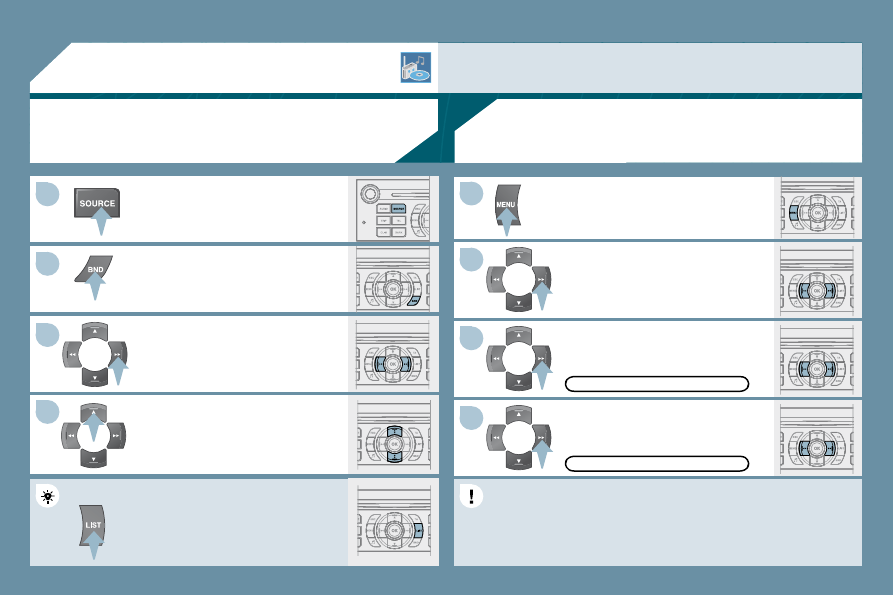
SELECTING A STATION
Press the SOURCE button several
times in succession and select the
radio.
Press the BND button to select a
waveband: FM1, FM2, FMast, AM.
Briefl y press one of the buttons to
carry out an automatic search of the
radio stations.
Press one of the buttons to carry out a
manual search of the radio stations.
Press the LIST button to display the
list of stations received locally
(30 stations maximum).
To update this list, press for more than
two seconds.
The external environment (hills, buildings, tunnels, basement car parks) may block reception, including
in RDS mode. This is a normal effect of the way in which radio waves are transmitted and does not
indicate any failure of the audio equipment.
RDS
Press the MENU button.
The RDS, if displayed, enables you to continue listening to the
same station by means of frequency following. However, in certain
conditions, this RDS station is not followed throughout the country
as radio stations do not cover 100 % of the territory. This explains
the loss of reception of the station during a journey.
Select ACTIVATE FREQUENCY
FOLLOWING (RDS) then press OK.
RDS appears on the display.
Select the FM WAVEBAND
PREFERENCES function then
press OK.
Select AUDIO FUNCTIONS then
press OK.
FM WAVEBAND PREFERENCES
ACTIVATE FREQUENCY FOLLOWING (RDS)