Peugeot 407 C Dag (2008 year). Instruction - part 3
2
34
Selection of the language
German, Spanish, French, English,
Italian, Dutch, Turkish, Portuguese
and Brazilian Portuguese.
Confi guration of the display
- "Setting the brightness-video".
- "Setting the date and time".
- "Selection of the units".
- "Selection of the colours".
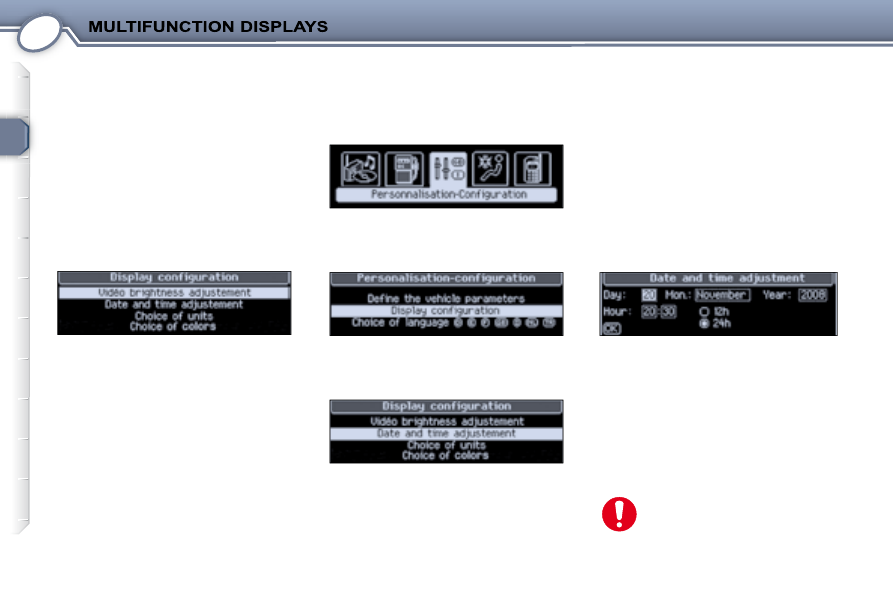
Changing the date and time
From the general menu , select the
"Personalisation-Configuration"
icon using the navigator, then confi rm.
From
the
list
displayed,
select
"Confi guration of the display" , then
confi rm.
From the list displayed, select "Setting
the date and time"
, then confi rm.
Set the parameters one by one:
-
the zone selected is displayed on
the screen,
-
use the navigator to move from
one zone to another,
- your new parameters are confi rmed
one by one, by pressing the navigator
button,
-
all of the changes are saved, if you
click on "OK" on the screen, or
cancelled, if you press the "ESC"
button on the control pad.
For safety reasons, confi gura-
tion of the multifunction dis-
plays by the driver must be
carried out while stationary.