Mazda Mazdaspeed 3 (2013 year). Instruction - part 19
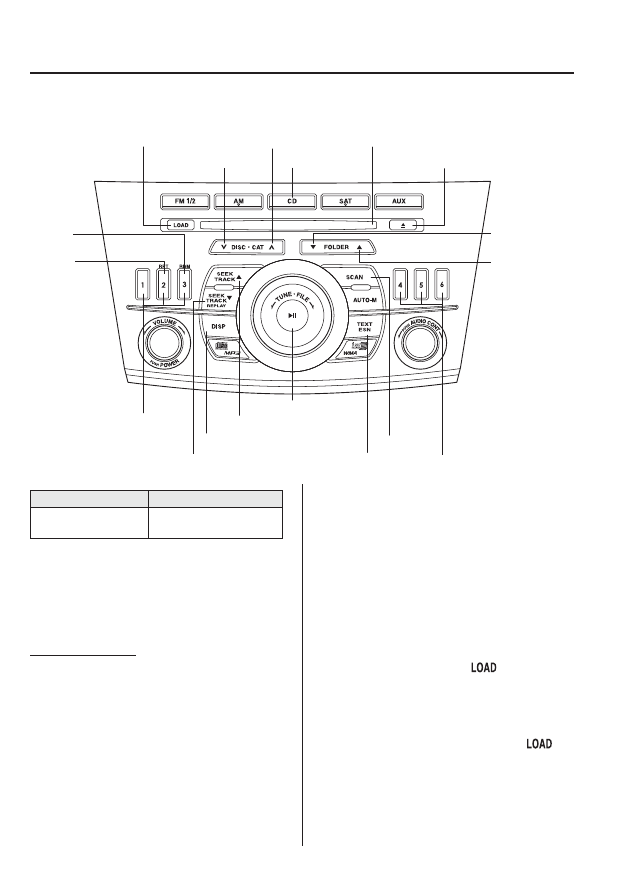
qOperating the In-Dash CD Changer
Track up/Fast-forward button
CD eject button
Display button
Load button
Channel preset buttons
Channel preset buttons
Track down/Reverse button
Text button
Disc down button
Folder down
button
Folder up
button
Disc up button
Random
button
Repeat
button
CD slot
CD play button
Scan button
Play/Pause button
Type
Playable data
Music/MP3/WMA CD
player
l
Music data (CD-DA)
l
MP3/WMA file
NOTE
If a disc has both music data (CD-DA) and
MP3/WMA files, playback of the two or three
file types differs depending on how the disc
was recorded.
Inserting the CD
The CD must be label-side up when
inserting. The auto-loading mechanism
will set the CD and begin play.
NOTE
The CD will begin playback automatically
after insertion. A CD cannot be inserted while
the display reads
“WAIT”. A beeping sound
can be heard during this waiting time.
There will be a short lapse before play begins
while the player reads the digital signals on
the CD.
Normal insertion
1. Press the load button (
).
2. When
“IN” is displayed, insert the CD.
Inserting CDs into desired tray number
1. Press and hold the load button (
)
for about 2 seconds until a beep sound
is heard.
6-56
Interior Comfort
Audio System