Lexus TX500H (2024 year). Manual in english - page 7
 

  Index      Manuals     Lexus TX500H (2024 year). Manual in english


Search            copyright infringement  


Content      ..     5      6      7      8     ..


Lexus TX500H (2024 year). Manual in english - page 7


216

4-3. Operating the lights and wipers

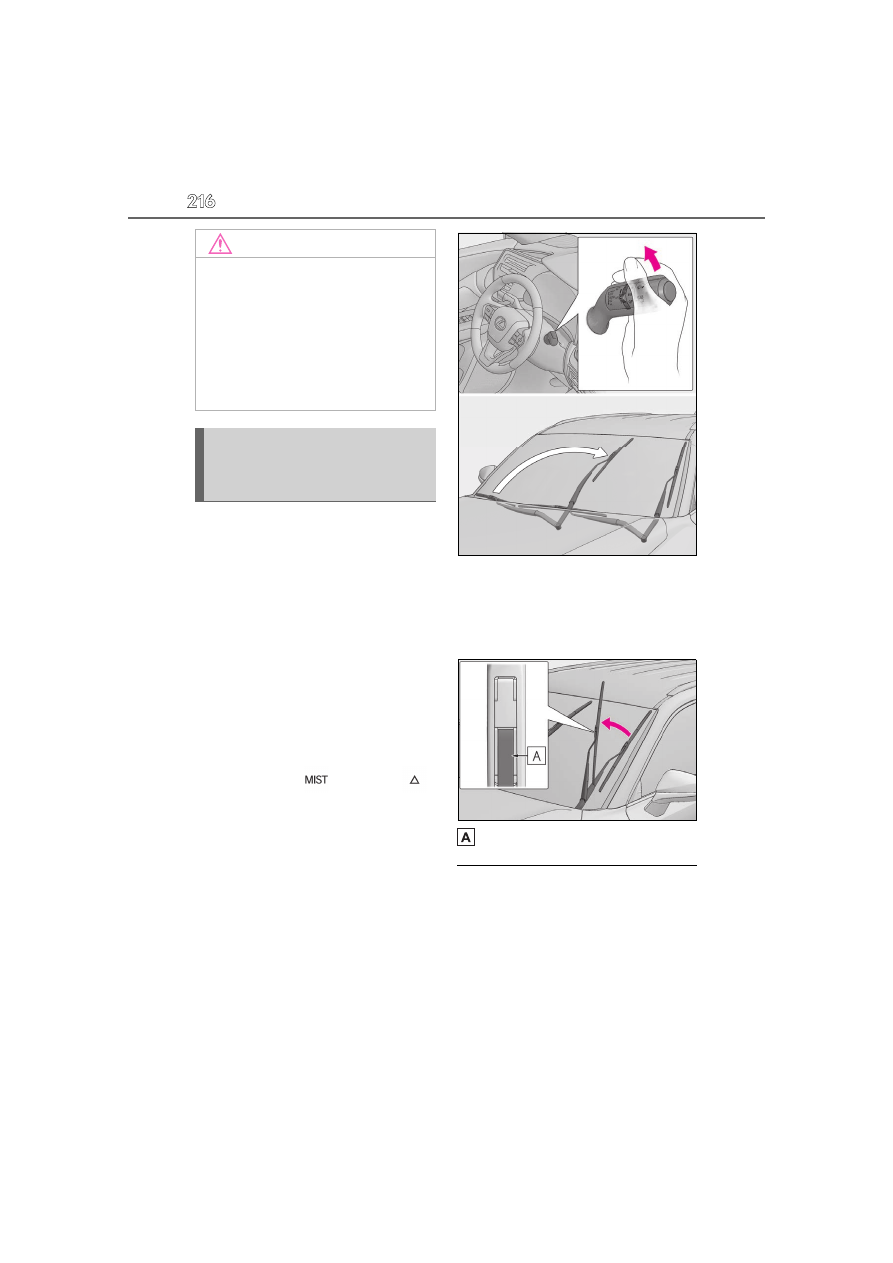
When the windshield wipers are not 
being used, they retract to below the 
hood. To enable the windshield wipers 
to be lifted when parking in cold condi-
tions or when replacing a windshield 
wiper insert, change the rest position of 
the windshield wipers to the service 
position using the wiper lever.

Raising the wipers to the service 
position

Within approximately 45 seconds of 
turning the power switch off, move the 

wiper lever to the 

 (U.S.A.) or 


(Canada) position and hold it for 
approximately 2 seconds or more.

The wipers will move to the service posi-
tion.

Lifting the windshield wipers

While holding the hook portion of the 
wiper arm, lift the windshield wiper 
from the windshield.

Hook portion

Lowering the windshield wipers to the 

retracted position

With the windshield wipers placed on the 

windshield, turn the power switch to ON 

and then move the wiper lever to an operat-

ing position. When the wiper switch is 

turned off, the windshield wipers will stop at 

the retracted position.

NOTICE

When a nozzle becomes blocked

In this case, contact your Lexus dealer.

Do not try to clear it with a pin or other 

object. The nozzle will be damaged.

To prevent 12-volt battery discharge

Do not leave the wipers on longer than 

necessary when the hybrid system is off.

Changing the windshield wiper 
rest position/Lifting the wind-
shield wipers

217

4-3. Operating the lights and wipers

4

Driving

Operating the windshield wipers and 
washer using the voice control system

*

*

: If equipped

For the U.S.A.

The windshield wipers can be moved to the 

service position using the voice control 

system. (Operation is possible only when 

the vehicle is stopped with the wiper switch 
in .)

For Canada

The windshield wipers can be moved to the 

service position using the voice control 

system. (Operation is possible only when 

the vehicle is stopped with the wiper switch 
in .)
For details regarding the voice control sys-

tem, refer to the “MULTIMEDIA 

OWNER’S MANUAL”.

Operating the 

 switch operates 

the rear wiper as follows:

1

 (U.S.A.) or 

 (Canada) Off

2

 (U.S.A.) or 

 (Canada) Inter-

mittent operation

3

 (U.S.A.) or 

 (Canada) Nor-

mal operation

NOTICE

When lifting the windshield wipers

Do not lift the windshield wipers when 

they are in the retracted position 

below the hood. Otherwise, they may 

contact the hood, possibly resulting in 

damage to a windshield wiper and/or 

the hood.

Do not lift a windshield wiper by the 

wiper blade. Otherwise, the wiper 

blade may be deformed.

Do not operate the wiper lever when 

the windshield wipers are lifted. Oth-

erwise, the windshield wipers may 

contact the hood, possibly resulting in 

damage to the windshield wipers 

and/or hood.

Rear window wiper and 
washer

NOTICE

When the rear window is dry

Do not use the wiper, as it may damage 

the rear window.

Operating the wiper lever

218

4-3. Operating the lights and wipers

4

 Washer/wiper dual opera-

tion

Pushing the lever operates the wiper and 
washer.
The wiper will automatically operate a cou-
ple of times after the washer squirts.
The washer will automatically operate and 
clean the camera for the Digital Rear-view 
Mirror

*1

 (

P.146) and rear camera

*2

.

*1

: If equipped

*2

: Refer to the “MULTIMEDIA 

OWNER’S MANUAL”.

The rear window wiper and washer can 

be operated when

The power switch is in ON.

Operating the rear window wiper and 
washer using the voice control system

*

*

: If equipped

The following operation can be performed 

using the voice control system.

Operating the rear window wiper only 

once

Operating the rear window washer (it 

can be performed only when the vehicle 

is stopped)

For details regarding the voice control sys-

tem, refer to the “MULTIMEDIA 

OWNER’S MANUAL”.

If no washer fluid sprays

Check that the washer nozzle is not 

blocked if there is washer fluid in the washer 

fluid tank.

Reverse-linked rear window wiper func-

tion

When the shift position is shifted to R when 

the front wipers are operating, the rear win-

dow wiper will operate once.

Back door opening linked rear window 

wiper stop function

When the rear window wiper is operating, if 

the back door is opened while the vehicle is 

stopped, operation of the rear window 

wiper will be stopped to prevent anyone 

near the vehicle from being sprayed by 

water from the wiper. When the back door 

is closed, wiper operation will resume.

NOTICE

When the washer fluid tank is empty

Do not operate the switch continually as 

the washer fluid pump may overheat.

When a nozzle becomes blocked

In this case, contact your Lexus dealer.

Do not try to clear it with a pin or other 

object. The nozzle will be damaged.

To prevent 12-volt battery discharge

Do not leave the wiper on longer than 

necessary when the hybrid system is off.

219

4-4. Refueling

4

Driving

4-4.Refueling

Close all the doors and windows, 
and turn the power switch off.

Confirm the type of fuel.

Fuel types

P.539

Fuel tank opening for unleaded gasoline

To help prevent incorrect fueling, your vehi-

cle has a fuel tank opening that only accom-

modates the special nozzle on unleaded 

fuel pumps.

Opening the fuel tank cap

The fuel tank of your vehicle has a 
special structure, which requires a 
reduction in fuel tank pressure 
before refueling. After the opener 
switch has been pressed, it will take 
several seconds until the vehicle is 
ready for refueling.

Before refueling the vehicle

WARNING

When refueling the vehicle

Observe the following precautions while 

refueling the vehicle. Failure to do so may 

result in death or serious injury.

After exiting the vehicle and before 

opening the fuel door, touch an 

unpainted metal surface to discharge 

any static electricity. It is important to 

discharge static electricity before refu-

eling because sparks resulting from 

static electricity can cause fuel vapors 

to ignite while refueling.

Always hold the grips on the fuel tank 

cap and turn it slowly to remove it.

A whooshing sound may be heard 

when the fuel tank cap is loosened. 

Wait until the sound cannot be heard 

before fully removing the cap. In hot 

weather, pressurized fuel may spray 

out of the filler neck and cause injury.

Do not allow anyone that has not dis-

charged static electricity from their 

body to come close to an open fuel 

tank.

Do not inhale vaporized fuel.

Fuel contains substances that are 

harmful if inhaled.

Do not smoke while refueling the vehi-

cle.

Doing so may cause the fuel to ignite 

and cause a fire.

Do not return to the vehicle or touch 

any person or object that is statically 

charged.

This may cause static electricity to 

build up, resulting in a possible ignition 

hazard.

When refueling

Observe the following precautions to 

prevent fuel overflowing from the fuel 

tank:

Securely insert the fuel nozzle into the 

fuel filler neck.

Stop filling the tank after the fuel noz-

zle automatically clicks off.

Do not top off the fuel tank.

220

4-4. Refueling

1

Press the switch to open the fuel 
filler door.

The fuel filler door will open within about 

10 seconds of the switch being pressed. 

Before refueling is possible, a message will 

be shown on the multi-information display 

in the instrument cluster to indicate the 

progress of the fuel filler door opener.

2

Turn the fuel tank cap slowly and 
remove it, then put it into the holder 
on the fuel filler door.

If the fuel filler door cannot be opened

P.515

After refueling, turn the fuel tank cap 
until you hear a click. Once the cap is 
released, it will turn slightly in the oppo-
site direction.

NOTICE

Refueling

Finish refueling within 30 minutes. If 

more than 30 minutes passes, the 

internal valve closes. In this condition, 

fuel may overflow during the refueling 

process.

Press the fuel filler door opener switch 

again.

Make sure that the fuel filler door lock 

is not pushed by the fuel nozzle boot, 

etc. If the lock is held, the internal valve 

closes and fuel may overflow. To pre-

vent it, press the fuel filler door opener 

switch again.

Do not spill fuel during refueling.

Doing so may damage the vehicle, 

such as causing the emission control 

system to operate abnormally or dam-

aging fuel system components or the 

vehicle’s painted surface.

Opening the fuel tank cap

Closing the fuel tank cap

221

4-4. Refueling

4

Driving

When “Check Fuel Cap” is displayed on 

the multi-information display

The fuel tank cap may be unfastened or 

loose. Turn the power switch off, check the 

cap and tighten it securely. If the message 

remains, wait a few seconds and then turn 

the power switch off once again.

WARNING

When replacing the fuel tank cap

Do not use anything but a genuine Lexus 

fuel tank cap designed for your vehicle. 

Doing so may cause a fire or other inci-

dent which may result in death or serious 

injury.

222

4-5. Using the driving support systems

4-5.Using the driving support systems

This Owner’s Manual contains infor-
mation for Ver. 2. For the latest infor-
mation about the controls, use, 
warnings/precautions, etc. of each 
function of Lexus Safety System + 3, 
refer to the Digital Owner’s Manual at 
the Owner’s Manual website.
If the software of this system has been 
updated after initial purchase of the 
vehicle, before using this system, be 
sure to read the Owner’s Manual 
which corresponds to the software ver-
sion of the system.

Precautions for use

Be aware that some functions may tem-

porarily be disabled if a legal or safety 

related issue occurs.

If a connected services contract has not 

been entered or has expired, software 

updates will not be able to be performed 

wirelessly.

If the software of this system has been 
updated after initial purchase of the 
vehicle, to access the appropriate 
Owner’s Manual, it is necessary to 
check the software version of the sys-
tem and then visit the Owner’s Manual 
website.

The software version of the system can 
be checked using Lexus App.

1

Access the following URL using a 
computer or smartphone:

For U.S.A. owners

https://drivers.lexus.com/lexusdrivers/
resources/owners-manuals/manual?
om=om0e169u.tx.2024.2309.hev.vh

Lexus Safety System + 3 soft-
ware update

It is necessary to enter a connected 
services contract, provided by 
Lexus, to use these functions. For 
details, contact your Lexus dealer.

WARNING

For safe use

When the Lexus Safety System + 3 soft-

ware is updated, the operating methods 

of functions may change. Using this sys-

tem without knowing the correct operat-

ing methods may lead to an accident 

resulting in death or serious injury.

Make sure to read the Digital Owner’s 

Manual which corresponds to the soft-

ware version of the system, available at 

the Owner’s Manual website, before 

using this system.

Content of the Lexus Safety Sys-
tem + 3 Owner’s Manual

Checking your vehicle’s Lexus 
Safety System + 3 version

Checking the version using Lexus 
App

Using your vehicle’s Lexus Safety 
System + 3 version

223

4-5. Using the driving support systems

4

Driving

For Canadian owners

https://www.lexus.ca/lexus/
know-your-lexus/manual?
om=om0e169u.tx.2024.2309.hev.vh

2

Select the file which includes the 
previously checked system version.

If a software update is available, a noti-
fication will be displayed by Lexus App. 
Follow the instructions displayed on the 
screen.

Software update precautions

After a software update has been per-

formed, it will not be possible to revert to 

a previous version.

Depending on the communication envi-

ronment and the content of an update, a 

software update may take several hours. 

Although an update will be suspended 

when the power switch is turned off, it will 

resume when the power switch is 

changed back to ON.

Lexus Safety System + 3 can still be used 

while a software update is being per-

formed.

What can be checked using the Lexus 

App

The following items can be checked or per-

formed.

Software version, update details, precau-

tions, use methods, etc.

Software update

Updating the software

224

4-5. Using the driving support systems

Lexus Safety System +3

The Lexus Safety System +3 con-
sists of the driving assist systems 
and contributes to a safe and com-
fortable driving experience:

WARNING

Lexus Safety System +3

The Lexus Safety System +3 operates 

under the assumption that the driver will 

drive safely, and is designed to help 

reduce the impact to the occupants in a 

collision and assist the driver under nor-

mal driving conditions.

As there is a limit to the degree of recog-

nition accuracy and control performance 

that this system can provide, do not 

overly rely on this system. The driver is 

solely responsible for paying attention to 

the vehicle’s surroundings and driving 

safely.

For safe use

Do not overly rely on this system. The 

driver is solely responsible for paying 

attention to the vehicle’s surroundings 

and driving safely. This system may not 

operate in all situations and provided 

assistance is limited. Over-reliance on 

this system to drive the vehicle safely 

may lead to an accident resulting in 

death or serious injury.

Do not attempt to test the operation of 

the system, as it may not operate prop-

erly, possibly leading to an accident.

If attention is necessary while perform-

ing driving operations or a system mal-

function occurs, a warning message or 

warning buzzer will be operated. If a 

warning message is displayed on the 

display, follow the instructions dis-

played.

Depending on external noise, the vol-

ume of the audio system, etc. it may be 

difficult to hear the warning buzzer. 

Also, depending on the road condi-

tions, it may be difficult to recognize 

the operation of the system.

When it is necessary to disable the 

system

In the following situations, make sure to 

disable the system.

Failure to do so may lead to the system 

not operating properly, possibly leading 

to an accident resulting in death or seri-

ous injury.

When the vehicle is tilted due to being 

overloaded or having a flat tire

When driving at extremely high 

speeds

When towing another vehicle

When the vehicle is being transported 

by a truck, ship, train, etc.

When the vehicle is raised on a lift and 

the tires are allowed to rotate freely

When inspecting the vehicle using a 

drum tester such as a chassis dyna-

mometer or speedometer tester, or 

when using an on vehicle wheel bal-

ancer

When the vehicle is driven in a sporty 

manner or off-road

When using an automatic car wash

When a sensor is misaligned or 

deformed due to a strong impact 

being applied to the sensor or the area 

around the sensor

When accessories which obstruct a 

sensor or light are temporarily 

installed to the vehicle

When a compact spare tire or tire 

chains are installed to the vehicle or an 

emergency tire puncture repair kit has 

been used

225

4-5. Using the driving support systems

4

Driving

AHS (Adaptive High-beam Sys-
tem)

*

P.207

*

: If equipped

AHB (Automatic High Beam)

P.210

PCS (Pre-Collision System)

P.233

LTA (Lane Tracing Assist)

P.243

LDA (Lane Departure Alert)

P.251

LCA (Lane Change Assist)

*

P.248

*

: If equipped

FCTA (Front Cross Traffic Alert)

*

P.262

*

: If equipped

PDA (Proactive Driving Assist)

P.257

RSA (Road Sign Assist)

*

P.265

*

: If equipped

Dynamic radar cruise control

P.267

Cruise control

P.279

Emergency Driving Stop System

P.284

Traffic Jam Assist

*

P.286

*

: If equipped

Driver monitor

*

P.231

*

: If equipped

Various sensors are used to obtain the 
necessary information for system 
operation.

Sensors which detect the sur-
rounding conditions

Front radar sensor
Front camera

Front side radar sensors

*

Rear side radar sensors

WARNING

When the tires are excessively worn or 

the inflation pressure of the tires is low

When tires other than the manufac-

turer specified size are installed

When the vehicle cannot be driven 

stably, due to a collision, malfunction, 

etc.

Driving assist systems

Sensors used by Lexus Safety 
System +3

C

226

4-5. Using the driving support systems

*

: If equipped

Sensors which detect the driver 
condition

Driver monitor camera

*

*

: If equipped

WARNING

To prevent malfunction of the radar 

sensors

Observe the following precautions.

Failure to do so may lead to a radar sen-

sor not operating properly, possibly lead-

ing to an accident resulting in death or 

serious injury.

Keep the radar sensors and radar sen-

sor covers clean at all times.

Clean the front of a radar sensor or the 

front or back of a radar sensor cover if it 

is dirty or covered with water droplets, 

snow, etc.
When cleaning the radar sensor and 

radar sensor cover, use a soft cloth to 

remove dirt so as to not damage them.

Radar sensor
Radar sensor cover

Vehicles with front side radar sensors: 

Keep the surrounding area of the front 

side radar sensors on the front bumper 

clean at all times.

Do not attach accessories, stickers 

(including transparent stickers), alumi-

num tape, etc. to a radar sensor or 

radar sensor cover and their surround-

ing area.

Do not subject a radar sensor or its 

surrounding area to impact.

If a radar sensor, the front grille, or 

front bumper has been subjected to a 

impact, have the vehicle inspected by 

your Lexus dealer.

Do not disassemble the radar sensors.

Do not modify or paint the radar sen-

sors or radar sensor cover, or replace 

them with anything other than Lexus 

genuine parts.

In the following situations, recalibra-

tion of the radar sensors will be neces-

sary. For details, contact your Lexus 

dealer.

• When a radar sensor is removed and 

installed, or replaced

• When the front bumper or the front 

grille has been replaced

Radar sensor cover with a heater (if 

equipped)

When the system determines that snow 

may pile up over the radar sensor cover, 

the heater will operate automatically. If 

the area around the radar sensor cover is 

to be touched, such as during cleaning, 

make sure that the radar sensor cover is 

cool enough to prevent burns.

227

4-5. Using the driving support systems

4

Driving

WARNING

To prevent malfunction of the front 

camera

Observe the following precautions.

Failure to do so may lead to the front 

camera not operating properly, possibly 

leading to an accident resulting in death 

or serious injury.

Always keep the windshield clean.

• If the windshield is dirty or covered 

with an oily film, water droplets, snow, 

etc., clean the windshield.

• Even if a glass coating agent is applied 

to the windshield, it will still be neces-

sary to use the windshield wipers to 

remove water droplets, etc. from the 

area of the windshield in front of the 

front camera.

• If the inner side of the windshield 

where the front camera is installed is 

dirty, contact your Lexus dealer.

Do not attach stickers (including trans-

parent stickers) or other items to the 

area of the windshield in front of the 

front camera (shaded area in the illus-

tration).

Approximately 1.6 in. (4 cm)

If the part of the windshield in front of 

the front camera is fogged up or cov-

ered with condensation or ice, use the 

windshield defogger to remove the 

fog, condensation, or ice.

If water droplets cannot be properly 

removed from the area of the wind-

shield in front of the front camera by 

the windshield wipers, replace the 

wiper insert or wiper blade.

Do not attach window tint to the wind-

shield.

Replace the windshield if it is damaged 

or cracked.

If the windshield has been replaced, 

recalibration of the front camera will 

be necessary. For details, contact your 

Lexus dealer.

Do not allow liquids to contact the 

front camera.

Do not allow bright lights to shine into 

the front camera.

Do not damage the lens of the front 

camera or allow it to become dirty.

When cleaning the inside of the wind-

shield, do not allow glass cleaner to 

contact the lens of the front camera. 

Do not touch the lens of the front cam-

era.

If the lens of the front camera is dirty or 

damaged, contact your Lexus dealer.

Do not subject the front camera to a 

strong impact.

Do not change the position or orienta-

tion of the front camera or remove it.

Do not disassemble the front camera.

Do not modify any parts around the 

front camera, such as the inside rear 

view mirror or ceiling.

Do not attach accessories which may 

obstruct the front camera to the hood, 

front grille, or front bumper. For details, 

contact your Lexus dealer.

If a surfboard or other long object is to 

be mounted on the roof, make sure 

that it will not obstruct the front cam-

era.

Do not modify or change the head-

lights and other lights.

228

4-5. Using the driving support systems

Situations in which the sensors may not 

operate properly

When the height or inclination of the 

vehicle has been changed due to modifi-

cations

When the windshield is dirty, fogged up, 

cracked or damaged

When the ambient temperature is high or 

low

When mud, water, snow, dead insects, 

foreign matter, etc., is attached to the 

front of the sensor

When in inclement weather such as 

heavy rain, fog, snow, or a sandstorm

When water, snow, dust, etc. is thrown up 

in front of the vehicle, or when driving 

through mist or smoke

When the headlights are not illuminated 

while driving in the dark, such as at night 

or when in a tunnel

When the lens of a headlight is dirty and 

illumination is weak

When the headlights are misaligned

When a headlight is malfunctioning

When the headlights of another vehicle, 

sunlight, or reflected light shines directly 

into the front camera

When the brightness of the surrounding 

area changes suddenly

When driving near a TV tower, broad-

casting station, electric power plant, 

radar equipped vehicles, etc., or other 

location where strong radio waves or 

electrical noise may be present

When a wiper blade is blocking the front 

WARNING

Front camera installation area on the 

windshield

If the system determines that the wind-

shield may be fogged up, it will automati-

cally operate the heater to defog the part 

of the windshield around the front cam-

era. When cleaning, etc., be careful not 

to touch the area around the front cam-

era until the windshield has cooled suffi-

ciently, as touching it may cause burns.

Precautions for the driver monitor 

camera (if equipped)

Observe the following precautions.

Failure to do so may lead to malfunction 

of the driver monitor camera and the sys-

tems not operating properly, possibly 

leading to an accident resulting in death 

or serious injury.

Do not subject the driver monitor 

camera or its surrounding area to 

strong impact.

If subjected to a strong impact, the driver 

monitor camera may move out of align-

ment and the driver may no longer be 

detected correctly. In this case, have the 

vehicle inspected by your Lexus dealer.

Do not disassemble or modify the 

driver monitor camera.

Do not attach accessories, stickers 

(including transparent stickers), etc. to 

the driver monitor camera or its sur-

rounding area.

Do not allow the driver monitor cam-

era or its surrounding area to get wet.

Do not cover the driver monitor cam-

era or place anything in front of it.

Keep the lens of the driver monitor 

camera free from damage.

Do not touch the lens of the driver 

monitor camera or allow it to become 

dirty.

When there is dirt or fingerprints on the 

camera lens, clean it with a dry, soft cloth 

so as to not mark or damage it.

When cleaning the lens, do not use 

detergents or organic solvents that 

may damage plastic.

229

4-5. Using the driving support systems

4

Driving

camera

When in a location or near objects which 

strongly reflect radio waves, such as the 

following:

• Tunnels

• Truss bridges

• Gravel roads

• Rutted, snow-covered roads

• Walls

• Large  trucks

• Manhole  covers

• Guardrail

• Metal plates

When near a step or protrusion

When a detectable vehicle is narrow, 

such as a small mobility vehicle

When a detectable vehicle has a small 

front or rear end, such as an unloaded 

truck

When a detectable vehicle has a low 

front or rear end, such as a low bed trailer

When a detectable vehicle has extremely 

high ground clearance

When a detectable vehicle is carrying a 

load which protrudes from its cargo area

When a detectable vehicle has little 

exposed metal, such as a vehicle which is 

partially covered with cloth, etc.

When a detectable vehicle is irregularly 

shaped, such as a tractor, sidecar, etc.

When the distance between the vehicle 

and a detectable vehicle has become 

extremely short

When a detectable vehicle is at an angle

When snow, mud, etc. is attached to a 

detectable vehicle

When driving on the following kinds of 

roads:

• Roads with sharp curves or winding 

roads

• Roads with changes in grade, such as 

sudden inclines or declines

• Roads which is sloped to the left or right

• Roads with deep ruts

• Roads which are rough and unmain-

tained

• Roads  which  frequently undulate or are 

bumpy

When the steering wheel is being oper-

ated frequently or suddenly

When the vehicle is not in a constant 

position within a lane

When parts related to this system, the 

brakes, etc. are cold or extremely hot, 

wet, etc.

When the wheels are misaligned

When driving on slick road surfaces, such 

as when it is covered with ice, snow, 

gravel, etc.

When the course of the vehicle differs 

from the shape of a curve

When the vehicle speed is excessively 

high when entering a curve

When entering/exiting a parking lot, 

garage, car elevator, etc.

When driving in a parking lot

When driving through an area where 

there are obstructions which may contact 

your vehicle, such as tall grass, tree 

branches, a curtain, etc.

When driving in strong wind

Situations in which the lane may not be 

detected

When the lane is extremely wide or nar-

row

Immediately after changing lanes or 

passing through an intersection

When driving in a temporary lane or lane 

regulated by construction

230

4-5. Using the driving support systems

When there are structures, patterns, 

shadows which are similar to lane lines in 

the surrounding

When there are multiple white lines for a 

lane line

When the lane lines are not clear or driv-

ing on a wet road surface

When a lane line is on a curb

When driving on a bright, reflective road 

surface, such as concrete

Situations in which some or all of the 

functions of the system cannot operate

When a malfunction is detected in this 

system or a related system, such as the 

brakes, steering, etc.

When the VSC, TRAC, or other safety 

related system is operating

When the VSC, TRAC, or other safety 

related system is off

Changes in brake operation sound and 

pedal response

When the brakes have been operated, 

brake operation sounds may be heard 

and the brake pedal response may 

change, but this does not indicate a mal-

function.

When the system is operating, the brake 

pedal may feel stiffer than expected or 

sink. In either situation the brake pedal 

can be depressed further. Further 

depress the brake pedal as necessary.

Situations in which the driver monitor 

may not operate properly (if equipped)

In situations such as the following, the driver 

monitor camera may not be able to detect 

the driver’s face, and the function may not 

operate properly.

When the inside of the vehicle is hot, such 

as after the vehicle has been parked in 

the sun

When a very bright light, such as the sun 

or the headlights of following vehicle, 

shines onto the driver monitor camera

When the brightness inside the vehicle 

changes frequently due to the shadows of 

surrounding structures, etc.

When a very bright light, such as the sun 

or the headlights of an oncoming vehicle, 

is shining onto the driver’s face

When light, either inside or outside of the 

vehicle, is being reflected from the lenses 

of eyeglasses or sunglasses

When there are multiple faces in the 

detection range of the driver monitor 

camera, such as when a front or rear pas-

senger is leaning toward the driver’s seat

When the driver’s face is outside of the 

detection range of the driver monitor 

camera, such as when leaned forward or 

when their head is outside of the window

When the driver monitor camera is being 

blocked by the steering wheel, a hand 

holding the steering wheel, an arm, etc.

When the driver is wearing a hat

When the driver is wearing an eyepatch

When the driver is wearing eyeglasses or 

sunglasses that do not easily transmit 

infrared rays

When the driver is wearing contact 

lenses

When the driver is wearing a face mask

When the driver is laughing or their eyes 

are only slightly open

When the driver’s eyes, nose, mouth, or 

shape of their face is blocked

When the driver is wearing makeup 

which makes it difficult to detect their 

eyes, nose, mouth, or shape of their face

When the driver’s eyes are blocked by 

the frame of eyeglasses, sunglasses, hair, 

etc.

When there is a device inside the vehicle 

that radiates near infrared rays, such as a 

non-genuine driver monitoring system.

231

4-5. Using the driving support systems

4

Driving

*

: If equipped

During controlled driving, the driver 
monitor camera detects the position 
and direction the driver is facing, and 
whether their eyes are opened or 
closed. Through this, the system deter-
mines if the driver is checking their sur-
roundings and if the driver can perform 
driving operations.
In order to operate properly, the driver 
monitor camera requires an unob-
structed view of the driver’s face. If the 
steering column or seat position is 
either too high or too low, or if any 
other condition is present that 
obstructs the driver monitor camera’s 
view of the driver’s face, some driving 
support systems may not operate 
properly, or a warning message may be 
displayed.

Warning function

In situations such as the following, a 
buzzer will sound and a message will 
be displayed to warn the driver.

When the system determines that 

the driver is not paying attention to 
the road or their eyes are closed

When the driver’s face cannot be 
detected or the system determines 
that the driver has poor driving pos-
ture

When the seated position of the driver is 
such that the upper or lower part of the 
meter is not visible, the driver’s entire face 
may not be recognized by the driver moni-
tor camera. To mitigate the appearance of 
this warning, adjust the steering wheel and 
seat position so the driver can see the 
entire meter.

Face identification

The driver monitor is used as a device 
to identify faces in order to identify an 
individual.
For information about how to use the 
face identification function, priorities 
among other devices of individual 
identification, and linked vehicle set-
tings, see “My Settings”. (

P.162)

Warning function

These functions may not operate when the 

vehicle speed is low.

Driver monitor

*

Basic functions

WARNING

For safe use

The driver monitor is not designed to 

prevent the driver from driving care-

lessly or having a poor driving posture. 

Pay careful attention to the surround-

ing conditions in order to ensure safe 

driving.

The driver monitor cannot reduce 

drowsiness. If you feel unable to con-

centrate or drowsy, take a break and 

sleep as necessary in order to ensure 

safe driving.

232

4-5. Using the driving support systems

Face identification

Face identification starts when the door is 

opened then closed.
In face identification, facial traits are digi-

tized and stored in a built-in computer, to be 

used for identification in My Settings.

Face image or video are not stored. Voice 

is not stored either.

Digitized face information is not used for 

any purpose other than identification in 

My Settings. Additionally, face informa-

tion cannot be decoded and will not be 

disclosed or provided to a third party.

Face information can be deleted by your-

self.

For the handling of face information, 

please consent to the following before 

using it:

• Face identification does not guarantee a 

complete identity authentication, colla-

tion, or identification.

• When face information registration fails 

frequently or face identification fails fre-

quently, the driver cameras should be 

cleaned or face information should be 

registered again.

• Face information stored in the vehicle 

computer cannot be decoded or moved 

to another media. Therefore, it is neces-

sary to register face information again 

once it is deleted or relevant parts are 

replaced.

• Once deleted, face information cannot 

be restored. It is necessary to register 

face information again.

Situations where face identification may 

not be performed correctly

This system is designed for use to identify 

facial traits. In the following situations, face 

information may not be able to be regis-

tered or identified correctly:

When a part of the driver’s face (eye-

brows, eyes, nose, or mouth) is not visible

When the driver is wearing glasses/sun 

glasses, a face mask, muffler, etc.

When the driver is not facing front

When part of driver’s face is covered with 

hair, beard, a hand, clothes, jewelry, etc.

When the driver is closing eyes

When a non-registered driver is a twin, 

etc. with a registered driver, whose face 

looks quite alike with each other

Situations in which the driver monitor 

may not operate properly

P.230

The settings of Driver monitor can be 
changed through customize settings. 
(

P.550)

Changing Driver monitor set-
tings

233

4-5. Using the driving support systems

4

Driving

The system can detect the following as 
detectable objects. (Detectable 
objects differ depending on the func-
tion.)

Vehicles

Bicycles

*

Pedestrians

Motorcycles

*

Walls

*

: Detected as a detectable object only 

when being ridden.

Pre-collision warning

When the system determines that the 
possibility of a collision is high, a buzzer 
will sound and an icon and warning 
message will be displayed on the 
multi-information display to urge the 
driver to take evasive action.

PCS (Pre-Collision System)

The pre-collision system uses sen-
sors to detect objects (

P.233) in 

the path of the vehicle. When the 
system determines that the possi-
bility of a frontal collision with a 
detectable object is high, a warning 
operates to urge the driver to take 
evasive action and the potential 
brake pressure is increased to help 
the driver avoid the collision. If the 
system determines that the possi-
bility of a collision is extremely high, 
the brakes are automatically 
applied to help avoid the collision or 
help reduce the impact of the colli-
sion.

The pre-collision system can be dis-
abled/enabled and the warning tim-
ing can be changed. (

P.242)

WARNING

For safe use

Driving safely is solely the responsibil-

ity of the driver. Pay careful attention to 

the surrounding conditions in order to 

ensure safe driving.

Never use the pre-collision system in 

place of normal braking operations. This 

system cannot help avoid or reduce the 

impact of a collision in every situation. 

Over-reliance on this system to drive the 

vehicle safely may lead to an accident 

resulting in death or serious injury.

Although the pre-collision system is 

designed to help avoid or help reduce 

the impact of a collision, its effective-

ness may change according to various 

conditions. Therefore, it may not 

always be able to achieve the same 

level of performance.

Read the following items carefully. Do 

not overly rely on this system and 

always drive carefully.

For safe use: 

P.224

When to disable the pre-collision sys-

tem

When it is necessary to disable the sys-

tem: 

P.224

Detectable objects

System functions

234

4-5. Using the driving support systems

If the detectable object is a vehicle, 
moderate braking will be performed 
with the warning.

If the system determines that the accel-
erator pedal is strongly depressed, the 
following icon and message will be dis-
played on the multi-information dis-
play.

Pre-collision brake assist

If the system determines that the possi-
bility of a collision is high and the brake 
operation by the driver is insufficient, 
the braking power will be increased.

Pre-collision brake control

If the system determines that the possi-
bility of a collision is extremely high, the 
brakes are automatically applied to 
help avoid the collision or reduce the 
impact of the collision.

Emergency steering assist

If the system determines that the fol-

lowing conditions are met, assistance 
will be provided to help enhance vehi-
cle stability and prevent lane depar-
ture. During assistance, in addition to 
the pre-collision warning, the following 
icon will be displayed on the 
multi-information display.

The possibility of a collision is high

There is sufficient space within the 
lane to perform evasive steering 
maneuvers

The driver is operating the steering 
wheel

Vehicles with active steering function: 
The brakes and steering are controlled 
to help avoid a collision or reduce the 
impact of a collision, regardless of the 
evasive steering maneuvers performed 
by the driver.
During assistance, the pre-collision 
warning will operate and a message 
will be displayed to warn the driver.

Intersection collision avoidance 
support (left/right turn)

In situations such as the following, if the 
system determines that the possibility 
of a collision is high, the pre-collision 
warning and pre-collision braking will 
operate.

235

4-5. Using the driving support systems

4

Driving

Depending on the intersection, assis-
tance may not operate correctly.

When turning left/right at an inter-
section and crossing the path of an 
oncoming vehicle

When turning left/right and a 
pedestrian or bicycle is detected

Intersection collision avoidance 
support (crossing vehicles)

At an intersection, etc., if the system 
determines that the possibility of a col-
lision with an approaching vehicle or 
motorcycle is high, the pre-collision 
warning and pre-collision braking will 
operate.
Depending on the intersection, assis-
tance may not operate correctly.

Acceleration Suppression at Low 
Speed

When driving at a low speed, if the 
accelerator pedal is strongly 
depressed and the system determines 
that there is a possibility of a collision, 
hybrid system output will be restrained 
or the brakes will be applied weakly to 
restrict acceleration. During operation, 
a buzzer will sound and a warning indi-
cator and message will be displayed on 
the multi-information display.

Suspension control

When the system determines that the 
possibility of a collision is high, the 
Adaptive Variable Suspension system 
(

P.366) controls the damping force 

of the shock absorbers to help maintain 
an appropriate vehicle posture.

236

4-5. Using the driving support systems

Operating conditions of each function of the pre-collision system

The pre-collision system is enabled and the system determines that the possibility of a frontal 

collision with a detected object is high.
However, the system will not operate in the following situations:

WARNING

Pre-collision braking

When the pre-collision braking func-

tion is operating, a large amount of 

braking force will be applied.

The pre-collision braking function is 

not designed to hold the vehicle 

stopped. If the vehicle is stopped by 

pre-collision brake control, the driver 

should operate the brakes immedi-

ately as necessary.

The pre-collision braking function may 

not operate if certain operations are 

performed by the driver. If the acceler-

ator pedal is being depressed strongly 

or the steering wheel is being turned, 

the system may determine that the 

driver is taking evasive action and pos-

sibly prevent the pre-collision braking 

function from operating.

If the brake pedal is being depressed, 

the system may determine that the 

driver is taking evasive action and pos-

sibly delay the operation timing of the 

pre-collision brake control.

Acceleration Suppression at Low 

Speed

If the steering wheel is being turned, the 

system may determine that the driver is 

taking evasive action and possibly pre-

vent the Acceleration Suppression at 

Low Speed function from operating or 

possibly causing its operation to be can-

celed.

Emergency steering assist

The emergency steering assist will be 

canceled when the system determines 

that lane departure prevention control 

has completed.

Depending on operations performed 

by the driver, emergency steering 

assist may not operate or operation 

may be canceled.

• If the accelerator pedal is depressed 

strongly, the steering wheel is turned 

heavily, the brake pedal is depressed, 

or the turn signal lever is operated, the 

system may determine that the driver 

is taking evasive action and the emer-

gency steering assist may not operate.

• While the emergency steering assist is 

operating, if the accelerator pedal is 

depressed strongly, the steering wheel 

is turned heavily, or the brake pedal is 

depressed, the system may determine 

that the driver is taking evasive action 

and emergency steering assist opera-

tion may be canceled.

• While the emergency steering assist is 

operating, if the steering wheel is held 

or turned in the opposite direction of 

system operation, emergency steer-

ing assist operation will be canceled.

237

4-5. Using the driving support systems

4

Driving

When the vehicle has not been driven a certain amount after a terminal of the 12-volt bat-

tery has been disconnected and reconnected

When the shift position is in R

When the VSC OFF indicator is illuminated (only the pre-collision warning function will 

be operational)

The following are the operational speeds and cancelation conditions of each function:

Pre-collision warning

While the pre-collision warning is operating, if the steering wheel is operated heavily or sud-

denly, the pre-collision warning may be cancelled.

Pre-collision brake assist

Pre-collision braking

Detectable objects

Vehicle speed

Relative speed between your 

vehicle and object

Preceding vehicles, stopped 
vehicles

Approximately 3 to 110 mph 
(5 to 180 km/h)

Approximately 3 to 110 mph 
(5 to 180 km/h)

Oncoming vehicles

Approximately 20 to 110 
mph (30 to 180 km/h)

Approximately 50 to 130 
mph (80 to 220 km/h)

Bicycles

Approximately 3 to 50 mph 
(5 to 80 km/h)

Approximately 3 to 50 mph 
(5 to 80 km/h)

Pedestrians

Approximately 3 to 50 mph 
(5 to 80 km/h)

Approximately 3 to 50 mph 
(5 to 80 km/h)

Preceding motorcycles, 
stopped motorcycles

Approximately 3 to 110 mph 
(5 to 180 km/h)

Approximately 3 to 50 mph 
(5 to 80 km/h)

Oncoming motorcycles

Approximately 20 to 110 
mph (30 to 180 km/h)

Approximately 20 to 110 
mph (30 to 180 km/h)

Detectable objects

Vehicle speed

Relative speed between your 

vehicle and object

Preceding vehicles, stopped 
vehicles

Approximately 20 to 110 
mph (30 to 180 km/h)

Approximately 7 to 110 mph 
(10 to 180 km/h)

Bicycles

Approximately 20 to 50 
mph (30 to 80 km/h)

Approximately 20 to 50 
mph (30 to 80 km/h)

Pedestrians

Approximately 20 to 50 
mph (30 to 80 km/h)

Approximately 20 to 50 
mph (30 to 80 km/h)

Preceding motorcycles, 
stopped motorcycles

Approximately 20 to 110 
mph (30 to 180 km/h)

Approximately 7 to 50 mph 
(10 to 80 km/h)

238

4-5. Using the driving support systems

If either of the following occur while the pre-collision braking function is operating, it will be 

canceled:
• The accelerator pedal is strongly depressed
• The steering wheel is operated heavily or suddenly

Emergency steering assist

The emergency steering assist will not operate when the turn signal lights are flashing.

*

: Minimum vehicle speed: Vehicle speed at which evasion using pre-collision brake con-

trol is difficult

While the emergency steering assist is operating, if any of the following are performed, 

emergency steering assist operation may be cancelled:
• The accelerator pedal is strongly depressed
• The steering wheel is operated heavily or suddenly
• The brake pedal is depressed

Intersection collision avoidance support (left/right turn)

The intersection collision avoidance support (for left/right turning vehicles) will not operate 

when the turn signal lights are not flashing.

Detectable objects

Vehicle speed

Relative speed between your 

vehicle and object

Preceding vehicles, stopped 
vehicles

Approximately 3 to 110 mph 
(5 to 180 km/h)

Approximately 3 to 110 mph 
(5 to 180 km/h)

Oncoming vehicles

Approximately 20 to 110 
mph (30 to 180 km/h)

Approximately 50 to 130 
mph (80 to 220 km/h)

Bicycles

Approximately 3 to 50 mph 
(5 to 80 km/h)

Approximately 3 to 50 mph 
(5 to 80 km/h)

Pedestrians

Approximately 3 to 50 mph 
(5 to 80 km/h)

Approximately 3 to 50 mph 
(5 to 80 km/h)

Preceding motorcycles, 
stopped motorcycles

Approximately 3 to 110 mph 
(5 to 180 km/h)

Approximately 3 to 50 mph 
(5 to 80 km/h)

Oncoming motorcycles

Approximately 20 to 110 
mph (30 to 180 km/h)

Approximately 20 to 110 
mph (30 to 180 km/h)

Detectable objects

Vehicle speed

Relative speed between your 

vehicle and object

Preceding vehicles, stopped 
vehicles, bicycles, pedestri-
ans, motorcycles

Approximately 25 to 50 
mph (40 to 80 km/h)

Active steering function: 

*

 to 

50 mph (

*

 to 80 km/h)

Approximately 25 to 50 
mph (40 to 80 km/h)

Active steering function: 

*

 to 

50 mph (

*

 to 80 km/h)

239

4-5. Using the driving support systems

4

Driving

Intersection collision avoidance support (crossing vehicles)

Vehicles without front side radars

Vehicles with front side radars

When driving at approximately 29 mph (40 km/h) or more, this system will only operate 

when the speed of the other vehicle is approximately 29 mph (40 km/h) or less.
The system operates only when the crossing vehicle speed is same as or less than the vehi-

cle speed.

Acceleration Suppression at Low Speed

The Acceleration Suppression at Low Speed function will not operate when the turn signal 

Detectable objects

Vehicle speed

Oncoming vehicle 
speed

Relative speed 
between your vehi-
cle and object

Oncoming vehicles

Approximately 3 to 
25 mph (5 to 40 
km/h)

Approximately 3 to 
45 mph (5 to 75 
km/h)

Approximately 7 to 
70 mph (10 to 115 
km/h)

Pedestrians

Approximately 3 to 
20 mph (5 to 30 
km/h)

Approximately 3 to 

25 mph (5 to 40 

km/h)

Bicycles

Approximately 3 to 
20 mph (5 to 30 
km/h)

Approximately 3 to 

30 mph (5 to 50 

km/h)

Oncoming motorcy-
cles

Approximately 3 to 
25 mph (5 to 40 
km/h)

Approximately 3 to 
45 mph (5 to 75 
km/h)

Approximately 7 to 
70 mph (10 to 115 
km/h)

Detectable objects

Vehicle speed

Crossing vehicle 
speed

Relative speed 
between your vehicle 
and object

Vehicles, Motorcy-
cles (side)

Approximately 3 to 
38 mph (5 to 60 
km/h)

Your vehicle speed 
or less

Approximately 25 
mph or less (40 
km/h or less)

Approximately 3 to 
38 mph (5 to 60 
km/h)

Detectable objects

Vehicle speed

Crossing vehicle 
speed

Relative speed 
between your vehi-
cle and object

Vehicles, Motorcy-
cles (side)

Approximately 3 to 
38 mph (5 to 60 
km/h)

Approximately 
31mph or less (50 
km/h or less)

Approximately 3 to 
38 mph (5 to 60 
km/h)

240

4-5. Using the driving support systems

lights are flashing.

While the Acceleration Suppression at Low Speed function is operating, if any of the follow-

ing are performed, the low speed sudden acceleration suppression function operation will 

be cancelled:
• The accelerator pedal is released.
• The steering wheel is operated heavily or suddenly

Detection of detectable objects

Objects are detected based on their size, 

shape, and movement.
Depending on the ambient brightness, 

movement, posture and direction of a 

detectable object, it may not be detected 

and the system may not operate properly.
The system detects shapes, such as the fol-

lowing, as detectable objects.

Situations in which the system may 

operate even though the possibility of a 

collision is not high

In certain situations, such as the following, 

the system may determine that the possi-

bility of a collision is high and operate:

• When passing a detectable object

• When changing lanes while overtaking a 

detectable object

• When suddenly approaching a detect-

able object

• When approaching a detectable object 

or other object on the roadside, such as 

guardrails, utility poles, trees, walls, etc.

• When there is a detectable object or 

other object by the roadside at the 

entrance of a curve

• When there are patterns or a painting 

ahead of the vehicle that may be mistaken 

for a detectable object

• When passing a detectable object that is 

changing lanes or turning left/right

• When passing a detectable object which 

is stopped to make a left/right turn

• When a detectable object stops immedi-

ately before entering the path of the vehi-

cle

Detectable objects

Vehicle speed

Relative speed between your 
vehicle and object

Preceding vehicles, stopped 
vehicles, Pedestrians, Bicy-
cles, Wall

Approximately 0 to 9 mph 
(0 to 15 km/h)

Approximately 0 to 9 mph 
(0 to 15 km/h)

241

4-5. Using the driving support systems

4

Driving

• When passing through a location with a 

structure above the road (traffic sign, bill-

board, etc.)

• When approaching an electric toll gate 

barrier, parking lot barrier, or other bar-

rier that opens and closes

• When turning left/right and an oncoming 

vehicle, oncoming motorcycle, pedes-

trian or bicycle crosses in front of the 

vehicle

• When attempting to turn left/right in front 

of an oncoming vehicle, oncoming 

motorcycle, pedestrian or bicycle

• When turning left/right and an oncoming 

vehicle, oncoming motorcycle, pedes-

trian or bicycle stops or changes course 

immediately before entering the path of 

the vehicle

• When turning left/right and an oncoming 

vehicle turns left/right in front of the vehi-

cle

• When the steering wheel is operated 

toward the path of an oncoming vehicle

• When there is an object moving above or 

under the road

Situations in which the system may not 

operate properly

In certain situations, such as the following, 

a detectable object may not be detected 

by the front sensors, and the system may 

not operate properly:

• When a detectable object is approaching 

your vehicle

• When your vehicle or a detectable object 

is wandering

• When a detectable object makes an 

abrupt maneuver (such as sudden swerv-

ing, acceleration or deceleration)

• When suddenly approaching a detect-

able object

• When the detectable object is near a 

wall, fence, guardrail, manhole cover, 

steel plate on the road surface, or 

another vehicle

• When there is a structure above a detect-

able object

• When part of a detectable object is hid-

den by another object (large luggage, 

umbrella, guardrail, etc.)

• When multiple detectable objects are 

overlapping

• When a bright light, such as the sun, is 

reflecting off of a detectable object

• When a detectable object is white and 

looks extremely bright

• When  the  color  or  brightness of a detect-

able object causes it to blend in with its 

surroundings

• When a detectable object cuts in front of 

or suddenly emerges in front of your 

vehicle

• When approaching a vehicle which is 

diagonal

• If a bicycle is a child sized bicycle, is car-

rying a large load, is carrying an extra 

passenger, is carrying a forward leaning 

rider, or has an unusual shape (bicycles 

equipped with a child seat, tandem bicy-

cles, etc.)

• If a pedestrian or bicycle is shorter than 

approximately 3.2 ft. (1 m) or taller than 

approximately 6.5 ft. (2 m).

• When the silhouette of a pedestrian or 

bicycle is unclear (such as when they are 

wearing a raincoat, long skirt, etc.)

• When a pedestrian is bending forward or 

squatting

• When a pedestrian or bicycle is moving 

at high speed

242

4-5. Using the driving support systems

• When a pedestrian is pushing a stroller, 

wheelchair, bicycle or other vehicle

• When a detectable object blends in with 

the surrounding area, such as when it is 

dim (at dawn or dusk) or dark (at night or 

in a tunnel)

• When the vehicle has not been driven for 

a certain amount of time after the hybrid 

system was started

• While turning left/right or a few seconds 

after turning left/right

• While driving around a curve and a few 

seconds after driving around a curve

• When turning left/right and an oncoming 

vehicle is driving in a lane 3 or more lanes 

from the vehicle

• When turning left/right and the direction 

of the vehicle differs greatly from the 

direction traffic flows in the oncoming 

lane

• When turning left/right, a pedestrian or 

bicycle behind the vehicle comes in front 

of it as if it overtakes the vehicle

• When at an intersection, the approaching 

crossing vehicle is long in overall length, 

such as a large truck, towing trailer, etc.

In addition to the preceding, in certain sit-

uations, such as the following, the emer-

gency steering assist may not operate 

properly:

• When a detectable object is too close to 

the vehicle

• When there is insufficient space to per-

form evasive steering maneuvers or an 

obstruction exists in the evasion direction

• When there is an oncoming vehicle

In addition to the preceding, in certain sit-

uations, such as the following, walls may 

not be detected as a target object and the 

Acceleration Suppression at Low Speed 

function may not operate properly:

• When scenery behind the wall is visible, 

such as a glass door, grid fence, etc.

• When the wall is slanted or low

• When the wall is narrow, such as a pole, 

etc.

• When the wall is made of plants, such as a 

hedge, etc.

• When the road, etc. is reflected on the 

wall

• When the vehicle is approaching the wall 

at an angle

The pre-collision system can be 
enabled/disabled through a custom-
ize setting. (

P.550)

The system is enabled each time the power 
switch is turned to ON.

When the system is disabled, the 
PCS warning light will illuminate 
and a message will be displayed on 
the multi-information display.

The pre-collision setting can be 
changed on the customize settings. 
(

P.550)

Vehicles without active steering 
function: When the pre-collision 
warning timing is changed, the 
emergency steering assist timing 
will also be changed. When “Later” 
is selected, the emergency steering 
assist (excluding the active steering 
function) will not operate in most 
cases.

Changing the pre-collision set-
ting

243

4-5. Using the driving support systems

4

Driving

Vehicles with active steering func-
tion: When the pre-collision warn-
ing timing is changed, the 
emergency steering assist (exclud-
ing the active steering function) tim-
ing will also be changed. When 
“Later” is selected, the emergency 
steering assist (excluding the active 
steering function) will not operate in 
most cases.

Vehicles with a driver monitor cam-
era: When the system determines 
that the driver is not facing forward, 
the pre-collision warning and emer-
gency steering assist will operate at 
the “Earlier” timing, regardless of 
the user setting.

When the dynamic radar cruise 
control is operating, the pre-colli-
sion warning will operate at the 
“Earlier” timing, regardless of the 
user setting.

Vehicles with Traffic Jam Assist: 
When the Traffic Jam Assist is oper-
ating, the pre-collision warning will 
operate at the “Earlier” timing, 
regardless of the user setting.

When driving on a road with clear 
lane lines with the dynamic radar 
cruise control operating, lane lines 
and preceding and surrounding 
vehicles are detected using the front 
camera and radar sensor, and the 
steering wheel is operated to main-
tain the vehicle’s lane position.

Use the this function only on highways and 
expressways.
If the dynamic radar cruise control is not 
operating, the function will not operate.
In situations where the lane lines are diffi-
cult to see or are not visible, such as when 
in a traffic jam, support will be provided 
using the path of preceding and surround-
ing vehicles.
If the system determines that the steering 
wheel has not been operated for a certain 
amount of time or the steering wheel is not 
being firmly gripped, the driver will be 
alerted and this function will be temporarily 
canceled.
If the steering wheel is firmly gripped, the 
function will begin operating again.

LTA (Lane Tracing Assist)

LTA functions

244

4-5. Using the driving support systems

When the function is operating, if 
the vehicle is likely to depart from its 
lane, the driver will be alerted via a 
display and buzzer.

When the buzzer sounds, check the area 
around the vehicle and carefully operate 
the steering wheel to move the vehicle 
back to the center of the lane.

Operating conditions of function

This function is operable when all of the fol-

lowing conditions are met:

The LTA system detects lane lines or the 

path of preceding or surrounding vehi-

WARNING

Before using the LTA system

Do not overly rely on the LTA system. 

The LTA system is not a system which 

provides automated assistance in driv-

ing and it is not a system which reduces 

the amount of attention necessary for 

safe driving. The driver is solely 

responsible for paying attention to 

their surroundings and operating the 

steering wheel as necessary to ensure 

safety. Also, the driver is responsible 

for taking adequate breaks when 

fatigued, such as when driving for a 

long time.

Failure to perform appropriate driving 

operations and pay careful attention 

may lead to an accident.

When not using the LTA system, turn it 

off using the LTA switch.

245

4-5. Using the driving support systems

4

Driving

cles.

The dynamic radar cruise control is oper-

ating.

The lane width is approximately 10 to 13 

ft. (3 to 4 m).

The turn signal lever is not being oper-

ated.

The vehicle is not being driven around a 

sharp curve.

The vehicle is not accelerating or decel-

erating more than a certain amount.

The steering wheel is not being turned 

with a large force.

The hands off steering wheel warning 

(

P.245) is not operating.

The vehicle is being driven in the center 

of a lane.

Temporary cancelation of functions

When the operating conditions are no 

longer met, a function may be temporar-

ily canceled. However, when the opera-

tion conditions are met again, operation 

of the function will automatically be 

restored. (

P.244)

If the operating conditions of a function 

are no longer met while the function is 

operating, a buzzer may sound to indi-

cate that the function has been temporar-

ily canceled.

The steering assist operation of the func-

tion can be overridden by the steering 

wheel operation of the driver.

Lane departure warning function when 

the LTA is operating

Even if the LDA warning method is 

changed to vibration of the steering 

wheel, if the vehicle deviates from the 

lane while the LTA is operating, the warn-

ing buzzer will sound to alert the driver.

If steering wheel operation equivalent to 

that necessary for a lane change is 

detected, the system will determine the 

vehicle is not deviating from the lane and 

the warning will not operate.

Hands off steering wheel warning oper-

ation

When the system determines the driver is 

not holding the steering wheel, a mes-

sage urging the driver to grip the steering 

wheel and the icon shown in the illustra-

tion will be displayed on the multi-infor-

mation display to warn the driver. If the 

system detects that the steering wheel is 

held, the warning will be canceled. When 

using the system, make sure to grip the 

steering wheel firmly, regardless of 

whether the warning is operating or not.

If no operations are detected for a certain 

amount of time, the warning will operate 

and the function will be temporarily can-

celed. This warning may also operate if 

the driver only operates steering wheel a 

small amount continuously.

Situations in which the hands off steer-

ing wheel warning may not operate 

properly

Depending on the condition of the vehi-

cle, handle control condition and road 

surface, the warning function may not 

operate.

Vehicles with LCA: In the following situa-

tions, the system may not be able to 

detect when the driver’s hands are off the 

steering wheel.

• When a steering wheel cover is installed

• When the driver is wearing gloves

• When foreign matter is attached to the 

steering wheel

• When the driver is gripping the wood 

trim, seam of the leather, spokes, or other 

part of the steering wheel that does not 

have sensors

Vehicles with LCA: In the following situa-

tions, the hands off steering wheel warn-

ing may not operate and the LTA function 

may continue operating even though the 

driver’s hands are off the steering wheel:

• When something other than a hand is 

contacting the steering wheel

• When a wide object or arms are held 

246

4-5. Using the driving support systems

across the steering wheel

The LTA will change between 
ON/OFF each time the LTA switch is 
pressed.

When the LTA is ON, the LTA indicator will 
illuminate.

Vehicles without a head-updisplay

Vehicles with a head-up display

Enabling/disabling the system

WARNING

Situations in which the functions may 

not operate properly

In the following situations, the functions 

may not operate properly and the vehicle 

may depart from its lane. Do not overly 

rely on these functions. The driver is 

solely responsible for paying attention to 

their surroundings and operating the 

steering wheel as necessary to ensure 

safety.

When a preceding or surrounding 

vehicle changes lanes (Your vehicle 

may follow the preceding or surround-

ing vehicle and also change lanes)

When a preceding or surrounding 

vehicle is swaying (Your vehicle may 

sway accordingly and depart from the 

lane)

When a preceding or surrounding 

vehicle departs from a lane (Your vehi-

cle may follow the preceding or sur-

rounding vehicle and also depart from 

the lane)

When a preceding or surrounding 

vehicle is being driven extremely close 

to the left/right lane line (Your vehicle 

may follow the preceding or surround-

ing vehicle accordingly and depart 

from the lane)

When there are moving objects or 

structures in the surrounding area 

(Depending on the position of the 

moving object or structure relative to 

your vehicle, your vehicle may sway)

When the vehicle is struck by a cross-

wind or the turbulence of other nearby 

vehicles

Situations in which the sensors may not 

operate properly: 

P.228

Situations in which the lane may not be 

detected: 

P.229

When it is necessary to disable the sys-

tem: 

P.224

247

4-5. Using the driving support systems

4

Driving

The operating state of the LTA system is indicated.

Operation display of steering wheel operation support

Indicator

Lane display Steering icon

Situation

White

Grey/White

Grey

LTA is on standby

Green

Green

Green

LTA is operating

Yellow

Flashing

Yellow

Flashing

Green

The vehicle is departing the lane toward the 
side which the lane display is flashing


Content      ..     5      6      7      8     ..