Lexus LS (2022 year). Manual in english - page 7
 

  Index      Manuals     Lexus LS (2022 year). Manual in english


Search            copyright infringement  


Content      ..     5      6      7      8     ..


Lexus LS (2022 year). Manual in english - page 7


121

3

3-3. Adjusting the seats

Be

fore
 driving

(

P.476)

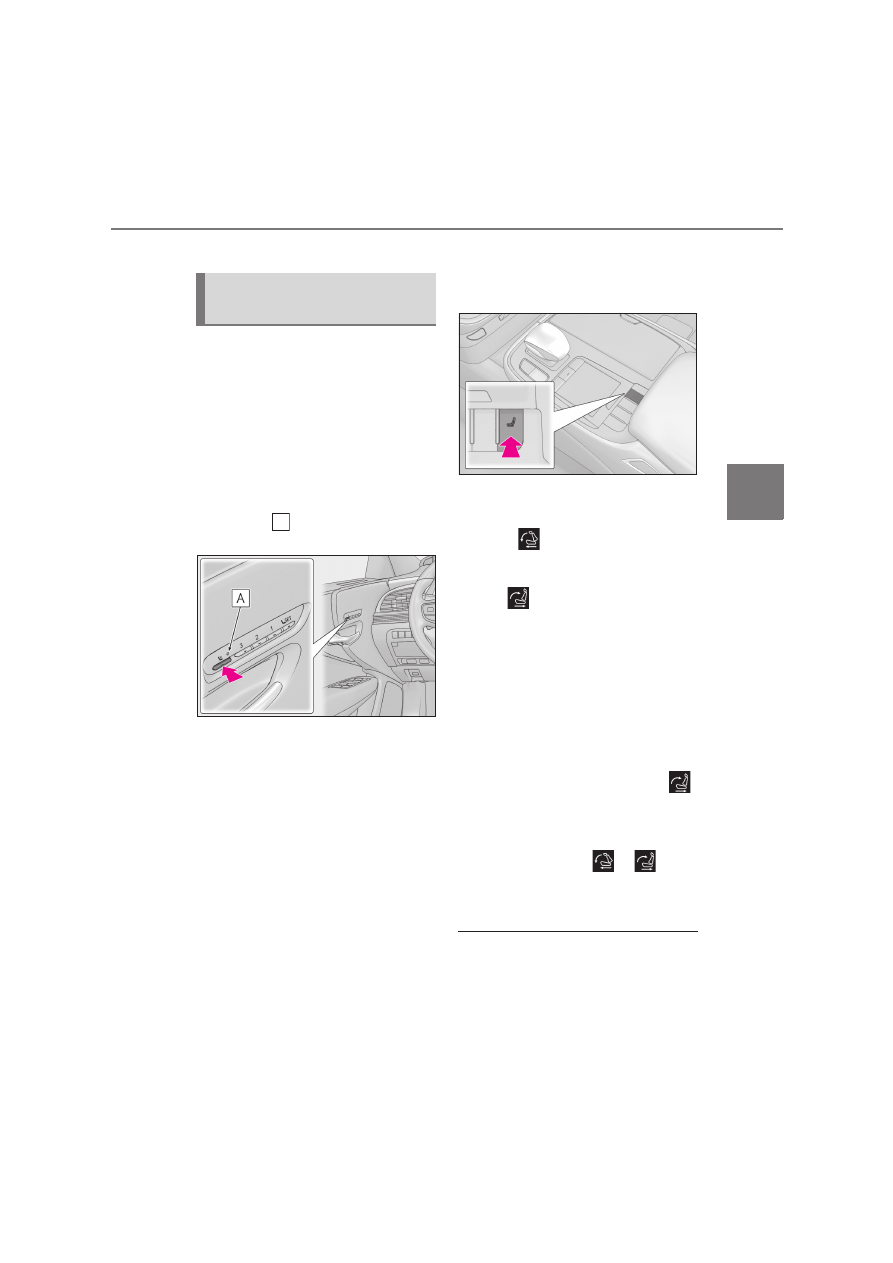
Using the driver’s seat adjustment 
switches to adjust the front passen-
ger’s seat (front passenger mode)

The mode of the driver’s seat adjust-
ment switches can be changed to 
adjust the front passenger’s seat.

1

Press the mode change button on 
the driver’s side door.

The indicator 

 will illuminate when front 

passenger mode is selected.

2

Using the seat adjustment switches 
on the driver’s seat, adjust the front 
passenger’s seat.

To cancel front passenger mode, press the 

mode change button again.
Front passenger mode will be canceled 

automatically if the driver’s seat adjustment 

switches are not operated for approxi-

mately 30 seconds.

Using the Center Display (vehicles 
with a foldable head restraint)

1

Press the seat switch.

2

Select the button for the desired 
operation.

“Full front” 

 of “Passenger”: Move the 

front passenger’s seat forward and folds 

the seatback and head restraint.

“Return” 

 of “Passenger”: Move the 

front passenger’s seat rearward and the 

seatback and head restraint to the upright 

position.
If the rear seat behind the front passenger’s 

seat is not in the upright position, it will 

move to the upright position before the 

front passenger’s seat moves to its upright 

position.
Vehicles with a rear seat entertainment 

system: If the front passenger’s seat is 
moved to the upright position and then 


is selected again, the front passenger’s seat 

will move rearward.

To stop the front passenger's seat while 
it is moving, select the 

 or 

 pas-

senger’s seat operation button or press 
the seat switch.

Operating the foldable head restraint 

using the driver’s seat adjustment 

switches in front passenger mode (if 

equipped)

When the front passenger’s seatback 

angle is adjusted using the driver’s seat 

Operating the front passenger’s 
seat from the driver’s seat

A

122

3-3. Adjusting the seats

adjustment switches in front passenger 

mode, the front passenger’s head 

restraint will operate automatically as fol-

lows:

• When the front passenger’s seatback is 

moved forward to the upright position, 

the head restraint will lower and fold for-

ward when the seatback angle adjust-

ment switch is released.

• When the front passenger’s seatback is 

moved backward to the upright position, 

the head restraint will move to the upright 

position when the seatback angle adjust-

ment switch is released.

If any of the following conditions are met, 

the front passenger’s head restraint will 

not fold forward even though the front 

passenger’s seatback angle is being 

adjusted using the driver’s seat adjust-

ment switches in front passenger mode:

• The engine switch is in ACCESSORY 

mode or off.

• The weight of an occupant or heavy 

object, etc. is detected on the front pas-

senger’s seat.

Once weight is detected on the seat, the 
seat will be judged as occupied until the 
front passenger’s door is opened then 
closed or the engine switch is turned off.
• Vehicles without a rear seat entertain-

ment system:The front passenger’s seat is 

in the rear most position.

• The front passenger’s seat belt is fas-

tened.

• The front passenger’s door is open. (The 

front seat will not move forward.)

• The front passenger’s seat is not in the 

lowest position.

• The front passenger’s seat seat cushion 

(front) is not in the lowest position.

• The front passenger’s seat seat cushion is 

extended (if equipped).

If either of the following conditions is met, 

the front passenger’s head restraint will 

not return to the upright position even 

though the front passenger’s seatback 

angle is being adjusted using the driver’s 

seat adjustment switches in front passen-

ger mode:

• The engine switch is in ACCESSORY 

mode or off.

• The front passenger’s seat position is 

moved to a position forward of the neu-

tral position.

Operating the foldable head restraint 

using the front passenger’s seat adjust-

ment switches (if equipped)

When the front passenger’s head restraint is 

folded forward and the front passenger’s 

door is open, if the front passenger’s seat 

adjustment switches are used to move the 

seat backward or recline the seatback, the 

head restraint will move to the upright posi-

tion automatically when the switch is 

released.
To stop the operation of the front passen-

ger’s head restraint part-way, perform any 

of the following operations:

Operate any front passenger’s seat 

adjustment switch.

The head restraint will stop when the seat 
position adjustment switch or seatback 
angle adjustment switch is operated to 
move the seat backward or recline the 
seatback, and will resume operating when 
the switch is released.

Press the “SET” button.

Press the “1”, “2” or “3” button.

Press the seat switch.

Operation of the front passenger’s seat 

using the Center Display will be 

canceled when (vehicles with a foldable 

head restraint)

In the following situations, the front passen-

ger’s seat cannot be operated using the 

Center Display:

The engine switch is in ACCESSORY 

mode or off.

The weight of an occupant or heavy 

object, etc. is detected on the front pas-

senger’s seat.

Once weight is detected on the seat, the 
seat will be judged as occupied until the 
front passenger’s door is opened then 
closed or the engine switch is turned off.

The front passenger’s seat belt is fas-

123

3

3-3. Adjusting the seats

Be

fore
 driving

tened.

The front passenger’s door is open. (The 

front seat will not move forward.)

When the front passenger’s seat is 

folded forward

By reclining the front passenger’s seat 

seatback, the forward view of the rear pas-

senger can be improved.

1

Press and hold to move the front 
passenger’s seat forward and fold 
the seatback forward.

2

Press and hold to move the front 
passenger’s seat backward and 
move the seatback to the upright 
position.

1

Display the home screen on the 
Rear Multi Operation Panel 
(

P.336) and then touch “Seat”.

2

Touch “Passenger”.

3

Touch the button for the desired 
operation.

When the operating conditions are not 

met, the buttons will be grayed out.

Move the front passenger’s seat 
forward and fold the seatback for-
ward.

On vehicles with a foldable head restraint, 
the head restraint will also fold forward.
To stop the front passenger seat while it is 
moving, touch “STOP”.

Move the front passenger’s seat 
backward and the seatback to the 
upright position.

If the rear seat behind the front passenger’s 
seat is not in the upright position, it will 
move to the upright position before the 
front passenger’s seat moves to its previous 
position.
On vehicles with a foldable head restraint, 
the head restraint will also move to the 
upright position.
Vehicles with a rear seat entertainment 
system: If the front passenger’s seat is 
moved to the upright position and then 


is selected again, the front passenger’s seat 
will move rearward.
To stop the front passenger seat while it is 
moving, touch “STOP”.

Move the front passenger’s seat 
forward or backward

The seat will move while a button is 

Operating the front passenger’s 
seat from the rear seat (vehicles 
without power rear seat)

Operating the front passenger’s 
seat from the rear seat (vehicles 
with power rear seat)

A

B

B

C

124

3-3. Adjusting the seats

touched and held.

Adjust the angle of the front pas-
senger’s seat seatback

*

The seatback will move while a button is 
touched and held.

*

: Vehicles with a foldable head restraint

Operating the front passenger’s seat 

from the rear seat

In the following situations, the front pas-

senger’s seat cannot be operated using 

the Rear Multi Operation Panel:

• The engine switch is in ACCESSORY 

mode or off.

*

• The rear seat belt is not fastened and 

weight is not detected on the rear seat.

Once weight is detected on the seat, the 
seat will be judged as occupied until a rear 
door is opened then closed or the engine 
switch is turned off and the doors are 
locked.
• The weight of an occupant or heavy 

object, etc. is detected on the front pas-

senger’s seat.

Once weight is detected on the seat, the 
seat will be judged as occupied until the 
front passenger’s door is opened then 
closed or the engine switch is turned off.
• The front passenger’s seat belt is fas-

tened.

• The front passenger’s door is open. (The 

front seat will not move forward.)

*

: Vehicles with foldable head restraint: 

Even when the engine switch is in 
ACCESSORY mode or off, the front 
passenger seat position and seatback 
angle can be adjusted.

If the rear armrest is stowed while the 

seat position is being adjusted, the opera-

tion will stop.

Canceling an operation

To cancel an operation, press and hold the 

 button of the Rear Multi Opera-

tion Panel or press it 3 times in quick suc-

cession.

When the front passenger’s seat is 

folded forward

P.123

Pneumatic chambers built into the 
front seat apply pressure to the occu-
pant’s body at different modes and 
intensities.

1

Press the seat switch.

2

Using the Remote Touch pad, 
select “Driver seat refresh” or “Pas-
senger seat refresh”.

3

Select the desired mode.

“Centripetal”

Applies pressure sequentially from the 
front of the seat cushion to top of the 
seatback

“Centrifugal”

Applies pressure sequentially from the top 
of the seatback to the front of the seat 
cushion

D

Front seat refresh system (if 
equipped)

125

3

3-3. Adjusting the seats

Be

fore
 driving

“Upper body”

Applies pressure sequentially from the bot-
tom to the top of the seatback

“Lower body”

Applies pressure sequentially from the 
front to the back of the seat cushion

“Lumbar”

Applies pressure sequentially from the bot-
tom to the top of the lumbar area of the 
seatback

4

Select the desired intensity and 
then confirm the setting.

The intensity can be adjusted in 5 steps.
To stop the operation select “Stop”.
If a seat is not occupied, do not operate the 

front seat refresh system for that seat.

Refresh system

Operating conditions

• The engine switch is in IGNITION ON 

mode.

• The temperature in the cabin is not 

extremely high.

• For the front passenger’s seat: The weight 

of an occupant is detected on the front 

passenger’s seat or the front passenger’s 

seat belt is fastened.

Once weight is detected on the seat, the 
seat will be judged as occupied until the 
front passenger’s door is opened then 
closed or the engine switch is turned off.

Automatic stop function

• The operation will be canceled automati-

cally after approximately 15 minutes.

• If  the  power  easy  access system begins 

operating, the front seat refresh system 

will stop.

WARNING

Important points while driving

Do not adjust the driver’s seat refresh 

system while driving.

Using it may affect your ability to control 

the vehicle, possibly leading to an acci-

dent resulting in death or serious injury.

Using the refresh system

Those who are pregnant, have recently 

given birth, or suffer from ailments 

requiring rest (heart disease etc.) 

should consult a doctor before use.

Do not allow children to use the 

refresh function.

Do not use immediately after consum-

ing a meal or alcohol, or for an 

extended period of time.

If you feel sick while using the refresh 

function, immediately discontinue use.

126

3-3. Adjusting the seats

*

: If  equipped

Automatic operation

The seat can be moved to preset posi-
tions.

1

Display the home screen on the 
Rear Multi Operation Panel 
(

P.336) and then touch “Seat”.

2

Touch “Left” or “Right”.

3

Touch the desired preset button.

When the operating conditions are not 

Power rear seat

*

WARNING

When adjusting the seat position

Take care when adjusting the seat 

position to ensure that other passen-

gers are not injured by the moving 

seat.

When adjusting the rear seat with an 

ottoman, make sure there is sufficient 

space so that a foot does not get 

caught between the ottoman and front 

passenger seat. (if equipped)

Vehicles with a rear seat entertainment 

system: When the rear seat is moving 

to the Entertainment Mode position, 

do not allow hands near the rear dis-

play. Otherwise, a hand or finger may 

be caught, possibly causing injury.

Seat adjustment

To reduce the risk of sliding under the lap 

belt during a collision, do not recline the 

seat more than necessary.

If the seat is too reclined, the lap belt may 

slide past the hips and apply restraint 

forces directly to the abdomen, or your 

neck may contact the shoulder belt, 

increasing the risk of death or serious 

injury in the event of an accident.

Adjustments should not be made while 

driving as the seat may unexpectedly 

move and cause the driver to lose control 

of the vehicle.

Using the ottoman (if equipped)

Do not sit on the ottoman.

If someone sits on the ottoman, the seat 
belt cannot be fitted properly, and they 
may be thrown from the seat, resulting in 
death or serious injury in the event of an 
accident or sudden braking.

When getting in or out of the vehicle, 

retract the ottoman. If the ottoman is 

not retracted, it may cause a fall, result-

ing in injury.

Do not operate the ottoman when the 

vehicle is moving.

Do not allow anyone to put their hands 

or feet under the rear seat when stow-

ing the ottoman.

NOTICE

To prevent an ottoman malfunction (if 

equipped)

Do not place any objects in the rear 

seat footwell that could prevent the 

operation of the ottoman.

Do not place heavy luggage on the 

ottoman.

Do not place any objects under the 

ottoman while it is raised for use. These 

objects may interfere with the ottoman 

being folded, causing damage to the 

ottoman or the objects themselves.

To prevent a rear display malfunction 

(if equipped)

Do not attempt to move the rear display 

by hand, as doing so may damage the 

rear display.

Adjustment procedure

127

3

3-3. Adjusting the seats

Be

fore
 driving

met, the preset buttons will be grayed out.

/

: Moves the rear seat 

to the upright position (Business 
Mode)

/

: Moves the rear seat 

with an ottoman to a slightly reclined 
position (Entertainment Mode) (if 
equipped)

Vehicles without a rear seat entertainment 
system: Moves the front passenger’s seat 
forward.
Vehicles with a rear seat entertainment 
system: Moves the front passenger’s seat 
and rear display to allow the rear display to 
be comfortably viewed.

: Moves the rear seat with an 

ottoman to a deeply reclined position 
(Relaxation Mode) (if equipped)

Moves the front passenger’s seat forward 
and folds the seatback and head restraint 
forward.
To stop the front passenger seat while it is 
moving, touch “STOP”.

Manual operation

1

Display the home screen on the 
Rear Multi Operation Panel 
(

P.336) and then touch “Seat”.

2

Touch “Left” or “Right”.

3

Touch the button for the desired 
adjustment.

Select the part you wish to adjust.
Adjust the position of the selected 
part.

The part will move while a button is 
touched.

Adjustment of the rear seat

When a rear seat is close to a front seat, 

the operation of the rear seat may be 

restricted.

If the rear armrest is stowed while the 

seat position is being adjusted, the opera-

tion will stop.

Operating conditions of Business Mode

When the rear seat belt is not fastened and 

weight is not detected on the rear seat, 

Business Mode cannot be selected.
Once weight is detected on the seat, the 
seat will be judged as occupied until a rear 
door is opened then closed or the engine 
switch is turned off and the doors are 
locked.

The rear seat with an ottoman cannot be 

moved to Entertainment Mode/Relaxa-

tion Mode when (if equipped)

In the following situations, Entertainment 

Mode or Relaxation Mode cannot be 

selected:

The engine switch is in ACCESSORY 

A
B

128

3-3. Adjusting the seats

mode or off.

The rear seat belt is not fastened and 

weight is not detected on the rear seat.

Once weight is detected on the seat, the 
seat will be judged as occupied until a rear 
door is opened then closed or the engine 
switch is turned off and the doors are 
locked.

The weight of an occupant or heavy 

object, etc. is detected on the front pas-

senger’s seat.

Once weight is detected on the seat, the 
seat will be judged as occupied until the 
front passenger’s door is opened then 
closed or the engine switch is turned off.

The front passenger’s seat belt is fas-

tened.

The front passenger’s door is open.

When the front passenger’s seat is 

folded forward

P.123

Automatic angle adjustment of the rear 

displays (if equipped)

When a seat is adjusted, the angle of the 

rear display will be adjusted automatically 

to maintain an optimal viewing angle for the 

rear display from the rear seat.

Operation after the engine switch is 

turned off

After a certain time elapses after the engine 

switch is turned off, the following parts of 

the rear seats will move to their neutral 

positions.

Shoulder bolster

Lumbar/pelvic support

Canceling an operation

To cancel an operation, press and hold the 

 button of the Rear Multi Opera-

tion Panel or press it 3 times in quick suc-

cession.

Pre-collision seatbacks for the passen-

ger seats (vehicles with Lexus Safety 

System + A or Lexus Safety System +)

P.214, 227

Customization

Some functions can be customized. 

(

P.476)

1

Press the seat switch.

2

Select “Return” 

 of “Rear”.

The rear seat will move to the upright posi-

tion.

Operation of the rear seats from the 

front seats

In the following situations, the rear seats 

cannot be operated from the front seats.

When the armrest is stowed and weight 

of an occupant, heavy object, etc. is 

detected on a rear seat

Once weight is detected on the seat, the 
seat will be judged as occupied until a rear 
door is opened then closed or the engine 
switch is turned off and the doors are 
locked.

When the armrest is stowed and a rear 

seat belt is fastened.

Returning the rear seat from the 
front seats

129

3

3-3. Adjusting the seats

Be

fore
 driving

The rear seat relaxation system utilizes 
pneumatic chambers and dedicated 
heaters, and applies pressure to the 
occupant’s body at different modes 
and intensities.
To display the rear seat relaxation sys-
tem screen, display the home screen 
on the Rear Multi Operation Panel 
(

P.336) and then touch “Relaxa-

tion”.

Touch to select the desired rear 
seat.
Touch to select the desired mode.

When a button is touched, operation will 
begin.

Touch to adjust the intensity.

The intensity can be adjusted in 5 steps.

Touch to turn the spot heaters 
on/off.

Touch to stop the operation.

If a seat is not occupied, do not operate the 
rear seat relaxation system for that seat.

Relaxation system

Operating conditions

• The engine switch is in IGNITION ON 

mode.

• The temperature in the cabin is not 

extremely high.

• The weight of an occupant is detected on 

the rear seat or the rear seat belt is fas-

tened.

Once weight is detected on the seat, the 
seat will be judged as occupied until a rear 
door is opened then closed or the engine 
switch is turned off and the doors are 
locked.

Automatic stop function

• The operation will be canceled automati-

cally after approximately 15 minutes.

• If the door for a seat that the relaxation 

system is currently being used is opened, 

the relaxation system will stop operating.

The following functions will cause the 

WARNING

When returning the rear seats to the 

neutral position

To avoid injuring the rear passengers, 

wait until they have gotten out of the 

vehicle before operating the switch.

Rear seat relaxation system (if 
equipped)

A

B

C

D

WARNING

Using the relaxation system

Those who are pregnant, have recently 

given birth, or suffer from ailments 

requiring rest (heart disease etc.) 

should consult a doctor before use.

Do not allow children to use the relax-

ation function.

Do not use immediately after consum-

ing a meal or alcohol, or for an 

extended period of time.

If you feel sick while using the relaxa-

tion function, immediately discontinue 

use.

Automatic Seat Operation

E

130

3-3. Adjusting the seats

rear seats to move automatically.

Seat return function linked to the 
door opening operation

The rear seat will return to the upright 
position automatically when the rear 
door is opened for easier entry and exit 
of the vehicle.
For the rear seat with an ottoman (if 
equipped): When the rear door on the 
side with the rear seat with an ottoman 
is opened, the seatback of the rear seat 
with an ottoman will move to a more 
upright position. The seatback will 
move to the upright position after the 
door is closed and the system deter-
mines that the rear passenger has 
exited.
However, if the armrest is stowed, the 
rear seat will not move.

Shift-linked rear seat reclining 
function

When the shift position is shifted from 
P, to enhance rear visibility for the 
driver, the rear seats will recline slightly.
However, the shift-linked rear seat 
reclining function will not operate in 
the following situations:

The weight of an occupant or heavy 
object, etc. is detected on a rear 
seat.

Once weight is detected on the seat, the 
seat will be judged as occupied until a rear 
door is opened then closed or the engine 
switch is turned off and the doors are 
locked.

A rear seat belt is fastened.

A rear door is open.

The armrest is stowed.

When a front seat is close to a rear 
seat, the rear seats may not operate or 
the range of movement may be 
restricted.

Changing automatic seat opera-
tion settings

The settings can be changed on the 
Rear Multi Operation Panel. 
(

P.336)

1

Display the home screen on the 
Rear Multi Operation Panel 
(

P.336) and then touch “Seat”.

2

Touch “Left” or “Right”.

3

Touch .

4

Touch a button to change the set-
ting.

Rear right seat automatic operation
Rear right seatback movement 
amount when door-linked rear seat 
return function operates

*

Rear left seat automatic operation

*

: Vehicles with a rear seat with an ottoman

A
B

C

131

3

3-3. Adjusting the seats

Be

fore
 driving

The seat and steering wheel are auto-
matically adjusted to allow the driver to 
enter and exit the vehicle easily.

Driver’s seat

When all of the following have been 
performed, the seat and steering 
wheel are automatically adjusted to a 
position that allows driver to enter and 
exit the vehicle easily.
• The shift position has been shifted to 

P.

• The engine switch has been turned 

off.

• The driver’s seat belt has been 

unfastened.

When the driver’s seat adjustment 
switches are in front passenger mode 
(

P.121), the seat and steering wheel will 

not move.

On vehicles with adjustable seat cush-
ion side bolsters, when the driver’s 
door is opened with the engine switch 
off, the seat cushion side bolsters will 
lower if they are in the default position.
When any of the following has been 
performed, the seat and steering 
wheel automatically return to their 
original positions.
• The engine switch has been turned 

to ACCESSORY mode or IGNI-
TION ON mode.

• The driver’s seat belt has been fas-

tened.

Front passenger’s seat

If all of the following have been per-
formed while the vehicle is stopped, 
the lumbar support, pelvic support, 
shoulder bolster (if equipped), 
seatback side bolster (if equipped), 
and hip support (if equipped) will be 
moved to their default position. On 
vehicles with adjustable seat cushion 
side bolsters, the seat cushion side bol-
sters will lower.
• The passenger’s seat belt has been 

unfastened.

• The front passenger’s door is 

opened.

Driving position memory

This feature automatically adjusts 
the positions of the front seats, 
steering wheel, outside rear view 
mirrors and head-up display (if 
equipped) to make entering and 
exiting the vehicle easier or to suit 
your preferences.

Up to 3 different driving positions 
can be recorded.

Each electronic key (including a 
card key) can be registered to 
recall your preferred driving posi-
tion.

Power easy access system

132

3-3. Adjusting the seats

Operation of the power easy access sys-

tem

When exiting the vehicle, the power easy 

access system may not operate if the seat 

is already in the rearmost or uppermost 

position or close to the rear seat.

If the seat position is adjusted during 

power easy access system operation, the 

automatic operation will stop. (The seat 

will change to manual operation.)

If the seat position is adjusted during or 

after the power easy access system oper-

ation when the driver is exiting the vehi-

cle, the power easy access system will not 

operate when entering the vehicle.

Seat cushion side bolster adjustment (if 

equipped)

If the seat cushion side bolsters have been 

lowered, when the front door is closed, the 

seat cushion side bolsters will move to their 

default position.
If the seat is adjusted while the seat cushion 

side bolsters are moving to the default posi-

tion, their movement will be temporarily 

suspended. (The seat cushion side bolsters 

will move to the default position after a cer-

tain amount of time.)

Customization

Some functions can be customized. 

(

P.476)

1

Turn the engine switch to IGNI-
TION ON mode.

2

Check that the shift position is in P.

3

Adjust the driver’s seat, steering 
wheel, outside rear view mirrors 
and head-up display (if equipped) 
to the desired positions.

4

While pressing the “SET” button, or 
within 3 seconds after the “SET” 

button is pressed, press button “1”, 
“2” or “3” until the buzzer sounds.

If the selected button has already been 

preset, the previously recorded position 

will be overwritten.
When the driver’s seat adjustment 

switches are in front passenger mode 

(

P.121), the position of the driver’s seat 

cannot be registered.

To record the position of the front pas-
senger’s seat, adjust the front passen-
ger’s seat to the desired position and 
perform step 

4

 using the buttons on 

the front passenger’s side.

In order to correctly use the driving 

position memory function

If a seat position is already in the furthest 

possible position and the seat is operated in 

the same direction, the recorded position 

may be slightly different when it is recalled.

1

Turn the engine switch to IGNI-
TION ON mode.

Recording a driving position into 
memory

WARNING

Seat adjustment caution

Take care during seat adjustment so that 

the seat does not strike the rear passen-

ger or squeeze your body against the 

steering wheel.

Recalling a driving position

133

3

3-3. Adjusting the seats

Be

fore
 driving

2

Check that the shift position is in P.

3

Press one of the buttons for the 
driving position you want to recall 
until the buzzer sounds.

When the driver’s seat adjustment 

switches are in front passenger mode 

(

P.121), a driving position cannot be 

recalled.

To stop the position recall operation 

part-way through

Perform any of the following operations:

Press the “SET” button.

Press button “1”, “2” or “3”.

Press the mode change button.

Operate any of the seat adjustment 

switches (only cancels seat position 

recall).

Operate the tilt and telescopic steering 

control switch (only cancels steering 

wheel position recall).

Recalling a driving position

If a driving position is recalled, the move-

ment of the front seat may be stopped part-

way if the seat moves close to the rear seat.
If a rear passenger is determined to be in 

the vehicle, the rearward movement of the 

front seat may be stopped partway to 

ensure sufficient space for the rear passen-

ger.

Recalling the front passenger’s seat 

position (vehicles with a rear seat with 

an ottoman)

If the ottoman of the rear seat is extended, 

the front passenger’s seat position cannot 

be recalled.

Operating the driving position memory 

after turning the engine switch off

Driver’s seat:

Recorded seat positions can be activated 

up to 180 seconds after the driver’s door is 

opened and another 60 seconds after it is 

closed again.
Front passenger’s seat:

Recorded seat positions can be recalled up 

to 180 seconds after the front passenger’s 

door is opened.

When the recorded seat position can-

not be recalled

The seat position may not be recalled in 

some situations when the seat position is 

recorded in a certain range. For details, 

contact any authorized Lexus retailer or 

Lexus authorized repairer, or any reliable 

repairer.

Registering procedure

Record your driving position to button 
“1”, “2” or “3” before performing the 
following:
Carry only the key you want to register, 
and then close the driver’s door.
If 2 or more keys are in the vehicle, the 
driving position cannot be recorded 
properly.

1

Turn the engine switch to IGNI-
TION ON mode.

2

Check that the shift position is in P.

3

Recall the driving position that you 
want to record.

Registering/canceling/recall a 
driving position to an electronic 
key (including a card key) (mem-
ory recall function)

134

3-3. Adjusting the seats

4

While pressing the recalled button, 
press and hold the door lock switch 
(either lock or unlock) until the 
buzzer sounds.

If the button could not be registered, the 

buzzer sounds continuously for approxi-

mately 3 seconds.

Cancelation procedure

Carry only the key you want to cancel 
and then close the driver’s door.
If 2 or more keys are in the vehicle, the 
driving position cannot be canceled 
properly.

1

Turn the engine switch to IGNI-
TION ON mode.

2

Check that the shift position is in P.

3

While pressing the “SET” button, 
press and hold the door lock switch 
(either lock or unlock) until the 
buzzer sounds twice.

If the button could not be canceled, the 

buzzer sounds continuously for approxi-

mately 3 seconds.

Recall procedure

1

Make sure that the doors are 
locked before recalling the driving 
position. Carry the electronic key 
that has been registered to the driv-
ing position, and then unlock and 
open the driver’s door using the 

smart entry & start system or wire-
less remote control.

The driving position will move to the 

recorded position (not including the steer-

ing wheel and head-up display [if 

equipped]). However, the seat will move to 

a position slightly behind the recorded 

position in order to make entering the vehi-

cle easier.
If the driving position is in a position that 

has already been recorded, the seat and 

outside rear view mirrors will not move.

2

Turn the engine switch to ACCES-
SORY mode or IGNITION ON 
mode, or fasten a seat belt.

The seat, steering wheel and head-up dis-

play (if equipped) will move to the 

recorded position.

Recalling the driving position using the 

memory recall function

Different driving positions can be regis-

tered for each electronic key. Therefore, 

the driving position that is recalled may 

be different depending on the key being 

carried.

If a door other than the driver’s door is 

unlocked with the smart entry & start sys-

tem, the driving position cannot be 

recalled. In this case, press the driving 

position button which has been set.

Customization

Some functions can be customized. 

(

P.476)

135

3

3-3. Adjusting the seats

Be

fore
 driving

*

: If  equipped

1

Turn the engine switch to IGNI-
TION ON mode.

2

Display the home screen on the 
Rear Multi Operation Panel 
(

P.336) and then touch “Seat”.

3

Touch “Left” or “Right”.

4

Adjust the rear seat to the desired 
position and then touch “SET”.

5

Touch “1” or “2”.

If the preset is being used, the previously 

recorded seat position will be overwritten.

In order to correctly use the position 

memory function

If a seat position is already in the furthest 

possible position and the seat is operated in 

the same direction, the recorded position 

may be slightly different when it is recalled.

1

Turn the engine switch to IGNI-
TION ON mode.

2

Display the home screen on the 
Rear Multi Operation Panel 
(

P.336) and then touch “Seat”.

3

Touch “Left” or “Right”.

4

Touch “1” or “2”.

When the operating conditions are not 

met, the buttons will be grayed out.
To stop the operation touch “STOP”.
If the seat is adjusted while a memorized 

position is being recalled, the automatic 

operation will stop. (The seat will change to 

manual operation.)

Operating condition

The weight of an occupant is detected on 

the rear seat or the rear seat belt is fas-

tened.
Once weight is detected on the seat, the 
seat will be judged as occupied until the 
rear door is opened then closed or the 
engine switch is turned off.

Recalling a rear seat position

If a memorized rear seat position is recalled, 

the seat may stop part-way to ensure suffi-

cient space for the rear passenger.

Recalling the ottoman position (if 

equipped)

When a seat position is recalled, the otto-

man will not raise or extend. The ottoman 

position can only be recalled if the memo-

rized position is lower and shorter than the 

current position.

Rear seat position memory

*

The rear seat position can be mem-
orized and recalled with the touch 
of a button.

Recording a position into mem-
ory

WARNING

Seat adjustment caution

Take care during seat adjustment so that 

the rear passengers do not strike the 

front seats.

Recalling the memorized posi-
tion

136

3-3. Adjusting the seats

Front seats

Center Display

1

Press the seat switch.

2

Using the Remote Touch pad, 
select “Driver seat adjustment” or 
“Passenger seat adjustment”.

3

Select   then the desired adjust-
ment button  ,  ,  , or   to 
adjust the head restraint.

Up
Backward
Down
Forward

The head restraint moves while the adjust-

ment button is selected.

Head restraints

Head restraints are provided for all 
seats.

Vehicles with power rear seat: The 
head restraint for the rear center 
seat is integrated into the seatback 
and cannot be adjusted.

WARNING

Head restraint precautions

Observe the following precautions 

regarding the head restraints. Failure to 

do so may result in death or serious 

injury.

Use the head restraints designed for 

each respective seat.

Adjust the head restraints to the cor-

rect position at all times.

Manual type: After adjusting the head 

restraints, push down on them and 

make sure they are locked in position.

Do not drive with the head restraints 

removed.

Adjusting a head restraint verti-
cally and horizontally (power 
head restraints)

A

B C D

E

B
C
D

E


Content      ..     5      6      7      8     ..