Lexus NX300h (2021 year). Manual in english - page 15
 

  Index      Manuals     Lexus NX300h (2021 year). Manual in english


Search            copyright infringement  


Content      ..     13      14      15      16     ..


Lexus NX300h (2021 year). Manual in english - page 15


252

4-5. Using the driving support systems

*1

: The images may differ from that shown 

in the illustrations. (

P.248)

*2

: Automatic buzzer mute function is 

enabled. (

P.252)

*3

: The distance segments will blink slowly.

Buzzer operation and distance to 
an obstacle

A buzzer sounds when the sensors are 
operating.

The buzzer sounds faster as the 
vehicle approaches an obstacle.
When the vehicle comes within the 

approximately 1.0 ft. (30 cm) of the 
obstacle, the buzzer sounds contin-
uously.

When 2 or more obstacles are 
detected simultaneously, the buzzer 
system responds to the nearest 
obstacle. If one or both come within 
the above distances, the beep will 
repeat a long tone, followed by fast 
beeps.

Automatic buzzer mute function:
After a buzzer begins sounding, if 
the distance between the vehicle 
and the detected object does not 
become shorter, the buzzer will be 
muted automatically. (However, if 
the distance between the vehicle 
and object is 1.0 ft. (30 cm) or less, 
this function will not operate.)

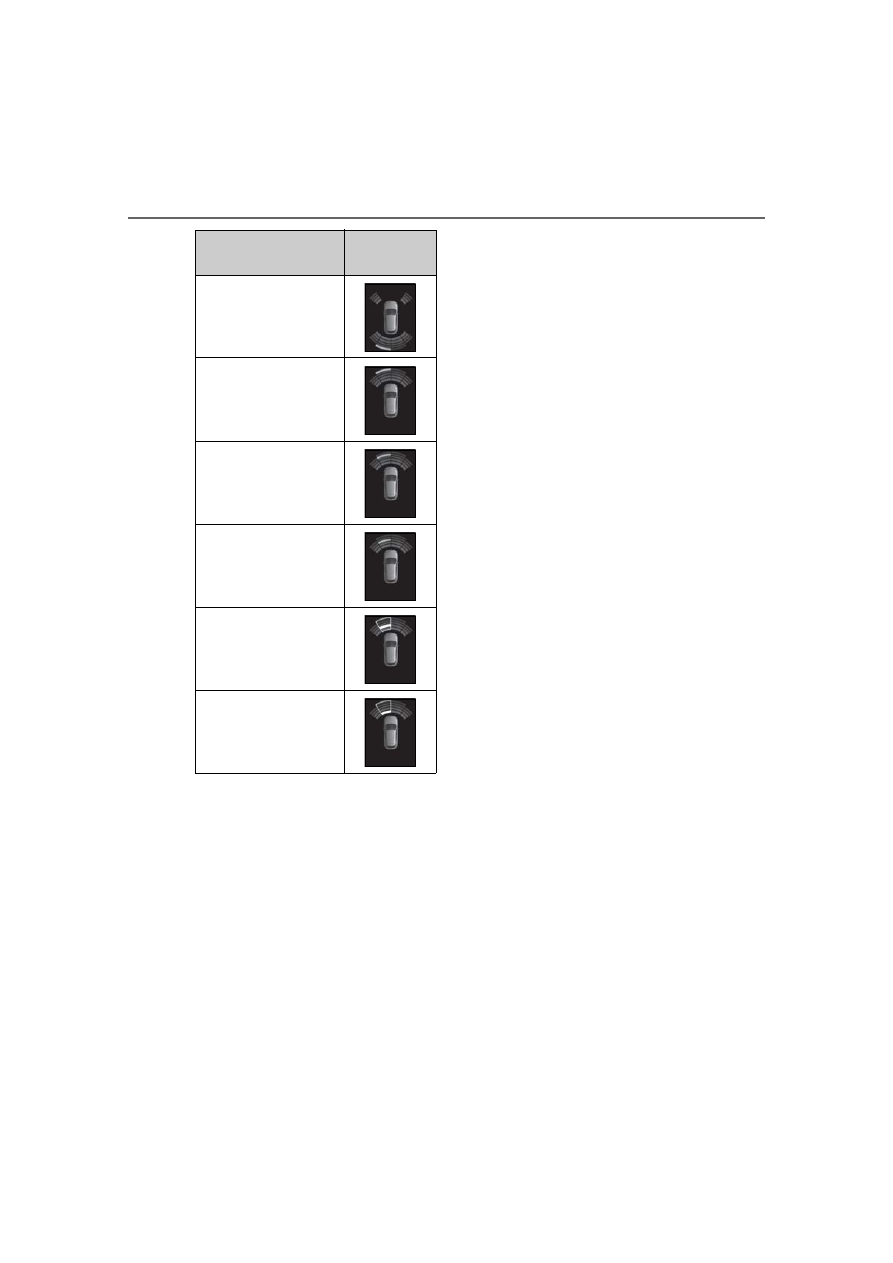
Approximate distance to 

obstacle

Display

*1

Rear center sensor: 4.9 ft. 

(150 cm) to 1.9 ft. (65 

cm)

*2

Front center sensor: 3.3 
ft. (100 cm) to 1.9 ft. (65 

cm)

*2

1.9 ft. (65 cm) to 1.5 ft. (45 

cm)

*2

1.5 ft. (45 cm) to 1.0 ft. 

(30 cm)

*2

1.0 ft. (30 cm) to 0.5 ft. 

(15 cm)

*3

Less than 0.5 ft. (15 cm)

*3

253

4-5. Using the driving support systems

4

Driving

*

: If  equipped

The system operates in the following 
situations when a static object is 
detected in the traveling direction of 
the vehicle.

The vehicle is driven at low speeds 
and the brake pedal is not 
depressed, or is depressed too late

The accelerator pedal is depressed 
too far

Parking Support Brake func-
tion (for static objects)

*

When a collision may occur with a 
static object while parking or trav-
eling at low speeds, when the vehi-
cle suddenly moves forward due to 
mistaken accelerator pedal opera-
tion, or when the vehicle moves due 
to the shift lever being in the wrong 
position, the sensors detect static 
objects to the front or rear in the 
traveling direction of the vehicle, 
and the system operates to lessen 
impact with static objects such as 
walls, and reduce resulting dam-
age.

Examples of system operation

254

4-5. Using the driving support systems

When the shift lever is mistakenly 
in D and the vehicle moves forward

Sensor positions and types

Front corner sensors

Front center sensors

Rear corner sensors

Rear center sensors

This system can be enabled/disabled 
on the multi-information display.

WARNING

For safe use

Do not rely solely upon the system. Rely-

ing solely upon the system may lead to an 

unexpected accident.

Driving safely is the sole responsibility 

of the driver. Pay careful attention to 

the surrounding conditions in order to 

ensure safe driving. The Parking Sup-

port Brake function (for static objects) 

can provide support to lessen the 

severity of collisions. However, it may 

not operate depending on the situa-

tion.

The Parking Support Brake function 

(for static objects) is not a system 

designed to completely stop the vehi-

cle. Furthermore, even if the Parking 

Support Brake function (for static 

objects) is able to stop the vehicle, 

brake control is canceled after 

approximately 2 seconds, so depress 

the brake pedal immediately.

Sensor positions and types

NOTICE

Preventing sensor malfunctions

If the area around a sensor is subjected 

to an impact, equipment may not oper-

ate properly due to a sensor malfunc-

tion. Have the vehicle inspected by 

your Lexus dealer.

When using a high-pressure washer to 

wash the vehicle, do not spray water 

directly on the sensors. The sensors 

may not function properly if subjected 

to an impact from strong water pres-

sure.

When using steam to wash the vehicle, 

do not direct steam too close to the 

sensors. The sensors may not function 

properly if subjected to steam.

Changing settings of the Park-
ing Support Brake function (for 
static objects)

A
B
C
D

255

4-5. Using the driving support systems

4

Driving

1

Press “

” or “

” of the meter 

control switches and select 

.

2

Press “

” or “

” of the meter 

control switches and select 

.

3

Press 

 on the meter control 

switches to enable/disable the sys-
tem.
The PKSB OFF indicator comes on 
when the Parking Support Brake 
function is OFF (not operating).

When the Parking Support Brake func-

tion is switched OFF, system operation 
does not resume until the function is 
switched back ON through the set-
tings screen on the multi-information 
display. (System operation does not 
resume by operating the power 
switch.)

Hybrid system output restraint control

When there is a static object, where a potential collision may occur, is detected, the 
increase of the vehicle speed is restrained due to hybrid system output being con-
trolled.

Operation

256

4-5. Using the driving support systems

Accelerator pedal

Brake pedal

Hybrid system output

Braking force

ON

OFF

Control starts

Collision is likely

DOWN

“BRAKE!” is displayed in the multi-information display

“Switch to Brake” is displayed in the multi-information display

Brake Control

If the accelerator is continuously depressed even after the hybrid system output is 
being controlled, the brakes are engaged and the vehicle decelerates.

Accelerator pedal

Brake pedal

Hybrid system output

A
B
C
D

E
F

G

H

I

J

K

A
B
C

257

4-5. Using the driving support systems

4

Driving

Braking force

ON

OFF

Control starts

Collision is likely

DOWN

Collision possibility is very high

UP

“BRAKE!” is displayed in the multi-information display

“Switch to Brake” is displayed in the multi-information display

Operation starting conditions

When the PKSB OFF indicator is not illumi-

nated or flashing (

P.254, 392) and all of 

the following conditions are met, the system 

operates.

Hybrid system output restriction control

• The Parking Support Brake function (for 

static objects) is on.

• The vehicle speed is 10 mph (15 km/h) or 

less.

• There is a static object in the traveling 

direction of the vehicle (6 to 13 ft. [2 to 4 

m] ahead).

• The system determined that a stronger-

than-normal brake operation was neces-

sary to avoid a collision.

Brake control

• Hybrid system output restriction control 

is being performed.

• The system determined that an emer-

gency brake operation was necessary to 

avoid a collision.

Operation ending conditions

In any of the following situations, the system 

stops operating.

Hybrid system output restriction control

• The Parking Support Brake function (for 

static objects) has been turned off 

(stopped).

• The collision became avoidable with nor-

mal brake operation.

• The static object is no longer in the travel-

ing direction of the vehicle (6 to 13 ft. [2 

to 4 m] ahead).

Brake control

• The Parking Support Brake function (for 

static objects) has been turned off 

(stopped).

• Approximately 2 seconds elapsed after 

the vehicle was stopped by brake control.

• The brake pedal was depressed after the 

vehicle was stopped by brake control.

• The static object is no longer in the travel-

ing direction of the vehicle (6 to 13 ft. [2 

to 4 m] ahead).

Sensor detection range

The detection range of the Parking Support 

Brake function (for static objects) differs 

from the detection range of the clearance 

sonar (

P.251).

Therefore, even if the clearance sonar 

detects a static object and provides a warn-

ing, the Parking Support Brake function (for 

static objects) may not start operating.

Static objects not detected by the sen-

sors

The following static objects may not be 

detected by the sensors.

Objects such as people, cloth and snow, 

that are difficult for sonic waves to reflect 

off of. (In particular, people may also not 

be detected depending on the type of 

D

E
F

G

H

I

J

K

L

M

258

4-5. Using the driving support systems

clothing they are wearing.)

Objects not perpendicular with the 

ground, objects not at a right angle to the 

traveling direction of the vehicle, uneven 

objects or waving objects

Low objects

Thin objects such as wires, fences, ropes 

and signposts

Objects that are extremely close to the 

bumper

Sharply-angled objects

Tall objects with upper sections project-

ing outwards in the direction of your vehi-

cle

Situations in which the Parking Support 

Brake function (for static objects) may 

not operate

When driving with the shift lever in N

Situations when the system may operate 

even though there is no possibility of a 

collision

In the following situations, the system may 

operate even though there is no possibility 

of a collision.

Environmental influence

• The vehicle is driven on a narrow road

• The vehicle is driven on a gravel road or 

in an area with tall grass

• The vehicle is driven toward a banner or 

flag, a low-hanging branch or a boom 

barrier (such as those used at railroad 

crossings, toll gates and parking lots).

• There is a static object on the shoulder of 

the road (when the vehicle is driven in a 

narrow tunnel, on a narrow bridge or on a 

narrow road)

• The vehicle is being parallel parked

• There is a rut or hole in the surface of the 

road

• When the vehicle is driven on a metal 

cover (grating), such as those used for 

drainage ditches

• The vehicle is driven on a steep slope

• The sensor is covered by water on a 

flooded road

Influence from the weather

• Ice, snow, dirt, etc., has adhered to the 

sensor (if removed, the system returns to 

normal)

• Heavy rain or water strikes the vehicle

• In severe weather such as fog, snow or a 

sand storm

Influence from other sonic waves

• An ultrasonic wave source is nearby, such 

as the horn or clearance sonar of another 

vehicle, a vehicle detector, a motorcycle 

engine or the air brake of a large vehicle

• Electronic components (such as a backlit 

license plate (especially fluorescent 

types), fog lights, a fender pole or a wire-

less antenna) are installed near the sen-

sors

Changes in the vehicle

• The vehicle is tilted a large amount

• The height of the vehicle has drastically 

changed due to the carried load (the 

nose tilts up or down)

• The direction of the sensor has deviated 

due to a collision or other impact

Situations in which the system may not 

operate normally

In the following situations, the system may 

not operate normally.

Environmental influence

• There is a static object that cannot be 

detected between the vehicle and 

another static object that can be 

detected

• A static object such as another vehicle, a 

motorcycle, a bicycle or a pedestrian cuts 

in front of the vehicle or jumps out from 

259

4-5. Using the driving support systems

4

Driving

the side.

Influence from the weather

• The area around the sensor is extremely 

hot or cold

• The wind is strong

• Ice, snow, dirt, etc., has adhered to the 

sensor (if removed, the system returns to 

normal)

• Heavy rain or water strikes the vehicle

• In severe weather such as fog, snow or a 

sand storm

Influence from other sonic waves

• An ultrasonic wave source is nearby, such 

as the horn or clearance sonar of another 

vehicle, a vehicle detector, a motorcycle 

engine or the air brake of a large vehicle

• Electronic components (such as a backlit 

license plate (especially fluorescent 

types), fog lights, a fender pole or a wire-

less antenna) are installed near the sen-

sors

Changes in the vehicle

• The vehicle is tilted a large amount

• The height of the vehicle has drastically 

changed due to the carried load (the 

nose tilts up or down)

• The direction of the sensor has deviated 

due to a collision or other impact

When “Parking Support Brake Unavail-

able” is displayed on the multi-informa-

tion display and the PKSB OFF indicator 

flashes

Ice, snow, dirt, etc., may have adhered to 

the sensor. If this occurs, remove the ice, 

snow, dirt, etc., from the sensor to return 

the system to normal.

Also, a warning message may be dis-

played at low temperatures due to ice 

forming on the sensor, and the sensor 

may not detect static objects. Once the 

ice melts, the system will return to normal.

If this message is shown even after 

removing dirt from the sensor, or shown 

when the sensor was not dirty to begin 

with, have the vehicle inspected by your 

Lexus dealer.

System initialization may not have been 

performed after removal and installation 

of the 12-volt battery. Perform system ini-

tialization.

When removing and installing the 12-

volt battery

The system needs to be initialized.
The system can be initialized by driving the 

vehicle straight ahead for 5 seconds or 

more at a speed of approximately 22 mph 

(35 km/h) or higher.

When “Parking Support Brake Mal-

function Visit Your Dealer” is displayed 

on the multi-information display, the 

PKSB OFF indicator flashes and the 

buzzer sounds

The system may not be operating properly. 

Have the vehicle inspected by your Lexus 

dealer.

WARNING

In order for the system to operate 

properly

Make sure to observe the following pre-

cautions regarding the sensors 

(

P.251). Failure to observe these pre-

cautions may cause the sensors not to 

operate properly, and may result in an 

unexpected accident.

Do not perform work such as modifi-

cation, disassembly or painting

Only perform replacements using 

genuine parts

260

4-5. Using the driving support systems

When the hybrid system output restric-
tion control or brake control operates, 
the buzzer sounds and a message is 
displayed on the multi-information dis-

play, head-up display and naviga-
tion/multimedia system screen to alert 
the driver.

Depending on the situation, output restric-
tion control operates to either limit accel-
eration or restrict output as much as 
possible.

Hybrid system output restriction 
control is operating (acceleration 
limitation control)

Hybrid system output restriction 
control is operating (control to 
restrict output as much as possible)

Do not subject the area around the 

sensors to any impacts

Do not damage the sensors, and 

always keep them clean

Handling the suspension

Do not modify the suspension, as 

changes to the height or incline of the 

vehicle may prevent the sensors from 

correctly detecting static objects, may 

cause the system not operate, or may 

cause the system to operate unnecessar-

ily.

NOTICE

Preventing unnecessary operation

In the following situations, turn the Park-

ing Support Brake function (for static 

objects) OFF. The system may operate 

even though there is no possibility of a 

collision.

A chassis roller, chassis dynamo, free 

roller or similar equipment is being 

used for an inspection, etc.

The vehicle is being loaded onto a ship, 

truck or other transport vessel

The suspension has been lowered or 

tires that have a different size than the 

genuine tires are equipped

The height of the vehicle has drastically 

changed due to the carried load (the 

nose tilts up or down).

A towing hook is installed

When using an automatic car wash

Display and buzzer for hybrid 
system output restriction con-
trol and brake control

Situation

Acceleration at a certain 

speed or higher is not 

possible.

Multi-informa-

tion dis-

play/Head-up 

display

“Object Detected Accel-

eration Reduced”

Naviga-

tion/multime-

dia system 

screen

PKSB OFF 

Indicator

Not illuminated

Buzzer

Situation

A stronger than normal 

brake operation is neces-

sary

Multi-informa-

tion dis-

play/Head-up 

display

“BRAKE!”

Naviga-

tion/multime-

dia system 

screen

261

4-5. Using the driving support systems

4

Driving

Brake control is operating

The vehicle is stopped by system 
operation

*

: If the accelerator pedal is not depressed, 

“Press Brake Pedal” will be displayed.

If the Parking Support Brake has oper-

ated

If the vehicle is stopped due to operation of 

the Parking Support Brake, the Parking 

Support Brake will be disabled and the 

PKSB OFF indicator will illuminate. If the 

Parking Support Brake operates unneces-

sarily, brake control can be canceled by 

depressing the brake pedal or waiting for 

approximately 2 seconds for it to automati-

cally be canceled. Then, the vehicle can be 

operated by depressing the accelerator 

pedal.

Re-enabling the Parking Support Brake

To re-enable the Parking Support Brake 

when it has been disabled due to system 

operation, perform any of the following 

operations. At this time, the PKSB OFF indi-

cator will turn off (

P.82)

Turn the PKSB system on (

P.254)

Turn the power switch off, and then back 

to ON mode

Shift the shift lever to P

Drive with no operation targets in the 

traveling direction of the vehicle

Change the traveling direction of the 

vehicle

Lexus parking assist-sensor buzzer

Regardless of whether the Lexus parking 

assist-sensor buzzer is enabled or not 

(

P.248), if the Parking Support Brake 

function (static objects) is enabled 

(

P.254), the front or rear sensors detect 

an object and brake control is performed, 

the Lexus parking assist-sensor buzzer will 

sound to notify the driver of the approxi-

mate distance to the object.

In the unlikely event that the Parking 

Support Brake function (for static 

objects) mistakenly operates at a cross-

ing or elsewhere

Even in the unlikely event that the Parking 

Support Brake function (for static objects) 

mistakenly operates at a crossing or else-

where, brake control is canceled after 

approximately 2 seconds, allowing you to 

proceed forward and leave the area. Fur-

thermore, brake control is also canceled 

PKSB OFF 

Indicator

Not illuminated

Buzzer

Short beep

Situation

Emergency braking is 

necessary

Multi-informa-

tion dis-

play/Head-up 

display

“BRAKE!”

Naviga-

tion/multime-

dia system 

screen

PKSB OFF 

Indicator

Not illuminated

Buzzer

Short beep

Situation

The vehicle is stopped 

after brake control oper-

ation

Multi-informa-

tion dis-

play/Head-up 

display

“Switch to Brake”

*

Naviga-

tion/multime-

dia system 

screen

“Press Brake Pedal”

PKSB OFF 

Indicator

Illuminated

Buzzer

Short beep

262

4-5. Using the driving support systems

when the brake pedal is depressed. 

Depressing the accelerator pedal again 

allows you to proceed forward and leave 

the area.

*

: If equipped

BSM main switch

Pressing the switch turns the system on or 

BSM (Blind Spot Monitor)

*

The Blind Spot Monitor uses the 
sensors installed behind the rear 
bumper. The system is intended to 
assist the driver check areas that 
are not easily visible. The system 
has the following 2 functions:

The Blind Spot Monitor function

Assists the driver in making the decision 
when changing lanes

The Rear Cross Traffic Alert func-
tion

Assists the driver when backing up

These functions use the same sen-
sors.

System components

A

263

4-5. Using the driving support systems

4

Driving

off. When the switch is set to on, the 
switch’s indicator illuminates and the 
buzzer sounds. This switch is for both Blind 
Spot Monitor function and Rear Cross 
Traffic Alert function.

BSM outside rear view mirror indi-
cators

Blind Spot Monitor function:
When a vehicle is detected in a blind spot 
of the outside rear view mirrors or 
approaching rapidly from behind into a 
blind spot, the outside rear view mirror 
indicator on the detected side will illumi-
nate. If the turn signal lever is operated 
toward the detected side, the outside rear 
view mirror indicator will flash.
Rear Cross Traffic Alert function:
When a vehicle approaching from the right 
or left at the rear of the vehicle is detected, 
both outside rear view mirror indicators 
will flash.

Rear Cross Traffic Alert buzzer 
(Rear Cross Traffic Alert function 
only)

When a vehicle approaching from the right 
or left rear of the vehicle is detected, a 
buzzer sounds from behind the right-hand 
rear seat.

Navigation/multimedia system 
screen (Rear Cross Traffic Alert 
function only)

If a vehicle approaching from the right or 
left at the rear of the vehicle is detected, 
the Rear Cross Traffic Alert icon (

P.267) 

for the detected side will be displayed.

The BSM outside rear view mirror indi-

cators visibility

When under strong sunlight, the BSM out-

side rear view mirror indicator may be diffi-

cult to see.

Rear Cross Traffic Alert buzzer hearing

Rear Cross Traffic Alert function may be 

difficult to hear over loud noises such as 

high audio volume.

When “Blind Spot Monitor Unavailable” 

is shown on the multi-information dis-

play

Water, snow mud, etc., may be built up in 

the vicinity of the sensor area of bumper. 

(

P.265) Removing the water, snow, mud, 

etc., from the vicinity of the sensor area 

bumper should return it to normal. Also, the 

sensor may not function normally when 

used in extremely hot or cold weather.

When “Blind Spot Monitor System Mal-

function Visit Your Dealer” is shown on 

the multi-information display

There may be a sensor malfunction or volt-

age abnormality. Have the vehicle 

inspected at a Lexus dealer.

B

C

D

265

4-5. Using the driving support systems

4

Driving

The Blind Spot Monitor function uses 
radar sensors to detect vehicles that 
are traveling in an adjacent lane in the 
area that is not reflected in the outside 

rear view mirror (the blind spot), and 
advises the driver of the vehicles exis-
tence via the BSM outside rear view 
mirror indicator.

The Blind Spot Monitor function 
detection areas

The areas that vehicles can be 
detected in are outlined below.

The range of the detection area extends to:

Approximately 11.5 ft. (3.5 m) from 
the side of the vehicle

The first 1.6 ft. (0.5 m) from the side of the 
vehicle is not in the detection area

Approximately 9.8 ft. (3 m) from 
the rear bumper

Approximately 3.3 ft. (1 m) forward 
of the rear bumper

The Blind Spot Monitor function is oper-

ational when

The BSM main switch is set to on

Vehicle speed is greater than approxi-

mately 10 mph (16 km/h).

The Blind Spot Monitor function will 

detect a vehicle when

A vehicle in an adjacent lane overtakes 

WARNING

Handling the radar sensor

One Blind Spot Monitor sensor is 

installed inside the left and right side of 

the vehicle rear bumper respectively. 

Observe the following to ensure the 

Blind Spot Monitor system can function 

correctly.

Keep the sensor and its surrounding 

area on the bumper clean at all times.

Do not subject the sensor or surround-

ing area on the bumper to a strong 

impact. If the sensor moves even 

slightly off position, the system may 

malfunction and vehicles that enter the 

detection area may not be detected. If 

the sensor or surrounding area is sub-

ject to a strong impact, always have the 

area inspected by your Lexus dealer.

Do not disassemble the sensor.

Do not attach accessories or stickers 

to the sensor or surrounding area on 

the bumper.

Do not modify the sensor or surround-

ing area on the bumper.

Do not paint the rear bumper any 

color other than an official Lexus color.

If the radar sensor needs to be 

replaced, contact your Lexus dealer.

The Blind Spot Monitor function

A

B

C

266

4-5. Using the driving support systems

your vehicle.

Another vehicle enters the detection 

area when it changes lanes.

You overtake a vehicle in adjacent lane 

slowly.

Conditions under which the Blind Spot 

Monitor function will not detect a vehi-

cle

The Blind Spot Monitor function is not 

designed to detect the following types of 

vehicles and/or objects:

Small motorcycles, bicycles, pedestrians, 
etc.

*

Vehicles traveling in the opposite direc-

tion

Guardrails, walls, signs, parked vehicles 
and similar stationary objects

*

Following vehicles that are in the same 
lane

*

Vehicles driving 2 lanes across from your 
vehicle

*

Vehicles which are being overtaken rap-
idly by your vehicle

*

*

: Depending on conditions, detection of a 

vehicle and/or object may occur.

Conditions under which the Blind Spot 

Monitor function may not function cor-

rectly

The Blind Spot Monitor function may not 

detect vehicles correctly in the following 

situations:

• When the sensor is misaligned due to a 

strong impact to the sensor or its sur-

rounding area

• When mud, snow, ice, a sticker, etc. is 

covering the sensor or surrounding area 

on the rear bumper

• When driving on a road surface that is 

wet with standing water during bad 

weather, such as heavy rain, snow, or fog

• When multiple vehicles are approaching 

with only a small gap between each vehi-

cle

• When the distance between your vehicle 

and a following vehicle is short

• When there is a significant difference in 

speed between your vehicle and the vehi-

cle that enters the detection area

• When the difference in speed between 

your vehicle and another vehicle is 

changing

• When a vehicle enters a detection area 

traveling at about the same speed as your 

vehicle

• As your vehicle starts from a stop, a vehi-

cle remains in the detection area

• When driving up and down consecutive 

steep inclines, such as hills, dips in the 

road, etc.

• When driving on roads with sharp bends, 

consecutive curves, or uneven surfaces

• When vehicle lanes are wide, or when 

driving on the edge of a lane, and the 

vehicle in an adjacent lane is far away 

from your vehicle

• When towing a trailer (vehicles with tow-

ing package)

• When items such as a bicycle carrier are 

installed on the rear of the vehicle

• When there is a significant difference in 

height between your vehicle and the 

vehicle that enters the detection area

• Immediately after the Blind Spot Monitor 

function is turned on

Instances of the Blind Spot Monitor func-

tion unnecessarily detecting a vehicle 

and/or object may increase in the follow-

ing situations:

• When the sensor is misaligned due to a 

strong impact to the sensor or its sur-

rounding area

• When the distance between your vehicle 

and a guardrail, wall, etc. that enters the 

detection area is short

• When driving up and down consecutive 

steep inclines, such as hills, dips in the 

road, etc.

• When vehicle lanes are narrow, or when 

driving on the edge of a lane, and a vehi-

cle traveling in a lane other than the adja-

cent lanes enters the detection area

• When driving on roads with sharp bends, 

consecutive curves, or uneven surfaces

• When the tires are slipping or spinning

• When the distance between your vehicle 

and a following vehicle is short

• When a bicycle carrier or other acces-

sory is installed to the rear of the vehicle

• When towing a trailer (vehicles with tow-

ing package)

267

4-5. Using the driving support systems

4

Driving

The Rear Cross Traffic Alert function operates when your vehicle is in reverse. It 
can detect other vehicles approaching from the right or left rear of the vehicle. It 
uses radar sensors to alert the driver of the other vehicle’s existence through flash-
ing the BSM outside rear view mirror indicators and sounding a buzzer.

Approaching vehicles

Detection areas

Rear Cross Traffic Alert icon dis-
play (if equipped)

When a vehicle approaching from the 
right or left at the rear of the vehicle is 
detected, the following will be dis-
played on the navigation/multimedia 

system screen.

Lexus parking assist monitor

A vehicle is approaching from the left 
or right at the rear of the vehicle

WARNING

Cautions regarding the use of the sys-

tem

The driver is solely responsible for safe 

driving. Always drive safely, taking care 

to observe your surroundings.

The Blind Spot Monitor function is a sup-

plementary function which alerts the 

driver that a vehicle is present in the blind 

spot. Do not overly rely on the Blind Spot 

Monitor function. The function cannot 

judge if it is safe to change lanes, there-

fore over reliance could cause an acci-

dent resulting in death or serious injury.

According to conditions, the system may 

not function correctly. Therefore the 

driver’s own visual confirmation of safety 

is necessary.

The Rear Cross Traffic Alert function

A
B

268

4-5. Using the driving support systems

Panoramic view monitor

A vehicle is approaching from the left 

or right at the rear of the vehicle

The Rear Cross Traffic Alert function detection areas

The areas that vehicles can be detected in are outlined below.

To give the driver a more consistent 
time to react, the buzzer can alert for 
faster vehicles from farther away.
Example:

The Rear Cross Traffic Alert function is 

operational when

The BSM main switch is set to on.

The shift lever is in R.

Vehicle speed is less than approximately 

5 mph (8 km/h).

Approaching vehicle speed is between 

approximately 5 mph (8 km/h) and 18 

mph (28 km/h).

Conditions under which the Rear Cross 

Traffic Alert function will not detect a 

vehicle

The Rear Cross Traffic Alert function is not 

designed to detect the following types of 

vehicles and/or objects.

Small motorcycles, bicycles, pedestrians, 
etc.

*

Vehicles approaching from directly 
behind

*

Guardrails, walls, signs, parked vehicles 
and similar stationary objects

*

Vehicles moving away from your vehicle

Vehicles approaching from the parking 

Approach-

ing vehicle

Speed

 Approxi-

mate alert 

distance

Fast

18 mph (28 

km/h)

65 ft. (20 m)

Slow

5 mph (8 

km/h)

18 ft. (5.5 m)

A


Content      ..     13      14      15      16     ..