Jeep Renegade (2022 year). Manual in english - page 7
 

  Index      Manuals     Jeep Renegade (2022 year). Manual in english


Search            copyright infringement  


Content      ..     5      6      7      8     ..


Jeep Renegade (2022 year). Manual in english - page 7


106


STARTING AND OPERATING


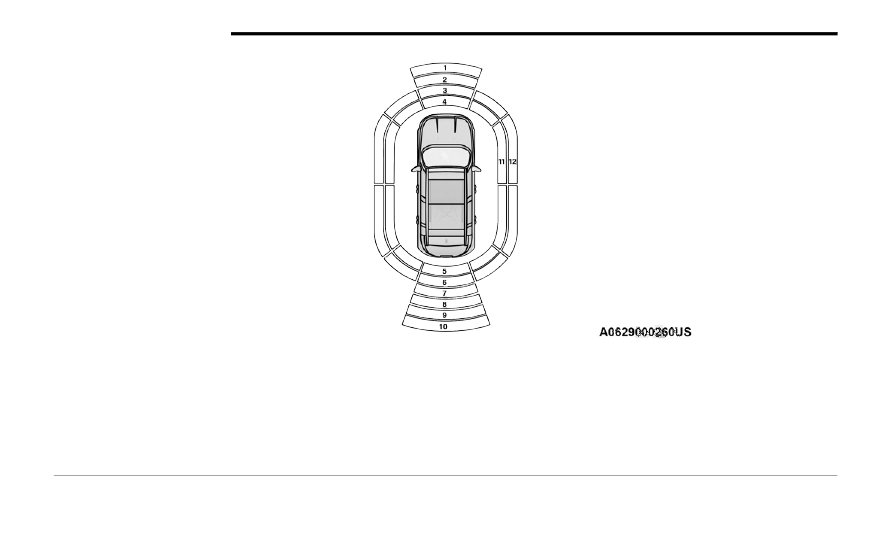
Front/Rear/Side ParkSense Arcs

1 — Solid Center Arc

7 — Flashing Center Arc

2 — Flashing Center Arc

8 — Solid Center Arc

3 — Flashing Left/Center/Right Arcs

9 — Solid Center Arc

4 — Flashing Left/Center/Right Arcs

10 — Solid Center Arc

5 — Flashing Left/Center/Right Arcs

11 — Flashing Arcs

6 — Flashing Left/Center/Right Arcs

12 — Flashing Arcs


STARTING AND OPERATING


107

The vehicle is close to the obstacle when the instrument cluster display shows one flashing arc and sounds a continuous tone. The following chart shows the 

warning alert operation when the system is detecting an obstacle:

NOTE:


ParkSense will reduce the volume of the radio, if on, when the system is sounding an audible tone.

WARNING ALERTS FOR REAR

Rear Distance 

(inches/cm)

Greater than 

59


inches

(150 cm)

59–52


inches 

(150-130 cm)

52-41


inches 

(130-105 cm)

41-34


inches 

(105-85 cm)

34-24


inches 

(85-60 cm)

24-12


inches 

(60-30 cm)

Less than 

12


inches

(30 cm)

Arcs — Left

None

None

None

None

None

6th Flashing

5th Flashing

Arcs — Center

None

10th Solid

9th Solid

8th Solid

7th Flashing

6th Flashing

5th Flashing

Arcs — Right

None

None

None

None

None

6th Flashing

5th Flashing

Audible Alert Chime

None

Audible chime increases as the object gets closer to the vehicle

Continuous

Radio Volume 

Reduced

No

Yes

WARNING ALERTS FOR FRONT

Front Distance

(inches/cm)

Greater than 39


inches 

(100 cm)

39-32


inches 

(100-80 cm)

32-24


inches 

(80-60 cm)

24-12


inches

(60-30 cm)

Less than 12


inches 

(30 cm)

Arcs — Left

None

None

None

3rd Flashing

4th Flashing

Arcs — Center

None

1st Solid

2nd Flashing

3rd Flashing

4th Flashing

Arcs — Right

None

None

None

3rd Flashing

4th Flashing

Audible Alert Chime

None

Audible chime increases as the object gets close to the vehicle

Continuous

Radio Volume Reduced

No

Yes

Yes

Yes

4

108


STARTING AND OPERATING


Front Park Assist Audible Alerts
ParkSense will turn off the Front Park Assist 

audible alert (chime) after approximately three 

seconds when an obstacle has been detected, and 

the vehicle is stationary. If the obstacle has been 

detected within less than 12


inches (30 cm), then 

the Parksense will not turn off the Front Park Assist 

audible alert.
Adjustable Chime Volume Settings
Front and Rear chime volume settings can be 

selected from the Customer-Programmable 

Features section of the Uconnect system  

Ú


page


133.

If the Uconnect system is equipped, chime volume 

settings will not be accessible from the instrument 

cluster display.
The chime volume settings include low, medium, 

and high. The factory default volume setting is 

medium.
ParkSense will retain its last known configuration 

state through ignition cycles.

E

NABLING

 A

ND

 D

ISABLING

 P

ARK

S

ENSE

ParkSense can be enabled and disabled 

with the ParkSense switch, located on 

the switch panel below the Uconnect 

display.

When the ParkSense switch is pushed to disable 

the system, the instrument cluster display  

Ú


page


64 will show the “ParkSense Disabled” 

message for approximately five seconds.
The ParkSense switch LED turns on when the 

system is disabled by pushing the switch, as well 

as in case of failure or temporary disabling 

conditions. The ParkSense switch LED will be off 

when the system is enabled. If the ParkSense 

switch is pushed, and requires service, the 

ParkSense switch LED will blink momentarily, and 

then the LED will be on.

S

ERVICE

 T

HE

 P

ARK

S

ENSE

 P

ARK

 A

SSIST


S

YSTEM

When the ParkSense System has detected a 

faulted condition, the instrument cluster display 

will actuate a single chime, and it will show the 

"PARKSENSE UNAVAILABLE WIPE REAR 

SENSORS", "PARKSENSE UNAVAILABLE WIPE 

FRONT SENSORS", or the "PARKSENSE 

UNAVAILABLE SERVICE REQUIRED" message for 

five seconds. Under this condition, ParkSense will 

not operate.
If "PARKSENSE UNAVAILABLE WIPE REAR 

SENSORS" or "PARKSENSE UNAVAILABLE WIPE 

FRONT SENSORS" appears in the instrument 

cluster display make sure the outer surface and 

the underside of the rear fascia/bumper and/or 

front fascia/bumper is clean and clear of snow, 

ice, mud, dirt or other obstruction and then cycle 

the ignition. If the message continues to appear 

see an authorized dealer.
If the "PARKSENSE UNAVAILABLE SERVICE 

REQUIRED" message appears in the instrument 

cluster display, see an authorized dealer.

C

LEANING

 T

HE

 P

ARK

S

ENSE

 S

YSTEM

Clean the ParkSense sensors with water, car wash 

soap and a soft cloth. Do not use rough or hard 

cloths. Do not scratch or poke the sensors. 

Otherwise, you could damage the sensors.

P

ARK

S

ENSE

 S

YSTEM

 U

SAGE


P

RECAUTIONS

NOTE:

Ensure that the front and rear fascia/bumper 

are free of snow, ice, mud, dirt and debris to 

keep the ParkSense system operating properly.

Construction equipment, large trucks, and other 

vibrations could affect the performance of Park

-

Sense.

When you turn ParkSense off, the instrument 

cluster display will read “PARKSENSE OFF.” 

Furthermore, once you turn ParkSense off, it 

remains off until you turn it on again, even if you 

cycle the ignition key.

ParkSense, when on, will reduce the volume of 

the radio when it is sounding a tone.


STARTING AND OPERATING


109

Clean the ParkSense sensors regularly, taking 

care not to scratch or damage them. The 

sensors must not be covered with ice, snow, 

slush, mud, dirt or debris. Failure to do so can 

result in the system not working properly. The 

ParkSense system might not detect an obstacle 

behind or in front of the fascia/bumper, or it 

could provide a false indication that an obstacle 

is behind or in front of the fascia/bumper.

Use the ParkSense switch to turn the ParkSense 

system off if objects such as bicycle carriers, 

etc. are placed within 12


inches (30 cm) from 

the rear fascia/bumper. Failure to do so can 

result in the system misinterpreting a close 

object as a sensor problem, causing the “PARK

-

SENSE UNAVAILABLE SERVICE REQUIRED” 

message to be displayed in the instrument 

cluster display.

NOTE:


If any objects are attached to the bumper within a 

6.5


ft (2


m) field of view, they will interfere and 

cause false alerts and possibly blockage.

There may be a delay in the object detection 

rate if the object is moving.

The operation of the rear sensors is automati

-

cally deactivated when the trailer's electric plug 

is inserted in the vehicle's tow hook socket, 

while the front sensors stay active and can 

provide acoustic and visual warnings. The rear 

sensors are automatically reactivated when the 

trailer's cable plug is removed.

S

IDE

 D

ISTANCE

 W

ARNING

 (SDW) 

S

YSTEM

The Side Distance Warning system has the 

function of detecting the presence of side 

obstacles near the vehicle using the parking 

sensors located in the front and rear bumpers.

Side Distance Warning Display

The Side Distance Warning screen will only be 

displayed if “Sound and Display” is selected from 

the Customer-Programmable Features section of 

the Uconnect system  

Ú


page


133.

WARNING!


Drivers must be careful when backing up even 

when using ParkSense. Always check carefully 

behind your vehicle, look behind you, and be 

sure to check for pedestrians, animals, other 

vehicles, obstructions, and blind spots before 

backing up. You are responsible for safety and 

must continue to pay attention to your 

surroundings. Failure to do so can result in 

serious injury or death.

Before using ParkSense, it is strongly recom

-

mended that the ball mount and hitch ball 

assembly be disconnected from the vehicle 

when the vehicle is not used for towing. 

Failure to do so can result in injury or damage 

to vehicles or obstacles because the hitch ball 

will be much closer to the obstacle than the 

rear fascia when the vehicle sounds the 

continuous tone. Also, the sensors could 

detect the ball mount and hitch ball assembly, 

depending on its size and shape, giving a false 

indication that an obstacle is behind the 

vehicle.

CAUTION!


ParkSense is only a parking aid and it is 

unable to recognize every obstacle, including 

small obstacles. Parking curbs might be 

temporarily detected or not detected at all. 

Obstacles located above or below the sensors 

will not be detected when they are in close 

proximity.

The vehicle must be driven slowly when using 

ParkSense in order to be able to stop in time 

when an obstacle is detected. It is recom

-

mended that the driver looks over his/her 

shoulder when using ParkSense.

4

110


STARTING AND OPERATING


The system warns the driver with an acoustic 

signal and where provided, with visual indications 

on the instrument panel display.

NOTE:

Parksense will reduce the volume of the radio if 

on when the system is sounding an audible 

tone.

The alert chime is activated only when the 

obstacle is in the vehicle path.

Activation — Deactivation

The system can operate only after driving a short 

distance and if the vehicle speed is between 0 and 

11


mph (0 and 18


km/h). The system can be 

activated/deactivated via the "Settings" menu of 

the Uconnect system. If the ParkSense System is 

deactivated via the ParkSense Hard switch then 

the Side Distance Warning system will 

automatically be deactivated.
Message on the display for Side Distance Warning 

feature:
“Wipe Sensors” — This message is displayed in the 

case of a failure of the Side Distance Warning 

system sensors. Free the bumpers of any 

obstacles, ensure that the front and rear bumper 

are free of snow, ice, mud, dirt and debris to keep 

the ParkSense system operating properly.
“SDW Not Available” — This message is displayed 

if the Side Distance Warning system is not 

available. The failed operation of the system might 

be due to the insufficient voltage from the battery 

or other failures on the electrical system. Contact 

an authorized dealer as soon as possible to have 

the electrical system checked.

Operation With A Trailer

The system is automatically deactivated when the 

trailer's electric plug is inserted in the vehicle's tow 

hook socket. The rear sensors are automatically 

reactivated when the trailer's cable plug is 

removed.

ParkSense Usage Precautions

Some conditions may influence the performance 

of the Side Distance Warning system:
NOTE:

Ensure that the front and rear bumper are free 

of snow, ice, mud, dirt and debris to keep the 

ParkSense system operating properly.

Construction equipment, large trucks, and other 

vibrations could affect the performance of Park

-

Sense.

When you turn ParkSense off, the message to 

appear in the instrument cluster display will 

read “PARKSENSE OFF.” Furthermore, once you 

turn ParkSense off, it remains off until you turn 

it on again, even if you cycle the ignition key.

ParkSense, when on, will reduce the volume of 

the radio when it is sounding a tone.

WARNING ALERTS

Distance 

(inches/cm)

Less than 

12


inches

(30 cm)

12–65


inches 

(30–60 cm)

Arcs-Left

11th Flashing 12th Flashing

Arcs-Right

11th Flashing 12th Flashing

Audible Alert 

Chime

Continuous

Audible chime 

increases as 

the objects 

within the 

vehicle’s path 

get close to 

the vehicle

Radio Volume 

Reduced

Yes

Yes


STARTING AND OPERATING


111

Clean the ParkSense sensors regularly, taking 

care not to scratch or damage them. The 

sensors must not be covered with ice, snow, 

slush, mud, dirt or debris. Failure to do so can 

result in the system not working properly. The 

ParkSense system might not detect an obstacle 

behind or in front of the fascia/bumper, or it 

could provide a false indication that an obstacle 

is behind or in front of the fascia/bumper.

The presence of a tow hook without a trailer may 

interfere with the correct operation of the 

parking sensors. Before using the ParkSense 

system, it is recommended to remove the 

removable tow hook ball assembly and any 

attachments from the vehicle when it is not 

used for towing operations. If you wish to leave 

the tow hook fitted when not towing a trailer, 

contact your authorized dealer for the Park

-

Sense system operations update because the 

tow hook could be detected as an obstacle by 

the sensors.

PARKSENSE ACTIVE PARK ASSIST SYSTEM — 

IF EQUIPPED

The ParkSense Active Park Assist system is 

intended to assist the driver during parallel, 

perpendicular, and parallel park exit maneuvers by 

identifying a proper parking space, providing 

audible/visual instructions, and controlling the 

steering wheel. The ParkSense Active Park Assist 

system is defined as “semi-automatic” since the 

driver maintains control of the accelerator, gear 

selector and brakes. Depending on the driver's 

parking maneuver selection, the ParkSense Active 

Park Assist system is capable of maneuvering a 

WARNING!


Drivers must be careful when backing up even 

when using ParkSense. Always check carefully 

behind your vehicle, look behind you, and be 

sure to check for pedestrians, animals, other 

vehicles, obstructions, and blind spots before 

backing up. You are responsible for safety and 

must continue to pay attention to your 

surroundings. Failure to do so can result in 

serious injury or death.

Before using ParkSense, it is strongly recom

-

mended that the ball mount and hitch ball 

assembly be disconnected from the vehicle 

when the vehicle is not used for towing. 

Failure to do so can result in injury or damage 

to vehicles or obstacles because the hitch ball 

will be much closer to the obstacle than the 

rear fascia when the vehicle sounds the 

continuous tone. Also, the sensors could 

detect the ball mount and hitch ball assembly, 

depending on its size and shape, giving a false 

indication that an obstacle is behind the 

vehicle.

CAUTION!


ParkSense is only a parking aid and it is 

unable to recognize every obstacle, including 

small obstacles. Parking curbs might be 

temporarily detected or not detected at all. 

Obstacles located above or below the sensors 

will not be detected when they are in close 

proximity.

The vehicle must be driven slowly when using 

ParkSense in order to be able to stop in time 

when an obstacle is detected. It is recom

-

mended that the driver looks over his/her 

shoulder when using ParkSense.

4

112


STARTING AND OPERATING


vehicle into a parallel or a perpendicular parking 

space on either side (i.e., driver side or passenger 

side), as well as exiting a parallel parking space.
NOTE:

The driver is always responsible for controlling 

the vehicle, responsible for any surrounding 

objects, and must intervene as required.

The system is designed to assist the driver and 

not to substitute the driver.

During a semi-automatic maneuver, if the driver 

touches the steering wheel after being 

instructed to remove their hands from the 

steering wheel, the system will cancel, and the 

driver will be required to manually complete the 

parking maneuver.

The system may not work in all conditions (e.g. 

environmental conditions such as heavy rain, 

snow, etc., or if searching for a parking space 

that has surfaces that will absorb the ultrasonic 

sensor waves).

E

NABLING

 A

ND

 D

ISABLING

 T

HE


P

ARK

S

ENSE

 A

CTIVE

 P

ARK

 A

SSIST


S

YSTEM

The ParkSense Active Park Assist system 

can be enabled and disabled with the 

ParkSense Active Park Assist switch, 

located on the switch panel below the 

Uconnect display.

To enable or disable the ParkSense Active Park 

Assist system, push the ParkSense Active Park 

Assist switch once (LED turns on). Pushing the 

switch a second time will disable the system (LED 

turns off).
The ParkSense Active Park Assist system will turn off 

automatically for any of the following conditions: 

Parking maneuver is complete

Vehicle speed is greater than 18


mph (30


km/h) 

when searching for a parking space

Vehicle speed is greater than 5


mph (7


km/h) 

during active steering guidance into the parking 

space

Steering wheel is touched during active steering 

guidance into the parking space

ParkSense Front/Rear Park Assist switch is 

pushed

Driver's door is opened

Rear liftgate is opened

Electronic Stability Control/Anti-Lock Brake 

System intervention

The ParkSense Active Park Assist system will allow 

a maximum number of shifts between DRIVE and 

REVERSE. If the maneuver cannot be completed 

within the maximum amount of shifts, the system 

will cancel and the instrument cluster display will 

instruct the driver to complete the maneuver 

manually.

The ParkSense Active Park Assist system will only 

operate and search for a parking space when the 

following conditions are present:

Gear selector is in DRIVE.

Ignition is in the RUN position.

ParkSense Active Park Assist switch is acti

-

vated.

Driver's door is closed.

Rear liftgate is closed.

Vehicle speed is less than 15


mph (25


km/h).

NOTE:


If the vehicle is driven above approximately 

15


mph (25


km/h), the instrument cluster display 

will instruct the driver to slow down. If the vehicle 

is driven above approximately 18


mph (30


km/h), 

the system will cancel. The driver must then reac

-

tivate the system by pushing the ParkSense Active 

Park Assist switch.

The outer surface and the underside of the front 

and rear fascias/bumpers are clean and clear 

of snow, ice, mud, dirt or other obstruction.

When pushed, the LED on the ParkSense Active 

Park Assist switch will blink momentarily, and then 

the LED will turn off if any of the above conditions 

are not present.


STARTING AND OPERATING


113

P

ARALLEL

/P

ERPENDICULAR

 P

ARKING


S

PACE

 A

SSISTANCE

 O

PERATION

When the ParkSense Active Park Assist system is 

enabled, the “Active ParkSense Searching - Press 

 or   to Switch Maneuver” message will 

appear in the instrument cluster display. You may 

select perpendicular, parallel, or parallel park exit. 

The arrow buttons on the left side of the steering 

wheel can be used to switch parking maneuvers.

Active ParkSense Searching

NOTE:

When searching for a parking space, use the 

turn signal indicator to select which side of the 

vehicle you want to perform the parking 

maneuver. The ParkSense Active Park Assist 

system will automatically search for a parking 

space on the passenger's side of the vehicle if 

the turn signal is not activated.

The driver needs to make sure that the selected 

parking space for the maneuver remains free 

and clear of any obstructions (e.g. pedestrians, 

bicycles, etc.).

The driver is responsible to ensure that the 

selected parking space is suitable for the 

maneuver and free/clear of anything that may 

be overhanging or protruding into the parking 

space (e.g., ladders, tailgates, etc. from 

surrounding objects/vehicles).

When searching for a parking space, the driver 

should drive as parallel or perpendicular 

(depending on the type of maneuver) to other 

vehicles as possible.

The system will only indicate the last detected 

parking space (example: if passing multiple 

available parking spaces, the system will only 

indicate the last detected parking space for the 

maneuver).

When an available parking space has been found, 

and the vehicle is not in position, you will be 

instructed to move forward to position the vehicle 

for a perpendicular or parallel parking sequence 

(depending on the type of maneuver being 

performed).

Space Found — Keep Moving Forward

Once the vehicle is in position, you will be 

instructed to stop the vehicle’s movement and 

remove your hands from the steering wheel. When 

the vehicle comes to a standstill (your hands still 

removed from the steering wheel), you will be 

instructed to place the gear selector into the 

REVERSE position.
The system may then instruct the driver to wait for 

steering to complete before then instructing to 

check surroundings and move backward.

4

114


STARTING AND OPERATING


(Continued)

Move Backward Into Parallel Parking Space

Move Backward Into Perpendicular Parking Space

The system may instruct several more gear shifts 

(DRIVE and REVERSE), with hands off of the 

steering wheel, before instructing the driver to 

check surroundings and complete the parking 

maneuver.

When the vehicle is in the parking position, the 

maneuver is complete and the driver will be 

instructed to check the vehicle's parking position, 

then shift the vehicle into PARK. The message 

"Active ParkSense Complete - Check Parking 

Position" will be displayed momentarily.
NOTE:

It is the driver's responsibility to use the brake 

and accelerator during the semi-automatic 

parking maneuver.

It is the driver's responsibility to use the brake 

and stop the vehicle. The driver should check 

their surroundings and be prepared to stop the 

vehicle either when instructed to, or when driver 

intervention is required.

When the system instructs the driver to remove 

their hands from the steering wheel, the driver 

should check their surroundings and begin to 

back up slowly.

The ParkSense Active Park Assist system will 

allow a maximum of six shifts between DRIVE 

and REVERSE. If the maneuver cannot be 

completed within six shifts, the system will 

cancel and the instrument cluster display will 

instruct the driver to complete the maneuver 

manually.

The system will cancel the maneuver if the 

vehicle speed exceeds 5


mph (7


km/h) during 

active steering guidance into the parking space. 

The system will provide a warning to the driver 

at 3


mph (5


km/h) that tells them to slow down. 

The driver is then responsible for completing the 

maneuver if the system is canceled.

If the system is canceled during the maneuver 

for any reason, the driver must take control of 

the vehicle.

WARNING!


Drivers must be careful when performing 

parallel or perpendicular parking maneuvers 

even when using the ParkSense Active Park 

Assist system. Always check carefully behind 

and in front of your vehicle, look behind and in 

front of you, and be sure to check for pedes

-

trians, animals, other vehicles, obstructions, 

and blind spots before backing up and moving 

forward. You are responsible for safety and 

must continue to pay attention to your 

surroundings. Failure to do so can result in 

serious injury or death.


STARTING AND OPERATING


115

(Continued)

E

XITING

 T

HE

 P

ARKING

 S

PACE

NOTE:


The function does not work for exiting a perpen

-

dicular parking space, but only exiting parallel 

parking spaces.
Activation
To activate this function, push the ParkSense 

Active Park Assist switch and then use the steering 

wheel arrow buttons to select the Parallel Park Exit 

feature. After the selection, the system activates 

and instructs the driver through the instrument 

cluster display about the operations that have to 

be carried out to perform the maneuver correctly.

Selection Of The Maneuver Side
Use the right and left arrow buttons on the steering 

wheel to select between parallel or perpendicular 

parking mode. Then use the direction indicators 

(turn signals) to choose the direction that you want 

to perform the maneuver.
During the maneuver, the system asks the driver to 

shift to REVERSE, and operate the turn signal in 

the direction you want to exit. Let go of the steering 

wheel and use the brake or accelerator pedals as 

instructed, while the system handles the steering 

automatically for exiting the parking space. If the 

driver continues to carry out a voluntary or 

involuntary action on the steering wheel during the 

exit maneuver (touching or holding the steering 

wheel to prevent its movement), the maneuver will 

be interrupted.

Check Surroundings — Move Backward

Before using the ParkSense Active Park Assist 

system, it is strongly recommended that the 

ball mount and hitch ball assembly be discon

-

nected from the vehicle when the vehicle is 

not used for towing. Failure to do so can result 

in injury or damage to vehicles or obstacles 

because the hitch ball will be much closer to 

the obstacle than the rear fascia when the 

vehicle sounds the continuous tone. Also, the 

sensors could detect the ball mount and hitch 

ball assembly, depending on its size and 

shape, giving a false indication that an 

obstacle is behind the vehicle.

CAUTION!


The ParkSense Active Park Assist system is 

only a parking aid and it is unable to recognize 

every obstacle, including small obstacles. 

Parking curbs might be temporarily detected 

or not detected at all. Obstacles located above 

or below the sensors will not be detected 

when they are in close proximity.

WARNING!

The vehicle must be driven slowly when using 

the ParkSense Active Park Assist system in 

order to be able to stop in time when an 

obstacle is detected. It is recommended that 

the driver looks over his/her shoulder when 

using the ParkSense Active Park Assist 

system.

CAUTION!

4

116


STARTING AND OPERATING


Check Surroundings — Move Forward

End Of Maneuver
The semi-automatic maneuver ends when the 

display shows the message of a completed 

maneuver. At the end of the maneuver, the system 

gives back the vehicle control to the driver.

Important Information

If the sensors undergo impact which alters their 

position, the system operation could be greatly 

affected.

The sensors reach top performance after the 

vehicle has gone about 30


miles (50


km) due to 

the dynamic tire circumference calculations used 

for parking.

Clean the ParkSense sensors regularly, taking 

care not to scratch or damage them. The sensors 

must not be covered with ice, snow, slush, mud, 

dirt or debris. Failure to do so can result in the 

system not working properly. The ParkSense 

system might not detect an obstacle behind or in 

front of the fascia/bumper, or it could provide a 

false indication that an obstacle is behind or in 

front of the fascia/bumper.

Construction equipment, large trucks, and other 

vibrations could affect the performance of Park

-

Sense.

Sensors may detect a nonexistent obstacle (echo 

noise) due to mechanical noises, for example 

while washing the vehicle or in the case of rain, 

strong wind, and hail.

The sensors may not detect objects of a particular 

shape or made from particular materials (very 

thin poles, trailer beams, panels, nets, bushes, 

anti-parking posts, pavements, rubbish bins, 

motor vehicles, etc.). Always take great care to 

check that the vehicle and its path are actually 

compatible with the parking place identified by 

the system.

The use of wheels and tires that are different size 

to the original equipment could affect the opera

-

tion of the system.

The operation of the rear sensors is automatically 

deactivated when the trailer's electric plug is 

inserted in the vehicle's tow hook socket, while 

the front sensors stay active and can provide 

acoustic and visual warnings. The rear sensors 

are automatically reactivated when the trailer's 

cable plug is removed.

In "Search in Progress" mode, the system could 

incorrectly identify a parking place to carry out the 

maneuver (e.g. by a junction, driveways, roads 

crossing the direction of travel, etc.).

In the case of parking maneuvers on roads with 

an incline, the performance of the system could 

be inferior and it may deactivate.

If a parking maneuver is being carried out 

between two parked vehicles alongside the pave

-

ment, the system may cause the vehicle to mount 

the pavement.

Some maneuvers at very tight bends might be 

impossible to be carried out.

Take great care to ensure that conditions do not 

change during the parking maneuver (e.g. if there 

are persons and/or animals in the parking place, 

moving vehicles, etc.) and intervene immediately 

if necessary.

During parking maneuvers, pay attention to vehi

-

cles approaching from the opposite direction. 

Always abide by the law and road regulations.

NOTE:

Correct system operation is not guaranteed if 

snow chains or the spare tire are fitted.

The function only informs the driver about the 

last appropriate parking place (parallel or 

perpendicular) detected by the parking sensors.

Some messages displayed are accompanied by 

acoustic warnings.


STARTING AND OPERATING


117

LANESENSE — IF EQUIPPED 

L

ANE

S

ENSE

 O

PERATION

The LaneSense system is operational at speeds 

above 37


mph (60


km/h) and below 112


mph 

(180


km/h). The LaneSense system uses a 

forward looking camera to detect lane markings 

and measure vehicle position within the lane 

boundaries.
When both lane markings are detected and the 

driver unintentionally drifts out of the lane (no turn 

signal applied), the LaneSense system provides a 

haptic warning in the form of torque applied to the 

steering wheel to prompt the driver to remain within 

the lane boundaries. If the driver continues to 

unintentionally drift out of the lane, the LaneSense 

system provides a visual warning through the 

instrument cluster display to prompt the driver to 

remain within the lane boundaries.
The driver may manually override the haptic warning 

by applying torque to the steering wheel at any time.
When only a single lane marking is detected and 

the driver unintentionally drifts across the lane 

marking (no turn signal applied), the LaneSense 

system provides a visual warning through the 

instrument cluster display to prompt the driver to 

remain within the lane. When only a single lane 

marking is detected, a haptic (torque) warning will 

not be provided.

NOTE:


When operating conditions have been met, the 

LaneSense system will monitor if the driver’s 

hands are on the steering wheel and provides an 

audible warning to the driver when the driver’s 

hands are not detected on the steering wheel. The 

system will cancel if the driver does not return their 

hands to the wheel.

T

URNING

 L

ANE

S

ENSE

 O

N

 O

R

 O

FF

The LaneSense button is located on the 

center stack.

To turn the LaneSense system on, push the 

LaneSense button (LED turns off). A “Lane Sense 

On” message is shown in the instrument cluster 

display.
To turn the LaneSense system off, push the 

LaneSense button once (LED turns on).
NOTE:


The LaneSense system will retain the last system 

state on or off from the last ignition cycle when the 

ignition is changed to the ON/RUN position.

L

ANE

S

ENSE

 W

ARNING

 M

ESSAGE

The LaneSense system will indicate the current 

lane drift condition through the instrument cluster 

display.
Base Instrument Cluster Display — If Equipped
When the LaneSense system is on, the lane lines 

are gray when both of the lane boundaries have 

not been detected and the LaneSense telltale is 

solid white.

System On (Gray Lines/White Telltale)

4

118


STARTING AND OPERATING


Left Lane Departure — Only Left Lane Detected 

When the LaneSense system is on, the Lane

-

Sense telltale is solid white when only the left 

lane marking has been detected and the system 

is ready to provide visual warnings in the instru

-

ment cluster display if an unintentional lane 

departure occurs.

When the LaneSense system senses the lane 

has been approached and is in a lane departure 

situation, the left lane line flashes from white to 

gray, and the LaneSense telltale changes from 

solid white to flashing yellow.

Lane Approached

(Flashing White To Gray Line/Flashing Yellow Telltale)

NOTE:


The LaneSense system operates with similar 

behavior for a right lane departure when only the 

right lane marking has been detected.
Left Lane Departure — Both Lanes Detected 

When the LaneSense system is on, the lane 

lines turn from gray to white to indicate that 

both of the lane markings have been detected. 

The LaneSense telltale is solid green when both 

lane markings have been detected and the 

system is “armed” to provide visual warnings in 

the instrument cluster display and a torque 

warning in the steering wheel if an unintentional 

lane departure occurs.

Lanes Sensed (White Lines/Green Telltale)

When the LaneSense system senses a lane drift 

situation, the left lane line turns solid white. The 

LaneSense telltale changes from solid green to 

solid yellow. At this time torque is applied to the 

steering wheel in the opposite direction of the 

lane boundary.
For example: If approaching the left side of the 

lane, the steering wheel will turn to the right.

Lane Sensed (Solid White Line/Solid Yellow Telltale)

When the LaneSense system senses the lane 

has been approached and is in a lane departure 

situation, the left lane line flashes from white to 

gray and the LaneSense telltale changes from 

solid yellow to flashing yellow. At this time, 

torque is applied to the steering wheel in the 

opposite direction of the lane boundary.


STARTING AND OPERATING


119

For example: If approaching the left side of the 

lane, the steering wheel will turn to the right.

Lane Approached

(Flashing White To Gray Line/Flashing Yellow Telltale)

NOTE:


The LaneSense system operates with similar 

behavior for a right lane departure.
Premium Instrument Cluster Display — If Equipped
When the LaneSense system is on, the lane lines 

are gray when both of the lane boundaries have 

not been detected and the LaneSense telltale is 

solid white.

System On (Gray Lines/White Telltale)

Left Lane Departure — Only Left Lane Detected 

When the LaneSense system is on, the Lane

-

Sense telltale is solid white when only the left 

lane marking has been detected and the system 

is ready to provide visual warnings in the instru

-

ment cluster display if an unintentional lane 

departure occurs.

When the LaneSense system senses the lane 

has been approached and is in a lane departure 

situation, the left lane line flashes yellow (on/

off) and the LaneSense telltale changes from 

solid white to flashing yellow.

Lane Approached

(Flashing Yellow Line/Flashing Yellow Telltale)

NOTE:


The LaneSense system operates with similar 

behavior for a right lane departure when only the 

right lane marking has been detected.
Left Lane Departure — Both Lanes Detected 

When the LaneSense system is on, the lane 

lines turn from gray to white to indicate that 

both of the lane markings have been detected. 

The LaneSense telltale is solid green when both 

lane markings have been detected and the 

system is “armed” to provide visual warnings in 

the instrument cluster display and a torque 

warning in the steering wheel if an unintentional 

lane departure occurs.

4

120


STARTING AND OPERATING


Lanes Sensed (White Lines/Green Telltale)

When the LaneSense system senses a lane drift 

situation, the left lane line turns solid yellow. 

The LaneSense telltale changes from solid 

green to solid yellow. At this time torque is 

applied to the steering wheel in the opposite 

direction of the lane boundary.
For example: If approaching the left side of the 

lane the steering wheel will turn to the right.

Lane Sensed (Solid Yellow Line/Solid Yellow Telltale)

When the LaneSense system senses the lane 

has been approached and is in a lane departure 

situation, the left lane line flashes yellow (on/

off). The LaneSense telltale changes from solid 

yellow to flashing yellow. At this time torque is 

applied to the steering wheel in the opposite 

direction of the lane boundary.
For example: If approaching the left side of the 

lane the steering wheel will turn to the right.

Lane Approached 

(Flashing Yellow Line/Flashing Yellow Telltale)

NOTE:


The LaneSense system operates with similar 

behavior for a right lane departure.


STARTING AND OPERATING


121

C

HANGING

 L

ANE

S

ENSE

 S

TATUS

The LaneSense system has settings to adjust the 

intensity of the torque warning and the warning 

zone sensitivity (early/late) that you can configure 

through the Uconnect system  

Ú


page


133.

NOTE:

When enabled the system operates above 

37


mph (60


km/h) and below 112


mph 

(180


km/h).

Use of the turn signal suppresses the warnings.

The system will not apply torque to the steering 

wheel whenever a safety system engages 

(Anti-Lock Brakes, Traction Control System, 

Electronic Stability Control, Forward Collision 

Warning, etc.).

REAR BACK UP CAMERA   

The Rear Back Up Camera allows you to see an 

on-screen image of your vehicle's rear 

surroundings when the gear selector is put into 

REVERSE. The image will be displayed on the 

touchscreen display along with a note to “Check 

Entire Surroundings” across the top of the screen. 

After five seconds, this note will disappear. The 

camera is located above the rear license plate. 

Parking Camera

When the vehicle is shifted out of REVERSE with 

camera delay turned off, the rear camera mode is 

exited and the navigation or audio screen appears 

again.
When the vehicle is shifted out of REVERSE with 

camera delay turned on, the camera image will 

continue to be displayed for up to 10 seconds unless 

the vehicle speed exceeds 8


mph (13


km/h), the 

vehicle is shifted into PARK or the ignition is placed 

in the OFF position.
When the vehicle is shifted out of REVERSE, a 

touchscreen "X" button is shown on the camera 

image in order to disable the visualization earlier 

than 10 seconds.
When enabled, active guidelines are overlaid on 

the image to illustrate the width of the vehicle and 

its projected backup path based on the steering 

wheel position.

Different colored zones indicate the distance to 

the rear of the vehicle.
The following table shows the approximate 

distances for each zone:

NOTE:


If snow, ice, mud, or any foreign substance builds 

up on the camera lens, clean the lens, rinse with 

water, and dry with a soft cloth. Do not cover the 

lens.


Zone

Distance To The Rear Of 

The Vehicle

Red

0 - 1


ft (0 - 30 cm)

Yellow

1


ft - 3


ft (30 cm - 1


m)

Green

3


ft or greater 

(1


m or greater)

WARNING!


Drivers must be careful when backing up even 

when using the Rear Back Up Camera. Always 

check carefully behind your vehicle, and be sure 

to check for pedestrians, animals, other 

vehicles, obstructions, or blind spots before 

backing up. You are responsible for the safety of 

your surroundings and must continue to pay 

attention while backing up. Failure to do so can 

result in serious injury or death.

4


Content      ..     5      6      7      8     ..