Jaguar XJ (X350). Manual - part 1326


  Index      Jaguar     Jaguar XJ (X350) - service repair manual 2003-2009 year


Search            


Content   ..  1324  1325  1326  1327   ..


Jaguar XJ (X350). Manual - part 1326


Published: 11-May-2011

Video System - Rear Passenger Entertainment Control Panel

Removal and Installation

Removal

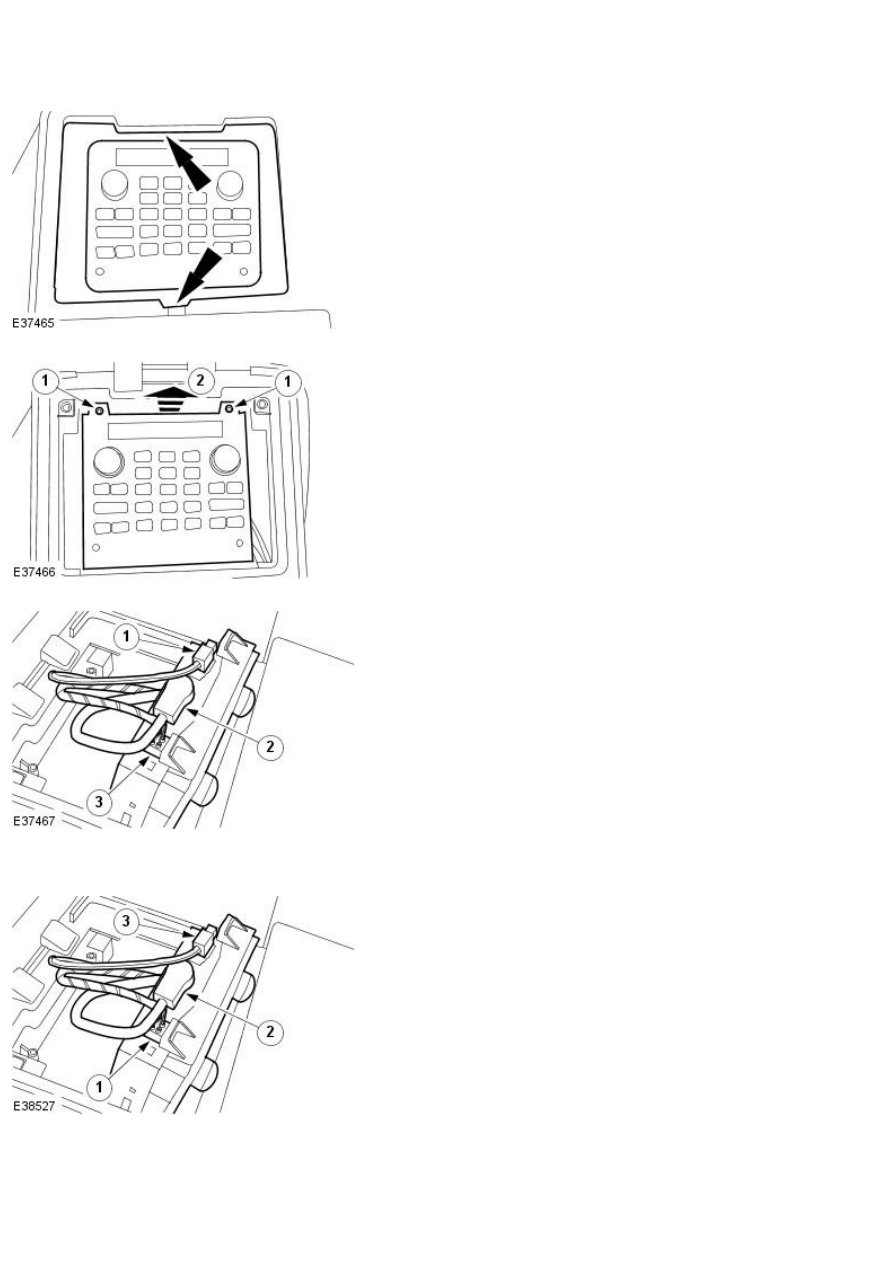
1. Remove the passenger entertainment control panel trim panel.

2. Detach the passenger entertainment control panel.

1. Remove the retaining screws.

2. Lift the passenger entertainment panel and slide fowards.

3. Remove the passenger entertainment control panel.

1. Disconnect the fibre optic cable.

2. Disconnect the 20 way connector.

3. Disconnect the 8 way connector.

Installation

1. NOTE: The connectors must be installed in reverse order.

To install, reverse the removal procedure.

1. Connect the 8 way connector.

2. Connect the 20 way connector.

3. Connect the fibre optic cable.

Video Display   

Removal  


1 . 

  CAUTION: Care should be taken to avoid scratching the display screen. 


  CAUTION: The display screen should only be cleaned with a soft cloth. 


Remove the video display trim panel. <<501-05>>  


2 . Detach the video display.  


3 . Remove the video display.  


Disconnect the electrical connector.


www.


Installation  


1 . NOTE:  


Ensure the cable is not trapped. 


To install, reverse the removal procedure. 


Video System Module   

Removal  


1 . Remove the rear seat backrest. <<501-10>> 


2 . Disconnect the video system module electrical connectors. 


3 . Remove the video system module.  


Installation  


1 . To install, reverse the removal procedure. 


Tighten to 6 Nm.


www.


Content   ..  1324  1325  1326  1327   ..