Hyundai Santa Fe (2023 year). Manual in english - page 10
05
,1)27$,10(17 6<67(0
NOTICE
Antenna
ś If you install an aftermarket HID
Shark fin antenna
head lamp, your vehicle’s audio and
electronic devices may not function
properly.
ś Prevent chemicals such as perfume,
cosmetic oil, sun cream, hand
cleaner, and air freshener from
contacting the interior parts
because they may cause damage or
discoloration.
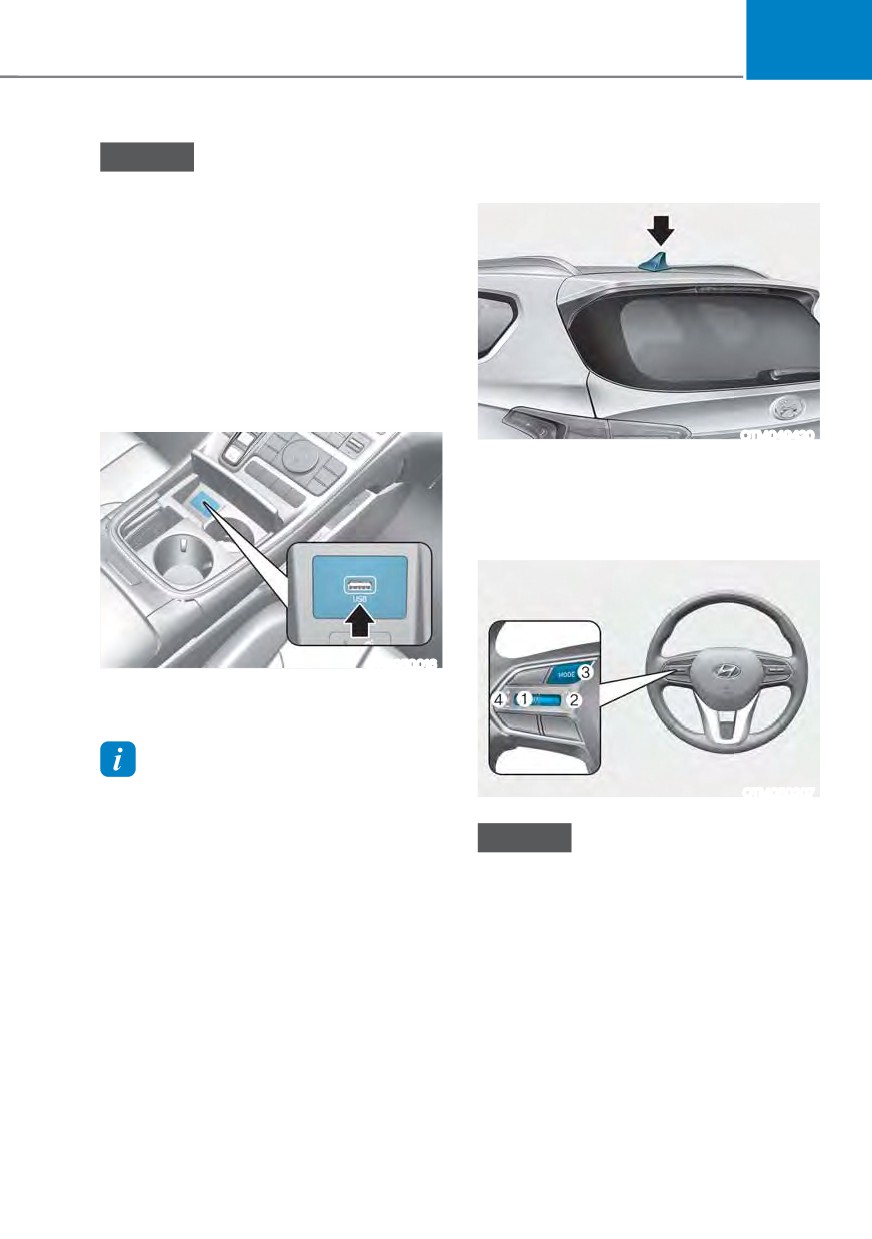
USB Port
OTM049420
The shark fin antenna receives
transmitted data. (for example: AM/FM,
DAB, GPS)
Steering wheel remote controls
OTM050016
You can use an USB cable to connect
audio devices to the vehicle USB port.
Information
When using a portable audio device
OTM050207
connected to the power outlet, noise may
occur during playback. If this happens,
NOTICE
use the portable audio device’s power
source.
Do not operate multiple audio remote
control buttons simultaneously.
5-137
Convenience features
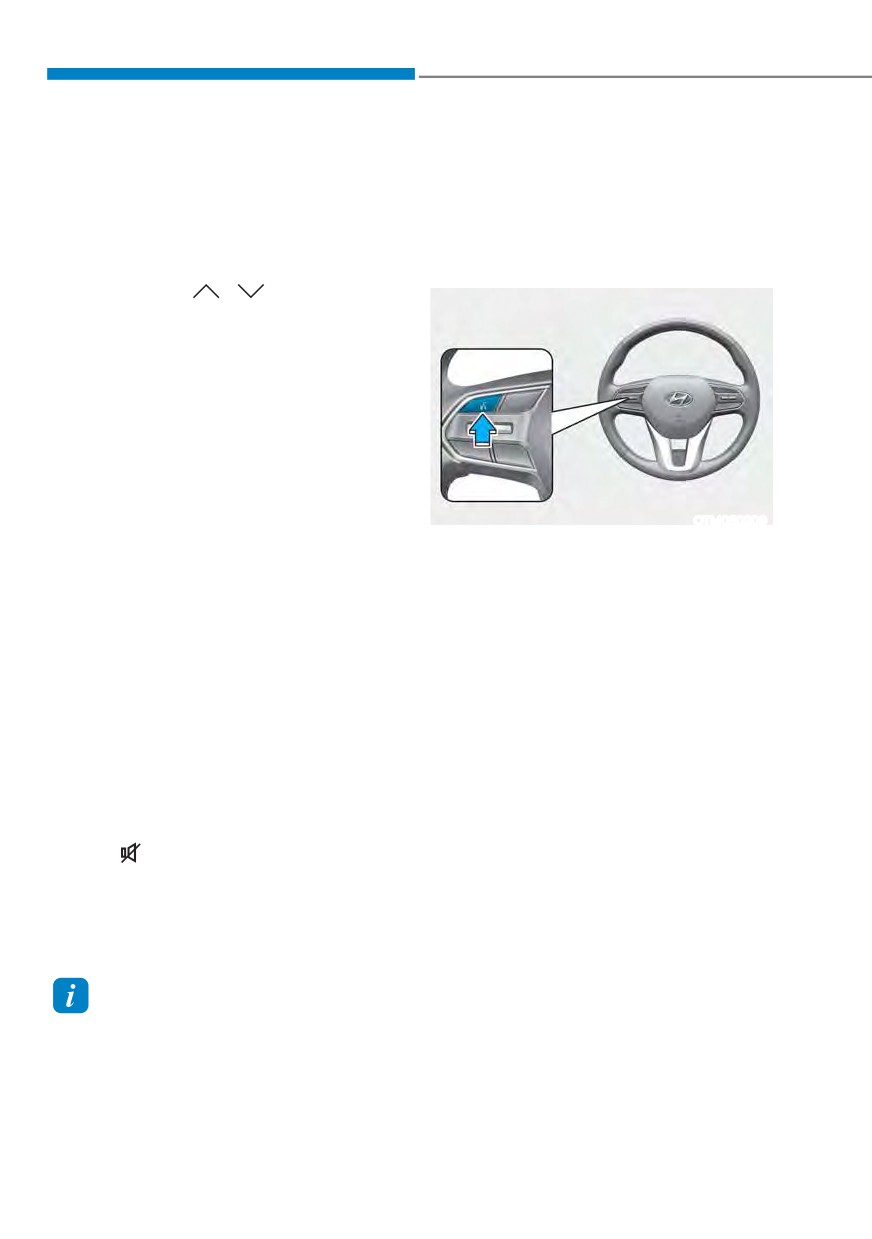
VOLUME (VOL + / VOL -) (1)
Infotainment system
ś Rotate the VOLUME scroll up to
For detailed information, refer to the
increase volume.
separately supplied infotainment system
ś Rotate the VOLUME scroll down to
manual.
decrease volume.
Voice recognition
SEEK/PRESET (
/
) (2)
If the SEEK/PRESET switch is pressed up
or down and held for 0.8 second or more,
it will function in the following modes:
ś RADIO mode
It will function as the AUTO SEEK
select button. It will SEEK until you
release the button.
ś MEDIA mode
It will function as the FF/RW button.
OTM050209
If the SEEK/PRESET switch is pressed up
For detailed information, refer to the
or down, it will function in the following
separately supplied infotainment
modes:
system manual.
ś RADIO mode
It will function as the PRESET STATION
UP/DOWN button.
ś MEDIA mode
It will function as the TRACK UP/
DOWN button.
MODE (3)
Press the MODE button to toggle
through Radio or Media modes.
MUTE (
) (4)
ś Press the MUTE button to mute the
sound.
ś Press the MUTE button again to
activate the sound.
Information
See additional information in supplied
Infotainment Manual.
5-138
05
Bluetooth® Wireless Technology
How vehicle radio works
FM reception
OTM050208
OJF045308L
AM and FM radio signals are broadcast
from transmitter towers located around
your city. They are intercepted by the
radio antenna on your vehicle. This signal
is then received by the radio and sent to
your vehicle speakers.
When a strong radio signal has reached
your vehicle, the precise engineering
OTM050224L
of your audio system ensures the best
possible quality reproduction. However,
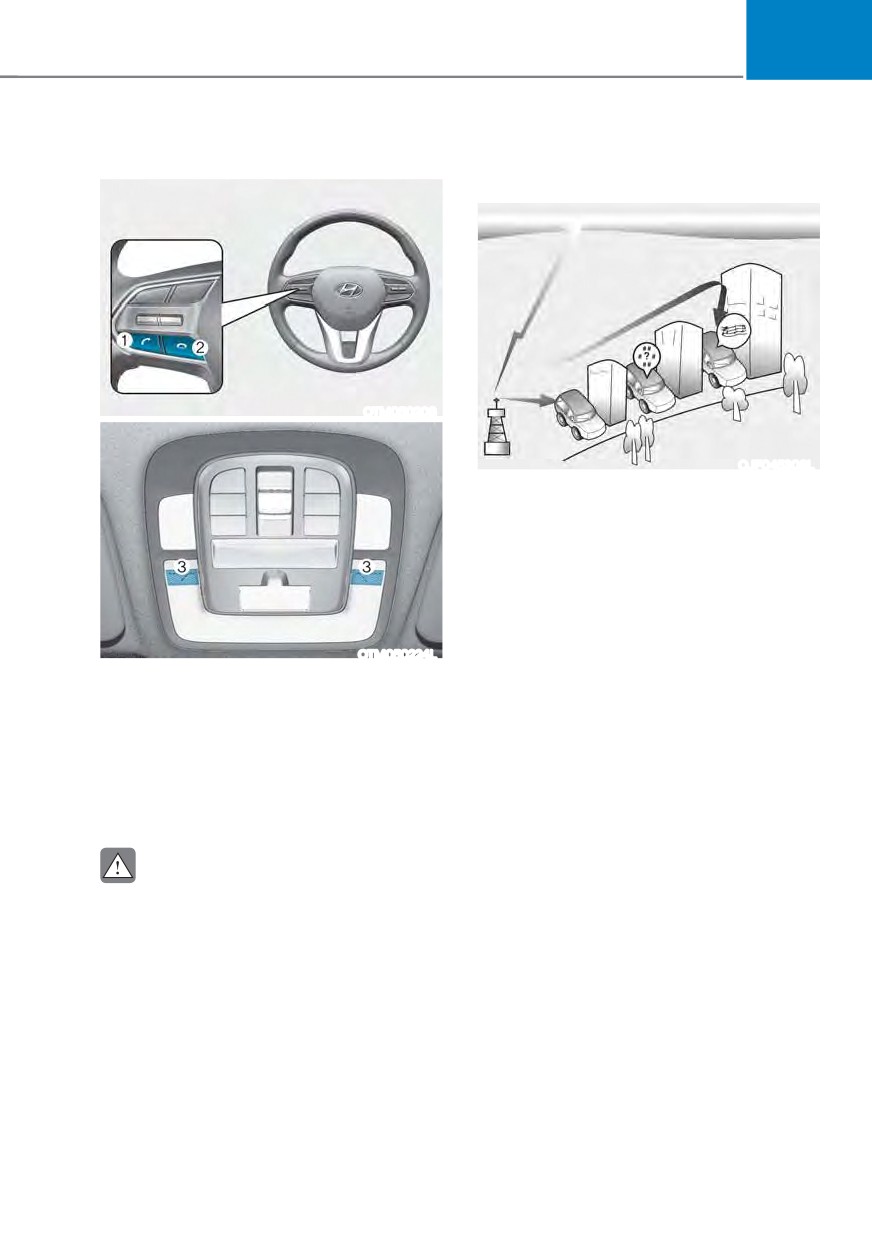
(1) Call / Answer button
in some cases the signal coming to your
(2) Call end button
vehicle may not be strong and clear.
(3) Microphone
This can be due to factors, such as
the distance from the radio station,
For detailed information, refer to the
closeness of other strong radio stations
separately supplied infotainment
or the presence of buildings, bridges or
system manual.
other large obstructions in the area.
CAUTION
To avoid driver distractions, do not
excessively operate the device while
driving the vehicle which may lead to
an accident.
5-139
Convenience features
AM (MW, LW) reception
FM radio station
OJF045309L
OJF045310L
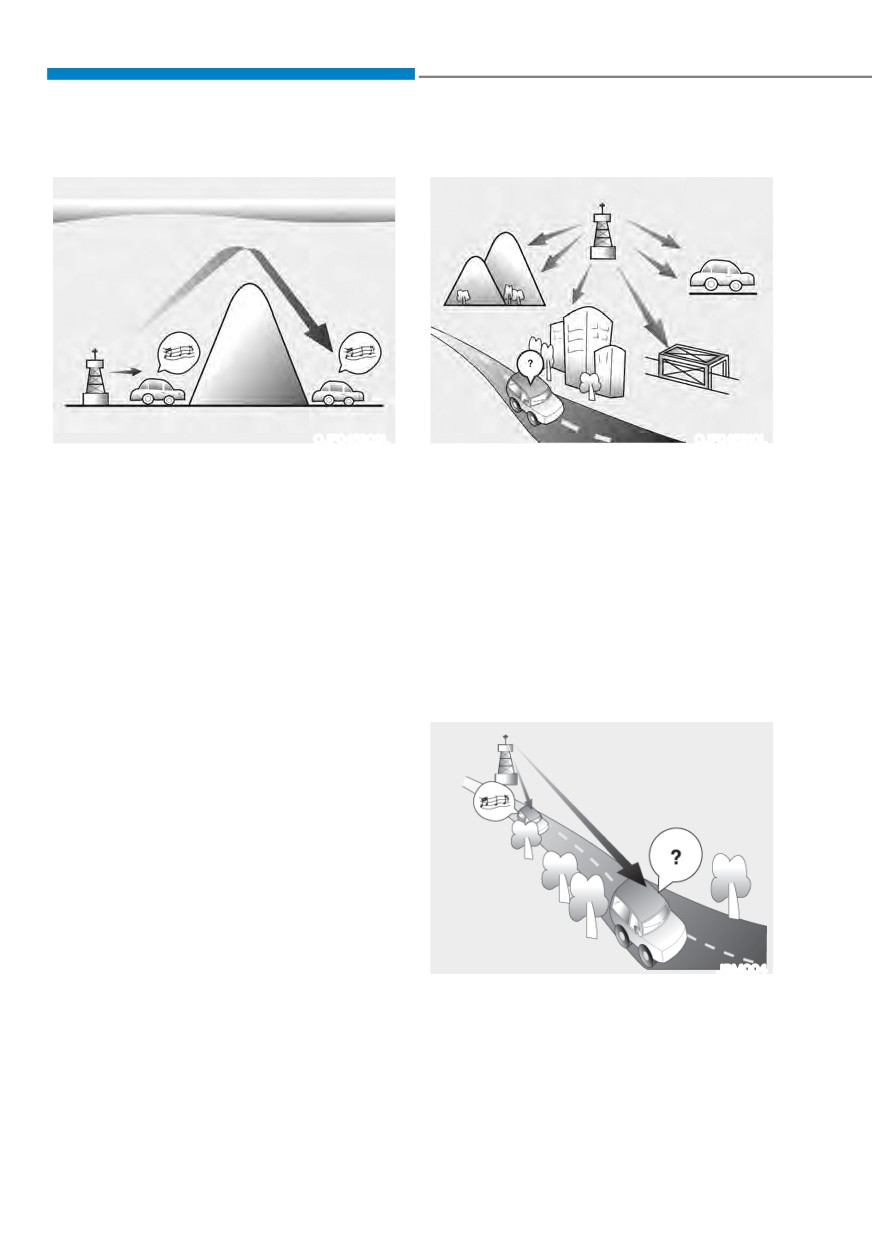
AM broadcasts can be received at
FM broadcasts are transmitted at high
greater distances than FM broadcasts.
frequencies and do not bend to follow
This is because AM radio waves are
the earth’s surface. Because of this, FM
transmitted at low frequencies. These
broadcasts generally begin to fade at
long, low frequency radio waves can
short distances from the station. Also, FM
follow the curvature of the earth rather
signals are easily affected by buildings,
than travelling straight out into the
mountains, or other obstructions. These
atmosphere.
can result in certain listening conditions
which might lead you to believe a
In addition, they curve around
problem exists with your radio.
obstructions so that they can provide
better signal coverage.
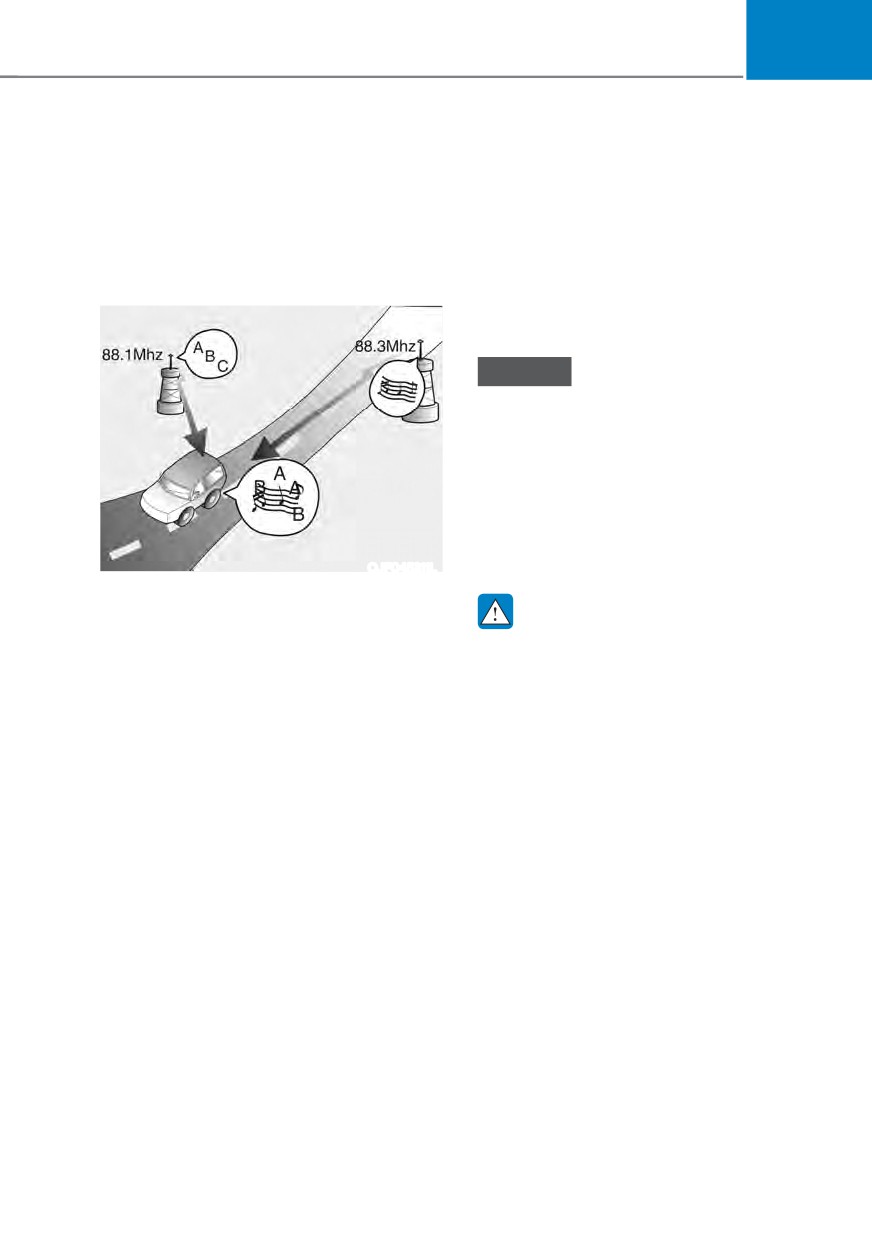
The following conditions are normal and
do not indicate radio trouble :
JBM004
ś Fading - As your vehicle moves away
from the radio station, the signal will
weaken and sound will begin to fade.
When this occurs, we suggest that you
select another stronger station.
5-140
05
ś
Flutter/Static - Weak FM signals
Using a cellular phone or a twoway
or large obstructions between the
radio
transmitter and your radio can disturb
When a cellular phone is used inside
the signal causing static or fluttering
the vehicle, noise may be produced
noises to occur. Reducing the treble
from the audio system. This does not
level may lessen this effect until the
mean that something is wrong with the
disturbance clears.
audio equipment. In such a case, use
the cellular phone at a place as far as
possible from the audio equipment.
NOTICE
When using a communication system
such as a cellular phone or a radio set
inside the vehicle, a separate external
antenna must be fitted. When a cellular
phone or a radio set is used with an
internal antenna alone, it may interfere
with the vehicle’s electrical system and
adversely affect safe operation of the
vehicle.
OJF045311L
ś
Station Swapping - As a FM signal
weakens, another more powerful
WARNING
signal near the same frequency may
Do not use a cellular phone while
begin to play. This is because your
driving. Stop at a safe location to use a
radio is designed to lock onto the
cellular phone.
clearest signal. If this occurs, select
another station with a stronger signal.
ś
Multi-Path Cancellation - Radio
signals being received from several
directions can cause distortion or
fluttering. This can be caused by a
direct and reflected signal from the
same station, or by signals from two
stations with close frequencies. If this
occurs, select another station until the
condition has passed.
5-141
Convenience features
iPod®
iPod® is a registered trademark of Apple
Inc.
Bluetooth® Wireless Technology
The Bluetooth® word mark and logos
are registered trademarks owned by
Bluetooth SIG, Inc. and any use of such
marks by HYUNDAI is under license.
Other trademarks and trade names are
those of their respective owners.
A Bluetooth® Wireless Technology
enabled cell phone is required to use
Bluetooth® Wireless Technology.
5-142
05
,1)27$,10(17 6<67(0 63(&,),&$7,216
USB
ś Maximum length of folder/file names
(Based on Unicode): 40 English or
Supported audio formats
Korean characters
ś
Audio file specification
ś Supported characters for folder/
- WAVeform audio format
file names (Unicode support): 2,604
- MPEG1/2/2.5 Audio Layer3
Korean characters, 94 alphanumeric
- Windows Media Audio Ver 7.X/8.X
characters, 4,888 Chinese characters
in common use, 986 special
ś
Bit rates
characters
- MPEG1 (Layer3):
ś Maximum number of folders: 1,000
32/40/48/56/64/80/96/112/128/160
ś Maximum number of files: 5,000
/192/224/256/320 kbps
- MPEG2 (Layer3):
8/16/24/32/40/48/56/64/80/96/112
NOTICE
/128/144/160 kbps
ś
Files that are not in a supported
- MPEG2.5 (Layer3):
format may not be recognised or
8/16/24/32/40/48/56/64/80/96/112
played, or information about them,
/128/144/160 kbps
such as the file name, may not be
displayed properly.
- WMA (High Range):
48/64/80/96/128/160/192 kbps
ś
Only files with .mp3/.wma/.wav
extensions can be recognised by the
ś
Bits Per Sample
system. If the file is not in supported
- WAV (PCM(Stereo)): 24 bit
format, change the file format by
- WAV (IMA ADPCM): 4 bit
using the latest encoding software.
- WAV (MS ADPCM): 4 bit
ś
The device will not support files
ś
Sampling frequency
locked by DRM (Digital Rights
Management).
- MPEG1: 44100/48000/32000 Hz
ś
For MP3/WMA compression files and
- MPEG2: 22050/24000/16000 Hz
WAV file, differences in sound quality
- MPEG2.5: 11025/12000/8000 Hz
will occur depending on the bitrate.
- WMA: 32000/44100/48000 Hz
(Music files with a higher bitrate
have a better sound quality.)
- WAV: 44100/48000 Hz
ś
Japanese or Simplified Chinese
characters in folder or file names
may not be displayed properly.
5-143
Convenience features
75$'(0
$5.6
Supported USB storage devices
Other trademarks and trade names are
those of their respective owners.
ś Byte/Sector: 64 kbyte or less
ś
The Bluetooth®
ś Format system: FAT12/16/32
word mark and
(recommended), exFAT/NTFS
logos are registered
trademarks owned
NOTICE
by Bluetooth SIG,
Inc. and any use
ś Operation is guaranteed only for a
metal cover type USB storage device
of such marks by
HYUNDAI is under
with a plug type connector.
licence.
- USB storage devices with a plastic
plug may not be recognised.
- USB storage devices in memory
card types, such as CF card or SD
cards, may not be recognised.
ś USB hard disk drives may not be
recognised.
ś When you use a large capacity USB
storage device with multiple logical
drives, only files stored on the first
drive will be recognised.
ś If an application program is loaded
on a USB storage device, the
corresponding media files may not
play.
ś Use USB 2.0 devices for better
compatibility.
Bluetooth
ś Bluetooth Power Class 2: -6 to 4 dBm
ś Aerial power: Max 3 mW
ś Frequency range: 2400 to 2483.5 MHz
ś Bluetooth patch RAM software
version: 1
5-144
6.Driving your vehicle
Before driving
6-4
Before entering the vehicle
6-4
Before starting
6-4
Ignition switch
6-5
Key ignition switch
6-5
Key ignition switch positions
6-6
Starting the engine
6-7
Engine Start/Stop button
6-9
Engine Stop/Start button positions
6-10
Starting the engine
6-11
Turning off the engine
6-12
Remote start
6-13
Vehicle auto-shut off
6-14
Operating Conditions
6-14
Deactivating Conditions
6-14
System Operation
6-14
Automatic transmission
6-15
Automatic transmission operation
6-15
LCD display message (button type)
6-20
Paddle shifter (Manual shift mode)
6-21
Good driving practices
6-22
Dual clutch transmission
6-24
Dual clutch transmission operation
6-24
6
Parking
6-31
LCD display message (button type)
6-31
Paddle shifter (Manual shifter mode)
6-33
Good driving practices
6-34
Braking system
6-35
Power-assist brakes
6-35
Disc brakes wear indicator
6-36
Electronic Parking Brake (EPB)
6-36
Auto Hold
6-40
Anti-lock Brake System (ABS)
6-44
Electronic Stability Control (ESC)
6-45
Vehicle Stability Management (VSM)
6-48
Hill-Start Assist Control (HAC)
6-49
Downhill Brake Control (DBC)
6-49
Good braking practices
6-52
Four wheel drive (4WD)
6-53
Four Wheel Drive (4WD) operation
6-54
Emergency precautions
6-59
Reducing the risk of a rollover
6-60
Idle Stop and Go (ISG)
6-62
ISG system operation
6-62
ISG system off
6-65
Forced to restart engine
6-65
ISG malfunction
6-66
Calibrating the Battery Sensor
6-66
Drive mode integrated control system (2WD)
6-67
Drive mode
6-67
Drive mode integrated control system (4WD)
6-70
Drive mode
6-70
Special driving conditions
6-73
Hazardous driving conditions
6-73
Rocking the vehicle
6-73
Smooth cornering
6-74
Driving at night
6-74
Driving in the rain
6-74
Driving in flooded areas
6-75
Highway driving
6-75
Reducing the risk of a rollover
6-75
6
Winter driving
6-76
Snow or icy conditions
6-76
Winter precautions
6-78
Trailer towing
6-80
If you decide to pull a trailer?
6-81
Trailer towing equipment
6-84
Driving with a trailer
6-85
Maintenance when towing a trailer
6-88
Vehicle load limit
6-89
The Loading Information Label
6-90
06
WARNING
Carbon monoxide (CO) gas is toxic. Breathing CO can cause unconsciousness and
death.
Engine exhaust contains carbon monoxide which cannot be seen or smelled.
Do not inhale engine exhaust.
If at any time you smell engine exhaust inside the vehicle, open the windows
immediately. Exposure to CO can cause unconsciousness and death by asphyxiation.
Be sure the exhaust system does not leak.
The exhaust system should be checked whenever the vehicle is raised to change the
oil or for any other purpose. If you hear a change in the sound of the exhaust or if you
drive over something that strikes the underneath side of the vehicle, have the exhaust
system be checked as soon as possible by an authorized HYUNDAI dealer.
Do not run the engine in an enclosed area.
Letting the engine idle in your garage, even with the garage door open, is a hazardous
practice. Run the engine only long enough to start the engine and to move the vehicle
out of the garage.
Avoid idling the engine for prolonged periods with people inside the vehicle.
If it is necessary to idle the engine for a prolonged period with people inside the
vehicle, be sure to do so only in an open area with the air intake set at “Fresh” and fan
control set to high so fresh air is drawn into the interior.
Keep the air intakes clear.
To assure proper operation of the ventilation system, keep the ventilation air intakes
located in front of the windshield clear of snow, ice, leaves, or other obstructions.
If you must drive with the liftgate open:
Close all windows.
Open instrument panel air vents.
Set the air intake control at “Fresh”, the air flow control at “Floor” or “Face”, and the fan
control set to high.
WARNING
CALIFORNIA PROPOSITION 65 WARNING
Engine exhaust and a wide variety of automobile components including
components found in the interior furnishings in a vehicle, contain or emit harmful
chemicals known to the State of California to cause cancer and birth defects and
reproductive harm. In addition, certain fluids contained in vehicles and certain
products of components contain or emit chemicals known to the State of California
to cause cancer and birth defects or other reproductive harm.
6-3
Driving your vehicle
BEFORE DRIVING
Before entering the vehicle
WARNING
ś Be sure all windows, outside mirror(s),
To reduce the risk of SERIOUS INJURY or
and outside lights are clean and
DEATH, take the following precautions:
unobstructed.
ś ALWAYS wear your seat belt. All
ś Remove frost, snow, or ice.
passengers must be properly belted
ś Visually check the tires for uneven
whenever the vehicle is moving.
wear and damage.
For more information, refer to “Seat
Belts” section in chapter 3.
ś Check under the vehicle for any sign
of leaks.
ś Always drive defensively. Assume
ś Be sure there are no obstacles behind
other drivers or pedestrians may be
you if you intend to back up.
careless and make mistakes.
ś Stay focused on the task of driving.
Before starting
Driver distraction can cause
accidents.
ś
Make sure the hood, the liftgate, and
the doors are securely closed and
ś Leave plenty of space between you
locked.
and the vehicle in front of you.
ś
Adjust the position of the seat and
steering wheel.
WARNING
ś
Adjust the inside and side view
NEVER drink or take drugs and drive.
mirrors.
Drinking or taking drugs and driving
ś
Verify all the lights work.
is dangerous and may result in an
ś
Fasten your seat belt. Check that all
accident and SERIOUS INJURY or
passengers have fastened their seat
DEATH.
belts.
Drunk driving is the number one
ś
Check the gauges and indicators
contributor to the highway death
in the instrument panel and the
toll each year. Even a small amount
messages on the instrument display
of alcohol will affect your reflexes,
when the ignition switch is in the ON
perceptions and judgment. Just
position.
one drink can reduce your ability to
ś
Check that any items you are carrying
respond to changing conditions and
are stored properly or fastened down
emergencies and your reaction time
securely.
gets worse with each additional drink.
Driving while under the influence
of drugs is as dangerous or more
dangerous than driving under the
influence of alcohol.
You are much more likely to have a
serious accident if you drink or take
drugs and drive. If you are drinking or
taking drugs, don’t drive. Do not ride
with a driver who has been drinking
or taking drugs. Choose a designated
driver or call a taxi.
6-4
06
IGNITION SWITCH
WARNING
WARNING
To reduce the risk of SERIOUS INJURY or
ś
NEVER turn the ignition switch to
DEATH, take the following precautions:
the LOCK or ACC position while the
vehicle is in motion except in an
ś NEVER allow children or any person
emergency.
who is unfamiliar with the vehicle to
touch the ignition switch or related
This will result in the engine turning
parts. Unexpected and sudden
off and loss of power assist for the
vehicle movement can occur.
steering and brake systems. This may
lead to loss of directional control and
ś NEVER reach through the steering
braking function, which could cause
wheel for the ignition switch, or any
an accident.
other control, while the vehicle is in
motion. The presence of your hand
ś
Before leaving the driver's seat,
or arm in this area may cause a loss
always make sure the shift button is
of vehicle control resulting in an
in 1st gear (for manual transmission
accident.
vehicle) or P (Park, for automatic
transmission vehicle) position, apply
Key ignition switch (if equipped)
the parking brake, and turn the
ignition switch to the LOCK position.
Unexpected vehicle movement may
occur if these precautions are not
followed.
NOTICE
Never use after market keyhole covers.
This may generate start-up failure due
to communication failure.
OTM060051L
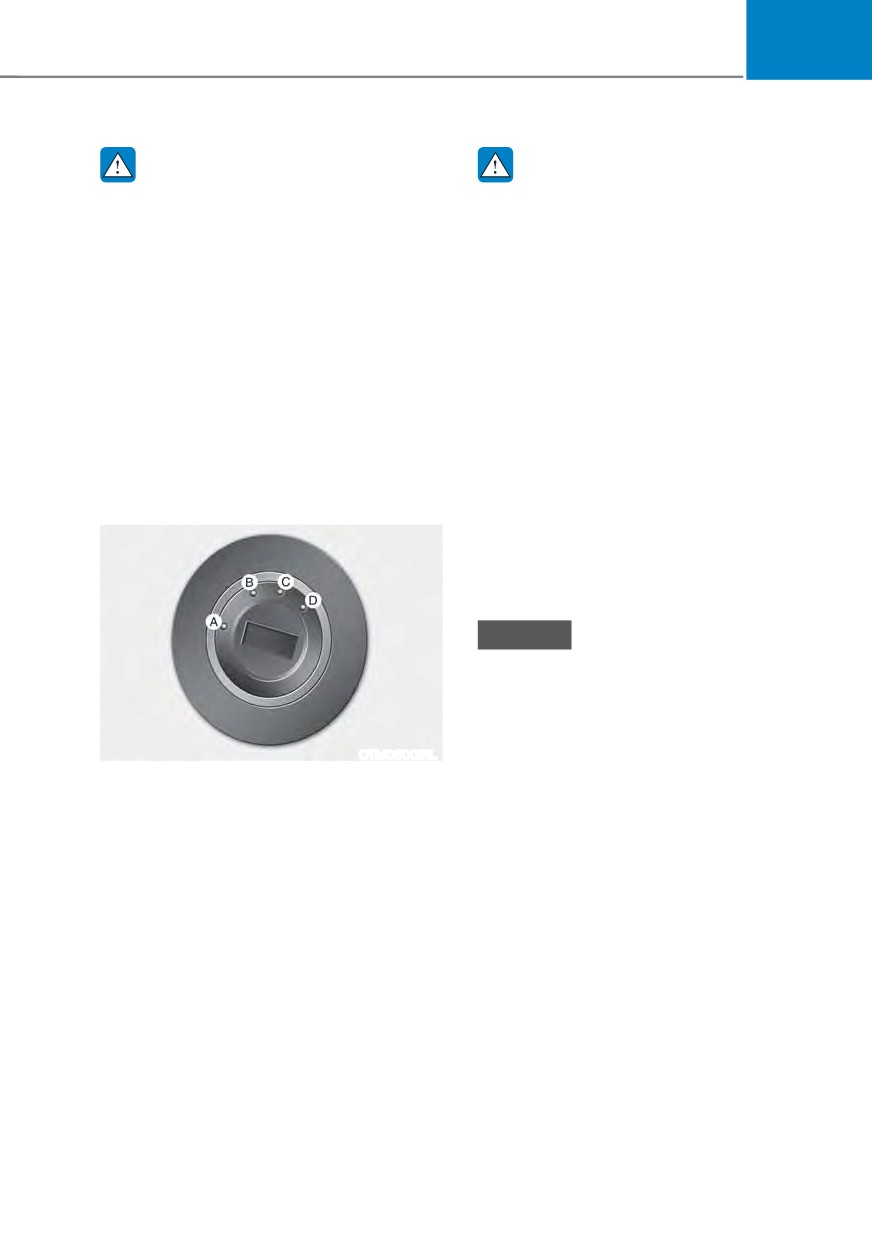
[A] : LOCK, [B] : ACC
[C] : ON, [D] : START
Whenever the front door is opened, the
ignition switch will illuminate, provided
the ignition switch is not in the ON
position. The light will go off immediately
when the ignition switch is turned on or
go off after about 30 seconds when the
door is closed. (if equipped)
6-5

Driving your vehicle
Key ignition switch positions
Switch
Action
Notes
Position
To turn the ignition switch to the LOCK
position, push the key in at the ACC
position and turn the key towards the
LOCK position.
LOCK
The ignition key can be removed in
the LOCK position.
The steering wheel locks to protect
the vehicle from theft. (if equipped)
Some electrical accessories are
If difficulty is experienced turning the
usable. The steering wheel unlocks.
ignition switch to the ACC position,
ACC
turn the key while turning the steering
wheel right and left to release.
This is the normal key position when
Do not leave the ignition switch in the
the engine has started. All features
ON position when the engine is not
and accessories are usable.
running to prevent the battery from
ON
The warning lights can be checked
discharging.
when you turn the ignition switch
from ACC to ON.
To start the engine, turn the ignition
The engine will crank until you release
switch to the START position. The
the key.
START
switch returns to the ON position
when you let go of the key.
6-6
06
Starting the engine
Information
ś Do not wait for the engine to warm up
WARNING
while the vehicle remains stationary.
ś Always wear appropriate shoes when
Start driving at moderate engine
operating your vehicle. Unsuitable
speeds. (Steep accelerating and
shoes, such as high heels, ski boots,
decelerating should be avoided.)
sandals, flip-flops, etc., may interfere
ś Always start the vehicle with your foot
with your ability to use the brake,
on the brake pedal. Do not depress the
accelerator and clutch pedals.
accelerator while starting the vehicle.
ś Do not start the vehicle with the
Do not race the engine while warming
accelerator pedal depressed. The
it up.
vehicle can move which can lead to
an accident.
NOTICE
ś Wait until the engine rpm is normal.
To prevent damage to the vehicle:
The vehicle may suddenly move if
ś Do not hold the ignition key in the
the brake pedal is released when the
START position for more than 10
rpm is high.
seconds. Wait 5 to 10 seconds before
trying again.
ś Do not turn the ignition switch to
1. Make sure the parking brake is
the START position with the engine
applied.
running. It may damage the starter.
2. Make sure the shift button is in P
ś If traffic and road conditions permit,
(Park).
you may put the shift button in the N
3. Depress the brake pedal.
(Neutral) position while the vehicle
4. Turn the ignition switch to the START
is still moving and turn the ignition
position. Hold the key (maximum of
switch to the START position in an
10 seconds) until the engine starts and
attempt to restart the engine.
release it.
ś Do not push or tow your vehicle to
start the engine.
NOTICE
If the engine does not start within 10
seconds after preheating is completed,
turn the ignition switch once more
to the LOCK position and wait for 10
seconds. Then turn the ignition switch
to the ON position in order to preheat
the engine again.
6-7
Driving your vehicle
NOTICE
Do not turn off the engine immediately
after it has been subjected to a heavy
load. Doing so may cause severe
damage to the engine or turbo charger
unit.
NOTICE
To prevent damage to the vehicle:
ś Do not hold the ignition key in the
START position for more than 10
seconds. Wait 5 to 10 seconds before
trying again.
ś Do not turn the ignition switch to
the START position with the engine
running. It may damage the starter.
ś If traffic and road conditions permit,
you may put the shift button in the N
(Neutral) position while the vehicle
is still moving and turn the ignition
switch to the START position in an
attempt to restart the engine.
ś Do not push or tow your vehicle to
start the engine.
6-8
06
(1*,1( 67$57 6723 %87721 ǣ,) (48,33('Ǥ
WARNING
ś
NEVER press the Engine Start/Stop
button while the vehicle is in motion
except in an emergency. This will
result in the vehicle turning off and
loss of power assist for the steering
and brake systems. This may lead
to loss of directional control and
braking function, which could cause
an accident.
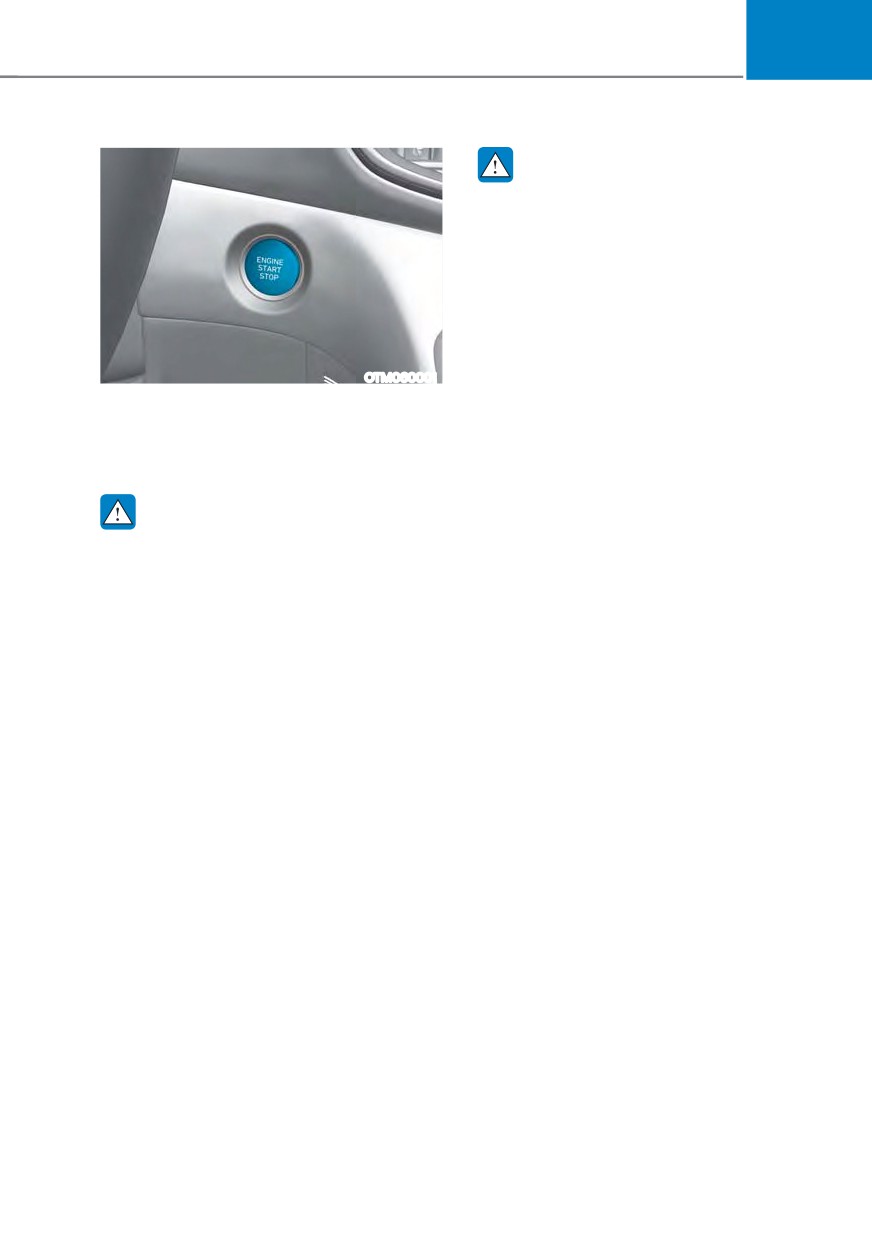
OTM060001
ś
Before leaving the driver’s seat,
Whenever the front door is opened, the
always make sure the gear is in the
Engine Start/Stop button will illuminate
P (Park) position, set the parking
and will go off 30 seconds after the door
brake, press the Engine Start/Stop
is closed.
button to the OFF position, and take
the Smart Key with you. Unexpected
vehicle movement may occur if these
WARNING
precautions are not followed.
To turn the vehicle off in an emergency:
ś
NEVER reach through the steering
wheel for the Engine Start/Stop
Press and hold the Engine Start/Stop
button or any other control while the
button for more than two seconds OR
vehicle is in motion. The presence
Rapidly press and release the Engine
of your hand or arm in this area
Start/Stop button three times (within
may cause a loss of vehicle control
three seconds).
resulting in an accident.
If the vehicle is still moving, you can
restart the vehicle without depressing
the brake pedal by pressing the Engine
Start/Stop button with the gear in the N
(Neutral) position.
6-9

Driving your vehicle
Engine Stop/Start button positions
Button
Action
Notes
Position
To turn off the engine, press the
If the steering wheel is not locked
Engine Start/Stop button with the
properly when you open the driver’s
vehicle shifted to P (Park).
door, the warning chime will sound.
OFF
If the Engine Start/Stop button is
pressed with the vehicle shifted to D
(Drive), R (Reverse), or N (Neutral), the
gear automatically shifts to P (Park).
Press the Engine Start/Stop button
ś If you leave the Engine Start/Stop
when the button is in the OFF position
button in the ACC position for more
without depressing the brake pedal.
than one hour, the battery power will
Some of the electrical accessories are
turn off automatically to prevent the
usable.
battery from discharging.
ACC
The steering wheel unlocks.
ś If the steering wheel doesn’t
unlock properly, the Engine Start/
Stop button will not work. Press
the Engine Start/Stop button while
turning the steering wheel right and
left to release.
Press the Engine Start/Stop button
Do not leave the Engine Start/Stop
while it is in the ACC position without
button in the ON position when the
ON
depressing the brake pedal.
engine is not running to prevent the
The warning lights can be checked
battery from discharging.
before the engine is started.
To start the engine, depress the brake
If you press the Engine Start/Stop
pedal and press the Engine Start/ Stop
button without depressing the brake
button with the gear shifted to the P
pedal, the engine does not start and
START
(Park) position.
the Engine Start/Stop button changes
as follows:
2)) Ɵ $&& Ɵ 21 Ɵ 2)) RU $&&
6-10

06
Starting the engine
Starting the gasoline engine
1. Always carry the smart key with you.
2. Make sure the parking brake is
WARNING
applied.
ś
Always wear appropriate shoes when
3. Make sure the shift button is in
operating your vehicle. Unsuitable
P(Park).
shoes, such as high heels, ski boots,
sandals, flipflops, etc., may interfere
4. Depress the brake pedal.
with your ability to use the brake and
5. Press the Engine Start/Stop button.
accelerator pedals.
ś
Do not start the vehicle with the
Information
accelerator pedal depressed.
ś
Do not wait for the engine to warm up
The vehicle can move which can lead
while the vehicle remains stationary.
to an accident.
Start driving at moderate engine
ś
Wait until the engine rpm is normal.
speeds. Steep accelerating and
The vehicle may suddenly move if
decelerating should be avoided.
the brake pedal is released when the
rpm is high.
ś
Always start the vehicle with your foot
on the brake pedal. Do not depress the
accelerator while starting the vehicle.
Information
Do not race the engine while warming
ś
The vehicle will start by pressing the
it up.
Engine Start/Stop button, only when
the smart key is in the vehicle.
ś
Even if the smart key is in the vehicle,
and when it is far away from the driver,
the engine may not start.
ś
When the Engine Start/Stop button
is in the ACC or ON position, if any
door is open, the system checks for the
smart key. When the smart key is not
in the vehicle, the “
” indicator
will blink and the warning 'Key not in
vehicle' will come on. When all doors
are closed, the chime will also sound for
about 5 seconds. Keep the smart key in
the vehicle.
6-11
Driving your vehicle
NOTICE
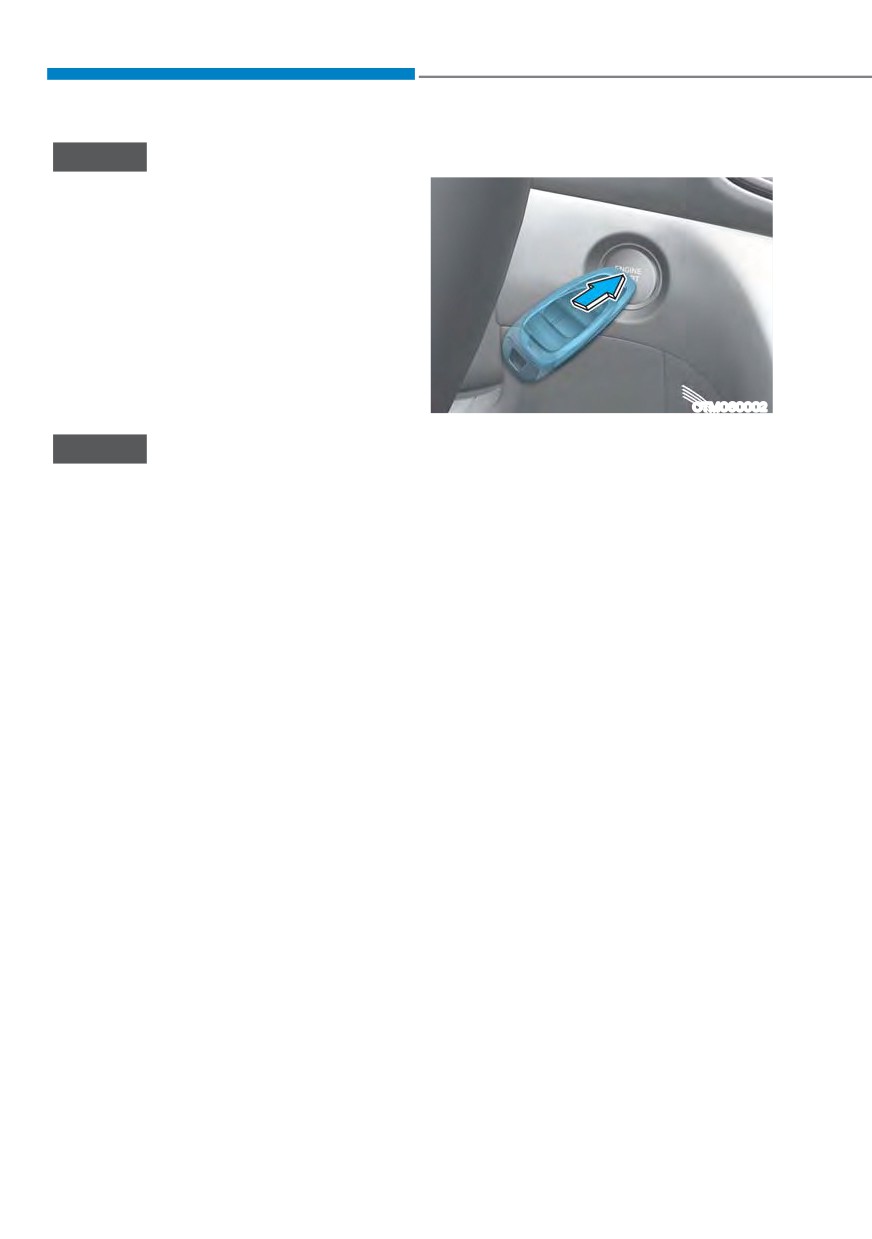
Emergency starting
To prevent damage to the vehicle:
ś If the engine stalls while you are in
motion, do not attempt to shift the
gear to the P (Park) position.
If traffic and road conditions permit,
you may put the gear in N (Neutral)
while the vehicle is still moving and
press the Engine Start/Stop button in
an attempt to restart the engine.
ś Do not push or tow your vehicle to
start the vehicle.
OTM060002
If the smart key battery is weak or the
NOTICE
smart key does not work correctly, you
can start the vehicle by pressing the
To prevent damage to the vehicle:
Engine Start/Stop button with the smart
Do not press the Engine Start/Stop
key in the direction of the picture above.
button for more than 10 seconds except
when the stop lamp fuse is blown.
Turning off the engine
When the stop lamp fuse is blown,
1. Stop the vehicle and depress the
you cannot normally start the engine.
brake pedal fully.
Replace the fuse with a new one. If you
are not able to replace the fuse, you
2. Make sure the shift button is in
can start the engine by pressing and
P(Park).
holding the Engine Start/Stop button
3. Press the Engine Start/Stop button
for 10 seconds with the Engine Start/
to the OFF position and apply the
Stop button in the ACC position.
parking brake.
For your safety always depress the
brake pedal before starting the vehicle.
6-12
06
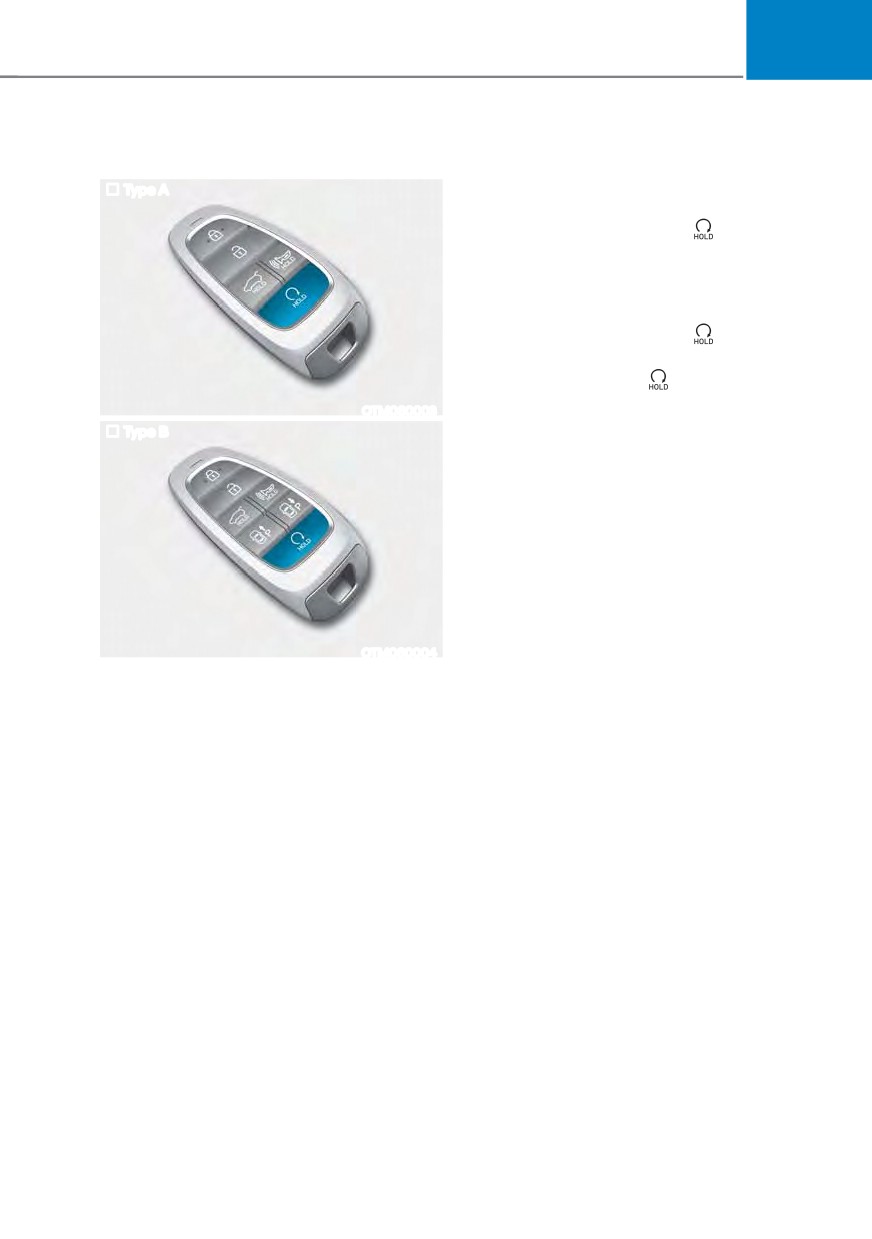
Remote start (if equipped)
To start the vehicle remotely:
1. Press the door lock button within 10 m
Type A
(32 feet) from the vehicle.
2. Press the remote start (
) button for
over 2 seconds within 4 seconds after
locking the doors. The hazard warning
lights will blink.
3. To turn off the remote start function,
press the remote start (
) button
once.
ś The remote start (
) button may not
operate if the smart key is not within
OTM060003
10 m (32 feet).
Type B
ś The vehicle will not remotely start if
the engine hood or liftgate is opened.
ś The vehicle must be in P (Park) for the
remote start function to start.
ś The engine turns off if you get in the
vehicle without a registered smart key.
ś The engine turns off if you do not get
in the vehicle within 10 minutes after
remotely starting the vehicle.
ś Do not idle the engine for a long
OTM060004
period.
You can start the vehicle using the
Remote Start button of the smart key.
6-13
Driving your vehicle
9(+,&/( $872ǘ6+87 2)) ǣ,) (48,33('Ǥ
If your vehicle is parked and the engine
System Operation
is left on for a long period of time, the
engine will turn off automatically to help
reduce fuel consumption and prevent
accidents caused by carbon dioxide
poisoning.
Operating Conditions
Vehicle Auto-Shut Off timer operates
when all the following conditions are
satisfied:
ś Vehicle speed is below 1.8 mph (3
km/h), and the gear is shifted to P
OJK041087N
(Park)
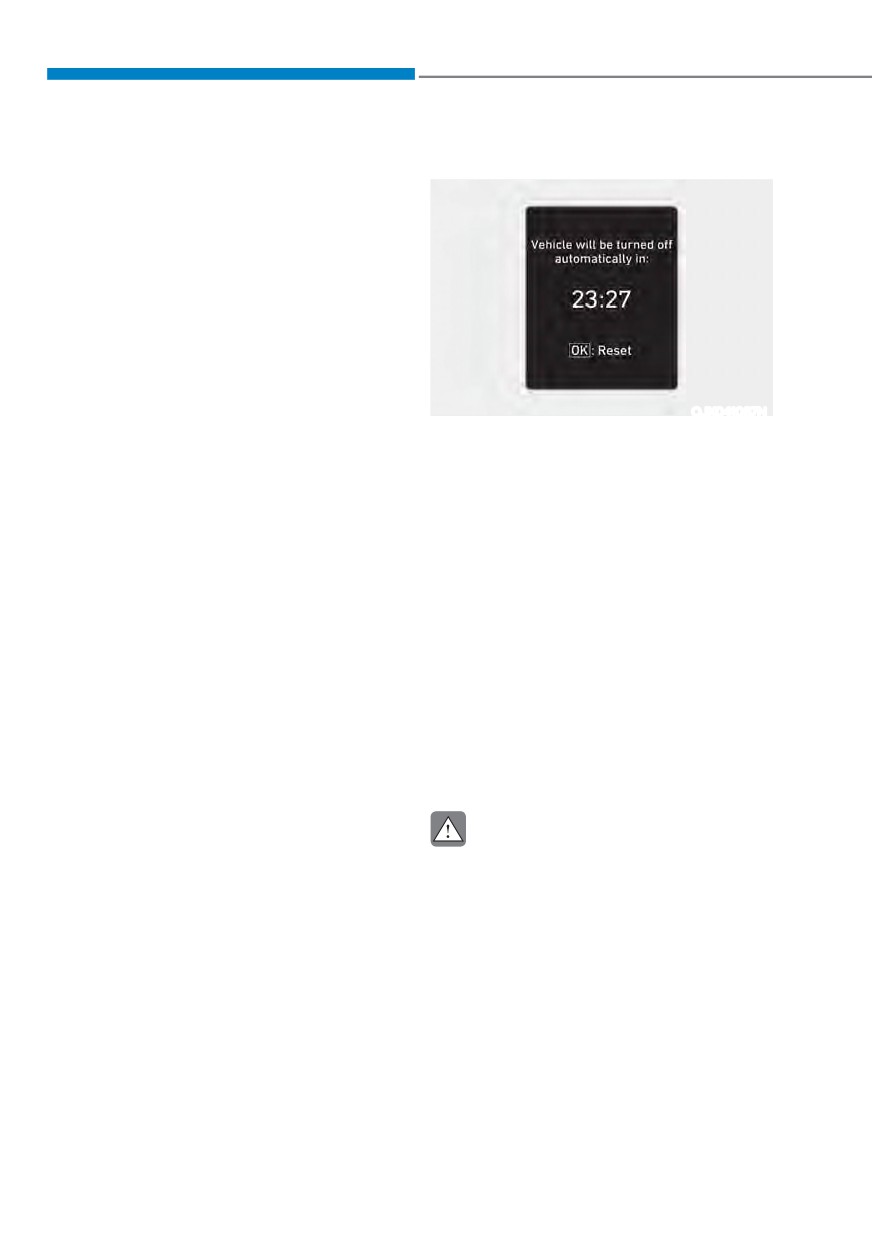
When all the conditions are satisfied, the
ś The brake pedal and accelerator pedal
Vehicle Auto-Shut Off operates and turns
are not depressed
the engine off automatically after 60
minutes.
ś The driver’s seat belt is unfastened
A timer appears on the instrument
ś The passenger seat is empty
cluster 30 minutes before vehicle shut
ś The infotainment system is not being
off.
updated
Resetting cluster timer
Deactivating Conditions
To reset the cluster timer, do one of
Vehicle Auto-Shut Off timer turns off
following:
when one of the situation occur:
ś Release the accelerator pedal or brake
ś Vehicle speed is above 1.8 mph (3
pedal after Vehicle Auto-Shut Off is
km/h)
complete.
ś The gear is shifted to R (Reverse), D
ś Press the OK button on the steering
(Drive) or N (Neutral)
wheel while the timer appears on the
ś The brake pedal or accelerator pedal
instrument cluster.
is depressed
ś The driver’s seat belt is fastened
CAUTION
ś A passenger is in the passenger’s seat
Do not leave a passenger or a pet in
the vehicle in hot weather since the air
conditioning system turns off when the
engine is off.
6-14
06
$8720$7,& 75
$160,66,21 ǣ,) (48,33('Ǥ
OTM060005
Automatic transmission operation
The automatic transmission has eight forward speeds and one reverse speed.
The Individual forward speeds are selected automatically in the D (Drive) position.
6-15
Driving your vehicle
The indicator in the instrument cluster
WARNING
displays the shift button position when
the ignition switch is in the ON position.
ś Shifting into P (Park) while the
vehicle is in motion may cause you to
lose control of the vehicle.
WARNING
ś After the vehicle has stopped, always
To reduce the risk of serious injury or
make sure the shift button is in P
death:
(Park), apply the parking brake, and
turn the engine off.
ś ALWAYS check the surrounding
areas near your vehicle for people,
ś When parking on an incline, shift
especially children, before shifting a
the gear to P (Park) and apply the
vehicle into D (Drive) or R (Reverse).
parking brake to prevent the vehicle
from rolling downhill.
ś Before leaving the driver’s seat,
always make sure the shift button
ś Do not use the P (Park) position in
is in the P (Park) position, then set
place of the parking brake.
the parking brake, and place the
ignition switch in the LOCK/OFF
R (Reverse)
position. Unexpected and sudden
Use this position to drive the vehicle
vehicle movement can occur if these
backward.
precautions are not followed.
ś When using the paddle shifter
NOTICE
(manual shift mode), do not use
engine braking (shifting from a
Always come to a complete stop before
high gear to lower gear) rapidly on
shifting into or out of R (Reverse); you
slippery roads. The vehicle may slip
may damage the transmission if you
causing an accident.
shift into R (Reverse) while the vehicle is
in motion.
P (Park)
When the vehicle is stopped in R
Always come to a complete stop before
(Reverse) or D (Drive) position, if you
shifting into P (Park).
open the driver’s door with the seat
belt unfastened, the gear is shifted to P
To shift from P (Park), you must depress
(Park) position automatically.
firmly on the brake pedal and make sure
your foot is off the accelerator pedal.
However when the vehicle moves in R
(Reverse) or D (Drive) position, if you
The shift button must be in P (Park)
open the driver’s door with the seat belt
before turning the engine off.
unfastened, the gear may be not shifted
to P (Park) position automatically for
protecting the automatic transmission.
6-16
06
N (Neutral)
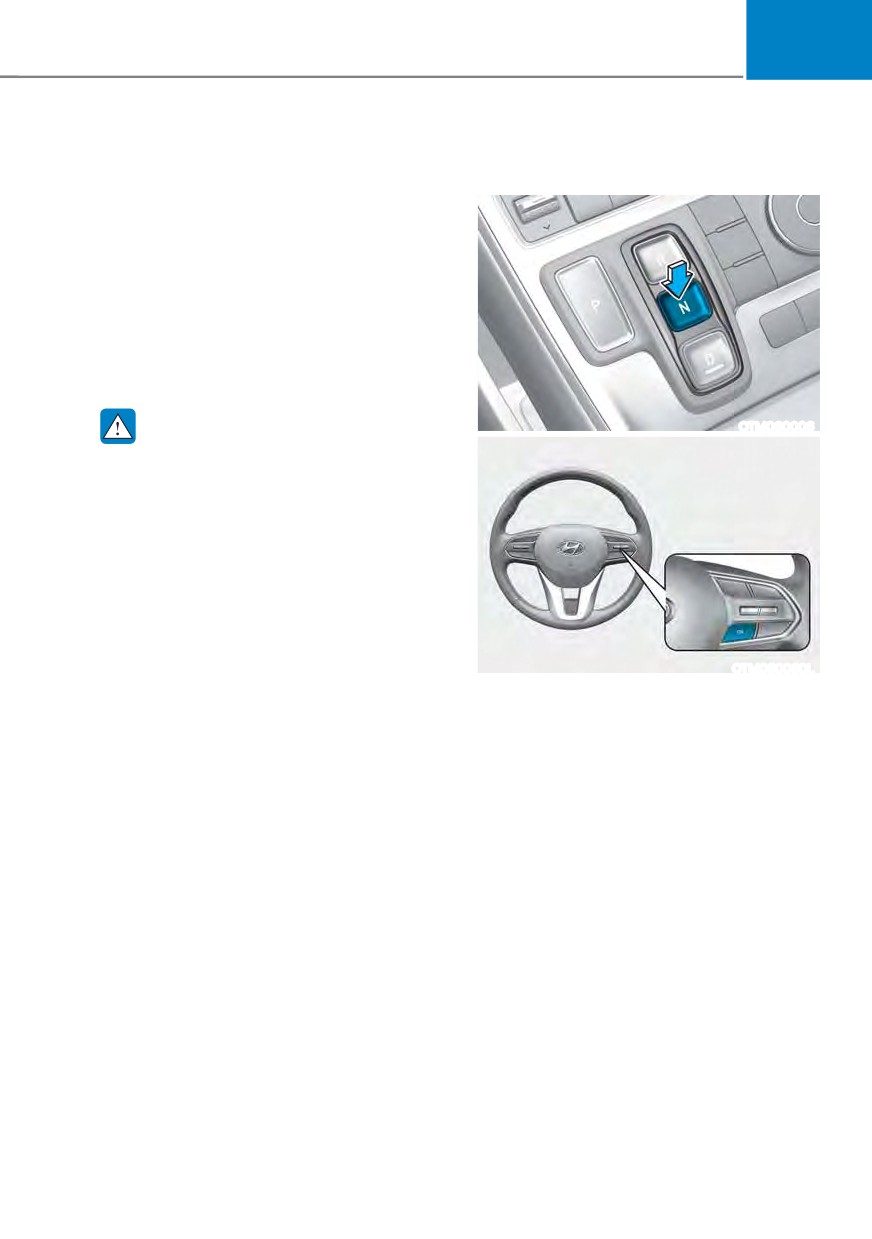
To stay in N (Neutral) when vehicle is
OFF (button type)
The wheels and transmission are not
engaged.
Use N (Neutral) if you need to restart a
stalled engine, or if it is necessary to stop
with the engine ON. Shift into P (Park)
if you need to leave your vehicle for any
reason.
Always depress the brake pedal when
you are shifting from N (Neutral) to
another gear.
WARNING
OTM060006
Do not shift into gear unless your foot is
firmly on the brake pedal. Shifting into
gear when the engine is running at high
speed can cause the vehicle to move
very rapidly. You could lose control of
the vehicle and hit people or objects.
OTM060060L
If you want to stay in N (Neutral) after the
engine is OFF (in the ACC state), do the
following.
1. Turn off Auto Hold and release
Electronic Parking Brake when the
engine is running.
2. Push the N (neutral) button while
depressing the brake pedal.
3. When you take your foot off the brake
pedal, the message ‘Press and hold
OK button to stay in Neutral when
vehicle is Off’ (or 'Hold OK button to
stay in neutral gear position when
vehicle is Off') will appear on the
cluster LCD display.
6-17
Driving your vehicle
4. Press and hold the OK button on
D (Drive)
the steering wheel for more than 1
This is the normal driving position. The
second.
transmission will automatically shift
5. When the message ‘Vehicle will stay in
through an 8-gear sequence, providing
(N). Change gear to cancel’ (or ‘N will
the best fuel economy and power.
stay engaged when the vehicle is Off’)
To start the vehicle forward, push the D
will appear on the cluster LCD display,
(Drive) button by depressing the brake
press the Engine Start/Stop button
pedal with the engine ON. (button type)
while depressing the brake pedal.
Then depress the accelerator pedal
However, if you open the driver’s or
smoothly.
front passenger’s door, the gear will
For extra power when passing another
automatically shift to P (Park) and the
Engine Start/ Stop button will change
vehicle or driving uphill, depress the
accelerator fully. The transmission will
to the OFF position.
automatically down shift to the next
lower gear (or gears, as appropriate).
NOTICE
When the vehicle is stopped in D (Drive)
With the gear in N (Neutral) the Engine
position, if you open the driver’s door
Start/Stop button will be in the ACC
with the seat belt unfastened, the gear is
position. In the ACC position, the doors
shifted to P (Park) position automatically.
cannot be locked. The battery may
(button type)
discharge if left in the ACC position for
However while the vehicle is moving in D
a long time.
(Drive) position, if you open the driver’s
door with the seat belt unfastened, the
gear may not shift to P (Park) position
automatically to protect the automatic
transmission.
The DRIVE MODE switch, located on the
shift button console, allows the driver to
switch from NORMAL/COMFORT mode
to SPORT or ECO mode. (if equipped)
For more Details, refer to "Drive Mode
Integrated Control System" later in this
chapter.
6-18
06
Shift-lock system
Parking
For your safety, the automatic
Always come to a complete stop and
transmission has a shift-lock system
continue to depress the brake pedal.
which prevents shifting the transmission
Move the shift button into the P (Park)
from P (Park) into R (Reverse) unless the
position, apply the parking brake, and
brake pedal is depressed.
place the ignition switch in the LOCK/
To shift the transmission from P (Park)
OFF position. Take the Key with you
when exiting the vehicle.
into R (Reverse):
1. Depress and hold the brake pedal.
2. Start the engine or place the ignition
WARNING
switch in the ON position.
When you stay in the vehicle with
3. Depress the brake pedal and push the
the engine running, be careful not to
R (Reverse) button. (button type)
depress the accelerator pedal for a long
period of time. The engine or exhaust
Ignition key interlock system
system may overheat and start a fire.
(if equipped)
The exhaust gas and the exhaust system
The ignition key cannot be removed
are very hot. Keep away from the
unless the shift button is in the P (Park)
exhaust system components.
position.
Do not stop or park over flammable
materials, such as dry grass, paper or
When the battery is discharged:
leaves. They may ignite and cause a fire.
The shift buttons will not function when
the battery is discharged.
In emergencies, do the following to
move the shift button to N (Neutral) on a
level ground.
1. Connect the battery cables from
another vehicle or from a another
battery to the jump-starting terminals
inside the engine compartment.
For more details, refer to “Jump
Starting” in chapter 7.
2. Release the parking brake with the
ignition switch in the ON position.
3. Shift the gear to the N(Neutral)
position refer to the “Stay in Neutral
when vehicle is Off” in this chapter.
6-19
Driving your vehicle
LCD display message (button
Press and hold the OK button on the
type)
steering wheel to stay in Neutral
Shifting conditions not met. Reduce
The warning message appears on
speed, then shift
the LCD display, when pushing the
N(Neutral) button. If you want to stay
The warning message appears on the
N(Neutral) after turning off the engine,
LCD display, when engine RPM is too
press and hold the “OK” button on the
high, or when driving speed is too fast to
steering wheel more than 1 second.
shift the gear.
We recommend you decrease the engine
Vehicle will stay in (N). Change gear
speed or slow down before shifting the
to cancel
gear.
The warning message appears on the
LCD display, when pushing the “OK”
Press brake pedal to change gear
button on the steering wheel after the
The warning message appears on the
message (“Press and hold OK button
LCD display, when the brake pedal is not
to stay in Neutral when vehicle is Off”)
depressed while shifting the gear.
appears on the cluster LCD display. The
We recommend you to depress the brake
gear stays in N(Neutral) position after
pedal and then shift the gear.
turning off the engine.
Shift to P after stopping
NEUTRAL engaged
The warning message appears on the
The message appears on the LCD
LCD display, when the gear is shifted to P
display, when the N (Neutral) position is
(Park) while the vehicle is moving.
engaged.
Stop the vehicle before shifting to P
(Park).
Gear already selected
The message appears on the LCD
PARK engaged
display, when pushing the current shift
button again.
The warning message appears on the
LCD display, when the gear is shifted to P
(Park) while the vehicle is moving.
Stop the vehicle before shifting to P
(Park).
6-20
06
Shift button held down
Paddle shifter (Manual shift
The warning message appears on the
mode)
LCD display, when the shift button is
pressed continuously or the shift button
does not properly operate. Clean the
surroundings of gear shift button.
If this message appears again, have
the vehicle inspected by an authorized
HYUNDAI dealer.
Shifter system malfunction! Service
immediately
The warning message appears on the
LCD display, when the transmission
or the shift button does not properly
OTM058130L
operate in the P (Park) position.
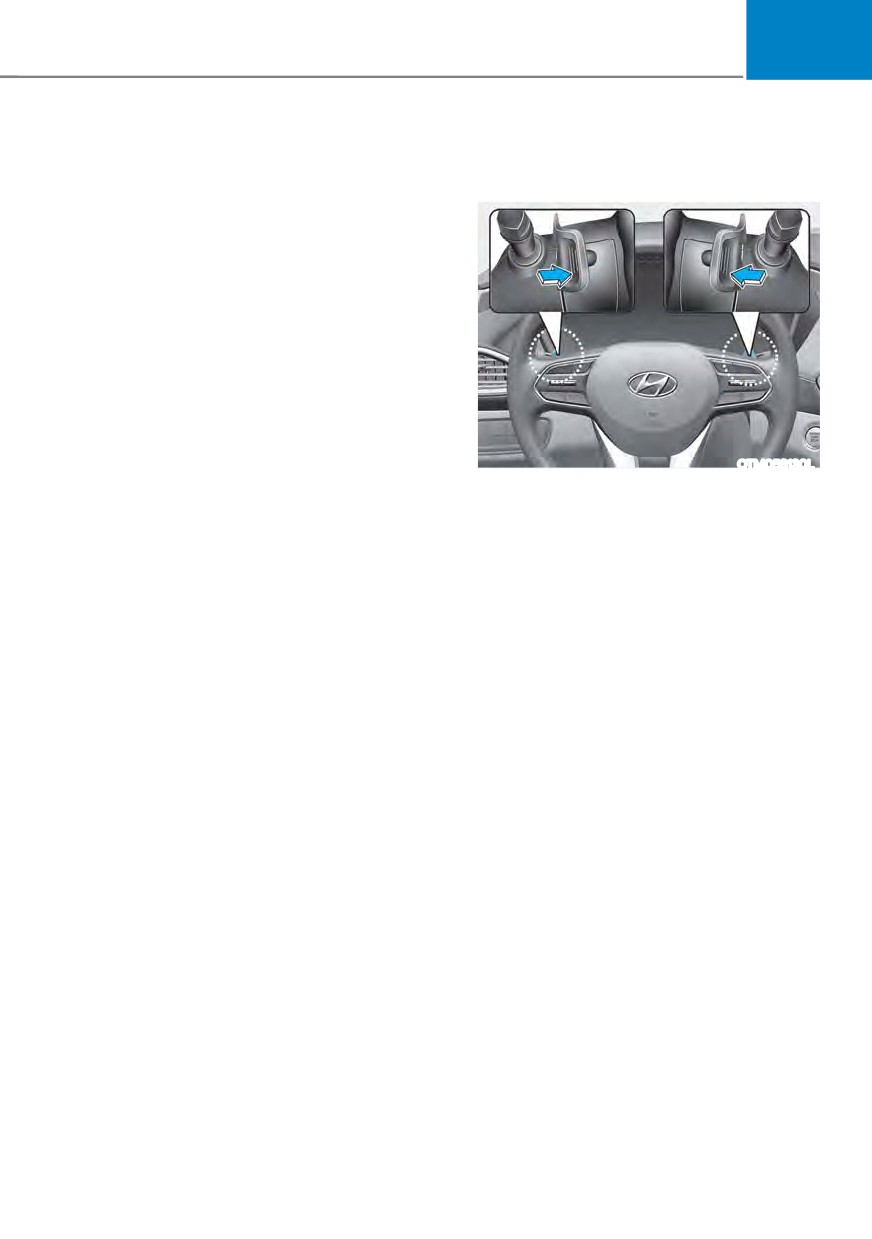
The paddle shifter is available when the
In this case, have the vehicle inspected
shift button is in the D (Drive) position or
immediately by an authorized HYUNDAI
the manual shift mode.
dealer.
With the shift button in the D position
Check shift controls
The paddle shifter will operate when the
The warning message appears on the
vehicle speed is more than 6 mph.
LCD display, when there is a malfunction
Pull the [+] or [-] paddle shifter once
with transmission shift button.
to shift up or down one gear and the
In this case, have the vehicle inspected
system changes from automatic mode to
immediately by an authorized HYUNDAI
manual shift mode.
dealer.
In the manual shift mode, pull the [+]
or [-] paddle shifter once to shift up or
down one gear.
To change back to automatic shift mode
from manual shift mode, do one of the
followings :
- Pull the [+] paddle shifter for more
than one second
- Press the D button.
6-21
Driving your vehicle
The manual shift mode also changes
Good driving practices
back to automatic shift mode in one of
ś
Never move the shift button from
following situations
P (Park) or N (Neutral) to any other
- When the accelerator pedal is gently
position with the accelerator pedal
depressed for more than 6 seconds
depressed.
while driving
ś
Never move the shift button into P
- When the vehicle stops
(Park) when the vehicle is in motion.
Be sure the vehicle is completely
stopped before you attempt to shift
Information
into R (Reverse) or D (Drive).
If the [+] and [-] paddle shifters are pulled
ś
Do not shift the gear to N (Neutral)
at the same time, gear shift may not occur.
when driving. If the gear is shifted to
N (Neutral) while driving, the vehicle
loses the ability to provide engine
braking. Doing so may increase the
risk of an accident.
Also, shifting the gear back to
D (Drive) while the vehicle is
moving may severely damage the
transmission.
ś
When driving uphill or downhill,
always shift to D (Drive) for driving
forward or shift to R (Reverse) for
driving rearwards. After selecting
D (Drive) or R (Reverse), check the
gear position indicated on the cluster
before driving. If the vehicle moves in
the opposite direction of the selected
gear, the engine may turn off and a
serious accident might occur due to
degraded brake performance.
ś
Do not drive with your foot resting
on the brake pedal. Even light, but
consistent pedal pressure can result
in the brakes overheating, brake wear
and possibly even brake failure.
ś
When driving with shifter paddles,
slow down before shifting to a lower
gear. Otherwise, the lower gear may
not be engaged if the engine rpms are
outside of the allowable range.
ś
Always apply the parking brake when
leaving the vehicle. Do not depend on
placing the transmission in P (Park) to
keep the vehicle from moving.
6-22
06
ś Exercise extreme caution when
driving on a slippery surface. Be
especially careful when braking,
accelerating or shifting gears. On a
slippery surface, an abrupt change
in vehicle speed can cause the drive
wheels to lose traction and may cause
loss of vehicle control resulting in an
accident.
ś Optimum vehicle performance and
economy is obtained by smoothly
depressing and releasing the
accelerator.
WARNING
To reduce the risk of SERIOUS INJURY
or DEATH:
ś
ALWAYS wear your seatbelt. In a
collision, an unbelted occupant
is significantly more likely to be
seriously injured or killed than a
properly belted occupant.
ś
Avoid high speeds when cornering or
turning.
ś
Do not make quick steering wheel
movements, such as sharp lane
changes or fast, sharp turns.
ś
The risk of rollover is greatly
increased if you lose control of your
vehicle at highway speeds.
ś
Loss of control often occurs if two or
more wheels drop off the roadway
and the driver over steers to reenter
the roadway.
ś
In the event your vehicle leaves
the roadway, do not steer sharply.
Instead, slow down before pulling
back into the travel lanes.
ś
HYUNDAI recommends you follow all
posted speed limits.
6-23