Honda Accord Hybrid (2022 year). Manual in english - page 7
 

  Index      Manuals     Honda Accord Hybrid (2022 year). Manual in english


Search            copyright infringement  


Content      ..     5      6      7      8     ..


Honda Accord Hybrid (2022 year). Manual in english - page 7


110

uu

Indicators

u

In

strum

ent Pa

nel

Indicator

Name

On/Blinking

Explanation

Message

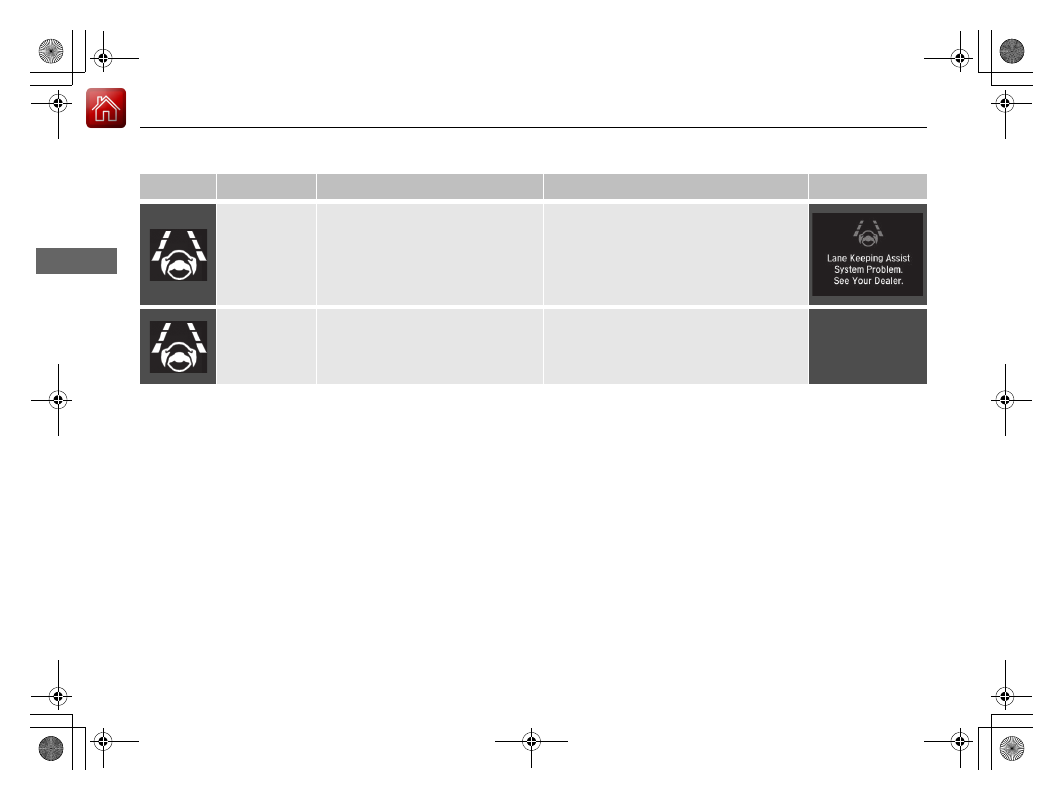
Lane Keeping 
Assist System 
(LKAS) Indicator 
(Amber)

Comes on if there is a problem with 
the LKAS.

Stays on constantly 

- Have your vehicle 

checked by a dealer.

Lane Keeping 
Assist System 
(LKAS) Indicator 
(White/Green)

Lights up in white when you press 
the LKAS button.

Lights up in green when the LKAS is 
in operation.

2

Lane Keeping Assist System (LKAS)


P. 480

111

uu

Indicators

u

Continued

In

strum

ent Pa

nel

Indicator

Name

On/Blinking

Explanation

Message

Safety Support 
Indicator 
(Amber)

Comes on if there is a problem with 
RDM, Low Speed Braking Control

*

CMBS

TM

, or blind spot information 

system

*

.

Stays on constantly 

- Have your vehicle 

checked by a dealer.

Comes on if the RDM, Low Speed 
Braking Control

*

, and CMBS

TM

 are 

deactivated temporarily after the 
12-volt battery has been 
disconnected and then re-
connected.

Drive a short distance at more than 12 
mph (20 km/h). The indicator should go 
off. If it does not, have your vehicle 
checked by a dealer.

* Not available on all models

112

uu

Indicators

u

In

strum

ent Pa

nel

Indicator

Name

On/Blinking

Explanation

Message

Safety Support 
Indicator 
(Amber)

Comes on when RDM, Low Speed 
Braking Control

*

, and/or CMBS

TM


shuts itself off.

Indicator may come on temporarily when 
passing through an enclosed space, such 
as tunnel.

The area around the radar sensor cover is 
blocked by dirt, mud, etc. Stop your 
vehicle in a safe place and wipe the debris 
off with a soft cloth. Indicator may take 
some time to go off after the radar sensor 
cover is cleaned.

Have your vehicle checked by a dealer if 
the indicator does not go off even after 
you have cleaned the radar sensor cover.

2

Radar Sensor

 P. 501

Stays on 

- The temperature inside the 

camera is too high.
Use the climate control system to cool 
down the camera.
The system activates when the 
temperature inside the camera cools 
down.

2

Front Sensor Camera

 P. 499

* Not available on all models

113

uu

Indicators

u

Continued

In

strum

ent Pa

nel

Indicator

Name

On/Blinking

Explanation

Message

Safety Support 
Indicator 
(Amber)

Comes on when RDM, Low Speed 
Braking Control

*

, and/or CMBS

TM


shuts itself off.

Stays on 

- The area around the camera is 

blocked by dirt, mud, etc. Stop your 
vehicle in a safe place and wipe the debris 
off with a soft cloth.

Have your vehicle checked by a dealer if 
the indicator and message are still 
displayed even after you have cleaned the 
area around the camera.

2

Front Sensor Camera

 P. 499

Comes on when mud, snow, or ice 
accumulates in the vicinity of sonar.

Remove the obstacle in the vicinity of the 
sonar sensor. 

2

Low Speed Braking Control

*

 P. 459

2

Sonar Sensors

*

 P. 502

Comes on when mud, snow, or ice 
has accumulated in the vicinity of 
the blind spot information system 
sensor.

Comes on while driving 

- Something 

may be interfering with the blind spot 
information system sensor. Check the 
vicinity of the blind spot information 
system sensor and remove any obstacles. 

2

Blind spot information System

*


P. 443

Indicator may come on temporarily 
when the Maximum Load Limit is 
exceeded.

Make sure the total load is within the 
Maximum Load Limit.

2

Maximum Load Limit

 P. 413

Models with Low Speed Braking Control

Models with blind spot information 
system

* Not available on all models

114

uu

Indicators

u

In

strum

ent Pa

nel

Indicator

Name

On/Blinking

Explanation

Message

Safety Support 
Indicator 
(Green/Gray)

Lights up in green when RDM, Low 
Speed Braking Control

*

, CMBS

TM

and blind spot information system

*


are on.

Lights up in green and gray when 
RDM, Low Speed Braking Control

*

CMBS

TM

, or blind spot information 

system

*

 or any two of these systems 

are off.

Lights up in gray when RDM, Low 
Speed Braking Control

*

, CMBS

TM

and blind spot information system

*


are off.

2

RDM On and Off

 P. 491

2

CMBS

TM

 On and Off

 P. 453

2

Blind spot information system on 
and off

 P. 445

2

System On and Off

 P. 461

* Not available on all models

115

uu

Indicators

u

Driver Information Interface Warning and Information Messages

Continued

In

strum

ent Pa

nel

Driver Information Interface Warning and Information Messages

The following messages appear only on the driver information interface. Press the 

 (home) button, select 

Warnings

, then press the left 

selector wheel to see the message again with the system message indicator on.

Message

Condition

Explanation

Appears when the vehicle is no longer able to run 
due to a malfunction.

Immediately stop in a safe place.

Appears when there is a risk that the vehicle will 
move unexpectedly after you have stopped due to a 
malfunction with the vehicle.

While the vehicle is stopped, apply the parking brake.

2

Parking Brake

 P. 503

Have your vehicle checked by a dealer.

Appears when you set the power mode to ON again 
and the vehicle is able to run.

2

Turning on the Power

 P. 416

116

uu

Indicators

u

Driver Information Interface Warning and Information Messages

In

strum

ent Pa

nel

Message

Condition

Explanation

Appears if any door or the trunk is not completely 
closed.

Appears if any door or the trunk is opened while 
driving. The beeper sounds.

Disappears when all doors and the trunk are closed.

117

uu

Indicators

u

Driver Information Interface Warning and Information Messages

Continued

In

strum

ent Pa

nel

Message

Condition

Explanation

Appears when the engine oil pressure is low.

Appears while driving 

- Immediately stop in a safe 

place.

2

If the Low Oil Pressure Warning Appears

 P. 609

Appears if there is a problem with the shutter grille, 
and the radiator coolant temperature is too high.

Power output will be reduced, so you may not be able 
to accelerate or maintain your current speed. Have your 
vehicle checked by a dealer.

Appears when the washer fluid is low.

Refill the washer fluid.

2

Refilling Window Washer Fluid

 P. 552

Appears when the scheduled maintenance is due 
soon.

Consequently, 

Maintenance Due Now

 and 

Maintenance Past Due

 follow.

2

Maintenance Minder Messages on the Driver 
Information Interface

 P. 535

Canadian models

118

uu

Indicators

u

Driver Information Interface Warning and Information Messages

In

strum

ent Pa

nel

Message

Condition

Explanation

Appears when there is a problem with the 12-volt 
battery charging system.

Have your vehicle checked by a dealer.

Appears when the engine coolant temperature is 
near its upper limit.

Drive slowly to prevent overheating.

Appears when the engine coolant temperature gets 
abnormally high.

2

Overheating

 P. 606

119

uu

Indicators

u

Driver Information Interface Warning and Information Messages

Continued

In

strum

ent Pa

nel

Message

Condition

Explanation

Appears if the automatic brake hold is automatically 
canceled while it is in operation.

Immediately depress the brake pedal.

Appears when the automatic brake hold system is 
turned off.

2

Automatic Brake Hold

 P. 508

Appears when the automatic brake hold button is 
pressed without wearing the driver’s seat belt.

Fasten the driver’s seat belt.

2

Automatic Brake Hold

 P. 508

Appears when the automatic brake hold button is 
pressed without depressing the brake pedal while 
the automatic brake hold is in operation.

Press the automatic brake hold button with the brake 
pedal depressed.

2

Automatic Brake Hold

 P. 508

120

uu

Indicators

u

Driver Information Interface Warning and Information Messages

In

strum

ent Pa

nel

Message

Condition

Explanation

Appears when the parking brake is applied 
automatically while it is in operation.

2

Automatic Brake Hold

 P. 508

2

Parking Brake

 P. 503

Appears when the electric parking brake switch is 
pressed without depressing the brake pedal while 
the electric parking brake is in operation.

Press the electric parking brake switch with the brake 
pedal depressed.

2

Parking Brake

 P. 503

Appears when you set the power mode to 
ACCESSORY or ON.

Appears after you unlock and open the driver’s 
door.

2

Turning on the Power

 P. 416

Canadian models

121

uu

Indicators

u

Driver Information Interface Warning and Information Messages

Continued

In

strum

ent Pa

nel

Message

Condition

Explanation

Appears when the power mode is in ACCESSORY.

Appears after the driver’s door is opened when the 
power mode is in ACCESSORY.

Change the power mode to VEHICLE OFF.

2

POWER Button

 P. 197

Appears when you close the door with the power 
mode in ON without the keyless remote inside the 
vehicle.

Disappears when you bring the keyless remote back 
inside the vehicle and close the door.

2

Keyless Remote Reminder

 P. 199

Appears when the keyless remote battery becomes 
weak.

2

Replacing the Remote Battery

 P. 575

122

uu

Indicators

u

Driver Information Interface Warning and Information Messages

In

strum

ent Pa

nel

Message

Condition

Explanation

Appears if the keyless remote’s battery is too weak 
to turn on the power system or the key is not within 
operating range to turn on the power system.
The beeper sounds six times.

Bring the back of the keyless remote into contact with 
the 

POWER

 button.

2

If the Keyless Remote Battery is Weak

 P. 602

Appears as soon as a problem is detected in the 
keyless access system (smart entry system) or push 
button starting system.

Appears constantly 

- Have your vehicle checked by a 

dealer.

Appears if you press the 

POWER

 button while the 

vehicle is moving.

2

Emergency Power System Off

 P. 603

123

uu

Indicators

u

Driver Information Interface Warning and Information Messages

Continued

In

strum

ent Pa

nel

Message

Condition

Explanation

Appears if the vehicle is being driven in a manner 
consistent with drowsy or inattentive driving.

2

Driver Attention Monitor

 P. 157

Appears when you set the power mode to VEHICLE 
OFF, if the rear doors were opened shortly before or 
after the vehicle was powered on.

Check the rear seat for passengers or items before 
exiting the vehicle.

2

Rear Seat Reminder

 P. 223

124

uu

Indicators

u

Driver Information Interface Warning and Information Messages

In

strum

ent Pa

nel

Message

Condition

Explanation

Appears when you set the power mode to OFF while 
driving.

Immediately stop in a safe place, set the parking brake, 
then restart the power system. If the message 
disappears, continue driving.

Appears if the vehicle is stopped and the driver’s seat 
belt is unfastened, as there is a possibility that the 
vehicle may roll.

When the vehicle is idling or when you are parking or 
exiting the vehicle, put the transmission into 

(

P

 before 

releasing the brake pedal.

2

Shift Operation

 P. 425

Appears when you put the transmission into 

(

N

then release the 

(

N

 button.

2

If you want to keep the transmission in 

(

N


position [car wash mode]

 P. 427

125

uu

Indicators

u

Driver Information Interface Warning and Information Messages

Continued

In

strum

ent Pa

nel

Message

Condition

Explanation

Appears when you try to change the transmission 
without releasing your foot off the accelerator pedal.

Release your foot off the accelerator pedal, then 
change the transmission.

Appears when the 

(

P

 button is pressed while the 

vehicle is moving.

Appears if you put the transmission into 

(

R

 while 

the vehicle is moving forward, or into 

(

D

 while the 

vehicle is reversing.

Make sure that the vehicle comes to a stop before 
operating the shift button.

Appears when you set the power mode to ON 
without fastening the driver’s seat belt.

Appears when you change the shift position after 

(

P

 has been automatically selected with the driver’s 

door open, the driver’s seat belt unfastened, then 
the brake pedal is released.

Fasten the seat belt properly before you start to drive.

2

Shift Operation

 P. 425

Appears when you try to change the transmission 
without depressing the brake pedal.

Depress the brake pedal, then change the transmission.

(White)


Content      ..     5      6      7      8     ..