Honda Accord Hybrid (2022 year). Manual in english - page 6
 

  Index      Manuals     Honda Accord Hybrid (2022 year). Manual in english


Search            copyright infringement  


Content      ..     4      5      6      7     ..


Honda Accord Hybrid (2022 year). Manual in english - page 6


94

uu

Indicators

u

In

strum

ent Pa

nel

Indicator

Name

On/Blinking

Explanation

Message

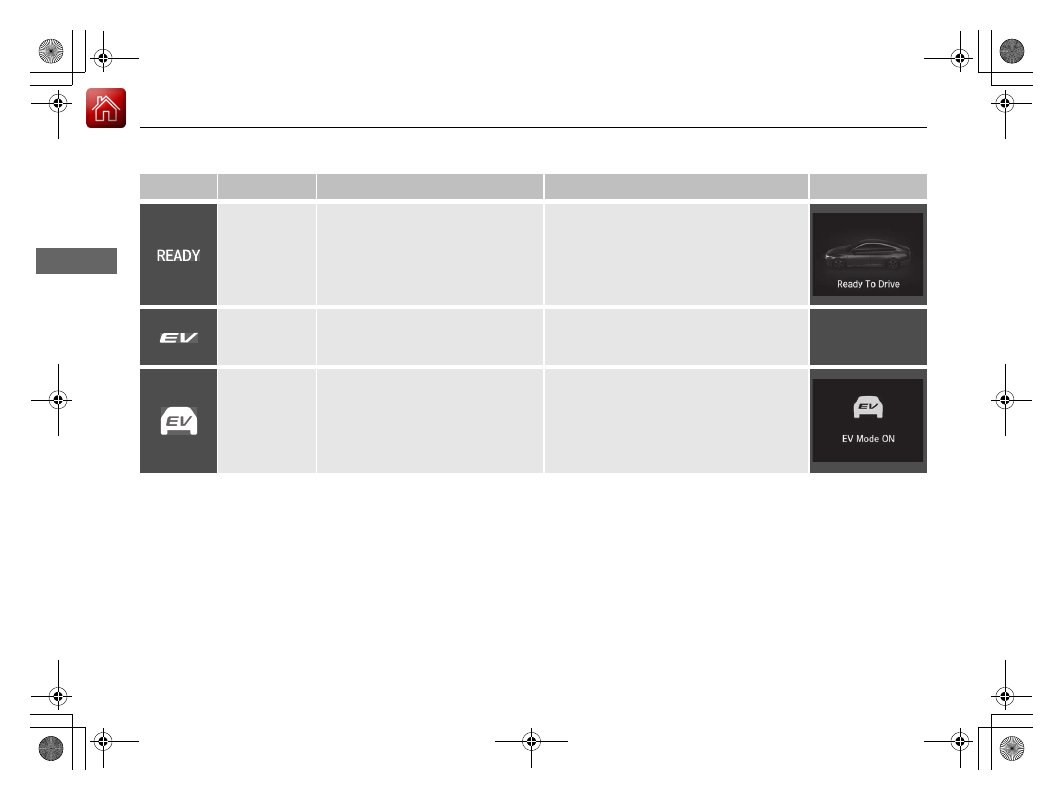
READY


Indicator

Comes on when the vehicle is ready 
to drive.

2

Turning on the Power

 P. 416

EV

 Indicator

Comes on when the vehicle is 
moved by the motor, and the 
engine is not operating.

EV

 Mode 

Indicator

Comes on when the vehicle is in EV 
mode.

2

SPORT HYBRID i-MMD (intelligent 
Multi-Mode Drive)

 P. 12

95

uu

Indicators

u

Continued

In

strum

ent Pa

nel

Indicator

Name

On/Blinking

Explanation

Message

Automatic 
Brake Hold 
System 
Indicator

Comes on when the automatic 
brake hold system is on.

2

Automatic Brake Hold

 P. 508

Automatic 
Brake Hold 
Indicator

Comes on when the automatic 
brake hold is activated.

2

Automatic Brake Hold

 P. 508

U.S.

Canada

96

uu

Indicators

u

In

strum

ent Pa

nel

Indicator

Name

On/Blinking

Explanation

Message

Malfunction 
Indicator Lamp

After you have set the power mode 
to ON, the vehicle performs system 
checks. However, if the readiness 
codes have not been set by that 
time, this indicator will blink five 
times and then go off.

Readiness codes are part of the on-board 
diagnostics for the emissions control 
systems.

2

Testing of Readiness Codes

 P. 631

Comes on if there is a problem with 
the emissions control systems.

Blinks when a misfire in the 
engine’s cylinders is detected.

2

If the Malfunction Indicator Lamp 
Comes On or Blinks

 P. 610

97

uu

Indicators

u

Continued

In

strum

ent Pa

nel

Indicator

Name

On/Blinking

Explanation

Message

12-Volt Battery 
Charging 
System 
Indicator

Comes on when there is a problem 
with the charging system.

Stop in a safe place and contact a dealer 
immediately.

2

Checking the 12-Volt Battery

 P. 573

2

If the 12-Volt Battery Charging 
System Indicator Comes On

 P. 610

Shift Position 
Indicator

Indicates the current shift position.

2

Shifting

 P. 423

Deceleration 
Paddle Selector 
Indicator

Comes on when the paddle selector 
is pulled.

Blinks when the deceleration does 
not occur while pulling the paddle 
selector.

Comes on with 

M

 when 

SPORT


mode is selected and pulling the 
paddle selector.

2

Deceleration Paddle Selector

 P. 430

98

uu

Indicators

u

In

strum

ent Pa

nel

Indicator

Name

On/Blinking

Explanation

Message

Transmission 
System 
Indicator

The current shift position blinks if 
the transmission system has a 
problem.

Blinks while driving 

- Avoid sudden 

starts and acceleration and have your 
vehicle checked by a dealer immediately.

The current shift position or all the 
shift positions blink if there is a 
problem with the transmission and 
the vehicle is no longer able to run.

Immediately park your car in a safe place.

2

Emergency Towing

 P. 620

Have your vehicle checked by a dealer.

The current shift position or all the 
shift positions blink if there is a 
problem with the transmission and 
it is not possible to select 

(

P

.

While the vehicle is stopped, apply the 
parking brake.

Have your vehicle checked by a dealer 
immediately.

99

uu

Indicators

u

Continued

In

strum

ent Pa

nel

Indicator

Name

On/Blinking

Explanation

Message

Seat Belt 
Reminder 
Indicator

Blinks and the beeper sounds for a 
few seconds if you are not wearing 
a seat belt when you set the power 
mode to ON, then the indicator 
comes on.

If the front passenger is not 
wearing a seat belt, the indicator 
comes on a few seconds later.

Comes on for a while when the rear 
seat belt is unfastened while the 
power mode in ON.

Blinks while driving if you and/or 
any passenger has not fastened a 
seat belt. The beeper sounds and 
the indicator blinks at regular 
intervals.

The beeper stops and the indicator goes 
off when you and the passengers fasten 
their seat belts.

Stays on after you and/or the 
passengers have fastened the seat 
belt(s) 

- A detection error may have 

occurred in the sensor. Have your vehicle 
checked by a dealer.

2

Seat Belt Reminder

 P. 46

100

uu

Indicators

u

In

strum

ent Pa

nel

Indicator

Name

On/Blinking

Explanation

Message

Low Fuel 
Indicator

Comes on when the fuel reserve is 
running low (approximately 1.6 
U.S. gal./6.2 Liter left).

Blinks if there is a problem with the 
fuel gauge.

Comes on 

- Refuel your vehicle as soon as 

possible.

Blinks 

- Have your vehicle checked by a 

dealer.

Anti-lock Brake 
System (

ABS

Indicator

Comes on if there is a problem with 
the ABS.

Stays on constantly 

- Have your vehicle 

checked by a dealer. With this indicator 
on, your vehicle still has normal braking 
ability but no anti-lock function.

2

Anti-lock Brake System (ABS)

 P. 510

Supplemental 
Restraint 
System 
Indicator

Comes on if a problem with any of 
the following is detected:

-

Supplemental restraint system

-

Side airbag system

-

Side curtain airbag system

-

Seat belt tensioner

Stays on constantly 

- Have your vehicle 

checked by a dealer.

Auto High-
Beam Indicator

Comes on when all the operating 
conditions of the auto high-beam are met.

2

Auto High-Beam

 P. 205

101

uu

Indicators

u

Continued

In

strum

ent Pa

nel

Indicator

Name

On/Blinking

Explanation

Message

Vehicle Stability 
Assist

TM

 (VSA

®

System 
Indicator

Blinks when VSA

®

 is active.

Comes on if there is a problem with 
the VSA

®

 system.

Stays on constantly 

- Have your vehicle 

checked by a dealer.

2

Vehicle Stability Assist

TM

 (VSA

®

), aka 

Electronic Stability Control (ESC), 
System

 P. 435

Comes on if the VSA

®

 system is 

deactivated temporarily after the 
12-volt battery has been 
disconnected, then re-connected.

Drive a short distance at more than 12 
mph (20 km/h). The indicator should go 
off. If it does not, have your vehicle 
checked by a dealer.

102

uu

Indicators

u

In

strum

ent Pa

nel

Indicator

Name

On/Blinking

Explanation

Message

Vehicle Stability 
Assist

TM

 (VSA

®

OFF

 Indicator

Comes on when you partially 
disable VSA

®

.

2

VSA

®

 On and Off

 P. 436

Comes on if the VSA

®

 system is 

deactivated temporarily after the 
12-volt battery has been 
disconnected, then re-connected.

Drive a short distance at more than 12 
mph (20 km/h). The indicator should go 
off. If it does not, have your vehicle 
checked by a dealer.

Electric Power 
Steering (EPS) 
System 
Indicator

Comes on if there is a problem with 
the EPS system.

Stays on constantly 

- Have your vehicle 

checked by a dealer.

2

If the Electric Power Steering (EPS) 
System Indicator Comes On

 P. 613

103

uu

Indicators

u

Continued

In

strum

ent Pa

nel

Indicator

Name

On/Blinking

Explanation

Message

Low Tire 
Pressure/TPMS 
Indicator

May come on briefly if the power 
mode is set to ON and the vehicle is 
not moved within 45 seconds, to 
indicate the calibration process is 
not yet complete.

Comes on and stays on when:

-

One or more tires’ pressures are 
determined to be significantly low.

-

The system has not been 
calibrated.

Comes on while driving 

- Stop in a safe 

place, check tire pressures, and inflate the 
tire(s) if necessary.

Stays on after the tires are inflated to 
the recommended pressures 

- The 

system needs to be calibrated.

2

TPMS Calibration

 P. 439

Blinks for about one minute, and 
then stays on if there is a problem 
with the TPMS.

Blinks and remains on 

- Have your 

vehicle checked by a dealer.

Comes on if the TPMS is 
deactivated temporarily after the 
12-volt battery has been 
disconnected, then re-connected.

Drive a short distance at more than 12 
mph (20 km/h). The indicator should go 
off. If it does not, have your vehicle 
checked by a dealer.

104

uu

Indicators

u

In

strum

ent Pa

nel

Indicator

Name

On/Blinking

Explanation

Message

Turn Signal and 
Hazard 
Warning 
Indicators

Blinks when you operate the turn 
signal lever.

Blink along with all turn signals 
when you press the hazard warning 
button.

Does not blink or blinks rapidly

2

Replacing Light Bulbs

 P. 556 

High Beam 
Indicator

Comes on when the high beam 
headlights are on.

Lights On 
Indicator

Comes on when the parking, tail, 
and other external lights are on.

2

Light Switches

 P. 201

Fog Light 
Indicator

*

Comes on when the fog lights are 
on.

2

Fog Lights

*

 P. 203

* Not available on all models

105

uu

Indicators

u

Continued

In

strum

ent Pa

nel

*1:Canadian models only: Apply and hold the brake pedal before selecting the ON mode.
*2:Canadian models

Indicator

Name

On/Blinking

Explanation

Message

Immobilizer 
System 
Indicator

Blinks if the immobilizer system 
cannot recognize the key 
information.

Blinks 

- You cannot start the power 

system. Set the power mode to VEHICLE 
OFF

*1

, then select the ON mode again.

Repeatedly blinks 

- The system may be 

malfunctioning. Have your vehicle 
checked by a dealer.

Do not attempt to alter this system or add 
other devices to it. Electrical problems can 
occur.

Security System 
Alarm Indicator

Blinks when the security system 
alarm has been set.

2

Security System Alarm

 P. 190

Indicator

*2

*2

Indicator

106

uu

Indicators

u

In

strum

ent Pa

nel

Indicator

Name

On/Blinking

Explanation

Message

System 
Message 
Indicator

Comes on along with a beep when 
a problem is detected. A system 
message on the driver information 
interface appears at the same time.

While the indicator is on, press the 


(home) button to see the message again.

2

Accessing contents in the main 
display

 P. 143

Refer to the Indicators information in this 
chapter when a system message appears 
on the driver information interface. 
Respond to the message accordingly.

The driver information interface does not 
return to the normal screen unless the 
warning is canceled, or the left selector 
wheel is pressed.

107

uu

Indicators

u

Continued

In

strum

ent Pa

nel

*1:Models without adaptive damper system
*2:Models with adaptive damper system

Indicator

Name

On/Blinking

Explanation

Message

ECON Mode 
Indicator

Comes on when the ECON mode is 
on.

2

ECON Mode

 P. 433

*1

*2

108

uu

Indicators

u

In

strum

ent Pa

nel

*1:Models without adaptive damper system
*2:Models with adaptive damper system

Indicator

Name

On/Blinking

Explanation

Message

SPORT

 Mode 

Indicator

Comes on when you press the 

SPORT

 button.

The ambient meter remains lit up in red as 
long as 

SPORT

 mode is on.

2

SPORT Mode

 P. 429

*1

*2

109

uu

Indicators

u

Continued

In

strum

ent Pa

nel

Indicator

Name

On/Blinking

Explanation

Message

Adaptive Cruise 
Control (ACC) 
with Low Speed 
Follow Indicator 
(Amber)

Comes on if there is a problem with 
ACC with Low Speed Follow.

Comes on while driving 

- Have your 

vehicle checked by a dealer.

Comes on if the ACC with Low 
Speed Follow is deactivated 
temporarily after the 12-volt battery 
has been disconnected, then re-
connected.

Drive a short distance at more than 12 
mph (20 km/h). The indicator should go 
off. If it does not, have your vehicle 
checked by a dealer.

Indicator may come on temporarily 
when the Maximum Load Limit is 
exceeded.

ACC with Low Speed Follow has 
been automatically canceled.

Make sure the total load is within the 
Maximum Load Limit.

2

Maximum Load Limit

 P. 413

Stays on constantly 

- Have your vehicle 

checked by a dealer.

Adaptive Cruise 
Control (ACC) 
with Low Speed 
Follow Indicator 
(White/Green)

Lights up in white when you press 
the  

button.

Lights up in green when you press 
the 

RES/+

 button or 

SET/–

 button.

2

Adaptive Cruise Control (ACC) with 
Low Speed Follow

 P. 464

Cruise Mode 
Indicator 
(White/Green)

Lights up in white when you 
change to cruise mode.

Lights up in green when you have 
set a speed for cruise control.

2

To Switch ACC with Low Speed 
Follow to Cruise Control

 P. 478


Content      ..     4      5      6      7     ..