Honda Accord (2022 year). Manual in english - page 32
 

  Index      Manuals     Honda Accord (2022 year). Manual in english


Search            copyright infringement  


Content      ..     30      31      32      33     ..


Honda Accord (2022 year). Manual in english - page 32


uu

Braking

u

Brake System

510

Driving

Automatic parking brake feature operation

If the automatic parking brake feature has been activated:

The parking brake is applied automatically when you set the power mode to 
VEHICLE OFF.

To confirm that the parking brake is applied, check if the parking brake and brake 
system indicator (red) is on.

2

Activating and deactivating the automatic parking brake feature

 P. 511

To release automatically

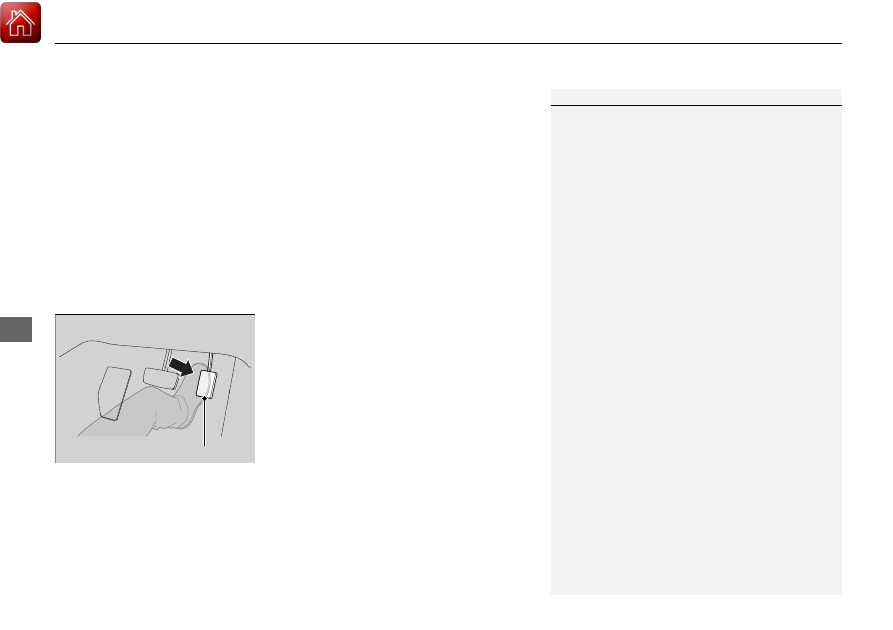
Depressing the accelerator pedal releases the parking brake.

Use the accelerator pedal to release the brake when you are starting the vehicle 
facing uphill, or in a traffic jam.

Gently depress the accelerator pedal.
When on a hill, it may require more 
accelerator input to release.

u

The parking brake and brake system 
indicator (red) goes off.

You can release the parking brake automatically when:

You are wearing the driver’s seat belt.

The engine is running.

The transmission is not in 

(

P

 or 

(

N

.

1

Parking Brake

If the parking brake cannot be released 
automatically, release it manually.

When the vehicle is traveling uphill, the accelerator 
pedal may need to be pressed farther to 
automatically release the electric parking brake.

The parking brake cannot be released automatically 
while the following indicators are on:

Malfunction indicator lamp

Transmission system indicator

The parking brake may not be released automatically 
while the following indicators are on:

Parking brake and brake system indicator

VSA

®

 system indicator

ABS

 indicator

Supplemental restraint system indicator

Accelerator Pedal

Continued

511

uu

Braking

u

Brake System

Driving

Activating and deactivating the automatic parking brake feature

With the power mode is in ON, carry out the following steps to either activate or 
deactivate the automatic parking brake feature.

1.

Put the transmission into 

(

P

.

2.

Without depressing the brake pedal, pull up and release the electric parking brake 
switch.

u

Check that the parking brake and brake system indicator (red) has come on.

3.

Pull up and hold the electric parking brake switch. When you hear a beeping 
sound, release the switch and within 3 seconds pull up and hold the switch again.

4.

When you hear a sound indicating that the procedure is completed, release the 
switch.

u

Two beeps indicates that the feature has been activated.

u

One beep indicates that the feature has been deactivated.

u

When you have completed activating the feature, the parking brake will 
remain applied after you turn off the engine.

u

To confirm that the parking brake is applied, check if the parking brake and 
brake system indicator (red) is on.

If you need to temporarily deactivate the feature while putting your vehicle through 
a conveyor type car wash, you can follow the procedure explained below.

1.

Depress the brake pedal and bring the vehicle to a stop.

2.

Set the power mode to VEHICLE OFF and then within 2 seconds push down the 
electric parking brake switch.

u

Activation and deactivation settings for the feature will not be affected.

u

Before temporarily deactivating the feature, make sure to first turn off both 
ACC with Low Speed Follow and the automatic brake hold system.

u

To confirm that the parking brake is applied, check if the parking brake and 
brake system indicator (red) is on.

1

Parking Brake

In cold climates, the parking brake may freeze in 
place if applied.
When parking the vehicle, chock the wheels and 
make sure the automatic parking brake feature is 
deactivated.
Also, when putting your vehicle through a conveyor-
type car wash or when having your vehicle towed, 
deactivate the automatic parking brake feature and 
leave the parking brake released.

Automatic transmission models

uu

Braking

u

Brake System

512

Driving

Your vehicle is equipped with disc brakes at all four wheels. The brake assist system 
increases the stopping force when you depress the brake pedal hard in an 
emergency situation. The anti-lock brake system (ABS) helps you retain steering 
control when braking very hard.

2

Brake Assist System

 P. 517

2

Anti-lock Brake System (ABS)

 P. 516

Foot Brake

1

Foot Brake

Check the brakes after driving through deep water, 
or if there is a buildup of road surface water. If 
necessary, dry the brakes by lightly depressing the 
pedal several times.

If you hear a continuous metallic friction sound when 
applying the brakes, this is caused by the brake wear 
indicator rubbing on the brake rotor and indicates 
that the brake pads need to be replaced. Have the 
vehicle checked by a dealer. If you hear only an 
occasional squeak or squeal when you initially apply 
the brake pedal, this may be normal and caused by 
high frequency vibration of the brake pads against 
the rotating brake disc.

Constantly using the brake pedal while going down a 
long hill builds up heat, which reduces the brake 
effectiveness. Apply engine braking by taking your 
foot off the accelerator pedal and downshifting to a 
lower gear/speed position.

Do not rest your foot on the brake pedal while 
driving, as it will lightly apply the brakes and cause 
them to lose effectiveness over time and reduce pad 
life. It will also confuse drivers behind you.

Whenever the brakes are activated by CMBS

TM

 or 

another system that automatically controls braking, 
the brake pedal is depressed and released in 
accordance with braking function.

Continued

513

uu

Braking

u

Brake System

Driving

Keeps the brake applied after releasing the brake pedal until the accelerator pedal is 
pressed. You can use this system while the vehicle is temporarily stopped, like at 
traffic lights and in heavy traffic.

Automatic Brake Hold

1

Automatic Brake Hold

3

WARNING

Activating the automatic brake hold system 
on steep hills or slippery roads may still 
allow the vehicle to move if you remove 
your foot from the brake pedal.

If a vehicle unexpectedly moves, it may 
cause a crash resulting in serious injury or 
death.

Never activate the automatic brake hold 
system or rely on it to keep a vehicle from 
moving when stopped on a steep hill or 
slippery roads.

3

WARNING

Using the automatic brake hold system to 
park the vehicle may result in the vehicle 
unexpectedly moving.

If a vehicle moves unexpectedly, it may 
cause a crash, resulting in serious injury or 
death.

Never leave the vehicle when braking is 
temporarily kept by automatic brake hold 
and always park the vehicle by putting the 
transmission in 

(

P

 and applying the parking 

brake.

Turning on the system

Fasten your seat belt 
properly, then start the 
engine. Press the 
automatic brake hold 
button.

The automatic brake 
hold system indicator 
comes on. The system 
is turned on.

Activating the system

Depress the brake pedal 
to come to a complete 
stop. The transmission 
must not be in 

(

P

 or 

(

R

.

The automatic brake 
hold indicator comes 
on. Braking is kept for 
up to 10 minutes.

Release the brake pedal 
after the automatic 
brake hold indicator 
comes on.

Canceling the system

Depress the accelerator 
pedal while the 
transmission is in a 
position other than 

(

P

 or 

(

N

. The system is 

canceled and the vehicle 
starts to move.

The automatic brake 
hold indicator goes 
off. The system 
continues to be on.

Accelerator Pedal

Brake Pedal

Automatic Brake 
Hold Button

Goes 
Off

U.S.

Canada

On

On

Comes 
On

Comes 
On

Comes 
On

uu

Braking

u

Brake System

514

Driving

The system automatically cancels when:

You engage the parking brake.

You depress the brake pedal and put the transmission into 

(

P

 or 

(

R

.

The system automatically cancels and the parking brake is applied when:

Braking is kept for more than 10 minutes.

The driver’s seat belt is unfastened.

The engine is turned off.

There is a problem with automatic brake hold system.

1

Automatic Brake Hold

While the system is activated, you can turn off the 
engine or park the vehicle through the same 
procedure as you normally do.

2

When Stopped

 P. 518

Whether the system is on, or the system is activated, 
the automatic brake hold turns off once the engine is 
off.

515

uu

Braking

u

Brake System

Driving

Turning off the automatic brake hold system

While the system is on, press the automatic 
brake hold button again.

u

The automatic brake hold system 
indicator goes off.

If you want to turn off automatic brake hold 
while the system is in operation, press the 
automatic brake hold button with the brake 
pedal depressed.

1

Turning on the system

Make sure to turn off the automatic brake hold 
system before using an automated car wash.

You may hear an operating noise if the vehicle moves 
while the automatic brake hold system is in 
operation.

Automatic Brake 
Hold Button

Goes 
Off

516

uu

Braking

u

Anti-lock Brake System (ABS)

Driving

Anti-lock Brake System (ABS)

Helps prevent the wheels from locking up, and helps you retain steering control by 
pumping the brakes rapidly, much faster than you can.

The electronic brake distribution (EBD) system, which is part of the ABS, also 
balances the front-to-rear braking distribution according to vehicle loading.

You should never pump the brake pedal. Let the ABS work for you by always 
keeping firm, steady pressure on the brake pedal. This is sometimes referred to as 
“stomp and steer.”

ABS operation

The brake pedal may pulsate slightly when the ABS is working. Depress the brake 
pedal and keep holding the pedal firmly down. On dry pavement, you will need to 
press on the brake pedal very hard before the ABS activates. However, you may feel 
the ABS activate immediately if you are trying to stop on snow or ice.

ABS may activate when you depress the brake pedal when driving on:

Wet or snow covered roads.

Roads paved with stone.

Roads with uneven surfaces, such as potholes, cracks, manholes, etc.

When the vehicle speed goes under 6 mph (10 km/h), the ABS stops.

ABS

1

Anti-lock Brake System (ABS)

NOTICE

The ABS may not function correctly if you use a tire of 
the incorrect size or type.

If the ABS indicator comes on while driving, there 
may be a problem with the system. While normal 
braking will not be affected, there is a possibility that 
the ABS will not be operating. Have your vehicle 
checked by a dealer immediately.

The ABS is not designed for the purpose of reducing 
the time or distance it takes for a vehicle to stop: It is 
designed to limit brake lockup which can lead to 
skidding and loss of steering control.

In the following cases, your vehicle may need more 
distance to stop than a vehicle without the ABS:

You are driving on rough or uneven road surfaces, 
such as gravel or snow.

The tires are equipped with tire chains

*

.

The following may be observed with the ABS system:

Motor sounds coming from the engine 
compartment when the brakes are applied, or 
when system checks are being performed after the 
engine has been started and while the vehicle 
accelerates.

Brake pedal and/or the vehicle body vibration when 
ABS activates.

These vibrations and sounds are normal to ABS 
systems and are no cause for concern.

* Not available on all models

517

uu

Braking

u

Brake Assist System

Driving

Brake Assist System

Designed to assist the driver by generating greater braking force when you depress 
the brake pedal hard during emergency braking.

Brake assist system operation

Press the brake pedal firmly for more powerful braking.

When brake assist operates, the pedal may wiggle slightly and an operating noise 
may be heard. This is normal. Keep holding the brake pedal firmly down.

518

Driving

Parking Your Vehicle

When Stopped

1.

Depress the brake pedal firmly.

2.

With the brake pedal depressed, pull up the electric parking brake switch slowly, 
but fully.

3.

Put the transmission into 

(

P

.

4.

Turn off the engine.

u

The parking brake and brake system indicator (red) goes off in about 30 
seconds.

Always set the parking brake, in particular if you are parked on an incline.

1

Parking Your Vehicle

Do not park your vehicle near flammable objects, 
such as dry grass, oil, or timber.
Heat from the exhaust can cause a fire.

3

WARNING

The vehicle can roll away if left unattended 
without confirming that Park is engaged.

A vehicle that rolls away could cause a crash 
resulting in serious injury or death.

Always keep your foot on the brake pedal 
until you have confirmed that 

(

P

 is shown 

on the shift position indicator.

519

uu

Parking Your Vehicle

u

When Stopped

Driving

1

When Stopped

NOTICE

The following can damage the transmission:

Depressing the accelerator and brake pedals 
simultaneously.

Holding the vehicle in place when facing uphill by 
depressing the accelerator pedal.

Putting the transmission into 

(

P

 before the vehicle 

stops completely.

In extremely cold temperatures, the parking brake 
may freeze up if applied. If such temperatures are 
expected, do not apply the parking brake but, if 
parking on a slope, either turn the front wheels so 
they will contact the curb if the vehicle rolls down the 
slope or block the wheels to keep the vehicle from 
moving. If you do not take either precaution, the 
vehicle may roll unexpectedly, leading to a crash. 

520

uu

Parking Your Vehicle

u

Parking Sensor System

*

Driving

Parking Sensor System

*

The corner and center sensors monitor obstacles around your vehicle, and the 
beeper, driver information interface and audio/information screen let you know the 
approximate distance between your vehicle and the obstacle.

The sensor location and range

1

Parking Sensor System

*

Even when the system is on, always confirm if there is 
no obstacle near your vehicle before parking.

The system may not work properly when:

The sensors are covered with snow, ice, mud, or 
dirt.

The vehicle is on uneven surface, such as grass, 
bumps, or a hill.

The vehicle has been out in hot or cold weather.

The system is affected by devices that emit 
ultrasonic waves.

Driving in bad weather.

The system may not sense:

Thin or low objects.

Sonic-absorptive materials, such as snow, cotton, 
or sponge.

Objects directly under the bumper.

Do not put any accessories on or around the sensors.

Within about 24 in (60 cm) or less

Front Corner Sensors

Rear Corner Sensors

Front

*

: Within about 39 in (100 cm) or less

Rear: Within about 43 in (110 cm) or less

Rear Center Sensors

Front Center Sensors

*

* Not available on all models

Continued

521

uu

Parking Your Vehicle

u

Parking Sensor System

*

Driving

Parking sensor system on and off

With the power mode in ON, press the 
parking sensor system button to turn on or off 
the system. The indicator in the button comes 
on when the system is on.

The front corner, rear corner and rear center 
sensors start to detect an obstacle when the 
transmission is in 

(

R

, and the vehicle speed is 

less than 5 mph (8 km/h).

The front corner and front center

*

 sensors start 

to detect an obstacle when the transmission is 
in any position other than 

(

P

 or 

(

R

, and the 

vehicle speed is less than 5 mph (8 km/h).

1

Parking Sensor System

*

When you set the power mode to ON, the system will 
be in the previously selected condition.

* Not available on all models

uu

Parking Your Vehicle

u

Parking Sensor System

*

522

Driving

Screen Operation

You can switch between split view off and 
split view on by touching the split screen tab.

1

Screen Operation

The split screen tab disappears, and the split view 
returns to the last camera view mode under the 
following conditions:

If the parking sensor system is turned off.

If there is a malfunction in the system.

Split Screen 
Tab

Split View Off

Split View On

523

uu

Parking Your Vehicle

u

Parking Sensor System

*

Continued

Driving

When the distance between your vehicle and detected obstacles becomes shorter

*1:At this stage, only the center sensors detect obstacles.

Interval between 

beeps

Distance between the Bumper and Obstacle

Indicator

Driver information interface/

Audio/Information Screen

Corner Sensors

Center Sensors

Moderate

Front

*

: About 39-24 in 

(100-60 cm)

Rear: About 43-24 in 

(110-60 cm) 

Comes on in Yellow

*1

Short

About 24-18 in 

(60-45 cm) 

About 24-18 in 

(60-45 cm) 

Comes on in Amber

Very short

About 18-14 in 

(45-35 cm) 

About 18-14 in 

(45-35 cm) 

Continuous

About 14 in 

(35 cm) or less

About 14 in 

(35 cm) or less

Comes on in Red

Indicators light up where the 
sensor detects an obstacle.

Indicators light up where the 
sensor detects an obstacle.

Audio/Information Screen

Driver information interface

* Not available on all models

uu

Parking Your Vehicle

u

Parking Sensor System

*

524

Driving

1.

Make sure that the parking sensor system is not activated. Set the power mode to 
VEHICLE OFF.

2.

Press and hold the parking sensor system button, and set the power mode to ON.

3.

Keep pressing the button for 10 seconds. Release the button when the indicator 
in the button flashes.

u

The beeper sounds once.

4.

Press the button again. The indicator in the button goes off.

u

The beeper sounds twice. The rear sensors are now turned off.

To turn the rear sensors on again, follow the above procedure. The beeper sounds 
three times when the rear sensors come back on.

Turning off All Rear Sensors

1

Turning off All Rear Sensors

When you put the transmission into 

(

R

, the indicator 

in the parking sensor system button blinks as a 
reminder that the rear sensors have been turned off.

525

uu

Parking Your Vehicle

u

Cross Traffic Monitor

*

Continued

Driving

Cross Traffic Monitor

*

Monitors the rear corner areas using the radar sensors when reversing, and alerts 
you if a vehicle approaching from a rear corner is detected.

The system is convenient when you are backing out of a parking space.

1

Cross Traffic Monitor

*

The parking sensor system’s alerting buzzer overrides 
the Cross Traffic Monitor buzzer when the sensors 
are detecting obstacles at the closest range.

3

CAUTION

Cross Traffic Monitor cannot detect all 
approaching vehicles and may not detect 
an approaching vehicle at all.

Failure to visually confirm that it is safe to 
back up the vehicle before doing so may 
result in a collision.

Do not solely rely on the system when 
reversing; always also use your mirrors, and 
look behind and to the sides of your vehicle 
before reversing.

Models with parking sensor system

* Not available on all models


Content      ..     30      31      32      33     ..