Honda HR-V eHEV (2022 year). Manual in english - page 23
 

  Index      Manuals     Honda HR-V eHEV (2022 year). Manual in english


Search            copyright infringement  


Content      ..     21      22      23      24     ..


Honda HR-V eHEV (2022 year). Manual in english - page 23


369

uu

When Driving

u

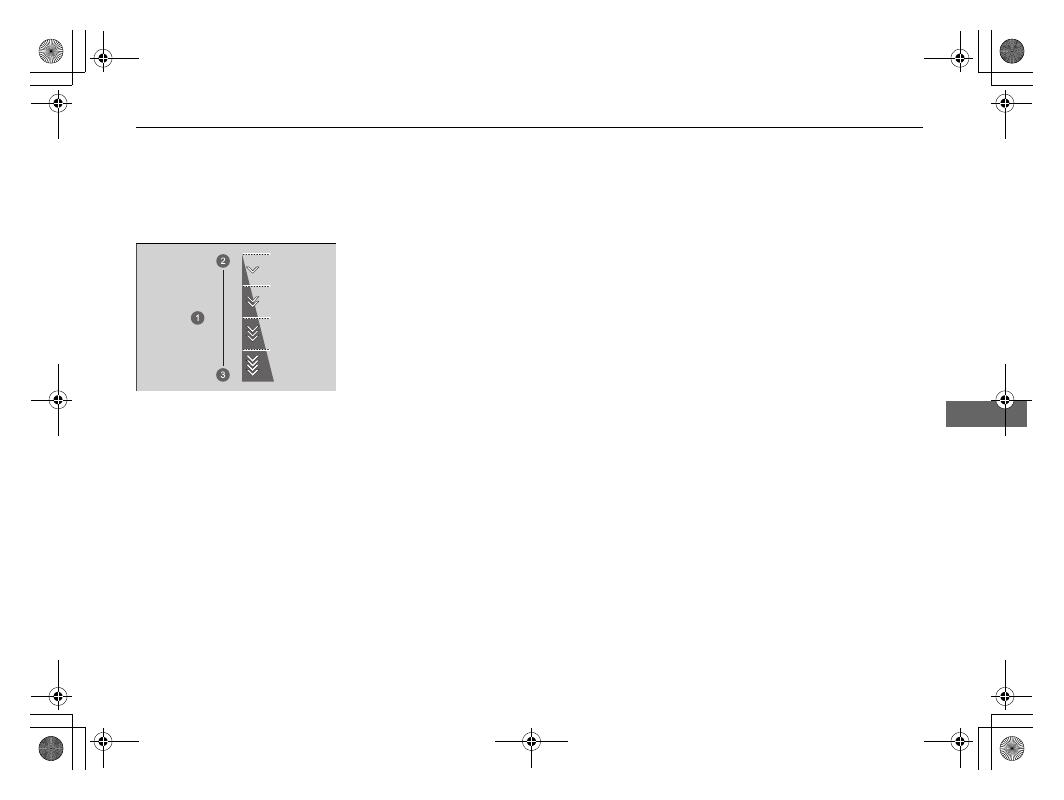
Deceleration Paddle Selector

Driving

Common operations

To select the different stages of deceleration:

Pull back the 

(

+

 selector (right side) to decrease the deceleration stage.

Pull back the 

(

-

 selector (left side) to increase the deceleration stage.

Each paddle selector operation makes a single 
stage deceleration change.

u

The deceleration stage may not change if 
you keep the paddle selector pulled 
back.

a

Deceleration Stage

b

Decrease

c

Increase

370

uu

When Driving

u

Acoustic Vehicle Alerting System

Driving

Acoustic Vehicle Alerting System

Alerts pedestrians when a vehicle is propelled solely by electricity, approaching at 
speeds around 25 km/h (16 mph) or less.

371

uu

When Driving

u

Drive Mode Switch

Continued

Driving

Drive Mode Switch

Continuously controls your vehicle’s driving performance according to the mode you 
select.
You can choose between three modes, 

SPORT

 mode, 

NORMAL

 mode and 

ECON


mode, by moving the drive mode switch forward or back.
The currently selected mode is displayed on the driver information interface, and the 
display will change for each mode.

1

Drive Mode Switch

NORMAL

 mode is selected automatically every time 

you set the power mode to ON. However, if 

ECON


mode was selected the last time you drove the 
vehicle, 

ECON

 mode will be selected when the 

power mode is set to ON.

The mode may not be able to be changed under 
some driving conditions.
If there is a vehicle system failure, the following 
message will also appear on the driver information 
interface, and you cannot select any other mode.

a

SPORT

 Mode

b

NORMAL

 Mode

c

ECON

 Mode

d

Drive Mode Switch

372

uu

When Driving

u

Drive Mode Switch

Driving

This mode enhances the responsiveness of the 
acceleration.

This mode optimizes the balance between 
operability and comfort.

SPORT Mode

NORMAL Mode

373

uu

When Driving

u

Drive Mode Switch

Driving

This mode facilitates fuel-efficient driving.

ECON Mode

1

ECON Mode

While in 

ECON

 mode, the climate control system will 

be less effective and the vehicle slower to accelerate.

374

uu

When Driving

u

Hill Descent Control System

Driving

Hill Descent Control System

When driving down hills where engine braking is not enough to decelerate the 
vehicle, this system helps maintain a constant vehicle speed without needing to 
depress the brake pedal.

The system operates under the following conditions.

Driving at a speed between about 3-20 km/h (2-12 mph).

Driving downhill.

Accelerator pedal and brake pedal are not depressed.

Hill Descent Control Operating Conditions

Driver information interface display

1

Hill Descent Control System

The brake lights automatically come on while the 
system is in operation.

The system may not operate when driving down a 
gentle slope. Check the Hill Descent Control indicator 
to see if the system is in operation.

The system may activate even when not driving 
downhill, such as when the vehicle leans while 
driving over uneven surfaces.

3

WARNING

Hill descent control cannot maintain a 
constant vehicle speed in every situation.

When driving down a very steep hill or on 
slippery road surfaces, the vehicle may not 
be able to maintain the vehicle speed and 
could cause a crash, resulting in serious 
injury or death.

Since Hill Descent Control is not designed 
to increase the limits of vehicle 
performance, the driver must always be 
aware of road surface conditions and drive 
safely.

a

The system’s operating status

Green: Activated

White: Standby

b

Vehicle speed display

White: Set speed

Grey: Current speed

u

Blinks when the vehicle speed is 
above the operating speed.

c

Current speed

d

Operating range of set speed

375

uu

When Driving

u

Hill Descent Control System

Driving

To turn the system on

When the vehicle speed is less than about 20 
km/h (12 mph), press the 

 button to turn 

the system on.

u

The system goes into standby mode, and 
the Hill Descent Control indicator (white) 
comes on.

When all the working conditions are met, the 
system activates, and the vehicle begins to 
maintain the vehicle speed when driving 
downhill.

u

The Hill Descent Control indicator (green) 
comes on when operating.

To adjust the set speed

Depress the accelerator pedal or brake pedal 
to adjust the vehicle speed within the 
operating range. The vehicle speed at which 
you release the accelerator pedal or brake 
pedal will be the set speed.

To turn the system off

Press the 

 button to turn the system off.

How to Operate Hill Descent Control

1

How to Operate Hill Descent Control

Using the system repeatedly for a long time may 
cause the brakes to heat up and make the system go 
into standby mode temporarily.

Hill Descent Control is turned off every time you turn 
the power system off, even if it was turned on the last 
time you drove the vehicle.

The pedals may vibrate or you may hear the system 
working when in operation.

a

Hill Descent Control Indicator

b

 (Hill Descent Control) 

Button

1

To turn the system off

When the vehicle speed is 60 km/h (37 mph) or more, 
the system turns off automatically.

376

uu

When Driving

u

Adjustable Speed Limiter

Driving

Adjustable Speed Limiter

This system enables you to set a maximum speed that cannot be exceeded even if 
you are depressing the accelerator pedal.
The vehicle speed limit can be set from about 30 km/h (18 mph) to about 250 km/h 
(156 mph).

1

Adjustable Speed Limiter

The adjustable speed limiter may not hold the set 
speed limit when driving downhill. If this occurs, slow 
down by depressing the brake pedal.

When not using the adjustable speed limiter:
Turn off the adjustable speed limiter by pressing the 

 button.

You cannot use the Adjustable Speed Limiter and 
below systems at the same time.

-

Adaptive cruise control (ACC) with low speed follow

-

Intelligent speed limiter

3

WARNING

Adjustable Speed Limiter has limitations.
It is always your responsibility to adjust the 
vehicle speed to obey the actual speed 
limit, and safely operate the vehicle.

3

WARNING

Do not depress the accelerator pedal more 
than necessary.
Maintain an appropriate accelerator pedal 
position depending on the vehicle speed.

a

Press the 

 button on the steering wheel.

b

If a different indicator comes on, press the 

LIM

 button to switch to the adjustable 

speed limiter.

c

The Adjustable Speed Limiter Indicator (White) is on in the gauge.

Adjustable speed limiter is ready to use.

Continued

377

uu

When Driving

u

Adjustable Speed Limiter

Driving

Take your foot off the pedal and press the 

SET/−

 button when you reach the 

desired speed.
The moment you release the 

SET/−

 button, the speed limit is fixed, and the 

adjustable speed limiter is set. The speed limit is displayed.

You can set the previously set speed limit by pressing the 

RES/+

 button.

To Set the Speed Limit

1

To Set the Speed Limit

If you set the speed limit while travelling at less than 
30 km/h (18 mph), the speed limit is set to 30 km/h 
(18 mph).

The beeper sounds and the displayed speed limit 
blinks if the vehicle speed exceeds the limit by 3 km/h 
(2 mph) or more on a steep descent.

The adjustable speed limiter is set to the current 
speed if it is higher than the previously set speed limit 
when you press the 

RES/+

 button.

You can switch the displayed set speed 
measurements between km/h and mph on the audio/
information screen.

2

Customized Features

 P. 305

a

RES/+

 Button

b

SET/−

 Button

c

On when the adjustable speed limiter is set.

d

Adjustable Speed Limiter Indicator (Green)

378

uu

When Driving

u

Adjustable Speed Limiter

Driving

Increase or decrease the speed limit by using the 

RES/+

 or 

SET/−

 buttons on the 

steering wheel.

Each time you press the button, the speed limit increases or decreases by 1 km/h 
or 1 mph accordingly.

If you keep the button pressed, the speed limit increases or decreases in 
increments of 10 km/h or 10 mph every 0.5 second until system limit is reached.

The vehicle may accelerate or decelerate until the set speed is reached.

To Adjust the Speed Limit

a

To increase speed

b

To decrease speed

Continued

379

uu

When Driving

u

Adjustable Speed Limiter

Driving

The speed limit can be exceeded by depressing the accelerator pedal completely.

u

The displayed limit speed blinks.

u

The beeper sounds once the speed limit has been exceeded.

Exceeding the Speed Limit Temporarily

1

Exceeding the Speed Limit Temporarily

The beeper sounds when the vehicle speed goes 
higher than the set speed limit with the accelerator 
pedal depressed completely.

The adjustable speed limiter resumes working once 
the vehicle speed goes lower than the set speed limit.

uu

When Driving

u

Adjustable Speed Limiter

380

Driving

To cancel the adjustable speed limiter, do any 
of the following:

Press the 

CANCEL

 button.

Press the 

 button.

Press the 

LIM

 button.

To Cancel

1

To Cancel

The adjustable speed limiter changes into adaptive 
cruise control (ACC) with Low Speed Follow or 
intelligent speed limiter if the 

LIM

 button is pressed.

Resuming the prior set speed:
Press the 

CANCEL

 button to display the prior set 

speed (gray) and press the 

RES/+

 button to resume 

the prior set speed.
If you are driving at a speed faster than the prior set 
speed (gray), the adjustable speed limiter is set to the 
displayed speed by pressing the 

RES/+

 button.

If you press the 

RES/+

 button when no prior set 

speed (in gray) is displayed, the speed will be set to 
your vehicle’s current speed.

a

Adjustable Speed Limiter Indicator 
(White)

b

Prior Set Speed (Gray)

a

LIM

 Button

b

CANCEL

 Button

c

 Button

381

uu

When Driving

u

Adjustable Speed Limiter

Driving

1

To Cancel

If there is a problem with the system when you are using 
the adjustable speed limiter, the beeper sounds and 

OFF


comes on. The adjustable speed limiter will be turned off.

a

Adjustable Speed Limiter Indicator 
(White)

382

uu

When Driving

u

Intelligent Speed Limiter

Driving

Intelligent Speed Limiter

Automatically sets the speed limit that the traffic sign recognition system detects. 
And the speed limit cannot be exceeded even if you are depressing the accelerator 
pedal. If you fully depress the accelerator the speed limit can be exceeded.

2

Traffic Sign Recognition System

 P. 461

1

Intelligent Speed Limiter

Depending on the amount of depression of the 
accelerator pedal, the vehicle will accelerate until it 
reaches the speed identified by the traffic sign 
recognition system.

3

WARNING

Intelligent Speed Limiter has limitations. 
The Intelligent Speed Limiter may set itself 
to a speed above or below the actual speed 
limit, or may not work, particularly where 
the traffic sign recognition system does not 
operate correctly or where a road has no 
speed limit signs. It is always your 
responsibility to adjust the speed to obey 
the actual speed limit and to safely operate 
the vehicle.

Continued

383

uu

When Driving

u

Intelligent Speed Limiter

Driving

1

Intelligent Speed Limiter

The system is designed to detect signs that follow the 
Vienna Convention standards. Not all signs may be 
detected, but any signs posted on roadsides should 
not be ignored. The system does not work on the 
designated traffic signs of all the countries you travel, 
nor in all situations.

2

Traffic Sign Recognition System

 P. 461

If the intelligent speed limiter is set to the wrong 
speed limit, try one of the following:
To cancel

Press the 

CANCEL

 button.

Press the 

 button.

Press the 

LIM

 button.

To exceed the speed limit temporarily

Depressing the accelerator pedal fully.

The intelligent speed limiter may not hold the set 
speed limit when driving downhill. If this occurs, slow 
down by depressing the brake pedal.

When not using the intelligent speed limiter, turn off 

the intelligent speed limiter by pressing the 


button.

You cannot use the intelligent speed limiter and 
adaptive cruise control (ACC) with Low Speed Follow 
or adjustable speed limiter at the same time.

a

Press the 

 button on the steering wheel.

b

If a different indicator comes on, press the 

LIM

 button to change it to the 

intelligent speed limiter.

c

The Intelligent Speed Limiter Indicator (White) is on in the gauge.

Intelligent speed limiter is ready to use.

uu

When Driving

u

Intelligent Speed Limiter

384

Driving

The moment you release the 

SET/−

 button or 

RES/+

 button, the intelligent speed 

limiter is set to the speed limit that the traffic sign recognition system detects. The 
speed limit is displayed.

To Set the Speed Limit

1

Intelligent Speed Limiter

Do not use the intelligent speed limiter in areas of 
different units from the display unit of the intelligent 
speed limiter.
Change the displayed measurement of the set vehicle 
speed to the same units as the driving areas.

2

Customized Features

 P. 305

1

To Set the Speed Limit

If you set the intelligent speed limiter when the speed 
limit that the traffic sign recognition system detects is 
less than 30 km/h (20 mph), the speed limitation 
function and warning function may switch to pause.

If your vehicle speed is higher than the speed limit 
that the traffic sign recognition system detects, your 
vehicle decelerates slowly to the speed limit or less. If 
necessary, slow down by depressing the brake pedal.
And the beeper sounds and the displayed speed limit 
blinks if the vehicle speed exceeds the limit by 3 km/h 
(2 mph) or more.

a

RES/+

 Button

b

SET/−

 Button

c

On when the intelligent speed limiter is set to the speed limit that the traffic sign 
recognition system detects.

d

Intelligent Speed Limiter Indicator (Green)


Content      ..     21      22      23      24     ..