Honda HR-V eHEV (2022 year). Manual in english - page 21
 

  Index      Manuals     Honda HR-V eHEV (2022 year). Manual in english


Search            copyright infringement  


Content      ..     19      20      21      22     ..


Honda HR-V eHEV (2022 year). Manual in english - page 21


uu

Display Audio

u

Hands-Free Telephone System

336

Features

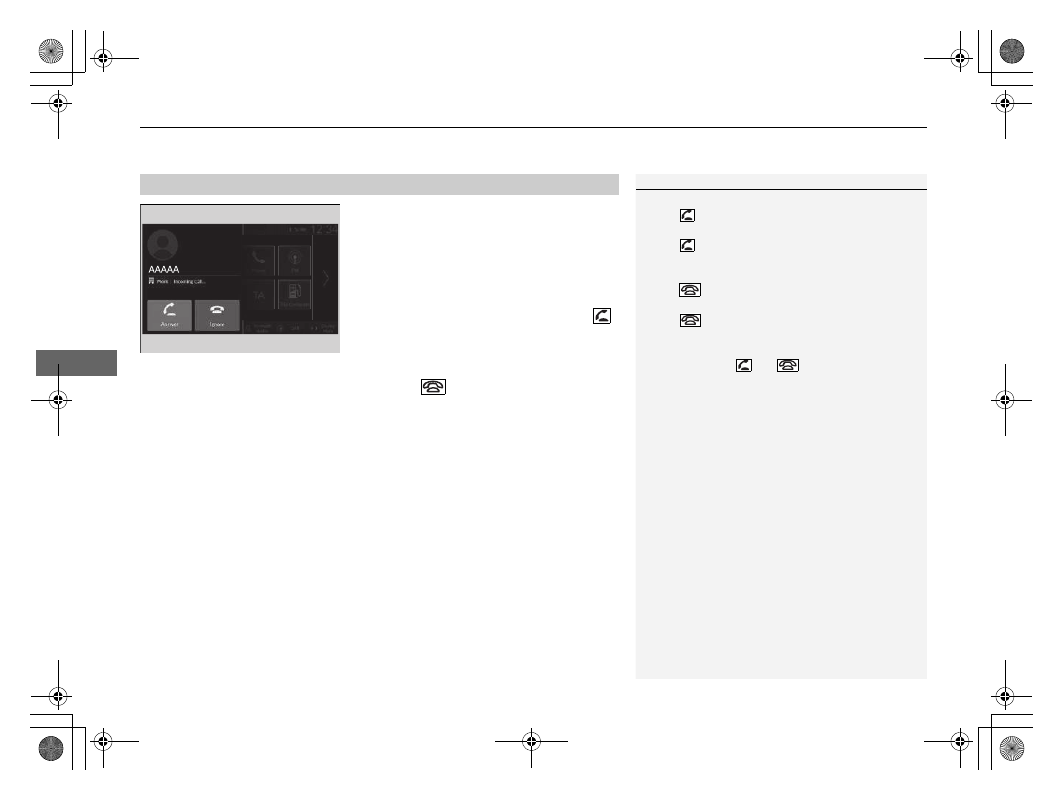
When there is an incoming call, an audible 
notification sounds (if activated) and the 

Incoming Call...

 screen appears. 

You can answer the call using the left selector 
wheel.
To pick the call, roll up or down to select 


(answer) on the driver information interface 
and then press the left selector wheel.

u

If you want to decline or end the call, 
select 

 (ignore) on the driver 

information interface using the left 
selector wheel.

Receiving a Call

1

Receiving a Call

Call Waiting
Select 

 (answer) to put the current call on hold to 

answer the incoming call.
Select 

 using the left selector wheel to return to 

the current call.

Select 

 (ignore) to ignore the incoming call if you 

do not want to answer it.
Select 

 if you want to hang up the current call.

You can select the icons on the audio/information 
screen instead of 

 and 

 on the driver 

information interface.

337

uu

Display Audio

u

Hands-Free Telephone System

Features

The following options are available during a call.

Keypad: 

Send numbers during a call. This is useful when you call a menu-driven 

phone system.

Mute: 

Mute your voice.

Use Handheld: 

Transfer a call from the system to your phone.

The available options are shown on the lower half of the screen.

Select the option.

u

The mute icon appears when 

Mute

 is selected when the other source screen 

other than the phone screen is displayed. Select 

Mute

 again to turn it off.

Options During a Call

1

Options During a Call

You can select the icons on the audio/information 
screen.

338

Features

Audio Error Messages

iPod/USB Flash Drive

If an error occurs while playing an iPod or USB flash drive, you may see the following 
error messages. If you cannot clear the error message, contact a dealer.

Error Message

Solution

No response from device

Appears when the system does not acknowledge the iPod. Reconnect the iPod.

Connect Retry

Unplayable File

Appears when the files in the USB flash drive are copyright protected or an unsupported 
format. This error message appears for about five seconds, then plays the next song.

Unsupported Device

Appears when the system does not communicate with a connected device. If it appears 
when a device is connected, contact your place of device purchase.

A charging error has occurred with the 
connected USB device. When safe please 
check the compatibility of the device and 
USB cable and try again.

Appears when an incompatible device is connected. Disconnect the device. Then turn 
the audio system off, and turn it on again. Do not reconnect the device that caused the 
error.

339

Continued

Features

General Information on the Audio System

Compatible iPod, iPhone, and USB Flash Drives

A USB flash drive of 256 MB or higher is recommended.

Some digital audio players may not be compatible.

Some USB flash drives (e.g., a device with security lockout) may not work.

Some software files may not allow for audio play or text data display.

Each audio system is compatible the following formats. Some versions of the 
formats may be unsupported.
MP3, WMA, AAC, FLAC, PCM/WAVE, MP4, AVI, MKV, ASF/WMV

iPod and iPhone Model Compatibility

Model

Made for iPod touch (5th to 6th generation) released between 2012 and 2015
Made for iPhone 5/iPhone 5s/iPhone 5c/iPhone 6/iPhone 6 Plus/iPhone 6S/
iPhone 6S Plus/iPhone SE/iPhone SE (2nd generation)/iPhone 7/iPhone 7 Plus/
iPhone 8/iPhone 8 Plus/iPhone X/iPhone XS/iPhone XS Max/iPhone XR/iPhone 11/
iPhone 11 Pro/iPhone 11 Pro Max/iPhone 12/iPhone 12 mini/iPhone 12 Pro/
iPhone 12 Pro Max

USB Flash Drives

1

iPod and iPhone Model Compatibility

This system may not work with all software versions 
of these devices.

1

USB Flash Drives

Files on the USB flash drive are played in their stored 
order. This order may be different from the order 
displayed on your PC or device.

340

uu

General Information on the Audio System

u

Compatible iPod, iPhone, and USB Flash Drives

Features

MP4 File

AVI File

Recommended Devices

Media

USB Flash Drive

Profile (MP4 version)

BaselineProfile/Level 3,

MailProfile/Level 3.1

(MPEG4-AVC)

SimpleProfile/Level 5 (MPEG4)

File extension (MP4 version)

.mp4/.m4v

Compatible audio codec

AAC, MP3

Compatible video codec

MPEG4-AVC (H.264)

MPEG4 (ISO/IEC 14496 Part.2)

Bit rate

10 Mbps, 14 Mbps

(MPEG4-AVC)

8 Mbps (MPEG4)

Maximum image

1,280 × 720 pixels (MPEG4-AVC)

720 × 576 pixels (MPEG4)

Media

USB Flash Drive

Profile (AVI version)

BaselineProfile/Level 3, 

MailProfile/Level 3.1

(MPEG4-AVC)

SimpleProfile/Level 5 (MPEG4)

AdvancedProfile/Level 2, 

MainProfile/Level Medium, 

SimpleProfile/Level Medium (VC-1)

File extension (AVI version)

.avi

Compatible audio codec

AAC, MP3, WMA

Compatible video codec

MPEG4-AVC (H.264)

MPEG4 (ISO/IEC 14496 Part.2)

VC-1

Bit rate

10 Mbps, 14 Mbps

(MPEG4-AVC)

8 Mbps (MPEG4)

20 Mbps, 10 Mbps, 384 kbps

(VC-1)

Maximum image

1,280 × 720 pixels 

(MPEG4-AVC)

720 × 576 pixels (MPEG4)

1,280 × 720 pixels,

720 x 480 pixels,

352 x 288 pixels (VC-1)

341

uu

General Information on the Audio System

u

Compatible iPod, iPhone, and USB Flash Drives

Features

MKV File

ASF/WMV File

Media

USB Flash Drive

Profile (MKV version)

BaselineProfile/Level 3, 

MailProfile/Level 3.1

(MPEG4-AVC)

SimpleProfile/Level 5 (MPEG4)

AdvancedProfile/Level 2, 

MainProfile/Level Medium, 

SimpleProfile/Level Medium (VC-1)

File extension (MKV version)

.mkv

Compatible audio codec

AAC, MP3

Compatible video codec

MPEG4-AVC (H.264)

MPEG4 (ISO/IEC 14496 Part.2)

VC-1

Bit rate

10 Mbps, 14 Mbps

(MPEG4-AVC)

8 Mbps (MPEG4)

20 Mbps, 10 Mbps, 384 kbps

(VC-1)

Maximum image

1,280 × 720 pixels

(MPEG4-AVC)

720 × 576 pixels

(MPEG4)

1,280 × 720 pixels,

720 x 480 pixels,

352 x 288 pixels (VC-1)

Media

USB Flash Drive

Profile (ASF/WMV version)

BaselineProfile/Level 3, 

MailProfile/Level 3.1

(MPEG4-AVC)

AdvancedProfile/Level 2,

MainProfile/Level Medium,

SimpleProfile/Level Medium (VC-1)

File extension

(ASF/WMV version)

.asf/.wmv

Compatible audio codec

WMA

Compatible video codec

MPEG4-AVC (H.264)

VC-1

Bit rate

10 Mbps, 14 Mbps (MPEG4-AVC)

20 Mbps, 10 Mbps, 384 kbps (VC-1)

Maximum image

1,280 × 720 pixels (MPEG4-AVC)

1,280 × 720 pixels,

720 x 480 pixels,

352 x 288 pixels (VC-1)

342

uu

General Information on the Audio System

u

About Open Source Licences

Features

About Open Source Licences

To see the open source licence information, follow these steps.

1.

Select 

General Settings

.

2.

Select 

System

.

3.

Select 

Detail Information

.

Copyright 2014 jQuery Foundation and other contributors

http://jquery.com/

Permission is hereby granted, free of charge, to any person obtaining a copy of this software and associated documentation files (the 
“Software”), to deal in the Software without restriction, including without limitation the rights to use, copy, modify, merge, publish, 
distribute, sublicense, and/or sell copies of the Software, and to permit persons to whom the Software is furnished to do so, subject to the 
following conditions:

The above copyright notice and this permission notice shall be included in all copies or substantial portions of the Software.

THE SOFTWARE IS PROVIDED “AS IS”, WITHOUT WARRANTY OF ANY KIND, EXPRESS OR IMPLIED, INCLUDING BUT NOT LIMITED TO THE 
WARRANTIES OF MERCHANTABILITY, FITNESS FOR A PARTICULAR PURPOSE AND NONINFRINGEMENT. IN NO EVENT SHALL THE 
AUTHORS OR COPYRIGHT HOLDERS BE LIABLE FOR ANY CLAIM, DAMAGES OR OTHER LIABILITY, WHETHER IN AN ACTION OF 
CONTRACT, TORT OR OTHERWISE, ARISING FROM, OUT OF OR IN CONNECTION WITH THE SOFTWARE OR THE USE OR OTHER DEALINGS 
IN THE SOFTWARE.

Software for the Display Audio

*

* Not available on all models

343

uu

General Information on the Audio System

u

Legal Information on Apple CarPlay/Android Auto

Continued

Features

Legal Information on Apple CarPlay/Android Auto

USE OF APPLE CARPLAY IS SUBJECT TO YOUR AGREEMENT TO THE CARPLAY TERMS OF USE, WHICH ARE INCLUDED AS PART OF THE 
APPLE iOS TERMS OF USE. IN SUMMARY, THE CARPLAY TERMS OF USE DISCLAIM APPLE AND ITS SERVICE PROVIDERS’ LIABILITY IF THE 
SERVICES FAIL TO PERFORM CORRECTLY OR ARE DISCONTINUED, STRICTLY LIMIT APPLE AND ITS SERVICE PROVIDERS’ OTHER 
LIABILITIES, DESCRIBE THE KINDS OF USER INFORMATION (INCLUDING, FOR EXAMPLE, VEHICLE LOCATION, VEHICLE SPEED, AND 
VEHICLE STATUS) BEING GATHERED AND STORED BY APPLE AND ITS SERVICE PROVIDERS, AND DISCLOSE CERTAIN POSSIBLE RISKS 
ASSOCIATED WITH THE USE OF CARPLAY, INCLUDING THE POTENTIAL FOR DRIVER DISTRACTION. SEE APPLE’S PRIVACY POLICY FOR 
DETAILS REGARDING APPLE’S USE AND HANDLING OF DATA UPLOADED BY CARPLAY.

USE OF ANDROID AUTO IS SUBJECT TO YOUR AGREEMENT TO THE ANDROID AUTO TERMS OF USE WHICH MUST BE AGREED TO WHEN 
THE ANDROID AUTO APPLICATION IS DOWNLOADED TO YOUR ANDROID PHONE. IN SUMMARY, THE ANDROID AUTO TERMS OF USE 
DISCLAIM GOOGLE AND ITS SERVICE PROVIDERS’ LIABILITY IF THE SERVICES FAIL TO PERFORM CORRECTLY OR ARE DISCONTINUED, 
STRICTLY LIMIT GOOGLE AND ITS SERVICE PROVIDERS’ OTHER LIABILITIES, DESCRIBE THE KINDS OF USER INFORMATION (INCLUDING, 
FOR EXAMPLE, VEHICLE LOCATION, VEHICLE SPEED, AND VEHICLE STATUS) BEING GATHERED AND STORED BY GOOGLE AND ITS 
SERVICE PROVIDERS, AND DISCLOSE CERTAIN POSSIBLE RISKS ASSOCIATED WITH THE USE OF ANDROID AUTO, INCLUDING THE 
POTENTIAL FOR DRIVER DISTRACTION. SEE GOOGLE’S PRIVACY POLICY FOR DETAILS REGARDING GOOGLE’S USE AND HANDLING OF 
DATA UPLOADED BY ANDROID AUTO.

OWNER’S MANUAL LICENSE/LIABILITY STATEMENTS

344

uu

General Information on the Audio System

u

Legal Information on Apple CarPlay/Android Auto

Features

YOU EXPRESSLY ACKNOWLEDGE AND AGREE THAT USE OF APPLE CARPLAY OR ANDROID AUTO (“THE APPLICATIONS”) IS AT YOUR 
SOLE RISK AND THAT THE ENTIRE RISK AS TO SATISFACTORY QUALITY, PERFORMANCE, ACCURACY AND EFFORT IS WITH YOU TO THE 
MAXIMUM EXTENT PERMITTED BY APPLICABLE LAW, AND THAT THE APPLICATIONS AND INFORMATION ON THE APPLICATIONS IS 
PROVIDED “AS IS” AND “AS AVAILABLE,” WITH ALL FAULTS AND WITHOUT WARRANTY OF ANY KIND, AND HONDA HEREBY 
DISCLAIMS ALL WARRANTIES AND CONDITIONS WITH RESPECT TO THE APPLICATIONS AND INFORMATION ON THE APPLICATIONS, 
EITHER EXPRESS, IMPLIED OR STATUTORY, INCLUDING, BUT NOT LIMITED TO, THE IMPLIED WARRANTIES AND/OR CONDITIONS OF 
MERCHANTABILITY, SATISFACTORY QUALITY, FITNESS FOR A PARTICULAR PURPOSE, ACCURACY, QUIET ENJOYMENT, AND NON-
INFRINGEMENT OF THIRD PARTY RIGHTS. NO ORAL OR WRITTEN INFORMATION OR ADVICE GIVEN BY HONDA OR AN AUTHORISED 
REPRESENTATIVE SHALL CREATE A WARRANTY. AS EXAMPLES, AND WITHOUT LIMITATION, HONDA DISCLAIMS ANY WARRANTY 
REGARDING THE ACCURACY OF DATA PROVIDED BY THE APPLICATIONS, SUCH AS THE ACCURACY OF DIRECTIONS, ESTIMATED 
TRAVEL TIME, SPEED LIMITS, ROAD CONDITIONS, NEWS, WEATHER, TRAFFIC, OR OTHER CONTENT PROVIDED BY APPLE, GOOGLE, THEIR 
AFFILIATES, OR THIRD PARTY PROVIDERS; HONDA DOES NOT GUARANTEE AGAINST LOSS OF APPLICATION DATA, WHICH MAY BE LOST 
AT ANY TIME; HONDA DOES NOT GUARANTEE THAT THE APPLICATIONS OR ANY SERVICES PROVIDED THROUGH THEM WILL BE 
PROVIDED AT ALL TIMES OR THAT ANY OR ALL SERVICES WILL BE AVAILABLE AT ANY PARTICULAR TIME OR LOCATION. FOR EXAMPLE, 
SERVICES MAY BE SUSPENDED OR INTERRUPTED WITHOUT NOTICE FOR REPAIR, MAINTENANCE, SECURITY FIXES, UPDATES, ETC., 
SERVICES MAY BE UNAVAILABLE IN YOUR AREA OR LOCATION, ETC. IN ADDITION, YOU UNDERSTAND THAT CHANGES IN THIRD PARTY 
TECHNOLOGY OR GOVERNMENT REGULATION MAY RENDER THE SERVICES AND/OR APPLICATIONS OBSOLETE AND/OR UNUSABLE.

TO THE EXTENT NOT PROHIBITED BY LAW, IN NO EVENT SHALL HONDA OR ITS AFFILIATES BE LIABLE FOR PERSONAL INJURY, OR ANY 
INCIDENTAL, SPECIAL, INDIRECT OR CONSEQUENTIAL DAMAGES WHATSOEVER, INCLUDING, WITHOUT LIMITATION, DAMAGES FOR 
LOSS OF PROFITS, CORRUPTION OR LOSS OF DATA, FAILURE TO TRANSMIT OR RECEIVE ANY DATA, BUSINESS INTERRUPTION OR ANY 
OTHER COMMERCIAL DAMAGES OR LOSSES, ARISING OUT OF OR RELATED TO THE APPLICATIONS OR YOUR USE OF OR INABILITY TO 
USE THE APPLICATIONS OR INFORMATION ON THE APPLICATIONS, HOWEVER CAUSED, REGARDLESS OF THE THEORY OF LIABILITY 
(CONTRACT, TORT OR OTHERWISE) AND EVEN IF HONDA WERE ADVISED OF THE POSSIBILITY OF SUCH DAMAGES. SOME REGIONS AND 
JURISDICTIONS MAY DISALLOW THE EXCLUSION OR LIMITATION OF LIABILITY FOR DAMAGES, SO THESE LIMITATIONS AND EXCLUSIONS 
MAY NOT APPLY TO YOU. THE FOREGOING LIMITATIONS WILL APPLY EVEN IF THE ABOVE STATED REMEDY FAILS OF ITS ESSENTIAL 
PURPOSE.

DISCLAIMER OF WARRANTIES; LIMITATION ON LIABILITY

345

Continued

Features

Emergency Call (eCall)

Automatic emergency call

If your vehicle is involved in a collision, the 
vehicle will attempt to connect to a Public 
Safety Answering Point (PSAP) operator. Once 
a connection is established, various 
information about the vehicle will be sent to a 
PSAP operator with whom you will be able to 
speak. This information includes:

Vehicle identification number (VIN)

Type of vehicle (passenger vehicle or light-weight commercial vehicle)

Type of energy stored for vehicle propulsion (gasoline/diesel/CNG/LPG/electricity/
hydrogen)

Last three locations of the vehicle

Direction of travel

Triggering mode (automatic or manual)

Timestamp

When an emergency call is initiated, the vehicle speakers are disabled so that you 
can hear the operator.

When the power mode is set to ON, the eCall indicator lights up in green for 1 
second, then in red for 1 second.

1

Emergency Call (eCall)

Your vehicle is equipped with the 112-based eCall 
service system.

The 112-based eCall service is a public service of 
general interest and is accessible free of charge.

The 112-based eCall in-vehicle system is activated 
when the power mode is set to ON. In the event of a 
collision, the system will determine the degree of the 
impact based on information collected from the on-
board sensors and, depending on the severity of the 
collision, will initiate the emergency call.

The 112-based eCall in-vehicle system can also be 
triggered manually, if needed.

2

Manual emergency call

 P. 347

Any processing of personal data through the 112-
based eCall in-vehicle system shall comply with the 
personal data protection rules provided for in 
Directives 95/46/EC (replaced by 2016/679/EC) and 
2002/58/EC, and in particular, shall be based on the 
necessity to protect the vital interests of the 
individuals in accordance with Article 7(d) of Directive 
95/46/EC (replaced by 2016/679/EC).

Processing of such data is strictly limited to the 
purpose of for which the single European emergency 
number 112 is designated.

a

eCall Indicator

uu

Emergency Call (eCall)

u

Automatic emergency call

346

Features

If the eCall system is working properly, the indicator will light up in green.

Green: eCall system is ready.

Blinking in green: eCall system is connected and making an eCall to a PSAP 
operator.

Repeating a pattern of short flashes of the red light: The eCall system has failed 
to connect to an operator. The eCall indicator will continue this pattern for 5 
seconds

*1

/30 seconds

*2

, then it will light up in green.

If the 112-based eCall system is disabled in the event of a critical system failure, the 
following warning will be given to the occupants of the vehicle:

Red or blacked out: A problem with the eCall system has occurred. If the indicator 
stays red or blacked out even after you have restarted the vehicle, have the system 
check by a dealer.

Blinking in red: The level of the backup battery is too low. While the power is in 
ON, the battery undergoes recharging. Once the battery has been recharged to a 
certain level, the eCall indicator lights up in green.

*1 : Except Turkish models
*2 : Turkish models

1

Emergency Call (eCall)

Recipients of data processed by the 112-based eCall 
in-vehicle system are the relevant public safety 
answering points designated by the respective public 
authorities of the country in which they are located 
and are the first to receive and for which the single 
European emergency number 112 is designated.

Your vehicle may NOT be able to connect to a PSAP 
operator if:

both the 12V battery and backup battery are too 
low.

your vehicle is in an area without adequate cellular 
coverage.

There is a problem with the eCall system itself or its 
peripheral equipment such as the microphone or 
speakers.

The backup battery is designed to operate for at least 
3 years, after which it may need to be replaced.

The backup battery is not available for direct 
purchase. For replacement, visit a dealer.

347

uu

Emergency Call (eCall)

u

Manual emergency call

Continued

Features

Manual emergency call

If you need to make an emergency call, you 
can establish a connection manually: Press the 

SOS

 button and hold it for more than 0.5 

seconds.

To cancel a call, press the 

SOS

 cancel button 

for more than 0.5 seconds, before 5 seconds 
has elapsed since the 

SOS

 button was 

pressed.

The 

SOS

 button is protected by a cover. Open the cover to gain access.

When an emergency call is initiated, the vehicle speakers are disabled so that you 
can hear the operator.

1

Manual emergency call

Do NOT press the button while you are driving. If you 
need to contact an operator, park the vehicle in a 
safe place before you make a call.

If the eCall system at first fails to connect to a PSAP 
operator, it will try again until a connection is 
established. However, if 2 minutes have elapsed since 
the first try was attempted, the system will no longer 
attempt to establish a connection.

The 

SOS

 cancel button does not cancel a call once 

the system is connected to an operator.

a

Microphone

b

SOS

 Cancel Button

c

Cover

d

SOS

 Button

uu

Emergency Call (eCall)

u

Manual emergency call

348

Features

1

Emergency Call (eCall)

Data privacy

The 112-based eCall in-vehicle system is designed to 
ensure that:

Data contained in the system memory is not 
available outside the system before an eCall is 
triggered.

It is not traceable or subject to any constant 
tracking during its normal operation status.

Data in the internal memory of the system is 
automatically and continuously removed.

For the system to function normally, the vehicle 
location data is constantly overwritten in the internal 
memory of the system so that the last three locations 
of the vehicle are kept up-to-date.

The log of activity data in the 112-based eCall in-
vehicle system is kept for no longer than necessary 
for attaining the purpose of handling the emergency 
eCall and in any case not beyond 13 hours from the 
moment an emergency eCall was initiated.

349

uu

Emergency Call (eCall)

u

Manual emergency call

Features

1

Emergency Call (eCall)

Owner’s rights

The data subject (the vehicle’s owner) has a right of 
access to data and as appropriate to request the 
rectification, erasure or blocking of data, concerning 
him or her, the processing of which does not comply 
with the provisions of Directive 95/46/EC (replaced by 
2016/679/EC).

Any third parties to whom the data have been 
disclosed have to be notified of such rectification, 
erasure or blocking carried out in compliance with 
this Directive, unless it proves impossible or involves a 
disproportionate effort.

The data subject has a right to complain to the 
competent data protection authority if he or she 
considers that his or her rights have been infringed as 
a result of the processing of his or her personal data.

Honda eCall Service Information:
If you have any questions about eCall, contact the 
office relevant to the country in which you reside. See 
the service booklet for list of offices.

350

Features

Refuel Recommend

Your vehicle is equipped with a feature that automatically calculates when to refuel. 
This feature will notify you when refueling is recommended as well as enable you to 
search for petrol stations that are located in the vicinity of your vehicle.

1.

When it is time to refuel the vehicle, a 
notification is displayed and a notification 
icon is displayed in the header. 

2.

Touch the box that contains the icon.

3.

Select 

Find Petrol Station Now

.

4.

Choose a petrol station from the search 
screen of the navigation system.

u

For instructions on how to use the 
navigation system, refer to the 
navigation system manual.

1

Refuel Recommend

You can turn the 

Refuel Recommend

 function on 

and off.

2

Customized Features

 P. 305

When you turn off this feature, the refuel 
recommend notification will not display.

This feature can only be used when the fuel level in 
the tank is below 30 percent.

If you select 

Find Petrol Station Now

 or put more 

than 5 litres of petrol into the fuel tank, the 
notification for refueling will disappear. If you prefer 
not to be notified, select 

OFF

 in the settings for 

Refuel Recommend

When you drive on a rough road or ascend or 
descend a hill for an extended period of time, the 
notification may disappear or may not be displayed at 
all.

a

Notification Icon

351

Driving

This chapter discusses driving and refueling.

Before Driving

................................... 352

Towing a Trailer

................................ 356

Off-road Guidelines

.......................... 357

When Driving

Turning on the Power ...................... 359
Precautions While Driving................. 362
Transmission .................................... 364
Shifting ............................................ 365
Deceleration Paddle Selector ............ 367
Acoustic Vehicle Alerting System...... 370
Drive Mode Switch........................... 371
Hill Descent Control System ............. 374
Adjustable Speed Limiter.................. 376
Intelligent Speed Limiter................... 382

Vehicle Stability Assist (VSA) System .... 389
Agile Handling Assist ....................... 391
Deflation Warning System................ 392
Blind spot information System

*

........ 394

High Voltage Battery........................ 399
Adjusting Headlight Distribution ...... 400

Honda Sensing

.................................. 402

Collision Mitigation Braking System (CMBS).. 405
Low Speed Braking Control.............. 417
Adaptive Cruise Control (ACC) with Low 

Speed Follow ................................. 423

Lane Keeping Assist System (LKAS) .. 441
Road Departure Mitigation System... 453
Traffic Sign Recognition System ....... 461

Front Wide View Camera................. 468
Sonar Sensors .................................. 470

Braking

Brake System ................................... 471
Anti-lock Brake System (ABS) ........... 478
Brake Assist System ......................... 479
Emergency Stop Signal .................... 480

Parking Your Vehicle

When Stopped ................................ 481
Parking Sensor System ..................... 483
Cross Traffic Monitor

*

..................... 488

Multi-View Rear Camera

.................. 493

Refueling

........................................... 495

Fuel Economy and CO

2

 Emissions

.... 498

* Not available on all models


Content      ..     19      20      21      22     ..