Honda HR-V eHEV (2022 year). Manual in english - page 8
 

  Index      Manuals     Honda HR-V eHEV (2022 year). Manual in english


Search            copyright infringement  


Content      ..     6      7      8      9     ..


Honda HR-V eHEV (2022 year). Manual in english - page 8


127

uu

Indicators

u

Driver Information Interface Warning and Information Messages

Continued

In

strum

e

nt Pa

nel

Icon

Message

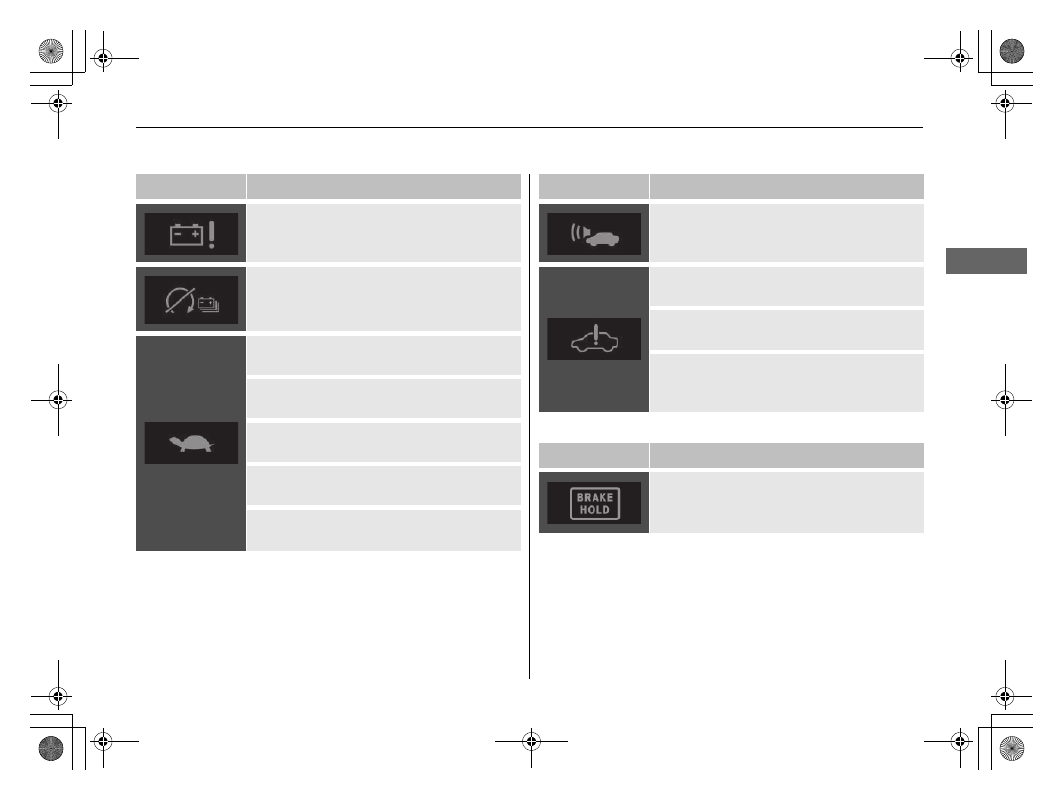
Check Charging System

High Voltage Battery Charge Too Low.
Vehicle Cannot Start

Low Charge.
Power Reduced.

Low Temperature.
Power Reduced.

High Temperature.
Power Reduced.

Hybrid System Problem.
Power Reduced.

Check 12 Volt Charging System.
Power Reduced.

Green Icons

Icon

Message

Acoustic Vehicle Alerting System Problem

Power System Problem.
Power May Be Reduced.

Power System Problem.
Stop Driving When Safe.

Power System Problem.
Avoid Strong Acceleration And High 
Speed.

Icon

Message

Brake Hold System Standby

uu

Indicators

u

Driver Information Interface Warning and Information Messages

128

In

strum

e

nt Pa

nel

Other Icons

Icon

Message

Avoid Strong Acceleration And High 
Speed.
Engine Temperature Near Limit

Gear Position Is N.
Release Accelerator Pedal

Cannot Set Cruise:
Brake Pedal Is Applied

Brake Hold System OFF

Icon

Message

To Enable Brake Hold:
Seat Belt + Push

To Disable Brake Hold:
Brake + Push

Cannot Set Hill Descent Control:
Cruise Is Active

Cannot Set Hill Descent Control:
Speed Too High

Hill Descent Control OFF:
Speed Too High

Hill Decent Control Cancelled:
Slope Not Steep Enough

129

uu

Indicators

u

Driver Information Interface Warning and Information Messages

Continued

In

strum

e

nt Pa

nel

Icon

Message

Cannot Set Hill Descent Control:
Cruise Is Active

Cannot Set Cruise:
Hill Descent Control Is Active

To Enable Brake Hold:
Fasten Seat Belt

Fasten Seat Belt

Cannot Set Cruise:
Fasten Seat Belt

Cruise Cancelled:
Fasten Seat Belt

Icon

Message

Cannot Set Cruise:
Speed Too High

Cruise Cancelled:
Speed Too High

Cannot Set Cruise:
System Not Available

Cruise Cancelled:
System Not Available

Cruise Will Cancel Soon

Cannot Set Cruise:
Too Close To Vehicle Ahead

Cruise Cancelled:
Too Close To Vehicle Ahead

uu

Indicators

u

Driver Information Interface Warning and Information Messages

130

In

strum

e

nt Pa

nel

Icon

Message

Cannot Set Cruise:
Slope Too Steep

Cruise Cancelled:
Slope Too Steep

Cannot Set Cruise:
Slope Too Steep

Cruise Cancelled:
Slope Too Steep

Cannot Set Cruise:
Shift To Drive

Cruise Cancelled:
Shift To Drive

To Resume Cruise:
Use "RES/+" Switch

Cruise Cancelled:
Loss Of Traction

Icon

Message

Press Switch To Operate

Press Switch To Operate ACC

Low Speed Braking Control Activated.
Object Detected.

Lane Keeping Assist Cannot Operate

Some Driver Assist Systems Cannot 
Operate:
Clean Front Windscreen Or Poor Viewing 
Condition.

131

uu

Indicators

u

Driver Information Interface Warning and Information Messages

In

strum

e

nt Pa

nel

Icon

Message

Road Departure Mitigation Activated

Some Driver Assist Systems Available

To Start Vehicle:
Brake + Push

To Start Vehicle:
Fully Depress
Brake + Push

To Continue To Drive:
Depress Brake Pedal And Push Switch

Icon

Message

To Unlock Wheel:
Push + Turn

To Turn Vehicle OFF:
Push Twice

Accessory Mode

Fully Release
Brake + Push

To Start, Hold Remote Near Start Button

2

If the Keyless Remote Battery is Weak


P. 584

Pressing Twice Or Holding Will Cause IGN 
OFF

Ready To Drive

132

In

strum

e

nt Pa

nel

Gauges and Driver Information Interface

Gauges

Gauges include the speedometer, fuel gauge, and other related indicators. They are 
displayed when the power mode is in ON.

Displays your driving speed in km/h or mph.

Displays the amount of fuel left in the fuel tank.

Electric motor

The degree to which the electric motor is being powered is displayed by the readings 
on the 

POWER

 side.

Battery charge in progress

The degree to which the High Voltage battery is being charged is displayed by the 
readings on the 

CHARGE

 side.

Speedometer

Fuel Gauge

POWER/CHARGE Gauge

1

Speedometer

You can set the speedometer and the displayed 
measurements to read in either km/h and mph.

2

Change Units

 P. 137

1

Fuel Gauge

NOTICE

You should refuel when the reading approaches 

(

0

.

Running out of fuel can cause the engine to misfire, 
damaging the catalytic converter.

The actual amount of remaining fuel may differ from 
the fuel gauge reading.

Continued

133

uu

Gauges and Driver Information Interface

u

Gauges

In

strum

e

nt Pa

nel

Shows the total number of kilometres that your vehicle has accumulated.

Changes to green to indicate that the vehicle is being driven in a fuel efficient 
manner with the 

SPORT

 mode off.

Shows the outside temperature in Celsius.

If the outside temperature has been below 3°C at the time you set the power mode 
to ON, 

 message appears on the driver information interface.

Adjusting the outside temperature display

Adjust the temperature reading by up to ±3°C if the temperature reading seems 
incorrect.

Odometer

Ambient Meter

Outside Temperature

1

Outside Temperature

The temperature sensor is in the front bumper.
Road heat and exhaust from another vehicle can 
affect the temperature reading when your vehicle 
speed is less than 30 km/h (19 mph).

It may take several minutes for the display to be 
updated after the temperature reading has stabilised.

You can adjust the temperature reading.

2

Customized Features

 P. 305

134

uu

Gauges and Driver Information Interface

u

Gauges

In

strum

e

nt Pa

nel

Shows the clock.
You can adjust the time manually or change the clock display to show the 12 hour 
clock or 24 hour clock.

2

Clock Setup

 P. 266

Shows the current mode for ACC with Low Speed Follow and LKAS.

2

Adaptive Cruise Control (ACC) with Low Speed Follow

 P. 423

2

Lane Keeping Assist System (LKAS)

 P. 441

Shows traffic signs while driving.
The indicator blinks when the maximum speed of the traffic sign detected by the 
Traffic Sign Recognition System is exceeded.

2

Traffic Sign Recognition System

 P. 461

Clock

Current Mode for ACC with Low Speed Follow and the LKAS

Traffic Sign Recognition System

135

uu

Gauges and Driver Information Interface

u

Driver Information Interface

Continued

In

strum

e

nt Pa

nel

Driver Information Interface

The driver information interface shows information such as the estimated travelable 
distance and fuel economy of the vehicle. It also displays messages such as warnings 
and other helpful information.
When a warning message displays, please check the message and contact a dealer 
and have the vehicle inspected if necessary. Please refer to the pages below if the 

Engine Oil Pressure Low

Engine Temperature Too Hot

 or 

Reduced Stopping 

Power

 message is displayed.

2

If the Engine Oil Pressure Low Warning Appears

 P. 593

2

Overheating

 P. 591

2

If the Reduced Stopping Power Warning Appears

 P. 594

Press the 

 (home) button, then roll the left selector wheel to scroll to the content 

you want to see. Press the left selector wheel to see detailed information.

Switching the Display

1

Switching the Display

To go back to the previous screen, press the 


(back) button.

You can add or delete the meter contents.

2

Customize Display

 P. 148

136

uu

Gauges and Driver Information Interface

u

Driver Information Interface

In

strum

e

nt Pa

nel

a

Left Selector Wheel

f

Speed & Time


2

 P. 141

k

Seat Belts


2

 P. 145

b

 (Home) Button

g

Audio


2

 P. 143

l

Maintenance

*


2

 P. 145

c

Power /Charge


2

 P. 137

h

Phone


2

 P. 143

m

Safety Support


2

 P. 146

d

Power Flow


2

 P. 138

i

Navigation


2

 P. 143

n

Customize Display


2

 P. 148

e

Range & Fuel


2

 P. 139

j

Speed Alarm


2

 P. 144

o

Information


2

 P. 148

* Not available on all models

137

uu

Gauges and Driver Information Interface

u

Driver Information Interface

Continued

In

strum

e

nt Pa

nel

Shows the degree to which the electric motor is being powered and the High 
Voltage battery is being charged. Other contents will be hidden.

2

POWER/CHARGE Gauge

 P. 132

Change Units

Enables you to show another unit on the driver information interface and audio/
information screen and set the displayed measurements to read in either km and 
miles, km/h and mph.

Press and hold the left selector wheel when you select 

Power/Charge

 on the driver 

information interface. Each time you do this, the unit will change from 

km

km/h

 to 

miles

mph

 or vice versa. After this, a confirmation screen will appear for a few 

seconds.

Power/Charge

uu

Gauges and Driver Information Interface

u

Driver Information Interface

138

In

strum

e

nt Pa

nel

Displays the power flow of the motor and engine, indicating the vehicle’s power 
source and whether the battery is being charged.

Power Flow/Engine Status Display/High Voltage Battery 

Charge Level Gauge

1

Power Flow/Engine Status Display/High Voltage Battery Charge 
Level Gauge

The high voltage battery charge level may decrease 
under the following conditions:

When the 12-volt battery has been replaced.

When the 12-volt battery has been disconnected.

When the high voltage battery control system 
corrects its reading.

The charge level reading will be corrected 
automatically while driving.

Changes in the temperature of the high voltage 
battery can increase or decrease the battery’s charging 
capacity. If the temperature changes cause the 
battery’s capacity to change, the number of indicators 
in the battery charge level gauge may also change, 
even if the amount of charge remains the same.

While the vehicle is stationary with the engine 
running, the following may appear on the driver 
information interface.

a

High Voltage Battery Charge Level Gauge

b

Power Flow

c

Engine

d

Engine ON

e

Engine OFF

f

Hybrid (HV)

: Power is supplied by the motor and the engine.

g

Electric Vehicle (EV)

: Power is supplied by the motor.

h

Engine (Direct Drive)

: The engine is running and the motor is charging the High 

Voltage battery.

i

The engine is running and the motor is charging the High Voltage battery.

j

Power is being supplied by the engine only.

k

Regeneration

: The motor is charging the High Voltage battery.

139

uu

Gauges and Driver Information Interface

u

Driver Information Interface

Continued

In

strum

e

nt Pa

nel

Roll the left selector wheel to switch between trip meter A and trip meter B.

Range / Fuel / Trip Meter

a

Trip Meter A

b

Average Fuel Economy

c

Instant Fuel Economy

d

Range

e

Trip Meter B

uu

Gauges and Driver Information Interface

u

Driver Information Interface

140

In

strum

e

nt Pa

nel

Trip meter

Shows the total number of kilometres or miles driven since the last reset. Meters A 
and B can be used to measure two separate trips.

Resetting a trip meter

To reset the trip meter, display it, press the left selector wheel and then select 

Reset

The trip meter is reset to 

0.0

.

Average fuel economy

Shows the estimated average fuel economy of each trip meter in l/100km or mpg.
The display is updated at set intervals. When a trip meter is reset, the average fuel 
economy is also reset.

Instant fuel economy

Shows the instant fuel economy as a bar graph in l/100 km or mpg.

Range

Shows the estimated distance you can travel on the remaining fuel. This estimated 
distance is based on the vehicle’s current fuel economy.

1

Average fuel economy

You can change when to reset the average fuel 
economy.

2

Customized Features

 P. 305

141

uu

Gauges and Driver Information Interface

u

Driver Information Interface

Continued

In

strum

e

nt Pa

nel

Roll the left selector wheel to switch between trip meter A and trip meter B.

Speed & Time

a

Trip meter A

b

Elapsed Time

c

Average Speed

d

Trip meter B

uu

Gauges and Driver Information Interface

u

Driver Information Interface

142

In

strum

e

nt Pa

nel

Trip meter

2

Trip meter

 P. 140

Elapsed Time

Shows the time elapsed since Trip A or Trip B was reset.

Average Speed

Shows the average speed in km/h or mph since Trip A or Trip B was reset.

1

Elapsed Time

You can change when to reset the elapsed time.

2

Customized Features

 P. 305

1

Average Speed

You can change when to reset the average speed.

2

Customized Features

 P. 305


Content      ..     6      7      8      9     ..