Honda HR-V eHEV (2022 year). Manual in english - page 6
 

  Index      Manuals     Honda HR-V eHEV (2022 year). Manual in english


Search            copyright infringement  


Content      ..     4      5      6      7     ..


Honda HR-V eHEV (2022 year). Manual in english - page 6


94

uu

Child Safety

u

Safety of Infants and Small Children

Safe Driving

a

Ahead of the Vehicle

b

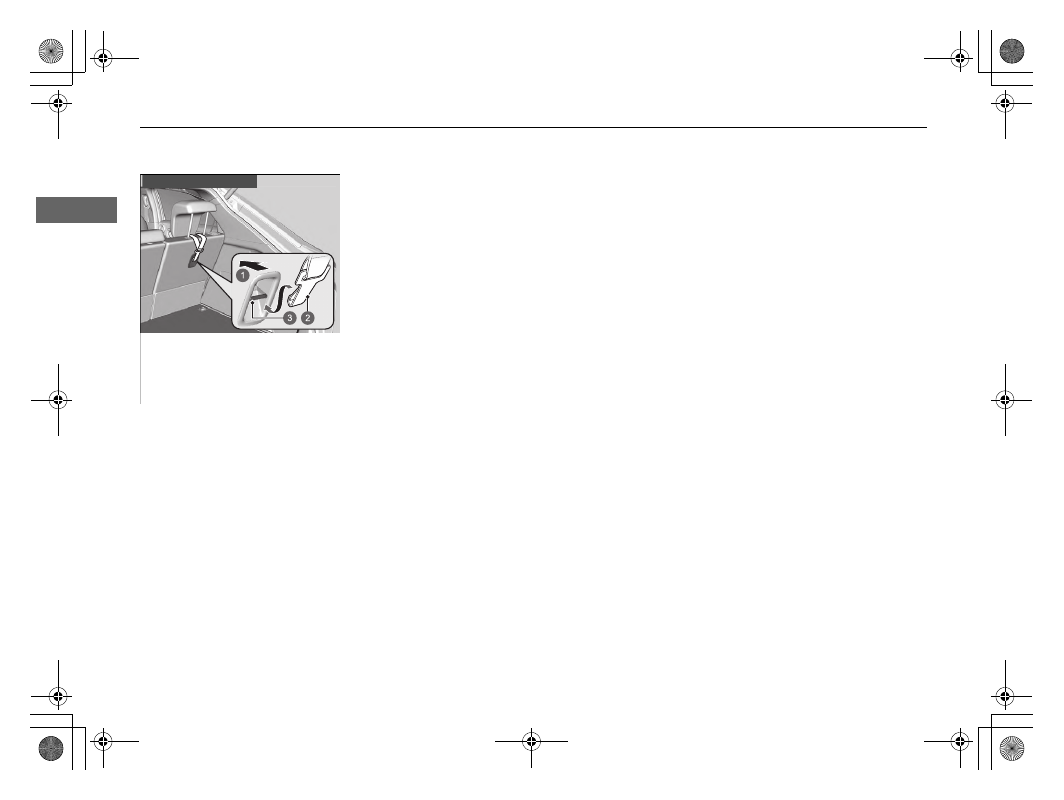
Tether Strap Hook

c

Anchorage

Other top tether type

95

uu

Child Safety

u

Safety of Larger Children

Continued

Safe Driving

Safety of Larger Children

The following pages give instructions on how to check proper seat belt fit, what kind 
of booster seat to use if one is needed, and important precautions for a child who 
must sit in front.

When a child is too big for a child restraint system, secure the child in a rear seat 
using the lap/shoulder seat belt. Have the child sit upright and all the way back, then 
answer the following questions.

Checklist

Do the child’s knees bend comfortably over 
the edge of the seat?

Does the shoulder belt cross between the 
child’s neck and arm?

Is the lap part of the seat belt as low as 
possible, touching the child’s thighs?

Will the child be able to stay seated like this 
for the whole trip?

If you answer yes to all these questions, the child is ready to wear the lap/shoulder 
seat belt correctly. If you answer no to any question, the child needs to ride on a 
booster seat until the seat belt fits properly without a booster seat.

Protecting Larger Children

Checking Seat Belt Fit

1

Safety of Larger Children

3

WARNING

Allowing a child aged 12 or under to sit in 
front can result in injury or death if the 
passenger’s front airbag inflates.

If a larger child must ride in front, move the 
vehicle seat as far to the rear as possible, 
have the child sit up properly and wear the 
seat belt properly, using a booster seat if 
needed.

uu

Child Safety

u

Safety of Larger Children

96

Safe Driving

If a lap/shoulder seat belt cannot be used 
properly, position the child in a booster seat in 
the rear seat. For the child’s safety, check that 
the child meets the booster seat 
manufacturer’s recommendations.

A backrest is available for a specific booster 
seat. Install the backrest to the booster seat 
and adjust it to the vehicle seat according to 
the booster seat manufacturer’s instructions. 
Make sure the seat belt is properly routed 
through the guide at the shoulder of the 
backrest and the belt does not touch and 
cross the child’s neck.

Booster Seats

1

Booster Seats

When installing a booster seat, make sure to read the 
instructions that came with it, and install the seat 
accordingly.
There are high- and low-type booster seats. Choose a 
booster seat that allows the child to wear the seat 
belt correctly.

We recommend a booster seat with a backrest as it is 
easier to adjust the shoulder belt.

a

Guide

97

uu

Child Safety

u

Safety of Larger Children

Safe Driving

Your vehicle has a rear seat where children can be properly restrained. If you ever 
have to carry a group of children, and a child must ride in front:

Make sure you read and fully understand the instructions and safety information 
in this manual.

Move the front passenger seat as far back as possible.

Have the child sit upright and well back in the seat.

Check that the seat belt is properly positioned so that the child is secure in the 
seat.

Monitoring child passengers

We strongly recommend that you keep an eye on child passengers. Even older, more 
mature children sometimes need to be reminded to fasten their seat belts and sit up 
properly.

Protecting Larger Children - Final Checks

98

Safe Driving

Exhaust Gas Hazard

Carbon Monoxide Gas

The engine exhaust from this vehicle contains carbon monoxide, a colourless, 
odourless, and highly toxic gas. As long as you properly maintain your vehicle, 
carbon monoxide gas will not get into the interior.

Have the exhaust system inspected for leaks whenever

The exhaust system is making an unusual noise.

The exhaust system may have been damaged.

The vehicle is raised for an oil change.

When you operate a vehicle with the tailgate open, airflow can pull exhaust gas into 
the interior and create a hazardous condition. If you must drive with the tailgate 
open, open all the windows and set the climate control system as shown below.

1.

Select the fresh air mode.

2.

Select the 

 mode.

3.

Set the fan speed to high.

4.

Set the temperature control to a comfortable setting.

Adjust the climate control system in the same manner if you sit in your parked 
vehicle with the engine running.

1

Carbon Monoxide Gas

An enclosed area such as a garage can quickly fill up 
with carbon monoxide gas.
Do not run the engine with the garage door closed. 
Even when the garage door is open, drive out of the 
garage immediately after starting the engine.

3

WARNING

Carbon monoxide gas is toxic. Breathing it 
can cause unconsciousness and even kill 
you.

Avoid any enclosed areas or activities that 
expose you to carbon monoxide.

99

Safe Driving

Safety Labels

Label Locations

These labels are in the locations shown. They warn you of potential hazards that can cause serious injury or death. Read these labels 
carefully.

If a label comes off or becomes hard to read, contact a dealer for a replacement.

a

Protecting Child Passenger (Left-hand drive type) 

2

 P. 73

b

Protecting Child Passenger (Right-hand drive type) 

2

 P. 73

c

Rear Head Restraint 

2

 P. 216

d

Fuel 

2

 P. 495

e

Passenger Front Airbag Off System (Right-hand drive type) 

2

 P. 65

f

Information for Painting 

2

 P. 563

g

12-volt battery 

2

 P. 551

100

uu

Safety Labels

u

Label Locations

Safe Driving

h

Inverter Coolant Reserve Tank Cap

i

Radiator Cap 

2

 P. 526

j

Air Conditioner 

2

 P. 554

k

Passenger Front Airbag Off System (Left-hand drive type) 

2

 P. 65

l

Wireless Charger

*


2

 P. 233

* Not available on all models

102

In

strum

e

nt Pa

nel

Indicators

Indicators come on/blink depending on the condition of the vehicle. Messages may display on the driver information interface at the same
time. Please take the appropriate action outlined in the message, such as contacting a dealer.

Display messages by setting 

Warning Message

 to ON.

You can also change the message language.

2

Customized Features

 P. 305

Anti-lock Brake System 
(

ABS

) Indicator

P.

109

*1

Ready Indicator

P.

107

Low Fuel Indicator

P.

109

Parking Brake and 
Brake System 
Indicator (Red)

Parking Brake and 
Brake System 
Indicator (Amber)

Automatic Brake 
Hold System Indicator

Automatic Brake Hold 
Indicator

*1 : When you set the power mode to ON, these indicators come on to indicate that system checks are being performed. They go off a few seconds later or after the power 

system has started. If an indicator does not come on or turn off, there may be a malfunction in the corresponding system. To resolve the issue, follow the instructions in 
the owner’s manual. 

P.

104

*1

Malfunction Indicator 
Lamp

12-Volt Battery 
Charging System 
Indicator

Seat Belt Reminder 
Indicator

Supplemental Restraint 
System Indicator

P.

106

P.

106

P.

106

P.

107

P.

107

*1

*1

*1

*1

*1

Shift Position Indicator

P.

108

Deceleration Paddle 
Selector Indicator

P.

108

P.

109

P.

109

*1

Power System Indicator

P.

107

*1

EV

 Indicator

P.

107

*1

Transmission System 
Indicator

P.

108

Passenger Front Airbag 
On/Off Indicators

*1

P.

110

103

uu

Indicators

u

Continued

In

strum

e

nt Pa

nel

*1 : When you set the power mode to ON, these indicators come on to indicate that system checks are being performed. They go off a few seconds later or after the power 

system has started. If an indicator does not come on or turn off, there may be a malfunction in the corresponding system. To resolve the issue, follow the instructions in 
the owner’s manual. 

High Beam Indicator

P.

111

Turn Signal and Hazard 
Warning Indicators

P.

111

System Message 
Indicator

P.

114

Lights On Indicator

P.

111

Front Fog Light 
Indicator

*

P.

111

Auto High-Beam 
Indicator

P.

113

*1

ECON

 Mode Indicator

Vehicle Stability Assist 
(VSA) System Indicator

P.

114

Immobilizer System 
Indicator 

P.

113

P.

110

Security System Alarm 
Indicator

P.

113

*1

Adaptive Cruise Control 
(ACC) with Low Speed 
Follow Indicator (Amber)

Lane Keeping Assist 
System (LKAS) Indicator 
(Amber)

P.

116

P.

116

Adaptive Cruise Control 
(ACC) with Low Speed 
Follow Indicator (White/
Green)

P.

116

Lane Keeping Assist 
System (LKAS) Indicator 
(White/Green)

P.

117

*1

*1

Safety Support Indicator 
(Amber)

P.

117

Safety Support Indicator 
(Green/Grey)

P.

119

*1

Vehicle Stability Assist 
(VSA) 

OFF

 Indicator

P.

110

*1

Electric Power Steering 
(EPS) System Indicator

*1

P.

111

Road Departure 
Mitigation Ready to 
Assist Indicator

P.

117

Adjustable Speed 
Limiter Indicator 
(White/Green)

P.

115

Intelligent Speed 
Limiter Indicator 
(White/Green)

P.

115

Low Tyre Pressure/
Deflation Warning 
System Indicator

P.

112

*1

Rear Fog Light Indicator

P.

112

Hill Descent Control 
System Indicator 
(White/Green)

P.

115

SPORT

 Mode Indicator

P.

114

NORMAL

 Mode Indicator

P.

114

* Not available on all models

104

uu

Indicators

u

In

strum

e

nt Pa

nel

Indicator

Name

On/Blinking

Explanation

Parking Brake 
and Brake 
System 
Indicator (Red)

Comes on when the parking brake is applied, 
and goes off when it is released.

The beeper sounds and the indicator comes on 
if you drive with the parking brake applied.

Comes on for about 30 seconds when you 
apply the electric parking brake while the 
power mode is in ACCESSORY or VEHICLE 
OFF, then goes off.

Stays on for about 30 seconds when you set 
the power mode to VEHICLE OFF while the 
electric parking brake is applied, then goes off.

Comes on when the brake fluid level is low.

Comes on while driving

 - Make sure the 

parking brake is released.
Stop in a safe place and check the brake fluid 
level.

2

What to do when the indicator comes on 
while driving

 P. 595

(Red)

105

uu

Indicators

u

Continued

In

strum

e

nt Pa

nel

Indicator

Name

On/Blinking

Explanation

Parking Brake 
and Brake 
System 
Indicator (Red)

Comes on if there is a problem with the brake 
system.

Comes on along with the ABS indicator

 - 

Have your vehicle checked by a dealer.

2

If the Brake System Indicator (Red) Comes 
On or Blinks

 P. 595

Comes on along with the parking brake 
and brake system indicator (amber) 

Immediately stop in a safe place. Contact a 
dealer for repair. The brake pedal becomes 
harder to operate. Depress the pedal further 
than you normally do.

2

If the Brake System Indicator (Red) Comes 
On or Blinks at the Same Time When the 
Brake System Indicator (Amber) Comes On


P. 597

Blinks and the parking brake and brake 
system indicator (amber) comes on at the 
same time 

- There is a problem with the 

electric parking brake system. The parking 
brake may not be set.
Avoid using the parking brake and have your 
vehicle checked by a dealer immediately.

2

If the Brake System Indicator (Red) Comes 
On or Blinks at the Same Time When the 
Brake System Indicator (Amber) Comes On


P. 597

(Red)

106

uu

Indicators

u

In

strum

e

nt Pa

nel

Indicator

Name

On/Blinking

Explanation

Automatic 
Brake Hold 
System 
Indicator

Comes on when the automatic brake hold 
system is on.

2

Automatic Brake Hold

 P. 475

Automatic 
Brake Hold 
Indicator

Comes on when the automatic brake hold is 
activated.

2

Automatic Brake Hold

 P. 475

Parking Brake 
and Brake 
System 
Indicator 
(Amber)

Comes on if there is a problem with a system 
related to braking other than the conventional 
brake system.

Comes on if there is a problem with the 
cooperative control with regenerative braking, 
the electric servo brake system.

Comes on while driving

 - Avoid high speeds 

and sudden braking. Take the vehicle to a 
dealer immediately.

Comes on if there is a problem with the electric 
parking brake system and/or the automatic 
brake hold system.

Stays on constantly

 - Avoid using the parking 

brake and have your vehicle checked by a 
dealer immediately.

(Amber)

107

uu

Indicators

u

Continued

In

strum

e

nt Pa

nel

Indicator

Name

On/Blinking

Explanation

Malfunction 
Indicator Lamp

Comes on if there is a problem with the 
emissions control systems.

Blinks when a misfire in the engine’s cylinders is 
detected.

2

If the Malfunction Indicator Lamp Comes 
On or Blinks

 P. 594

Power System 
Indicator

Comes on if there is a problem with the electric 
vehicle system.

Have your vehicle checked by a dealer.

Stop Driving When Safe

 displays on the 

driver information interface - Immediately stop 
in a safe place and contact a dealer.

Ready Indicator

Comes on when the vehicle is ready to drive.

2

Turning on the Power

 P. 359

EV

 Indicator

Comes on when the vehicle is moved by the 
motor, and the engine is not operating.

12-Volt Battery 
Charging 
System 
Indicator

Comes on when the 12-volt battery is not 
charging.

Stop in a safe place and contact a dealer 
immediately.

2

Checking the 12-Volt Battery

 P. 546

2

If the 12-Volt Battery Charging System 
Indicator Comes On

 P. 593

108

uu

Indicators

u

In

strum

e

nt Pa

nel

Indicator

Name

On/Blinking

Explanation

Transmission 
System 
Indicator

Blinks if the transmission system has a problem.

Blinks while driving

 - Avoid sudden starts 

and acceleration and have your vehicle checked 
by a dealer immediately.

Do Not Drive displays on the driver 
information interface

 - Immediately stop in a 

safe place and contact a dealer.

Shift Position 
Indicator

Indicates the current shift position.

2

Shifting

 P. 365

Deceleration 
Paddle Selector 
Indicator

Comes on when the paddle selector is pulled.

Blinks when deceleration does not occur while 
pulling the paddle selector.

Comes on with 

M

 when 

SPORT

 mode is 

selected or the shift position is in 

, and the 

paddle selector is pulled.

2

Deceleration Paddle Selector

 P. 367

B

109

uu

Indicators

u

Continued

In

strum

e

nt Pa

nel

Indicator

Name

On/Blinking

Explanation

Seat Belt 
Reminder 
Indicator

Comes on if you are not wearing a seat belt 
when you set the power mode to ON.

If the front passenger is not wearing a seat belt, 
the indicator comes on a few seconds later.

Comes on for a while when the rear seat belt is 
unfastened while the power mode in ON.

Blinks while driving if you and/or any passenger 
has not fastened a seat belt. The beeper sounds 
and the indicator blinks at regular intervals.

The beeper stops and the indicator goes off 
when you and the passengers fasten their seat 
belts.

Stays on after you and/or the passengers 
have fastened the seat belt(s) 

- A detection 

error may have occurred in the sensor. Have 
your vehicle checked by a dealer.

2

Seat Belt Reminder

 P. 47

Low Fuel 
Indicator

Comes on when the fuel reserve is running low 
(approximately 5.3 Litres/1.17 Imp gal left).

Comes on

 - Refuel your vehicle as soon as 

possible.

Blinks if there is a problem with the fuel gauge.

Blinks

 - Have your vehicle checked by a dealer.

Anti-lock Brake 
System (

ABS

Indicator

Comes on if there is a problem with the ABS.

Stays on constantly

 - Have your vehicle 

checked by a dealer. With this indicator on, 
your vehicle still has normal braking ability but 
no anti-lock function.

2

Anti-lock Brake System (ABS)

 P. 478

Supplemental 
Restraint 
System 
Indicator

Comes on if a problem with any of the 
following is detected:

-

Supplemental restraint system

-

Side airbag system

-

Side curtain airbag system

-

Seat belt tensioner

Stays on constantly

 - Have your vehicle 

checked by a dealer.

110

uu

Indicators

u

In

strum

e

nt Pa

nel

Indicator

Name

On/Blinking

Explanation

Passenger 
Front Airbag 
On/Off 
Indicators

When the passenger front airbag is active: The 
on indicator comes back on and remains on for 
about 60 seconds.
When the passenger front airbag is inactive: 
The off indicator comes back on and stays on. 
This is a reminder that the passenger front 
airbag is deactivated.

2

Passenger Front Airbag Off System

 P. 63

Vehicle Stability 
Assist (VSA) 
System 
Indicator

Blinks when VSA is active.

Comes on if there is a problem with the VSA 
system, agile handling assist or hill start assist 
system.

Stays on constantly

 - Have your vehicle 

checked by a dealer.

2

Vehicle Stability Assist (VSA) System


P. 389

2

Hill start assist system

 P. 361

Comes on if the VSA system is deactivated 
temporarily after the 12-volt battery has been 
disconnected, then re-connected.

Drive a short distance at more than 20 km/h (12 
mph). The indicator should go off. If it does 
not, have your vehicle checked by a dealer.

Vehicle Stability 
Assist (VSA) 

OFF

 Indicator

Comes on when you partially disable VSA.

2

VSA On and Off

 P. 390

Comes on if the VSA system is deactivated 
temporarily after the 12-volt battery has been 
disconnected, then re-connected.

Drive a short distance at more than 20 km/h (12 
mph). The indicator should go off. If it does 
not, have your vehicle checked by a dealer.


Content      ..     4      5      6      7     ..