Honda CR-V Hybrid (2022 year). Manual in english - page 30
 

  Index      Manuals     Honda CR-V Hybrid (2022 year). Manual in english


Search            copyright infringement  


Content      ..     28      29      30      31     ..


Honda CR-V Hybrid (2022 year). Manual in english - page 30


uu

When Driving

u

Shifting

478

Driving

(

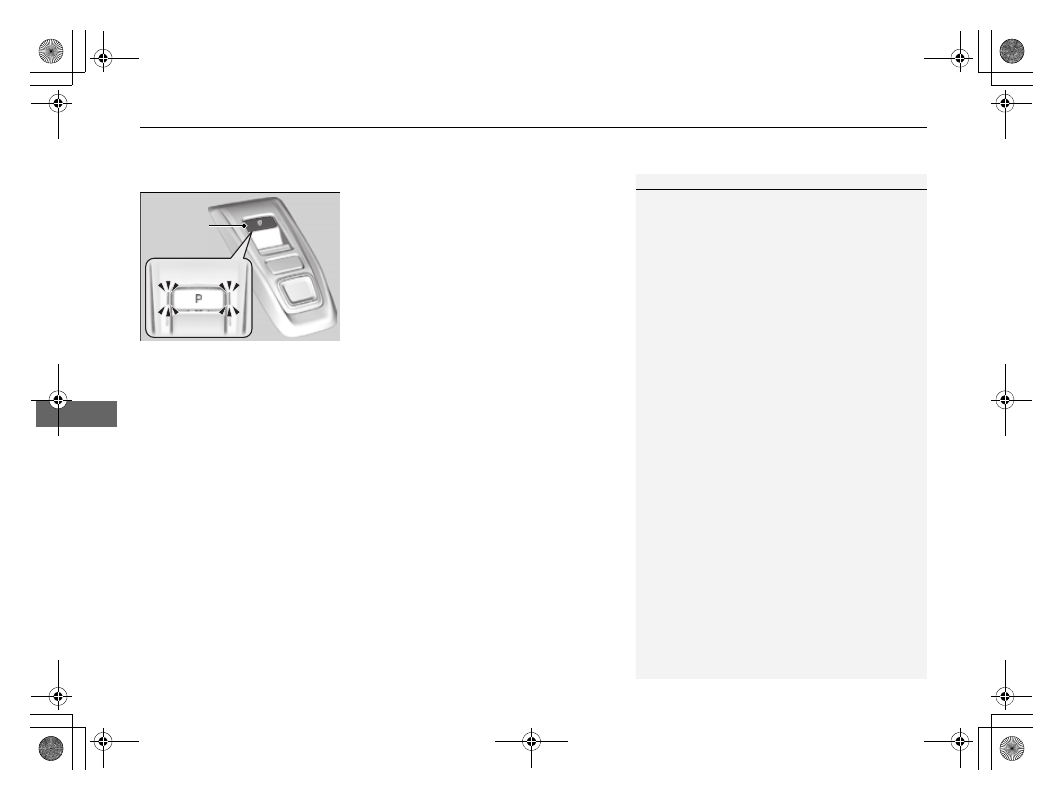
P

 (parking) button

The shift position changes to 

(

P

 when you 

press the 

(

P

 button while the vehicle is 

parked with the power mode in ON.
The indicators on the sides of the 

(

P

 button 

come on.

1

Shifting

The beeper sounds and the message appears on the 
driver information interface when you depress the 
accelerator pedal with the shift position in 

(

N

.

2

Driver Information Interface Warning and 
Information Messages

 P. 109

Change the shift position to 

(

D

 or 

(

R

 with the brake 

pedal depressed.

You may occasionally find that it takes longer than 
usual for the vehicle to start moving when you select 

(

R

, release the brake pedal, and/or depress the 

accelerator pedal. This may occur when the High 
Voltage battery level is extremely low, and does not 
indicate a vehicle malfunction.

(

P

 Button

Continued

479

uu

When Driving

u

Shifting

Driving

Shift Operation

1

Shift Operation

NOTICE

When you change 

(

D

 to 

(

R

 and vice versa, come to 

a complete stop and keep the brake pedal depressed.
Operating the shift button before the vehicle has 
come to a complete standstill can damage the 
transmission.

Use the shift position indicator and the shift button 
indicator to check the shift position before selecting a 
shift button.

If the indicator of the currently selected shift position, 
or all the shift position indicators are blinking 
simultaneously, there is a problem with the 
transmission.
Avoid sudden acceleration and have the transmission 
checked by a dealer as soon as possible.

When shifting positions in extremely low 
temperatures (-22°F/-30°C), there may be a short 
delay before the shift position is displayed. Always 
confirm you are in the correct shift position before 
driving.

The beeper sounds once when you change to 

(

R

.

2

Customized Features

 P. 140, 369

Shift Position Indicator 

(Transmission System Indicator)

Press the 

(

P

 button.

Press back the 

(

R

 button.

Press the 

(

N

 button.

Press the 

(

D

 button.

Shift Button 

Indicator

Deceleration Paddle Selector 

Indicator

uu

When Driving

u

Shifting

480

Driving

When opening the driver’s door

If you open the driver’s door under the following conditions, the shift position 
automatically changes to 

(

P

.

The vehicle is stationary with the power mode in ON, or moving at 1 mph (2 km/h) 
or slower.

The transmission is in other than 

(

P

.

You have unfastened the driver side seat belt.

u

If you manually change the shift position from 

(

P

 with the brake pedal 

depressed, the shift position will automatically return to 

(

P

 once you release 

the brake pedal.

When turning off the power mode

If you turn the power system off while the vehicle is stationary, and the transmission 
is in other than 

(

P

, the shift position automatically changes to 

(

P

.

1

When opening the driver’s door

While the system is designed to automatically change 
the shift position to 

(

P

 under the described 

conditions, in the interest of safety you should always 
select 

(

P

 before opening the driver’s door.

Make sure to park the vehicle in a safe place.

2

When Stopped

 P. 559

If you want to drive the vehicle after the shift position 
has automatically changed to 

(

P

 under the described 

conditions, close the door, fasten the seat belt, 
depress the brake pedal, then change the shift 
position.

If you leave the vehicle, turn off the power system 
and lock the doors.

Continued

481

uu

When Driving

u

Shifting

Driving

If you want to keep the transmission in 

(

N

 position [car wash mode]

With the power system on:

1.

Press and hold the brake pedal.

2.

Press and release the 

(

N

 button.

u

(

N

 (Neutral) hold mode will appear on the driver information interface.

3.

Press the 

(

N

 button again and hold it for two seconds.

u

The vehicle will enter car wash mode, which must be used when your vehicle 
is pulled through a conveyor type automatic car wash where you or an 
attendant do not remain in the vehicle.
If you want to cancel car wash mode, select a position other than 

(

N

.

If the 

POWER

 button is pressed after car wash 

mode has been activated, the power mode 
will change to ACCESSORY and a message 
will be displayed on the driver information 
interface.

u

For 15 minutes the transmission remains 
in 

(

N

 with the power mode will remain 

in ACCESSORY. After that, the 
transmission automatically changes to 

(

P

.

u

Manually changing to 

(

P

 cancels 

ACCESSORY mode. The 

(

P

 indicator 

comes on and the power mode changes 
to OFF. You must always put the 
transmission into 

(

P

 when car wash 

mode is no longer needed.

1

If you want to keep the transmission in 

(

N

 position [car wash 

mode]

To keep the vehicle in 

(

N

 position, you can also 

follow this procedure:
While the power system is on, select 

(

N

, and then 

within five seconds, press the 

POWER

 button.

Note that the transmission may not stay in 

(

N


position while any of the following indicators is on:

Transmission system indicator.

Malfunction indicator lamp.

Charging system indicator.

482

uu

When Driving

u

Shifting

Driving

Restrictions on selecting a shift position

You cannot select a shift position under certain circumstances that may lead to a crash.

When the 
transmission is in:

1. Under these 
circumstances:

2. If you try to change to 
the following:

3. The shift position 
remains in/changes to:

How to change the 
shift position

(

P

The brake pedal is not 
depressed.

Other shift position

(

P

Release the accelerator 
pedal and depress the 
brake pedal.

The accelerator pedal is 
depressed.

(

N

The vehicle is moving at low 
speed without the brake pedal 
depressed.

(

N

The vehicle is moving at low 
speed with the accelerator 
pedal depressed.

(

N

 or 

(

D

The vehicle is moving forward.

(

R

Park your vehicle in a 
safe place.

(

R

 or 

(

N

The vehicle is moving backward.

(

D

(

R

(

N

, or 

(

D

The vehicle is moving.

(

P

(

P

 or 

(

N

The 

READY

 indicator is not on.

A shift position other than 

(

P

 or 

(

N

(

P

 or 

(

N

Make sure that the 

READY

 indicator 

comes on.

483

uu

When Driving

u

SPORT Mode

Driving

SPORT Mode

To turn the SPORT mode on and off, press the 

SPORT

 button.

The SPORT mode increases engine performance and handling.
This mode is not recommended for fuel economy enhancement, but suitable for 
driving on hills or through curves on mountain roads.

The SPORT mode is turned off every time you turn on the power system, even if you 
turned it on the last time you drove the vehicle.

SPORT

 Button

SPORT

 Mode Indicator

484

uu

When Driving

u

Deceleration Paddle Selector

Driving

Deceleration Paddle Selector

When you release the accelerator pedal, you can control the rate of deceleration 
without removing your hands from the steering wheel. Using the deceleration 
paddle selector situated on the steering wheel, you can sequentially shift through 
four stages of deceleration.
When descending a hill, you can use the deceleration paddle selector to help 
maintain the rate of deceleration, thereby allowing you to keep a safe distance 
between your vehicle and the vehicle ahead.

The default deceleration stage is 

. Each 

paddle selector operation makes a single 
stage deceleration change.

u

The deceleration stage may not change if 
you keep the paddle selector pulled 
back.

To select the different stages of deceleration:

Pull back the 

(

+

 selector (right side) to decrease the deceleration stage.

Pull back the 

(

-

 selector (left side) to increase the deceleration stage.

Pull the 

(

+

 selector for a few seconds when you want to cancel the deceleration 

paddle selector.

1

Deceleration Paddle Selector

If you are descending a hill when you select stage 

the vehicle may enter stage 

.

If you pull back right and left paddle selector at the 
same time, the deceleration stage may not change.

3

CAUTION

Rapidly increasing the deceleration rate by 
quickly shifting the deceleration paddle 
selector can cause the tires to skid, resulting 
in a crash that could injure or kill someone.

Always maintain a reasonable rate of 
deceleration.

Increase

Deceleration 

Stage

Decrease

Continued

485

uu

When Driving

u

Deceleration Paddle Selector

Driving

1

Deceleration Paddle Selector

In the following situations, the stage may not change 
and the stage icon will blink even if you pull back the 
selector. The deceleration stage may decrease or 
cancel automatically:

The High Voltage battery is fully charged or its 
temperature is too cold or too hot.

The speed of the vehicle is beyond the deceleration 
range with SPORT mode off.

Hybrid system protection is needed.

The paddle selector is operated while your vehicle 
is stopped automatically by ACC with Low Speed 
Follow.

If either paddle selector is operated, ACC with Low 
Speed Follow will cancel automatically.

Increase the deceleration stage 

when pulling the 

(

-

 paddle 

selector (left side)

Paddle Selector

Decrease the deceleration stage 

when pulling the 

(

+

 paddle 

selector (right side)

When to use

Shift position is in 

(

D

Deceleration Stage

When SPORT mode is 

OFF, the deceleration 

stage appears.

When SPORT mode is 

ON, the deceleration 

stage and 

M

 appear.

486

uu

When Driving

u

Deceleration Paddle Selector

Driving

When SPORT mode is OFF

If you pull back the paddle selector, the rate of deceleration will change temporarily, 
and the stage will appear in the driver information interface.
When you want to cancel the deceleration paddle selector, pull the 

(

+

 selector 

(right side) for a few seconds.
The deceleration paddle selector will cancel automatically and deceleration stage in 
the driver information interface disappear when you drive with constant speed, 
situations of acceleration and decelerate just before stopping your vehicle.

When SPORT mode is ON

If you pull back the paddle selector, the rate of deceleration will change and the 
stage along with 

M

 will appear in the driver information interface. The deceleration 

stage will not cancel automatically while SPORT mode is ON.
When you want to cancel the deceleration paddle selector, turn the SPORT mode 
OFF, or pull the 

(

+

 selector (right side) for a few seconds. When canceled, 

deceleration stage in the driver information interface disappears.

487

uu

When Driving

u

ECON Mode

Driving

ECON Mode

The 

ECON

 button turns the ECON mode on and off.

The ECON mode helps you improve your fuel economy by adjusting the 
performance of the climate control system and the accelerator pedal response.

1

ECON Mode

While in ECON mode, the climate control system has 
greater temperature fluctuation.

488

uu

When Driving

u

Acoustic Vehicle Alerting System

Driving

Acoustic Vehicle Alerting System

Alerts pedestrians when the vehicle transmission is in a position other than 

(

P

 and 

is traveling at speeds of 22 mph (36 km/h) or less.

489

uu

When Driving

u

Vehicle Stability Assist

TM

 (VSA

®

), aka Electronic Stability Control (ESC), System

Continued

Driving

Vehicle Stability Assist

TM

 (VSA

®

), aka Electronic 

Stability Control (ESC), System

VSA

®

 helps to stabilize the vehicle during cornering if the vehicle turns more or less 

than what was intended. It also assists in maintaining traction on slippery surfaces. 
It does so by regulating engine output and selectively applying the brakes.

When VSA

®

 activates, you may notice that the 

engine and motor do not respond to the 
accelerator. You may also notice some noise 
from the hydraulic brake system. You will also 
see the indicator blink.

VSA

®

 Operation

1

Vehicle Stability Assist

TM

 (VSA

®

), aka Electronic Stability Control 

(ESC), System

The VSA

®

 may not function properly if tire type and 

size are mixed. Make sure to use the same size and 
type of tire, and the air pressures as specified.

When the VSA

®

 system indicator comes on and stays on 

while driving, there may be a problem with the system. 
While this may not interfere with normal driving, have 
your vehicle checked by a dealer immediately.

VSA

®

 cannot enhance stability in all driving situations 

and does not control the entire braking system. You 
still need to drive and corner at speeds appropriate 
for the conditions and always leave a sufficient 
margin of safety.

The main function of the VSA

®

 system is generally 

known as Electronic Stability Control (ESC). The 
system also includes a traction control function.

The indicators for the Adaptive Cruise Control (ACC) 
with Low Speed Follow, Road Departure Mitigation 
(RDM), Vehicle Stability Assist

TM

 (VSA

®

) system, 

Vehicle Stability Assist

TM

 (VSA

®

) OFF, low tire 

pressure/TPMS, Collision Mitigation Braking System

TM


(CMBS

TM

), and Parking Brake and Brake System 

(Amber) may come on along with a message in the 
Driver Information Interface after reconnecting the 
12V-battery. Drive a short distance at more than 12 
mph (20 km/h). The indicator should go off. If it does 
not, have your vehicle checked by a dealer.

VSA

®

 System 

Indicator

uu

When Driving

u

Vehicle Stability Assist

TM

 (VSA

®

), aka Electronic Stability Control (ESC), System

490

Driving

This button is on the driver side control panel. 
To partially disable VSA

®

 functionality/

features, press and hold it until you hear a 
beep.

Your vehicle will have normal braking and 
cornering ability, but traction control function 
will be less effective.

To restore VSA

®

 functionality/features, press 

the  

(VSA

®

 OFF) button until you hear a 

beep.

VSA

®

 is turned on every time you turn the 

power system on, even if you turned it off the 
last time you drove the vehicle.

VSA

®

 On and Off

1

Vehicle Stability Assist

TM

 (VSA

®

), aka Electronic Stability Control 

(ESC), System

In certain unusual conditions when your vehicle gets 
stuck in shallow mud or fresh snow, it may be easier 
to free it with the VSA

®

 temporarily switched off.

When the 

 button is pressed, the traction control 

function becomes less effective. This allows for the 
wheels to spin more freely at low speed. You should 
only attempt to free your vehicle with the VSA

®

 off if 

you are not able to free it when the VSA

®

 is on.

Immediately after freeing your vehicle, be sure to 
switch VSA

®

 on again. We do not recommend driving 

your vehicle with the VSA

®

 system switched off.

You may hear a motor sound coming from the 
engine compartment while system checks are being 
performed immediately after turning the power 
system on or while driving. This is normal.

VSA

®


OFF

 Indicator

491

uu

When Driving

u

Agile Handling Assist

Driving

Agile Handling Assist

Lightly brakes each of the front and rear wheels, as needed, when you turn the 
steering wheel, and helps support the vehicle’s stability and performance during 
cornering.

1

Agile Handling Assist

The agile handling assist cannot enhance stability in 
all driving situations. You still need to drive and 
corner at speeds appropriate for the conditions and 
always leave a sufficient margin of safety.

When the VSA

®

 system indicator comes on and stays 

on while driving, the agile handling assist does not 
activate.

You may hear a sound coming from the engine 
compartment while the agile handling assist is 
activated. This is normal.

492

uu

When Driving

u

Real Time AWD with Intelligent Control System

TM

Driving

Real Time AWD with Intelligent Control System

TM

Your vehicle is equipped with the AWD system. When the system senses a loss of 
front wheel traction, it automatically transfers some power to the rear wheels. This 
allows you to utilize all available traction and may increase mobility.

You still need to exercise the same care when accelerating, steering, and braking 
that you would in a two wheel drive vehicle.

If you excessively spin all four wheels and overheat the AWD system, only the front 
wheels receive power. Stop until the system cools down.

1

Real Time AWD with Intelligent Control System

TM

NOTICE

Do not continuously spin the front tires of your 
vehicle. Continuously spinning the front tires can 
cause transmission or rear differential damage.

The AWD system may not function properly if tire 
type and size are mixed. Make sure to use the same 
size and type of tire, and the air pressures as 
specified.

2

Tire and Wheel Replacement

 P. 612

493

uu

When Driving

u

Tire Pressure Monitoring System (TPMS)

Continued

Driving

Tire Pressure Monitoring System (TPMS)

Instead of directly measuring the pressure in each tire, the TPMS on this vehicle 
monitors and compares the rolling radius and rotational characteristics of each 
wheel and tire while you are driving to determine if one or more tires are 
significantly under-inflated.

This will cause the low tire pressure/TPMS 
indicator to come on and a message to appear 
on the driver information interface.

1

Tire Pressure Monitoring System (TPMS)

The system does not monitor the tires when driving 
at low speed.

Conditions such as low ambient temperature and 
altitude change directly affect tire pressure and can 
trigger the low tire pressure/TPMS indicator to come on.

Tire pressure checked and inflated in:

Warm weather can become under-inflated in 
colder weather.

Cold weather can become overinflated in warmer 
weather.

The low tire pressure/TPMS indicator will not come 
on as a result of overinflation.

The TPMS may not function properly if tire type and 
size are mixed. Make sure to use the same size and 
type of tire.

2

Checking and Maintaining Tires

 P. 606

The low tire pressure/TPMS indicator may come on 
with a delay or may not come on at all when:

You rapidly accelerate, decelerate, or turn the 
steering wheel.

You drive on snowy or slippery roads.

Tire chains are used.

The low tire pressure/TPMS indicator may come on 
under the following conditions:

There is a heavier and uneven load on the tires, 
such as when towing a trailer, than the condition at 
calibration.

Tire chains are used.

Low Tire Pressure/TPMS indicator


Content      ..     28      29      30      31     ..