Honda CR-V (2022 year). Manual in english - page 14
 

  Index      Manuals     Honda CR-V (2022 year). Manual in english


Search            copyright infringement  


Content      ..     12      13      14      15     ..


Honda CR-V (2022 year). Manual in english - page 14


Continued

221

uu

Operating the Switches Around the Steering Wheel

u

Light Switches

Co
ntrols

Automatic lighting control can be used when 
ignition switch is in ON 

(

w

*1

.

When the light switch is in 

AUTO

, the 

headlights and other exterior lights will switch 
on and off automatically depending on the 
ambient brightness.

The headlights come on when you unlock a 
door in dark areas with the headlight switch in 

AUTO

.

u

Once you lock the door, the headlights 
will go off.

*1: Models with the keyless access system have an 

ENGINE START/STOP

 button instead of an 

ignition switch.

Automatic Operation (automatic lighting control)

1

Automatic Operation (automatic lighting control)

We recommend that you turn on the lights manually 
when driving at night, in a dense fog, or in dark areas 
such as long tunnels or parking facilities.

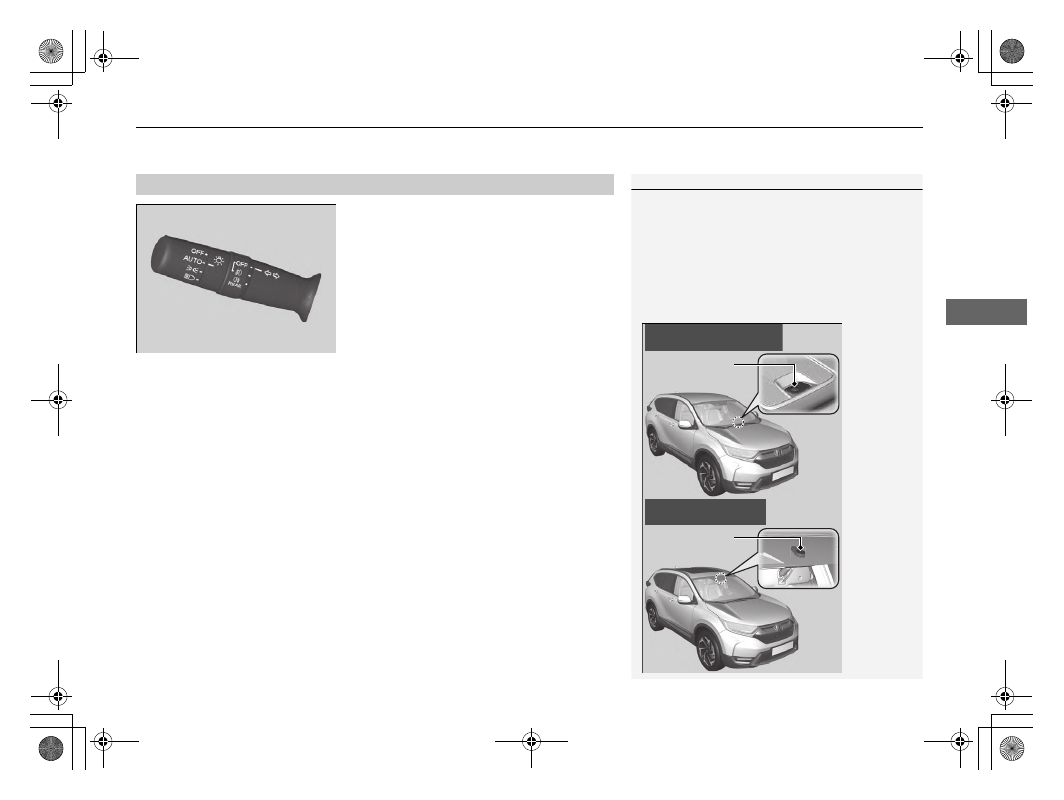
The light sensor is in the location shown below.
Do not cover this light sensor with anything; 
otherwise, the automatic lighting system may not 
work properly.

Light Sensor

Models without automatic 
intermittent wipers

Models with automatic 
intermittent wipers

Light Sensor

uu

Operating the Switches Around the Steering Wheel

u

Light Switches

222

Co
ntrols

The headlights automatically come on when the wipers are used several times within 
a certain number of intervals with the headlight switch in 

AUTO

.

The headlights automatically go off a few minutes later if the wipers are stopped.

The headlights, all other exterior lights, and the instrument panel lights turn off 15 
seconds after you remove the key or set the power mode to VEHICLE OFF (LOCK), 
take the remote with you, and close the driver’s door.
However, when the switch is in 

, the position lights remain on.

If you turn the ignition switch to LOCK 

(

0

*1

 with the headlight switch on, but do 

not open the door, the lights turn off after 10 minutes (3 minutes, if the switch is in 
the 

AUTO

 position).

The lights turn on again when you unlock or open the driver’s door. If you unlock 
the door, but do not open it within 15 seconds, the lights go off. If you open the 
driver’s door, you will hear a lights on reminder chime.

*1: Models with the keyless access system have an 

ENGINE START/STOP

 button instead of an 

ignition switch.

Headlight Integration with Wipers

Automatic Lighting Off Feature

1

Headlight Integration with Wipers

This feature activates while the headlights are off in 

AUTO

. The instrument panel brightness does not 

change when the headlights come on.

At dark ambient light levels, the automatic lighting 
control feature turns on the headlights, regardless of 
the number of wiper sweeps.

You can turn the headlight integration with wipers 
function on and off.

2

Customized Features

 P. 157

2

Customized Features

 P. 408

Models with colour audio system

Models with Display Audio

1

Automatic Operation (automatic lighting control)

You can change the headlight auto off timer setting.

2

Customized Features

 P. 157

2

Customized Features

 P. 408

Models with colour audio system

Models with Display Audio

223

uu

Operating the Switches Around the Steering Wheel

u

Fog Lights

Continued

Co
ntrols

Fog Lights

Front fog lights

*

Can be used when the position lights or the headlights are on.
Can be used when the headlights are on.

Rear fog light

Can be used when the headlights or the front fog lights are on.

To turn the front fog lights on

Rotate the switch up from the 

OFF

 position to 

the 

 position. The 

 indicator comes on.

To turn the front and rear fog lights on

Rotate the switch one position up from the 


position. The 

 and 

 indicators come on.

To turn the rear fog light on

Rotate the switch one position up from the 


position and then rotate the switch one 
position down from the 

 position. The 


indicator stays on.
To turn the rear fog light off, turn the 
headlight switch to the 

OFF

 position.

Front and Rear Fog Lights

*

Front and Rear 
Fog Light Switch

* Not available on all models

224

uu

Operating the Switches Around the Steering Wheel

u

Fog Lights

Co
ntrols

To turn the rear fog light on

Rotate the switch to . 

The  

indicator 

comes on.

Rear Fog Light

*

Rear Fog Light Switch

* Not available on all models

225

uu

Operating the Switches Around the Steering Wheel

u

Active Cornering Lights

*

Co
ntrols

Active Cornering Lights

*

Enhance the visibility of the corner(s) when making a turn. With the power mode in 
ON, the headlights on, and the vehicle speed at less than 40 km/h (25 mph), the 
cornering light(s) comes on either when operating the turn signals or the steering 
wheel, or moving the shift lever to 

(

R

.

The corner where you are making a turn is illuminated when:

Both front corners are illuminated 
when:

You move the shift lever to 

(

R

.

1

Active Cornering Lights

*

The active cornering lights go off automatically after 
five minutes. To resume the lights on, recreate the 
same condition; putting the turn signal lever or 
steering wheel in the centre position, then operate it 
again, or if the shift lever has been in 

(

R

, move it to 

another position momentarily.

Active Cornering Lights

You operate the turn 
signal lever.

You turn the 
steering wheel 
around 75 
degrees or 
more.

Left turn Right turn

Headlight beam coverage

Cornering light beam 
coverage

Headlight 
beam 
coverage

Cornering 
light beam 
coverage

* Not available on all models

226

uu

Operating the Switches Around the Steering Wheel

u

Daytime Running Lights

Co
ntrols

Daytime Running Lights

The position/daytime running lights come on when the following conditions have 
been met:

The ignition switch in ON 

(

w

*1

The headlight switch is 

AUTO

 or 

OFF

.

The daytime running lights are off once the headlight switch is turned on, or when 
the headlight switch is in 

AUTO

 and it is getting darker outside.

Turning off the ignition switch

*1

 will turn off the daytime running lights.

*1: Models with the keyless access system have an 

ENGINE START/STOP

 button instead of an 

ignition switch.

227

uu

Operating the Switches Around the Steering Wheel

u

Auto High-Beam

Continued

Co
ntrols

Auto High-Beam

The front sensor camera detects the light sources ahead of the vehicle such as the 
lights of a preceding or oncoming vehicle, or street lights. When you are driving at 
night, the system automatically switches the headlights between low beam and high 
beam depending on the situation.

1

Auto High-Beam

The auto high-beam system does not always operate 
in every situation. This system is just for assisting the 
driver. Always observe your surroundings and switch 
the headlights between high beam and low beam 
manually if necessary.

The range and the distance at which the camera can 
recognise varies depending on conditions 
surrounding your vehicle.

Regarding the handling of the camera mounted to 
the inside of the windscreen, refer to the following.

2

Front Sensor Camera

 P. 623

For the auto high-beam to work properly:

Do not place an object that reflects light on the 
dashboard.

Keep the windscreen around the camera clean.

When cleaning the windscreen, be careful not to 
apply the windscreen cleanser to the camera lens.

Do not attach an object, sticker or film to the area 
around the camera.

Do not touch the camera lens.

If the camera receives a strong impact, or repairing of 
the area near the camera is required, consult a dealer.

Front Sensor 
Camera

uu

Operating the Switches Around the Steering Wheel

u

Auto High-Beam

228

Co
ntrols

When all of the following conditions have been met, the auto high-beam indicator 
comes on and the auto high-beam is activated.

The ignition switch is in ON 

(

w

*1

.

The light switch is in 

AUTO

.

The lever is in the low beam position.

The headlights have been automatically 
activated.

It is dark outside the vehicle.

If the auto high-beam indicator does not come on even when all the conditions have 
been met, carry out either of the procedures below and the indicator will come on.

Pull the lever towards you and hold it over two seconds then release it.

Turn the light switch to 

 then turn the light switch to 

AUTO

.

*1: Models with the keyless access system have an 

ENGINE START/STOP

 button instead of an 

ignition switch.

How to Use the Auto High-Beam

1

How to Use the Auto High-Beam

In the following cases, the auto high-beam system 
may not switch the headlights properly or the 
switching timing may be changed. In case of the 
automatic switching operation does not fit for your 
driving habits, please switch the headlights manually.

The brightness of the lights from the preceding or 
oncoming vehicle is intense or poor.

Visibility is poor due to the weather (rain, snow, 
fog, windscreen frost, etc.).

Surrounding light sources, such as street lights, 
electric billboards and traffic lights are illuminating 
the road ahead.

The brightness level of the road ahead constantly 
changes.

The road is bumpy or has many curves.

A vehicle suddenly appears in front of you, or a 
vehicle in front of you is not in the preceding or 
oncoming direction.

Your vehicle is tilted with a heavy load in the rear.

A traffic sign, mirror, or other reflective object 
ahead is reflecting strong light towards the vehicle.

The oncoming vehicle frequently disappears under 
roadside trees or behind median barriers.

The preceding or oncoming vehicle is a motorcycle, 
bicycle, mobility scooter, or other small vehicle.

The auto high-beam system keeps the headlight low 
beam when:

Windscreen wipers are operating at a high speed.

The camera has detected dense fog.

Auto High-Beam 
Indicator

Light Switch

229

uu

Operating the Switches Around the Steering Wheel

u

Auto High-Beam

Continued

Co
ntrols

Automatic switching between high-beam and low-beam

When auto high-beam is active, the headlights switch between high beam and low 
beam based on the following conditions.

Manual switching between high-beam and low-beam

If you want to manually switch the headlights between high beam and low beam, 
follow either of the procedures below. Note that when you do this, the auto high-
beam indicator will turn off and the auto high-beam will be deactivated.

Using the lever:

Pull the lever towards you for flashing the high beams then release it or push the 
lever forward to the high beam position.

u

To reactivate the auto high-beam, follow either of the procedures below and 
the auto high-beam indicator will come on.

Pull the lever towards you and hold it over two seconds then release it.

Turn the light switch to 

 and then to 

AUTO

 when the lever is in the low beam position.

Using the light switch:

Turn the light switch to 

.

u

To reactivate the auto high-beam, turn the light switch to 

AUTO

 when the 

lever is in the low beam position, the auto high-beam indicator will come on.

Switching to high beam:

Switching to low beam:

All of the following conditions must 
be met before the high beams turn 
on.

Your vehicle speed is 40 km/h (25 
mph) or more.

There are no preceding or 
oncoming vehicle with headlights 
or taillights turned on.

There are few street lights on the 
road ahead.

One of the following conditions 
must be met before the low beams 
turn on.

Your vehicle speed is 24 km/h (15 
mph) or less.

There is a preceding or oncoming 
vehicle with headlights or 
taillights turned on.

There are many street lights on 
the road ahead.

uu

Operating the Switches Around the Steering Wheel

u

Auto High-Beam

230

Co
ntrols

You can turn the auto high-beam system off. If you want to turn the system off or 
on, turn the ignition switch to ON 

(

w

*1

, then carry out the following procedures 

while the vehicle is stationary.

To turn the system off:

With the light switch is in 

AUTO

, pull the lever 

towards you and hold it for at least 
40 seconds. After the auto high-beam 
indicator light blinks twice, release the lever.

To turn the system on:

With the light switch is in 

AUTO

, pull the lever 

towards you and hold it for at least 
30 seconds. After the auto high-beam 
indicator light blinks once, release the lever.

*1: Models with the keyless access system have an 

ENGINE START/STOP

 button instead of an 

ignition switch.

How to Turn Off the Auto High-Beam

1

How to Turn Off the Auto High-Beam

If you turn the auto high-beam system off, the system 
does not operate until you turn the system on.

Park in a safe place before turning the system off or 
on.

AUTO

 Position

231

uu

Operating the Switches Around the Steering Wheel

u

Wipers and Washers

Continued

Co
ntrols

Wipers and Washers

The windscreen wipers and washers can be 
used when the ignition switch is in ON 

(

w

*1

.

MIST

The wipers run at high speed until you release 
the lever.

Wiper switch (OFF, INT

*2

/AUTO

*3

, LO, 

HI)

Change the wiper switch setting according to 
the amount of rain.

Adjusting wiper operation

Turn the adjustment ring to adjust the wiper 
operation.

Washer

Sprays while you pull the lever towards you.
When you release the lever for more than one 
second, the spray stops, the wipers sweep two 
or three more times to clear the windscreen, 
then stop.

*1: Models with the keyless access system have an 

ENGINE START/STOP

 button instead of an 

ignition switch.
*2: Models with manual intermittent operation
*3: Models with automatic intermittent operation

Windscreen Wipers/Washers

1

Wipers and Washers

NOTICE

Do not use the wipers when the windscreen is dry.
The windscreen will get scratched, or the rubber 
blades will get damaged.

NOTICE

In cold weather, the blades may freeze to the 
windscreen.
Operating the wipers in this condition may damage 
the wipers. Use the demister or heated windscreen

*


to warm the windscreen, then turn the wipers on.

NOTICE

Turn the washers off if no washer fluid comes out.
The pump may get damaged.

If the vehicle speeds up while the wipers are 
operating intermittently, the length of the wipe 
interval shortens.
When the vehicle speeds up, the wiper operation’s 
shortest delay setting ( ) and the 

LO

 setting become 

the same.

If the wipers stop operating due to an obstacle such 
as the build-up of snow, park the vehicle in a safe 
place. Rotate the wiper switch to 

OFF

, and turn the 

ignition switch to ACCESSORY 

(

q

 or LOCK 

(

0

*1

then remove the obstacle.

Models with intermittent time adjustment ring

Intermittent Time 
Adjustment Ring

*

MIST

INT

*2

/

AUTO

*3

OFF

LO

: Low speed wipe

HI

: High speed wipe

Pull to 
use 
washer.

Lower speed, fewer sweeps

Higher speed, more sweeps

* Not available on all models

uu

Operating the Switches Around the Steering Wheel

u

Wipers and Washers

232

Co
ntrols

When you push the lever down to 

AUTO

, the 

windscreen wipers sweep once, and go into 
the automatic mode.

The wipers operate intermittently, at low 
speed, or at high speed and stops in 
accordance with the amount of rainfall the 
rainfall sensor detects.

AUTO sensitivity adjustment

When the wiper function is set to 

AUTO

, you 

can adjust the sensitivity of the rain fall sensor 
(using the adjustment ring) so that wipers will 
operate in accordance with your preference.

Sensor sensitivity

Automatic Intermittent Wipers

*

1

Wipers and Washers

The wiper motor may stop motor operation 
temporarily to prevent an overload. Wiper operation 
will return to normal within a few minutes, once the 
circuit has returned to normal.

1

Automatic Intermittent Wipers

*

The rainfall sensor is in the location shown below.

NOTICE

AUTO

 should always be turned 

OFF

 before the 

following situation in order to prevent severe damage 
to the wiper system:

Cleaning the windscreen

Driving through a car wash

No rain present

Rainfall Sensor

Adjustment Ring

Low Sensitivity

High Sensitivity

* Not available on all models

233

uu

Operating the Switches Around the Steering Wheel

u

Wipers and Washers

Continued

Co
ntrols

The rear wiper and washer can be used when 
the ignition switch is in ON 

(

w

*1

.

Wiper switch (OFF, INT, ON)

Change the wiper switch setting according to 
the amount of rain.

Washer (

)

Sprays while you rotate the switch to this position.
Hold it to activate the wiper and to spray the 
washer. Once released, the washer spray will 
stop and the rear wiper will return to its 
selected switch setting after a few sweeps.

Operating in reverse

When you shift the transmission to 

(

R

 with the windscreen wipers activated, the 

rear wiper operates automatically as follows even if its switch is off.

*1: Models with the keyless access system have an 

ENGINE START/STOP

 button instead of an 

ignition switch.
*2: Models with manual intermittent operation
*3: Models with automatic intermittent operation

Rear Wiper/Washer

INT

: Intermittent

OFF

ON

: Continuous wipe

Washer

Front Wiper Position

Rear Wiper Operation

INT

*2

 (Intermittent)

AUTO

*3

 (Intermittent)

Intermittent

LO

 (Low speed wipe)

HI

 (High speed wipe)

Continuous

uu

Operating the Switches Around the Steering Wheel

u

Wipers and Washers

234

Co
ntrols

Turn the headlights on and press the 
headlight washer button to operate.
The headlight washers also operate when you 
turn the windscreen washers for the first time 
after the ignition switch is in ON 

(

w

*1

.

*1: Models with the keyless access system have an 

ENGINE START/STOP

 button instead of an 

ignition switch.

Headlight Washers

*

1

Headlight Washers

*

The headlight washers use the same fluid reservoir as 
the windscreen washers.

* Not available on all models

235

uu

Operating the Switches Around the Steering Wheel

u

Rear Demister/Heated Door Mirror Button

Co
ntrols

Rear Demister/Heated Door Mirror Button

Press the rear demister and heated door mirror button to demist the rear window 
and mirrors when the ignition switch is in ON 

(

w

*1

.

The rear demister and heated door mirror 
automatically switches off after 10-30 
minutes depending on the outside 
temperature. However, if the outside 
temperature is 0°C or below, it does not 
automatically switch off.

*1: Models with the keyless access system have an 

ENGINE START/STOP

 button instead of an 

ignition switch.

1

Rear Demister/Heated Door Mirror Button

This system consumes a lot of power, so turn it off 
when the window has been demisted or deiced. Also, 
do not use the system for a long time while the 
engine is idling. This may weaken the battery, making 
it difficult to start the engine.

When the outside temperature is below 5°C, the 
heated door mirror may activate automatically for 10 
minutes when you turn the ignition switch to ON 

(

w

*1

.

236

uu

Operating the Switches Around the Steering Wheel

u

Heated Windscreen Button

*

Co
ntrols

Heated Windscreen Button

*

Press the heated windscreen button to deice 
the windscreen at the wiper park area and 
along the driver’s side edge of the windscreen 
when the ignition switch is in ON 

(

w

*1

.

The heated windscreen will automatically 
switch off after 15 minutes.

*1: Models with the keyless access system have an 

ENGINE START/STOP

 button instead of an 

ignition switch.

1

Heated Windscreen Button

*

This system consumes a lot of power, so turn it off 
when the window has been deiced. Also, do not use 
the system for a long period when the engine is 
idling. This may weaken the battery, making it 
difficult to start the engine.

* Not available on all models


Content      ..     12      13      14      15     ..