Honda CR-V (2022 year). Manual in english - page 9
 

  Index      Manuals     Honda CR-V (2022 year). Manual in english


Search            copyright infringement  


Content      ..     7      8      9      10     ..


Honda CR-V (2022 year). Manual in english - page 9


141

uu

Indicators

u

Driver Information Interface Warning and Information Messages

Continued

In

strum

e

nt Pa

nel

Message

Condition

Explanation

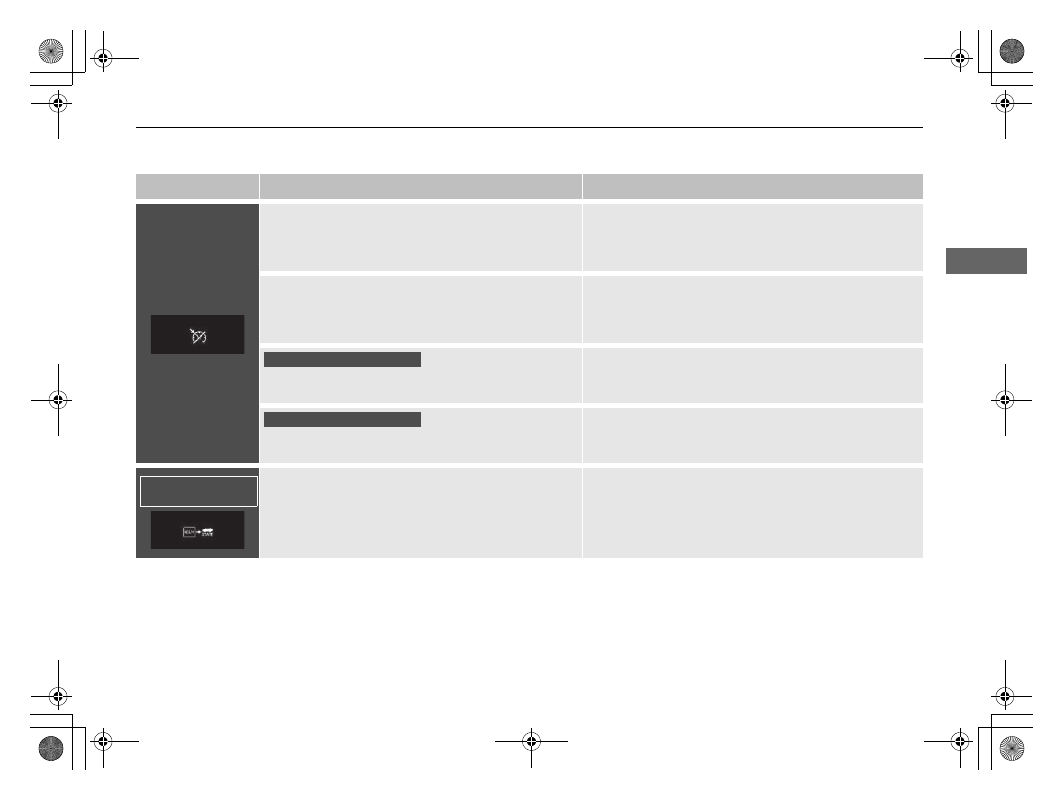
Appears when the speed of the vehicle is too high 
for you to set ACC.

Reduce the speed, then set ACC.

2

Adaptive Cruise Control (ACC) with Low Speed 
Follow (LSF)

 P. 569

2

Adaptive Cruise Control (ACC)

 P. 586

Appears when ACC is cancelled due to excessive 
high vehicle speed.

Reduce the speed, then reset ACC.

2

Adaptive Cruise Control (ACC) with Low Speed 
Follow (LSF)

 P. 569

2

Adaptive Cruise Control (ACC)

 P. 586

Appears when the speed of the vehicle is too low for 
you to set ACC.

Raise the speed, then set ACC.

2

Adaptive Cruise Control (ACC)

 P. 586

Appears when ACC is cancelled due to excessive low 
vehicle speed.

Raise the speed, then reset ACC.

2

Adaptive Cruise Control (ACC)

 P. 586

Appears when the vehicle ahead of you resumes 
driving, after your vehicle has been stopped 
automatically by ACC.

Press the 

RES/+

 or 

−/SET

 button or depress the 

accelerator pedal to resume.

2

Adaptive Cruise Control (ACC) with Low Speed 
Follow (LSF)

 P. 569

Manual transmission models

Manual transmission models

Continuously variable 
transmission models

142

uu

Indicators

u

Driver Information Interface Warning and Information Messages

In

strum

e

nt Pa

nel

Message

Condition

Explanation

Appears when the shift lever is moved into any 
position other than 

(

D

 or 

(

S

 while ACC is in 

operation.

ACC has been automatically cancelled.

2

Adaptive Cruise Control (ACC) with Low Speed 
Follow (LSF)

 P. 569

Appears when pressing the 

–/SET

 button while the 

shift lever is in any position other than 

(

D

 or 

(

S

.

ACC cannot be set.

2

Adaptive Cruise Control (ACC) with Low Speed 
Follow (LSF)

 P. 569

Appears when the vehicle is stopped on a very steep 
slope while ACC is in operation.

ACC has been automatically cancelled.

2

Adaptive Cruise Control (ACC) with Low Speed 
Follow (LSF)

 P. 569

Appears when pressing the 

–/SET

 button while the 

vehicle is stopped on a very steep slope.

ACC cannot be set.

2

Adaptive Cruise Control (ACC) with Low Speed 
Follow (LSF)

 P. 569

Appears when the parking brake is applied 
automatically while ACC is in operation.

ACC has been automatically cancelled.

2

Adaptive Cruise Control (ACC) with Low Speed 
Follow (LSF)

 P. 569

2

Parking Brake

 P. 626

Appears when pressing the 

–/SET

 button while the 

parking brake is applied.

ACC cannot be set.

2

Adaptive Cruise Control (ACC) with Low Speed 
Follow (LSF)

 P. 569

2

Parking Brake

 P. 626

Continuously variable 
transmission models

Continuously variable 
transmission models

Continuously variable 
transmission models

143

uu

Indicators

u

Driver Information Interface Warning and Information Messages

Continued

In

strum

e

nt Pa

nel

Message

Condition

Explanation

Appears when pressing the 

–/SET

 button while the 

vehicle is moving and the brake pedal is depressed.

ACC cannot be set.

2

Adaptive Cruise Control (ACC) with Low Speed 
Follow (LSF)

 P. 569

Appears if ACC is cancelled while your vehicle is 
automatically stopped by ACC.

Immediately depress the brake pedal.

Flashes when the system senses a likely collision with 
a vehicle in front of you. The beeper sounds.

Take appropriate action to prevent a collision (apply the 
brakes, change lanes, etc.)

2

Adaptive Cruise Control (ACC) with Low Speed 
Follow (LSF)

 P. 569

2

Adaptive Cruise Control (ACC)

 P. 586

2

Collision Mitigation Braking System (CMBS)

 P. 558

Continuously variable 
transmission models

Continuously variable 
transmission models

144

uu

Indicators

u

Driver Information Interface Warning and Information Messages

In

strum

e

nt Pa

nel

Message

Condition

Explanation

Appears if the vehicle is about to veer out of the 
detected lane.

Take direct control of the steering and keep the vehicle 
in the centre of the lane. The message will disappear 
after a while.

2

Lane Keeping Assist System (LKAS)

 P. 601

2

Road Departure Mitigation System

 P. 609

Appears if the driver is merely resting his or her 
hands on the steering wheel or is not holding the 
steering wheel at all and the vehicle is about to veer 
out of the detected lane. A beeper will also sound.

Take direct control of the steering and keep the vehicle 
in the centre of the lane. The message will disappear 
after a while.

2

Lane Keeping Assist System (LKAS)

 P. 601

Blinks if the driver is merely resting his or her hands 
on the steering wheel or is not holding the steering 
wheel at all. A beeper will also sound. If the driver 
continues to drive in this manner, the beeper will 
turn to a single long beep and LKAS will be 
deactivated.

Take direct control of the steering; the message will 
disappear.

2

Lane Keeping Assist System (LKAS)

 P. 601

Appears when the vehicle is likely to drive out of a 
detected lane.
The Road Departure Mitigation system also steers 
the vehicle to help you remain within your driving 
lane.

Take direct control of the steering and keep the vehicle 
in the centre of the lane. The message will disappear 
after a while.

2

Road Departure Mitigation System

 P. 609

(Amber)

(Red)

(White)

145

uu

Indicators

u

Driver Information Interface Warning and Information Messages

In

strum

e

nt Pa

nel

Message

Condition

Explanation

Appears when the LKAS is in operation, or the LKAS 
button is pressed, but there is a problem with a 
system related to the LKAS. The LKAS cancels 
automatically. The beeper sounds simultaneously.

If any other system indicators come on, such as the 
VSA, ABS and brake system, take appropriate action.

2

Indicators

 P. 98

Message

Condition

Explanation

Appears when there is a problem with the power 
tailgate system.

Manually open or close the power tailgate.

Have your vehicle checked by a dealer.

Message

Condition

Explanation

Appears if there is a problem with the real time AWD 
with intelligent control system.

The engine drives the front wheels only in this state. 
Have your vehicle checked by a dealer.

Appears when the differential temperature is too 
high.

Stop in a safe place, change to 

(

P

, and idle the engine 

until the message disappears. If the message does not 
disappear, have your vehicle checked by a dealer.

2

Real Time AWD with Intelligent Control System

*


P. 546

Models with power tailgate

Models with real time AWD with intelligent control system

* Not available on all models

146

In

strum

e

nt Pa

nel

Gauges and Displays

Gauges

Gauges include the speedometer, tachometer, fuel gauge, and related indicators. 
They are displayed when the ignition switch is in ON 

(

w

*1

.

Displays your driving speed in km/h or mph.

Shows the number of engine revolutions per minute.

Displays the amount of fuel left in the fuel tank.

Displays the temperature of the engine coolant.

*1: Models with the keyless access system have an 

ENGINE START/STOP

 button instead of an 

ignition switch.

Speedometer

Tachometer

Fuel Gauge

Temperature Gauge

1

Speedometer

Press the 

 (display/information) button 

repeatedly until the 

 icon is shown on the driver 

information interface. Press 

ENTER

, then press and 

hold it again. The speedometer reading and the 
displayed measurements will switch between km/h 
and mph.

1

Fuel Gauge

NOTICE

You should refuel when the reading approaches 

(

0

.

Running out of fuel can cause the engine to misfire, 
damaging the catalytic converter.

The actual amount of remaining fuel may differ from 
the fuel gauge reading.

1

Temperature Gauge

NOTICE

Driving with the temperature gauge pointer in the 
upper zone can cause serious engine damage. Pull 
safely to the side of the road and allow engine 
temperature to return to normal.

2

Overheating

 P. 747

147

uu

Gauges and Displays

u

Driver Information Interface

Continued

In

strum

e

nt Pa

nel

Driver Information Interface

The driver information interface shows the odometer, trip meter, outside 
temperature indicator, and other gauges.
It also displays important messages such as warnings and other helpful information.

Main displays

Press the 

 (display/information) button, and then press 

 or 

 to change the 

display. Press 

ENTER

 to see detailed information.

Switching the Display

Press , 

 or 

.

Press 

ENTER

.

Range & 
Fuel

Navigation

*


& Compass

*

Average 
Speed & 
Elapsed Time

Audio

*

Phone

*

Warning 
Messages

Speed Alarm

Speed Unit & 
Disp OFF

Rear Seat 
Belt 
Reminder

Traffic Sign 
Recognition 
System

Service Reminder 
System

*

/Oil 

Monitor System

*

 (Display/Information) 

Button

Vehicle 
Settings

*

Driver 
Attention 
Monitor

AWD Torque 
Distribution 
Monitor

*

* Not available on all models

148

uu

Gauges and Displays

u

Driver Information Interface

In

strum

e

nt Pa

nel

Trip computer

Press the 

 (

TRIP

) knob to change the display.

Shows the total number of kilometres or miles that your vehicle has accumulated.

Odometer

Odometer

Outside Temperature

Trip A

Trip B

 (

TRIP

Knob

Continued

149

uu

Gauges and Displays

u

Driver Information Interface

In

strum

e

nt Pa

nel

Shows the total number of kilometres or miles driven since the last reset. Meters A 
and B can be used to measure two separate trips.

Resetting a trip meter

To reset a trip meter, display it, then press and hold the 

 knob. The trip meter is 

reset to 

0.0

.

Shows the estimated average fuel economy of each trip meter in l/100 km or mpg. 
The display is updated at set intervals. When a trip meter is reset, the average fuel 
economy is also reset.

Shows the estimated distance you can travel on the remaining fuel. This distance is 
estimated from the fuel economy of your previous trips.

Shows the time elapsed since the last time Trip A or Trip B was reset.

Shows the average speed in km/h or mph since the last time Trip A or Trip B was 
reset.

Trip Meter

Average Fuel Economy

Range

Elapsed Time

Average Speed

1

Trip Meter

Switch between trip meter A and trip meter B by 
pressing the 

 knob.

1

Average Fuel Economy

You can change when to reset the average fuel 
economy.

2

Customized Features

 P. 157, 408

1

Elapsed Time

You can change when to reset the elapsed time.

2

Customized Features

 P. 157, 408

1

Average Speed

You can change when to reset the average speed.

2

Customized Features

 P. 157, 408

uu

Gauges and Displays

u

Driver Information Interface

150

In

strum

e

nt Pa

nel

Shows the instant fuel economy as a bar graph in l/100 km or mpg.

Shows the service reminder system.

2

Service Reminder System

*

 P. 660

Show the oil monitor system.

2

Oil Monitor System

*

 P. 665

Appears when any of the rear seat belts are latched or unlatched.

Shows the outside temperature in Celsius.
If the outside temperature has been below 3°C at the time you turn the ignition 
switch to ON 

(

w

*1

, the outside temperature indicator blinks for ten seconds.

Adjusting the outside temperature display

Adjust the temperature reading up to ±3°C if the temperature reading seems 
incorrect.

*1: Models with the keyless access system have an 

ENGINE START/STOP

 button instead of an 

ignition switch.

Instant Fuel Economy Gauge

Service Reminder System

*

Oil Monitor System

*

Rear Seat Belt Reminder

Outside Temperature

1

Outside Temperature

The temperature sensor is in the front bumper.
Road heat and exhaust from another vehicle can 
affect the temperature reading when your vehicle 
speed is less than 30 km/h (19 mph).

It may take several minutes for the display to be 
updated after the temperature reading has stabilized.

Use the driver information interface or audio/
information screen’s customized features to correct 
the temperature.

2

Customized Features

 P. 157, 408

* Not available on all models

Continued

151

uu

Gauges and Displays

u

Driver Information Interface

In

strum

e

nt Pa

nel

The Driver Attention Monitor analyses steering inputs to determine if the vehicle is 
being driven in a manner consistent with drowsy or inattentive driving. If it 
determines that the vehicle is being driven in such a manner, it will display the 
degree of the driver’s attention in the Driver Information Interface.

When the 

 (display/information) button 

is pressed, bars in the Driver Information 
Interface light up in white to indicate the 
degree of the driver’s attention.

2

Switching the Display

 P. 147

Driver Attention Monitor

1

Driver Attention Monitor

The Driver Attention Monitor cannot always detect if 
the driver is tired or inattentive.
Regardless of the system’s feedback, if you are 
feeling tired, stop in a safe location and rest for as 
long as needed.

Driver Information 
Interface

ENTER

 (Display/

Information) Button

Level

152

uu

Gauges and Displays

u

Driver Information Interface

In

strum

e

nt Pa

nel

If the number of bars drops to two, the Driver 
Attention Monitor will display the white 
coffee cup (without the bars) to warn the 
driver that his or her attention level is low.

If the number of bars drops to one, a beep will 
sound, the steering wheel will vibrate, and the 
coffee cup will turn to amber to warn the 
driver that he or she needs a break as his or 
her attention level is too low.
If the coffee cup lights up in amber, stop in a 
safe location and rest for as long as needed. 
The amber coffee cup warning will disappear 
when the 

ENTER

 button is pressed or when 

the system has determined that the driver is 
driving normally.
If the driver does not take a break and the 
monitor continues to detect that the driver is 
very tired, the coffee cup will light up in amber 
again after approximately 15 minutes, 
accompanied by a beep and steering wheel 
vibrations.
The warnings do not appear when the 
travelling time is 30 minutes or less.

Continued

153

uu

Gauges and Displays

u

Driver Information Interface

In

strum

e

nt Pa

nel

The Driver Attention Monitor resets when

the engine is turned off.

the driver unfastens the seat belt and opens the door while the vehicle is stopped.

For the Driver Attention Monitor to function

the vehicle must be travelling above 40 km/h (25 mph).

the electric power steering (EPS) system indicator must be off.

Depending on driving conditions or other factors, the Driver Attention 
Monitor may not function in the following circumstances.

the steering assist function of the Lane Keeping Assist System (LKAS) is active.

2

Lane Keeping Assist System (LKAS)

 P. 601

the condition of the road is poor, e.g. the surface is unpaved or bumpy.

it is windy.

the driver is frequently operating the vehicle in an assertive manner such as 
changing lanes or accelerating.

Customizing

You can change the Driver Attention Monitor settings. Select 

Tactile And Audible 

Alert

Tactile Alert Only

/

Tactile Alert

, or 

OFF

.

2

Customized Features

 P. 157, 408

1

For the Driver Attention Monitor to function

The bars in the Driver Information Interface remain 
greyed out unless the Driver Attention Monitor is 
functioning.

154

uu

Gauges and Displays

u

Driver Information Interface

In

strum

e

nt Pa

nel

The indicators on the display show the 
amount of torque being transferred to the 
right front, left front, right rear, and left rear 
wheels.

2

Real Time AWD with Intelligent Control 
System

*

 P. 546

AWD Torque Distribution Monitor

*

* Not available on all models

155

uu

Gauges and Displays

u

Driver Information Interface

Continued

In

strum

e

nt Pa

nel

Sets the speed alarm on and changes the speed alarm setting.

Each time you press the 

/

 button, the speed alarm setting changes as follows:

*1:Default Setting

Speed Alarm

 Speed Alarm 1 On/Off

*1

 Speed Alarm 2 On/Off

*1

 Speed Alarm 1 Speed Setting [50 km/h (30mph)

*1

]

 Speed Alarm 2 Speed Setting [80 km/h (50mph)

*1

]

 Exit

uu

Gauges and Displays

u

Driver Information Interface

156

In

strum

e

nt Pa

nel

Shows you turn-by-turn driving directions to your destination linked with the 
navigation system.

2

Refer to the Navigation System Manual

Shows the traffic sign recognition system.

2

Traffic Sign Recognition System

 P. 615

Shows the current audio information.

2

Audio System Basic Operation

 P. 331

Shows the current phone information.

2

Hands-Free Telephone System

 P. 457

Turn-by-Turn Directions

*

Traffic Sign Recognition System

Audio

*

Phone

*

1

Turn-by-Turn Directions

*

The driver information interface shows a compass 
when the route guidance is not used.

You can select whether the turn-by-turn display 
comes on or not during the route guidance.

2

Customized Features

 P. 408

* Not available on all models


Content      ..     7      8      9      10     ..