Honda CR-V (2022 year). Manual in english - page 10
Continued
157
uu
Gauges and Displays
u
Driver Information Interface
In
strum
e
nt Pa
nel
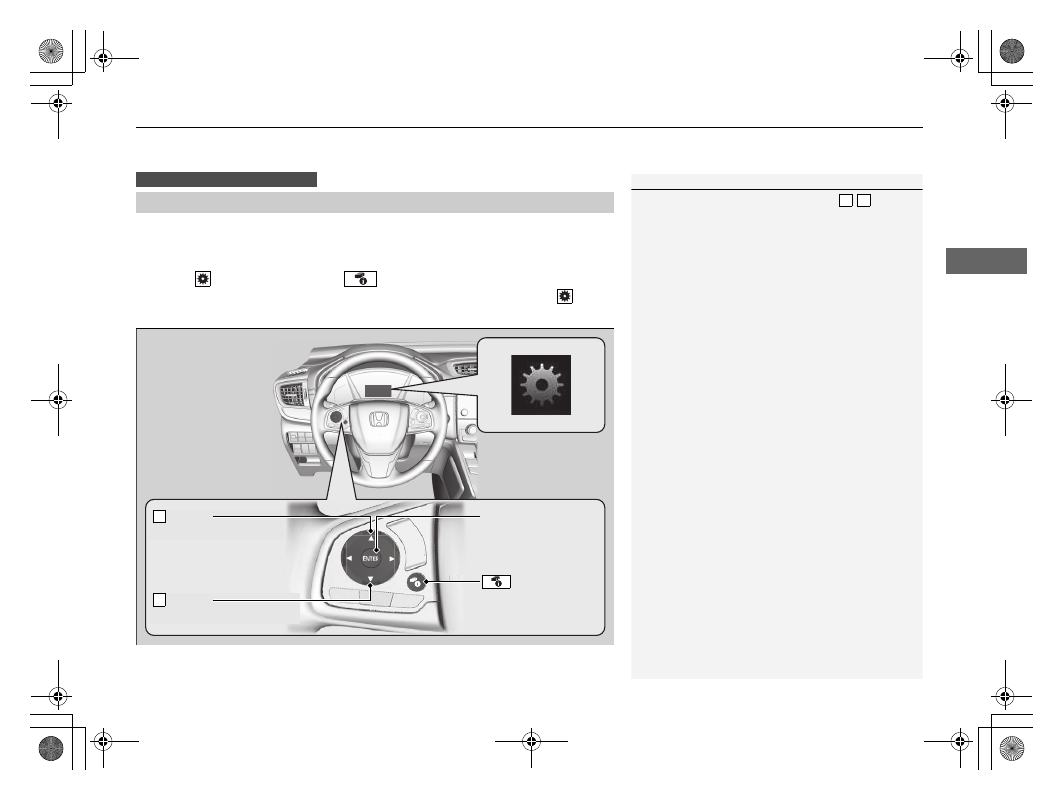
Use the driver information interface to customize certain features.
■
How to customize
Select the
screen by pressing the
button while the ignition switch is in ON
(
w
, the vehicle is at a complete stop, and the parking brake is set. Select
, then
press the
ENTER
button.
■
Customized Features
Models with colour audio system
1
To customize other features, press the
/
button.
2
2
Example of customization settings
When you customize settings, set the parking brake.
3 4
Button
Press to scroll upwards.
3
Button
Press to scroll downwards.
4
ENTER
Button
Press to set your
selection.
Button
Press to go to
Customize Settings.